JavaScript ES6 Classes Promises & Async/Await

Introduction
JavaScript has come a long way since its early days. When ECMAScript 6 (ES6) was released in 2015, it transformed JavaScript from a simple scripting language into a powerful, modern programming language capable of building full-scale web applications, mobile apps, and server-side systems.
If you are a student in Pakistan learning web development — whether you are studying at a university in Lahore, taking online courses in Karachi, or self-learning from home in Islamabad — mastering ES6+ features is no longer optional. It is expected by every employer, every bootcamp, and every modern JavaScript framework like React, Vue, and Node.js.
In this tutorial, we will focus on three of the most important ES6+ features:
- JavaScript Classes — a clean, object-oriented way to structure your code
- JavaScript Promises — a modern approach to handling asynchronous operations
- Async/Await — syntactic sugar that makes asynchronous code look and behave like synchronous code
By the end of this tutorial, you will understand how to write cleaner, more professional JavaScript — the kind of code that gets you hired.
Prerequisites
Before diving in, make sure you are comfortable with the following concepts. If any of these feel unfamiliar, we recommend reviewing our related tutorials first.
- Basic JavaScript syntax — variables, functions, loops, and conditionals
- JavaScript objects and arrays — creating, accessing, and modifying them
- The concept of callbacks — understanding how functions can be passed as arguments
- Basic understanding of the DOM — helpful but not strictly required
- JavaScript
thiskeyword — knowing howthisbehaves in different contexts
If you have been writing JavaScript for at least a few weeks and have built a few small projects, you are ready to proceed.
Core Concepts & Explanation
JavaScript Classes — Object-Oriented Programming Made Simple
Before ES6, JavaScript developers used constructor functions and prototypes to create reusable objects. The syntax was confusing and inconsistent. ES6 introduced the class keyword, which provides a much cleaner and more intuitive way to define objects with shared behavior.
Think of a class as a blueprint. For example, if you are building a university management system for a Pakistani institution, you might have a Student class that defines what every student object looks like — their name, roll number, and what actions they can perform (like enrolling in a course or checking their CGPA).
Here is the anatomy of a JavaScript class:
class Student {
  // The constructor runs when a new object is created
  constructor(name, rollNumber, cgpa) {
    this.name = name;
    this.rollNumber = rollNumber;
    this.cgpa = cgpa;
  }

  // A method — a function that belongs to this class
  introduce() {
    return `Hi! I am ${this.name}, Roll No: ${this.rollNumber}, CGPA: ${this.cgpa}`;
  }

  // Another method
  isEligibleForScholarship() {
    return this.cgpa >= 3.5;
  }
}

// Creating instances (objects) from the class
const student1 = new Student("Ahmad", "L1F21BSCS0042", 3.8);
const student2 = new Student("Fatima", "L1F21BSCS0099", 3.2);

console.log(student1.introduce());
// Output: Hi! I am Ahmad, Roll No: L1F21BSCS0042, CGPA: 3.8

console.log(student1.isEligibleForScholarship()); // true
console.log(student2.isEligibleForScholarship()); // false
Inheritance with extends is where classes become truly powerful. Inheritance allows one class to build upon another, reusing code without rewriting it.
class GraduateStudent extends Student {
  constructor(name, rollNumber, cgpa, researchTopic) {
    super(name, rollNumber, cgpa); // Call the parent class constructor
    this.researchTopic = researchTopic;
  }

  introduce() {
    // Override the parent method
    return `${super.introduce()} | Research: ${this.researchTopic}`;
  }
}

const grad = new GraduateStudent("Ali", "MS21CS001", 3.9, "Machine Learning in Urdu NLP");
console.log(grad.introduce());
// Output: Hi! I am Ali, Roll No: MS21CS001, CGPA: 3.9 | Research: Machine Learning in Urdu NLP
Key class concepts to remember:
constructor()— runs automatically whennew ClassName()is calledthis— refers to the current instance of the classextends— creates a child class that inherits from a parent classsuper()— calls the parent class's constructor or method- Getters and Setters — use
getandsetkeywords to control property access
JavaScript Promises — Managing Asynchronous Operations
JavaScript is single-threaded, meaning it can only do one thing at a time. But many operations — like fetching data from an API, reading a file, or waiting for a timer — take time. We do not want our entire application to freeze while waiting.
This is where Promises come in. A Promise represents a value that may not be available yet but will be resolved in the future. Think of it like ordering biryani at a restaurant in Karachi — the waiter gives you a token (the Promise), and you can continue chatting while you wait. When the order is ready, you are notified (the Promise resolves).
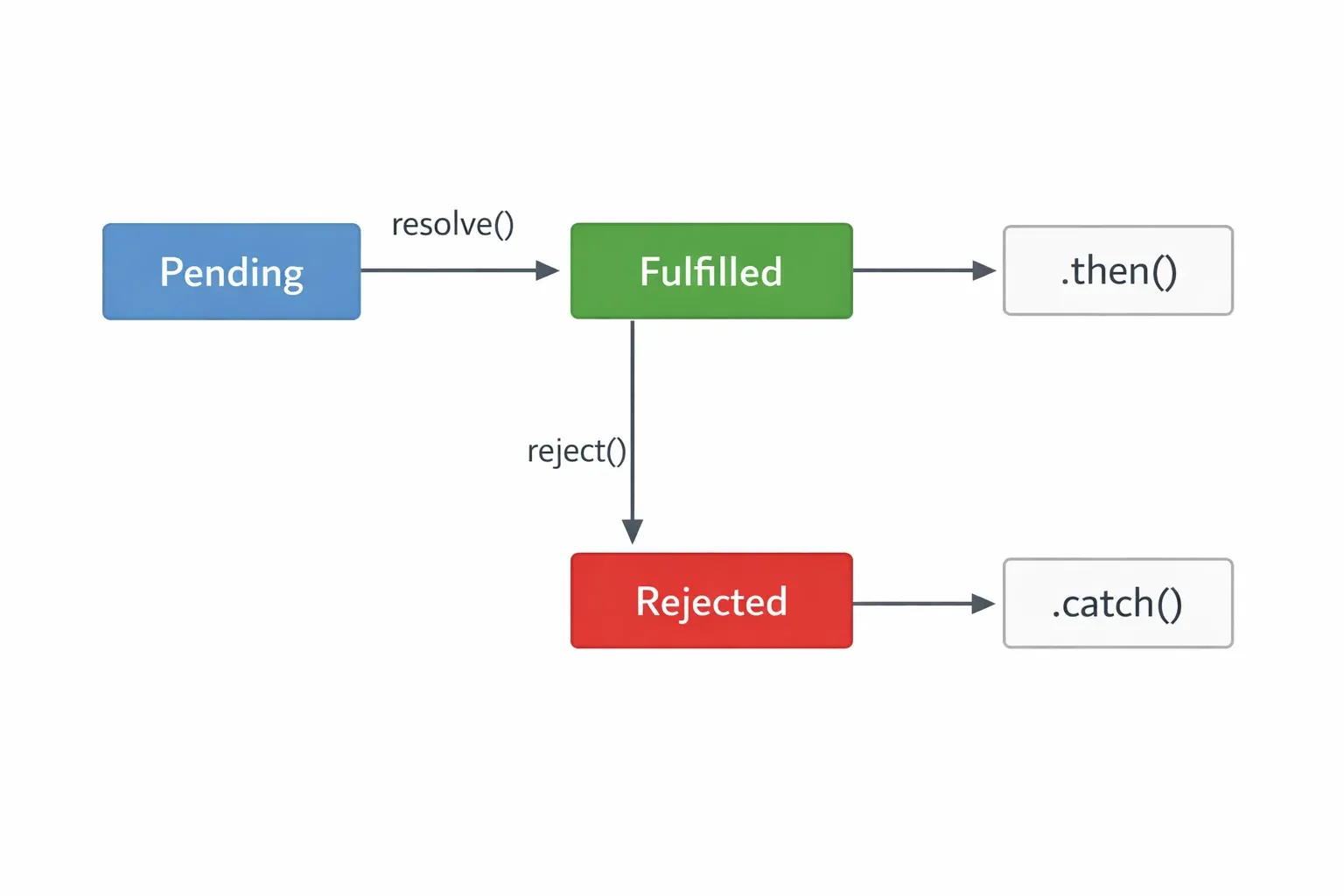
A Promise can be in one of three states:
| State | Meaning |
|---|---|
| Pending | The operation is still in progress |
| Fulfilled | The operation completed successfully |
| Rejected | The operation failed with an error |
Here is how to create and use a Promise:
// Creating a Promise
const fetchStudentData = new Promise((resolve, reject) => {
  // Simulate fetching data from a server (takes 2 seconds)
  setTimeout(() => {
    const success = true; // Change to false to test rejection

    if (success) {
      resolve({ name: "Fatima", cgpa: 3.7, city: "Lahore" });
    } else {
      reject(new Error("Failed to fetch student data from server"));
    }
  }, 2000);
});

// Using the Promise with .then() and .catch()
fetchStudentData
  .then((studentData) => {
    console.log("Data received:", studentData);
    console.log(`Welcome, ${studentData.name} from ${studentData.city}!`);
  })
  .catch((error) => {
    console.error("Something went wrong:", error.message);
  })
  .finally(() => {
    console.log("Request complete — hiding loading spinner");
  });
Promise Chaining allows you to perform multiple asynchronous operations in sequence:
// Simulate an e-commerce flow for a Pakistani online shop
function verifyPayment(amount) {
  return new Promise((resolve) => {
    setTimeout(() => resolve({ verified: true, amount }), 1000);
  });
}

function processOrder(paymentInfo) {
  return new Promise((resolve) => {
    setTimeout(() => resolve({ orderId: "PK-2024-9871", ...paymentInfo }), 800);
  });
}

function sendConfirmation(order) {
  return new Promise((resolve) => {
    setTimeout(() => resolve(`Order ${order.orderId} confirmed! SMS sent.`), 500);
  });
}

// Chain the Promises
verifyPayment(2500) // PKR 2500
  .then((payment) => processOrder(payment))
  .then((order) => sendConfirmation(order))
  .then((message) => console.log(message))
  .catch((error) => console.error("Transaction failed:", error.message));
// Output: Order PK-2024-9871 confirmed! SMS sent.
Async/Await — Writing Asynchronous Code Like It Is Synchronous
While Promises are a huge improvement over callbacks, long chains of .then() can still be hard to read. Async/Await was introduced in ES2017 (ES8) and is built on top of Promises — it gives us a way to write asynchronous code that reads naturally, top to bottom, like regular synchronous code.
The two keywords work together:
async— placed before a function declaration, it makes the function automatically return a Promiseawait— can only be used inside anasyncfunction; it pauses execution until the Promise resolves
// The same Promise chain from before, rewritten with async/await
async function processPaymentFlow(amount) {
  try {
    const payment = await verifyPayment(amount);
    console.log("Payment verified:", payment);

    const order = await processOrder(payment);
    console.log("Order processed:", order);

    const confirmation = await sendConfirmation(order);
    console.log(confirmation);

  } catch (error) {
    console.error("Payment flow failed:", error.message);
  }
}

processPaymentFlow(2500);
Notice how much cleaner this is. Each await line reads like a normal statement. Error handling is done with a familiar try/catch block rather than .catch() chained at the end.
Running Promises in Parallel with Promise.all():
Sometimes you want to run multiple async operations simultaneously rather than one after another. Promise.all() accepts an array of Promises and waits for all of them to complete:
async function loadDashboardData(studentId) {
  try {
    // These three requests fire simultaneously — much faster!
    const [profile, grades, notifications] = await Promise.all([
      fetchStudentProfile(studentId),
      fetchStudentGrades(studentId),
      fetchNotifications(studentId)
    ]);

    console.log("Profile:", profile);
    console.log("Grades:", grades);
    console.log("Notifications:", notifications);
  } catch (error) {
    // If ANY Promise rejects, the catch runs
    console.error("Failed to load dashboard:", error.message);
  }
}
Practical Code Examples
Example 1: Student Registration System Using Classes
Let us build a small but complete student registration system — something a Pakistani university portal might use. This demonstrates classes, inheritance, getters, and static methods working together.
// Base class: Person
class Person {
  #nationalId; // Private field (ES2022 syntax — # makes it private)

  constructor(name, email, nationalId) {
    this.name = name;
    this.email = email;
    this.#nationalId = nationalId; // Private — cannot be accessed from outside
  }

  // Getter — controlled read access to private field
  get maskedId() {
    // Show only last 4 digits of CNIC for privacy
    return `*******${this.#nationalId.slice(-4)}`;
  }

  greet() {
    return `Assalam-o-Alaikum! I am ${this.name}.`;
  }
}

// Child class: Student extends Person
class Student extends Person {
  #courses = []; // Private array to store enrolled courses

  constructor(name, email, nationalId, rollNumber, department) {
    super(name, email, nationalId); // Pass to parent
    this.rollNumber = rollNumber;
    this.department = department;
    this.feeStatus = "Unpaid";
  }

  // Enroll in a course
  enroll(courseName, creditHours) {
    this.#courses.push({ courseName, creditHours });
    console.log(`${this.name} enrolled in ${courseName} (${creditHours} credit hours)`);
  }

  // Get total enrolled credit hours
  get totalCreditHours() {
    return this.#courses.reduce((total, c) => total + c.creditHours, 0);
  }

  // View enrolled courses (returns a copy, not the private array itself)
  getCourses() {
    return [...this.#courses];
  }

  // Static method — called on the class itself, not an instance
  static generateRollNumber(department, year, sequence) {
    const deptCode = department.substring(0, 2).toUpperCase();
    return `${deptCode}-${year}-${String(sequence).padStart(4, "0")}`;
  }

  // Full profile summary
  getProfile() {
    return {
      name: this.name,
      email: this.email,
      cnic: this.maskedId,
      rollNumber: this.rollNumber,
      department: this.department,
      totalCreditHours: this.totalCreditHours,
      feeStatus: this.feeStatus
    };
  }
}

// --- Usage ---

// Generate a roll number using the static method
const rollNo = Student.generateRollNumber("Computer Science", 2024, 7);
console.log("Generated Roll Number:", rollNo);
// Output: Generated Roll Number: CO-2024-0007

// Create a student
const ahmad = new Student(
  "Ahmad Raza",
  "[email protected]",
  "3520112345678",
  rollNo,
  "Computer Science"
);

// Enroll in courses
ahmad.enroll("Data Structures", 3);
ahmad.enroll("Web Engineering", 3);
ahmad.enroll("Calculus II", 3);

// Check profile
console.log(ahmad.getProfile());
/*
{
  name: 'Ahmad Raza',
  email: '[email protected]',
  cnic: '*******5678',
  rollNumber: 'CO-2024-0007',
  department: 'Computer Science',
  totalCreditHours: 9,
  feeStatus: 'Unpaid'
}
*/

console.log(ahmad.greet());
// Output: Assalam-o-Alaikum! I am Ahmad Raza.
Line-by-line walkthrough of key parts:
#nationalIdand#courses— private class fields (ES2022), inaccessible from outside the classget maskedId()— a getter that computes a value instead of storing itsuper(name, email, nationalId)— passes data up to thePersonconstructorstatic generateRollNumber()— called asStudent.generateRollNumber(), not on an instance[...this.#courses]— the spread operator creates a shallow copy to prevent outside mutation
Example 2: Real-World Application — Pakistani Prayer Time API Fetcher
This example simulates a real-world async application: fetching Islamic prayer times for a Pakistani city and displaying them. It combines async/await, error handling, and Promise.all().
// Simulate an API response (in real apps, replace with actual fetch() calls)
function getPrayerTimes(city, date) {
  return new Promise((resolve, reject) => {
    setTimeout(() => {
      const prayerData = {
        Lahore: {
          date: date,
          city: "Lahore",
          times: { Fajr: "05:14", Dhuhr: "12:21", Asr: "15:49", Maghrib: "18:23", Isha: "19:47" }
        },
        Karachi: {
          date: date,
          city: "Karachi",
          times: { Fajr: "05:32", Dhuhr: "12:31", Asr: "15:58", Maghrib: "18:39", Isha: "20:01" }
        },
        Islamabad: {
          date: date,
          city: "Islamabad",
          times: { Fajr: "05:07", Dhuhr: "12:13", Asr: "15:38", Maghrib: "18:14", Isha: "19:38" }
        }
      };

      if (prayerData[city]) {
        resolve(prayerData[city]);
      } else {
        reject(new Error(`City "${city}" not found in database`));
      }
    }, 500); // Simulate network delay
  });
}

// Fetch and display prayer times for a single city
async function displayPrayerTimes(city) {
  console.log(`Fetching prayer times for ${city}...`);

  try {
    const today = new Date().toISOString().split("T")[0]; // "2024-11-15"
    const data = await getPrayerTimes(city, today);

    console.log(`\n📅 Prayer Times for ${data.city} — ${data.date}`);
    console.log("─".repeat(30));

    for (const [prayer, time] of Object.entries(data.times)) {
      console.log(`  ${prayer.padEnd(10)}: ${time}`);
    }
  } catch (error) {
    console.error(`Error: ${error.message}`);
  }
}

// Fetch prayer times for multiple cities at once (parallel)
async function displayAllCities() {
  const cities = ["Lahore", "Karachi", "Islamabad"];

  try {
    console.log("Fetching prayer times for all major cities simultaneously...\n");

    // All three requests fire at the same time
    const results = await Promise.all(
      cities.map(city => getPrayerTimes(city, "2024-11-15"))
    );

    results.forEach(data => {
      console.log(`🕌 ${data.city}: Fajr ${data.times.Fajr} | Maghrib ${data.times.Maghrib}`);
    });

  } catch (error) {
    // If even one city fails, we catch it here
    console.error("Failed to load city data:", error.message);
  }
}

// Run the examples
displayPrayerTimes("Lahore");
displayAllCities();
Common Mistakes & How to Avoid Them
Mistake 1: Using await Outside an async Function
This is the most common error beginners make. The await keyword can only be used inside a function declared with async. Using it at the top level of a regular script (outside any function) will throw a SyntaxError.
// ❌ WRONG — await used in a regular function
function loadData() {
  const data = await fetchStudentData(); // SyntaxError!
  console.log(data);
}

// ✅ CORRECT — function must be declared async
async function loadData() {
  const data = await fetchStudentData(); // Works perfectly
  console.log(data);
}

// ✅ ALSO CORRECT — async arrow function
const loadData = async () => {
  const data = await fetchStudentData();
  console.log(data);
};
Note: Modern JavaScript environments (Node.js 14.8+, modern browsers) support top-level await in ES modules (.mjs files), but for regular scripts and most beginner projects, always wrap your await calls inside an async function.
Mistake 2: Forgetting to Handle Promise Rejections
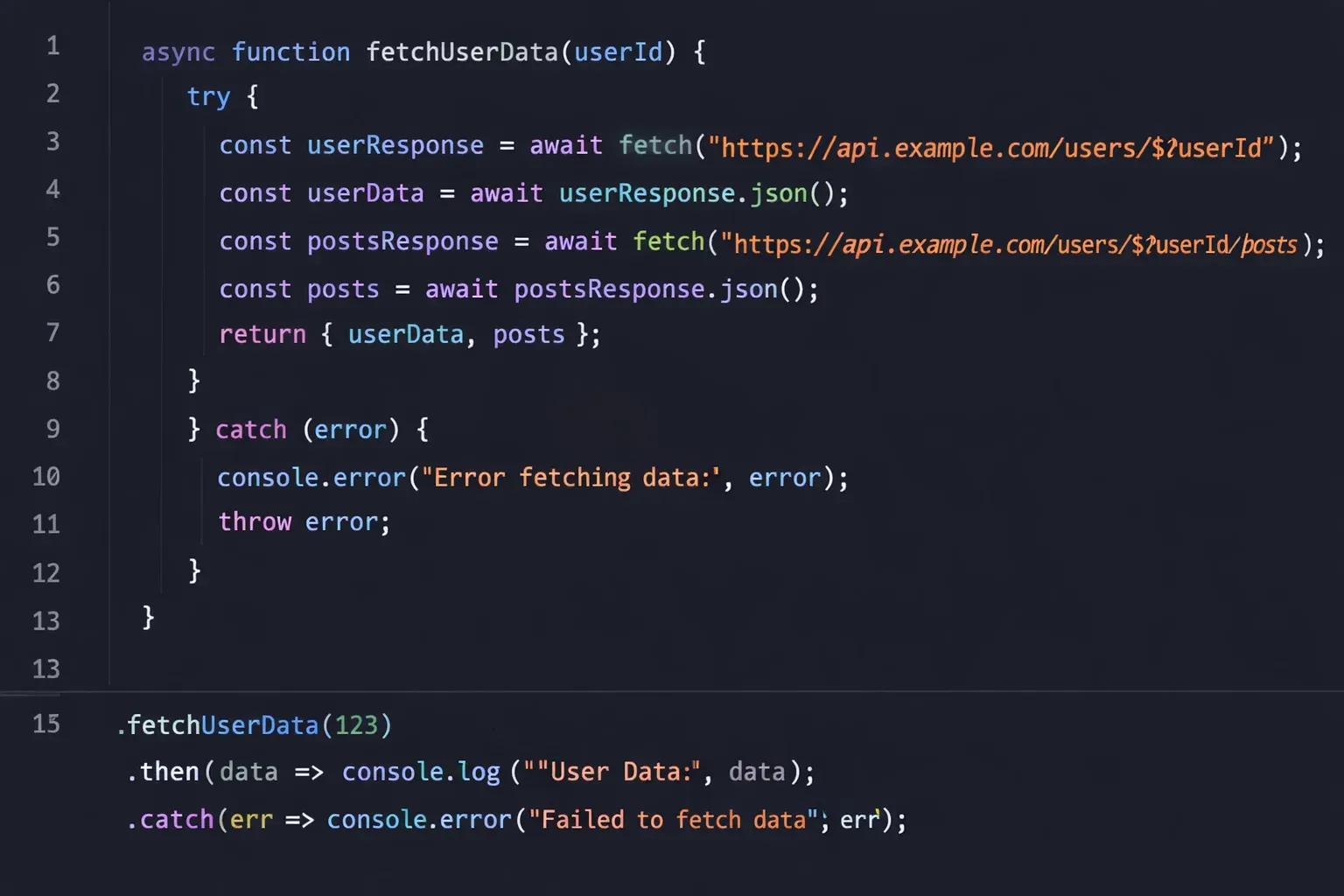
Unhandled Promise rejections can crash your Node.js application or cause silent failures in the browser. Always handle errors with either .catch() (for Promise chains) or try/catch (for async/await).
// ❌ WRONG — no error handling
async function fetchUserProfile(userId) {
  const response = await fetch(`https://api.example.com/users/${userId}`);
  const data = await response.json(); // Will crash if fetch fails!
  return data;
}

// ✅ CORRECT — always wrap in try/catch
async function fetchUserProfile(userId) {
  try {
    const response = await fetch(`https://api.example.com/users/${userId}`);

    // Also check if the HTTP response was successful
    if (!response.ok) {
      throw new Error(`Server error: ${response.status} ${response.statusText}`);
    }

    const data = await response.json();
    return data;
  } catch (error) {
    console.error("Failed to fetch profile:", error.message);
    return null; // Return a safe fallback value
  }
}
Mistake 3: Making Promises Sequential When They Could Be Parallel
A very common performance mistake is await-ing Promises one by one when they do not depend on each other. This makes your application needlessly slow.
// ❌ SLOW — each request waits for the previous one to finish
async function loadStudentDashboard(id) {
  const profile = await fetchProfile(id);    // Wait 500ms
  const grades = await fetchGrades(id);      // Wait 500ms more
  const schedule = await fetchSchedule(id);  // Wait 500ms more
  // Total: ~1500ms
}

// ✅ FAST — all requests fire simultaneously
async function loadStudentDashboard(id) {
  const [profile, grades, schedule] = await Promise.all([
    fetchProfile(id),    // These three
    fetchGrades(id),     // all fire
    fetchSchedule(id)    // at once
  ]);
  // Total: ~500ms (the time of the slowest one)
}
Use Promise.all() whenever your async operations are independent of each other.
Practice Exercises
Exercise 1: Build a Bank Account Class
Problem: Create a BankAccount class for a Pakistani bank that supports deposits, withdrawals, and balance checks. Requirements:
- Private
#balancefield starting at 0 deposit(amount)method that adds to balance (reject negative amounts)withdraw(amount)method that deducts from balance (reject if insufficient funds)getBalance()method that returns the current balance in PKR- A static method
isValidAmount(amount)that returnstrueif amount is a positive number
Solution:
class BankAccount {
  #balance = 0;
  #accountHolder;
  #transactions = [];

  constructor(accountHolder, initialDeposit = 0) {
    this.#accountHolder = accountHolder;
    if (initialDeposit > 0) {
      this.#balance = initialDeposit;
      this.#transactions.push({ type: "Initial Deposit", amount: initialDeposit });
    }
  }

  static isValidAmount(amount) {
    return typeof amount === "number" && amount > 0 && isFinite(amount);
  }

  deposit(amount) {
    if (!BankAccount.isValidAmount(amount)) {
      throw new Error("Invalid deposit amount. Must be a positive number.");
    }
    this.#balance += amount;
    this.#transactions.push({ type: "Deposit", amount });
    console.log(`✅ Deposited PKR ${amount.toLocaleString()}. New balance: PKR ${this.#balance.toLocaleString()}`);
  }

  withdraw(amount) {
    if (!BankAccount.isValidAmount(amount)) {
      throw new Error("Invalid withdrawal amount.");
    }
    if (amount > this.#balance) {
      throw new Error(`Insufficient funds. Balance: PKR ${this.#balance.toLocaleString()}`);
    }
    this.#balance -= amount;
    this.#transactions.push({ type: "Withdrawal", amount });
    console.log(`✅ Withdrew PKR ${amount.toLocaleString()}. New balance: PKR ${this.#balance.toLocaleString()}`);
  }

  getBalance() {
    return `PKR ${this.#balance.toLocaleString()}`;
  }

  getStatement() {
    console.log(`\n📄 Statement for: ${this.#accountHolder}`);
    this.#transactions.forEach(t => console.log(`  ${t.type}: PKR ${t.amount.toLocaleString()}`));
    console.log(`  Current Balance: ${this.getBalance()}\n`);
  }
}

// Test it
const account = new BankAccount("Fatima Khan", 50000);
account.deposit(25000);
account.withdraw(10000);
account.getStatement();

try {
  account.withdraw(200000); // This should fail
} catch (e) {
  console.error("Error:", e.message);
}
Exercise 2: Async Product Search with Error Handling
Problem: Simulate an async product search function for an online Pakistani grocery store. It should:
- Accept a
searchTermand return matching products - Simulate a 1-second API delay
- Reject if
searchTermis empty - Use
async/awaitwith propertry/catchin the calling code
Solution:
// Simulate a product database
const products = [
  { id: 1, name: "Basmati Rice 5kg", price: 1200, category: "Groceries" },
  { id: 2, name: "Rooh Afza 800ml", price: 350, category: "Beverages" },
  { id: 3, name: "Shan Biryani Masala", price: 180, category: "Spices" },
  { id: 4, name: "Nestle Milk Pack 1L", price: 280, category: "Dairy" },
  { id: 5, name: "Sunridge Flour 10kg", price: 1100, category: "Groceries" },
];

function searchProducts(searchTerm) {
  return new Promise((resolve, reject) => {
    if (!searchTerm || searchTerm.trim() === "") {
      reject(new Error("Search term cannot be empty"));
      return;
    }

    setTimeout(() => {
      const term = searchTerm.toLowerCase();
      const results = products.filter(p =>
        p.name.toLowerCase().includes(term) ||
        p.category.toLowerCase().includes(term)
      );
      resolve(results);
    }, 1000);
  });
}

async function runSearch(query) {
  console.log(`🔍 Searching for: "${query}"...`);
  try {
    const results = await searchProducts(query);

    if (results.length === 0) {
      console.log("No products found.");
    } else {
      console.log(`Found ${results.length} product(s):`);
      results.forEach(p => {
        console.log(`  - ${p.name} — PKR ${p.price}`);
      });
    }
  } catch (error) {
    console.error("Search failed:", error.message);
  }
}

// Test cases
runSearch("rice");
runSearch("Beverages");
runSearch("");       // Should trigger error
runSearch("xyz123"); // Should return "No products found"
Frequently Asked Questions
What is the difference between ES6 and modern JavaScript?
ES6 (also called ECMAScript 2015) was a major update to the JavaScript language that introduced classes, arrow functions, Promises, template literals, let/const, destructuring, and much more. "Modern JavaScript" generally refers to ES6 and everything that came after it (ES7, ES8, ES2019, ES2022, etc.). When developers say they use "modern JavaScript," they almost always mean ES6+ features are included in their code.
What is the difference between a Promise and async/await?
A Promise is an object representing the eventual result of an asynchronous operation. async/await is a syntax built on top of Promises that makes asynchronous code easier to write and read. Under the hood, an async function always returns a Promise. Choosing between them is a matter of style — async/await is generally preferred for readability, while Promises (.then()/.catch()) are useful for certain patterns like Promise.all() or when working in non-async functions.
Can I use JavaScript classes like in Java or Python?
JavaScript classes look and feel similar to classes in Java or Python, but there are important differences. JavaScript uses prototypal inheritance under the hood — the class keyword is syntactic sugar over this system. For practical purposes at the beginner-to-intermediate level, JavaScript classes behave similarly to those in other languages. The main difference to watch for is how this behaves inside class methods, especially when passing methods as callbacks.
How do I handle multiple async operations that depend on each other?
When async operations are sequential (Operation B needs the result of Operation A), chain them using await one after another inside an async function. When operations are independent of each other, use Promise.all() to run them simultaneously and dramatically reduce total wait time. For more complex dependency graphs, you can mix both approaches — run independent groups in parallel, then use their results sequentially.
Is async/await supported in all browsers and Node.js versions?
async/await has excellent support in all modern browsers (Chrome, Firefox, Safari, Edge) and Node.js 7.6+. For most projects in 2024 and beyond, you can safely use async/await without transpilation. If you need to support very old browsers (like Internet Explorer 11), you would need Babel to transpile your code — but IE11 is now well past its end-of-life date and its market share is negligible. For Pakistani government or enterprise projects targeting older systems, check your specific browser requirements.
Summary & Key Takeaways
Here is a quick recap of what you learned in this tutorial:
- JavaScript Classes provide a clean, readable syntax for object-oriented programming. Use
constructor()to initialize properties,extendsfor inheritance,super()to call parent constructors, and#privateFieldfor encapsulation. - Promises represent asynchronous operations with three states — Pending, Fulfilled, and Rejected. Use
.then()to handle success,.catch()for errors, and.finally()for cleanup code that always runs. - Async/Await makes asynchronous code look synchronous and is built on top of Promises. Every
asyncfunction returns a Promise, andawaitpauses execution until a Promise resolves. - Error handling is critical in async code. Always wrap
awaitcalls intry/catchblocks, and always handle.catch()in Promise chains to prevent unhandled rejections. - Performance matters: Use
Promise.all()to run independent async operations in parallel instead of awaiting them sequentially — this can dramatically speed up data loading in real applications. - Private class fields (
#field) introduced in ES2022 provide true encapsulation in JavaScript classes, preventing external code from directly accessing or modifying internal state.
Next Steps & Related Tutorials
You have taken a big step forward in your JavaScript journey. Here are the recommended tutorials on theiqra.edu.pk to continue building on what you have learned:
- JavaScript Arrow Functions & the
thisKeyword — Understandingthisis essential for using class methods as callbacks. This tutorial breaks it down clearly. - Fetch API & REST API Fundamentals — Now that you understand Promises and async/await, learn to use the browser's built-in
fetch()function to communicate with real APIs. - JavaScript Modules: Import & Export — Learn to organize your classes and async functions into separate files using ES6 modules, a critical skill for any real project.
- Introduction to Node.js for Pakistani Developers — Take your ES6+ skills to the server side. Node.js uses Promises and async/await extensively, and classes are used in frameworks like NestJS.
Keep coding, stay consistent, and remember: every senior Pakistani developer you admire was once a beginner who kept pushing through the difficult parts. You've got this. 💪
Published on theiqra.edu.pk — Pakistan's Premier Programming Education Platform
Keywords: es6 javascript, javascript classes, javascript promises, async await
Test Your Python Knowledge!
Finished reading? Take a quick quiz to see how much you've learned from this tutorial.