JavaScript Functions Declaration Expression & Arrow
Difficulty: Beginner | Read Time: ~18 minutes | Site: theiqra.edu.pk
Introduction
If you are a Pakistani student just starting your journey into web development, one of the most important building blocks you will ever learn is the JavaScript function. Think of a function like a recipe in your mother's kitchen — you write the steps once, and then you (or anyone else) can follow those steps again and again without rewriting them every single time.
JavaScript functions allow you to group a block of code, give it a name, and reuse it whenever you need it. Whether you are building a simple calculator for a school project in Lahore, creating an e-commerce website that calculates prices in PKR, or developing a web app to help students in Islamabad register for courses online — functions are at the heart of every JavaScript program.
In this tutorial, you will learn three essential ways to write JavaScript functions:
- Function Declarations — the classic, traditional way
- Function Expressions — storing functions in variables
- Arrow Functions — the modern, concise syntax introduced in ES6
By the end, you will be comfortable writing, calling, and understanding all three forms, and you will know when to use each one.
Prerequisites
Before diving into this tutorial, make sure you are comfortable with the following concepts. If any of these feel unfamiliar, spend a few minutes reviewing them first — it will make this tutorial much easier to follow.
- Basic HTML structure — you should know what
<script>tags are - JavaScript variables — understanding
let,const, andvar - Basic data types — strings, numbers, and booleans
console.log()— how to print output to the browser's developer console- Basic arithmetic operators —
+,-,*,/
If you are brand new to JavaScript, check out our beginner tutorial Introduction to JavaScript Variables on theiqra.edu.pk before continuing here.
Core Concepts & Explanation
What Is a JavaScript Function?
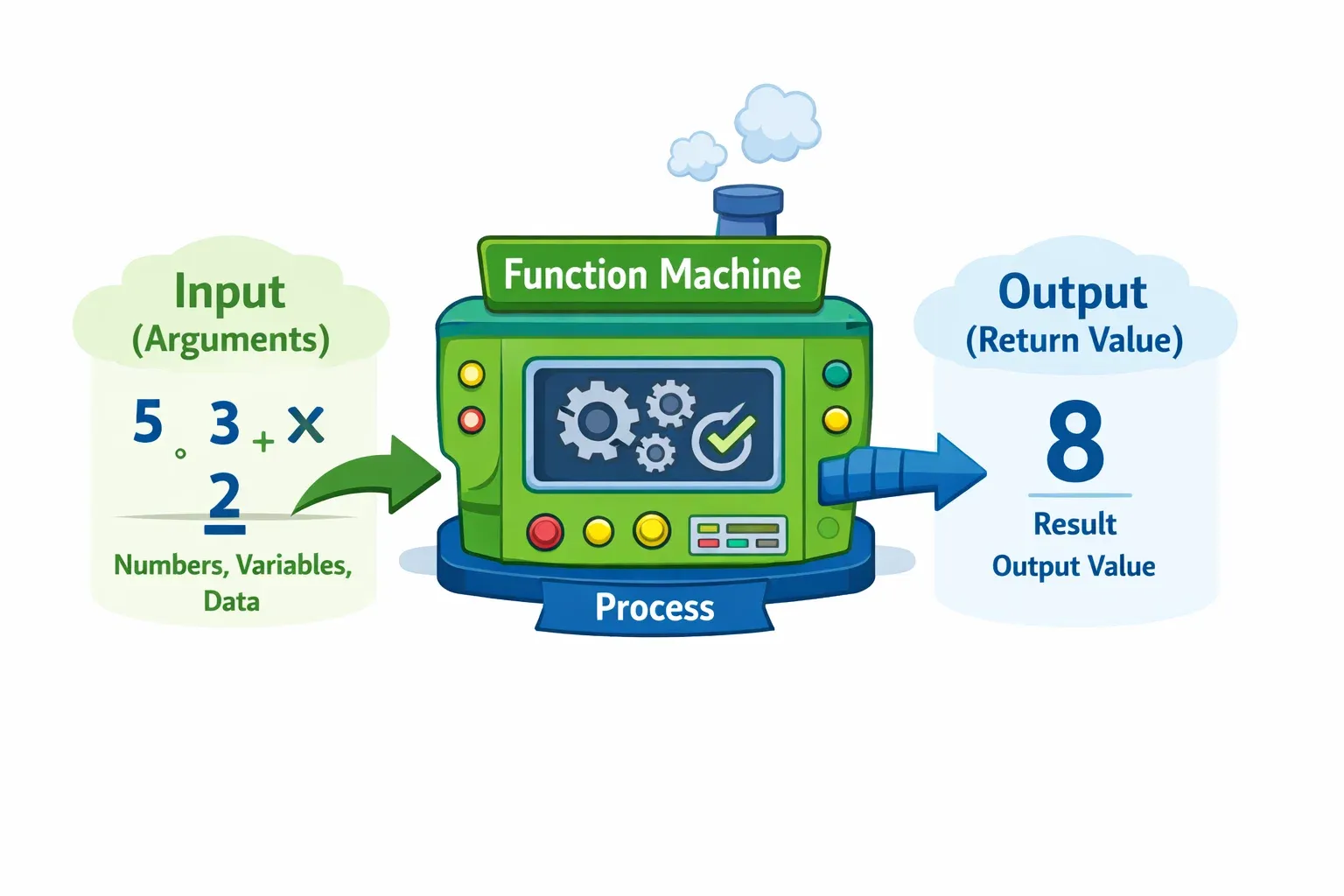
A JavaScript function is a named, reusable block of code designed to perform a specific task. Instead of writing the same logic over and over, you define it once inside a function and call (invoke) it whenever you need it.
Here is the simplest mental model: imagine you work at a shop in Karachi that sells mobile phones. Every time a customer buys a phone, you calculate 17% sales tax. Without functions, you would write that calculation every single time. With a function, you write it once and call it as many times as you like.
Functions in JavaScript have three key parts:
- Parameters — the inputs the function accepts (like the price of the phone)
- Body — the block of code that runs when the function is called
- Return value — the output the function sends back (like the tax amount)
Here is a minimal example to see the anatomy:
// Defining the function
function greetStudent(name) {      // 'name' is the parameter
    return "Assalam-o-Alaikum, " + name + "!";  // return value
}

// Calling the function
let message = greetStudent("Ahmad");
console.log(message);  // Output: Assalam-o-Alaikum, Ahmad!
Line-by-line explanation:
function greetStudent(name)— declares a function namedgreetStudentthat accepts one parameter callednamereturn "Assalam-o-Alaikum, " + name + "!"— combines the greeting string with thenamevalue and sends it backgreetStudent("Ahmad")— calls the function and passes"Ahmad"as the argument- The result is stored in the variable
messageand printed to the console
The Three Forms of JavaScript Functions
JavaScript gives you three different syntaxes to write functions. They each have unique behaviour and best use cases. Let us explore all three in depth.
1. Function Declaration
A function declaration uses the function keyword, followed by a name, parentheses for parameters, and curly braces for the body.
function calculateTax(price) {
    let tax = price * 0.17;
    return tax;
}

let mobileTax = calculateTax(25000);
console.log("Tax on PKR 25,000: PKR " + mobileTax);
// Output: Tax on PKR 25,000: PKR 4250
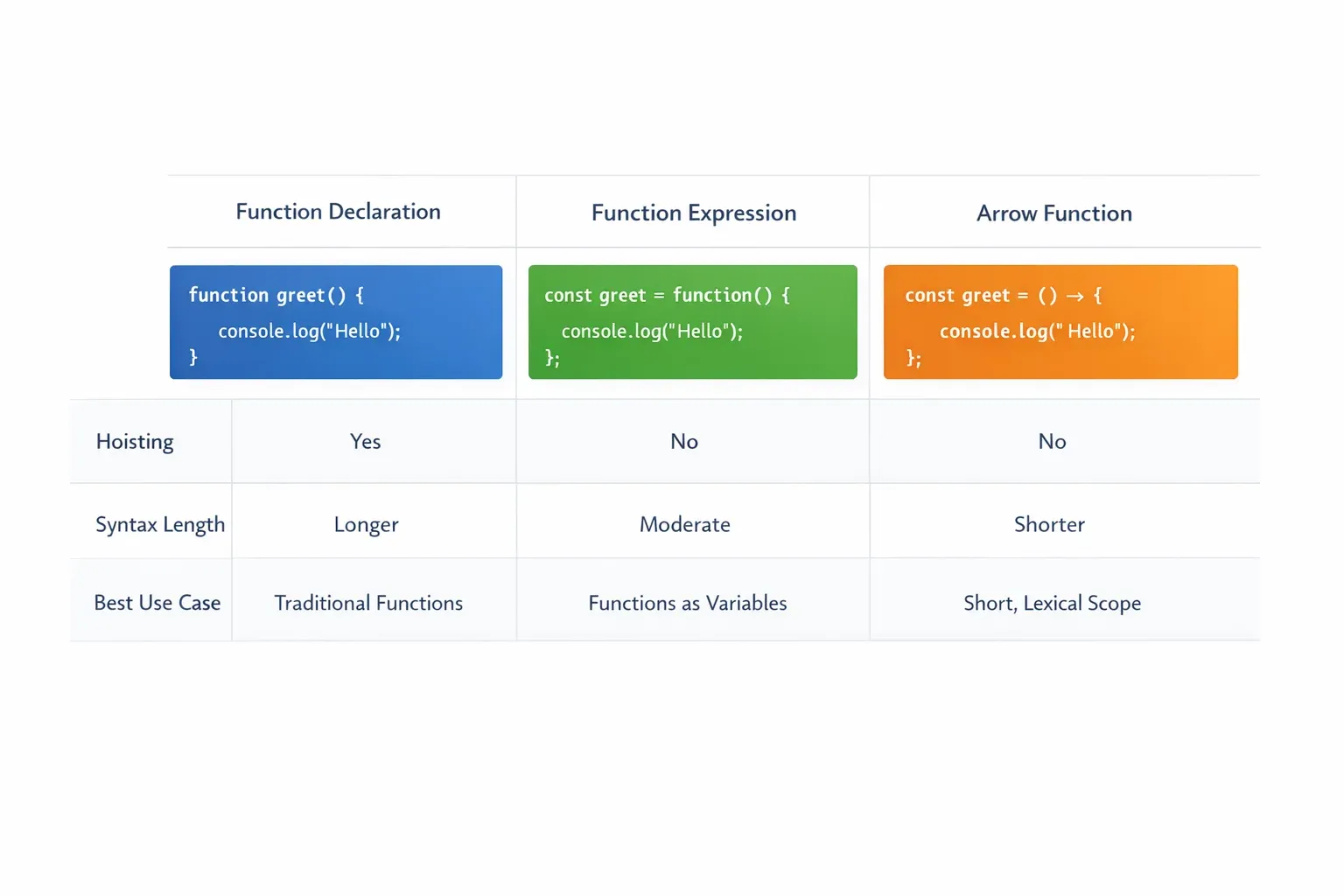
One very important feature of function declarations is hoisting. JavaScript "hoists" (moves) function declarations to the top of their scope before the code runs. This means you can call a declared function before it appears in your code:
// Calling BEFORE definition — this works because of hoisting!
let result = addNumbers(10, 20);
console.log(result);  // Output: 30

function addNumbers(a, b) {
    return a + b;
}
2. Function Expression
A function expression assigns an anonymous (or named) function to a variable. The variable becomes the way you refer to the function.
const calculateDiscount = function(price, discountPercent) {
    let discount = (price * discountPercent) / 100;
    return price - discount;
};

let finalPrice = calculateDiscount(5000, 10);
console.log("Final price after 10% discount: PKR " + finalPrice);
// Output: Final price after 10% discount: PKR 4500
Unlike function declarations, function expressions are not hoisted. If you try to call them before they are defined, JavaScript will throw a ReferenceError. This makes them more predictable in complex codebases.
3. Arrow Functions
Arrow functions were introduced in ES6 (2015) and provide a shorter, more concise syntax. They are especially popular in modern JavaScript development and are widely used in frameworks like React and Vue.
const greet = (name) => {
    return "Hello, " + name + "!";
};

console.log(greet("Fatima"));  // Output: Hello, Fatima!
For simple, single-expression functions, arrow functions can be written even more concisely — the curly braces and return keyword can be dropped:
// Concise arrow function (implicit return)
const square = (num) => num * num;

console.log(square(5));   // Output: 25
console.log(square(12));  // Output: 144
Practical Code Examples
Example 1: Student Grade Calculator
Let us build a practical grade calculator that Pakistani students might actually use. This example uses all three function types together.
// ---- Function Declaration ----
// Converts a numeric score to a letter grade (Pakistani grading system)
function getLetterGrade(score) {
    if (score >= 90) return "A+";
    if (score >= 80) return "A";
    if (score >= 70) return "B";
    if (score >= 60) return "C";
    if (score >= 50) return "D";
    return "F";
}

// ---- Function Expression ----
// Calculates percentage from obtained marks and total marks
const calculatePercentage = function(obtained, total) {
    let percentage = (obtained / total) * 100;
    return percentage.toFixed(2);  // Round to 2 decimal places
};

// ---- Arrow Function ----
// Generates a result message for the student
const generateResultMessage = (studentName, percentage, grade) =>
    `Dear ${studentName}, your result: ${percentage}% — Grade: ${grade}`;

// ---- Using all three together ----
let studentName = "Ali";
let obtainedMarks = 425;
let totalMarks = 500;

let percentage = calculatePercentage(obtainedMarks, totalMarks);  // "85.00"
let grade = getLetterGrade(parseFloat(percentage));               // "A"
let message = generateResultMessage(studentName, percentage, grade);

console.log(message);
// Output: Dear Ali, your result: 85.00% — Grade: A
Line-by-line explanation:
function getLetterGrade(score)— a function declaration that usesifconditions to return the correct letter grade based on the scorereturn "A+"etc. — each condition checks a score range and returns the matching grade; if none match, the function returns"F"const calculatePercentage = function(obtained, total)— a function expression stored in the variablecalculatePercentage(obtained / total) * 100— divides obtained marks by total and multiplies by 100 to get the percentage.toFixed(2)— a built-in JavaScript method that rounds the number to 2 decimal placesconst generateResultMessage = (studentName, percentage, grade) =>— a concise arrow function that takes three parameters- The backtick string (template literal)
\...`lets us embed variables directly using${}` syntax parseFloat(percentage)— converts the string"85.00"back to the number85sogetLetterGradecan compare it numerically
Example 2: Real-World Application — PKR Currency Converter
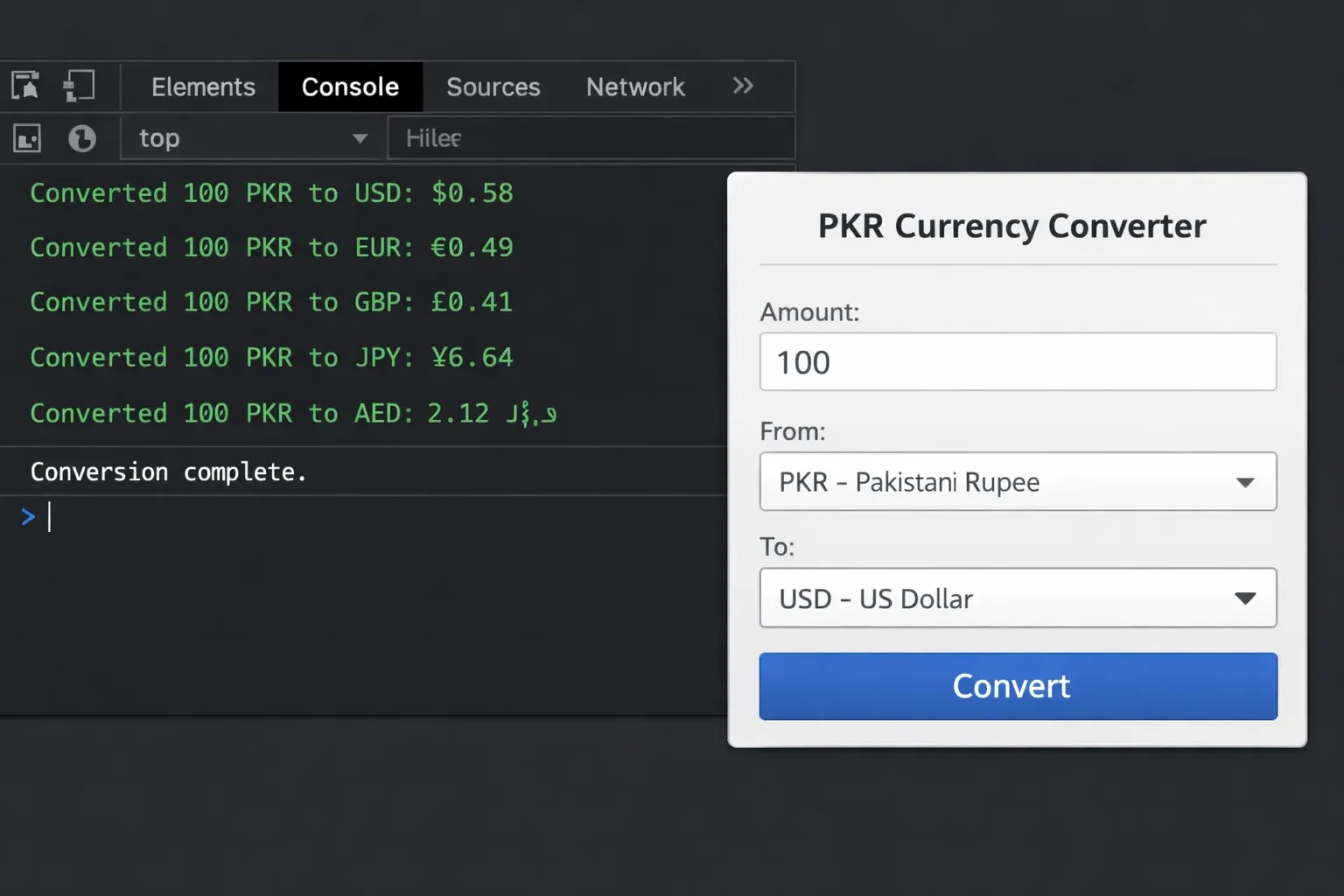
Here is a real-world example: a currency converter useful for Pakistani students learning about international pricing, freelancing rates, or e-commerce. This uses arrow functions extensively, as is common in modern JavaScript code.
// Exchange rates (example values — update for real use)
const exchangeRates = {
    USD: 278.50,   // 1 USD = 278.50 PKR
    GBP: 352.00,   // 1 GBP = 352.00 PKR
    SAR: 74.20,    // 1 SAR = 74.20 PKR (important for Pakistani diaspora)
    AED: 75.80     // 1 AED = 75.80 PKR (UAE - many Pakistanis work here)
};

// Arrow function: convert foreign currency to PKR
const toPKR = (amount, currency) => {
    if (!exchangeRates[currency]) {
        return "Error: Currency not supported.";
    }
    let pkrAmount = amount * exchangeRates[currency];
    return pkrAmount.toLocaleString("en-PK");  // Format with commas
};

// Arrow function: convert PKR to foreign currency
const fromPKR = (pkrAmount, currency) => {
    if (!exchangeRates[currency]) {
        return "Error: Currency not supported.";
    }
    let foreignAmount = pkrAmount / exchangeRates[currency];
    return foreignAmount.toFixed(2);
};

// Function expression: display a formatted conversion result
const showConversion = function(amount, fromCurrency, toCurrency) {
    if (fromCurrency === "PKR") {
        let result = fromPKR(amount, toCurrency);
        console.log(`PKR ${amount.toLocaleString()} = ${toCurrency} ${result}`);
    } else {
        let result = toPKR(amount, fromCurrency);
        console.log(`${fromCurrency} ${amount} = PKR ${result}`);
    }
};

// --- Test the converter ---
showConversion(100, "USD", "PKR");
// Output: USD 100 = PKR 27,850

showConversion(50000, "PKR", "USD");
// Output: PKR 50,000 = USD 179.53

showConversion(500, "SAR", "PKR");
// Output: SAR 500 = PKR 37,100
Key concepts demonstrated:
exchangeRates[currency]— using a variable as an object property key (bracket notation)!exchangeRates[currency]— the!negation checks if the currency does NOT exist in our rates object; if not, we return an error message early.toLocaleString("en-PK")— formats large numbers with commas (e.g.,27850becomes"27,850") using Pakistani locale.toFixed(2)— ensures we always show exactly 2 decimal places for foreign currency values- The
showConversionfunction expression acts as a "controller" that decides which conversion direction to use based onfromCurrency
Common Mistakes & How to Avoid Them
Mistake 1: Calling a Function Expression Before It Is Defined
This is one of the most common errors beginners make when they come from a background of using only function declarations.
❌ Wrong — This will throw a ReferenceError:
// Trying to call the function BEFORE it is defined
let total = calculateBill(1200, 5);  // ERROR: Cannot access 'calculateBill' before initialization
console.log(total);

const calculateBill = function(price, quantity) {
    return price * quantity;
};
✅ Correct — Define before you call:
// Define the function expression FIRST
const calculateBill = function(price, quantity) {
    return price * quantity;
};

// THEN call it
let total = calculateBill(1200, 5);
console.log("Total: PKR " + total);  // Output: Total: PKR 6000
Why this happens: Function expressions (and arrow functions) are stored in variables. JavaScript does not hoist variable values — only function declarations are fully hoisted. Always define function expressions at the top of your code or before their first use.
Mistake 2: Forgetting the return Statement
Many beginners write a function that does a calculation but forget to return the result. The function runs silently and gives back undefined.
❌ Wrong — Missing return:
function addDiscount(price, discount) {
    let finalPrice = price - discount;
    // Forgot to return!
}

let result = addDiscount(5000, 500);
console.log(result);  // Output: undefined  ← Not what we wanted!
✅ Correct — Include the return statement:
function addDiscount(price, discount) {
    let finalPrice = price - discount;
    return finalPrice;  // ✅ Now it sends the value back
}

let result = addDiscount(5000, 500);
console.log("After discount: PKR " + result);  // Output: After discount: PKR 4500
Pro tip: If your function does not need to return a value (for example, it just prints something or modifies the page), you can skip return. But if you need to use the result of a calculation elsewhere in your code, always include return.
Practice Exercises
Exercise 1: Zakat Calculator
Problem: Write a function called calculateZakat that accepts a person's total savings in PKR and returns the Zakat amount (2.5% of savings). Then write another arrow function called isZakatDue that checks if savings exceed the Nisab threshold (PKR 90,000 for simplicity). Call both functions with test values for students named Ahmad and Fatima.
Solution:
// Function Declaration: calculate 2.5% Zakat
function calculateZakat(savings) {
    let zakat = savings * 0.025;
    return zakat;
}

// Arrow Function: check if Zakat is due (savings above Nisab)
const isZakatDue = (savings) => savings >= 90000;

// Test with Ahmad's savings
let ahmadSavings = 150000;
if (isZakatDue(ahmadSavings)) {
    let zakatAmount = calculateZakat(ahmadSavings);
    console.log(`Ahmad's Zakat: PKR ${zakatAmount}`);
    // Output: Ahmad's Zakat: PKR 3750
} else {
    console.log("Ahmad: Zakat not due yet.");
}

// Test with Fatima's savings
let fatimaSavings = 60000;
if (isZakatDue(fatimaSavings)) {
    let zakatAmount = calculateZakat(fatimaSavings);
    console.log(`Fatima's Zakat: PKR ${zakatAmount}`);
} else {
    console.log("Fatima: Zakat not due yet.");
    // Output: Fatima: Zakat not due yet.
}
What to practise: Try changing the savings values. Try adding a third parameter to calculateZakat that allows a custom percentage so users can also calculate Ushr (10%).
Exercise 2: Temperature Converter for Pakistani Cities
Problem: Create a function expression called celsiusToFahrenheit and an arrow function called fahrenheitToCelsius. Use them to convert temperatures for cities across Pakistan: Lahore in summer (42°C), Islamabad in winter (5°C), and Karachi in a typical day (35°C). Display formatted results.
Solution:
// Function Expression: Celsius to Fahrenheit
const celsiusToFahrenheit = function(celsius) {
    return (celsius * 9/5) + 32;
};

// Arrow Function: Fahrenheit to Celsius
const fahrenheitToCelsius = (fahrenheit) => ((fahrenheit - 32) * 5/9).toFixed(1);

// City temperatures
const cities = [
    { name: "Lahore (Summer)", tempC: 42 },
    { name: "Islamabad (Winter)", tempC: 5 },
    { name: "Karachi (Typical)", tempC: 35 }
];

// Loop through cities and display results
cities.forEach(function(city) {
    let fahrenheit = celsiusToFahrenheit(city.tempC);
    console.log(`${city.name}: ${city.tempC}°C = ${fahrenheit}°F`);
});

// Output:
// Lahore (Summer): 42°C = 107.6°F
// Islamabad (Winter): 5°C = 41°F
// Karachi (Typical): 35°C = 95°F

// Reverse conversion example
console.log("107.6°F back to Celsius: " + fahrenheitToCelsius(107.6) + "°C");
// Output: 107.6°F back to Celsius: 42.0°C
What to practise: Add a Quetta (Winter) city with -2°C. Try writing a single arrow function that converts in both directions based on a third parameter (direction: "CtoF" or "FtoC").
Frequently Asked Questions
What is the difference between a function declaration and a function expression?
The main difference is hoisting. A function declaration is hoisted to the top of its scope, meaning you can call it before it appears in your code. A function expression is stored in a variable and is not hoisted — you must define it before calling it. In terms of functionality, both can accept parameters and return values in exactly the same way.
How do arrow functions differ from regular functions in JavaScript?
Arrow functions have a shorter syntax and do not have their own this binding — they inherit this from the surrounding (enclosing) scope. This makes them especially useful inside class methods and callbacks where the value of this can otherwise be tricky. For simple, stateless utility functions, arrow functions are often preferred for their clean, concise syntax.
When should I use a function declaration versus an arrow function?
Use function declarations for top-level, named utility functions that you want to be accessible throughout your file (thanks to hoisting). Use arrow functions for short, inline operations — especially as callbacks in array methods like .map(), .filter(), and .forEach(), or inside React components. Many modern JavaScript style guides recommend arrow functions as the default for most new functions.
Can a JavaScript function return multiple values?
JavaScript functions can only return a single value directly. However, you can return multiple values by wrapping them in an object or an array. For example: return { total: 5000, tax: 850 } returns an object with two properties, which you can then destructure: const { total, tax } = calculateBill(price).
What happens if I call a function with too few or too many arguments?
JavaScript does not throw an error for mismatched argument counts. If you pass too few arguments, the missing parameters will be undefined inside the function. If you pass too many, the extra arguments are silently ignored. To handle missing arguments gracefully, you can use default parameter values: function greet(name = "Guest") { ... } — this way, if no name is provided, it defaults to "Guest".
Summary & Key Takeaways
Here are the most important things to remember from this tutorial:
- Functions are reusable blocks of code — write once, call many times. They are the foundation of clean, maintainable JavaScript.
- Function declarations are hoisted — you can call them anywhere in the file, even before they are written. Function expressions and arrow functions are not hoisted, so always define them first.
- Arrow functions offer concise syntax — for single-expression functions, you can drop the curly braces and
returnkeyword entirely (implicit return). They also inheritthisfrom the enclosing scope. - Always include
returnif you need the result — forgettingreturnmeans your function will silently returnundefined, which is a very common beginner bug. - Parameters vs arguments — parameters are the named placeholders in the function definition; arguments are the actual values you pass when calling the function. The two terms are often used interchangeably in conversation, but it is good to know the distinction.
- Choose the right form for the job — use function declarations for main, named utilities; function expressions when you need to conditionally define or pass a function; and arrow functions for concise callbacks and modern ES6+ code.
Next Steps & Related Tutorials
Now that you have a strong grasp of JavaScript functions, here are the natural next topics to explore on theiqra.edu.pk:
- JavaScript Scope and Closures — understanding
let,const, block scope, and how closures let inner functions remember the variables of their outer function. This builds directly on what you learned here. - JavaScript Array Methods: map, filter, and reduce — these powerful built-in methods take functions as arguments (callbacks). Now that you can write arrow functions confidently, you are perfectly ready for these.
- JavaScript Objects and the
thisKeyword — learn why arrow functions behave differently withthiscompared to regular functions, with practical examples in object-oriented JavaScript. - Asynchronous JavaScript: Callbacks, Promises, and Async/Await — once you are comfortable with functions, the next big step is understanding how JavaScript handles tasks that take time, like fetching data from an API.
Keep practising, keep building, and remember — every expert developer in Islamabad, Karachi, or Lahore started exactly where you are today. You've got this! 💪
Published on theiqra.edu.pk — Pakistan's growing programming education community. Keywords: javascript functions, function declaration, arrow functions, function expression
Test Your Python Knowledge!
Finished reading? Take a quick quiz to see how much you've learned from this tutorial.