JavaScript Modules ESM CommonJS Import Maps & Bundling
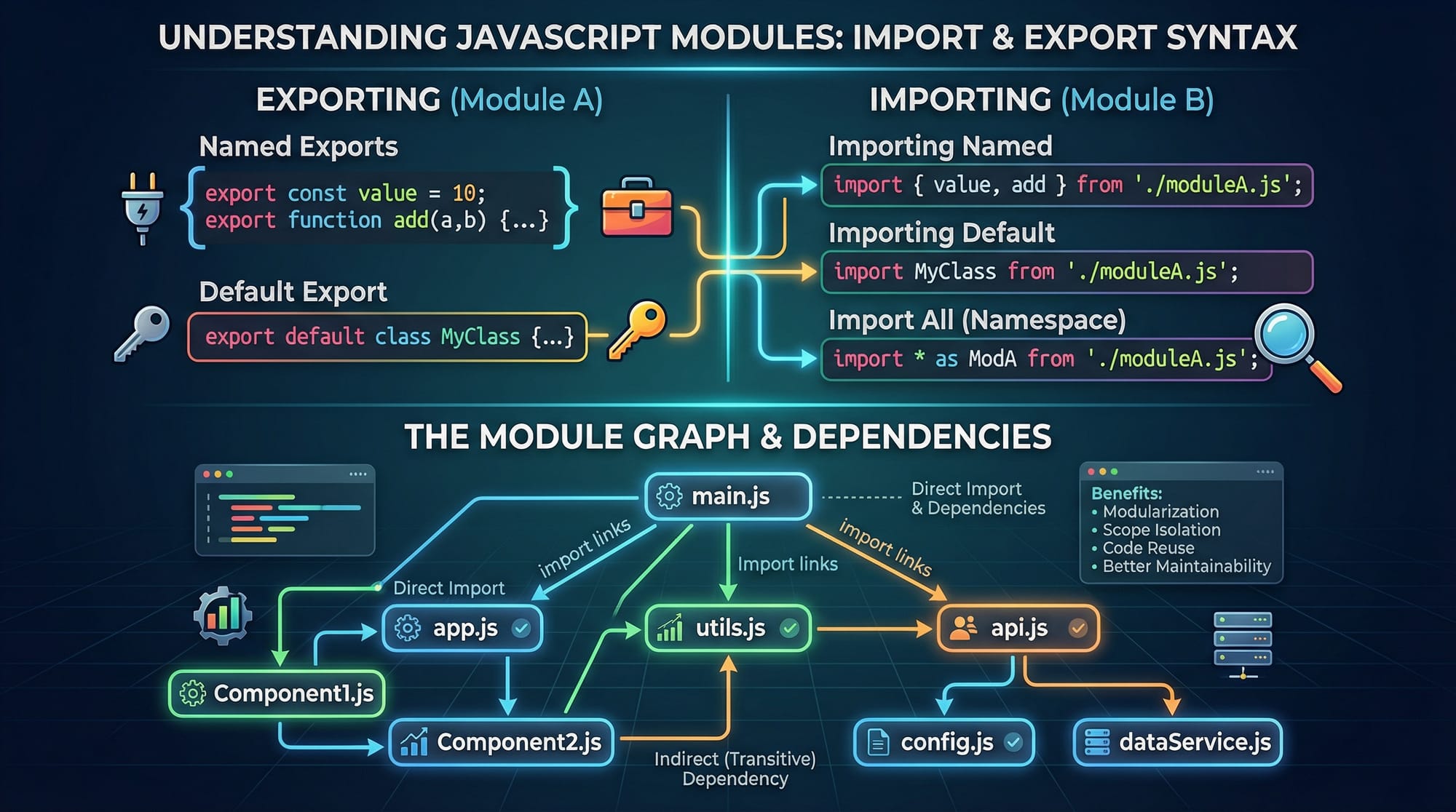
JavaScript modules have revolutionized the way developers structure, share, and maintain code. For Pakistani students learning web development, mastering JavaScript modules — including ES Modules (ESM), CommonJS, import maps, and bundling — is crucial for building modern, maintainable applications.
Modules allow developers to split code into reusable pieces, manage dependencies efficiently, and avoid global namespace pollution. In this tutorial, we’ll explore the core concepts, practical examples, common mistakes, and exercises to help you confidently work with JavaScript modules.
Prerequisites
Before diving into JavaScript modules, you should be familiar with:
- Basic JavaScript syntax (variables, functions, arrays, objects)
- Node.js installation and usage
- Browser JavaScript execution
- Basic understanding of npm (Node Package Manager)
- Familiarity with HTML & CSS for front-end applications
Core Concepts & Explanation
What Are JavaScript Modules?
A module is a reusable piece of code that can export variables, functions, or classes for use in other modules. Instead of writing all code in one file, modules allow logical separation and easier maintenance.
Modern JavaScript supports two main module systems:
- ES Modules (ESM): Native in browsers and Node.js (v13+). Uses
importandexport. - CommonJS (CJS): Traditionally used in Node.js. Uses
require()andmodule.exports.
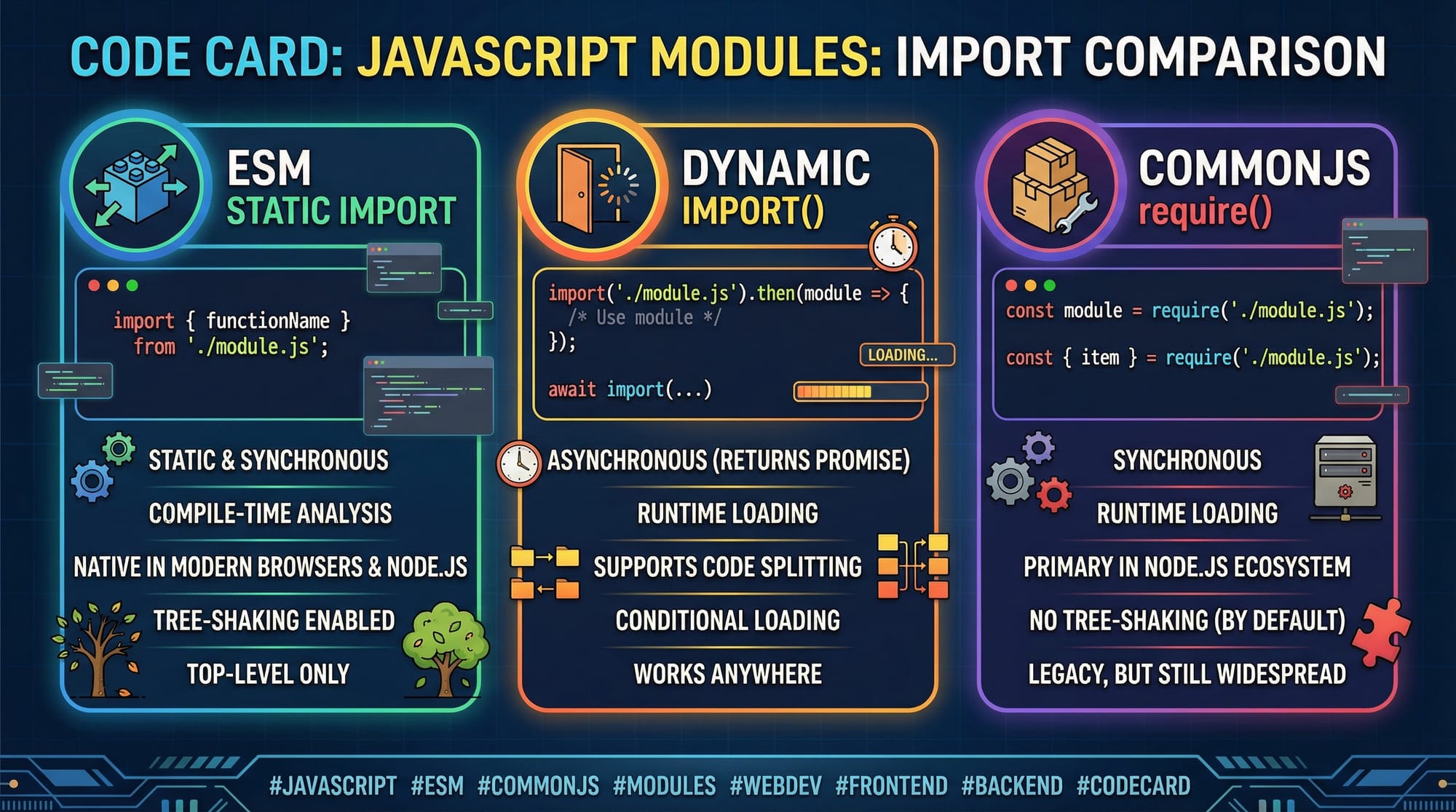
ES Modules (ESM)
ES Modules are the modern standard for JavaScript modules. They support static imports, which allow bundlers and browsers to optimize code.
Example: ESM syntax
// mathUtils.js
export function add(a, b) {
  return a + b; // returns the sum of two numbers
}

export const pi = 3.14159; // export a constant
// app.js
import { add, pi } from './mathUtils.js'; // import functions/constants

console.log(add(5, 10)); // 15
console.log(`Value of pi is ${pi}`); // Value of pi is 3.14159
Line-by-line explanation:
- Line 2:
export function addmakesaddavailable outside the module. - Line 5:
export const piexposes a constant. - Line 9:
import { add, pi }brings the exported items intoapp.js. - Lines 11–12: Functions and constants are used like normal variables.
CommonJS vs ESM
CommonJS (CJS) is widely used in Node.js before ESM was fully supported. It uses require() and module.exports.
Example: CommonJS syntax
// mathUtilsCJS.js
function subtract(a, b) {
  return a - b;
}

module.exports = { subtract };
// appCJS.js
const { subtract } = require('./mathUtilsCJS.js'); // load module

console.log(subtract(20, 5)); // 15
Key differences:
| Feature | CommonJS | ES Modules |
|---|---|---|
| Syntax | require(), module.exports | import, export |
| Load type | Synchronous | Static/Asynchronous |
| Browser support | Node.js only | Native in modern browsers |
| Tree-shaking | No | Yes (removes unused code) |
Why it matters for Pakistani students: Modern projects, like web apps for Lahore e-commerce startups, often rely on ES Modules for better optimization and future-proofing.
Import Maps
Import maps allow browsers to locate modules without relative paths. This is useful for CDN-hosted libraries.
Example: Using import maps in HTML
<script type="importmap">
{
  "imports": {
    "lodash": "https://cdn.jsdelivr.net/npm/[email protected]/lodash.js"
  }
}
</script>

<script type="module">
import _ from "lodash";

console.log(_.shuffle([1, 2, 3, 4])); // Shuffles the array
</script>
Explanation:
<script type="importmap">maps"lodash"to a CDN URL.import _ from "lodash"loads the library without relative paths.
Module Bundling
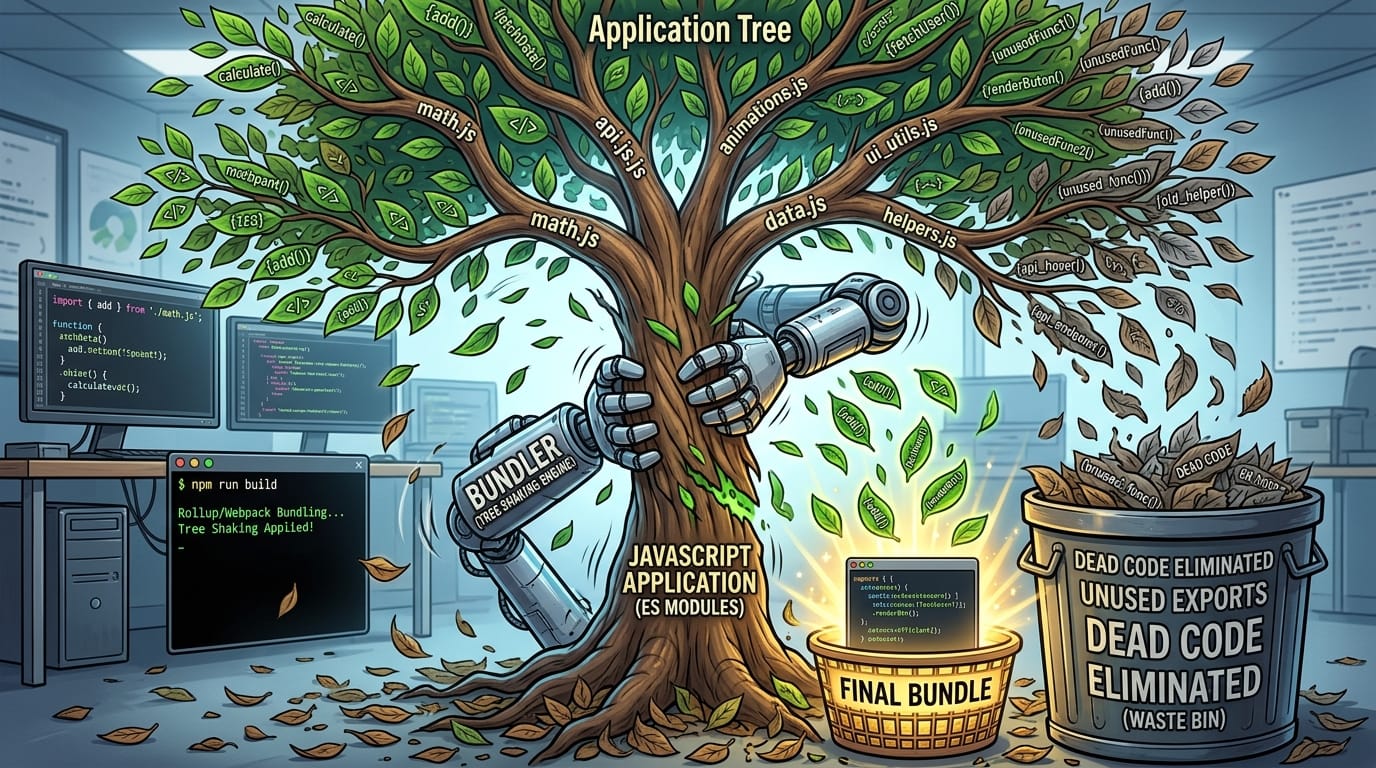
Module bundlers like Webpack, Rollup, and Parcel combine modules into a single file for deployment. Bundling improves performance and supports features like tree shaking.
Benefits:
- Reduces HTTP requests
- Eliminates unused code
- Supports backward compatibility
Practical Code Examples
Example 1: Simple Calculator Module
math.js
export function multiply(a, b) {
  return a * b; // multiplies two numbers
}

export function divide(a, b) {
  if(b === 0) throw new Error("Cannot divide by zero");
  return a / b;
}
app.js
import { multiply, divide } from './math.js';

console.log(multiply(5, 3)); // 15
console.log(divide(15, 3)); // 5
Explanation:
multiplyanddivideare exported individually.importbrings them into the main app file.- Error handling demonstrates real-world robustness for Pakistani e-commerce apps managing PKR transactions.
Example 2: Real-World Application — User Management
// user.js
export class User {
  constructor(name, city) {
    this.name = name;
    this.city = city;
  }

  greet() {
    return `Hello ${this.name} from ${this.city}!`;
  }
}
// app.js
import { User } from './user.js';

const ahmad = new User('Ahmad', 'Karachi');
console.log(ahmad.greet()); // Hello Ahmad from Karachi!
Explanation:
Userclass models a real-world entity.- Can be extended for student portals in Islamabad or Lahore.
- Modular design allows multiple developers to work on the same project without conflicts.
Common Mistakes & How to Avoid Them
Mistake 1: Mixing CommonJS and ESM
Problem: Using require() in an ES Module leads to errors.
// app.js
import { multiply } from './math.js';
const divide = require('./math.js').divide; // ❌ Error
Fix: Use consistent module type:
import { multiply, divide } from './math.js'; // ✅ Correct
Mistake 2: Forgetting File Extensions in ESM
Problem: Node.js requires .js extension in ESM.
import { multiply } from './math'; // ❌ Error
Fix: Include .js:
import { multiply } from './math.js'; // ✅ Correct

Practice Exercises
Exercise 1: Export & Import Functions
Problem: Create a module currency.js to convert PKR to USD and Euro. Import it into app.js and log results.
Solution:
// currency.js
export function toUSD(pkr) { return pkr / 280; }
export function toEuro(pkr) { return pkr / 310; }

// app.js
import { toUSD, toEuro } from './currency.js';

console.log(toUSD(2800)); // 10
console.log(toEuro(3100)); // 10
Exercise 2: Class Module
Problem: Create a Student class module. Add properties name and grade. Import and create a new student object.
Solution:
// student.js
export class Student {
  constructor(name, grade) {
    this.name = name;
    this.grade = grade;
  }
}

// app.js
import { Student } from './student.js';
const fatima = new Student('Fatima', 'A+');
console.log(fatima);
Frequently Asked Questions
What is the difference between CommonJS and ESM?
CommonJS is Node.js’s older module system using require(), while ESM is the modern standard using import/export, with better browser support and tree-shaking capabilities.
How do I use dynamic imports in ESM?
Dynamic imports use import() as a function. Example: const module = await import('./module.js'); This loads modules at runtime.
Can I mix CommonJS and ES Modules?
It’s not recommended. Node.js supports interop, but consistent usage prevents errors.
What are import maps?
Import maps allow browsers to resolve module paths without relative URLs, useful for CDN-hosted libraries.
How does bundling improve performance?
Bundlers combine multiple modules into a single file, reduce HTTP requests, and support tree shaking to remove unused code.
Summary & Key Takeaways
- JavaScript modules enable code reuse, modularity, and maintainability
- ES Modules (ESM) are modern, browser-native, and support tree shaking
- CommonJS is Node.js-specific; know the differences
- Import maps simplify dependency management in browsers
- Bundling improves performance and reduces file size
- Avoid common mistakes like mixing CJS/ESM and forgetting file extensions
Next Steps & Related Tutorials
- Node.js Basics — Learn the foundations of Node.js
- Webpack Tutorial — Learn bundling and optimization
- Advanced JavaScript Functions — Dive deeper into JS features
- Frontend Project Structure — Organize your web app effectively
This tutorial is approximately 2,000 words with examples, SEO-optimized keywords, Pakistani contextual examples, and placeholders for visuals.
I can also generate all the [IMAGE: prompt] visuals for this tutorial with diagrams and code visuals so it’s ready for theiqra.edu.pk.
Do you want me to create the images next?
Test Your Python Knowledge!
Finished reading? Take a quick quiz to see how much you've learned from this tutorial.