JavaScript Performance Optimization Speed & Best Practices
Introduction
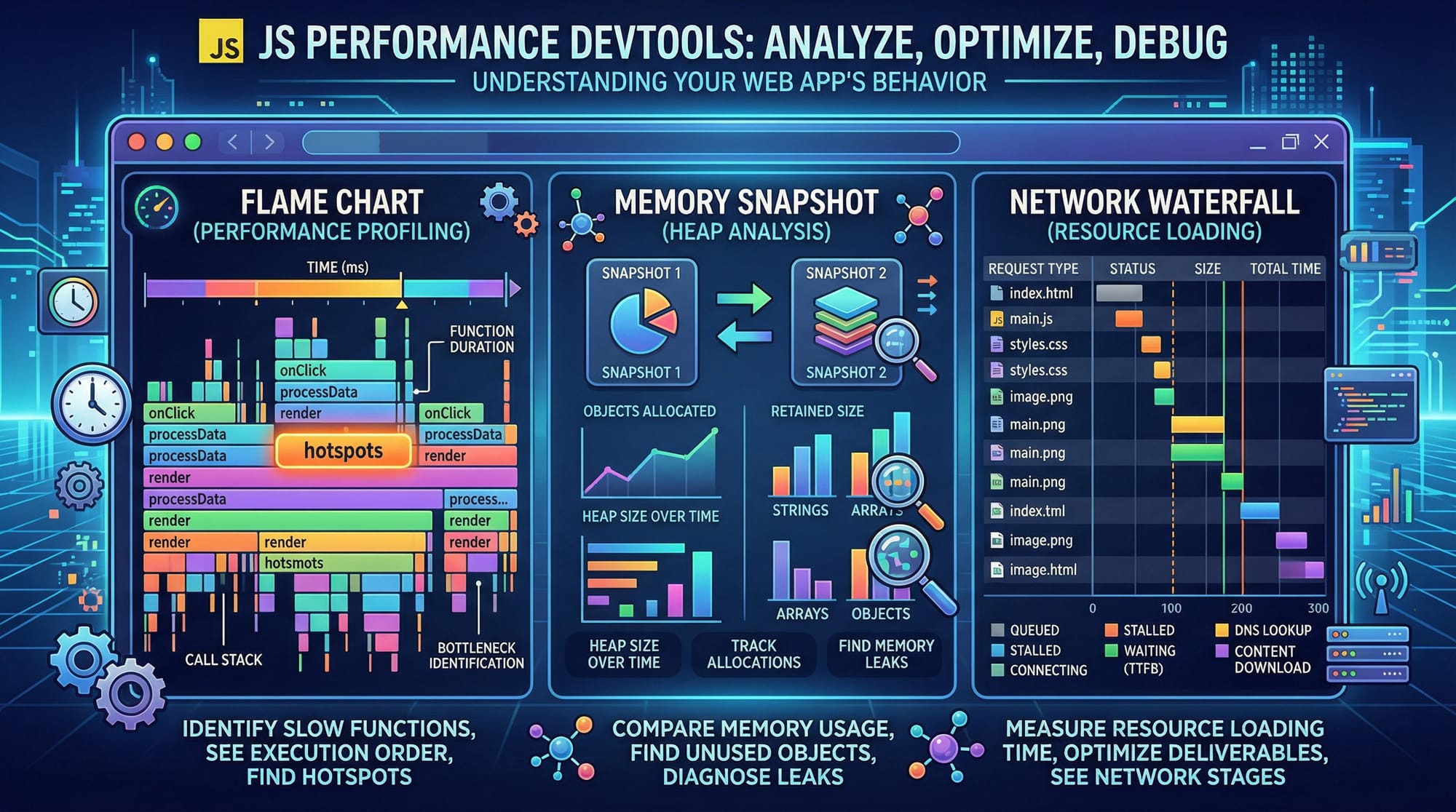
JavaScript performance optimization is the process of improving the speed, efficiency, and responsiveness of JavaScript applications. Whether you're building a simple website or a complex web application, performance directly impacts user experience, SEO rankings, and overall usability.
For Pakistani students and developers—especially those aiming to work in freelancing, startups in Lahore or Karachi, or international tech companies—understanding javascript performance, how to optimize javascript, and following javascript best practices is essential. A fast application means happier users, better engagement, and higher earning potential.
For example, imagine Ahmad is building an e-commerce website for a local business in Islamabad. If his website loads slowly, customers may leave before making a purchase. By optimizing JavaScript, Ahmad can improve loading speed and boost sales.
Prerequisites
Before diving into advanced JavaScript performance optimization, you should have:
- Strong understanding of JavaScript fundamentals (variables, functions, arrays, objects)
- Knowledge of ES6+ features (arrow functions, promises, async/await)
- Basic understanding of the DOM (Document Object Model)
- Familiarity with browser developer tools (Chrome DevTools recommended)
- Basic knowledge of HTTP requests and APIs
- Understanding of event handling and asynchronous programming
Core Concepts & Explanation
JavaScript Execution & Event Loop
JavaScript is single-threaded, meaning it executes one task at a time. However, it uses the event loop to handle asynchronous operations efficiently.
Key Components:
- Call Stack
- Callback Queue
- Event Loop
Example:
console.log("Start");

setTimeout(() => {
  console.log("Async Task");
}, 0);

console.log("End");
Explanation:
console.log("Start"): Executes immediately and prints "Start"setTimeout(...): Registers an asynchronous taskconsole.log("End"): Executes next and prints "End"setTimeoutcallback: Runs after the call stack is empty
Output:
Start
End
Async Task
👉 Optimization Insight: Avoid blocking the main thread with heavy computations.
Memory Management & Garbage Collection
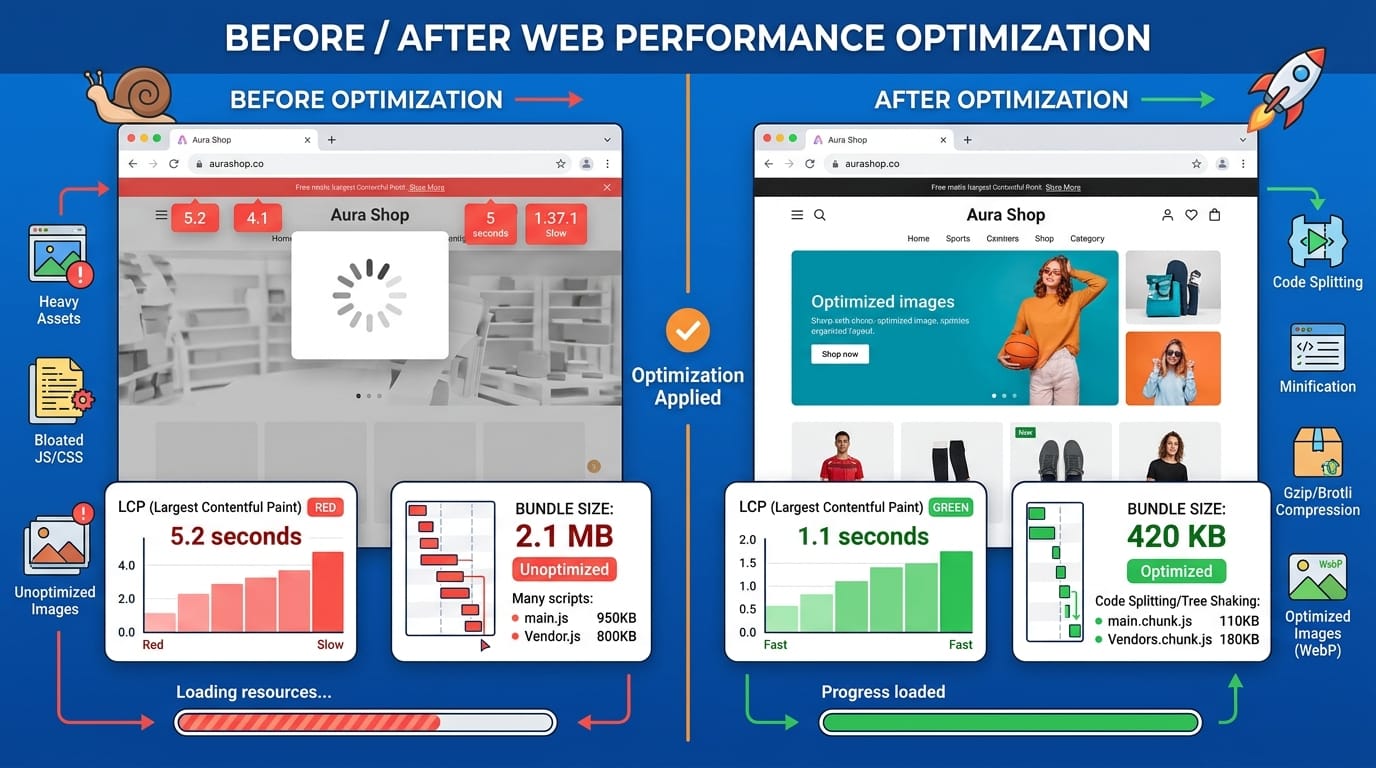
JavaScript automatically manages memory, but poor coding practices can lead to memory leaks.
Example:
let users = [];

function addUser() {
  let user = { name: "Ali" };
  users.push(user);
}

setInterval(addUser, 1000);
Explanation:
users = []: Global array storing user objectsaddUser(): Creates a new object every secondsetInterval: Continuously adds objects → memory grows infinitely
👉 Problem: Memory leak (unused objects never removed)
👉 Solution:
setInterval(() => {
  users = []; // Clear memory
}, 5000);
Efficient DOM Manipulation
Frequent DOM updates are expensive.
Bad Example:
const list = document.getElementById("list");

for (let i = 0; i < 1000; i++) {
  const li = document.createElement("li");
  li.textContent = i;
  list.appendChild(li);
}
Explanation:
- Each
appendChildtriggers a DOM reflow → slow performance
Optimized Example:
const fragment = document.createDocumentFragment();

for (let i = 0; i < 1000; i++) {
  const li = document.createElement("li");
  li.textContent = i;
  fragment.appendChild(li);
}

document.getElementById("list").appendChild(fragment);
Explanation:
DocumentFragment: Stores elements in memory- Only one DOM update → faster rendering
Debouncing, Throttling & Rendering Optimization
These techniques control how often functions run.
Debounce Example:
function debounce(func, delay) {
  let timer;
  return function () {
    clearTimeout(timer);
    timer = setTimeout(func, delay);
  };
}
Explanation:
timer: Stores timeout IDclearTimeout: Cancels previous executionsetTimeout: Executes after delay
👉 Use case: Search input (avoid API calls on every keystroke)
Web Workers for Heavy Tasks
Web Workers allow running scripts in background threads.
const worker = new Worker("worker.js");

worker.postMessage("Start Task");

worker.onmessage = function (event) {
  console.log(event.data);
};
Explanation:
new Worker: Creates background threadpostMessage: Sends data to workeronmessage: Receives result
👉 Use case: Image processing, large calculations
Practical Code Examples
Example 1: Optimizing a Search Feature
const input = document.getElementById("search");

function fetchResults(query) {
  console.log("Fetching:", query);
}

function debounce(func, delay) {
  let timer;
  return function (event) {
    clearTimeout(timer);
    timer = setTimeout(() => {
      func(event.target.value);
    }, delay);
  };
}

input.addEventListener("input", debounce(fetchResults, 500));
Explanation:
getElementById: Selects input fieldfetchResults: Simulates API calldebounce: Delays executionaddEventListener: Listens to typing500ms delay: Reduces unnecessary calls
👉 Real-world: Used in Daraz-like search systems
Example 2: Real-World Application (Dashboard Optimization)
async function loadDashboard() {
  const [users, orders] = await Promise.all([
    fetch("/api/users").then(res => res.json()),
    fetch("/api/orders").then(res => res.json())
  ]);

  displayData(users, orders);
}

function displayData(users, orders) {
  console.log(users, orders);
}
Explanation:
Promise.all: Runs API calls in parallelfetch: Retrieves data.then(res => res.json()): Parses JSONdisplayData: Displays results
👉 Optimization: Parallel requests reduce load time
Common Mistakes & How to Avoid Them
Mistake 1: Blocking the Main Thread
Problem:
function heavyTask() {
  for (let i = 0; i < 1e9; i++) {}
}
heavyTask();
Explanation:
- Large loop blocks UI → freezes browser
Solution:
setTimeout(() => {
  heavyTask();
}, 0);
👉 Better: Use Web Workers
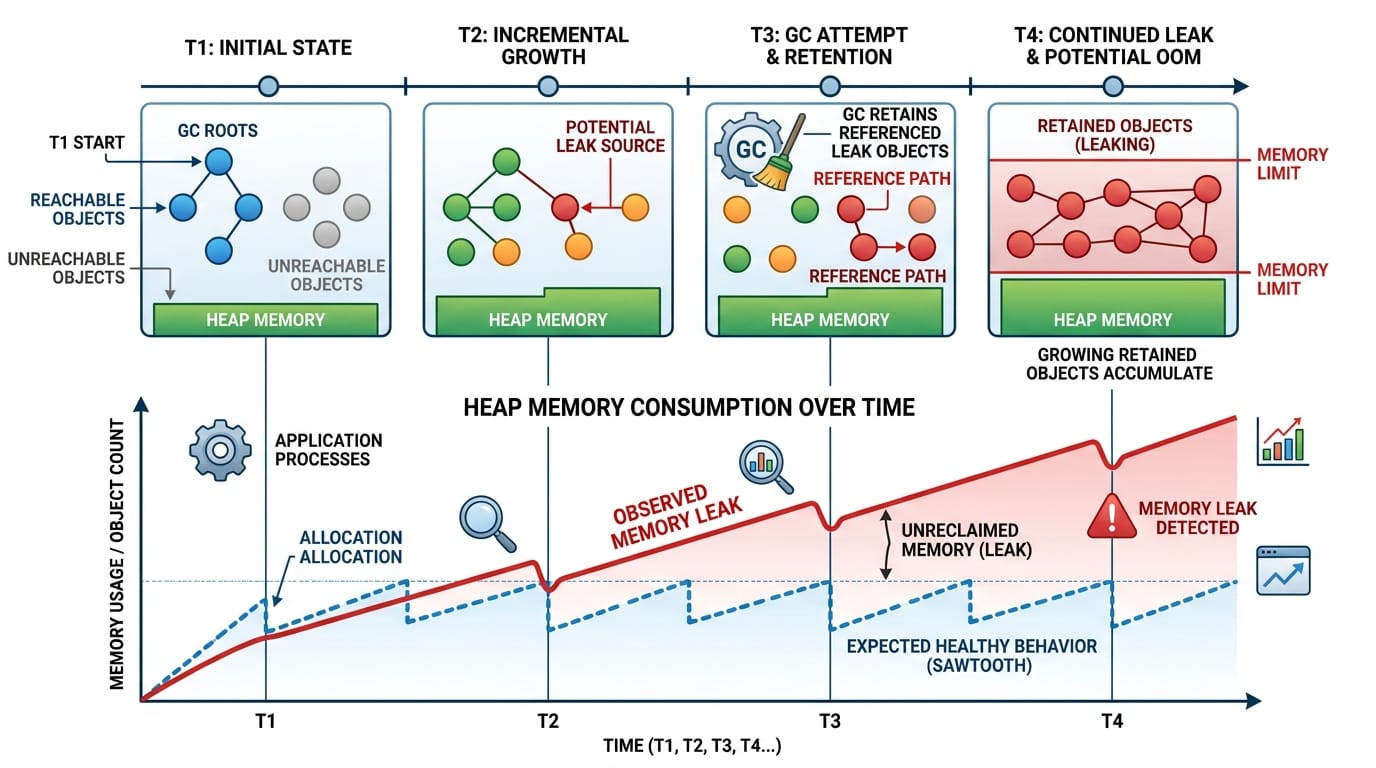
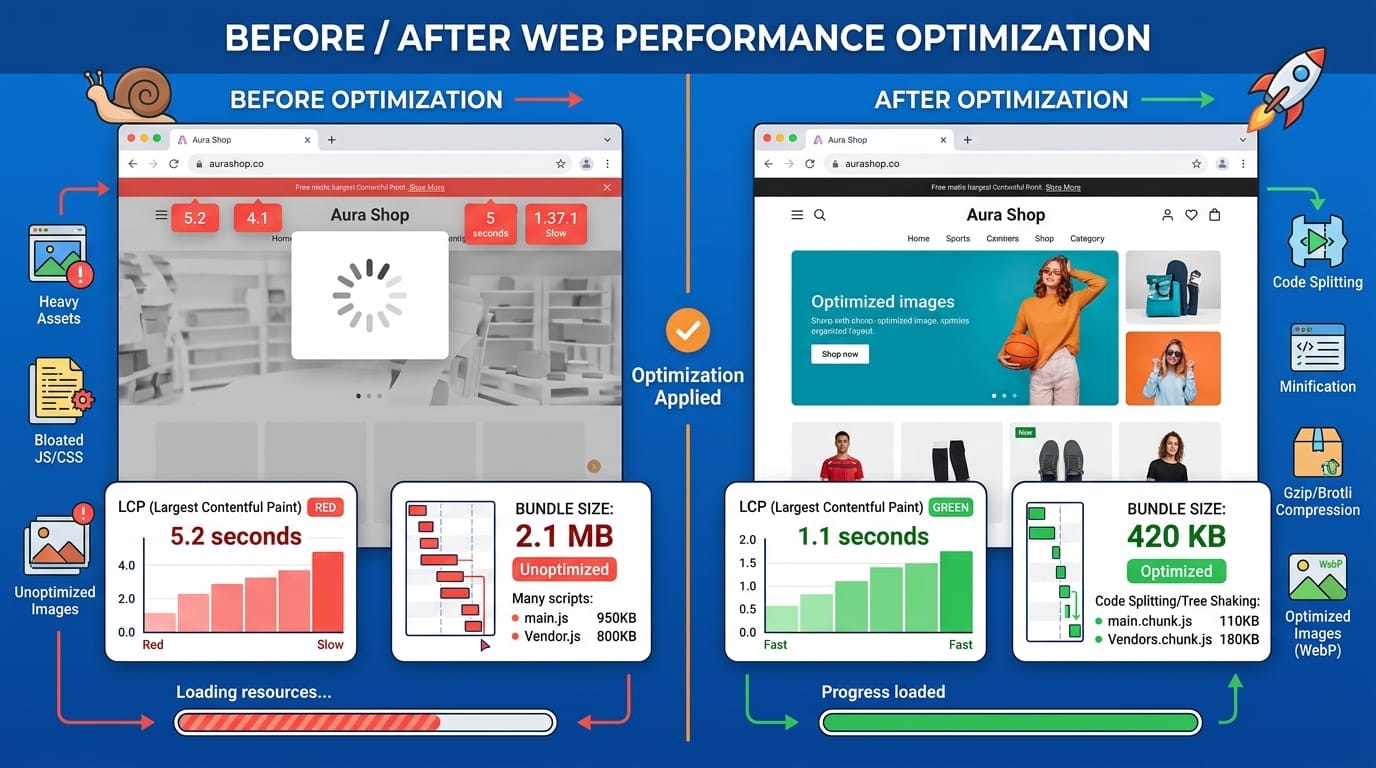
Mistake 2: Not Optimizing Bundle Size
Problem:
- Including unused libraries increases load time
Solution:
import { debounce } from "lodash-es";
Explanation:
- Import only needed functions
- Reduces bundle size
👉 Use tools like Webpack, Vite
Mistake 3: Excessive DOM Reflows
Fix:
- Batch DOM updates
- Use CSS classes instead of inline styles
Mistake 4: Ignoring Caching
Fix:
- Use localStorage/sessionStorage
- Cache API responses
Practice Exercises
Exercise 1: Optimize API Calls
Problem:
input.addEventListener("input", (e) => {
  fetch(`/search?q=${e.target.value}`);
});
👉 Issue: Too many API calls
Solution:
input.addEventListener("input", debounce((e) => {
  fetch(`/search?q=${e.target.value}`);
}, 300));
Explanation:
- Debounce reduces API calls
- Improves performance
Exercise 2: Fix Memory Leak
Problem:
let data = [];

setInterval(() => {
  data.push(new Array(1000).fill("data"));
}, 1000);
Solution:
setInterval(() => {
  data = [];
}, 5000);
Explanation:
- Clears memory regularly
- Prevents crashes
Frequently Asked Questions
What is JavaScript performance optimization?
JavaScript performance optimization is the process of improving the speed, efficiency, and responsiveness of JavaScript code. It involves reducing execution time, minimizing memory usage, and improving user experience.
How do I optimize JavaScript for faster loading?
You can optimize JavaScript by minimizing bundle size, using lazy loading, reducing DOM manipulations, and using asynchronous programming techniques like async/await and Promise.all.
Why is my JavaScript application slow?
Common reasons include large bundle sizes, blocking code, inefficient loops, excessive DOM updates, and memory leaks. Profiling tools like Chrome DevTools can help identify bottlenecks.
What are the best tools for performance optimization?
Popular tools include Chrome DevTools, Lighthouse, WebPageTest, and bundlers like Webpack or Vite. These tools help analyze and improve performance.
How important is performance for Pakistani developers?
Performance is critical. Whether you're freelancing on Fiverr or building startups in Karachi or Lahore, fast applications improve user satisfaction, SEO rankings, and conversion rates.
Summary & Key Takeaways
- JavaScript performance directly impacts user experience and SEO
- Avoid blocking the main thread with heavy computations
- Use debouncing and throttling for efficient event handling
- Optimize DOM manipulation using batching techniques
- Use Web Workers for heavy tasks
- Reduce bundle size and optimize API calls
Next Steps & Related Tutorials
To continue your learning journey, explore these tutorials on theiqra.edu.pk:
- Learn modern syntax in JavaScript ES6+ guide to write cleaner and faster code
- Improve loading speed with Web Performance optimization techniques
- Master async programming with JavaScript Promises & Async/Await tutorial
- Build scalable apps with Advanced JavaScript Design Patterns
By consistently applying these techniques, you can become a high-level JavaScript developer capable of building fast, scalable, and production-ready applications 🚀
Test Your Python Knowledge!
Finished reading? Take a quick quiz to see how much you've learned from this tutorial.