JavaScript Web APIs Fetch LocalStorage WebWorkers & More
Introduction
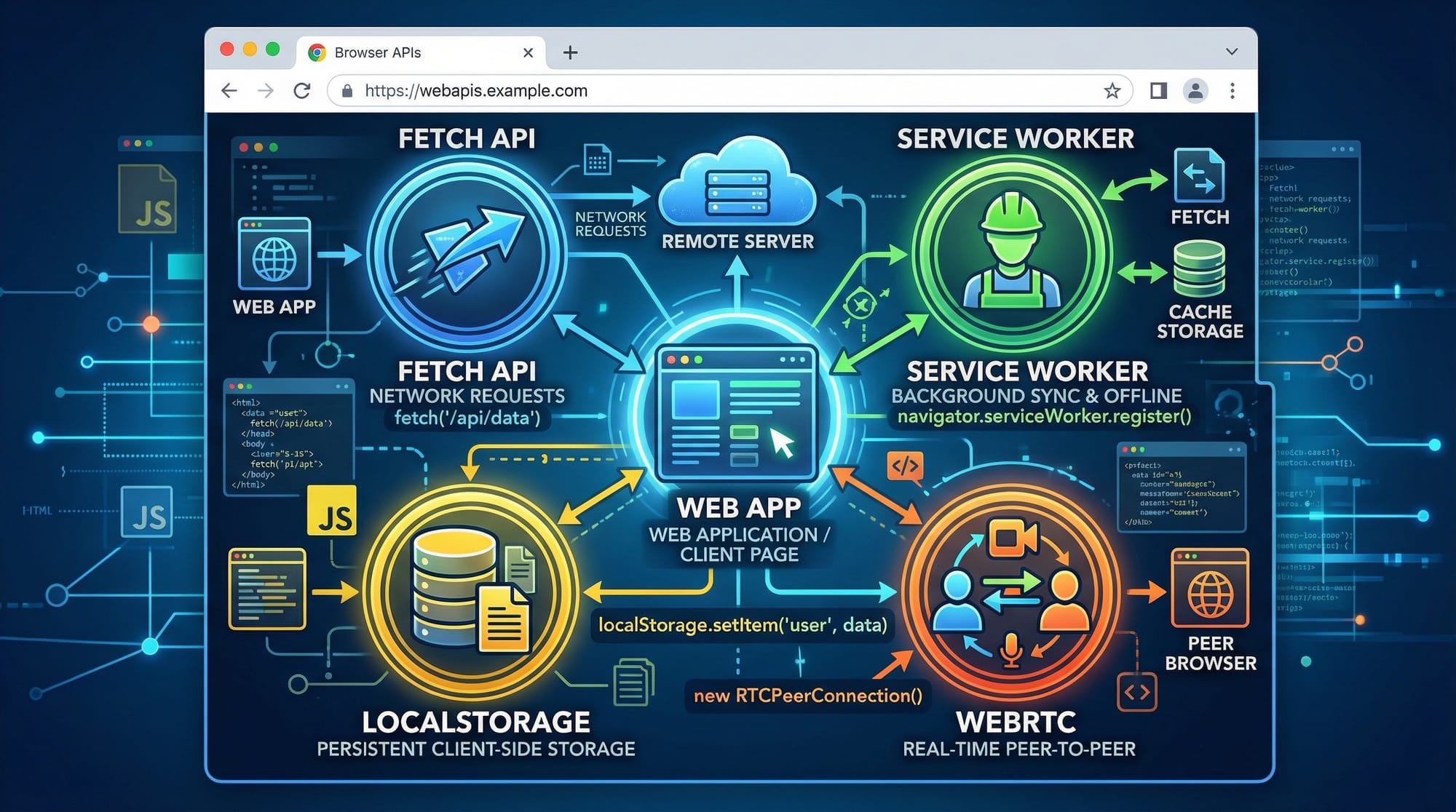
JavaScript Web APIs are powerful built-in browser features that allow developers to interact with the browser and the outside world. These APIs include tools like the Fetch API for making HTTP requests, LocalStorage for storing data in the browser, Web Workers for running background tasks, and many more.
If you’ve ever wondered how a website fetches live data, remembers your login, or loads content smoothly without freezing the page — you’re already seeing JavaScript Web APIs in action.
For Pakistani students learning web development, mastering these APIs is extremely important. Whether you’re building a startup project in Lahore, a freelance dashboard for a client in Karachi, or a university assignment in Islamabad, Web APIs help you create modern, interactive, and efficient web applications.
Prerequisites
Before starting this tutorial, you should have:
- Basic understanding of HTML, CSS, and JavaScript
- Knowledge of variables, functions, and arrays
- Familiarity with ES6 features (like arrow functions,
let,const) - Basic understanding of asynchronous JavaScript (Promises, async/await)
If you're not comfortable with async concepts, it’s recommended to review an Async JavaScript tutorial first.
Core Concepts & Explanation
Fetch API — Making HTTP Requests
The Fetch API allows you to request data from servers (APIs). It replaces older methods like XMLHttpRequest and is much easier to use.
For example, imagine Ahmad is building a weather app for Karachi. He needs to fetch live weather data from an API.
fetch('https://api.example.com/weather')
  .then(response => response.json())
  .then(data => console.log(data));
Explanation:
fetch(url)→ Sends a request to the server.then(response => response.json())→ Converts response to JSON.then(data => console.log(data))→ Uses the data
Using async/await (recommended):
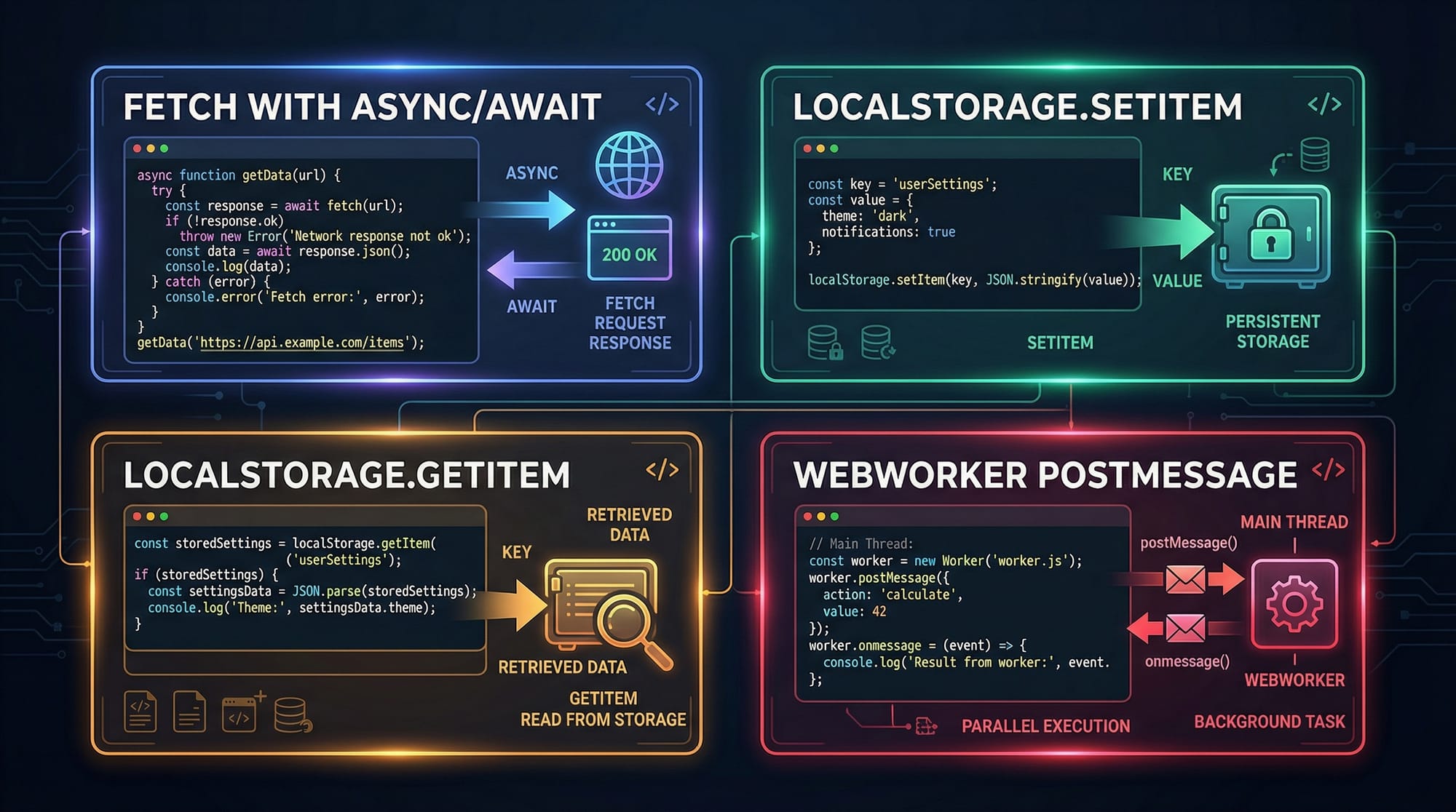
async function getWeather() {
  const response = await fetch('https://api.example.com/weather');
  const data = await response.json();
  console.log(data);
}
LocalStorage — Storing Data in the Browser
LocalStorage allows you to store data in the user’s browser — even after refreshing or closing the tab.
For example, Fatima is building a to-do app and wants to save tasks.
localStorage.setItem('username', 'Fatima');
const name = localStorage.getItem('username');
console.log(name);
Explanation:
setItem(key, value)→ Stores datagetItem(key)→ Retrieves data- Data is stored as strings
Web Workers — Running Background Tasks
Web Workers allow JavaScript to run in the background without blocking the UI.
Example: Ali is building a large data processing app.
main.js
const worker = new Worker('worker.js');

worker.postMessage(10);

worker.onmessage = function(event) {
  console.log('Result:', event.data);
};
worker.js
onmessage = function(event) {
  let result = event.data * 2;
  postMessage(result);
};
Explanation:
new Worker()→ Creates a background threadpostMessage()→ Sends dataonmessage→ Receives data
Other Useful Web APIs
Some additional APIs you should know:
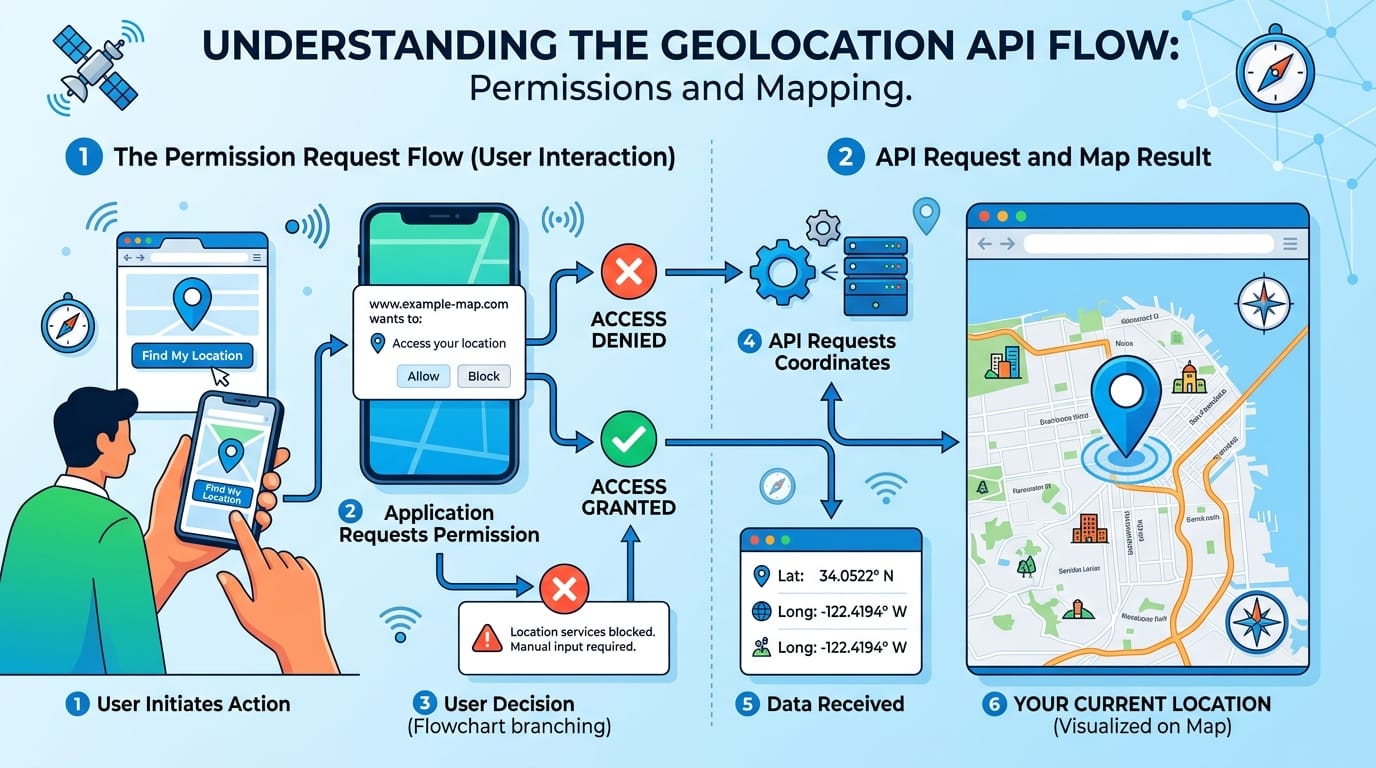
- Geolocation API → Get user location
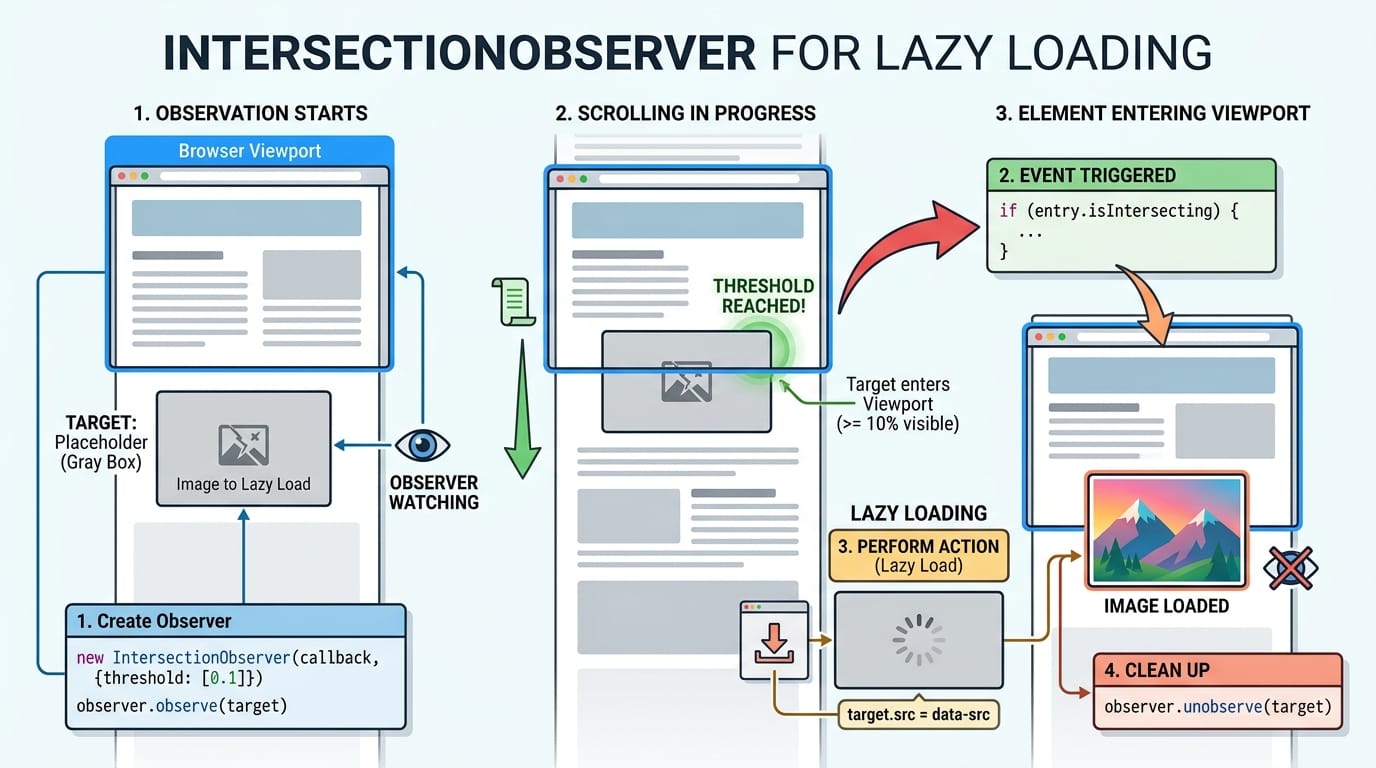
- IntersectionObserver API → Detect visibility (used for lazy loading)
- Clipboard API → Copy/paste programmatically
- Notifications API → Send browser notifications
Practical Code Examples
Example 1: Fetch API with Async/Await
async function getUsers() {
  try {
    const response = await fetch('https://jsonplaceholder.typicode.com/users');
    const users = await response.json();

    users.forEach(user => {
      console.log(user.name);
    });
  } catch (error) {
    console.log('Error:', error);
  }
}
getUsers();
Line-by-line Explanation:
async function getUsers()→ Declares async functionawait fetch(...)→ Waits for API responseawait response.json()→ Converts response to JSONusers.forEach(...)→ Loops through userstry...catch→ Handles errors safely
Example 2: Real-World Application (LocalStorage To-Do App)
function saveTask(task) {
  let tasks = JSON.parse(localStorage.getItem('tasks')) || [];
  tasks.push(task);
  localStorage.setItem('tasks', JSON.stringify(tasks));
}

function loadTasks() {
  let tasks = JSON.parse(localStorage.getItem('tasks')) || [];
  tasks.forEach(task => console.log(task));
}

saveTask('Buy groceries in Lahore');
loadTasks();
Line-by-line Explanation:
getItem('tasks')→ Retrieves saved tasksJSON.parse()→ Converts string to arraytasks.push(task)→ Adds new taskJSON.stringify()→ Converts array to stringsetItem()→ Saves updated tasks
This is useful for:
- Student task planners
- Budget tracking apps in PKR
- Small business tools
Common Mistakes & How to Avoid Them
Mistake 1: Not Handling Fetch Errors
❌ Wrong:
fetch(url).then(res => res.json());
✔️ Correct:
try {
  const res = await fetch(url);
  if (!res.ok) throw new Error('Network error');
} catch (err) {
  console.log(err);
}
Why it matters:
Without error handling, your app may crash silently.
Mistake 2: Storing Objects Without JSON
❌ Wrong:
localStorage.setItem('user', { name: 'Ali' });
✔️ Correct:
localStorage.setItem('user', JSON.stringify({ name: 'Ali' }));
Why it matters:
LocalStorage only stores strings — objects must be converted.
Practice Exercises
Exercise 1: Save User Name
Problem:
Save a user's name (Ahmad) in LocalStorage and display it.
Solution:
localStorage.setItem('name', 'Ahmad');

const name = localStorage.getItem('name');
console.log(name);
Explanation:
- Store name using
setItem - Retrieve using
getItem
Exercise 2: Fetch Posts
Problem:
Fetch posts from an API and display titles.
Solution:
async function getPosts() {
  const res = await fetch('https://jsonplaceholder.typicode.com/posts');
  const posts = await res.json();

  posts.forEach(post => console.log(post.title));
}

getPosts();
Explanation:
- Fetch data
- Convert to JSON
- Loop through posts
Frequently Asked Questions
What is JavaScript Web API?
JavaScript Web APIs are built-in browser features that allow developers to interact with the browser, server, and device capabilities like storage, network, and background processing.
How do I use Fetch API in JavaScript?
You use fetch() to send requests to a server and retrieve data. It works with Promises and is commonly used with async/await for cleaner code.
What is LocalStorage used for?
LocalStorage is used to store data in the browser permanently (until manually cleared). It’s useful for saving user preferences, tasks, and settings.
How do I run JavaScript in the background?
You can use Web Workers to run scripts in the background without blocking the main UI thread, improving performance.
Is LocalStorage secure?
No, LocalStorage is not secure for sensitive data like passwords. It should only be used for non-sensitive information.
Summary & Key Takeaways
- JavaScript Web APIs allow interaction with browser features and external data
- Fetch API is used for making HTTP requests
- LocalStorage helps store data persistently in the browser
- Web Workers improve performance by running background tasks
- Always handle errors and use JSON when working with storage
- These APIs are essential for building modern web apps
Next Steps & Related Tutorials
To continue your learning journey, explore these tutorials on theiqra.edu.pk:
- Learn how to handle user interactions with JavaScript Events
- Master asynchronous programming with Async JavaScript
- Build dynamic applications using DOM Manipulation
- Understand real-time features with WebSockets and APIs
By combining these concepts with Web APIs, you’ll be able to build professional-level applications — from student tools to full business solutions in Pakistan 🚀
Test Your Python Knowledge!
Finished reading? Take a quick quiz to see how much you've learned from this tutorial.