JWT Security Common Vulnerabilities & Best Practices
Introduction
JSON Web Tokens (JWTs) have become a standard way to handle authentication and authorization in modern web applications. Whether you're building a MERN stack app in Lahore or a fintech API in Karachi, understanding jwt security is critical to protecting user data.
A JWT is a compact, URL-safe token used to securely transmit information between parties. It is widely used in APIs, mobile apps, and microservices. However, improper implementation can lead to serious jwt vulnerabilities, such as authentication bypass, data leaks, and account takeover.
For Pakistani students entering the cybersecurity or backend development field, mastering json web token security is not optional—it’s essential. Many startups in Islamabad and software houses across Pakistan rely on JWTs for authentication. Knowing how attackers exploit JWT flaws can give you a competitive edge in both development and penetration testing.
Prerequisites
Before diving into JWT security, you should have:
- Basic understanding of HTTP/HTTPS protocols
- Familiarity with REST APIs
- Knowledge of JavaScript (Node.js preferred)
- Understanding of authentication concepts (sessions, cookies)
- Basic cybersecurity concepts (hashing, encryption, tokens)
Core Concepts & Explanation
Understanding JWT Structure (Header, Payload, Signature)
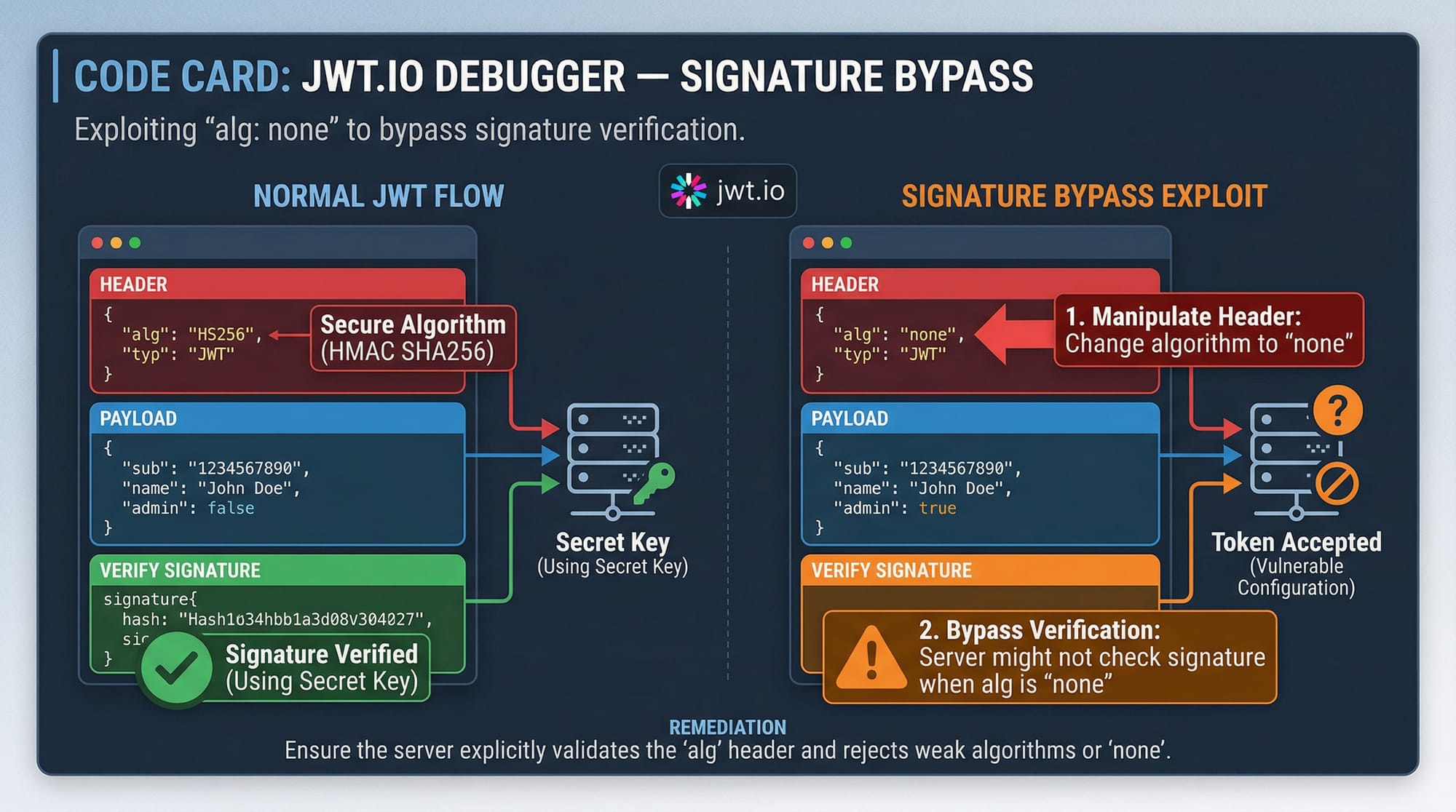
A JWT consists of three parts:
Header.Payload.Signature
Example:
eyJhbGciOiJIUzI1NiIsInR5cCI6IkpXVCJ9.
eyJ1c2VySWQiOiIxMjMiLCJyb2xlIjoiYWRtaW4ifQ.
SflKxwRJSMeKKF2QT4fwpMeJf36POk6yJV_adQssw5c
- Header: Defines the algorithm (e.g., HS256, RS256)
- Payload: Contains claims (user data)
- Signature: Ensures integrity
🔍 Example:
- Ahmad logs into a Lahore-based e-commerce app.
- The server generates a JWT with Ahmad’s user ID and role.
- The client stores the token and sends it with every request.
⚠️ Problem: If the token is not properly verified, attackers can modify it.
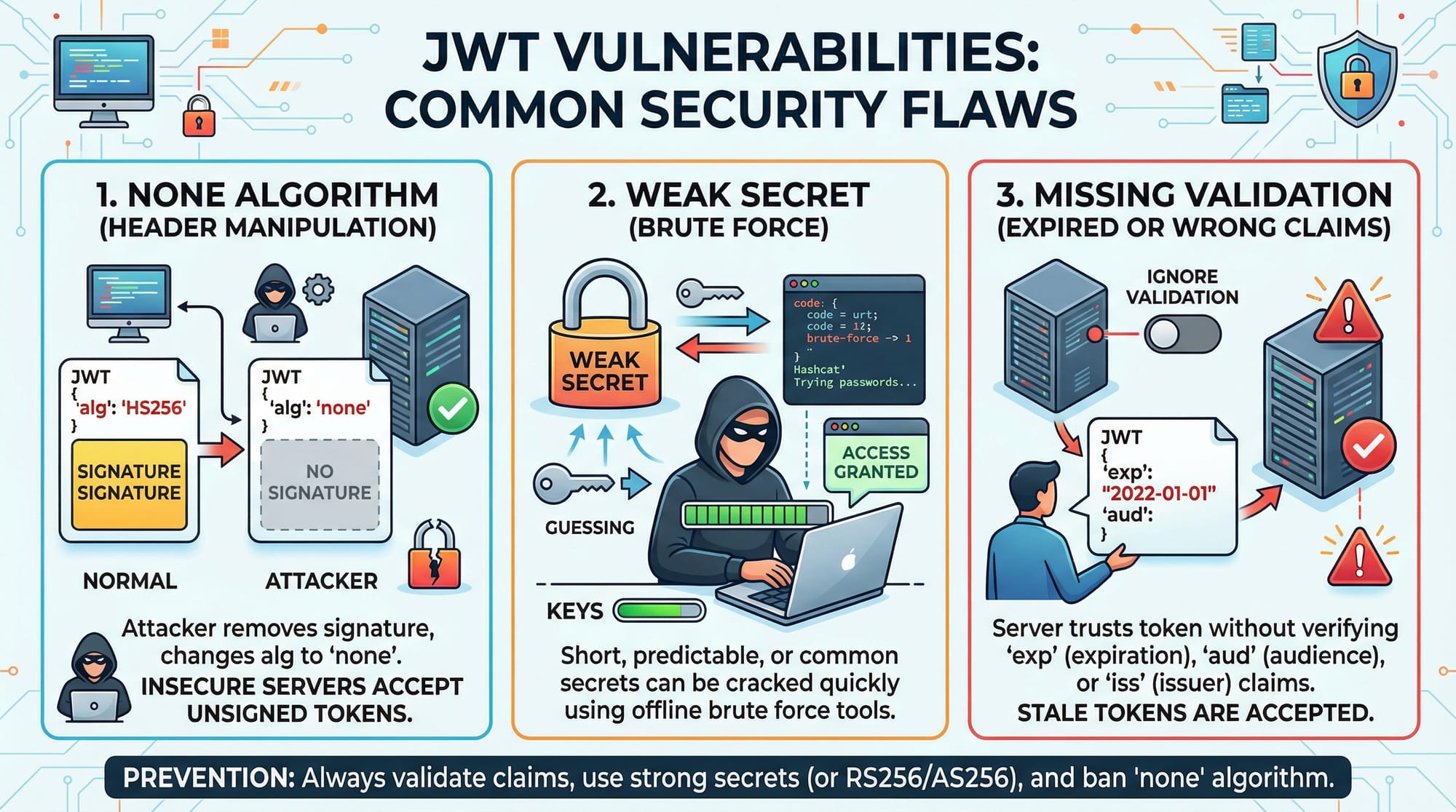
Common JWT Vulnerabilities Explained
JWTs are powerful—but also dangerous if misused.
1. "none" Algorithm Attack
If the server accepts tokens with "alg": "none", attackers can bypass authentication.
2. Weak Secret Key
Using weak secrets like "123456" makes it easy for attackers to brute-force the signature.
3. Missing Signature Validation
If the server doesn't verify the signature, any token can be accepted.
4. No Expiration (exp)
Tokens without expiration can be reused indefinitely.
5. Trusting Client Data
Never trust payload data like "role": "admin" without verification.
Practical Code Examples
Example 1: Creating and Verifying a JWT in Node.js
const jwt = require('jsonwebtoken');

// Secret key
const SECRET = "myStrongSecretKey";

// Create token
const token = jwt.sign(
  { userId: "123", role: "user" },
  SECRET,
  { expiresIn: "1h" }
);

// Verify token
try {
  const decoded = jwt.verify(token, SECRET);
  console.log(decoded);
} catch (err) {
  console.log("Invalid token");
}
Line-by-Line Explanation
require('jsonwebtoken'): Imports the JWT librarySECRET: Secret key used to sign tokens (must be strong!)jwt.sign(...): Creates a token with payload and expiry{ expiresIn: "1h" }: Token expires in 1 hourjwt.verify(...): Verifies token integritytry/catch: Handles invalid tokens
💡 Tip: Always use environment variables for secrets:
SECRET_KEY=super_secure_key_2026
Example 2: Real-World Application (Secure Login API)
const express = require('express');
const jwt = require('jsonwebtoken');

const app = express();
app.use(express.json());

const SECRET = "superSecureKey";

// Login route
app.post('/login', (req, res) => {
  const { username } = req.body;

  // Simulated user
  if (username === "Ali") {
    const token = jwt.sign(
      { username: "Ali", role: "student" },
      SECRET,
      { expiresIn: "30m" }
    );
    return res.json({ token });
  }

  res.status(401).send("Unauthorized");
});

// Protected route
app.get('/dashboard', (req, res) => {
  const token = req.headers.authorization;

  try {
    const decoded = jwt.verify(token, SECRET);
    res.send(`Welcome ${decoded.username}`);
  } catch {
    res.status(403).send("Invalid token");
  }
});

app.listen(3000);
Line-by-Line Explanation
express(): Creates serverapp.use(express.json()): Parses JSON requests/login: Authenticates userjwt.sign(...): Generates token/dashboard: Protected routereq.headers.authorization: Reads tokenjwt.verify(...): Validates tokenres.status(403): Rejects invalid access
📌 Real-world use: A university portal in Islamabad allowing students to access dashboards securely.
Common Mistakes & How to Avoid Them
Mistake 1: Using Weak Secret Keys
❌ Bad:
const SECRET = "12345";
✔️ Good:
const SECRET = process.env.JWT_SECRET;
🔒 Use:
- At least 256-bit secrets
- Environment variables
- Secret rotation policies
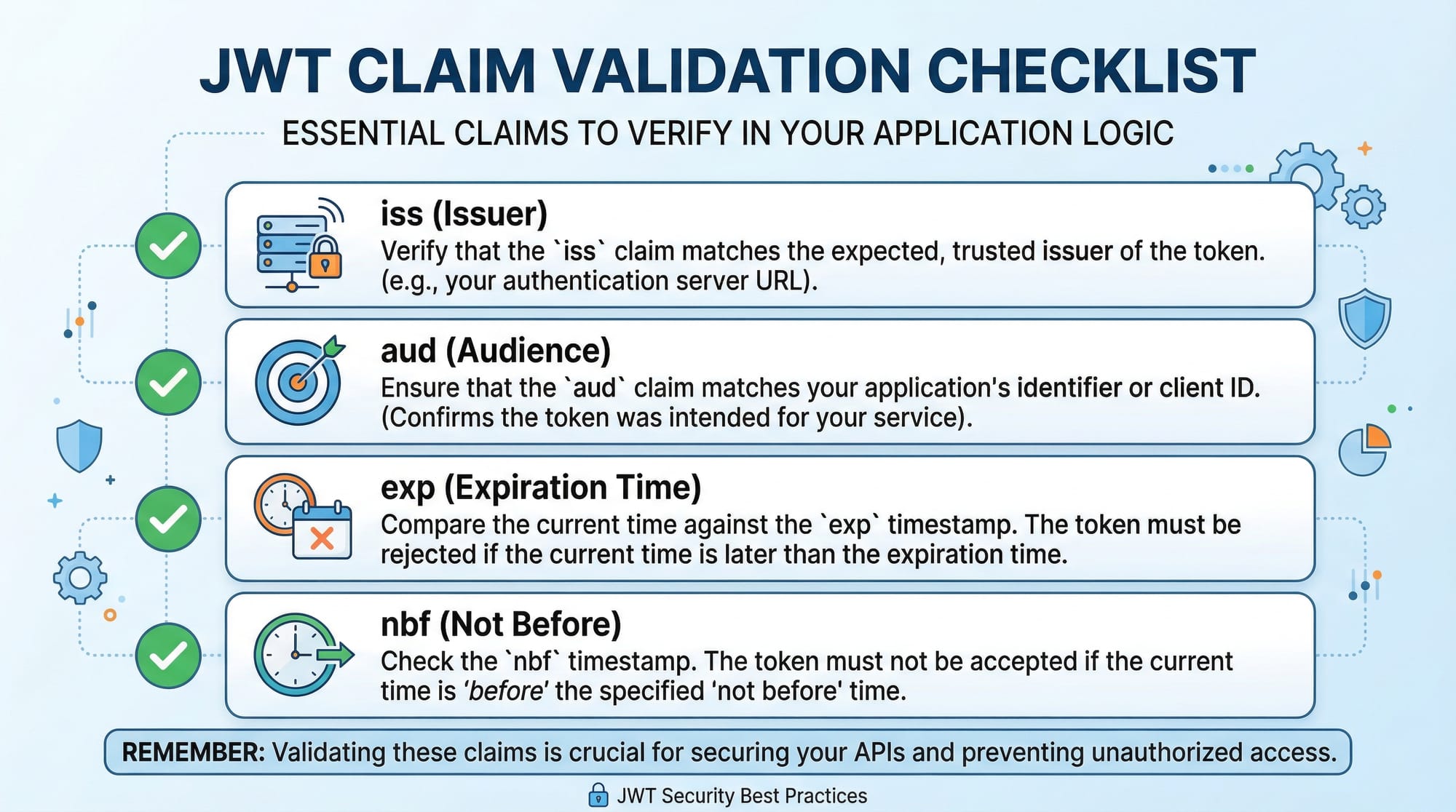
Mistake 2: Not Validating Claims (exp, iss, aud)
❌ Bad:
jwt.verify(token, SECRET);
✔️ Good:
jwt.verify(token, SECRET, {
  issuer: "iqra.edu.pk",
  audience: "students",
});
Why It Matters:
- Prevents token reuse across apps
- Ensures token is from trusted issuer
Mistake 3: Storing JWT in Local Storage
❌ Vulnerable to XSS attacks
✔️ Better:
- Store in HTTP-only cookies
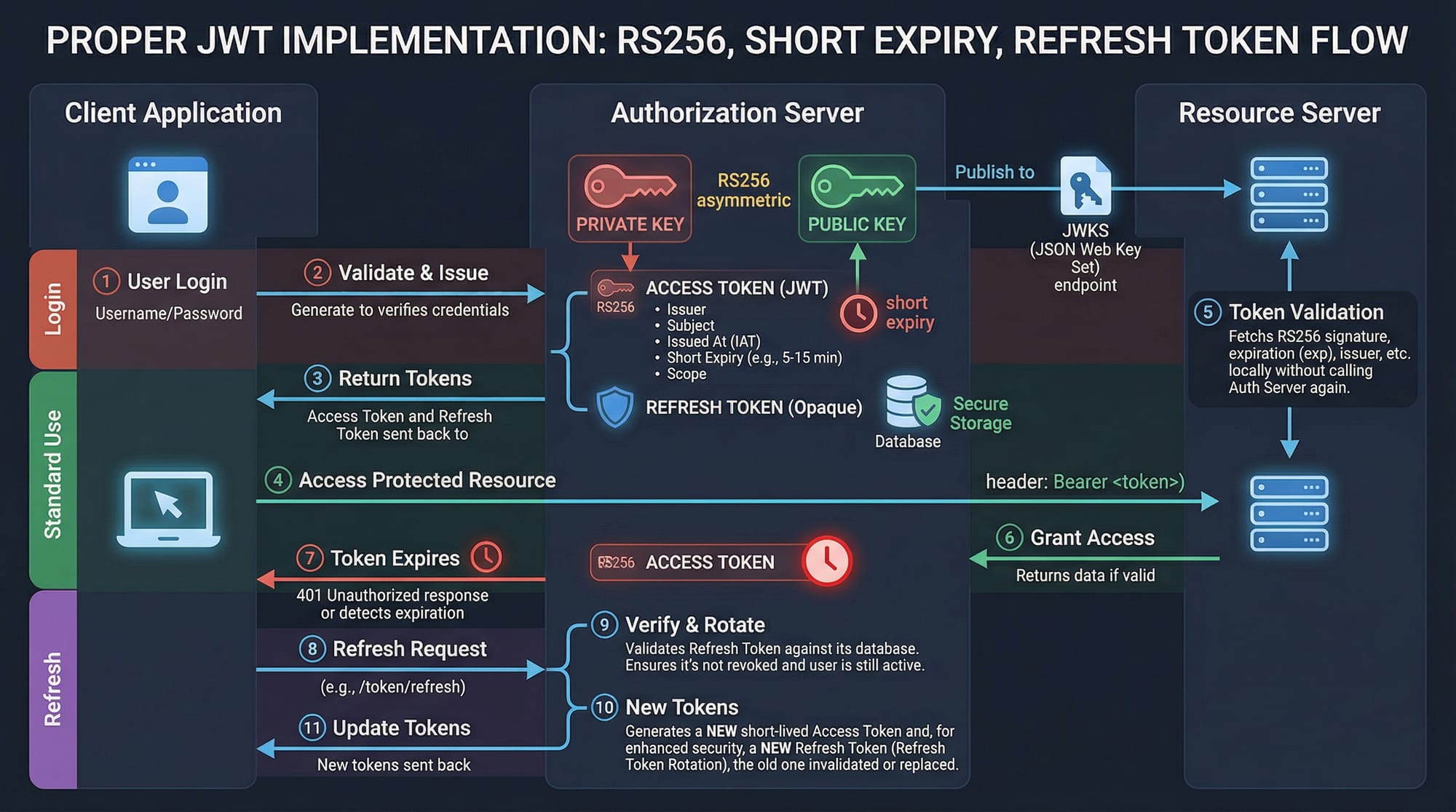
Mistake 4: Long Token Expiry
❌ Bad:
expiresIn: "7d"
✔️ Good:
expiresIn: "15m"
Use refresh tokens instead.
Practice Exercises
Exercise 1: Fix the Vulnerable JWT Code
Problem:
const token = jwt.sign({ user: "Fatima" }, "1234");
Solution:
const token = jwt.sign(
  { user: "Fatima" },
  process.env.JWT_SECRET,
  { expiresIn: "1h" }
);
✔ Fixes:
- Strong secret
- Adds expiration
Exercise 2: Add Role-Based Access Control
Problem:
Allow only admin users to access route.
Solution:
app.get('/admin', (req, res) => {
  const token = req.headers.authorization;

  try {
    const decoded = jwt.verify(token, SECRET);

    if (decoded.role !== "admin") {
      return res.status(403).send("Forbidden");
    }

    res.send("Admin panel");
  } catch {
    res.status(401).send("Invalid token");
  }
});
✔ Adds:
- Role check
- Secure authorization
Frequently Asked Questions
What is JWT security?
JWT security refers to the practices used to protect JSON Web Tokens from tampering, misuse, and attacks. It includes secure signing, validation, and storage of tokens.
How do I prevent JWT attacks?
Use strong secrets, validate all claims (exp, iss, aud), avoid storing tokens in local storage, and use HTTPS for all communications.
What is the best algorithm for JWT?
RS256 is considered more secure than HS256 because it uses asymmetric keys, making it safer for distributed systems.
Should I store JWT in cookies or local storage?
HTTP-only cookies are safer because they are not accessible via JavaScript, reducing XSS risks.
What is token expiration and why is it important?
Token expiration (exp) limits how long a token is valid. It reduces the risk of stolen tokens being reused indefinitely.
Summary & Key Takeaways
- JWTs are widely used but can introduce serious security risks if misconfigured
- Always validate token signature and claims (exp, iss, aud)
- Avoid weak secrets—use environment variables and strong keys
- Use short-lived tokens with refresh mechanisms
- Store JWTs securely (prefer HTTP-only cookies)
- Never trust payload data without verification
Next Steps & Related Tutorials
To continue learning, explore these related tutorials on theiqra.edu.pk:
- Learn how authentication works in API Authentication fundamentals
- Understand threats in Web Security best practices for beginners
- Dive deeper into OAuth 2.0 vs JWT authentication
- Practice skills with Penetration Testing using Burp Suite
These topics will strengthen your cybersecurity foundation and prepare you for real-world challenges in Pakistan’s growing tech industry 🚀
Test Your Python Knowledge!
Finished reading? Take a quick quiz to see how much you've learned from this tutorial.