k6 Load Testing Tutorial Performance Testing for APIs
Introduction
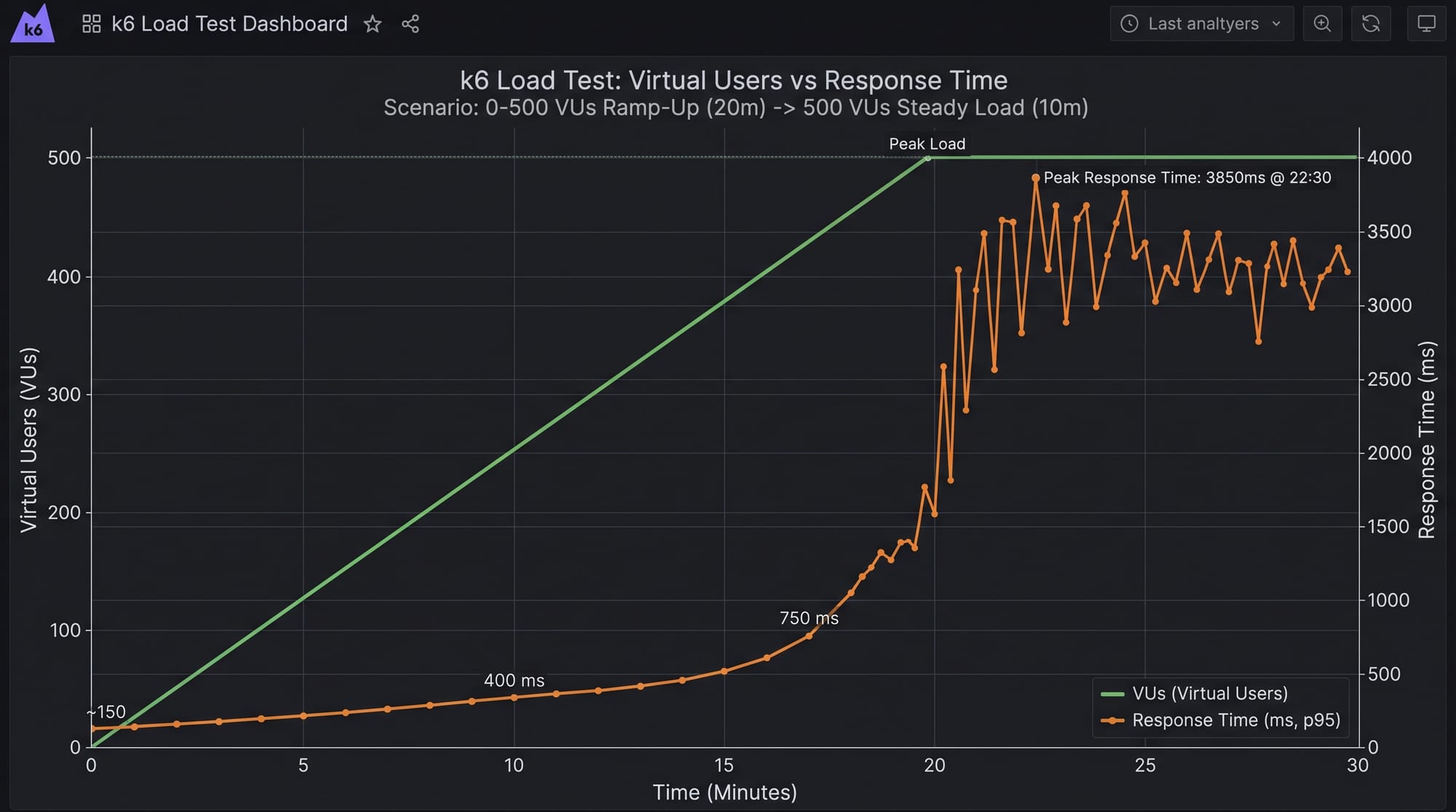
Load testing is a crucial part of modern software development, especially when building APIs that serve thousands—or even millions—of users. In this k6 Load Testing Tutorial: Performance Testing for APIs, you will learn how to simulate real-world traffic and measure how your API performs under pressure.
k6 is a modern, developer-friendly open-source tool designed for load testing APIs and microservices. It uses JavaScript for scripting, making it especially appealing for Pakistani students who already know web development.
Why should you learn k6 in Pakistan? Imagine Ahmad building a food delivery API in Lahore or Fatima creating an e-commerce platform in Karachi. If their APIs crash under heavy traffic (e.g., during sales or Ramadan promotions), users will leave. That’s where k6 performance testing helps ensure reliability and scalability.
Prerequisites
Before starting this k6 tutorial, you should have:
- Basic understanding of JavaScript (ES6)
- Knowledge of APIs (REST, HTTP methods like GET, POST)
- Familiarity with JSON data
- Basic command-line usage
- Node.js installed (optional but helpful)
Core Concepts & Explanation
Virtual Users (VUs) and Iterations
In k6, Virtual Users (VUs) simulate real users accessing your API.
- VUs = number of concurrent users
- Iterations = number of times a script runs
Example:
If you run 10 VUs with 5 iterations each → total 50 requests.
export let options = {
  vus: 10,
  iterations: 50,
};
Explanation:
vus: 10→ 10 users hitting your API simultaneouslyiterations: 50→ total number of requests
Stages and Load Patterns
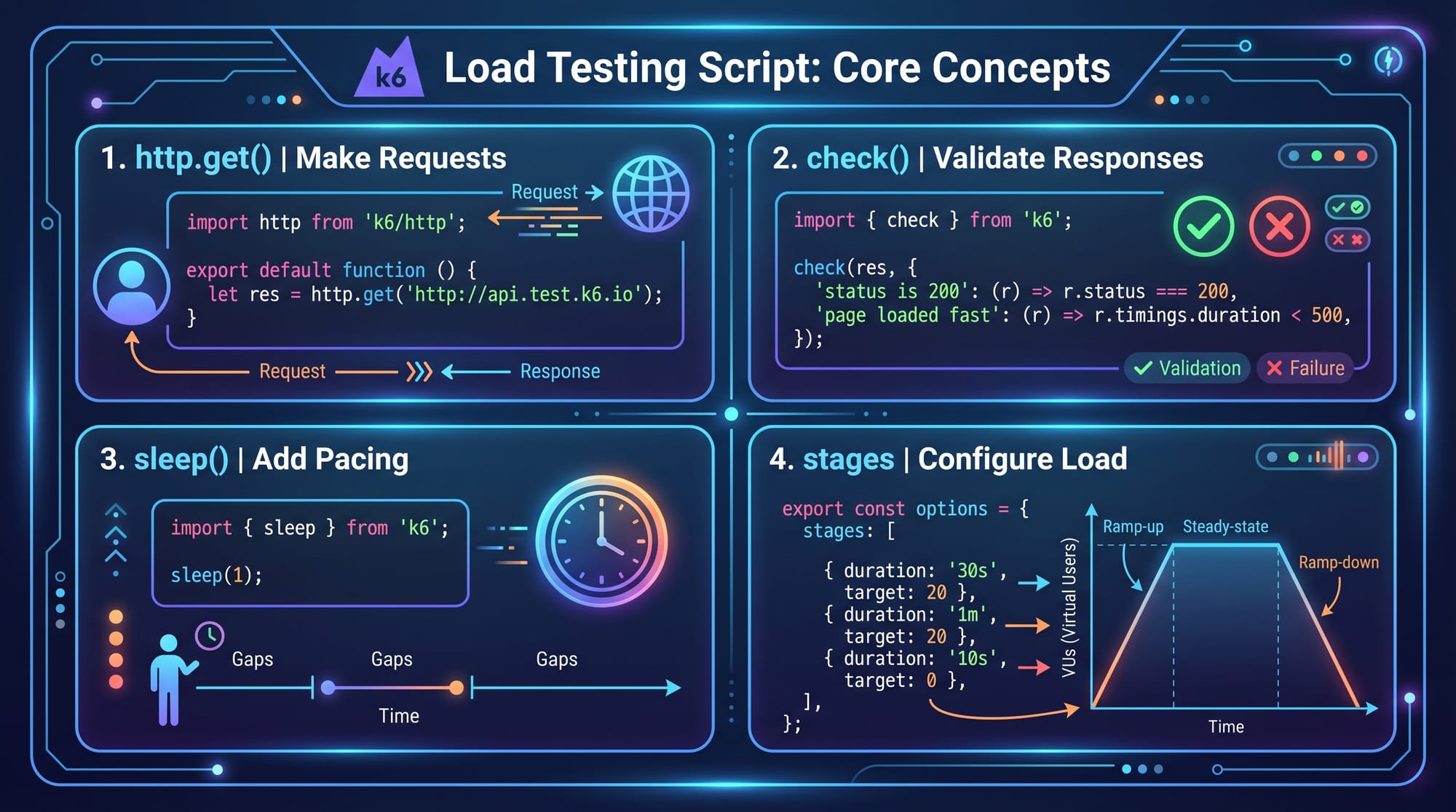
Instead of fixed users, you can simulate real traffic using stages.
export let options = {
  stages: [
    { duration: '30s', target: 10 },
    { duration: '1m', target: 50 },
    { duration: '30s', target: 0 },
  ],
};
Explanation:
- First 30 seconds → ramp up to 10 users
- Next 1 minute → increase to 50 users
- Final 30 seconds → ramp down to 0
This mimics real-world scenarios like a flash sale in Islamabad.
Practical Code Examples
Example 1: Basic API Load Test
import http from 'k6/http';
import { check, sleep } from 'k6';

export let options = {
  vus: 5,
  duration: '10s',
};

export default function () {
  let res = http.get('https://jsonplaceholder.typicode.com/posts');

  check(res, {
    'status is 200': (r) => r.status === 200,
  });

  sleep(1);
}
Line-by-line explanation:
import http from 'k6/http';→ Import HTTP moduleimport { check, sleep } from 'k6';→ Import validation & delay functionsvus: 5→ Simulate 5 usersduration: '10s'→ Run test for 10 secondshttp.get(...)→ Send GET requestcheck(res, {...})→ Validate response statussleep(1)→ Wait 1 second between requests
👉 This example tests if your API works under small load.
Example 2: Real-World Application (E-commerce API)
Imagine Ali building an online store in Karachi.
import http from 'k6/http';
import { check, sleep } from 'k6';

export let options = {
  stages: [
    { duration: '20s', target: 20 },
    { duration: '40s', target: 100 },
    { duration: '20s', target: 0 },
  ],
};

export default function () {
  let payload = JSON.stringify({
    product_id: 101,
    quantity: 2,
  });

  let params = {
    headers: {
      'Content-Type': 'application/json',
    },
  };

  let res = http.post('https://api.example.com/orders', payload, params);

  check(res, {
    'order placed successfully': (r) => r.status === 201,
  });

  sleep(2);
}
Explanation:
stages→ Simulates increasing traffic (sale event)payload→ JSON data sent in POST requestheaders→ Defines request typehttp.post(...)→ Sends order requestcheck(...)→ Ensures order is successfulsleep(2)→ Simulates user delay
Common Mistakes & How to Avoid Them
Mistake 1: Ignoring Response Validation
Many beginners only send requests but don’t validate responses.
❌ Wrong:
http.get('https://api.example.com');
✅ Correct:
let res = http.get('https://api.example.com');

check(res, {
  'status is 200': (r) => r.status === 200,
});
Fix: Always use check() to verify results.
Mistake 2: Unrealistic Load Patterns
Using constant VUs doesn’t reflect real usage.
❌ Wrong:
vus: 100
✅ Correct:
stages: [
  { duration: '30s', target: 100 },
  { duration: '1m', target: 200 },
]
Fix: Use stages to simulate real traffic spikes.

Practice Exercises
Exercise 1: Test a Public API
Problem:
Write a k6 script to test https://jsonplaceholder.typicode.com/users with 10 users for 15 seconds.
Solution:
import http from 'k6/http';
import { check } from 'k6';

export let options = {
  vus: 10,
  duration: '15s',
};

export default function () {
  let res = http.get('https://jsonplaceholder.typicode.com/users');

  check(res, {
    'status is 200': (r) => r.status === 200,
  });
}
Exercise 2: Simulate Login API
Problem:
Test a login API with POST request.
Solution:
import http from 'k6/http';
import { check } from 'k6';

export default function () {
  let payload = JSON.stringify({
    username: 'ahmad',
    password: '123456',
  });

  let res = http.post('https://api.example.com/login', payload);

  check(res, {
    'login success': (r) => r.status === 200,
  });
}
Frequently Asked Questions
What is k6 load testing?
k6 is a performance testing tool used to simulate real user traffic on APIs and measure performance metrics like response time and error rate. It helps developers identify bottlenecks before deployment.
How do I install k6 in Pakistan?
You can install k6 using Chocolatey (Windows), Homebrew (Mac), or download binaries from the official website. Pakistani students can also use Docker if preferred.
What is load testing API?
Load testing API means sending multiple requests to an API to evaluate its performance under heavy usage. It ensures your system can handle traffic spikes.
Can I use k6 for frontend testing?
k6 is mainly designed for backend and API testing. However, it can simulate HTTP requests triggered by frontend applications.
How do I analyze k6 results?
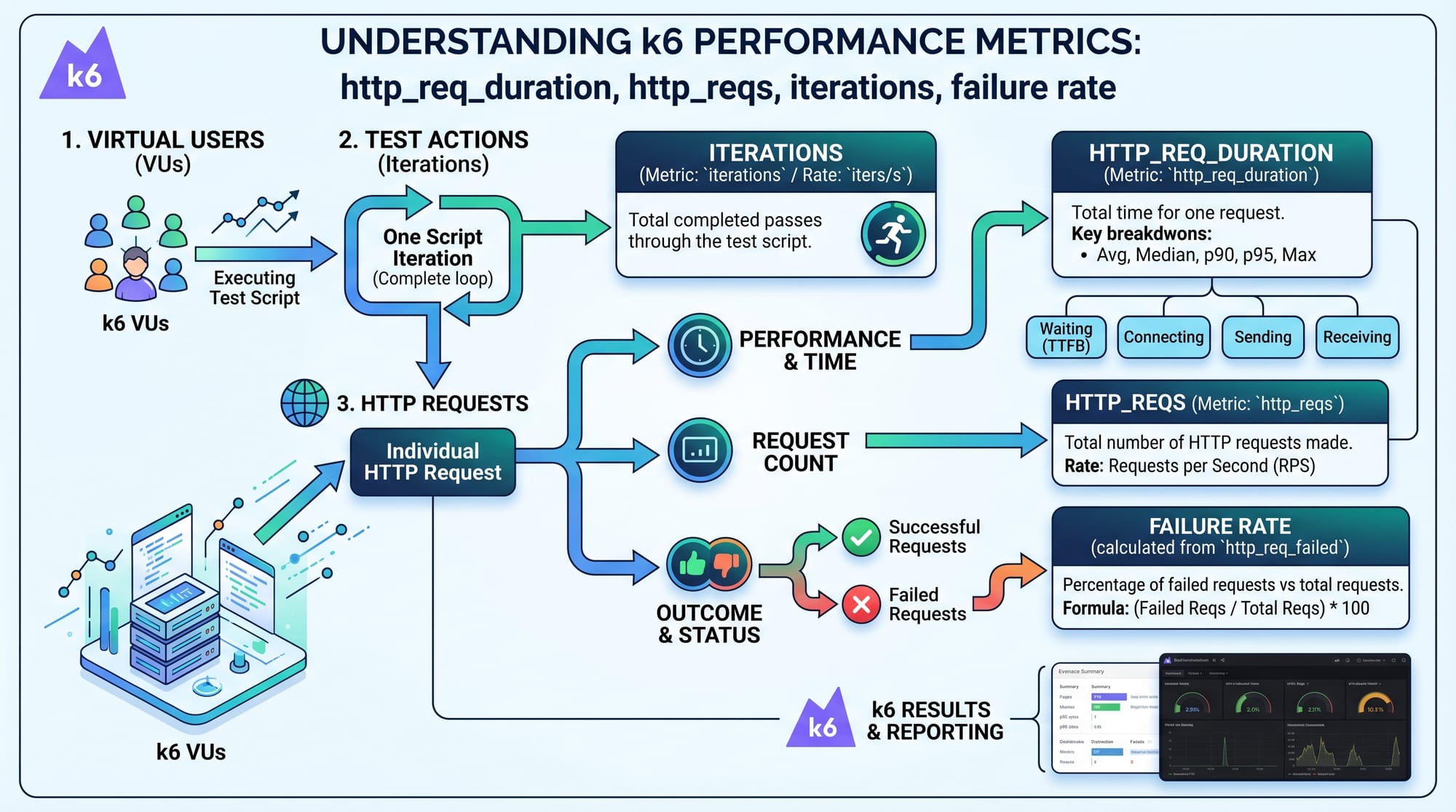
k6 provides metrics like response time, requests per second, and failure rate. You can also integrate it with tools like Prometheus and Grafana for visualization.
Summary & Key Takeaways
- k6 is a powerful tool for API performance testing
- Virtual Users (VUs) simulate real user traffic
- Stages help mimic real-world load patterns
- Always validate responses using
check() - Use realistic scenarios for accurate results
- k6 integrates well with monitoring tools like Grafana
Next Steps & Related Tutorials
Now that you’ve completed this k6 tutorial, continue learning with:
- Learn API Testing Fundamentals to strengthen your testing basics
- Explore Prometheus & Grafana Monitoring Setup for real-time dashboards
- Dive into Postman API Testing Guide for manual testing
- Master Node.js Backend Development to build APIs you can test
👉 These tutorials are available on theiqra.edu.pk and will help you become a complete backend and testing expert.
This guide equips you with practical skills in k6 performance testing and load testing APIs—essential for any developer aiming to build scalable systems in Pakistan’s growing tech industry 🚀
Test Your Python Knowledge!
Finished reading? Take a quick quiz to see how much you've learned from this tutorial.