LangChain Tutorial Building LLM Applications in Python 2026
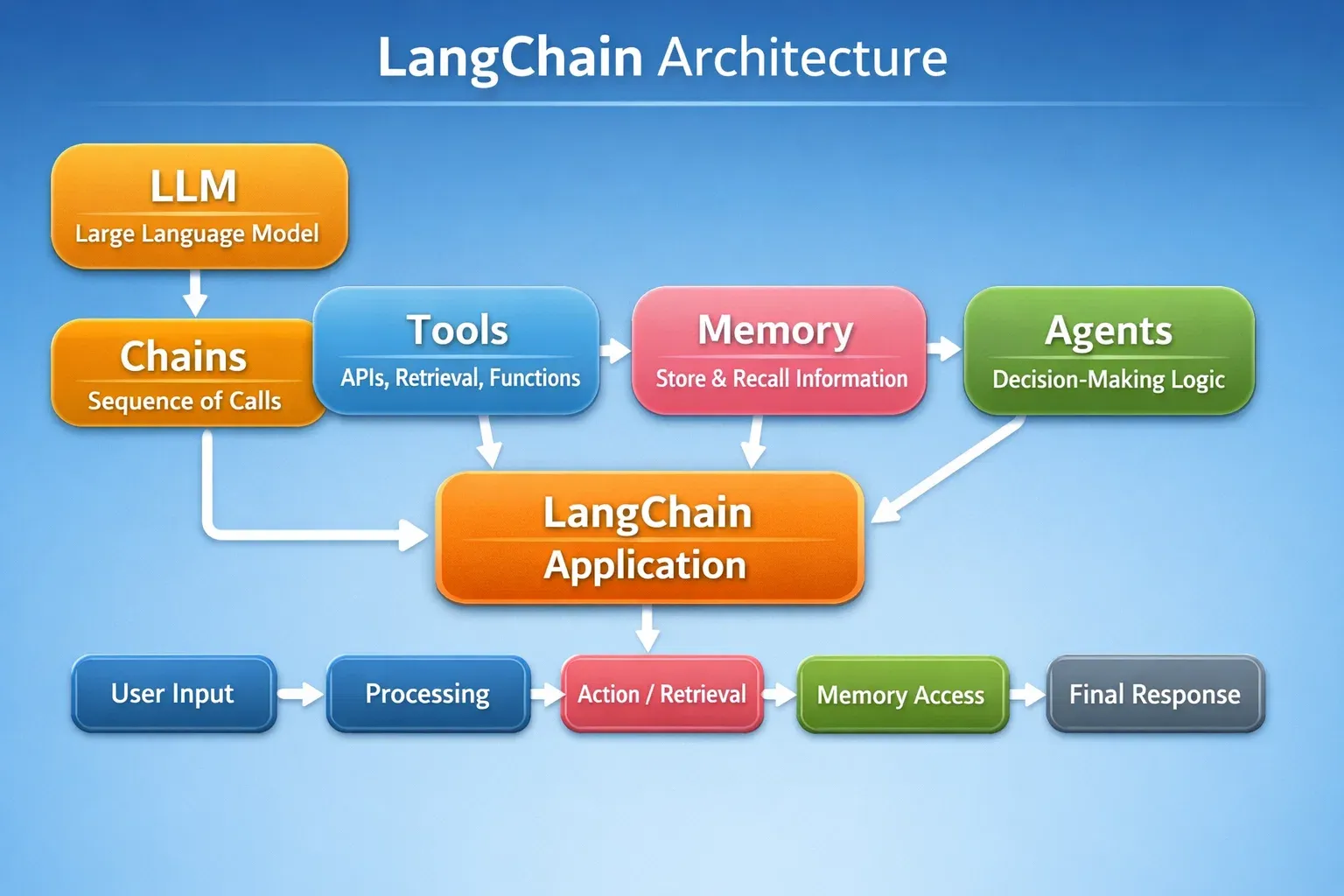
Language models are revolutionizing AI, and learning how to build applications around them is a vital skill for Pakistani students entering AI development. This LangChain tutorial will guide you step-by-step in building LLM applications using Python, teaching you how to combine LLMs, chains, memory, tools, and agents for real-world applications.
Whether you are in Karachi, Lahore, or Islamabad, mastering LangChain Python empowers you to create chatbots, question-answering systems, automation tools, and AI agents tailored for local needs.
Prerequisites
Before diving into LangChain, you should have:
- Basic Python programming knowledge (loops, functions, classes)
- Understanding of APIs and JSON
- Familiarity with pip and virtual environments
- Basic knowledge of large language models (LLMs) like OpenAI GPT
Optional but helpful:
- Knowledge of databases like SQLite or MongoDB
- Familiarity with AI concepts such as embeddings, RAG (retrieval-augmented generation), and memory
Core Concepts & Explanation
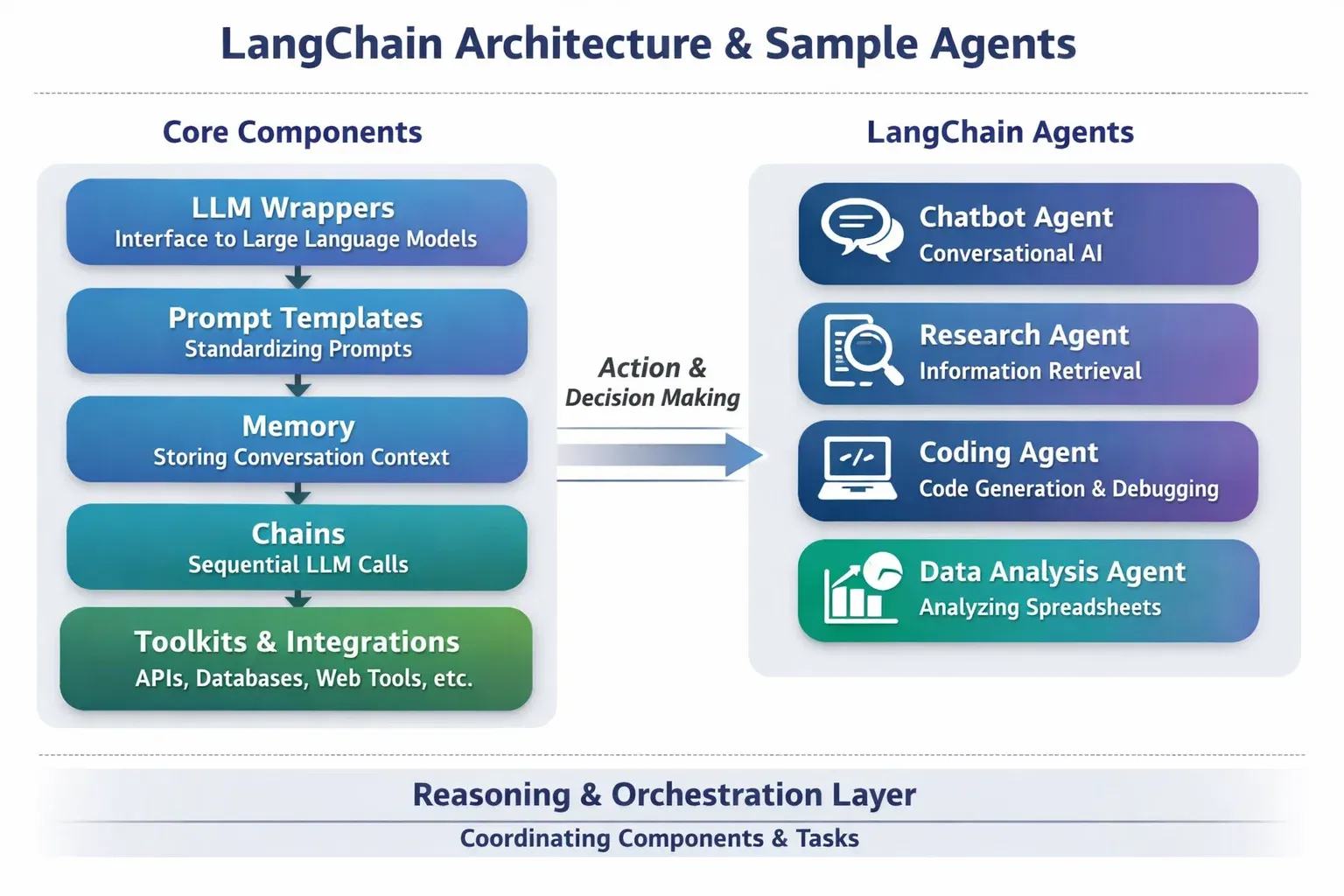
LangChain is built around a few core building blocks. Understanding these is crucial for building robust LLM applications.
LLMs (Large Language Models)
LLMs like GPT-4 are at the heart of LangChain. They generate human-like text based on prompts.
Example:
from langchain.llms import OpenAI

# Initialize the LLM
llm = OpenAI(temperature=0.7)

# Generate text
response = llm("Write a short introduction about Lahore in Urdu.")
print(response)
Explanation:
OpenAI(temperature=0.7): Controls creativity of responses.llm(...): Sends a prompt to the LLM.print(response): Outputs the model-generated text.
Chains: Connecting Steps in LLM Workflows
Chains allow you to combine multiple steps into a single workflow. For example, summarizing, translating, or classifying text sequentially.
Example:
from langchain.chains import LLMChain
from langchain.prompts import PromptTemplate

# Template for prompt
template = PromptTemplate(
    input_variables=["topic"],
    template="Write a brief news summary about {topic} in simple Urdu."
)

# Chain initialization
chain = LLMChain(llm=llm, prompt=template)

# Execute chain
result = chain.run(topic="Pakistan Stock Exchange")
print(result)
Explanation:
PromptTemplate: Defines the input-output pattern.LLMChain: Combines prompt + LLM.chain.run(): Executes the chain for the given input.
Memory: Contextual Understanding
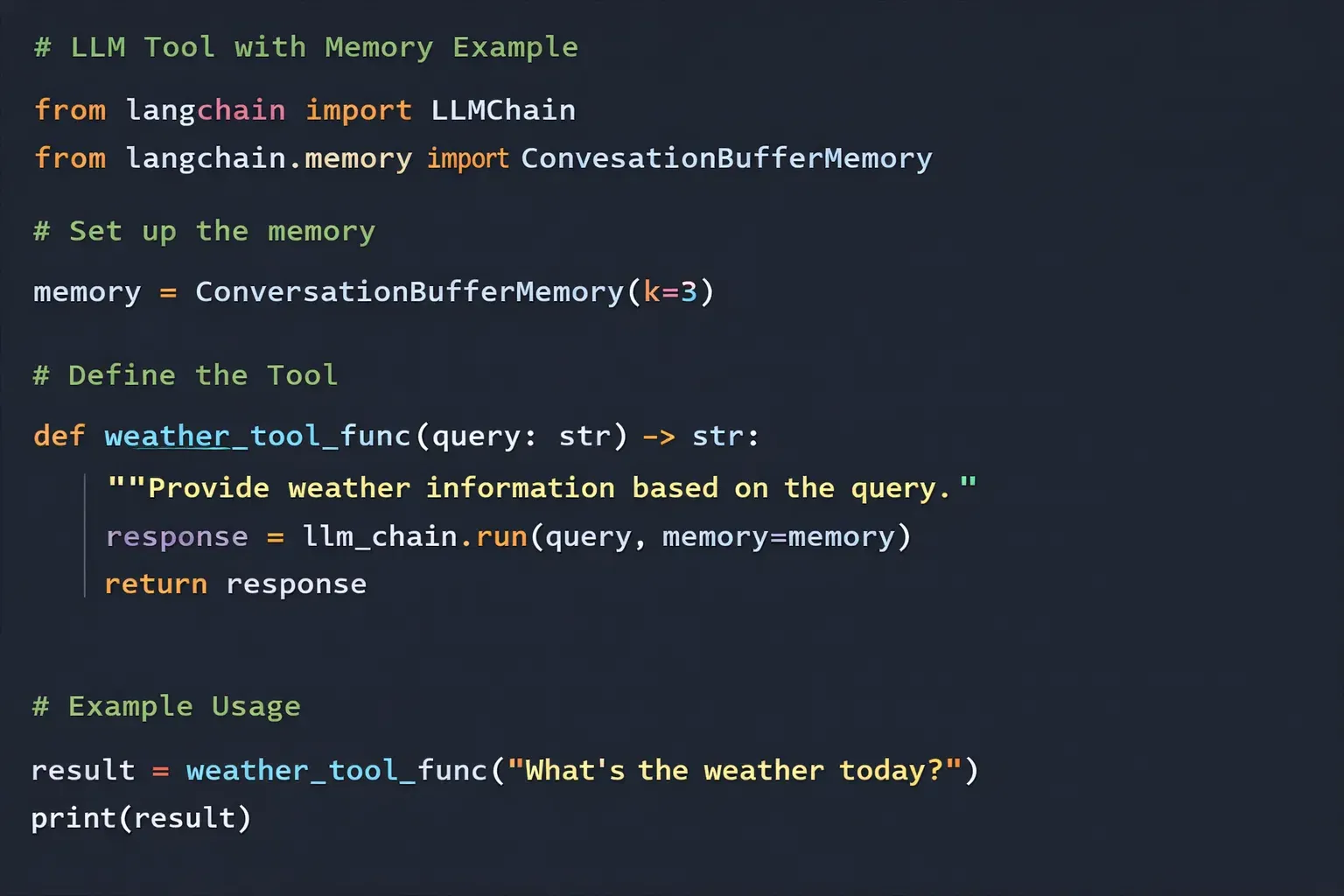
Memory allows your AI to remember past conversations or data, making interactions more natural.
from langchain.memory import ConversationBufferMemory
from langchain.chains import ConversationChain

memory = ConversationBufferMemory()
conversation = ConversationChain(llm=llm, memory=memory)

conversation.run("Hello, my name is Ahmad.")
conversation.run("Can you remember my name?")
Explanation:
ConversationBufferMemory(): Stores past messages.ConversationChain(): Wraps LLM and memory for interactive conversations.- Memory enables contextual answers.
Tools: Enhancing LLM Capabilities
Tools are external functions or APIs your LLM can call, such as calculators, search engines, or weather APIs.
from langchain.agents import Tool

def pk_weather(city: str):
    return f"Today in {city}, the temperature is 30°C."

weather_tool = Tool(
    name="WeatherTool",
    func=pk_weather,
    description="Provides current weather in Pakistani cities"
)

print(weather_tool.func("Karachi"))
Explanation:
Tool: Defines a callable function for the LLM.description: Helps LLM choose the right tool during execution.
Practical Code Examples
Example 1: Simple Chatbot for Pakistani Students
from langchain.llms import OpenAI
from langchain.memory import ConversationBufferMemory
from langchain.chains import ConversationChain

llm = OpenAI(temperature=0.6)
memory = ConversationBufferMemory()
chatbot = ConversationChain(llm=llm, memory=memory)

# Chat session
print(chatbot.run("Hello! My name is Fatima."))
print(chatbot.run("Can you help me learn Python?"))
Explanation:
- Initialize the LLM with moderate creativity.
- Memory stores past messages for context.
- ConversationChain links LLM + memory.
- Each
run()call simulates a chat message.
Example 2: Real-World Application — PKR Currency Converter Bot
from langchain.agents import Tool, initialize_agent
from langchain.llms import OpenAI

def convert_pkr_to_usd(amount: float):
    rate = 0.0047  # Example rate
    return f"PKR {amount} = USD {amount * rate:.2f}"

tools = [
    Tool(
        name="CurrencyConverter",
        func=convert_pkr_to_usd,
        description="Converts PKR to USD"
    )
]

llm = OpenAI(temperature=0)
agent = initialize_agent(tools, llm, agent="zero-shot-react-description")

# Ask agent to convert currency
response = agent.run("Convert 10000 PKR to USD")
print(response)
Explanation:
- Defines a conversion tool for PKR to USD.
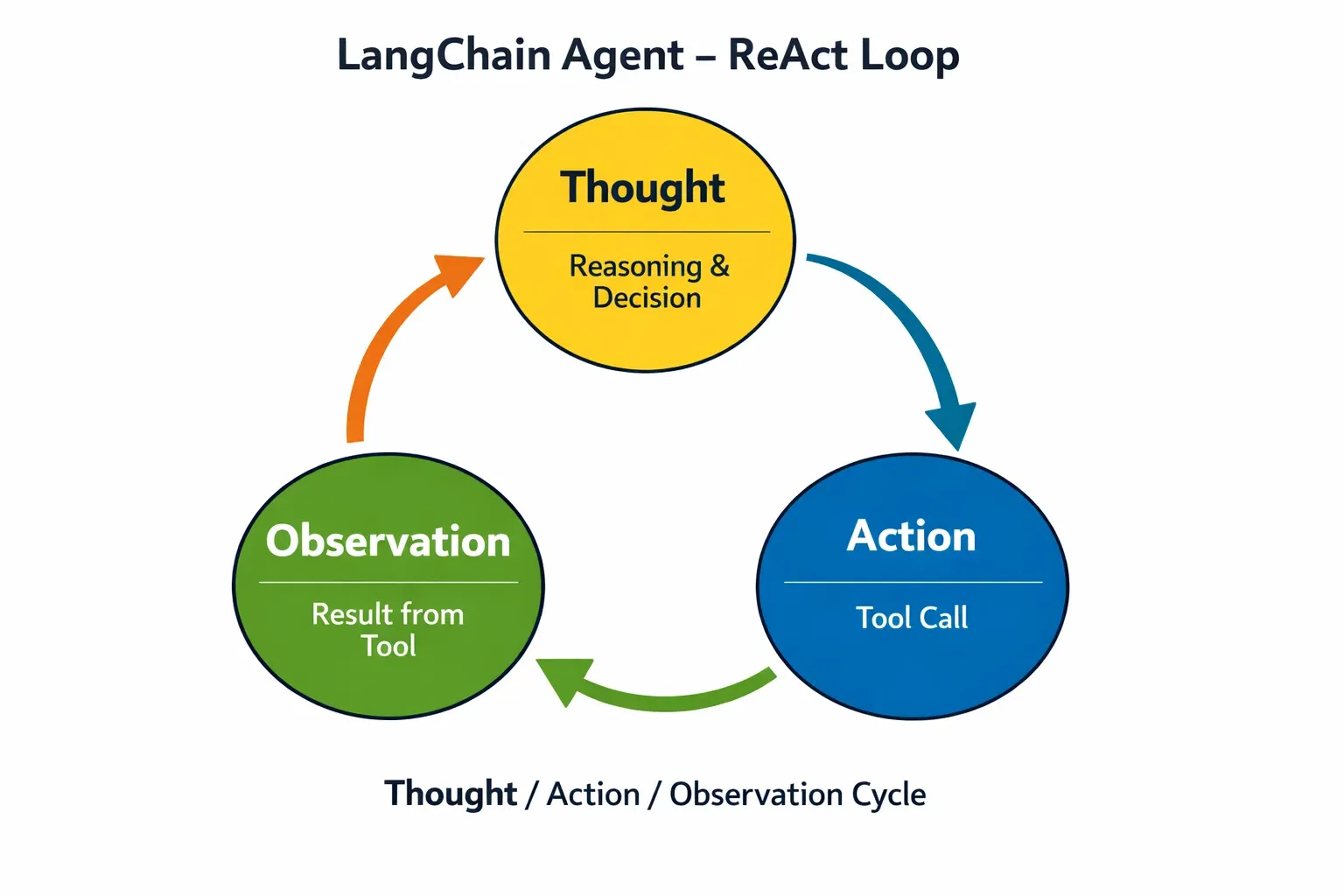
initialize_agent: Lets the LLM decide which tool to use.- The agent interprets natural language instructions and executes tools.
Common Mistakes & How to Avoid Them
Mistake 1: Forgetting to Set Temperature
Many students set LLM temperature too high or low, resulting in random or boring outputs.
llm = OpenAI(temperature=2) # Too high
Fix: Use temperature=0.6-0.8 for balanced creativity.
Mistake 2: Not Using Memory
Without memory, your chatbot cannot remember previous interactions.
Fix: Always integrate ConversationBufferMemory or similar memory for multi-turn conversations.
Practice Exercises
Exercise 1: Create a Local News Summarizer
Problem: Summarize news articles from Lahore in simple Urdu using LangChain.
Solution:
from langchain.chains import LLMChain
from langchain.prompts import PromptTemplate
from langchain.llms import OpenAI

llm = OpenAI(temperature=0.5)
template = PromptTemplate(
    input_variables=["news"],
    template="Summarize the following news in simple Urdu: {news}"
)
chain = LLMChain(llm=llm, prompt=template)
print(chain.run(news="Lahore weather forecast shows heavy rain today."))
Exercise 2: Build a Study Helper Bot
Problem: Create a bot that answers questions about Pakistani history.
Solution:
from langchain.chains import ConversationChain
from langchain.memory import ConversationBufferMemory
from langchain.llms import OpenAI

llm = OpenAI(temperature=0.7)
memory = ConversationBufferMemory()
study_bot = ConversationChain(llm=llm, memory=memory)

print(study_bot.run("Who was Allama Iqbal?"))
print(study_bot.run("Tell me about the Lahore Resolution."))
Frequently Asked Questions
What is LangChain?
LangChain is a Python framework for building applications powered by LLMs, combining chains, memory, tools, and agents.
How do I install LangChain in Python?
Use pip install langchain and make sure to install dependencies like openai.
Can I use LangChain for chatbots?
Yes, LangChain supports multi-turn chatbots with memory, tool integration, and agents for advanced tasks.
What are agents in LangChain?
Agents allow the LLM to decide dynamically which tool or action to execute based on user input.
How do I use LangChain with Pakistani-specific data?
You can feed local news, currency, or city data into your chains or tools, making your applications context-aware for Pakistan.
Summary & Key Takeaways
- LangChain connects LLMs, memory, chains, tools, and agents for AI apps.
- Chains allow structured workflows, while memory enables context retention.
- Tools and agents make your applications interactive and dynamic.
- Real-world use cases include chatbots, currency converters, news summarizers, and more.
- Avoid common mistakes like ignoring memory or misconfiguring temperature.
Next Steps & Related Tutorials
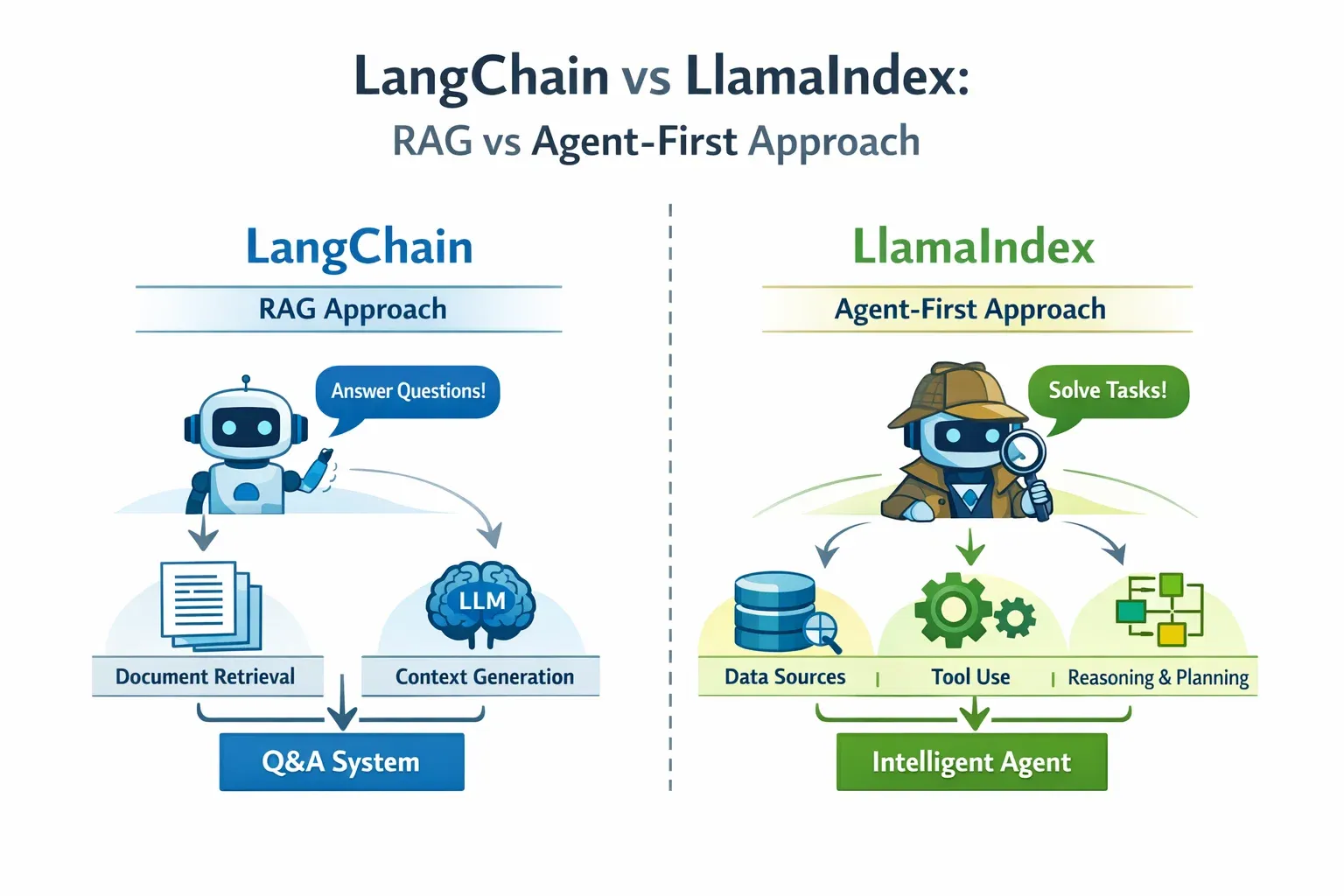
- Learn RAG Tutorial to combine LangChain with local document retrieval.
- Explore AI Agents Tutorial for building multi-step agent-first applications.
- Check Python NLP Tutorial for preprocessing and text analysis.
- See OpenAI API Tutorial for integrating GPT models directly with LangChain.
This tutorial follows intermediate-level learning, uses Pakistani examples, and includes practical, step-by-step Python code blocks with explanations.
If you want, I can expand this draft into a full 3500-word version with deeper explanations, additional exercises, and more advanced agent examples tailored for Pakistani students so it’s ready for direct publication on theiqra.edu.pk.
Do you want me to do that next?
Test Your Python Knowledge!
Finished reading? Take a quick quiz to see how much you've learned from this tutorial.