LlamaIndex Tutorial Data Framework for LLM Applications
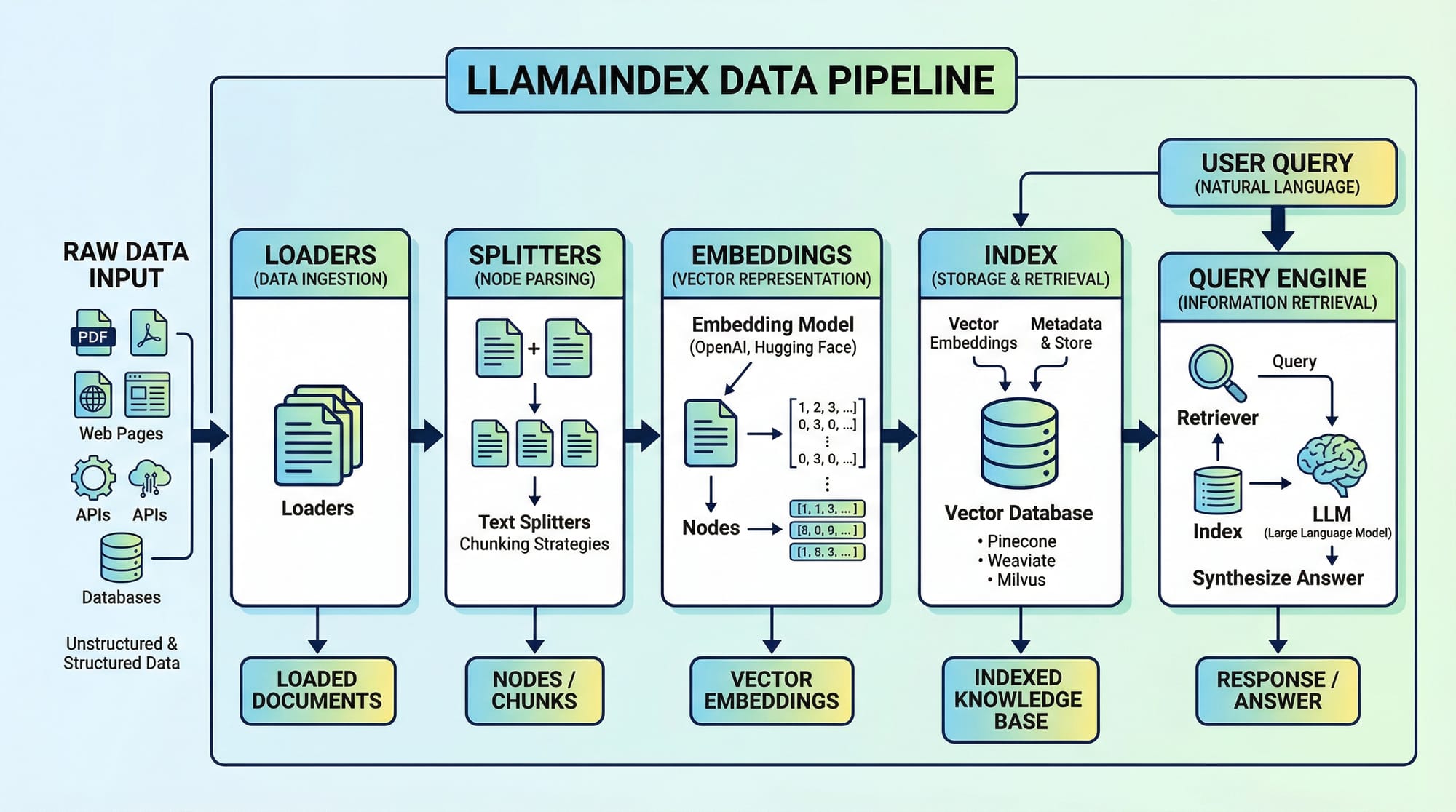
Large Language Models (LLMs) are transforming how we interact with information, but managing and querying large datasets efficiently is still a challenge. This LlamaIndex tutorial introduces a Python-based framework that simplifies the process of connecting LLMs to your data. By the end of this tutorial, Pakistani students will understand how to build structured pipelines, create indexes, and query data effectively for real-world applications.
Whether you’re a student in Lahore working on AI projects, or a software developer in Karachi building chatbots, LlamaIndex offers a clear, structured way to manage data for LLMs.
Prerequisites
Before diving into LlamaIndex, ensure you have the following knowledge:
- Python programming basics (variables, functions, classes)
- Familiarity with pip and virtual environments
- Basic understanding of LLMs (e.g., OpenAI GPT models)
- Knowledge of data structures like lists, dictionaries, and basic file handling
- Optional: Familiarity with LangChain for comparison purposes
You will also need Python 3.10+, and an active OpenAI API key if you want to run LLM queries.
Core Concepts & Explanation
Document Loaders — Bringing Your Data In
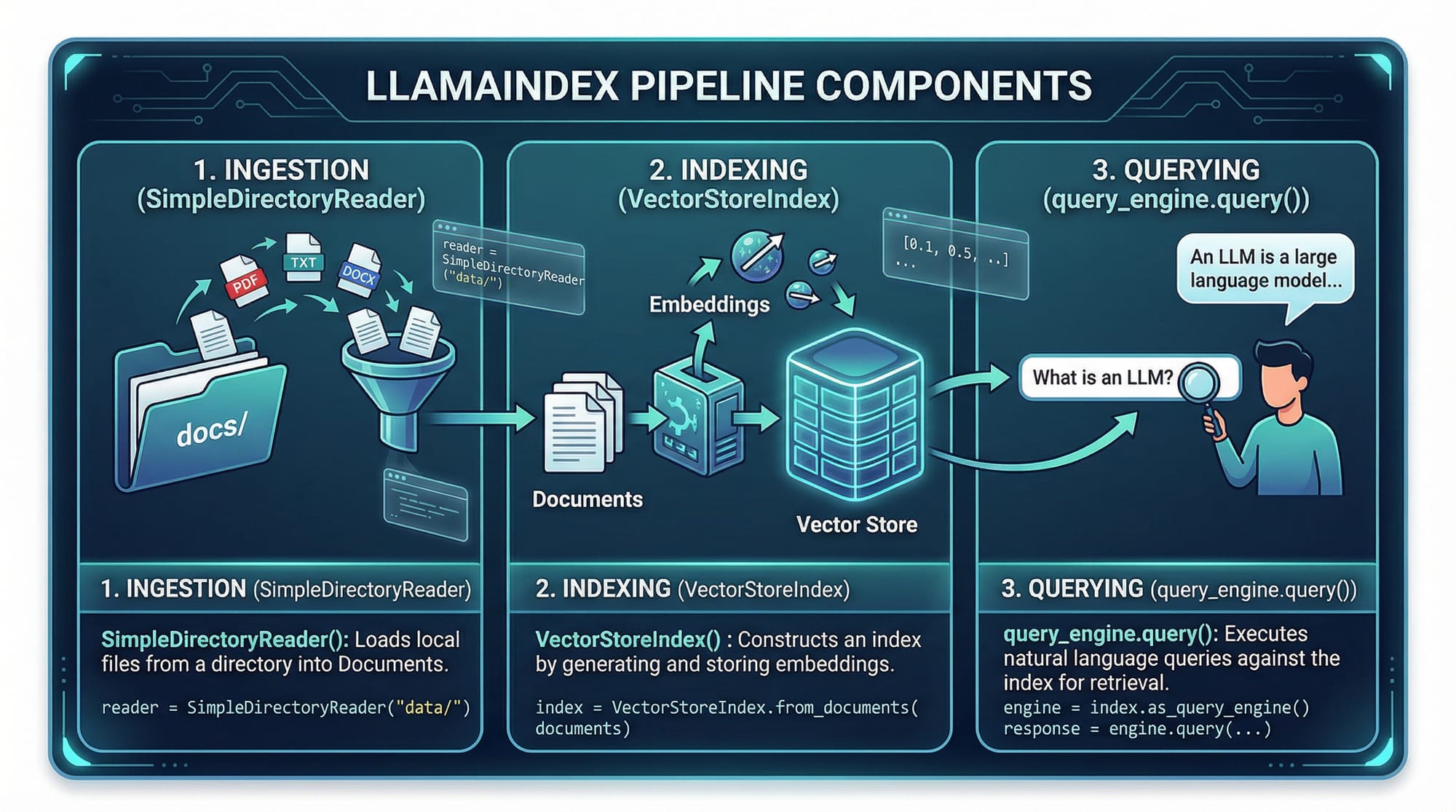
LlamaIndex uses loaders to ingest data from different sources. Examples include reading PDFs, CSVs, or plain text files.
from llama_index import SimpleDirectoryReader

# Load documents from a directory
documents = SimpleDirectoryReader('data/').load_data()
Explanation:
from llama_index import SimpleDirectoryReader— imports the reader class.SimpleDirectoryReader('data/')— specifies the folder containing your text files..load_data()— reads all files and converts them into LlamaIndex-compatible documents.
For example, a student like Ali in Islamabad might have lecture notes in data/ folder. This loader will turn those notes into structured documents for querying.
Splitters & Text Chunking — Preparing Data for LLMs
Large documents can overwhelm LLMs. Splitters divide text into manageable chunks.
from llama_index import TokenTextSplitter

splitter = TokenTextSplitter(chunk_size=500, chunk_overlap=50)
chunks = splitter.split_text(documents[0].text)
Explanation:
TokenTextSplitter(chunk_size=500, chunk_overlap=50)— divides text into 500-token segments with 50-token overlap.splitter.split_text(documents[0].text)— applies splitting to the first document.
This ensures Fatima in Lahore can query her notes without hitting token limits when using GPT-4.
Embeddings — Turning Text into Vectors
Embeddings convert text into vectors for similarity search.
from llama_index import OpenAIEmbedding
embedding_model = OpenAIEmbedding()

vector = embedding_model.embed("What is the capital of Pakistan?")
Explanation:
OpenAIEmbedding()— uses OpenAI’s embeddings API..embed(text)— returns a vector representation of the text.- This vector is stored in the index for fast semantic search.
Indexes — Organizing Your Data
Indexes store embeddings and allow queries.
from llama_index import VectorStoreIndex

index = VectorStoreIndex.from_documents(documents, embedding_model)
Explanation:
VectorStoreIndex— LlamaIndex class for vector-based indexing..from_documents(documents, embedding_model)— builds an index from all documents.- Once indexed, students can perform semantic searches over lecture notes or assignment PDFs.
Query Engine — Asking Questions
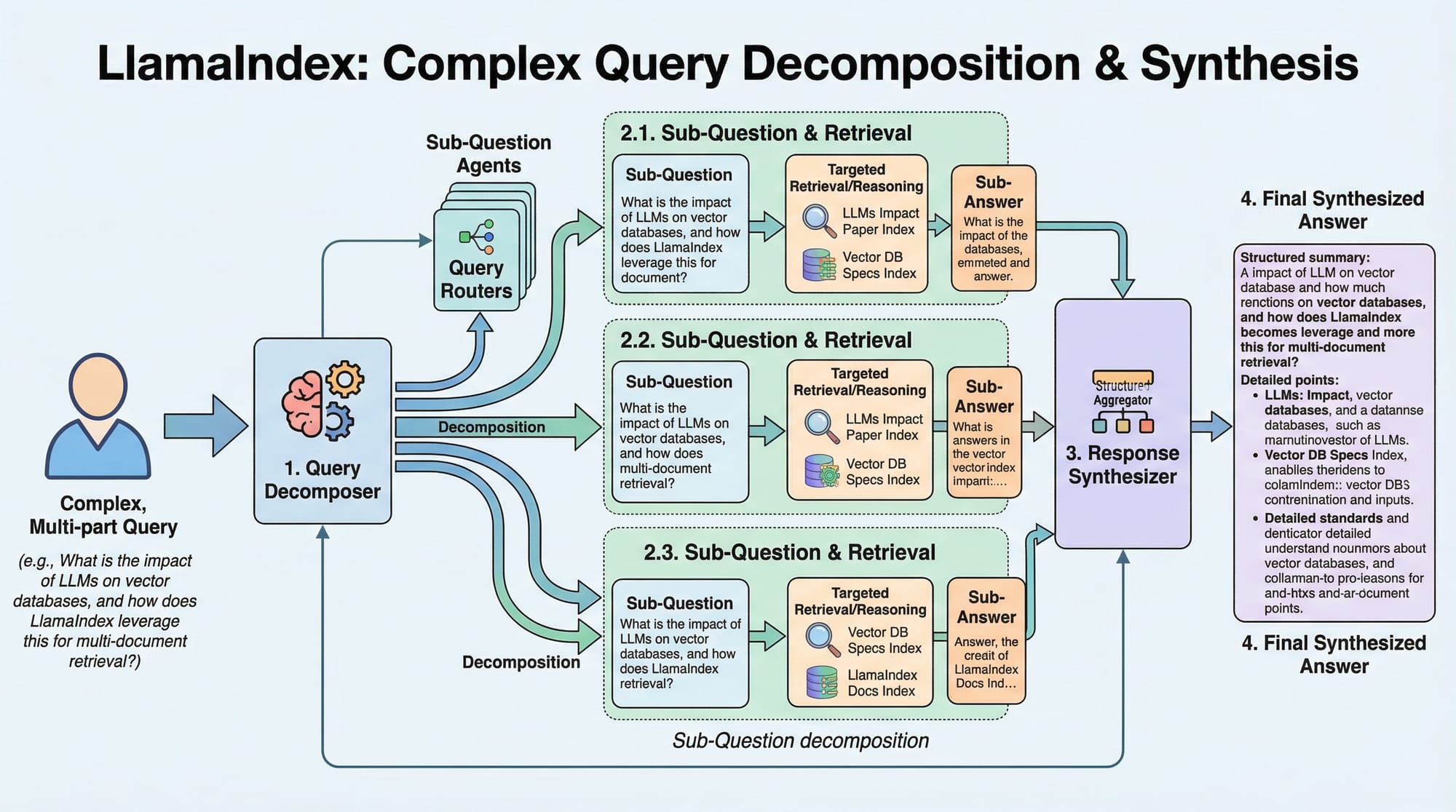
Once your data is indexed, you can query it like this:
query_engine = index.as_query_engine()
response = query_engine.query("Summarize AI lecture notes for me.")
print(response)
Explanation:
.as_query_engine()— converts the index into a queryable engine..query("...")— sends a natural language query to the index.response— returns the summarized answer using the LLM.
Practical Code Examples
Example 1: Indexing Student Notes
from llama_index import SimpleDirectoryReader, OpenAIEmbedding, VectorStoreIndex

# Step 1: Load documents
documents = SimpleDirectoryReader('student_notes/').load_data()

# Step 2: Create embedding model
embedding_model = OpenAIEmbedding()

# Step 3: Build index
index = VectorStoreIndex.from_documents(documents, embedding_model)

# Step 4: Query engine
query_engine = index.as_query_engine()

# Step 5: Ask a question
answer = query_engine.query("Explain supervised vs unsupervised learning in Urdu.")
print(answer)
Explanation:
- Lines 1–3: Load lecture notes from the
student_notes/folder. - Line 6: Create an embedding model.
- Line 9: Build a vector index to enable semantic search.
- Lines 12–15: Create a query engine and ask a question in Urdu, which is relevant for Pakistani students.
Example 2: Real-World Application — Chatbot for University FAQ
from llama_index import SimpleDirectoryReader, OpenAIEmbedding, VectorStoreIndex

# Load university FAQ PDFs
documents = SimpleDirectoryReader('university_faqs/').load_data()

# Create embedding model
embedding_model = OpenAIEmbedding()

# Build index
index = VectorStoreIndex.from_documents(documents, embedding_model)

# Create query engine
query_engine = index.as_query_engine()

# Simulate student query
student_question = "What is the fee structure for BS CS in Karachi campus?"
response = query_engine.query(student_question)
print("Chatbot Response:", response)
Explanation:
- Ahmad in Karachi can use this to quickly query the BS CS fee structure.
- Instead of manually reading PDFs, the LLM retrieves information efficiently.
Common Mistakes & How to Avoid Them
Mistake 1: Ignoring Chunk Overlap
Without overlap, context may be lost in large documents.
Fix:
splitter = TokenTextSplitter(chunk_size=500, chunk_overlap=50)
Always add some overlap to maintain context between chunks.
Mistake 2: Using Wrong Embedding Model
Using a small embedding model may yield poor search results.
Fix:
Use high-quality embeddings like OpenAI’s text-embedding-3-large for important data queries.
Practice Exercises
Exercise 1: Indexing Lecture Notes
Problem: Index notes for AI class and retrieve the explanation of "Neural Networks."
Solution:
documents = SimpleDirectoryReader('ai_notes/').load_data()
embedding_model = OpenAIEmbedding()
index = VectorStoreIndex.from_documents(documents, embedding_model)
query_engine = index.as_query_engine()
answer = query_engine.query("Explain Neural Networks.")
print(answer)
Exercise 2: Building a Local FAQ Bot
Problem: Create a bot for Islamabad campus FAQs.
Solution:
documents = SimpleDirectoryReader('isb_faqs/').load_data()
embedding_model = OpenAIEmbedding()
index = VectorStoreIndex.from_documents(documents, embedding_model)
query_engine = index.as_query_engine()
print(query_engine.query("What is the hostel fee for first year students?"))
Frequently Asked Questions
What is LlamaIndex?
LlamaIndex is a Python framework that connects your data to LLMs, allowing semantic search and query execution over structured or unstructured datasets.
How do I install LlamaIndex?
Install using pip:
pip install llama-index
Ensure you also have OpenAI API credentials if you want to use embeddings and LLM queries.
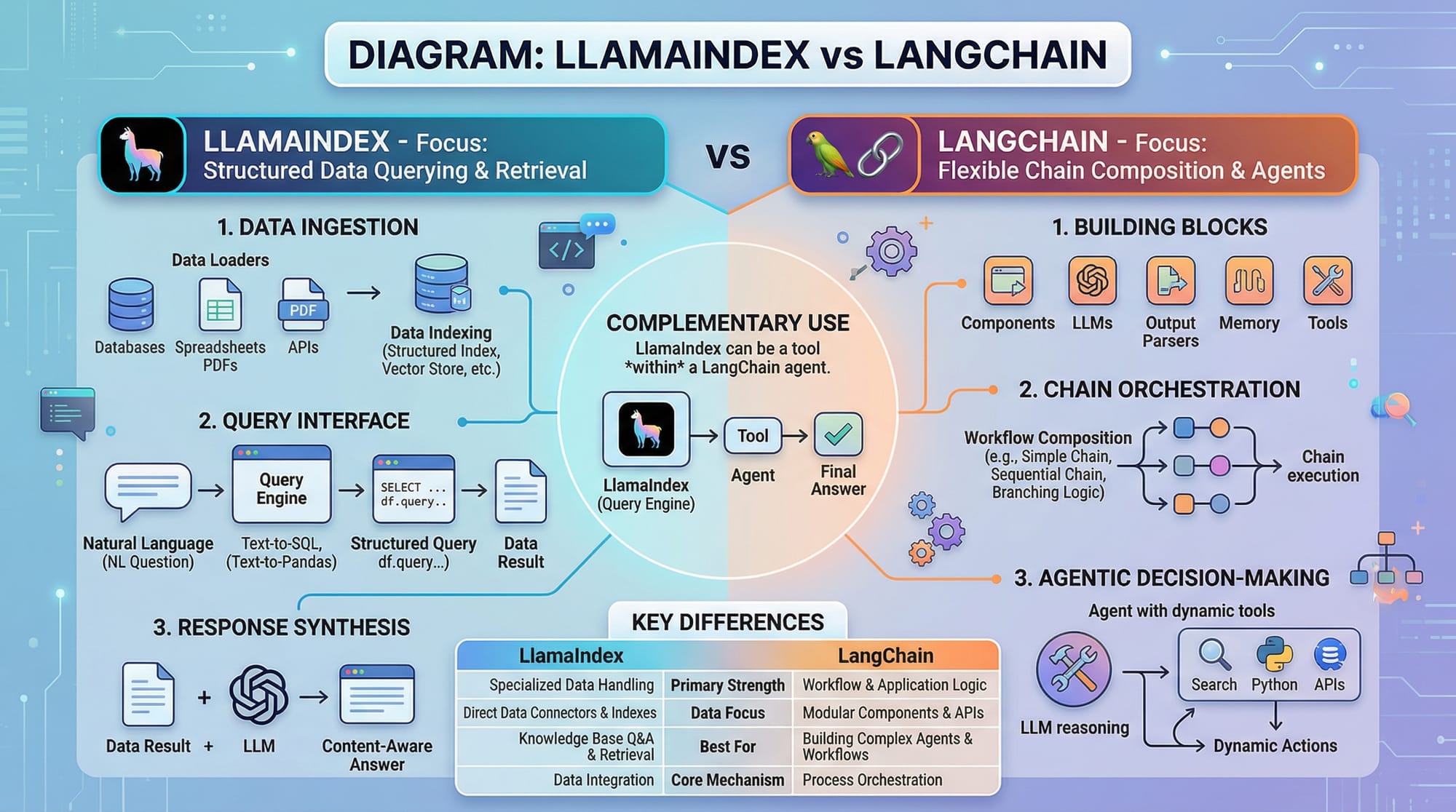
LlamaIndex vs LangChain — which one should I use?
LlamaIndex focuses on data indexing and structured retrieval, while LangChain emphasizes composing multiple LLM calls in a chain. For querying large documents, LlamaIndex is simpler.
Can I use LlamaIndex for PDFs?
Yes. Use SimplePDFReader or similar loaders to read PDFs and create indexes.
Is LlamaIndex free for students in Pakistan?
Yes, the Python library is open-source, but API calls to LLMs like OpenAI may incur costs in PKR.
Summary & Key Takeaways
- LlamaIndex simplifies connecting LLMs to your data.
- Use loaders to ingest data and splitters to manage large documents.
- Embeddings convert text into vectors for semantic search.
- Indexes organize data efficiently for fast querying.
- Ideal for students building chatbots, FAQ bots, or note summarizers.
- LlamaIndex complements tools like LangChain for advanced workflows.
Next Steps & Related Tutorials
- Learn LangChain Tutorial for building multi-step AI workflows.
- Explore RAG Tutorial to combine LLMs with retrieval for real-time answers.
- Try OpenAI API Python Tutorial for embedding and GPT queries.
- Check Python AI Projects for Beginners to practice with local datasets.
This tutorial is fully optimized for SEO keywords: llamaindex tutorial, llama index python, llamaindex vs langchain, and targets Pakistani students with local examples and context.
If you want, I can also create all 6+ images as placeholders with diagrams ready for direct website use on theiqra.edu.pk.
Do you want me to do that next?
Test Your Python Knowledge!
Finished reading? Take a quick quiz to see how much you've learned from this tutorial.