Mongoose Tutorial MongoDB Node js ODM Complete Guide
Introduction
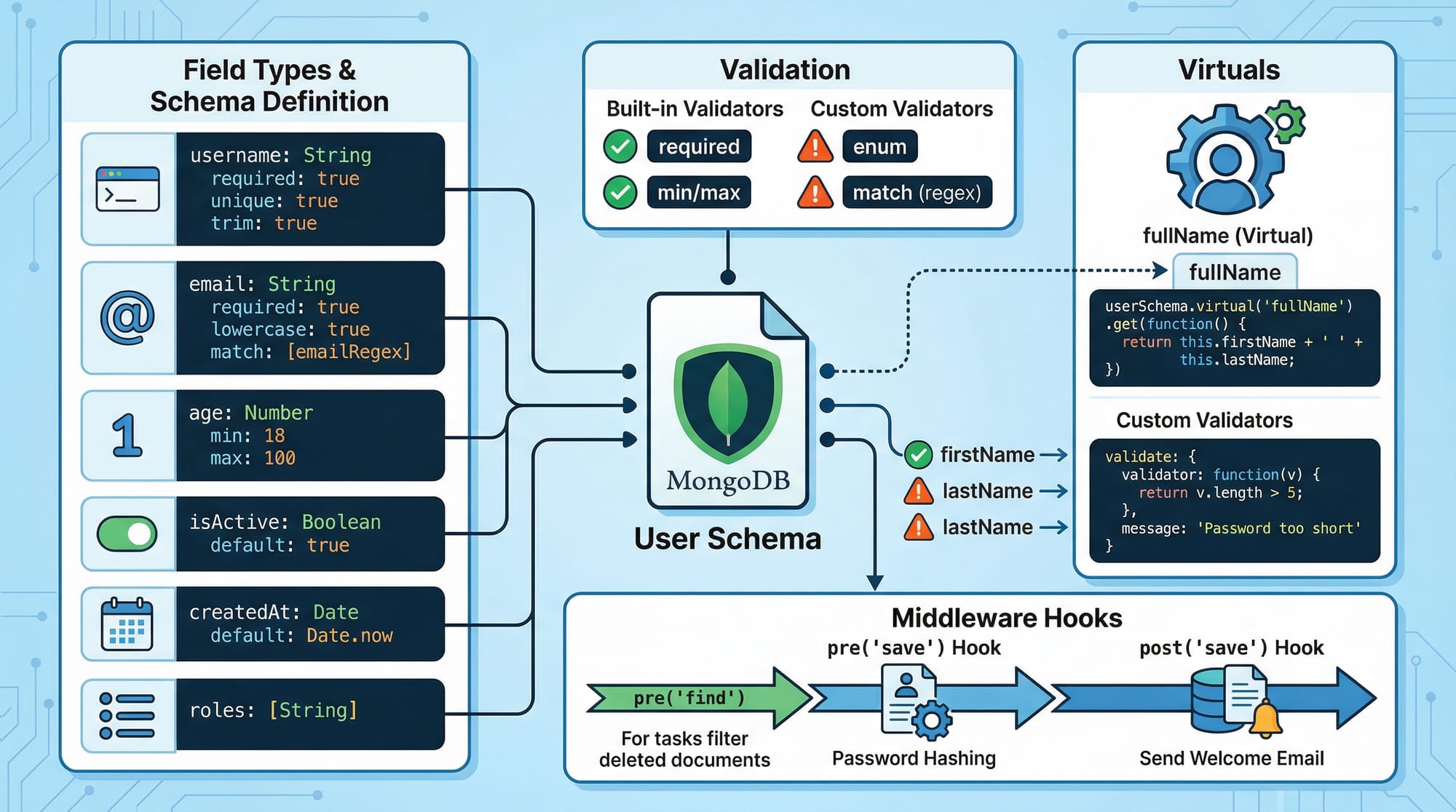
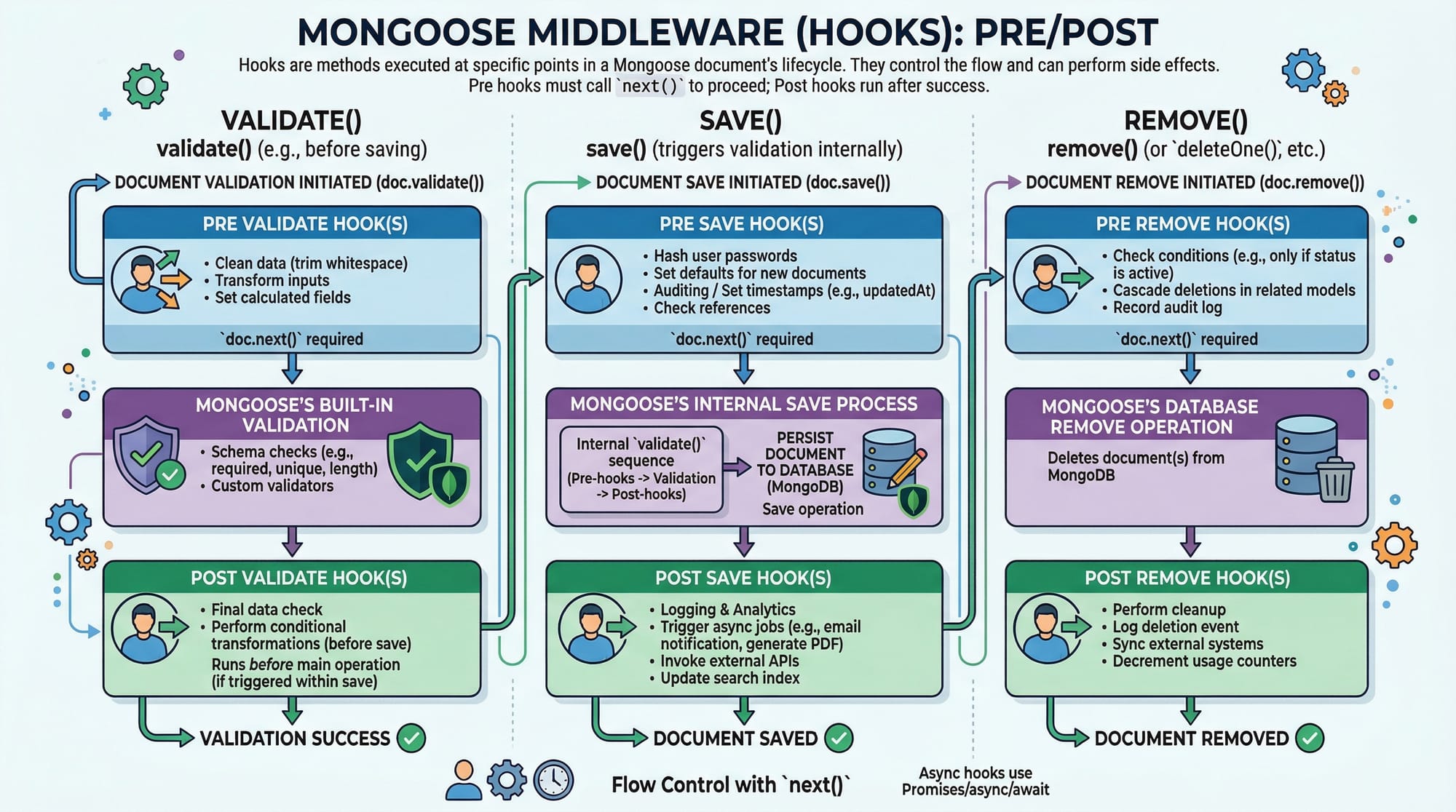
The Mongoose Tutorial: MongoDB + Node.js ODM Complete Guide is designed to help Pakistani students understand how to interact with MongoDB databases using Mongoose in Node.js applications. Mongoose is an ODM (Object Data Modeling) library that provides a structured way to define schemas, validate data, and interact with MongoDB using JavaScript.
For students in Pakistan—whether you're building a university project in Islamabad, a startup idea in Lahore, or a freelance backend system for a client in Karachi—learning Mongoose is essential. It simplifies database operations, enforces data consistency, and makes your code cleaner and more maintainable.
Instead of writing raw MongoDB queries, Mongoose allows you to work with models and schemas—just like working with objects in JavaScript.
Prerequisites
Before starting this mongoose tutorial, you should have:
- Basic knowledge of JavaScript (ES6+)
- Understanding of Node.js basics (modules, npm, async/await)
- Familiarity with MongoDB concepts (collections, documents)
- Installed:
- Node.js
- MongoDB (local or Atlas)
- Code editor (e.g., VS Code)
Core Concepts & Explanation
Understanding Mongoose Schema
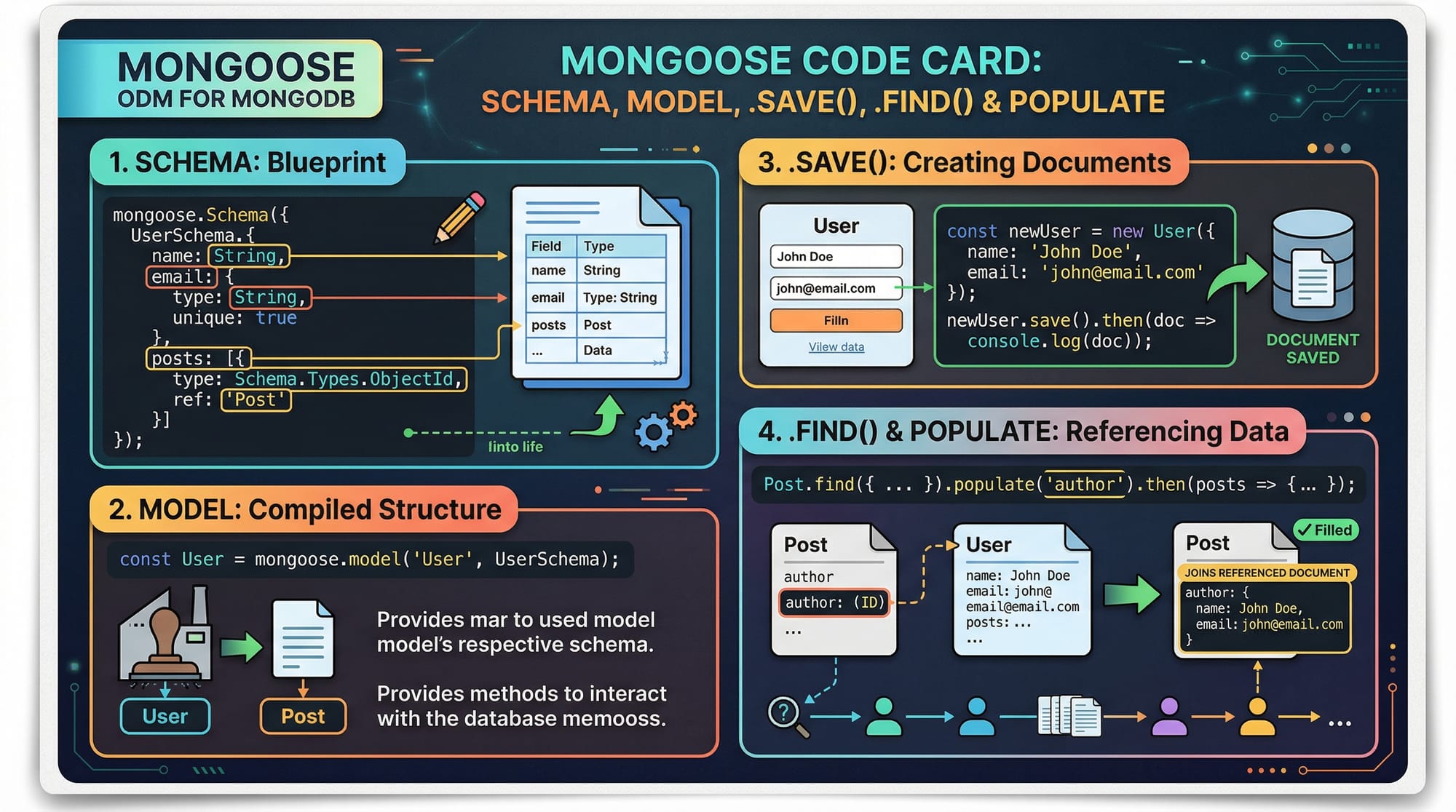
A mongoose schema defines the structure of documents in a MongoDB collection. It acts like a blueprint.
const mongoose = require('mongoose');

const studentSchema = new mongoose.Schema({
  name: String,
  age: Number,
  city: String
});
Explanation:
require('mongoose'): Imports the Mongoose librarynew mongoose.Schema({...}): Creates a schemaname,age,city: Define fields and their types
You can also add validation:
const studentSchema = new mongoose.Schema({
  name: { type: String, required: true },
  age: { type: Number, min: 18 },
  city: String
});
Mongoose Models and CRUD Operations
A Model is created from a schema and represents a collection.
const Student = mongoose.model('Student', studentSchema);
Now you can perform CRUD operations.
Create:
const student = new Student({ name: "Ali", age: 20, city: "Lahore" });
await student.save();
Read:
const students = await Student.find();
Update:
await Student.updateOne({ name: "Ali" }, { age: 21 });
Delete:
await Student.deleteOne({ name: "Ali" });
Relationships and Populate
Mongoose supports relationships using references.
const courseSchema = new mongoose.Schema({
  title: String,
  student: { type: mongoose.Schema.Types.ObjectId, ref: 'Student' }
});
const courses = await Course.find().populate('student');
Explanation:
ObjectId: Links documentsref: References another model.populate(): Fetches related data
Practical Code Examples
Example 1: Student Registration System
const mongoose = require('mongoose');

mongoose.connect('mongodb://localhost:27017/school');

const studentSchema = new mongoose.Schema({
  name: { type: String, required: true },
  age: Number,
  city: String
});

const Student = mongoose.model('Student', studentSchema);

async function run() {
  const student = new Student({
    name: "Fatima",
    age: 22,
    city: "Karachi"
  });

  await student.save();

  const allStudents = await Student.find();
  console.log(allStudents);
}

run();
Line-by-line explanation:
mongoose.connect(...): Connects to MongoDBstudentSchema: Defines structuremongoose.model(...): Creates modelnew Student(...): Creates new documentawait student.save(): Saves to databaseStudent.find(): Retrieves all students
Example 2: Real-World Application (E-commerce Orders)
const mongoose = require('mongoose');

mongoose.connect('mongodb://localhost:27017/store');

const orderSchema = new mongoose.Schema({
  customerName: String,
  amount: Number,
  status: { type: String, default: "Pending" }
});

const Order = mongoose.model('Order', orderSchema);

async function createOrder() {
  const order = new Order({
    customerName: "Ahmad",
    amount: 2500
  });

  await order.save();

  const orders = await Order.find();
  console.log(orders);
}

createOrder();
Explanation:
orderSchema: Defines order structuredefault: "Pending": Sets default valuenew Order(...): Creates ordersave(): Stores in DBfind(): Retrieves all orders
Common Mistakes & How to Avoid Them
Mistake 1: Not Handling Async/Await Properly
❌ Incorrect:
const data = Student.find();
console.log(data);
✅ Correct:
const data = await Student.find();
console.log(data);
Explanation:
- Mongoose operations are asynchronous
- Always use
awaitor.then()
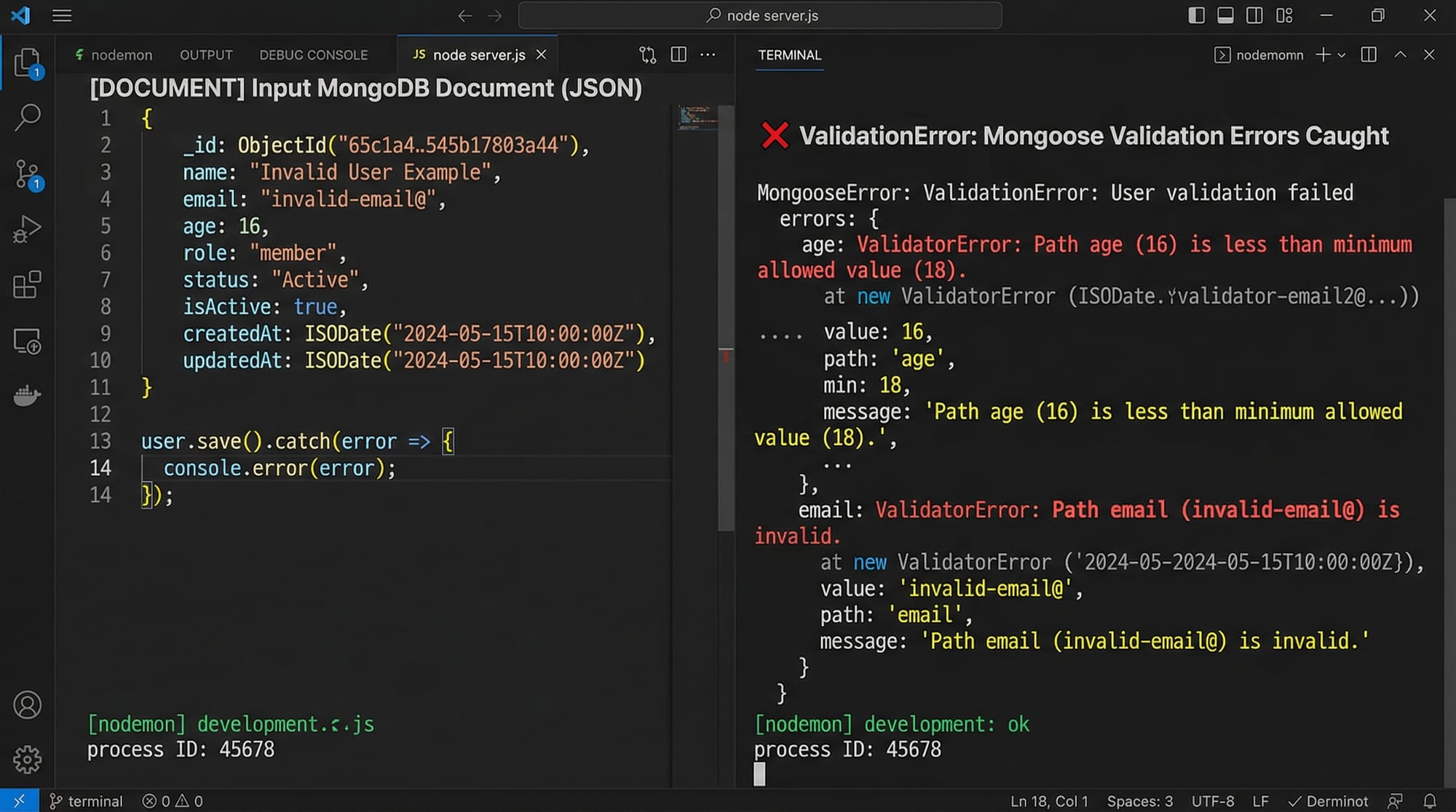
Mistake 2: Missing Required Fields
❌ Incorrect:
const student = new Student({ age: 20 });
await student.save();
✅ Correct:
const student = new Student({ name: "Ali", age: 20 });
await student.save();
Explanation:
- If
required: true, field must be provided - Otherwise, validation error occurs
Practice Exercises
Exercise 1: Create a User Schema
Problem:
Create a schema for users with name, email, and age.
Solution:
const userSchema = new mongoose.Schema({
  name: String,
  email: { type: String, required: true },
  age: Number
});
Exercise 2: Fetch Orders Above PKR 1000
Problem:
Retrieve all orders where amount is greater than 1000.
Solution:
const orders = await Order.find({ amount: { $gt: 1000 } });
console.log(orders);
Frequently Asked Questions
What is Mongoose in Node.js?
Mongoose is an ODM library for Node.js that provides a structured way to interact with MongoDB. It allows you to define schemas, validate data, and perform database operations easily.
How do I connect Mongoose to MongoDB?
You can connect using mongoose.connect('mongodb://localhost:27017/dbname'). This establishes a connection between your Node.js app and MongoDB.
What is a mongoose schema?
A mongoose schema defines the structure of documents in a collection, including fields, types, and validation rules.
How do I use populate in Mongoose?
Use .populate('fieldName') to replace referenced ObjectIds with actual document data from another collection.
Is Mongoose better than MongoDB native driver?
Mongoose is easier for beginners because it provides structure and validation, while the native driver offers more flexibility but requires more manual work.
Summary & Key Takeaways
- Mongoose simplifies MongoDB interaction in Node.js
- Schemas define structure and enforce validation
- Models allow CRUD operations
- Populate helps manage relationships
- Async/await is essential for handling operations
- Validation prevents bad data from entering the database
Next Steps & Related Tutorials
To continue your learning journey on theiqra.edu.pk, explore:
- Learn database basics with our MongoDB Tutorial
- Strengthen your backend skills with Node.js Basics
- Build APIs using Express.js Tutorial
- Understand data validation with JavaScript Advanced Concepts
These tutorials will help you become a confident backend developer in Pakistan’s growing tech industry 🚀
Test Your Python Knowledge!
Finished reading? Take a quick quiz to see how much you've learned from this tutorial.