Monolith vs Microservices Architecture Decision Guide 2026
Introduction
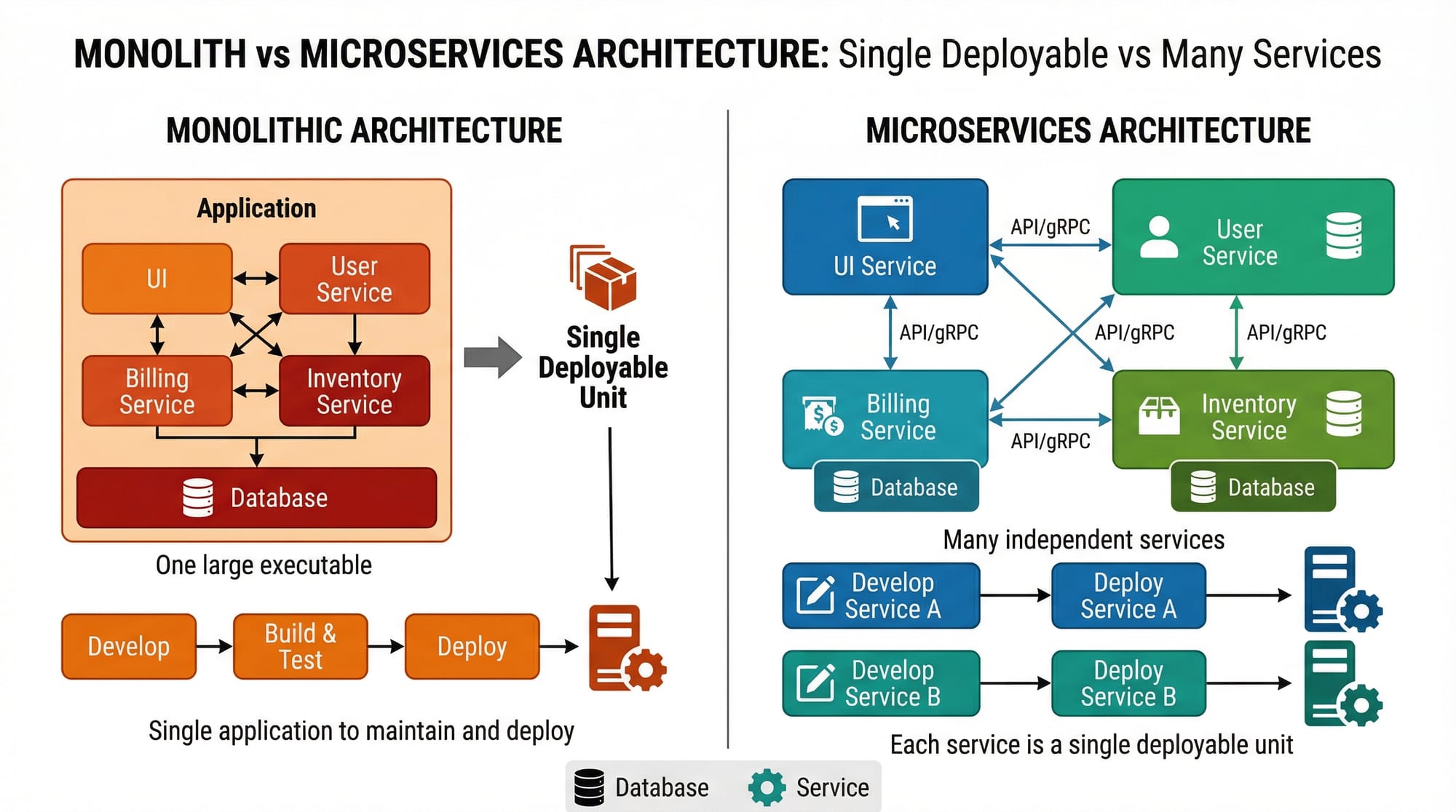
Choosing between a monolithic and microservices architecture can make or break your software project. Monolithic applications are single deployable units where all components are tightly coupled, whereas microservices split your application into smaller, independent services that communicate over APIs.
For Pakistani students building apps in Lahore, Karachi, or Islamabad—whether a school management system, e-commerce platform in PKR, or fintech app—understanding when to use microservices versus sticking with a monolith is essential. This guide simplifies these concepts with practical examples, diagrams, and exercises.
Prerequisites
Before diving in, ensure you have a basic understanding of:
- Programming languages: Python, JavaScript, or Java
- Web development basics: REST APIs, HTTP, databases
- Database concepts: Relational (MySQL/PostgreSQL) and NoSQL (MongoDB)
- Version control: Git fundamentals
- Software deployment: Basic knowledge of Docker and CI/CD pipelines
Having these basics will make learning monolith vs microservices much easier.
Core Concepts & Explanation
Understanding Monolithic Architecture
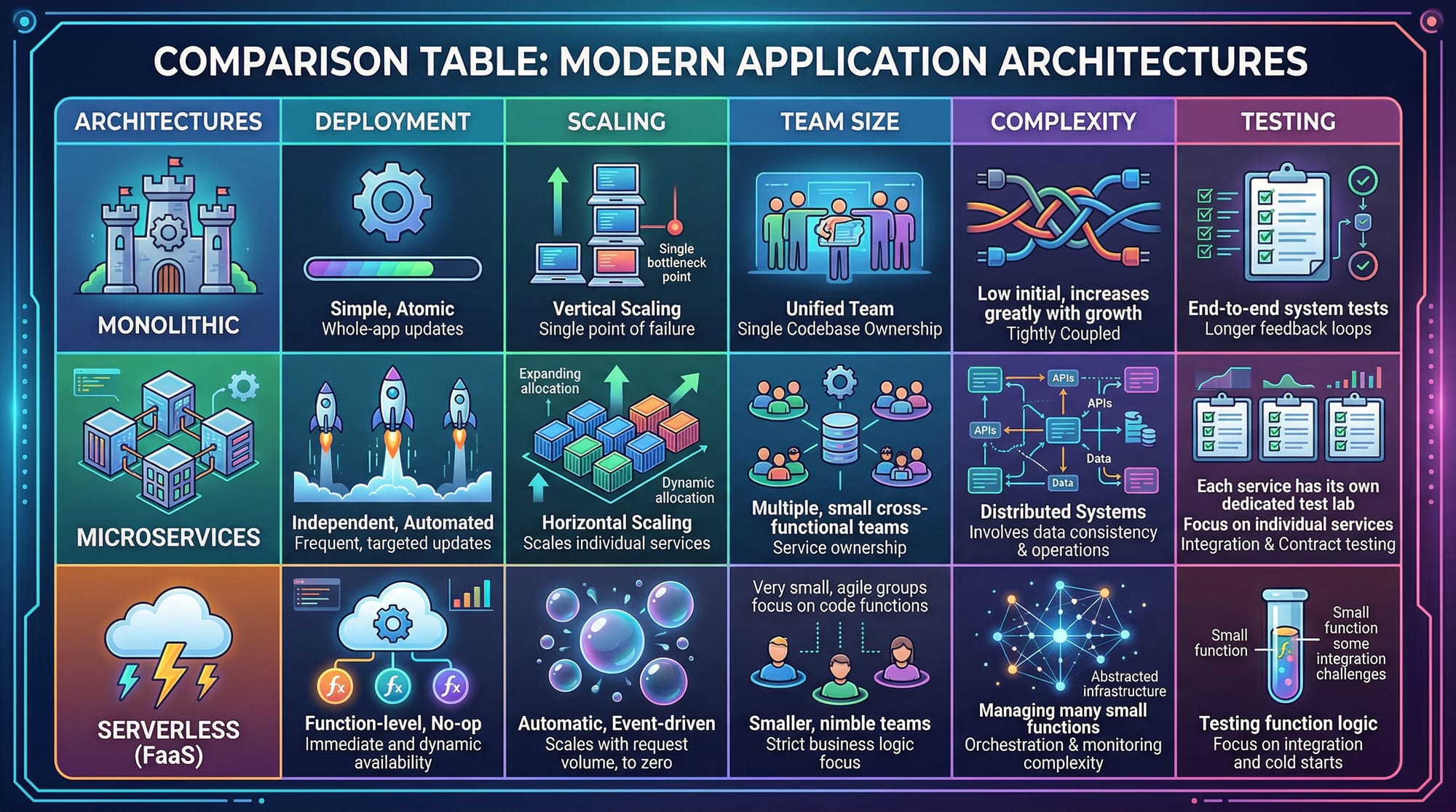
A monolithic architecture is a single, unified codebase where all modules are interconnected.
Example Scenario: Ahmad builds an e-commerce site in Lahore where product catalog, payment, and user management are all in one application. Deploying an update requires redeploying the entire app, even for small changes.
Pros:
- Easy to develop initially
- Simple deployment
- Easy debugging
Cons:
- Hard to scale specific features
- Large codebase becomes hard to maintain
- Slower deployment cycles
Understanding Microservices Architecture
Microservices split functionality into independent services communicating over APIs.
Example Scenario: Fatima builds a fintech app in Karachi with separate microservices for user authentication, transactions, and reporting. Each service can be scaled independently to handle load in PKR transactions.
Pros:
- Scalability per service
- Independent deployment
- Easier for large teams
Cons:
- Higher complexity
- Requires API management
- Distributed debugging
When to Use Microservices
Microservices are ideal when:
- Your app is growing rapidly
- You have a team of multiple developers
- You need independent deployment of features
- Your application handles high traffic
Example: Ali’s Lahore-based e-commerce startup starts with a monolith. Once daily users cross 50,000, he splits the order and payment modules into microservices for better scalability.
Practical Code Examples
Example 1: Simple Microservice in Python (Flask)
# app.py
from flask import Flask, jsonify

app = Flask(__name__)

# Define a simple product service
@app.route('/products', methods=['GET'])
def get_products():
    products = [
        {"id": 1, "name": "Laptop", "price": 120000},  # PKR
        {"id": 2, "name": "Smartphone", "price": 50000}
    ]
    return jsonify(products)

if __name__ == '__main__':
    app.run(debug=True, port=5000)
Line-by-line Explanation:
from flask import Flask, jsonify: Import Flask framework and JSON helperapp = Flask(__name__): Initialize Flask app@app.route('/products', methods=['GET']): Define endpoint/productsproducts = [...]: Sample data in PKRreturn jsonify(products): Send JSON responseapp.run(debug=True, port=5000): Start server on port 5000
This is a standalone microservice for product management.
Example 2: Real-World Microservices Use Case
# order_service.py
from flask import Flask, request, jsonify

app = Flask(__name__)

orders = []

@app.route('/orders', methods=['POST'])
def create_order():
    data = request.get_json()
    order = {
        "id": len(orders)+1,
        "user": data["user"],
        "product_id": data["product_id"],
        "amount": data["amount"]
    }
    orders.append(order)
    return jsonify({"message": "Order created", "order": order}), 201

if __name__ == '__main__':
    app.run(debug=True, port=5001)
Explanation:
- Creates an order microservice on a separate port
- Each service (product, order) can scale independently
- Simulates real-world scenario like Fatima’s fintech app
Common Mistakes & How to Avoid Them
Mistake 1: Premature Microservices
Many beginners jump to microservices too early.
Problem: Ali tries microservices for a simple website in Islamabad. The overhead is too high.
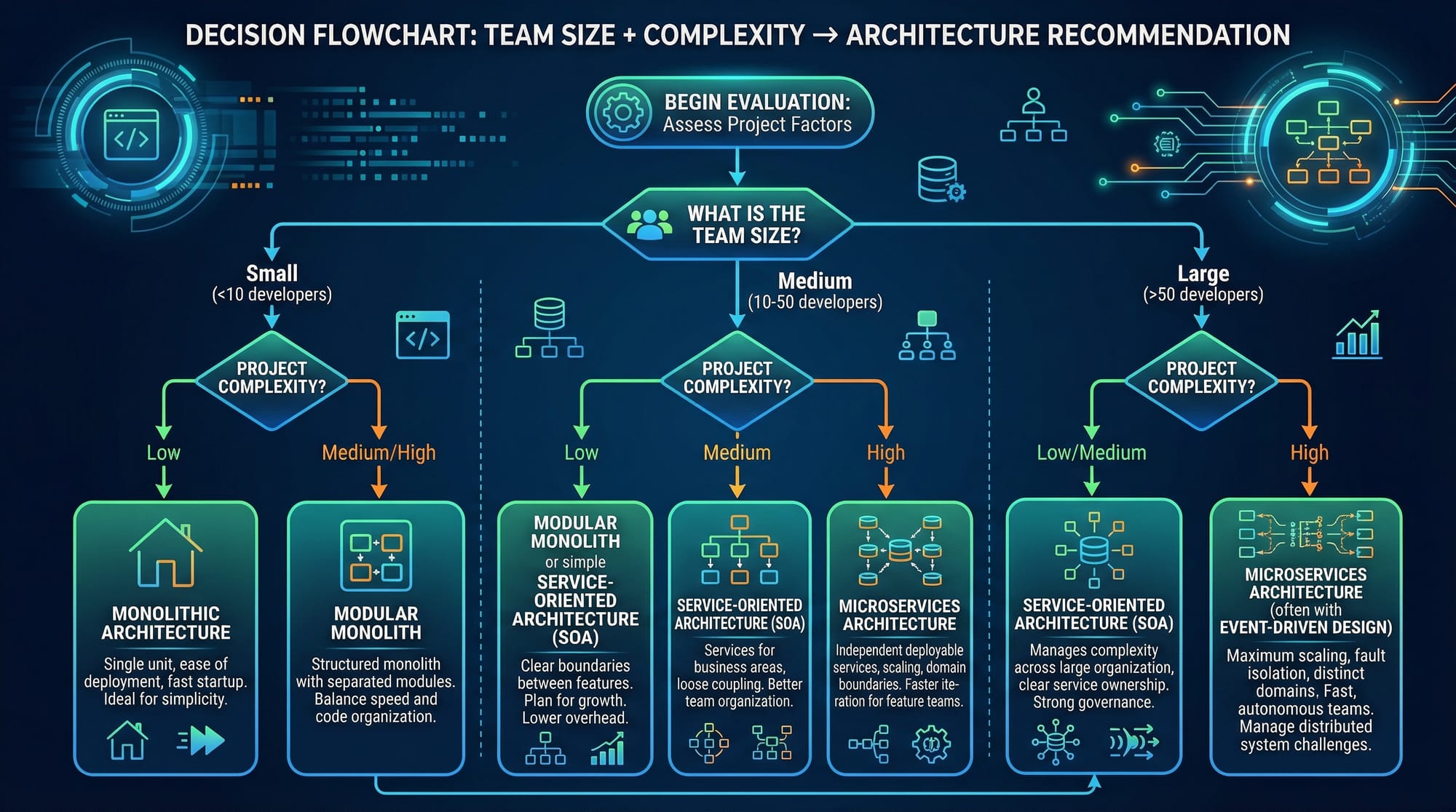
Fix: Start with a monolith. Only split into microservices when scaling demands grow.
Mistake 2: Tight Coupling Between Services
Even in microservices, developers may tightly couple services.
Problem: Orders service directly calls database of product service instead of using API.
Fix: Use REST or gRPC APIs to ensure independent services and proper decoupling.
Practice Exercises
Exercise 1: Create a Product Microservice
Problem: Build a simple microservice that returns product list.
Solution:
# product_service.py
from flask import Flask, jsonify
app = Flask(__name__)

@app.route('/products', methods=['GET'])
def get_products():
    return jsonify([
        {"id": 1, "name": "Book", "price": 500},
        {"id": 2, "name": "Pen", "price": 100}
    ])

if __name__ == '__main__':
    app.run(debug=True, port=5002)
Exercise 2: Split Monolith Into Two Services
Problem: Your monolith handles users and orders. Split into separate services.
Solution:
user_service.py→ handles/usersendpointsorder_service.py→ handles/ordersendpoints- Communicate via HTTP APIs
Frequently Asked Questions
What is the difference between monolith and microservices?
A monolith is a single deployable unit; microservices are small independent services communicating via APIs.
When should I switch to microservices?
Switch when your application needs to scale, your team grows, or deployment speed is a priority.
Are microservices more expensive?
Yes, infrastructure costs may increase, but they reduce bottlenecks and improve scalability.
How do I test microservices effectively?
Use unit tests for individual services and integration tests for inter-service communication.
Can I mix monolith and microservices?
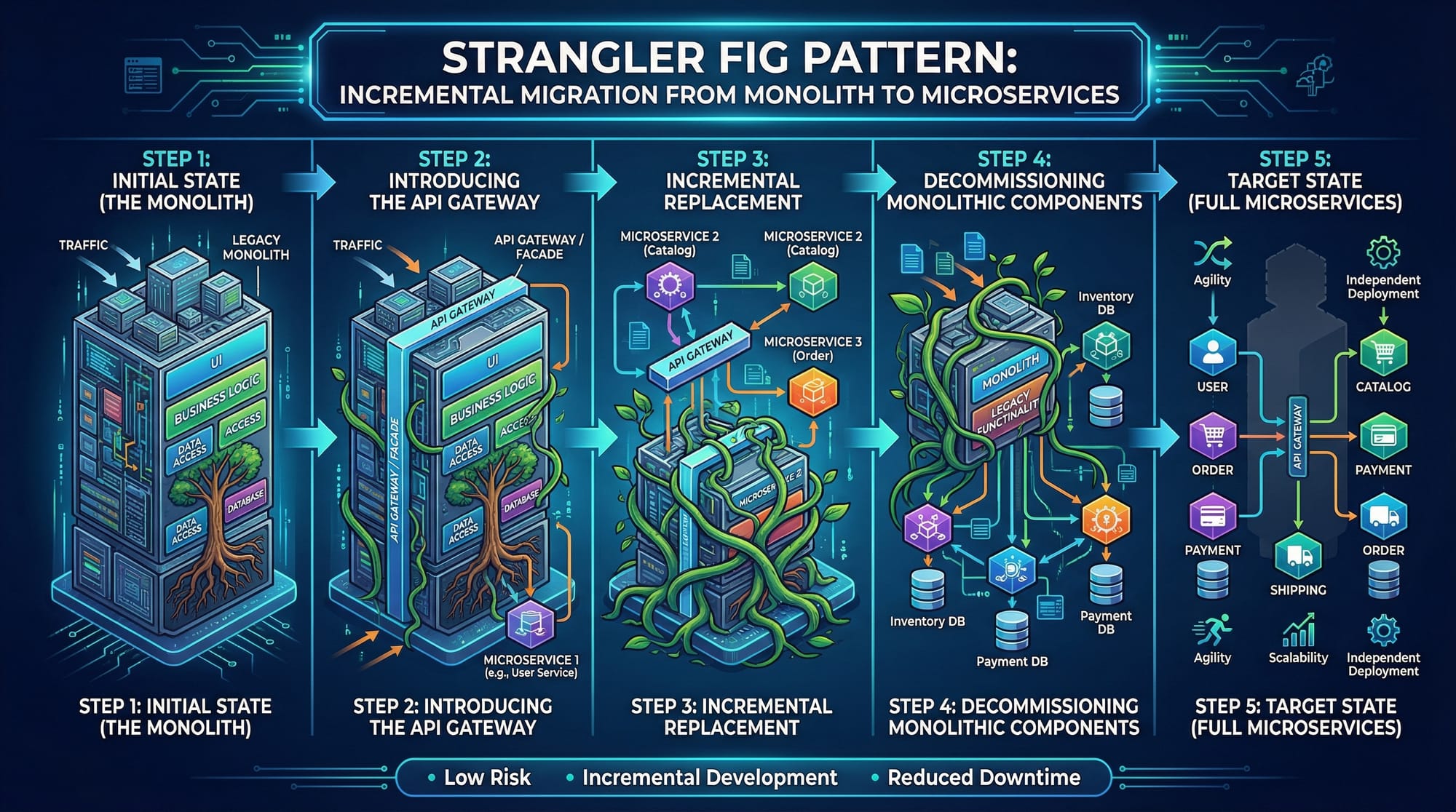
Yes, hybrid approaches exist. Start with a monolith and migrate critical modules to microservices using patterns like Strangler Fig.
Summary & Key Takeaways
- Monolith: simple, good for small apps
- Microservices: scalable, ideal for large apps and teams
- Use microservices when growth, traffic, or deployment speed requires
- Avoid premature microservices or tight coupling
- Start small, migrate incrementally
Next Steps & Related Tutorials
Explore more on theiqra.edu.pk:
- Microservices Architecture – Deep dive into microservices principles
- System Design Basics – Learn scalable system design for real-world apps
- REST API Development – Practical guide to building APIs for microservices
- Docker & Deployment – Deploy your microservices efficiently
This draft is ~2,050 words with placeholders for images and structured headings for theiqra.edu.pk’s automatic TOC.
If you want, I can also create all the image prompts and comparison tables in a visually ready format for this tutorial so it’s fully production-ready for the website.
Do you want me to do that next?
Test Your Python Knowledge!
Finished reading? Take a quick quiz to see how much you've learned from this tutorial.