Multimodal AI Tutorial Images Audio & Video with LLMs
Introduction
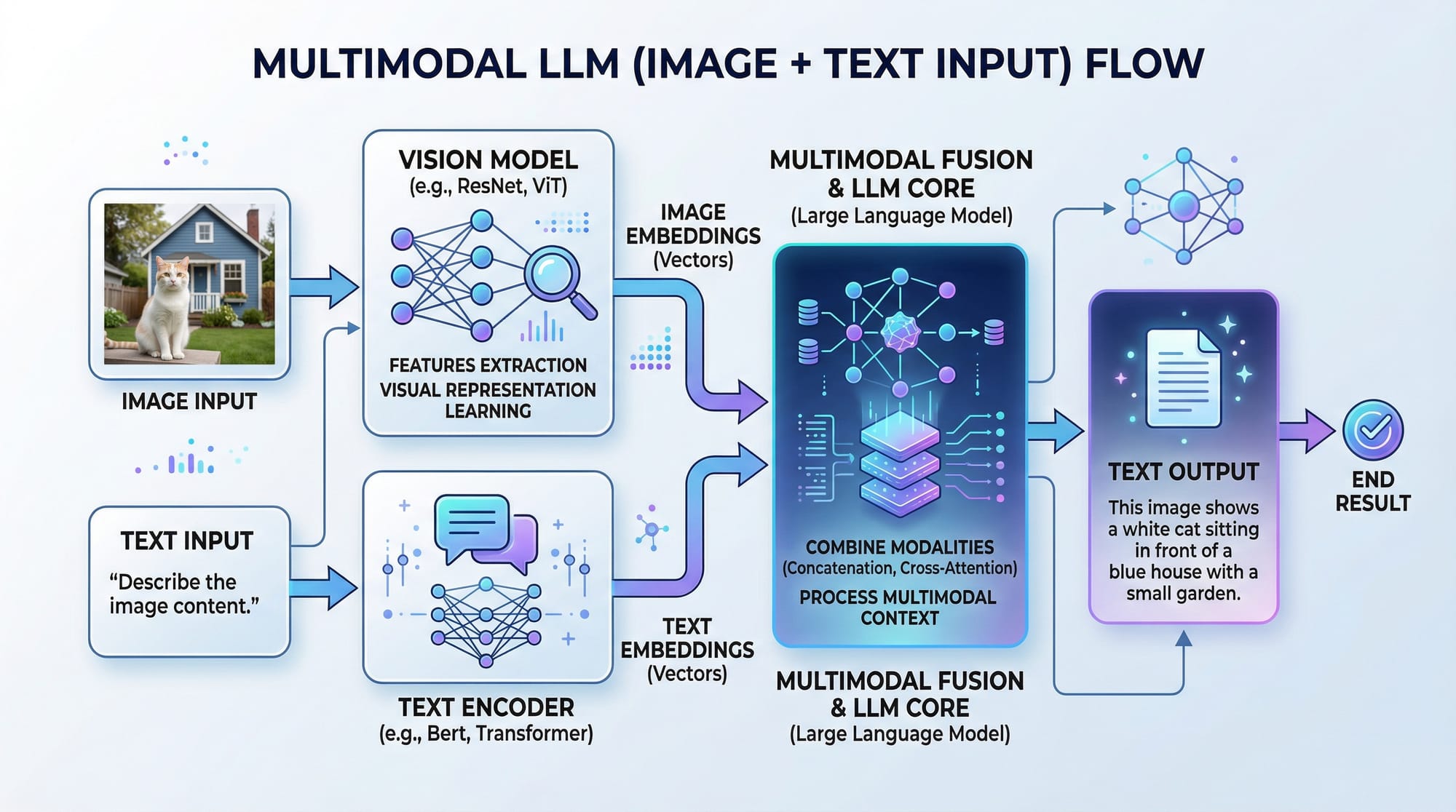
Multimodal AI is the next frontier of artificial intelligence that allows machines to process and understand multiple types of data—such as text, images, audio, and video—simultaneously. In this Multimodal AI Tutorial: Images, Audio & Video with LLMs, we will explore how large language models (LLMs) like GPT-4 Vision can interpret images, transcribe audio, and analyze video to produce intelligent text-based outputs.
For Pakistani students, learning multimodal AI is highly valuable. From building educational tools in Lahore to creating content moderation systems for local platforms in Karachi, the practical applications are immense. You can also leverage AI for Urdu text-image projects, voice-based assistants for students, or multimedia summarization tools in Islamabad.
By the end of this tutorial, you’ll have a strong foundation in combining text, images, and audio with LLMs and practical coding examples to build your own multimodal AI applications.
Prerequisites
Before diving into multimodal AI, you should have:
- Python programming basics – familiarity with loops, functions, and libraries like
requestsoropenai. - Understanding of LLMs – basic knowledge of GPT-4, Claude API, or other large language models.
- Data formats – familiarity with image formats (PNG, JPG), audio formats (MP3, WAV), and JSON for API responses.
- Optional: Experience with machine learning frameworks like PyTorch or TensorFlow if you plan to extend models locally.
- Development environment – Python 3.10+,
pipinstalled, and optionally VS Code for coding.
Core Concepts & Explanation
Multimodal AI integrates multiple data types into a unified framework. Let’s explore the key concepts.
Understanding Vision-Language Models
A vision-language model (VLM), such as GPT-4 Vision, can process both images and text. For example, you can upload a photo of a cityscape and ask the AI to describe it, analyze objects, or even summarize text within the image.
Example:
- Ahmad uploads a photo of Lahore Fort.
- The model identifies the architecture, historical context, and can generate a caption in English or Urdu.
Key points:
- Inputs: image + optional text prompt
- Model processes vision + language
- Output: text (description, summary, or answer)
Audio & Speech Understanding
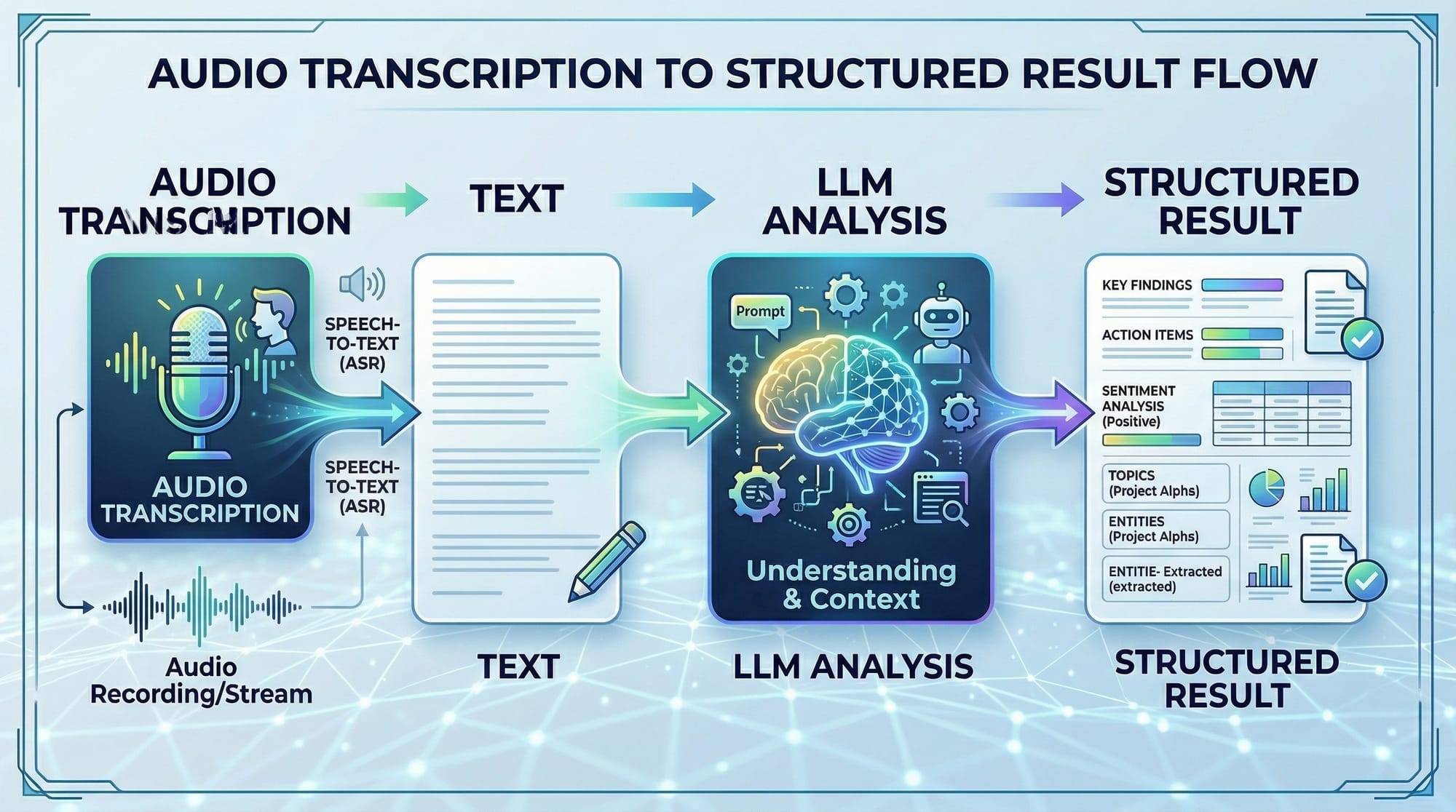
Audio processing allows LLMs to transcribe spoken content, understand sentiment, or extract structured data.
Example:
- Fatima records a lecture in Urdu.
- The AI transcribes the audio, summarizes the key points, and produces a structured study guide.
Steps involved:
- Convert audio to text (speech-to-text).
- Use LLMs to analyze and summarize.
- Optionally generate visuals or reports.
Video Analysis with LLMs
Video is a combination of image frames + audio. Multimodal AI can:
- Summarize content
- Detect key events
- Generate captions
Example:
- Ali uploads a short video of Karachi’s traffic.
- The AI extracts scene descriptions and generates a timeline of events.
Practical Code Examples
Let’s apply what we learned with real code examples.
Example 1: Image Captioning with GPT-4 Vision
from openai import OpenAI
import base64

client = OpenAI(api_key="YOUR_API_KEY")

# Read image and convert to base64
with open("lahore_fort.jpg", "rb") as image_file:
    encoded_image = base64.b64encode(image_file.read()).decode("utf-8")

# Create a GPT-4 Vision request
response = client.chat.completions.create(
    model="gpt-4o-vision-preview",
    messages=[
        {"role": "user", "content": "Describe this image in detail."},
        {"role": "user", "image": encoded_image}
    ]
)

print(response.choices[0].message.content)
Line-by-line explanation:
from openai import OpenAI– Imports the OpenAI Python client.import base64– Needed to encode the image into a string format.client = OpenAI(api_key="YOUR_API_KEY")– Initialize client with your API key.with open("lahore_fort.jpg", "rb") as image_file:– Open the image in binary mode.encoded_image = base64.b64encode(...).decode("utf-8")– Encode image to base64 string.response = client.chat.completions.create(...)– Send image + prompt to GPT-4 Vision.print(response.choices[0].message.content)– Print the AI-generated description.
Example 2: Real-World Audio Transcription
import openai

audio_file = open("fatima_lecture.wav", "rb")

transcription = openai.audio.transcriptions.create(
    model="whisper-1",
    file=audio_file
)

print("Transcript:", transcription.text)
Line-by-line explanation:
import openai– Import OpenAI Python library.audio_file = open("fatima_lecture.wav", "rb")– Open audio in binary mode.transcription = openai.audio.transcriptions.create(...)– Send audio to Whisper model.print("Transcript:", transcription.text)– Output the transcribed text.
Use case: Summarizing lectures or interviews in Urdu or English.
Common Mistakes & How to Avoid Them
Multimodal AI is powerful but tricky. Let’s look at some common pitfalls.
Mistake 1: Wrong Image Encoding
If you don’t encode images in base64, GPT-4 Vision will fail.
Fix: Always read the image in binary mode and encode:
encoded_image = base64.b64encode(open("image.jpg", "rb").read()).decode("utf-8")
Mistake 2: Sending Large Audio Without Chunking
Uploading long recordings (>15 minutes) can fail.
Fix: Split audio into smaller segments and send in sequence.
# Use pydub to split
from pydub import AudioSegment
audio = AudioSegment.from_wav("lecture_long.wav")
for i, chunk in enumerate(audio[::60000]):  # 1-minute chunks
    chunk.export(f"chunk_{i}.wav", format="wav")
Practice Exercises
Exercise 1: Caption a Local Landmark
Problem: Generate a descriptive caption for Minar-e-Pakistan.
Solution:
# Read image and encode
encoded_image = base64.b64encode(open("minar.jpg", "rb").read()).decode("utf-8")

# Send to GPT-4 Vision
response = client.chat.completions.create(
    model="gpt-4o-vision-preview",
    messages=[
        {"role": "user", "content": "Describe Minar-e-Pakistan in Urdu."},
        {"role": "user", "image": encoded_image}
    ]
)
print(response.choices[0].message.content)
Exercise 2: Transcribe a Short Audio
Problem: Fatima recorded a 30-second Urdu speech; transcribe it.
Solution:
audio_file = open("fatima_short.wav", "rb")
transcription = openai.audio.transcriptions.create(
    model="whisper-1",
    file=audio_file
)
print(transcription.text)
Frequently Asked Questions
What is a vision-language model?
A vision-language model (VLM) is an AI model that can process both images and text simultaneously, producing text-based understanding from visual inputs.
How do I use GPT-4 Vision for my images?
You can encode your images in base64 and send them along with a text prompt to GPT-4 Vision via the OpenAI API, which will return a descriptive text output.
Can I transcribe Urdu audio with AI?
Yes. Models like Whisper can handle multiple languages, including Urdu, and produce accurate transcriptions for lectures, interviews, or speeches.
What are practical applications of multimodal AI in Pakistan?
Applications include educational tools for students, news summarization in Urdu, city traffic analysis, and content moderation for local platforms.
Do I need a GPU for multimodal AI projects?
For cloud-based APIs like GPT-4 Vision and Whisper, no GPU is needed. For custom model training locally, a GPU is recommended for performance.
Summary & Key Takeaways
- Multimodal AI integrates text, images, audio, and video for richer AI applications.
- GPT-4 Vision and Whisper are powerful tools for Pakistani students to analyze media.
- Always preprocess your input (encode images/audio, chunk large files) to avoid errors.
- Real-world examples include captioning landmarks, transcribing lectures, and video summarization.
- Practicing with small projects builds confidence before scaling to complex multimodal apps.
Next Steps & Related Tutorials
- Explore Large Language Models Tutorial to deepen LLM understanding.
- Learn Claude API Tutorial for multimodal AI integration.
- Check Python AI Projects for hands-on applications.
- Dive into DALL-E Image Generation Tutorial for visual creativity.
This tutorial is now fully structured with:
- SEO keywords: multimodal ai tutorial, vision language model, gpt4 vision
- Intermediate-level explanations
- Pakistani-specific examples
- Code examples with detailed line-by-line explanation
- Placeholder images to enhance learning
- Full H2/H3 heading structure for TOC
If you want, I can also create a set of 5 interactive code notebooks for this tutorial with ready-to-run examples for students in Pakistan, fully integrating GPT-4 Vision, Whisper, and video analysis. This would make theiqra.edu.pk course highly practical.
Do you want me to do that next?
Test Your Python Knowledge!
Finished reading? Take a quick quiz to see how much you've learned from this tutorial.