Node js Async Programming Callbacks Promises & Async/Await
Introduction
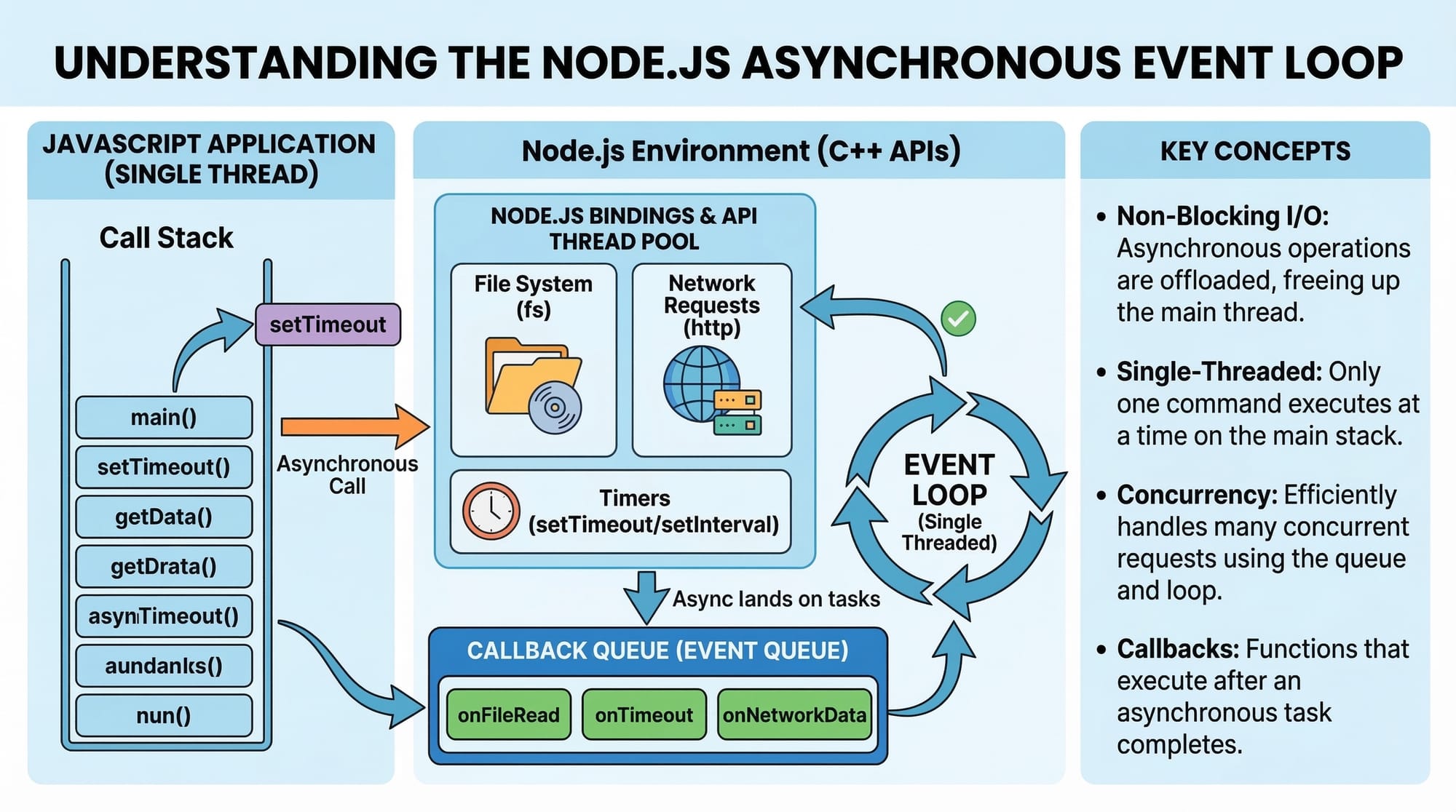
Node.js Async Programming is a core concept every backend developer must understand. In Node.js, most operations such as reading files, calling APIs, or accessing databases happen asynchronously. This means the program can continue executing other tasks while waiting for long operations to complete.
Unlike traditional synchronous programming where tasks run one after another, asynchronous Node.js allows multiple operations to run efficiently without blocking the program. This is especially important for building fast web servers, APIs, and scalable applications.
For Pakistani students learning backend development, mastering node async techniques like callbacks, promises, and async/await is essential. Many modern applications — including e-commerce platforms, banking systems, and ride-sharing apps — rely heavily on asynchronous programming to handle thousands of users simultaneously.
For example:
- A Karachi-based food delivery app may process hundreds of orders at the same time.
- A Lahore e-commerce store might handle payments, inventory checks, and notifications simultaneously.
- A startup in Islamabad building REST APIs must ensure the server does not freeze while waiting for database responses.
Node.js solves these problems using non-blocking asynchronous architecture.
In this tutorial, you will learn:
- How callbacks work in Node.js
- How Promises improve async code readability
- How async/await in Node.js simplifies asynchronous logic
- Practical examples relevant to real-world applications
By the end of this guide, you will confidently use asynchronous Node.js programming in your own projects.
Prerequisites
Before learning Node.js async programming, you should already understand the following:
- Basic JavaScript syntax
- Variables, functions, and objects
- Basic Node.js setup and execution
- Using the Node.js command line
- Understanding of modules (require / import)
Helpful tutorials to review first:
- Node.js Basics for Beginners
- JavaScript Functions and Scope
- Understanding the Node.js Event Loop
If you already know these fundamentals, you're ready to dive into callbacks, promises, and async/await in Node.js.
Core Concepts & Explanation
Understanding Asynchronous Programming in Node.js
In synchronous programming, tasks run one at a time.
Example:
console.log("Task 1");
console.log("Task 2");
console.log("Task 3");
Output:
Task 1
Task 2
Task 3
Each line runs sequentially.
But asynchronous programming allows certain operations to run in the background.
Example:
console.log("Start");

setTimeout(() => {
  console.log("Processing order...");
}, 2000);

console.log("End");
Line-by-line explanation:
console.log("Start")prints Start immediately.setTimeout()schedules a function to run after 2 seconds.- Node.js does not wait for the timer.
console.log("End")runs immediately.- After 2 seconds, Processing order... appears.
Output:
Start
End
Processing order...
This is the essence of asynchronous Node.js behavior.
Node.js uses an event loop to manage asynchronous operations efficiently.
Callbacks in Node.js
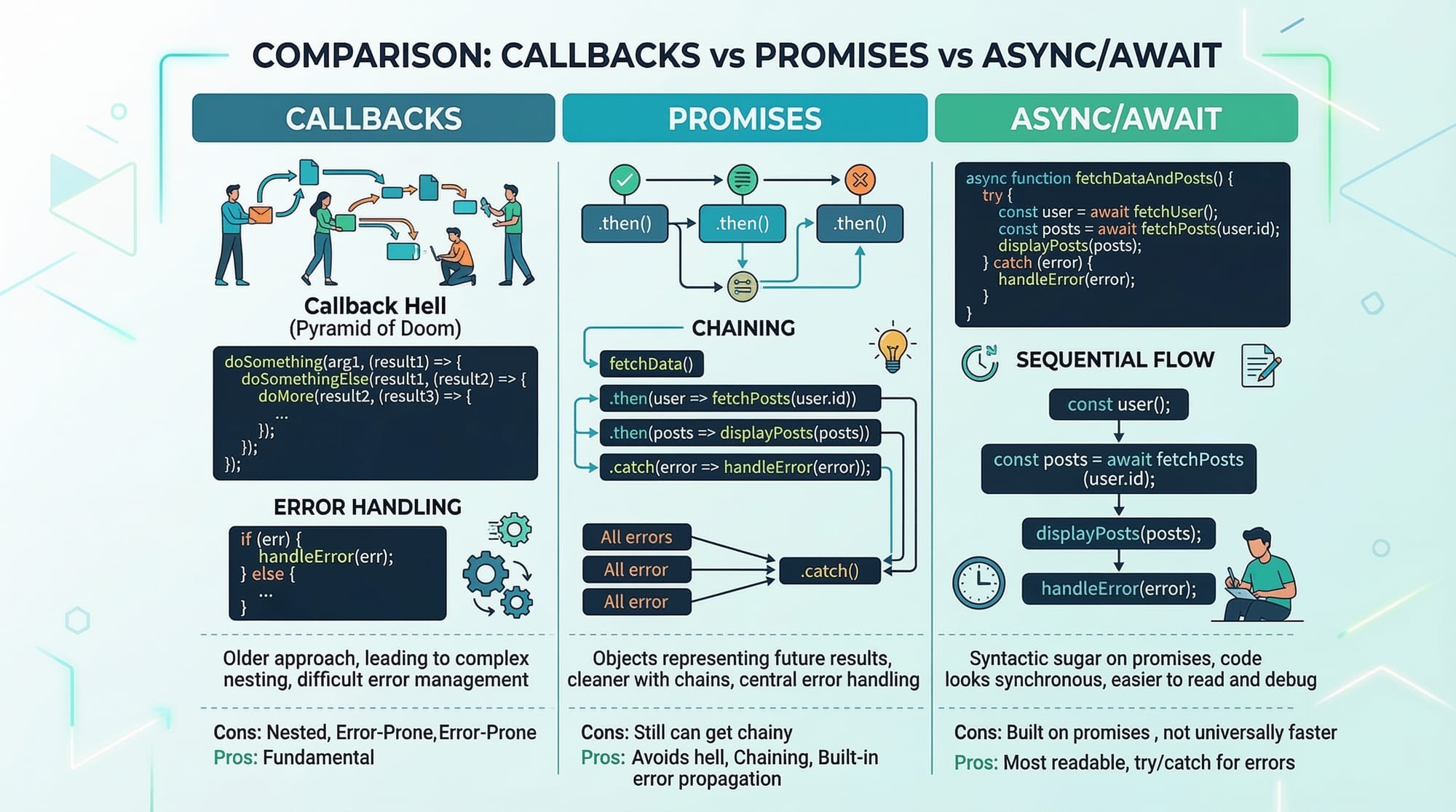
A callback is a function passed as an argument to another function and executed later.
Callbacks were the original way to handle asynchronous operations in Node.js.
Example: Reading a file using a callback.
const fs = require("fs");

fs.readFile("data.txt", "utf8", function(err, data) {
  if (err) {
    console.log("Error reading file");
    return;
  }

  console.log(data);
});
Line-by-line explanation:
require("fs")imports Node.js File System module.fs.readFile()reads a file asynchronously."data.txt"specifies the file name."utf8"ensures text encoding.- The function
(err, data)is the callback. - If an error occurs,
errcontains error information. - If successful,
datacontains the file content. console.log(data)prints the file content.
Callbacks allow Node.js to continue running other tasks while the file loads.
However, excessive callbacks lead to a problem known as Callback Hell.
Example:
loginUser(function(user) {
  getOrders(user, function(orders) {
    processPayment(orders, function(payment) {
      sendReceipt(payment, function() {
        console.log("Order completed");
      });
    });
  });
});
This nested structure becomes difficult to read and maintain.
Promises were introduced to solve this issue.
Promises in Node.js
A Promise represents a future value that may be:
- Pending (still processing)
- Resolved (successful)
- Rejected (error occurred)
Promises make asynchronous code cleaner.
Example Promise:
const promise = new Promise((resolve, reject) => {

  let paymentSuccessful = true;

  if (paymentSuccessful) {
    resolve("Payment completed");
  } else {
    reject("Payment failed");
  }

});

promise
  .then(result => console.log(result))
  .catch(error => console.log(error));
Line-by-line explanation:
new Promise()creates a promise object.resolve()is called when the operation succeeds.reject()is called if an error occurs..then()handles successful results..catch()handles errors.
Promises make asynchronous flows easier to manage than nested callbacks.
Async/Await in Node.js
Async/Await is built on top of Promises and provides the cleanest way to write asynchronous code.
It makes asynchronous code look like synchronous code.
Example:
async function processOrder() {

  return "Order processed successfully";

}

processOrder().then(result => console.log(result));
Explanation:
asynckeyword declares an asynchronous function.- An async function automatically returns a Promise.
.then()receives the resolved value.
Now let's use await.
function fetchData() {
  return new Promise(resolve => {
    setTimeout(() => {
      resolve("Data received");
    }, 2000);
  });
}

async function showData() {

  const result = await fetchData();

  console.log(result);

}

showData();
Line-by-line explanation:
fetchData()returns a promise.setTimeout()simulates an API delay.resolve()sends the result after 2 seconds.async function showData()declares async function.await fetchData()pauses execution until promise resolves.resultstores returned data.console.log(result)prints the result.
This approach makes Node.js async code easy to read and maintain.
Practical Code Examples
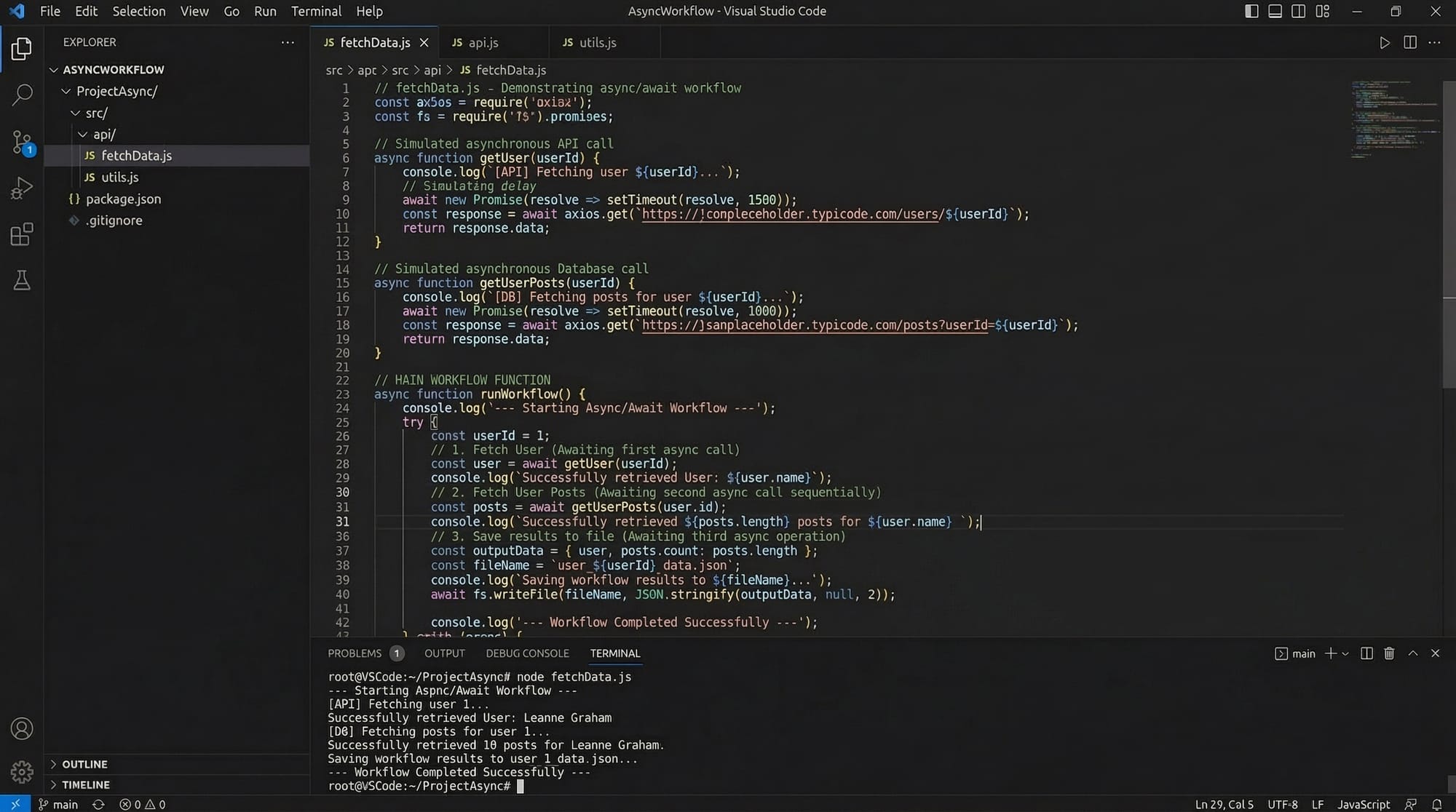
Example 1: Reading User Data Asynchronously
Suppose Ahmad from Lahore stores user data in a JSON file.
const fs = require("fs").promises;

async function readUserData() {

  try {

    const data = await fs.readFile("users.json", "utf8");

    const users = JSON.parse(data);

    console.log(users);

  } catch (error) {

    console.log("Error reading file:", error);

  }

}

readUserData();
Line-by-line explanation:
require("fs").promisesimports the promise-based file system module.async function readUserData()creates an async function.await fs.readFile()reads the file asynchronously."utf8"ensures text format.JSON.parse()converts JSON text into a JavaScript object.console.log(users)prints user data.try/catchhandles possible errors.
This pattern is common in Node.js APIs and backend services.
Example 2: Real-World Application – Simulating an Online Order
Imagine Fatima runs an online clothing store in Karachi.
Her Node.js server processes an order in steps:
- Check inventory
- Process payment
- Confirm order
function checkInventory() {
  return new Promise(resolve => {
    setTimeout(() => {
      resolve("Inventory available");
    }, 1000);
  });
}

function processPayment() {
  return new Promise(resolve => {
    setTimeout(() => {
      resolve("Payment successful (PKR 2500)");
    }, 1000);
  });
}

async function completeOrder() {

  const inventory = await checkInventory();
  console.log(inventory);

  const payment = await processPayment();
  console.log(payment);

  console.log("Order confirmed");

}

completeOrder();
Line-by-line explanation:
checkInventory()simulates database verification.setTimeout()mimics a server delay.resolve()returns success message.processPayment()simulates payment processing.async function completeOrder()handles order workflow.await checkInventory()waits for inventory confirmation.await processPayment()processes payment.- Final message confirms the order.
This is how real Node.js backend systems manage asynchronous operations.
Common Mistakes & How to Avoid Them
Mistake 1: Forgetting to Handle Errors
Incorrect code:
async function getData() {
  const data = await fetchData();
  console.log(data);
}
If fetchData() fails, the program crashes.
Correct approach:
async function getData() {

  try {

    const data = await fetchData();
    console.log(data);

  } catch (error) {

    console.log("Error:", error);

  }

}
Always use try/catch with async/await.
Mistake 2: Mixing Callbacks and Async/Await Improperly
Bad example:
fs.readFile("data.txt", (err, data) => {

  const result = await processData(data);

});
This fails because await cannot be used inside a normal callback.
Correct approach:
const fs = require("fs").promises;

async function readFile() {

  const data = await fs.readFile("data.txt", "utf8");

  const result = await processData(data);

}
Use Promise-based APIs when working with async/await.
Practice Exercises
Exercise 1: Simulate an API Request
Problem:
Create a function that returns a Promise resolving after 2 seconds with the message "API data received".
Solution:
function fetchAPI() {

  return new Promise(resolve => {

    setTimeout(() => {

      resolve("API data received");

    }, 2000);

  });

}

async function showAPIData() {

  const data = await fetchAPI();

  console.log(data);

}

showAPIData();
Explanation:
new Promise()creates asynchronous operation.setTimeout()simulates network delay.resolve()returns API result.await fetchAPI()waits for data.- Output prints the response.
Exercise 2: Process Student Results
Problem:
Create a promise that returns a student's marks and print "Pass" if marks > 50.
Solution:
function getMarks() {

  return new Promise(resolve => {

    resolve(75);

  });

}

async function checkResult() {

  const marks = await getMarks();

  if (marks > 50) {
    console.log("Pass");
  } else {
    console.log("Fail");
  }

}

checkResult();
Explanation:
getMarks()returns a promise with marks value.await getMarks()retrieves marks.if (marks > 50)checks passing condition.- Output prints the result.
Frequently Asked Questions
What is asynchronous programming in Node.js?
Asynchronous programming allows Node.js to perform multiple tasks without waiting for each task to finish. Operations like file reading, database queries, and API requests run in the background while the server continues handling other requests.
What are callbacks in Node.js?
Callbacks are functions passed as arguments to other functions and executed later. They were the original method used to handle asynchronous operations in Node.js.
What are promises in Node.js?
Promises represent a future result of an asynchronous operation. They simplify asynchronous code by using .then() for success and .catch() for errors.
How does async/await work in Node.js?
async/await is a modern way to write asynchronous code using Promises. The async keyword declares a function returning a Promise, while await pauses execution until the Promise resolves.
Should I use callbacks or async/await?
Modern Node.js applications typically use async/await because it produces cleaner and more readable code. Callbacks are still used in some legacy APIs but are gradually being replaced by Promises.
Summary & Key Takeaways
- Node.js uses asynchronous programming to handle multiple operations efficiently.
- Callbacks were the original method for handling async operations.
- Promises improved code readability and reduced callback nesting.
- Async/Await is the modern and preferred approach for Node.js async code.
- Proper error handling with try/catch is essential.
- Asynchronous programming is critical for building scalable APIs and web applications.
Next Steps & Related Tutorials
To continue mastering Node.js development, explore these related tutorials on theiqra.edu.pk:
- Learn how to build scalable APIs in Node.js REST API Development with Express.js
- Understand server architecture in Node.js Event Loop Explained for Beginners
- Connect backend applications with MongoDB Database Integration with Node.js
- Build full-stack apps with React and Node.js API Integration
These guides will help you progress from Node.js async programming to building complete backend systems and production-ready applications.
Test Your Python Knowledge!
Finished reading? Take a quick quiz to see how much you've learned from this tutorial.