Node js Basics Runtime Modules & NPM
Introduction
Node.js has revolutionized the way developers build server-side applications, and understanding node.js basics is essential for any aspiring programmer in today's digital landscape. For Pakistani students looking to build a career in software development, mastering Node.js opens doors to exciting opportunities in freelancing, startups, and established tech companies across Lahore, Karachi, Islamabad, and beyond. This comprehensive node js tutorial will guide you through the fundamental concepts that form the backbone of modern web development.
Node.js is an open-source, cross-platform JavaScript runtime environment that executes JavaScript code outside of a web browser. Unlike traditional server-side languages like PHP or Python, Node.js uses the V8 JavaScript engine (the same engine that powers Google Chrome) to provide exceptional performance and scalability. This means that developers like Ahmad from Lahore or Fatima from Karachi can use JavaScript for both front-end and back-end development, making it an incredibly versatile skill to learn.
The importance of learning Node.js for Pakistani students cannot be overstated. With the growing IT sector in Pakistan and increasing demand for full-stack developers in cities like Islamabad and Faisalabad, Node.js skills are highly sought after by employers. Many Pakistani startups and software houses prefer Node.js for its efficiency and the ability to handle multiple concurrent connections—perfect for applications serving millions of users across the country and internationally.
Prerequisites
Before diving into this Node.js tutorial, you should have a basic understanding of certain concepts to make the most of your learning journey. These prerequisites ensure that you can follow along with the examples and grasp the core concepts effectively:
• Basic JavaScript Knowledge: Familiarity with variables, functions, loops, and objects in JavaScript. If you've completed our JavaScript fundamentals course, you're well-prepared for this tutorial.
• Command Line Basics: Understanding how to navigate directories and run commands in Terminal (Mac/Linux) or Command Prompt/PowerShell (Windows). Pakistani students can practice this using Git Bash or the built-in terminal in VS Code.
• Text Editor Installation: A code editor like Visual Studio Code, which is free and widely used by developers in Pakistan's tech community. You can download it from code.visualstudio.com.
• Computer with Internet Access: A reliable internet connection for downloading Node.js and packages. Internet packages from providers like Jazz, Zong, or PTCL work well for development purposes.
• Enthusiasm to Learn: A willingness to experiment with code and build real projects. Programming is best learned by doing, so be ready to write and execute code alongside reading this tutorial.
Core Concepts & Explanation
Understanding the Node.js Runtime Environment
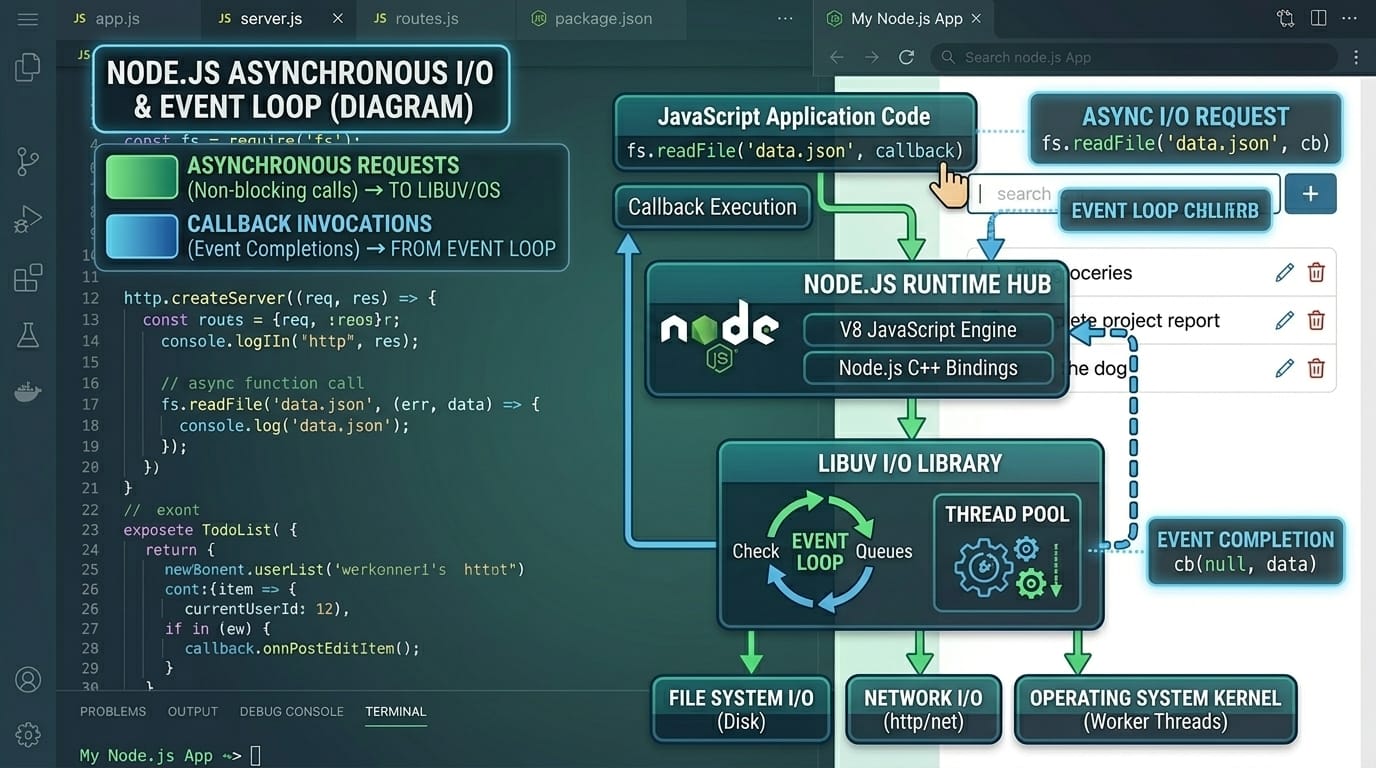
The nodejs runtime is the foundational layer that enables JavaScript to execute on servers rather than just in browsers. At its core, Node.js is built on Chrome's V8 JavaScript engine, which compiles JavaScript directly into machine code, resulting in lightning-fast execution speeds. This runtime environment includes several crucial components that work together seamlessly to provide a robust platform for building scalable applications.
The event-driven, non-blocking I/O model is what sets Node.js apart from traditional server-side technologies. In conventional environments like PHP or Java servlets, each request typically spawns a new thread, consuming significant memory. Node.js, however, operates on a single thread using an event loop that efficiently handles thousands of concurrent connections without creating new threads for each one. This makes it ideal for real-time applications like chat applications, gaming servers, and streaming platforms—applications that Pakistani developers frequently build for both local and international clients.
Consider this analogy: Imagine a restaurant in Lahore where one highly efficient waiter (the event loop) serves multiple tables simultaneously. Instead of waiting at each table for customers to decide (blocking I/O), the waiter takes orders and moves to the next table, returning when the food is ready. This is how Node.js handles multiple requests efficiently, making it perfect for applications that need to handle many users at once.
Exploring Node.js Modules System
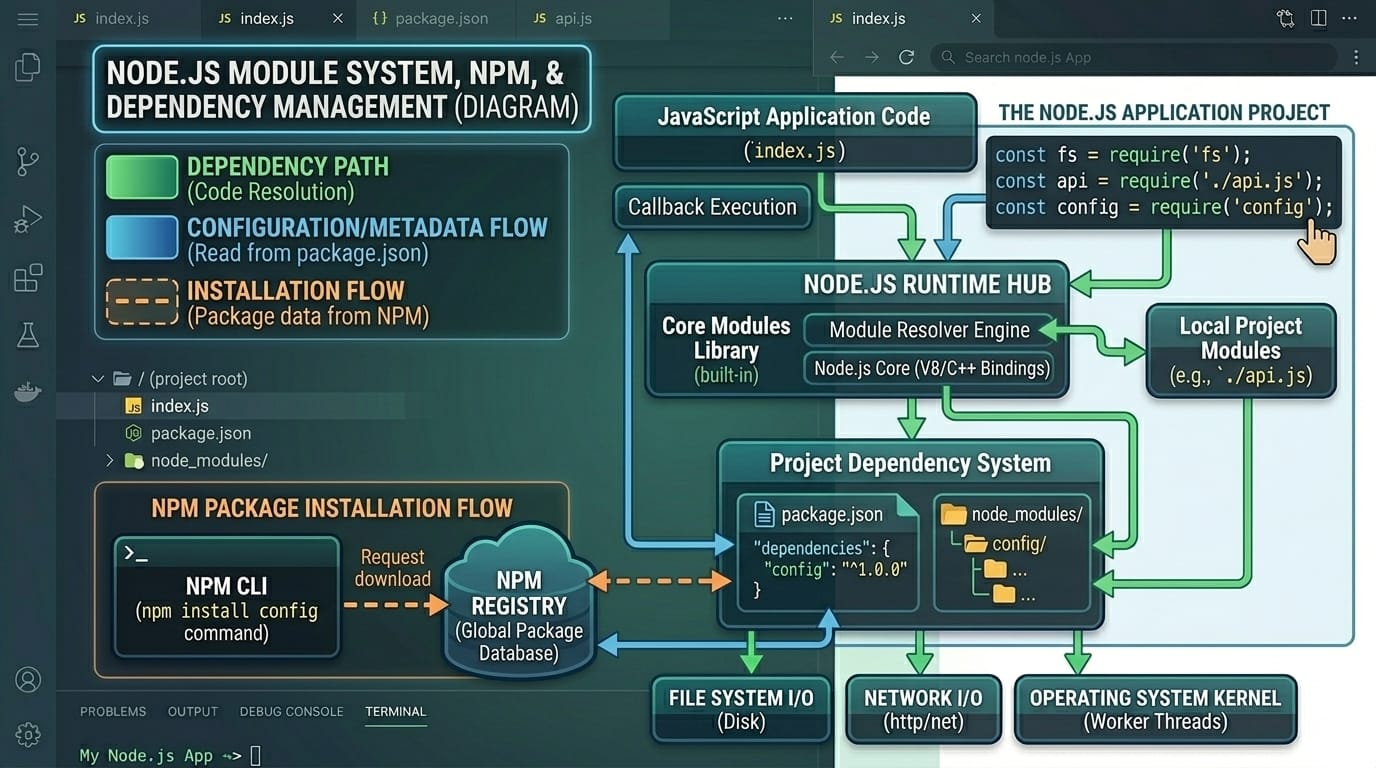
Nodejs modules are the building blocks of Node.js applications, allowing developers to organize code into reusable, maintainable components. The module system in Node.js follows the CommonJS specification, which provides a straightforward way to export functionality from one file and import it into another. This modular approach helps developers in Karachi, Islamabad, and across Pakistan build complex applications by breaking them into smaller, manageable pieces.
Node.js provides three types of modules: Core modules (built-in modules that come with Node.js installation), Local modules (modules you create within your project), and Third-party modules (modules created by the community and available through NPM). Core modules include essential utilities like 'fs' for file system operations, 'http' for creating web servers, 'path' for handling file paths, and 'events' for event-driven programming.
For example, if Ali, a student in Rawalpindi, wants to read a file containing Pakistani Rupee exchange rates, he would use the 'fs' module. If Fatima in Multan wants to create an API for her e-commerce startup, she would use the 'http' module. The beauty of modules is that they encapsulate related functionality, making code easier to test, debug, and maintain over time.
Mastering NPM (Node Package Manager)
NPM, which stands for Node Package Manager, is the world's largest software registry and an indispensable tool for Node.js developers. It comes bundled with Node.js installation and serves three primary functions: a package registry where developers can discover and download packages, a command-line interface for installing and managing packages, and an online repository for documentation and package discovery. Understanding NPM is crucial for Pakistani developers who want to leverage the vast ecosystem of open-source JavaScript packages.
With over a million packages available, NPM enables developers to quickly add functionality to their projects without reinventing the wheel. Need to handle date formatting? There's a package for that. Want to integrate with payment gateways popular in Pakistan like JazzCash or EasyPaisa? There are packages that can help. The package.json file, which NPM creates in your project, serves as a manifest documenting your project's dependencies, scripts, and metadata.
Practical Code Examples
Example 1: Creating Your First Node.js Server
Let's build a simple HTTP server that responds with a greeting message—a rite of passage for every Node.js developer. This example demonstrates how to use the built-in 'http' module to create a server that listens for requests and sends responses. Follow along with the code below:
// server.js - Creating a basic HTTP server
const http = require('http');
const hostname = '127.0.0.1';
const port = 3000;
const server = http.createServer((req, res) => {
res.statusCode = 200;
res.setHeader('Content-Type', 'text/plain');
res.end('Salaam! Welcome to Node.js from theiqra.edu.pk');
});
server.listen(port, hostname, () => {
console.log(`Server running at http://${hostname}:${port}/`);
});
Line-by-Line Explanation:
1. Line 1: We import the built-in 'http' module using the require() function. This module provides the functionality to create HTTP servers and clients.
2. Lines 3-4: We define the hostname (localhost) and port number (3000). The server will be accessible at http://127.0.0.1:3000/ on your machine.
3. Lines 6-10: The createServer() method creates a server instance. The callback function receives request (req) and response (res) objects. We set the HTTP status code to 200 (success), specify the content type, and send our greeting message.
4. Lines 12-14: The listen() method tells the server to start listening for incoming connections on the specified port and hostname. The callback confirms the server is running.
Example 2: Real-World Application - Currency Converter
Let's create a practical application that Pakistani students will find immediately useful—a module that converts amounts between Pakistani Rupees (PKR) and other currencies. This example demonstrates creating and using custom modules, a fundamental skill for building larger applications.
// currencyConverter.js - Custom module for currency conversion
// Exchange rates (approximate - for demonstration)
const rates = {
USD_TO_PKR: 278.50,
EUR_TO_PKR: 302.75,
GBP_TO_PKR: 352.40
};
// Function to convert USD to PKR
function usdToPkr(usd) {
return usd * rates.USD_TO_PKR;
}
// Function to convert PKR to USD
function pkrToUsd(pkr) {
return pkr / rates.USD_TO_PKR;
}
// Export functions for use in other files
module.exports = {
usdToPkr,
pkrToUsd,
rates
};
Now let's use this module in our main application file:
// app.js - Using our custom currency module
const converter = require('./currencyConverter');
// Ahmad wants to convert $100 to PKR
const amount = 100;
const pkrAmount = converter.usdToPkr(amount);
console.log(`$${amount} USD = PKR ${pkrAmount.toFixed(2)}`);
// Output: $100 USD = PKR 27850.00
This example showcases how modules help organize code logically. The currency conversion logic is encapsulated in its own file, making it reusable across multiple projects. Students in Islamabad can use this pattern to build larger applications with clean, maintainable code structures.
[IMAGE: Screenshot of VS Code editor showing the currency converter code with syntax highlighting, terminal output showing successful conversion result]
Common Mistakes & How to Avoid Them
Mistake 1: Forgetting to Export Module Functions
One of the most common errors beginners make is creating functions in a module file but forgetting to export them. This results in 'is not a function' or 'undefined' errors when trying to use the imported module. When Ahmad in Lahore creates a utility module and forgets to add module.exports, his application will fail silently until he tries to use those functions.
Incorrect Code:
// utils.js - Missing exports
function greet(name) {
return `Hello, ${name}!`;
}
Corrected Code:
// utils.js - Properly exported
function greet(name) {
return `Hello, ${name}!`;
}
module.exports = { greet }; // Don't forget this!
Mistake 2: Blocking the Event Loop with Synchronous Operations
Node.js excels at handling concurrent connections through its non-blocking event loop. However, using synchronous versions of file system operations or other I/O tasks can block the entire application, causing poor performance. This is particularly problematic for applications serving multiple users, such as a popular e-commerce site during Pakistan's Independence Day sales.
Problematic Synchronous Code:
// Blocks the event loop!
const data = fs.readFileSync('largeFile.json', 'utf8');
console.log(data);
Better Asynchronous Approach:
// Non-blocking with callback
fs.readFile('largeFile.json', 'utf8', (err, data) => {
if (err) throw err;
console.log(data);
});
The asynchronous version allows Node.js to continue processing other requests while the file is being read. For students building applications that might serve hundreds of concurrent users—like a university registration system in Karachi—this distinction is crucial for performance.
Practice Exercises
Exercise 1: Build a Simple Calculator Module
Create a calculator module that exports functions for basic arithmetic operations (add, subtract, multiply, divide). This exercise will reinforce your understanding of module creation and exports. Try to solve this before looking at the solution below.
Solution:
// calculator.js
const add = (a, b) => a + b;
const subtract = (a, b) => a - b;
const multiply = (a, b) => a * b;
const divide = (a, b) => b !== 0 ? a / b : 'Error: Division by zero';
module.exports = { add, subtract, multiply, divide };
// Usage in main.js
const calc = require('./calculator');
console.log(calc.add(10, 5)); // Output: 15
console.log(calc.multiply(7, 8)); // Output: 56
console.log(calc.divide(20, 4)); // Output: 5
Exercise 2: Create a File Logger Utility
Build a logging utility that writes timestamped messages to a file. This practical exercise teaches you about the fs module and working with files—a common requirement in real applications. For instance, Fatima might want to log transactions for her online store in Faisalabad.
Solution:
// logger.js
const fs = require('fs');
function log(message) {
const timestamp = new Date().toISOString();
const logEntry = `[${timestamp}] ${message}\n`;
fs.appendFile('app.log', logEntry, (err) => {
if (err) console.error('Error writing to log:', err);
});
}
module.exports = { log };
// Usage
const logger = require('./logger');
logger.log('User Ali logged in from Lahore');
logger.log('Order placed: PKR 5,500');
Frequently Asked Questions
What is Node.js and why should I learn it?
Node.js is a JavaScript runtime that allows you to run JavaScript on servers. Learning Node.js is valuable because it enables full-stack development using a single language, has excellent job prospects in Pakistan's growing IT sector, and is used by major companies like Netflix, LinkedIn, and PayPal for building scalable applications.
How do I install Node.js on my computer?
Visit the official Node.js website (nodejs.org) and download the LTS (Long Term Support) version for your operating system. The installer includes both Node.js and NPM. Pakistani students can use the website directly or find mirrors for faster downloads. After installation, verify by running 'node --version' in your terminal.
What is the difference between CommonJS and ES Modules?
CommonJS uses require() and module.exports for importing and exporting modules, while ES Modules use import and export statements. CommonJS is the traditional Node.js module system and is still widely used. ES Modules are the modern standard used in front-end frameworks like React. Both work in Node.js, but CommonJS is more commonly used in Node.js applications.
How do I install packages using NPM?
Use the command 'npm install package-name' to install a package locally in your project. For global installation (available across all projects), use 'npm install -g package-name'. Always initialize your project with 'npm init' first to create a package.json file that tracks your dependencies.
Can I use Node.js for production applications?
Absolutely! Node.js is production-ready and used by many large-scale applications worldwide. For Pakistani startups and businesses, Node.js offers excellent performance, scalability, and a rich ecosystem of packages. Popular Pakistani platforms and many international companies trust Node.js for their critical infrastructure, handling millions of requests daily.
Summary & Key Takeaways
Congratulations on completing this Node.js basics tutorial! You've taken an important step in your programming journey. Here are the key concepts to remember:
• Node.js Runtime: Node.js is a JavaScript runtime built on Chrome's V8 engine that enables server-side JavaScript execution with an event-driven, non-blocking I/O model.
• Module System: Node.js uses CommonJS modules with require() for importing and module.exports for exporting, helping organize code into reusable components.
• NPM: The Node Package Manager is essential for managing dependencies, with over a million packages available to accelerate your development process.
• Non-blocking I/O: Always prefer asynchronous operations in Node.js to maintain performance and scalability in your applications.
• Career Opportunities: Node.js skills are in high demand in Pakistan's IT sector, with opportunities in freelancing, startups, and established companies in Lahore, Karachi, Islamabad, and other cities.
• Practice Makes Perfect: Continue building projects and experimenting with the concepts you've learned to solidify your understanding.
Next Steps & Related Tutorials
Now that you've mastered the fundamentals of Node.js, it's time to continue your learning journey. Here are some recommended tutorials on theiqra.edu.pk that will help you build upon this foundation and create more sophisticated applications:
• Express.js Framework Tutorial - Learn how to build web applications and REST APIs using Express.js, the most popular Node.js framework. This tutorial will teach you routing, middleware, and building production-ready APIs.
• Node.js and MongoDB Integration - Discover how to connect your Node.js applications to MongoDB databases, a crucial skill for building full-stack applications. Perfect for students building data-driven applications.
• Building REST APIs with Node.js - Master the art of creating RESTful APIs that can serve mobile apps and front-end frameworks. This tutorial covers authentication, validation, and best practices.
• JavaScript ES6+ Features Guide - Deepen your JavaScript knowledge with modern ES6+ features like arrow functions, destructuring, promises, and async/await. These concepts are essential for writing clean, modern Node.js code.
Remember, the best way to learn programming is by building projects. Start small, maybe a simple calculator or a to-do list application, and gradually work your way up to more complex projects. Join the developer community in Pakistan, participate in coding challenges, and don't hesitate to ask questions. Happy coding from all of us at theiqra.edu.pk!
Test Your Python Knowledge!
Finished reading? Take a quick quiz to see how much you've learned from this tutorial.