Ollama Tutorial Run LLMs Locally on Your Machine 2026

Introduction
Ollama Tutorial: Run LLMs Locally on Your Machine 2026 is designed to help Pakistani students, developers, and AI enthusiasts learn how to operate Large Language Models (LLMs) directly on their personal computers. Instead of relying on cloud services, you can now run powerful AI models offline, giving you full control over your data and reducing costs in PKR. This tutorial will guide you step by step in installing, running, and using Ollama for both Python projects and interactive local AI experiences.
Learning to run LLMs locally is valuable for students in Lahore, Karachi, and Islamabad who want hands-on AI experience without paying for cloud computing. It also opens opportunities for building local AI applications, research projects, and practical experiments with real-time responses.
Prerequisites
Before starting with Ollama, you should have:
- Basic Python knowledge (variables, loops, functions)
- Familiarity with command-line interface (CLI) commands
- Installed Python 3.10+ on your machine
- Basic understanding of AI concepts such as machine learning and natural language processing
- Optional: Git installed for version control
Core Concepts & Explanation
What is Ollama?
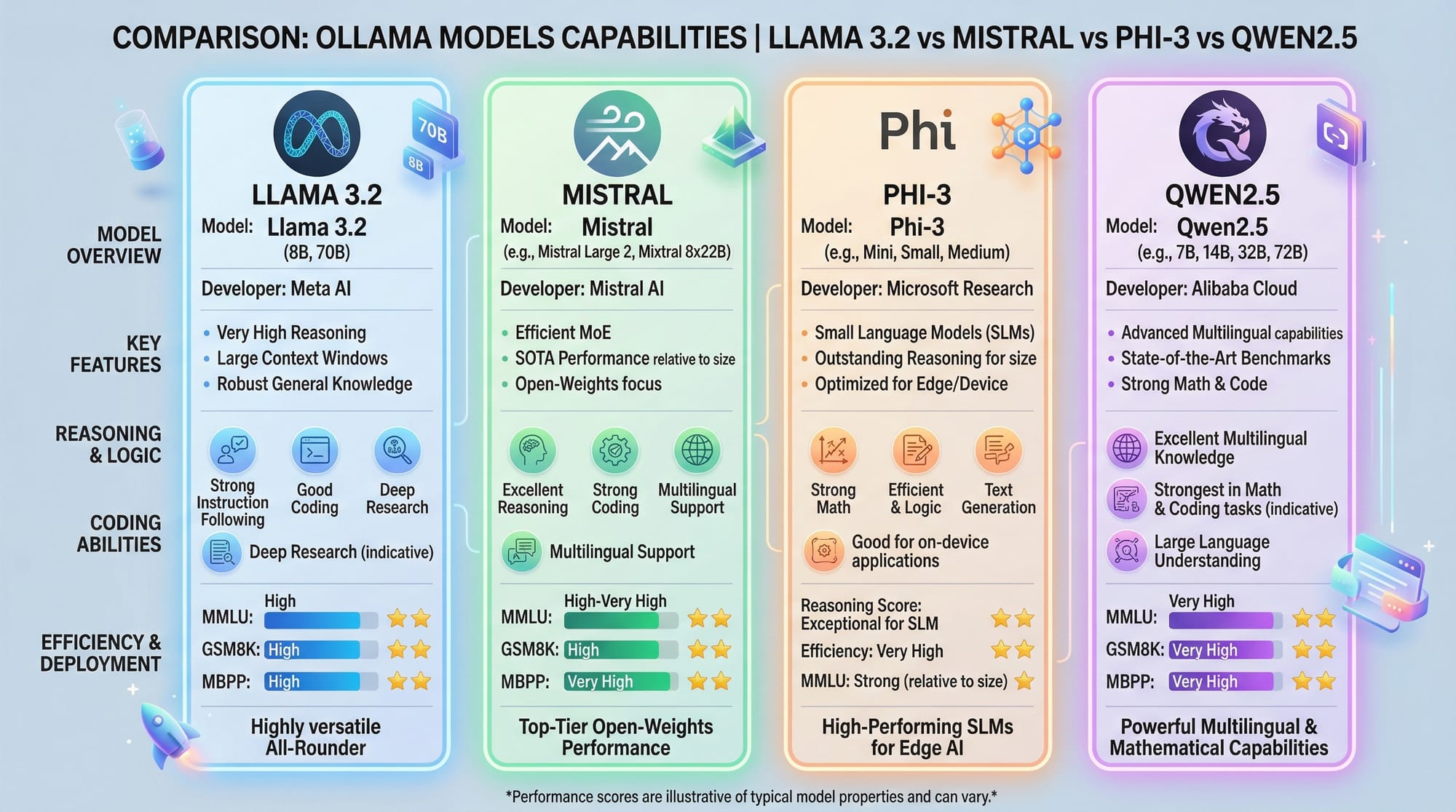
Ollama is a platform that allows you to run LLMs locally on your machine. It provides both a command-line interface and Python library for interacting with models like Llama 3.2, Mistral, Phi-3, and Qwen2.5. By running models locally, you can generate text, answer questions, summarize content, and integrate AI features into your applications.
Example:
# Run Llama 3.2 locally using Ollama CLI
ollama run llama3.2
This command downloads the model if it is not already installed and starts a chat interface for interaction.
How LLMs Work Locally
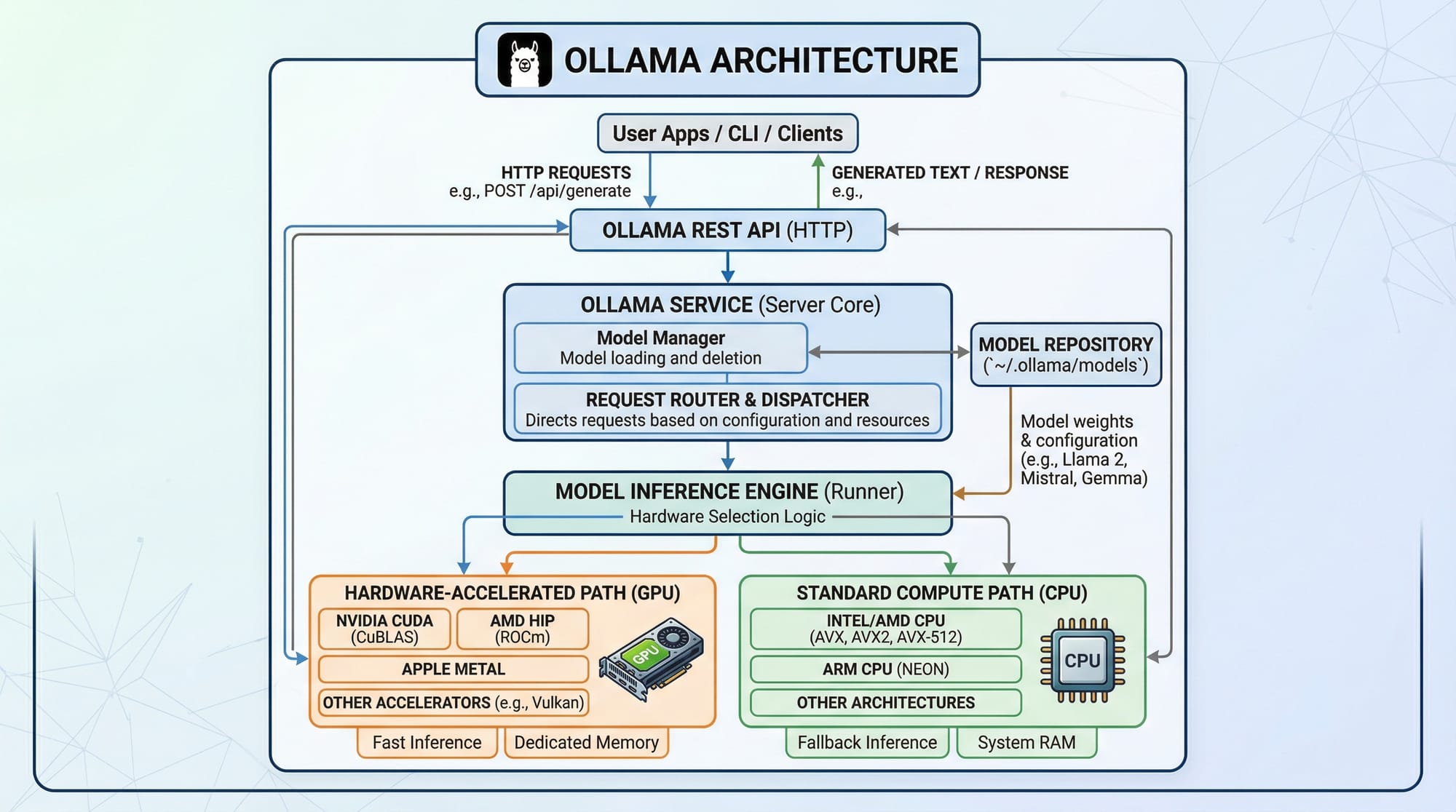
When you run an LLM locally, the model weights are stored on your machine. The CPU or GPU handles computations for text generation. Running LLMs locally provides benefits like faster response times, data privacy, and offline access.
Ollama Python Library
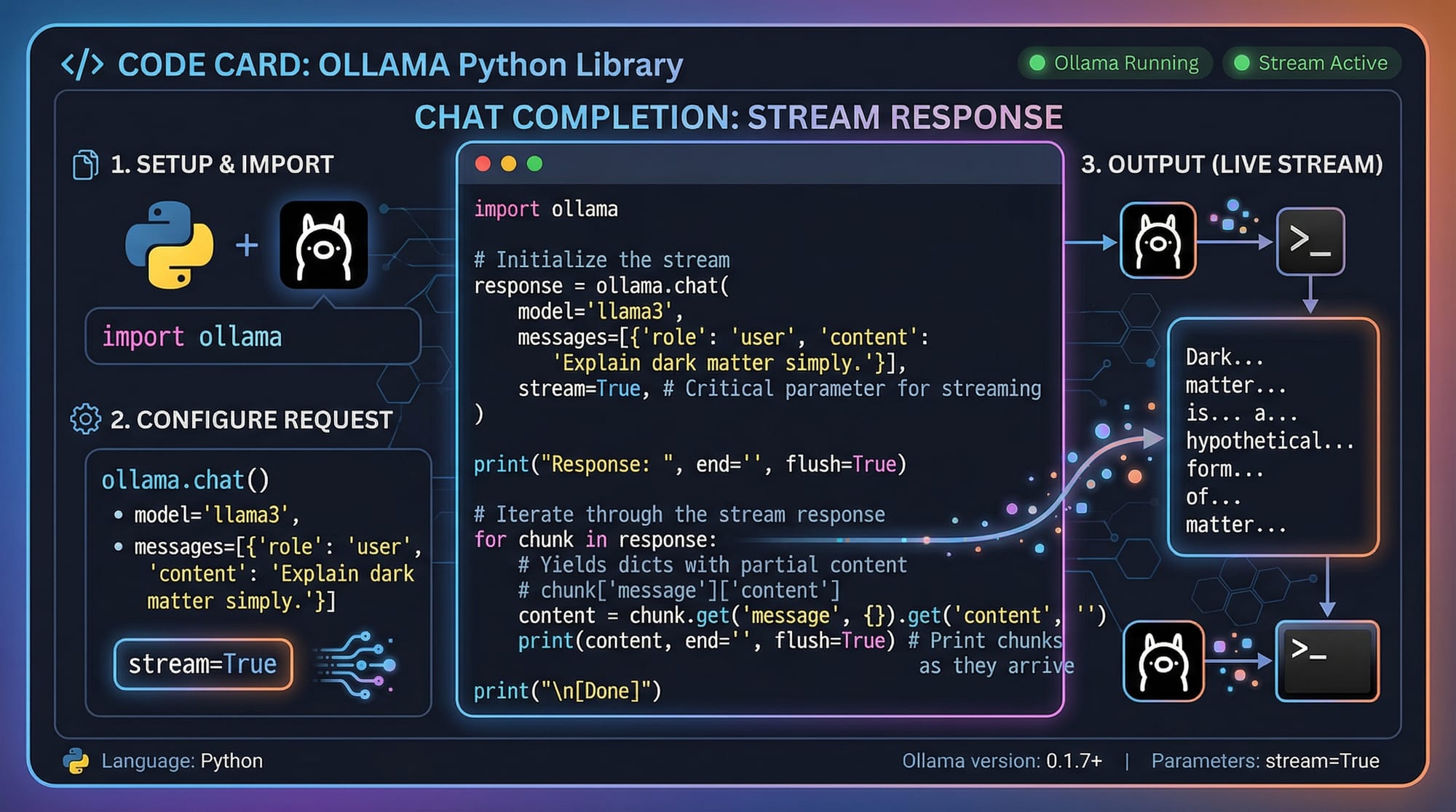
The Ollama Python library allows developers to integrate local LLMs into Python applications. With simple functions, you can generate responses, perform chat completions, and stream data in real-time.
Example:
from ollama import Ollama

ollama = Ollama()
response = ollama.chat(model='llama3.2', prompt='Hello, my name is Ahmad from Lahore.')
print(response)
Line-by-line explanation:
from ollama import Ollama: Import the Ollama class.ollama = Ollama(): Create an instance to interact with LLMs.ollama.chat(...): Send a prompt to the model.print(response): Display the AI-generated response.
Practical Code Examples
Example 1: Simple Chatbot in Python
Create a simple chatbot that responds to user messages.
from ollama import Ollama

# Initialize Ollama instance
ollama = Ollama()

# User input
user_message = 'Hi Fatima! How can I manage my PKR budget for Lahore travel?'

# Generate AI response
bot_response = ollama.chat(model='llama3.2', prompt=user_message)

# Output the response
print('Bot:', bot_response)
Explanation:
- Initialize the Ollama object.
- Take a message from the user.
- Send the message to the local LLM using
chat(). - Print the AI-generated response.
Example 2: Real-World Application — Summarizing Student Notes
from ollama import Ollama

# Initialize Ollama
ollama = Ollama()

# Sample student notes
notes = '''Today in AI class in Karachi, Ahmad and Fatima learned about natural language processing. Key points included tokenization, embeddings, and local LLM usage.'''

# Generate summary
summary = ollama.chat(model='llama3.2', prompt=f'Summarize these notes: {notes}')
print('Summary:', summary)
Explanation:
- This code takes detailed student notes.
- Sends them to the local LLM for summarization.
- Outputs a concise summary for easier revision.
Common Mistakes & How to Avoid Them
Mistake 1: Model Not Found
If you try to run a model that hasn’t been downloaded:
ollama run unknown_model
Fix:
ollama pull llama3.2  # Download the model first
ollama run llama3.2
Mistake 2: Out of Memory Errors
Running large models on machines with limited RAM or GPU memory can cause errors.
Fix:
- Use smaller models like Mistral or Phi-3.
- Reduce batch size in Python code.
- Ensure your system has sufficient swap memory.
Practice Exercises
Exercise 1: Create a Local Chat Assistant
Problem: Build a chatbot that can answer questions about Pakistan’s cities.
from ollama import Ollama
ollama = Ollama()
prompt = 'What is the population of Islamabad?'
response = ollama.chat(model='llama3.2', prompt=prompt)
print(response)
Solution:
- Run this Python code.
- The local model will generate an answer based on knowledge and context.
Exercise 2: Generate Study Questions
Problem: Convert your lecture notes into multiple-choice questions.
notes = 'Fatima studied AI concepts including LLMs, tokenization, embeddings, and Python integration.'
response = ollama.chat(model='llama3.2', prompt=f'Create 3 MCQs from these notes: {notes}')
print(response)
Solution:
- The local AI will generate 3 MCQs automatically.
Frequently Asked Questions
What is Ollama?
Ollama is a platform that allows you to run LLMs locally on your machine, providing offline AI capabilities and privacy.
How do I install Ollama Python?
Install via pip: pip install ollama. Ensure Python 3.10+ is installed.
Can I run LLMs without GPU?
Yes, Ollama supports CPU inference, but GPU will speed up computations significantly.
Which models can I run locally?
Popular models include Llama 3.2, Mistral, Phi-3, and Qwen2.5.
Is it safe to run models locally in Pakistan?
Yes, your data stays on your machine, and no external servers are required.
Summary & Key Takeaways
- Ollama enables running LLMs locally, reducing costs and ensuring privacy.
- Python integration allows easy use in scripts and applications.
- Always download models before running to avoid errors.
- CPU-only machines can run LLMs, but GPUs are recommended for speed.
- Practical exercises like chatbots and note summarization help reinforce learning.
Next Steps & Related Tutorials
- Explore our Large Language Models Tutorial for advanced concepts.
- Check the Claude AI Tutorial to compare cloud vs local models.
- Learn about Prompt Engineering to improve model outputs.
- Try our Python AI Projects for hands-on experience with local AI applications.
Test Your Python Knowledge!
Finished reading? Take a quick quiz to see how much you've learned from this tutorial.