Operating Systems for Developers Processes Memory & I/O
Introduction
Operating systems (OS) are the backbone of every computer system—from your laptop in Lahore to servers running applications in Karachi’s tech startups. For developers, understanding operating systems for developers: processes, memory & I/O is not just theory—it directly impacts how efficiently your programs run, scale, and interact with hardware.
In this operating systems tutorial, we will break down essential OS concepts like processes, threads, memory management, and input/output (I/O). Whether you are building a web app, a mobile app, or working on backend systems, these concepts help you write faster, safer, and more scalable code.
For Pakistani students, especially those studying Computer Science at universities like Iqra University or FAST, mastering these fundamentals gives you a strong advantage in internships, freelancing, and job interviews.
Prerequisites
Before diving into this tutorial, you should have:
- Basic programming knowledge (Python, C, or Java preferred)
- Understanding of variables, loops, and functions
- Familiarity with command-line basics (Linux or Windows terminal)
- Basic knowledge of how a computer works (CPU, RAM, storage)
Core Concepts & Explanation
Processes and Threads: The Building Blocks of Execution
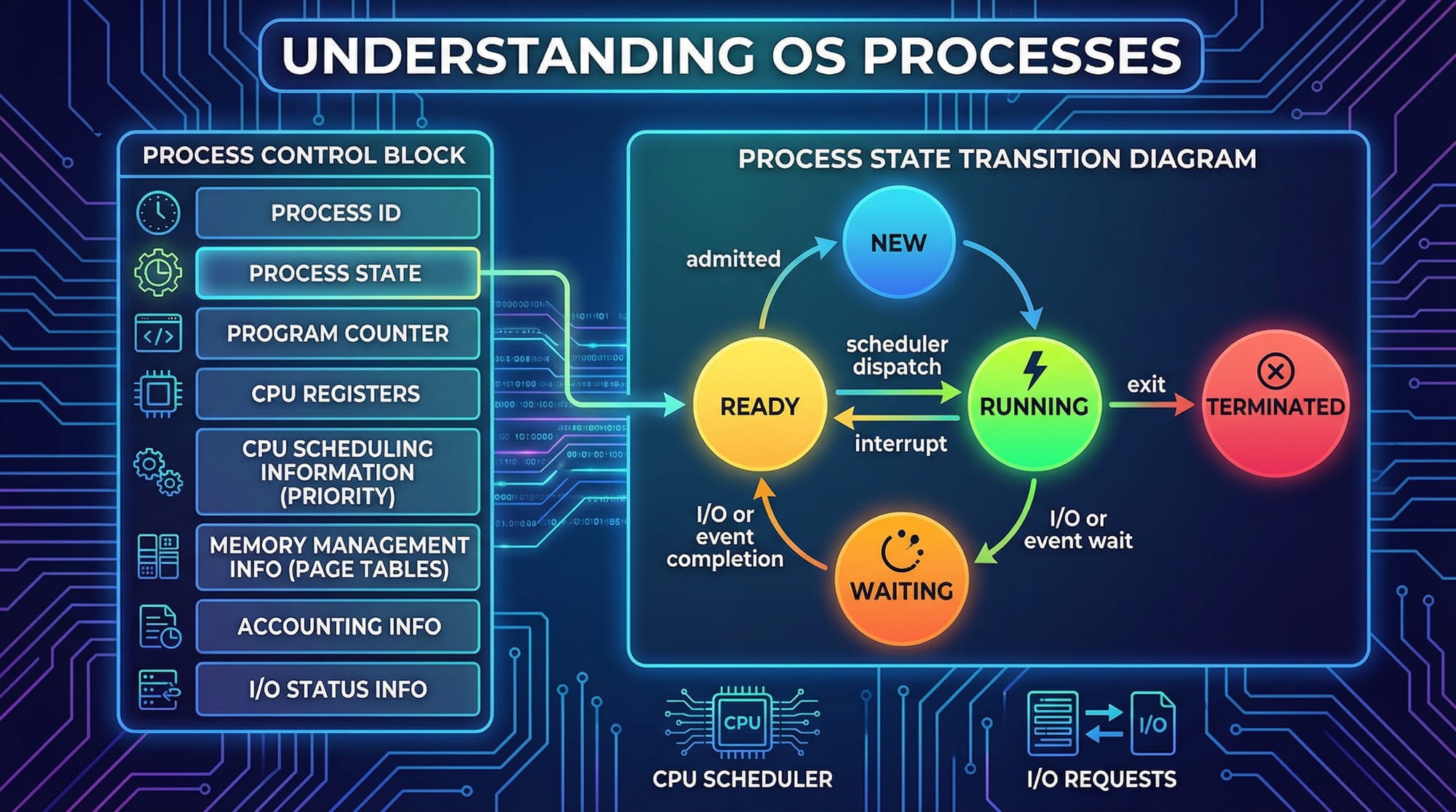
A process is a program in execution. For example, when Ahmad opens a web browser in Islamabad, the OS creates a process for it.
Each process contains:
- Program code
- Memory space
- Open files
- CPU state (stored in Process Control Block - PCB)
Process States:
- New → Process is being created
- Running → Currently executing
- Waiting → Waiting for I/O (e.g., file read)
- Terminated → Finished execution
A thread is a lightweight unit of execution within a process.
- A process can have multiple threads (multithreading)
- Threads share memory, making them faster but riskier (race conditions)
Example:
Ali runs a food delivery app backend. Each incoming order request can be handled by a separate thread, improving performance.
Memory Management: Virtual Memory and Paging
Memory management ensures efficient use of RAM.
Key concepts:
- Virtual Memory: Each process gets its own virtual address space
- Paging: Memory divided into fixed-size blocks (pages)
- Page Table: Maps virtual addresses to physical memory
- TLB (Translation Lookaside Buffer): Speeds up address translation
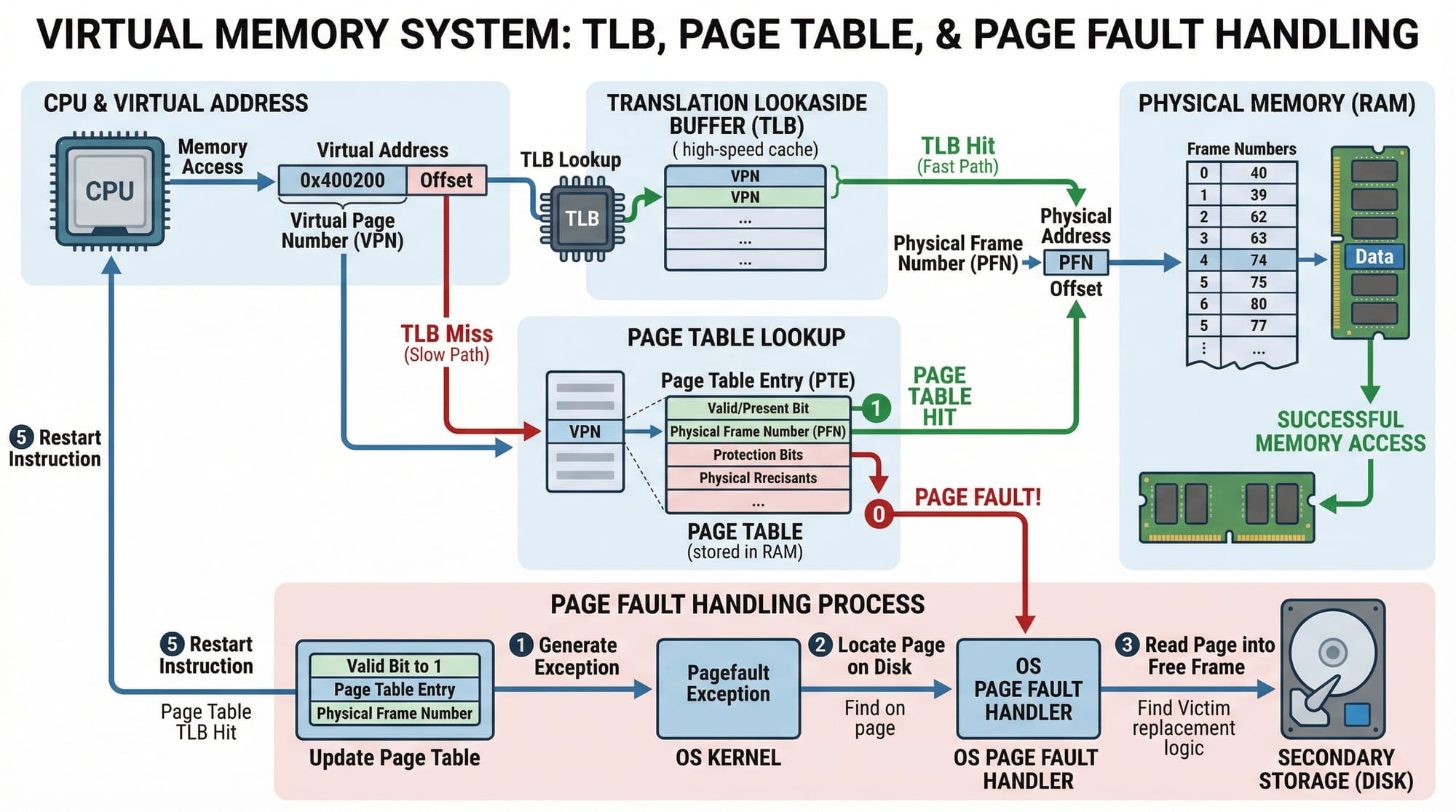
Page Fault
Occurs when required data is not in RAM → OS loads it from disk.
Example:
Fatima opens a large Excel file on her laptop. If RAM is full, the OS swaps data between RAM and disk using paging.
CPU Scheduling and Context Switching
The OS decides which process gets CPU time using scheduling algorithms:
- First-Come First-Serve (FCFS)
- Round Robin
- Priority Scheduling
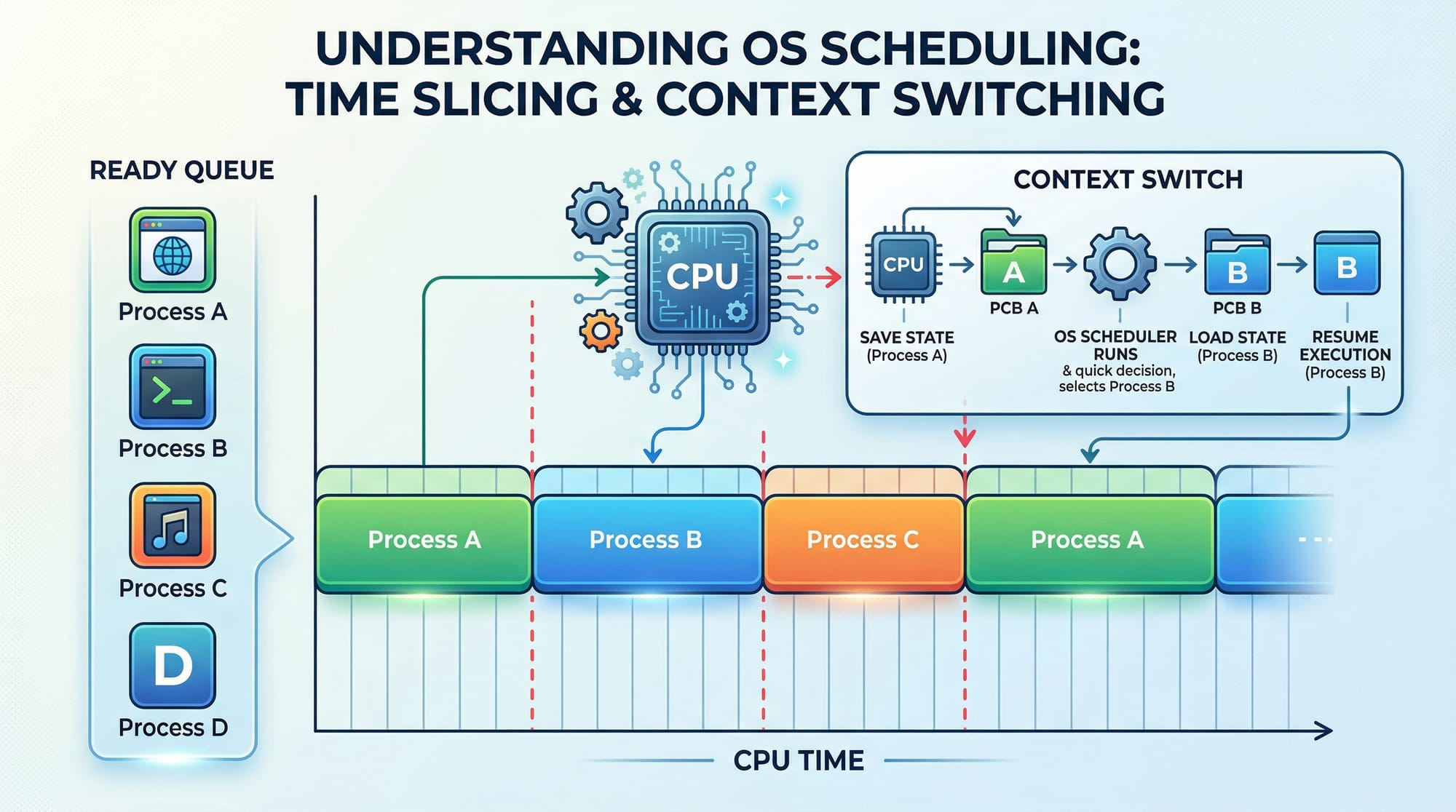
Context Switching:
When CPU switches from one process to another, saving/restoring state.
Example:
While coding in VS Code, listening to music, and browsing—your OS rapidly switches between processes.
Input/Output (I/O) Management
I/O operations involve communication with devices:
- Keyboard
- Disk
- Network
Types:
- Blocking I/O → Program waits
- Non-blocking I/O → Program continues execution
Example:
A banking app in Pakistan waits for server response (blocking I/O) when checking account balance.
Practical Code Examples
Example 1: Creating a Process using Python
import os

# Create a new process using fork
pid = os.fork()

if pid == 0:
    print("This is the child process")
else:
    print("This is the parent process")
Explanation:
import os→ Imports OS moduleos.fork()→ Creates a new processpid == 0→ Child process conditionelse→ Parent process
Output:
Both parent and child run independently.
Example 2: Real-World Application — Running Commands with subprocess
import subprocess

# Run a system command
result = subprocess.run(["ls", "-l"], capture_output=True, text=True)

print("Output:")
print(result.stdout)
Explanation:
import subprocess→ Used for running system commandssubprocess.run()→ Executes command"ls -l"→ Lists files (Linux)capture_output=True→ Captures outputresult.stdout→ Displays output
Real-world use:
A developer in Karachi builds a deployment tool that runs shell commands automatically.
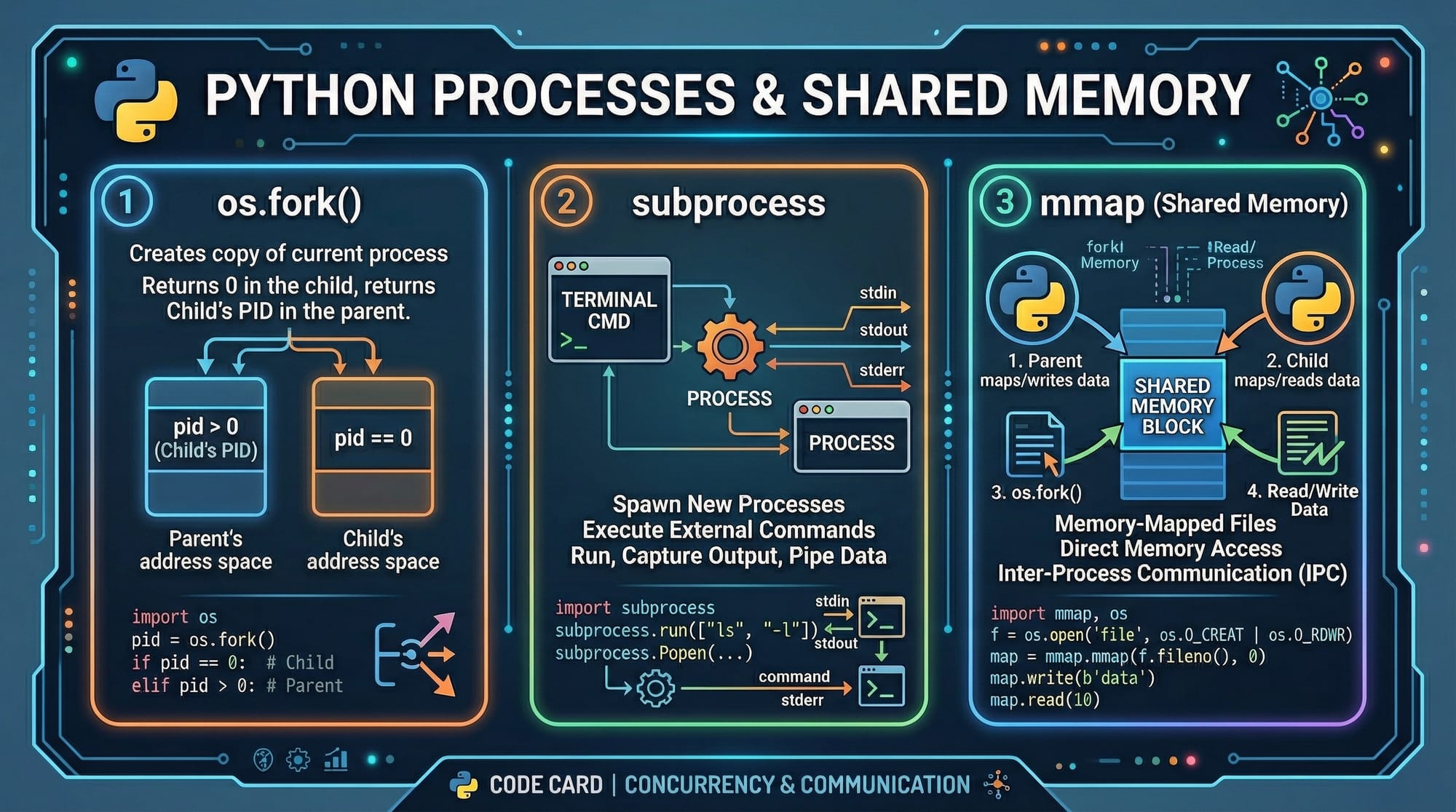
Example 3: Shared Memory using mmap
import mmap

# Create a memory-mapped file
with open("data.txt", "r+b") as f:
    mm = mmap.mmap(f.fileno(), 0)
    print(mm.readline())
Explanation:
mmap→ Maps file into memoryf.fileno()→ File descriptormm.readline()→ Reads from memory
Use case:
High-performance applications like databases.
Common Mistakes & How to Avoid Them
Mistake 1: Ignoring Race Conditions
When multiple threads access shared data.
# Wrong approach
counter += 1
Fix:
Use locks
import threading

lock = threading.Lock()

with lock:
    counter += 1
Mistake 2: Memory Leaks
Failing to release memory.
# Wrong
data = [1] * 1000000
Fix:
Use proper cleanup
del data
Practice Exercises
Exercise 1: Create Multiple Processes
Problem:
Write a Python program that creates two child processes.
Solution:
import os

for i in range(2):
    pid = os.fork()
    if pid == 0:
        print(f"Child process {i}")
        break
Explanation:
- Loop runs twice
os.fork()creates processes- Each child prints its ID
Exercise 2: Simulate Threading
Problem:
Create two threads printing messages.
Solution:
import threading

def task(name):
    print(f"Running {name}")

t1 = threading.Thread(target=task, args=("Ali",))
t2 = threading.Thread(target=task, args=("Fatima",))

t1.start()
t2.start()

t1.join()
t2.join()
Explanation:
threading.Thread()→ Creates threadstart()→ Starts executionjoin()→ Waits for completion
Frequently Asked Questions
What is a process in operating systems?
A process is a program in execution with its own memory space and resources. It includes code, data, and execution state managed by the OS.
How do I differentiate between a thread and a process?
A process is independent with its own memory, while threads share memory within a process. Threads are faster but require careful synchronization.
What is virtual memory and why is it important?
Virtual memory allows programs to use more memory than physically available by using disk storage. It ensures smooth multitasking and isolation.
How do I handle I/O efficiently in applications?
Use non-blocking or asynchronous I/O to prevent delays. This is especially useful in web servers and real-time applications.
Why is context switching important?
Context switching allows multiple processes to share the CPU efficiently. It ensures multitasking but introduces overhead.
Summary & Key Takeaways
- Processes and threads are core to program execution
- Memory management uses virtual memory and paging
- CPU scheduling ensures fair resource allocation
- I/O management affects application performance
- Synchronization is critical in multithreaded programs
- Understanding OS concepts improves real-world coding skills
Next Steps & Related Tutorials
To deepen your knowledge, explore these tutorials on theiqra.edu.pk:
- Learn the basics of system commands in Linux Basics
- Understand concurrency in Java Multithreading
- Dive into backend performance optimization
- Explore system design fundamentals for scalable apps
These topics will strengthen your understanding of os concepts, processes, threads, and memory, helping you become a more confident and capable developer in Pakistan’s growing tech industry.
Test Your Python Knowledge!
Finished reading? Take a quick quiz to see how much you've learned from this tutorial.