Postman Tutorial API Testing Collections & Mock Servers
Introduction
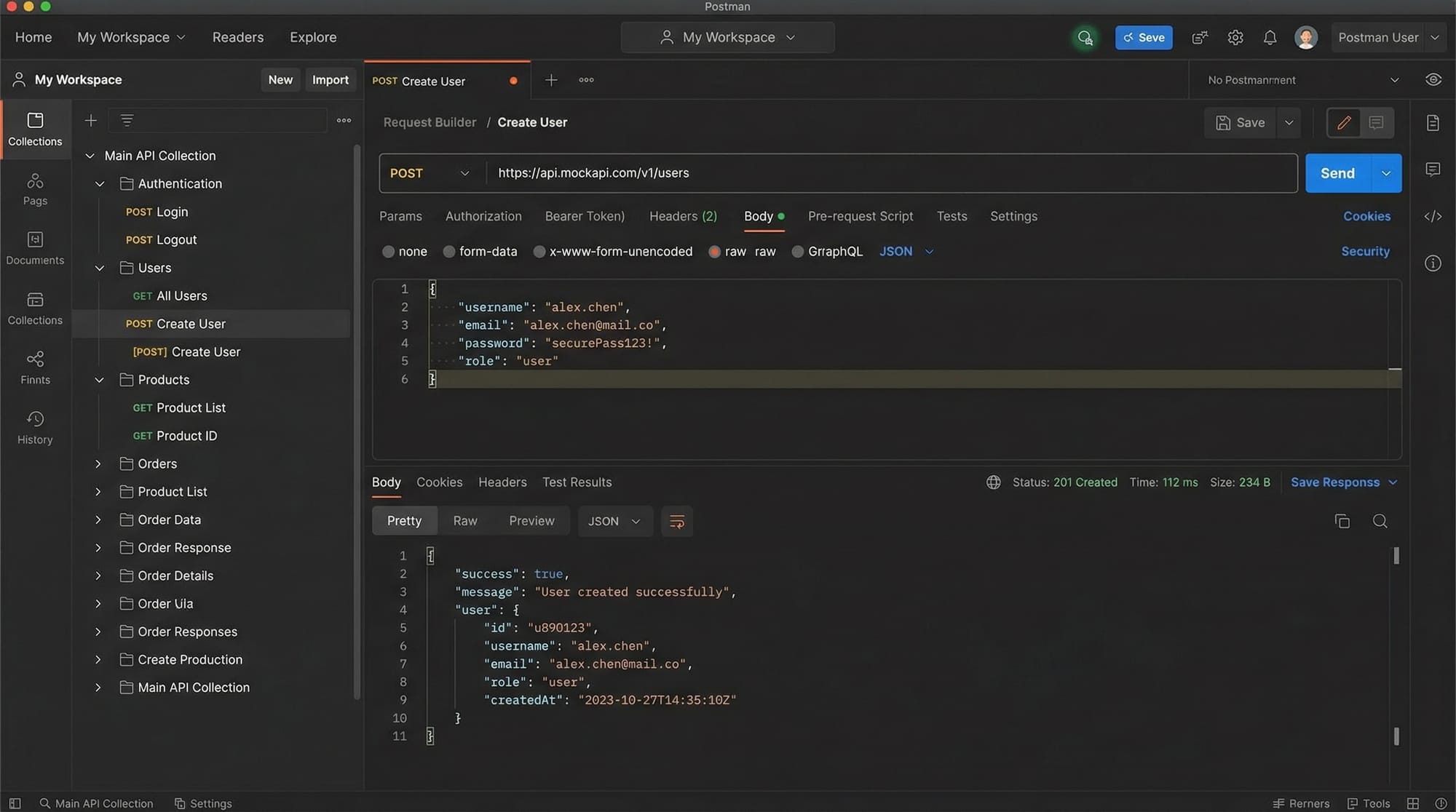
Postman Tutorial: API Testing, Collections & Mock Servers is a beginner-friendly guide to learning how to test and manage APIs using Postman, one of the most popular tools used by developers worldwide.
APIs (Application Programming Interfaces) are the backbone of modern applications—from mobile apps in Lahore to banking systems in Karachi. If you’re building or testing APIs, Postman helps you send requests, inspect responses, organize your work, and even simulate backend servers.
For Pakistani students learning web development, mastering Postman is extremely valuable because:
- It’s widely used in software houses across Islamabad, Lahore, and Karachi
- It simplifies API testing without needing complex code
- It helps in freelancing and job readiness
Whether you're Ahmad building a REST API project or Fatima testing a university system, this tutorial will guide you step by step.
Prerequisites
Before starting this postman tutorial, you should have:
- Basic understanding of HTTP methods (GET, POST, PUT, DELETE)
- Familiarity with REST APIs
- Basic knowledge of JSON format
- Installed Postman application or access to Postman Web
- A beginner-level understanding of web development
👉 If you're new, check out REST API Tutorial and VS Code Setup on theiqra.edu.pk first.
Core Concepts & Explanation
Understanding API Requests in Postman
In api testing postman, everything starts with a request. A request consists of:
- Method (GET, POST, etc.)
- URL (API endpoint)
- Headers (metadata like authentication)
- Body (data sent to server)
Example
A GET request to fetch users:
GET https://jsonplaceholder.typicode.com/users
👉 When you send this request in Postman:
- You’ll see a list of users in JSON format
- Postman shows status codes (200 OK, 404 Not Found, etc.)
Working with Postman Collections
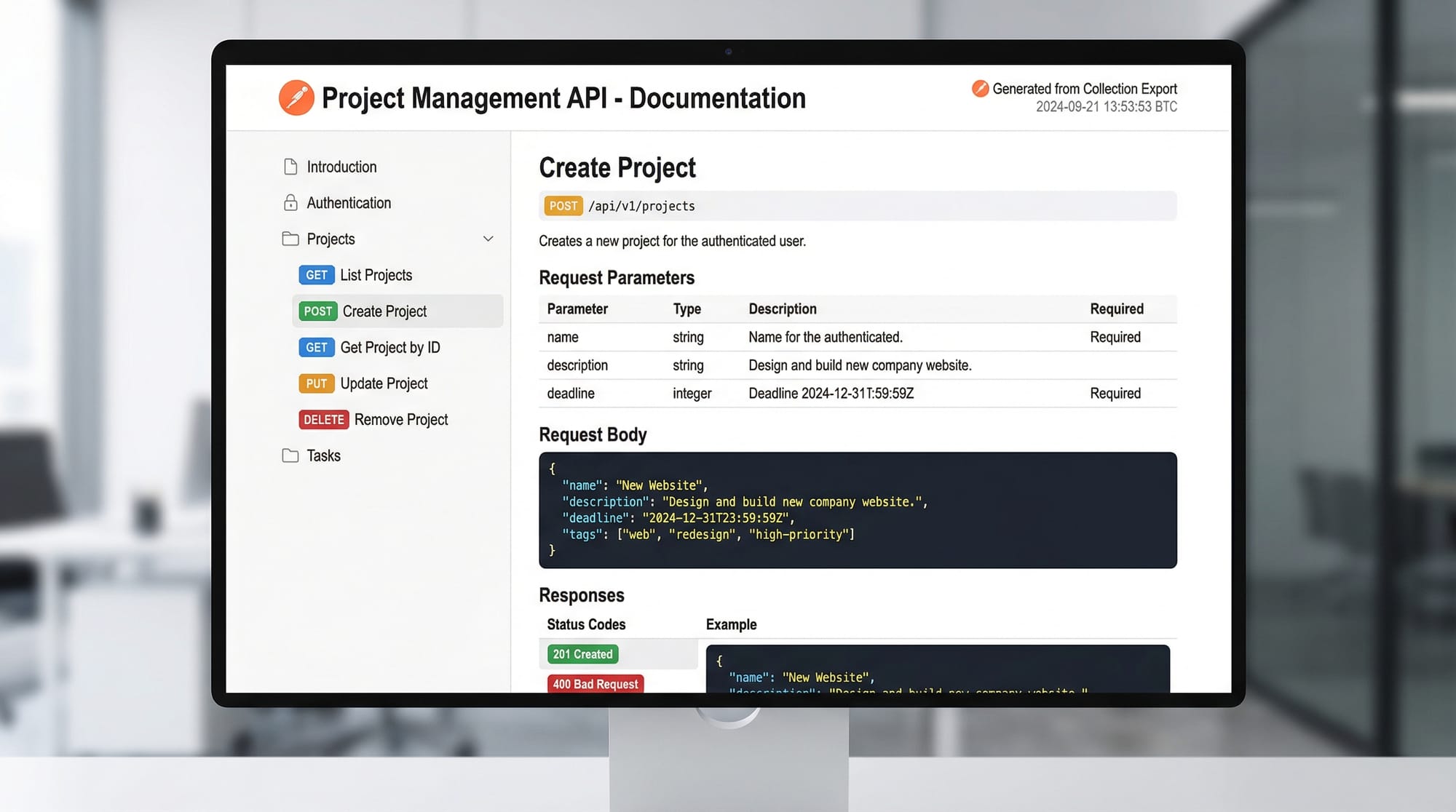
Postman collections allow you to organize multiple API requests into folders.
Think of it like this:
- Ahmad is building a student management system
- He creates a collection named
Student API - Inside it, he stores requests like:
- Get Students
- Add Student
- Update Student
Benefits:
- Easy organization
- Reusable requests
- Team collaboration
- Export/import functionality
Environment Variables & Automation
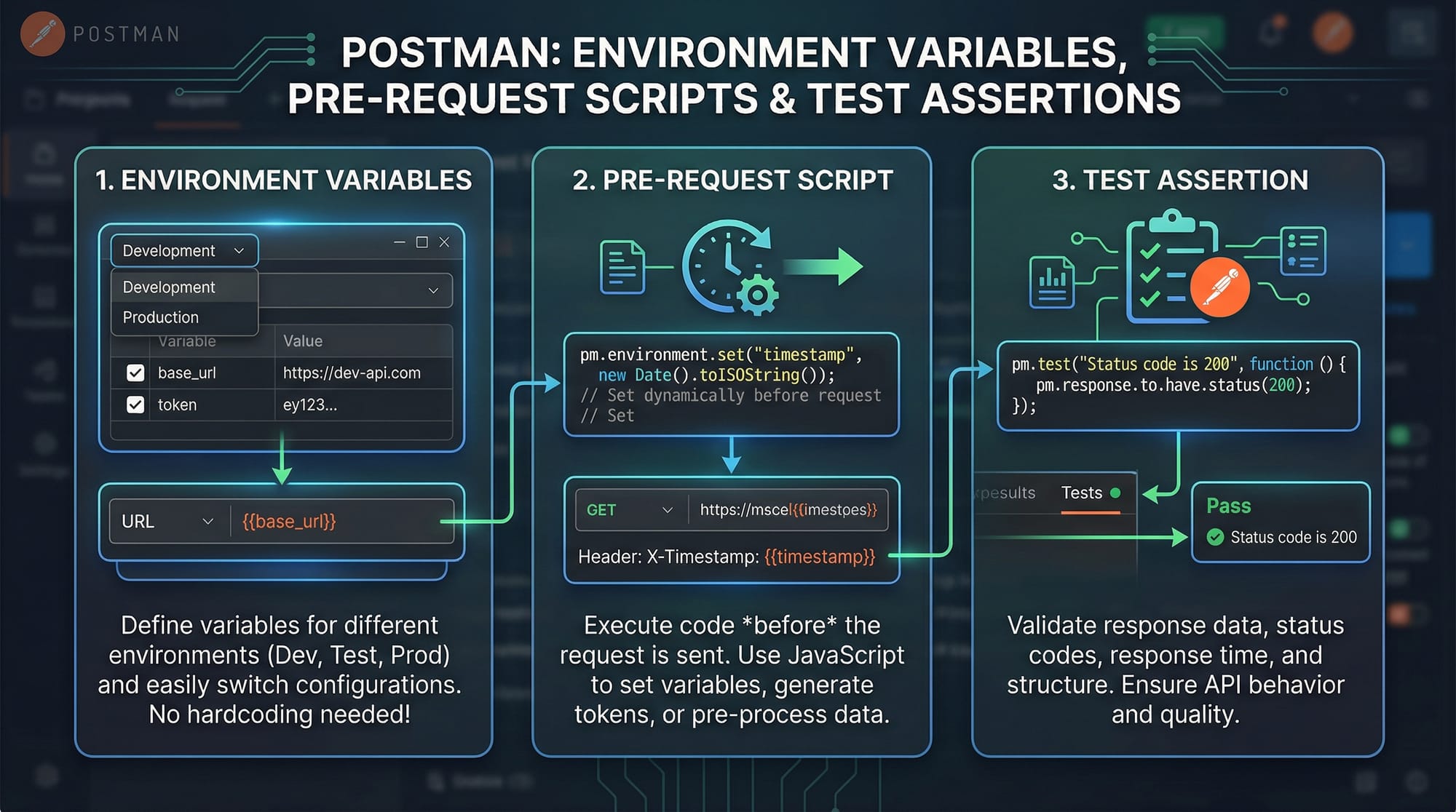
Postman supports environment variables, which are extremely useful.
Example:
{{base_url}}/students
Instead of writing full URLs repeatedly, you define:
base_url = https://api.myproject.com
👉 This is helpful when:
- Switching between development and production
- Working in teams
Practical Code Examples
Example 1: Sending a GET Request
GET https://jsonplaceholder.typicode.com/posts/1
Explanation:
GET→ Retrieves data from the serverhttps://jsonplaceholder.typicode.com/posts/1→ API endpoint/posts/1→ Fetches a single post
👉 When you click Send in Postman:
- You’ll receive JSON response
- Status code:
200 OK - Response body contains post details
Example 2: Real-World Application (POST Request for Student Data)
Imagine Ali is building a student system in Lahore.
POST https://example.com/api/students
Content-Type: application/json

{
  "name": "Ali Khan",
  "city": "Lahore",
  "fee": 50000
}
Explanation:
POST→ Sends data to serverContent-Type: application/json→ Defines data format- JSON body:
"name"→ Student name"city"→ Location"fee"→ Fee in PKR
👉 Response may include:
{
  "id": 101,
  "name": "Ali Khan",
  "city": "Lahore",
  "fee": 50000
}
Example 3: Writing Test Scripts in Postman
pm.test("Status code is 200", function () {
    pm.response.to.have.status(200);
});
Explanation:
pm.test()→ Defines a test case"Status code is 200"→ Test namepm.response.to.have.status(200)→ Checks response status
👉 This helps automate testing.
Common Mistakes & How to Avoid Them
Mistake 1: Incorrect HTTP Method
Many beginners use GET instead of POST.
❌ Wrong:
GET /users
✅ Correct:
POST /users
👉 Fix: Always check API documentation.
Mistake 2: Missing Headers
Forgetting headers like Content-Type causes errors.
❌ Wrong:
POST /students
✅ Correct:
POST /students
Content-Type: application/json
👉 Fix: Add required headers before sending requests.
Mistake 3: Not Using Environment Variables
Hardcoding URLs makes testing difficult.
❌ Wrong:
https://dev.api.com/users
https://prod.api.com/users
✅ Correct:
{{base_url}}/users
Practice Exercises
Exercise 1: Fetch User Data
Problem:
Send a GET request to retrieve user data.
Solution:
GET https://jsonplaceholder.typicode.com/users/1
Explanation:
- Retrieves user with ID 1
- Response shows user details
Exercise 2: Create New Student
Problem:
Send a POST request to create a student.
Solution:
POST https://example.com/api/students
Content-Type: application/json

{
  "name": "Fatima Ahmed",
  "city": "Karachi",
  "fee": 60000
}
Explanation:
- Sends new student data
- Server stores and returns response
Frequently Asked Questions
What is Postman used for?
Postman is used for API testing, allowing developers to send requests, analyze responses, and automate tests without writing full backend code.
How do I create a collection in Postman?
Click on “Collections” → “New Collection” → Add requests. It helps organize APIs for projects.
What are Postman environment variables?
They are reusable variables like {{base_url}} that simplify managing URLs and configurations across environments.
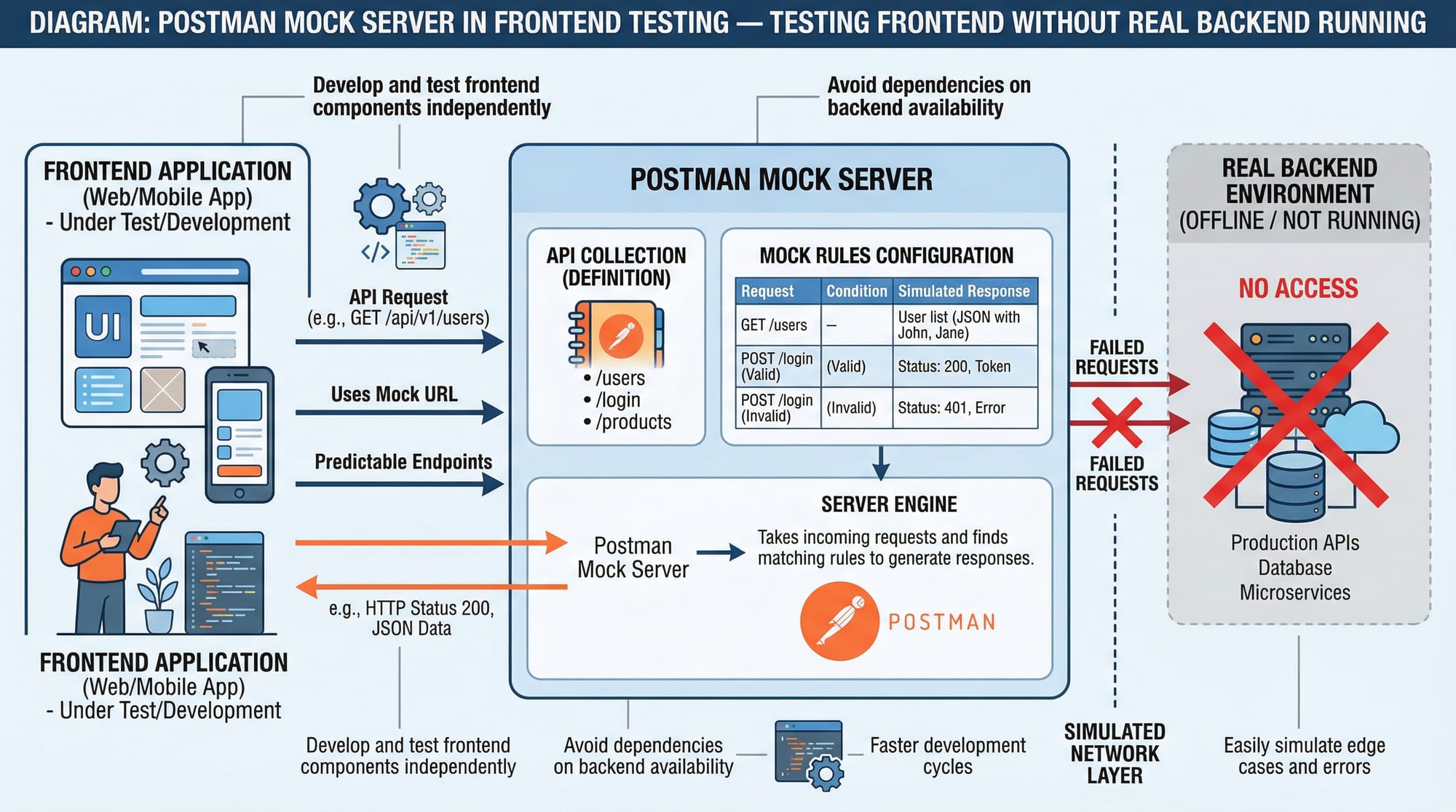
Can I test APIs without backend?
Yes, Postman provides mock servers to simulate API responses without a real backend.
Is Postman free to use?
Yes, Postman offers a free version with essential features for students and beginners.
Summary & Key Takeaways
- Postman is a powerful tool for API testing
- You can send requests (GET, POST, etc.) easily
- Postman collections help organize your work
- Environment variables simplify API management
- Test scripts automate validation
- Mock servers allow frontend testing without backend
Next Steps & Related Tutorials
To continue learning, explore these tutorials on theiqra.edu.pk:
- Learn the basics with REST API Tutorial
- Set up your coding environment with VS Code Setup
- Understand backend APIs with Node.js API Development Guide
- Practice testing with JavaScript Fetch API Tutorial
👉 Mastering Postman will give you a strong foundation in backend and API development, opening doors to internships and jobs across Pakistan’s growing tech industry.
Test Your Python Knowledge!
Finished reading? Take a quick quiz to see how much you've learned from this tutorial.