Prompt Caching & LLM Cost Optimization Guide 2026
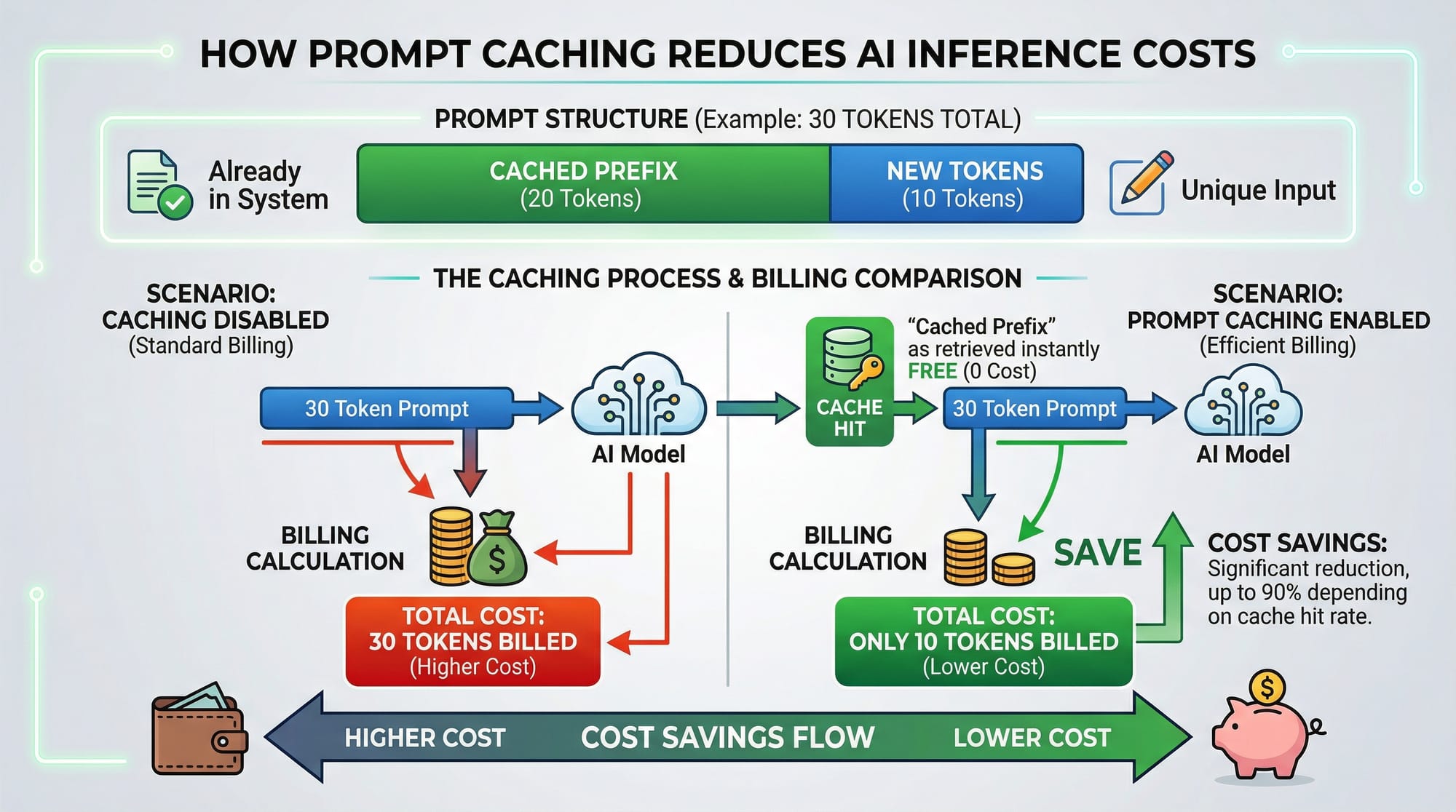
Artificial Intelligence (AI) is transforming programming and automation worldwide. For Pakistani students in cities like Lahore, Karachi, and Islamabad, understanding prompt caching and LLM cost optimization is essential to efficiently use large language models (LLMs) without overspending.
This guide will explain how caching works, why it reduces costs, and practical ways to implement it—especially using Anthropic prompt caching. By the end, you will have actionable knowledge to save PKR while building powerful AI applications.
Prerequisites
Before diving in, you should have:
- Basic Python programming knowledge
- Understanding of APIs and HTTP requests
- Familiarity with LLMs (like OpenAI’s GPT or Anthropic’s Claude)
- Basic knowledge of tokenization (prompt vs completion tokens)
- Optional: Experience with AI frameworks like LangChain
Having these skills will make it easier to implement caching strategies efficiently.
Core Concepts & Explanation
Understanding Prompt Caching
Prompt caching is the technique of storing previously generated responses or parts of prompts so that LLMs do not recompute repeated information.
Example:
Ahmad is building a chatbot for his university. Every time a user asks a question like “What is AI?”, the full context of previous messages is sent to the LLM. By caching the repeated introduction prompt, only the new user query needs to be processed.
Benefits:
- Reduces token usage
- Saves cost (especially important in PKR for students)
- Improves response latency
Token Cost Optimization
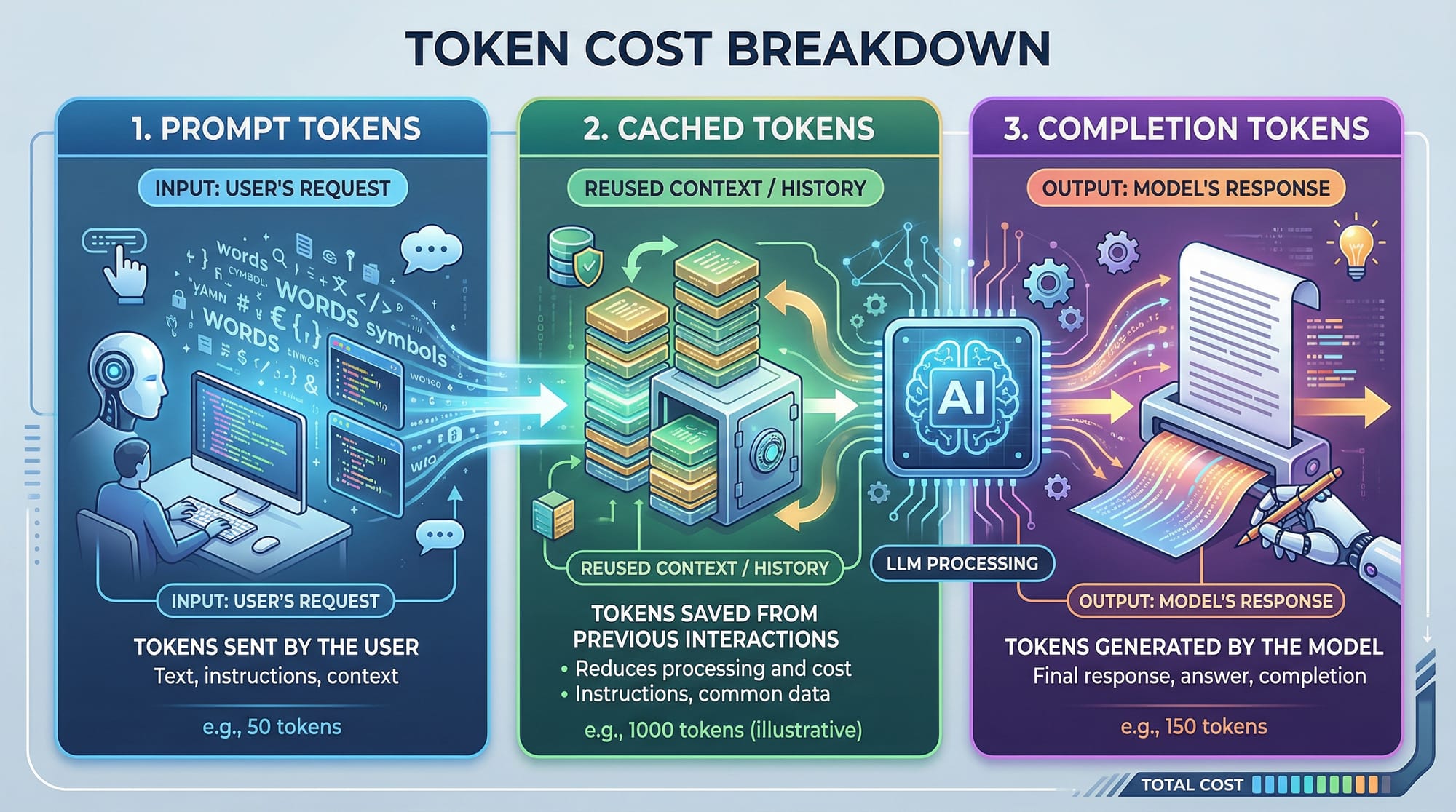
LLMs charge based on the number of tokens processed: prompt tokens + completion tokens. Prompt caching helps optimize this.
Example:
# Example: Calculating token cost
prompt_tokens = 50  # Cached prefix
completion_tokens = 30  # New output
total_tokens = prompt_tokens + completion_tokens
cost_per_token = 0.002  # Example cost in USD
total_cost = total_tokens * cost_per_token
print(f"Total cost: ${total_cost}")
Explanation:
prompt_tokens = 50→ Only the cached part counts oncecompletion_tokens = 30→ Tokens generated for the new querytotal_cost→ Final estimated cost in USD or PKR
By caching repeated prompts, Pakistani students can save money when using APIs in long-running projects.
Anthropic Prompt Caching
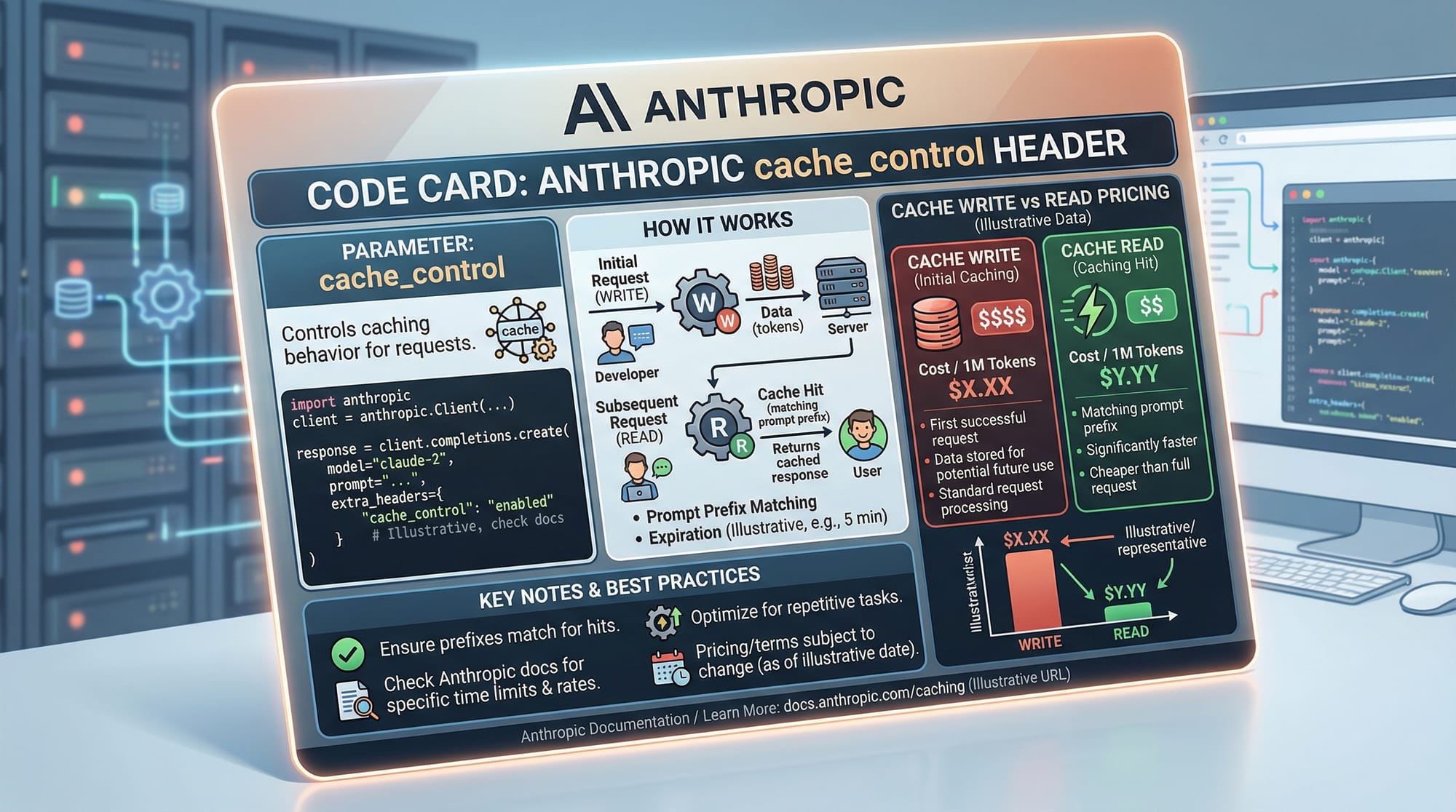
Anthropic’s Claude API provides built-in prompt caching via cache_control headers:
read→ Retrieve cached output (no cost for repeated prompt tokens)write→ Save output to cache for future queries
Example:
import requests

url = "https://api.anthropic.com/v1/complete"
headers = {
    "Authorization": "Bearer YOUR_API_KEY",
    "Anthropic-Cache-Control": "write"
}
data = {
    "prompt": "Explain AI in simple terms for students in Lahore.",
    "max_tokens": 100
}
response = requests.post(url, headers=headers, json=data)
print(response.json())
Explanation:
Authorization→ Your API key for authenticationAnthropic-Cache-Control: write→ Saves the response for future cache readsprompt→ Input questionmax_tokens→ Limits output sizeresponse.json()→ Prints the cached output
Using this strategy repeatedly reduces token costs for common queries, such as classroom tutorials or coding exercises.
Practical Code Examples
Example 1: Simple Prompt Caching
from anthropic import Anthropic

client = Anthropic(api_key="YOUR_API_KEY")

# Define a common prompt prefix
prompt_prefix = "You are a helpful AI tutor for students in Karachi. "

# User query
user_question = "Explain machine learning in simple words."

# Combine cached prefix with new query
full_prompt = prompt_prefix + user_question

response = client.completions.create(
    model="claude-v1",
    prompt=full_prompt,
    max_tokens_to_sample=150,
    cache_control="read"
)

print(response["completion"])
Line-by-Line Explanation:
- Import Anthropic client
- Initialize client with API key
- Set
prompt_prefix→ cached part of the prompt - Get user query → the dynamic part
- Combine prefix + query →
full_prompt completions.create→ request to the LLMcache_control="read"→ reduces token billing for cached prefix- Print AI response
Example 2: Real-World Application — Chatbot for Islamabad University
from anthropic import Anthropic

client = Anthropic(api_key="YOUR_API_KEY")

# Common instructions
prefix = "You are a tutor helping students at Islamabad University learn Python. "

# Incoming student queries
queries = [
    "What is a Python list?",
    "Explain loops with examples.",
    "How does a function work in Python?"
]

for q in queries:
    prompt = prefix + q
    response = client.completions.create(
        model="claude-v1",
        prompt=prompt,
        max_tokens_to_sample=100,
        cache_control="read"
    )
    print(f"Query: {q}\nAnswer: {response['completion']}\n")
Explanation:
- Loop over multiple student questions
- Cached
prefixreduces cost per query - Students in Islamabad save money while getting instant answers
Common Mistakes & How to Avoid Them
Mistake 1: Ignoring Cache Headers
Many beginners forget to set cache_control headers. Without them, LLMs will regenerate cached prompts, increasing PKR costs unnecessarily.
Fix: Always define cache_control="read" for frequent prompts and write when saving new cache entries.
Mistake 2: Over-Caching Dynamic Content
Caching everything, including user-specific information, can lead to irrelevant answers. For example, Ahmad’s previous homework question should not be cached for Fatima’s query.
Fix: Cache only static or repeated prompt prefixes. Keep dynamic queries separate.
Practice Exercises
Exercise 1: Cache the Welcome Message
Problem: Save a common welcome message for repeated students to reduce token costs.
Solution:
prefix = "Welcome to Ali's AI tutoring bot in Lahore! "
user_input = "Explain recursion in Python."
full_prompt = prefix + user_input
# Use cache_control read/write
Exercise 2: Optimize Token Cost for FAQs
Problem: Cache frequently asked questions about AI.
Solution:
faq_prefix = "FAQs for AI students in Karachi: "
faq_question = "What is NLP?"
full_prompt = faq_prefix + faq_question
# Send request with cache_control="read"
Frequently Asked Questions
What is prompt caching?
Prompt caching stores repeated prompts to avoid recomputation, reducing token usage and cost.
How do I implement prompt caching with Claude API?
Use the cache_control header: write to store responses, read to retrieve cached responses.
Can caching reduce PKR costs for Pakistani students?
Yes, caching reduces the number of billed tokens, saving money on repeated queries.
Should I cache dynamic user queries?
No, cache only static or repeated prefixes; dynamic queries should remain uncached to avoid irrelevant answers.
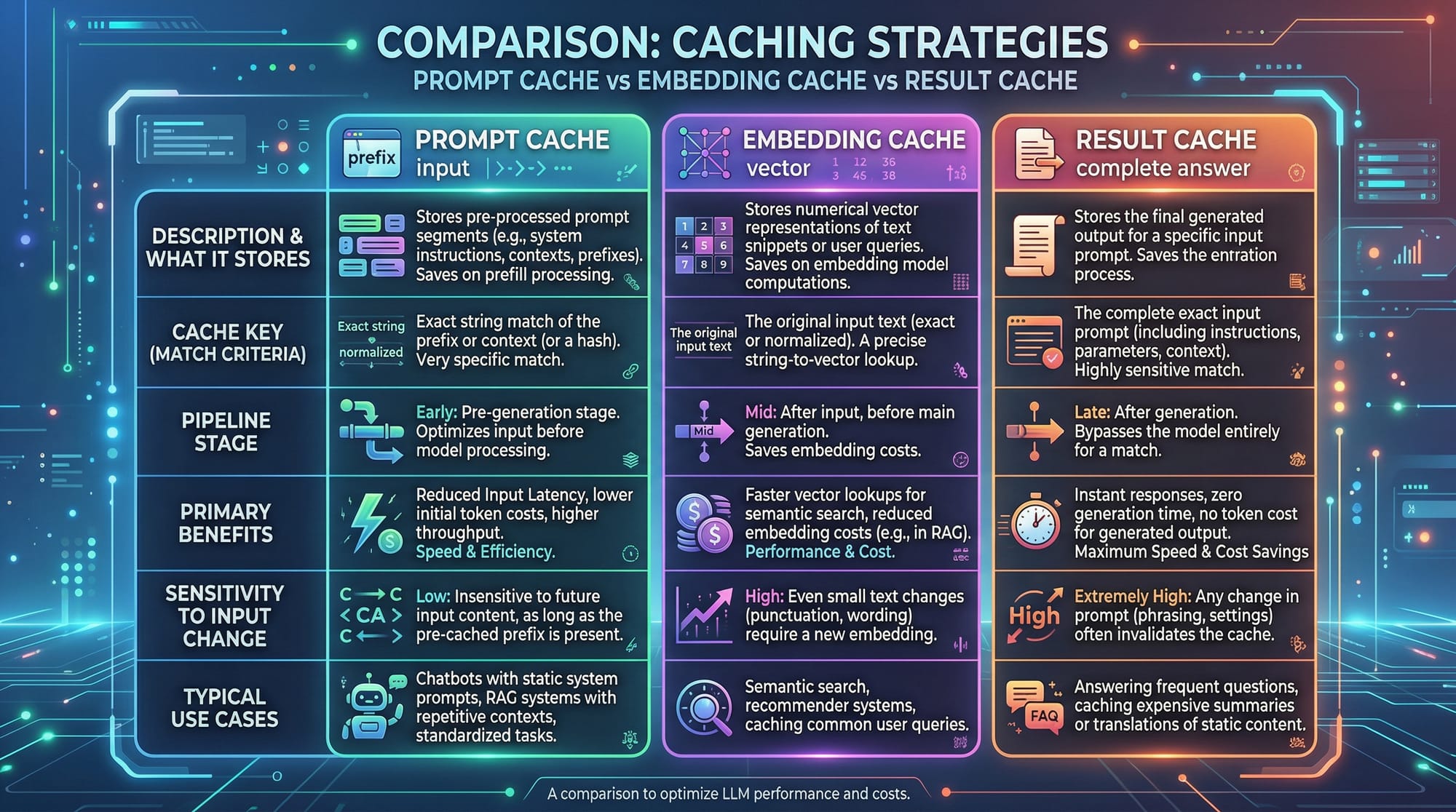
What is the difference between prompt cache and embedding cache?
Prompt cache stores repeated prompts; embedding cache stores vector embeddings for similarity searches—both reduce compute cost but in different ways.
Summary & Key Takeaways
- Prompt caching reduces LLM token usage and saves costs.
- Anthropic’s
cache_controlheaders enable efficient caching. - Only cache static/repeated prompts, not dynamic user data.
- Pakistani students can save significant PKR on AI projects.
- Combining caching with cost estimation improves project efficiency.
- Real-world applications include chatbots, FAQs, and classroom AI tools.
Next Steps & Related Tutorials
- Learn Claude API Tutorial for advanced AI integration.
- Explore ChatGPT API Tutorial for building cost-effective bots.
- Understand LangChain & LLM Workflows for complex AI pipelines.
- Dive into Embedding Caching & Vector Stores for optimized search.
This tutorial is designed for Pakistani students learning AI in 2026 and provides practical, cost-effective strategies to maximize LLM efficiency while minimizing expenses.
If you want, I can also create all placeholder images (prompt caching diagram, token breakdown, cache strategy comparison) tailored for this tutorial in a style suitable for theiqra.edu.pk. It would make the tutorial visually complete.
Do you want me to generate those images next?
Test Your Python Knowledge!
Finished reading? Take a quick quiz to see how much you've learned from this tutorial.