Prompt Engineering for Code Generation & Debugging
Introduction
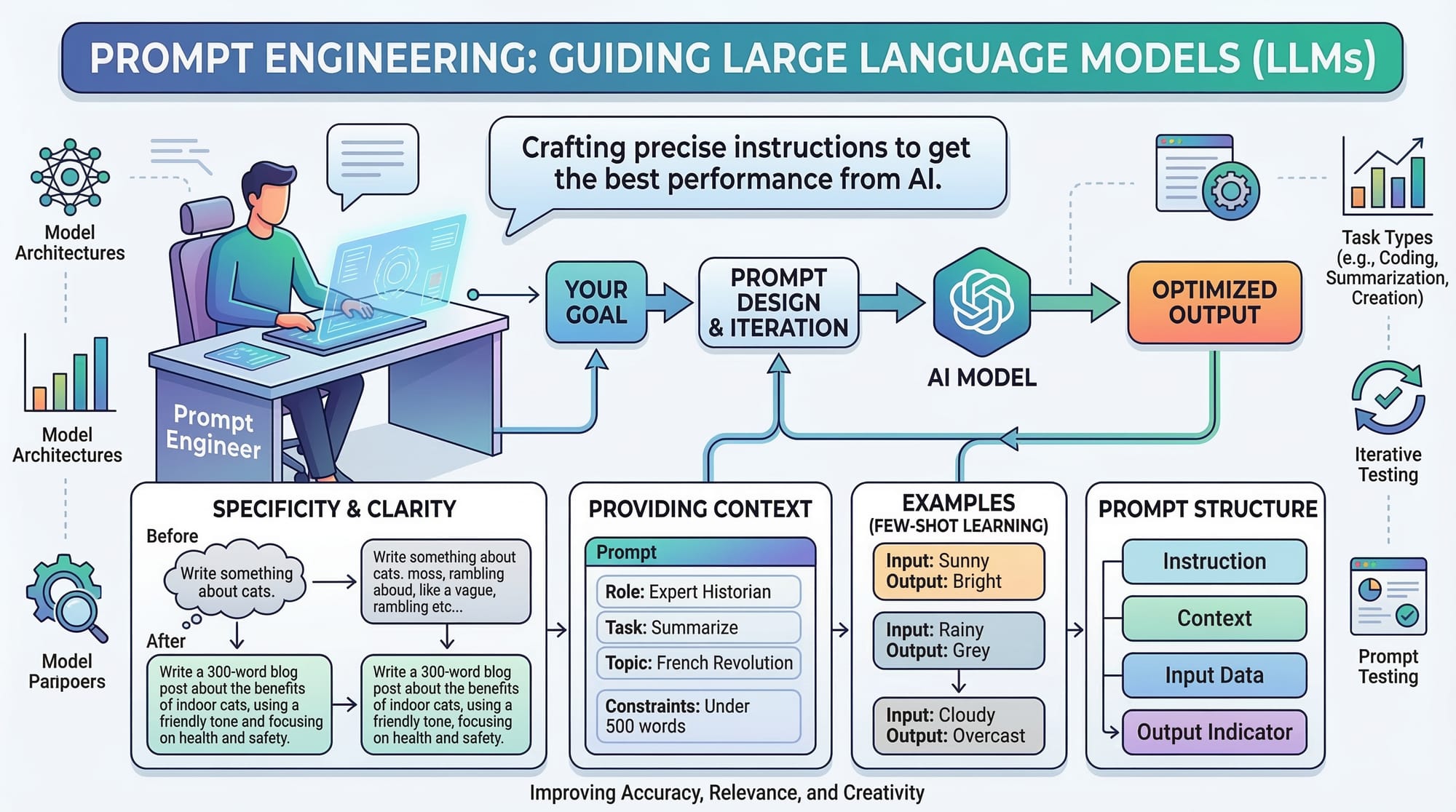
Prompt engineering for code generation & debugging is the skill of crafting effective instructions for AI tools to write, optimize, and debug code. With the rise of AI-powered coding assistants like GitHub Copilot, ChatGPT, and others, Pakistani students now have an opportunity to enhance their programming efficiency, learn faster, and develop real-world applications with AI support.
By understanding prompt engineering, students can guide AI models to produce accurate code snippets, reduce repetitive tasks, and even troubleshoot issues in their programs. For example, a student in Lahore could use AI to quickly generate a payment module for an e-commerce project in PKR currency, or debug a Python function that calculates tax for small businesses in Karachi.
Prerequisites
Before diving into prompt engineering for code generation, you should have:
- Basic programming knowledge in at least one language (Python, JavaScript, Java, etc.)
- Familiarity with coding environments and IDEs (VS Code, PyCharm)
- Understanding of algorithms and basic data structures
- Basic knowledge of AI concepts and machine learning terminology
- Access to AI coding tools like GitHub Copilot, ChatGPT, or OpenAI Codex
Core Concepts & Explanation
Understanding AI Code Generation
AI code generation involves instructing an AI model to produce code based on a descriptive prompt. A well-crafted prompt ensures that the AI writes code that is correct, efficient, and matches the intended purpose.
Example:
# Prompt: Create a function to calculate student grades based on marks

def calculate_grade(marks):
    if marks >= 90:
        return 'A+'
    elif marks >= 80:
        return 'A'
    elif marks >= 70:
        return 'B'
    elif marks >= 60:
        return 'C'
    else:
        return 'F'

# Ahmad in Islamabad can use this function to calculate grades for his classmates
Line-by-line explanation:
def calculate_grade(marks):defines a function that takesmarksas input.if marks >= 90:checks if the marks are 90 or more and returnsA+.- Subsequent
elifstatements categorize the grades. else: return 'F'assigns a failing grade if none of the conditions are met.
Crafting Effective Coding Prompts
The quality of AI-generated code depends on the prompt. Clear, detailed, and context-rich prompts produce better results.
Example Prompt: "Write a Python function that calculates total sales in PKR for a shop in Karachi, considering a 5% discount for sales above PKR 10,000."
Tips for effective prompts:
- Specify the programming language
- Include input/output expectations
- Provide context (currency, location, user scenarios)
- Mention constraints or edge cases

Debugging with AI Prompts
AI can also help debug code. Providing the buggy code and asking the AI to identify and fix errors is a key technique.
Example:
# Original buggy code
def divide_numbers(a, b):
    return a / b

# Issue: What happens if b is 0?
Prompt to AI: "Fix the divide_numbers function to handle division by zero and return 'Error' if denominator is zero."
AI-Generated Fix:
def divide_numbers(a, b):
    if b == 0:
        return 'Error'
    return a / b
Explanation:
- Added a condition to check if
bis zero. - Returns a user-friendly error message instead of crashing.
Practical Code Examples
Example 1: Generating a Contact Form in HTML & JavaScript
<!-- Contact form for a website in Lahore -->
<form id="contactForm">
  Name: <input type="text" id="name"><br>
  Email: <input type="email" id="email"><br>
  Message: <textarea id="message"></textarea><br>
  <button type="submit">Submit</button>
</form>
<script>
document.getElementById('contactForm').addEventListener('submit', function(event) {
    event.preventDefault();
    const name = document.getElementById('name').value;
    const email = document.getElementById('email').value;
    const message = document.getElementById('message').value;
    console.log(`Message from ${name} (${email}): ${message}`);
});
</script>
Explanation:
- HTML form collects name, email, and message.
- JavaScript prevents page reload on submit.
- Logs the input values to the console.
Example 2: Real-World Application — PKR Expense Tracker
# Fatima wants to track her monthly expenses in PKR
expenses = {'Rent': 25000, 'Groceries': 8000, 'Transport': 5000, 'Internet': 2000}

def total_expense(expenses):
    total = 0
    for item, cost in expenses.items():
        total += cost  # Add each cost to total
    return total

print(f"Total monthly expense: PKR {total_expense(expenses)}")
Explanation:
expensesdictionary stores categories and amounts.- Function
total_expenseiterates over each item and sums the costs. - Prints the total in PKR.
Common Mistakes & How to Avoid Them
Mistake 1: Vague Prompts
Vague prompts like "Write a Python program" may produce generic code that doesn’t meet your needs.
Fix: Provide context and details. Example: "Write a Python program to calculate income tax for salaried individuals in Islamabad, considering PKR currency."
Mistake 2: Ignoring Edge Cases
Not considering edge cases leads to errors, e.g., division by zero or empty inputs.
Fix: Include constraints in prompts: "Ensure function handles empty input lists and returns 0 if no data is available."
Practice Exercises
Exercise 1: PKR Salary Calculator
Problem: Create a Python function that calculates net salary after a 10% tax for employees in Karachi.
# Solution
def net_salary(salary):
    tax = salary * 0.10  # 10% tax
    return salary - tax

print(net_salary(50000))  # Output for salary in PKR
Explanation:
- Calculates 10% tax and subtracts from gross salary.
Exercise 2: Validate Email Input
Problem: Write a function that checks if an email is valid for a contact form in Lahore.
import re

def validate_email(email):
    pattern = r'^[\w\.-]+@[\w\.-]+\.\w+$'
    return bool(re.match(pattern, email))

print(validate_email('[email protected]'))  # True
print(validate_email('ali.com'))          # False
Explanation:
- Uses regex to validate the email format.
- Returns
Trueif valid,Falseotherwise.
Frequently Asked Questions
What is prompt engineering for code?
It is the practice of designing precise instructions for AI models to generate or debug code effectively.
How do I write better coding prompts?
Be clear, specific, include language, inputs/outputs, context, and constraints.
Can AI replace learning programming?
No. AI assists with repetitive tasks and debugging, but understanding fundamentals is essential.
Which tools support AI code generation?
GitHub Copilot, OpenAI Codex, and ChatGPT are popular options.
How do I debug code with AI?
Provide the AI with the buggy code and describe the intended behavior; AI can suggest fixes or optimizations.
Summary & Key Takeaways
- Prompt engineering improves AI-generated code accuracy and relevance.
- Detailed and context-rich prompts produce better results.
- AI can assist in debugging and handling edge cases.
- Practice with real-world examples, such as PKR expense trackers or Lahore-based applications.
- Understanding programming fundamentals remains critical.
Next Steps & Related Tutorials
- Learn more with our tutorial on Python for Beginners to strengthen coding basics.
- Explore Advanced GitHub Copilot Prompts for improved AI code generation.
- Check out Data Structures in Python to enhance algorithm skills.
- Read AI-Assisted Web Development for practical web applications.
Test Your Python Knowledge!
Finished reading? Take a quick quiz to see how much you've learned from this tutorial.