Pulumi Tutorial Modern Infrastructure as Code 2026
Introduction
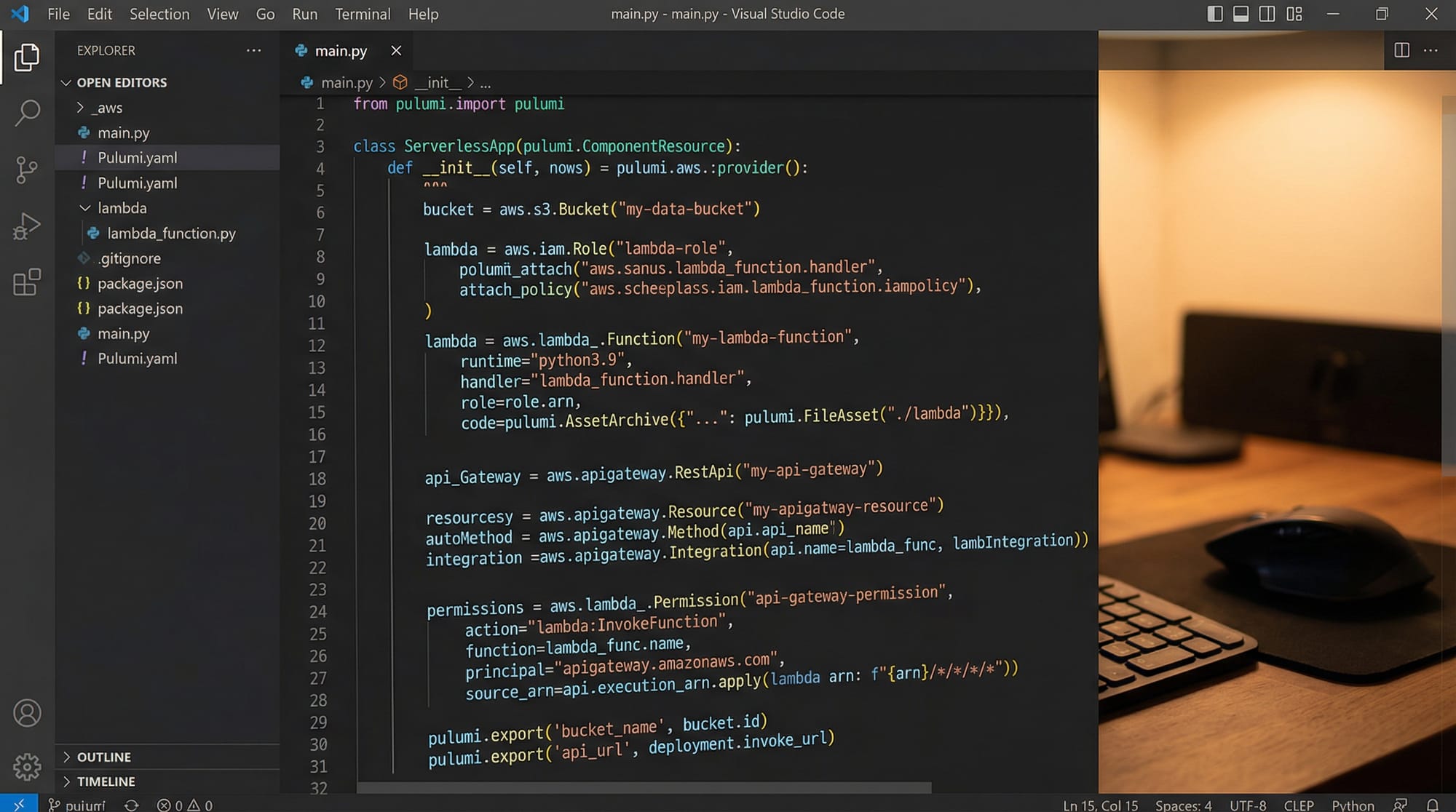
Infrastructure as Code (IaC) has become an essential skill for modern developers and DevOps engineers. In this Pulumi Tutorial: Modern Infrastructure as Code 2026, you’ll learn how to define, deploy, and manage cloud infrastructure using real programming languages like Python and TypeScript instead of domain-specific languages.
Unlike traditional tools, Pulumi allows you to write infrastructure code using familiar syntax, making it easier for Pakistani students already comfortable with programming. Whether you are Ahmad building a startup in Lahore, Fatima learning cloud computing in Islamabad, or Ali preparing for DevOps interviews, Pulumi can significantly boost your skillset.
This tutorial also explores pulumi vs terraform comparisons and shows how to use pulumi python typescript effectively in real-world scenarios.
Prerequisites
Before starting this Pulumi tutorial, you should have:
- Basic understanding of cloud platforms (AWS, Azure, or GCP)
- Familiarity with programming (Python or TypeScript preferred)
- Knowledge of:
- CLI tools
- Git basics
- JSON/YAML concepts
- Installed:
- Node.js or Python
- Pulumi CLI (
pulumi) - Cloud provider CLI (e.g., AWS CLI)
💡 Tip for Pakistani students: If you’ve already studied basic AWS services like S3, EC2, and Lambda, you’re ready to go.
Core Concepts & Explanation
Infrastructure as Code with Real Programming Languages
Pulumi’s biggest advantage is that it lets you use real programming languages instead of writing configuration files like Terraform’s HCL.
Example (Python)
import pulumi
import pulumi_aws as aws

bucket = aws.s3.Bucket("my-bucket")

pulumi.export("bucket_name", bucket.id)
Explanation
import pulumi
Imports Pulumi core SDK.import pulumi_aws as aws
Imports AWS provider for Pulumi.bucket = aws.s3.Bucket("my-bucket")
Creates an S3 bucket resource.pulumi.export("bucket_name", bucket.id)
Exports the bucket name as output.
👉 This looks just like normal Python — no new language to learn!
Pulumi State, Config, and Outputs
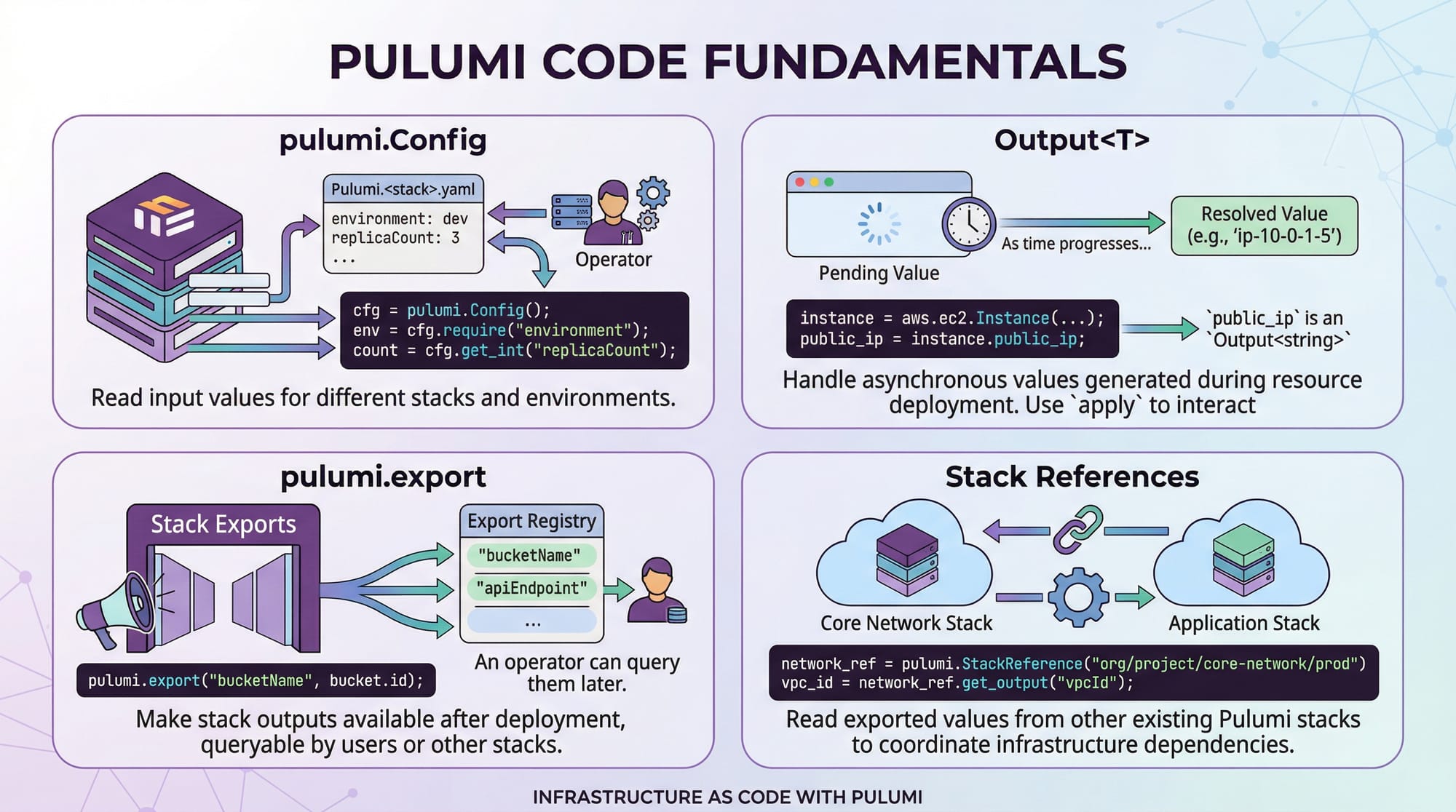
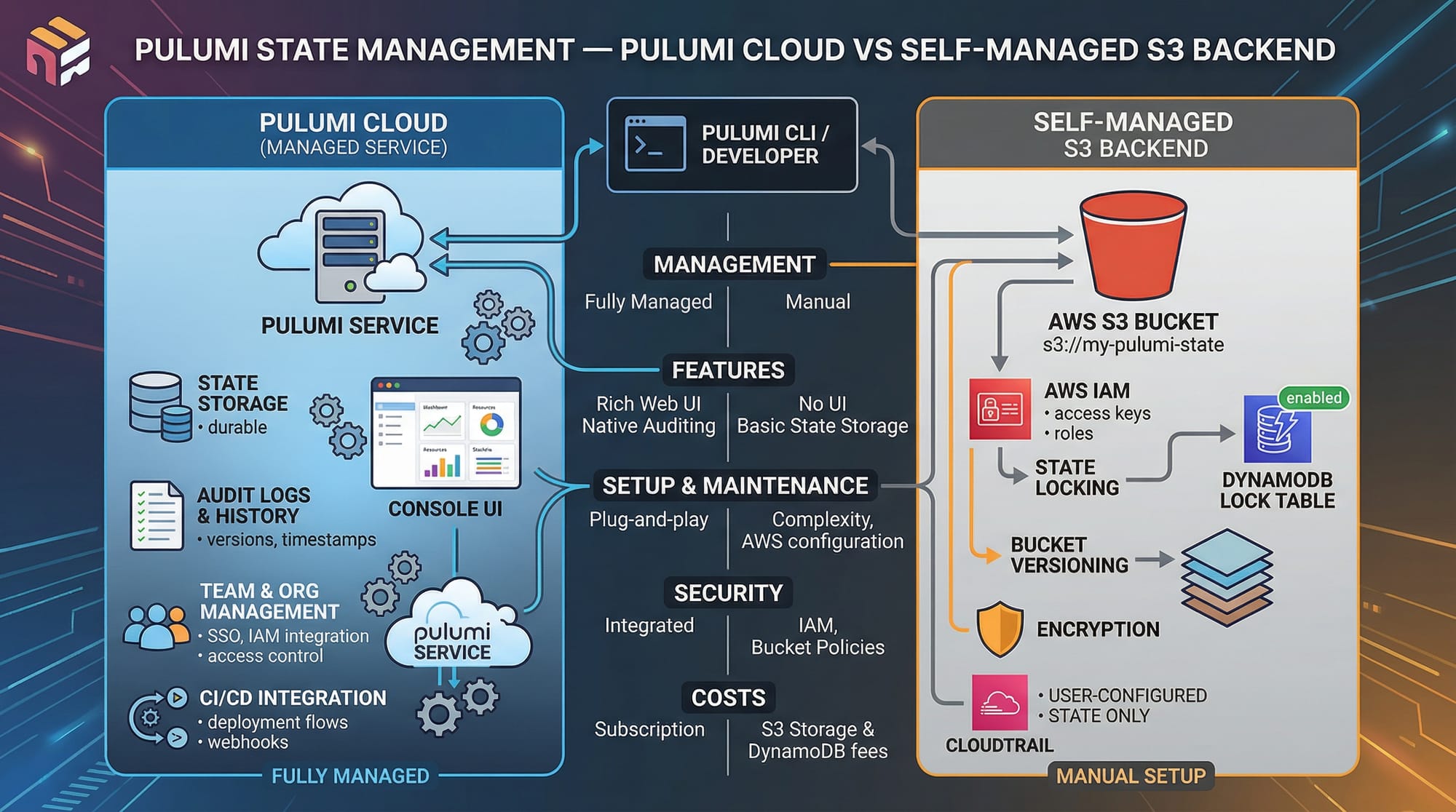
Pulumi manages infrastructure state and configuration internally or via cloud backends.
Key Concepts:
- Config → Store environment-specific values
- Output → Represents values available after deployment
- State → Tracks infrastructure resources
Example
config = pulumi.Config()
region = config.require("region")

bucket = aws.s3.Bucket("config-bucket")

pulumi.export("region", region)
pulumi.export("bucket", bucket.id)
Explanation
pulumi.Config()
Access configuration values.config.require("region")
Fetch required config value.pulumi.export(...)
Expose values after deployment.
Practical Code Examples
Example 1: Create an AWS S3 Bucket with Tags
import pulumi
import pulumi_aws as aws

# Create S3 bucket
bucket = aws.s3.Bucket(
    "student-bucket",
    tags={
        "Name": "AhmadBucket",
        "Environment": "Dev",
        "Country": "Pakistan"
    }
)

# Export bucket name
pulumi.export("bucket_name", bucket.id)
Line-by-line Explanation
import pulumi
Loads Pulumi SDK.import pulumi_aws as aws
Enables AWS resource creation.aws.s3.Bucket(...)
Creates a new S3 bucket."student-bucket"
Logical name of the resource.tags={...}
Adds metadata (useful for billing in PKR or project grouping).pulumi.export(...)
Outputs the bucket name.
💡 Real-world use: A startup in Karachi can use this to store user uploads.
Example 2: Real-World Application – Serverless API
import pulumi
import pulumi_aws as aws

# Create IAM role
role = aws.iam.Role(
    "lambda-role",
    assume_role_policy="""{
        "Version": "2012-10-17",
        "Statement": [{
            "Action": "sts:AssumeRole",
            "Principal": {"Service": "lambda.amazonaws.com"},
            "Effect": "Allow"
        }]
    }"""
)

# Create Lambda function
lambda_func = aws.lambda_.Function(
    "my-function",
    runtime="python3.9",
    role=role.arn,
    handler="index.handler",
    code=pulumi.AssetArchive({
        ".": pulumi.FileArchive("./app")
    })
)

# API Gateway
api = aws.apigatewayv2.Api(
    "api",
    protocol_type="HTTP"
)

pulumi.export("api_url", api.api_endpoint)
Line-by-line Explanation
aws.iam.Role(...)
Creates IAM role for Lambda.assume_role_policy
Allows Lambda service to assume role.aws.lambda_.Function(...)
Deploys serverless function.runtime="python3.9"
Specifies runtime.handler="index.handler"
Entry point.AssetArchive(...)
Packages code.aws.apigatewayv2.Api(...)
Creates API endpoint.pulumi.export(...)
Outputs API URL.
💡 Real-world use: Build a Pakistani e-commerce backend in Islamabad.
Common Mistakes & How to Avoid Them
Mistake 1: Not Handling Outputs Properly
Problem
url = api.api_endpoint
print(url)  # This may not work correctly
Fix
pulumi.export("url", api.api_endpoint)
Explanation
Pulumi uses asynchronous values (Outputs), so direct printing may fail.
Mistake 2: Hardcoding Configuration Values
Problem
region = "us-east-1"
Fix
config = pulumi.Config()
region = config.require("region")
Explanation
- Keeps code reusable
- Supports multiple environments (Dev, Prod)
Practice Exercises
Exercise 1: Create a Storage Bucket for Lahore Startup
Problem
Create an S3 bucket with:
- Name:
lahore-startup-bucket - Tag: Owner = Ali
Solution
import pulumi
import pulumi_aws as aws

bucket = aws.s3.Bucket(
    "lahore-startup-bucket",
    tags={
        "Owner": "Ali"
    }
)

pulumi.export("bucket_name", bucket.id)
Explanation
- Creates bucket resource
- Adds ownership metadata
- Exports result
Exercise 2: Deploy Simple Lambda Function
Problem
Deploy a Lambda function returning “Hello Pakistan”.
Solution
import pulumi
import pulumi_aws as aws

role = aws.iam.Role(
    "role",
    assume_role_policy="""{
        "Version": "2012-10-17",
        "Statement": [{
            "Action": "sts:AssumeRole",
            "Principal": {"Service": "lambda.amazonaws.com"},
            "Effect": "Allow"
        }]
    }"""
)

func = aws.lambda_.Function(
    "hello-func",
    runtime="python3.9",
    role=role.arn,
    handler="index.handler",
    code=pulumi.AssetArchive({
        ".": pulumi.FileArchive("./code")
    })
)

pulumi.export("function_name", func.name)
Explanation
- Creates role
- Deploys Lambda
- Packages code directory
- Outputs function name
Frequently Asked Questions
What is Pulumi and how is it different from Terraform?
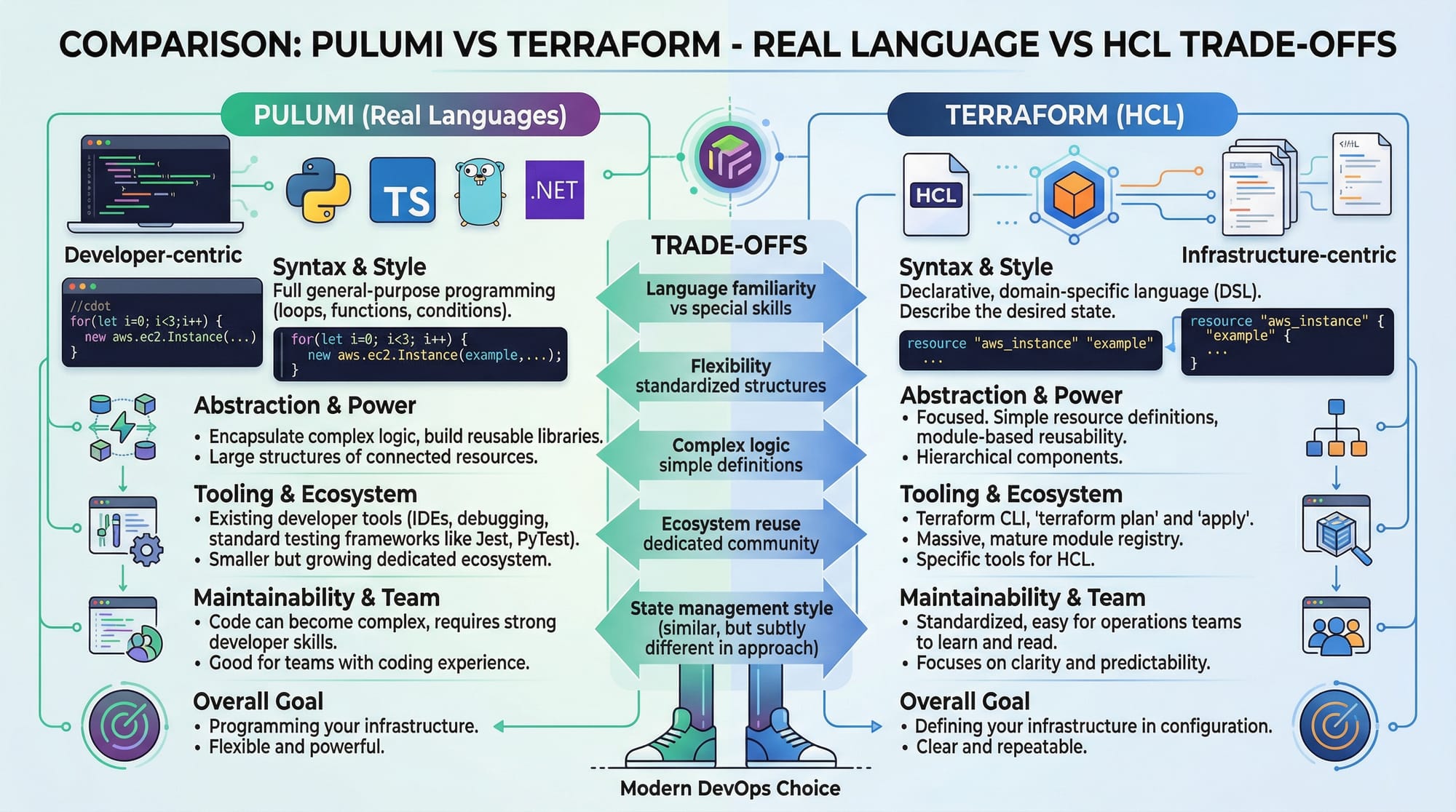
Pulumi is an Infrastructure as Code tool that uses real programming languages like Python and TypeScript. In contrast, Terraform uses HCL, a domain-specific language. Pulumi offers more flexibility for developers already familiar with coding.
How do I choose between Pulumi vs Terraform?
If you prefer writing infrastructure using real code and want better integration with existing applications, Pulumi is ideal. Terraform is better if your team prefers declarative configuration and has existing Terraform expertise.
Can I use Pulumi with Python and TypeScript?
Yes, Pulumi fully supports both Python and TypeScript. Many developers in Pakistan prefer Python for simplicity, while TypeScript is great for large-scale applications.
Is Pulumi free to use?
Pulumi offers a free tier suitable for students and small projects. You can also use self-managed backends like AWS S3 to avoid additional costs.
How do I deploy my first Pulumi project?
Install Pulumi CLI, run pulumi new, choose a template, configure your cloud provider, and run pulumi up to deploy your infrastructure.
Summary & Key Takeaways
- Pulumi allows you to write infrastructure using real programming languages
- It supports Python and TypeScript, making it beginner-friendly
- Outputs and configuration management are key concepts
- Pulumi vs Terraform depends on your use case and preference
- Ideal for modern DevOps workflows in Pakistan
- Enables real-world projects like APIs, storage systems, and serverless apps
Next Steps & Related Tutorials
To continue your cloud journey on theiqra.edu.pk, explore:
- Learn the basics with our Terraform Tutorial (compare with Pulumi)
- Build scalable apps with our AWS CDK Tutorial
- Master CI/CD with our GitLab CI/CD tutorial
- Understand cloud fundamentals with Docker and Kubernetes guides
💡 Suggested path:
Start with Terraform → Learn Pulumi → Build real-world cloud projects
This concludes your Pulumi tutorial: modern infrastructure as code 2026. Practice regularly, build real-world Pakistani use cases, and you’ll quickly become confident in modern cloud development 🚀
Test Your Python Knowledge!
Finished reading? Take a quick quiz to see how much you've learned from this tutorial.