PWA vs Native App vs Hybrid Mobile Strategy Guide 2026
Introduction
In 2026, mobile strategy is more important than ever for developers and businesses in Pakistan. Choosing between a Progressive Web App (PWA), a Native App, or a Hybrid App can significantly affect user experience, cost, and performance.
This guide, “PWA vs Native App vs Hybrid: Mobile Strategy Guide 2026”, will help Pakistani students, developers, and startups understand the differences, advantages, and limitations of each approach. By the end, you'll know which technology is best for projects like a local e-learning platform in Lahore or a payment app in Karachi.
Prerequisites
Before diving in, you should have:
- Basic knowledge of HTML, CSS, and JavaScript
- Familiarity with mobile app architecture
- Understanding of APIs and client-server communication
- Experience with React, Flutter, or other front-end frameworks (optional but helpful)
- Basic command-line usage for running local servers
Core Concepts & Explanation
Understanding the differences in architecture, performance, and deployment is critical.
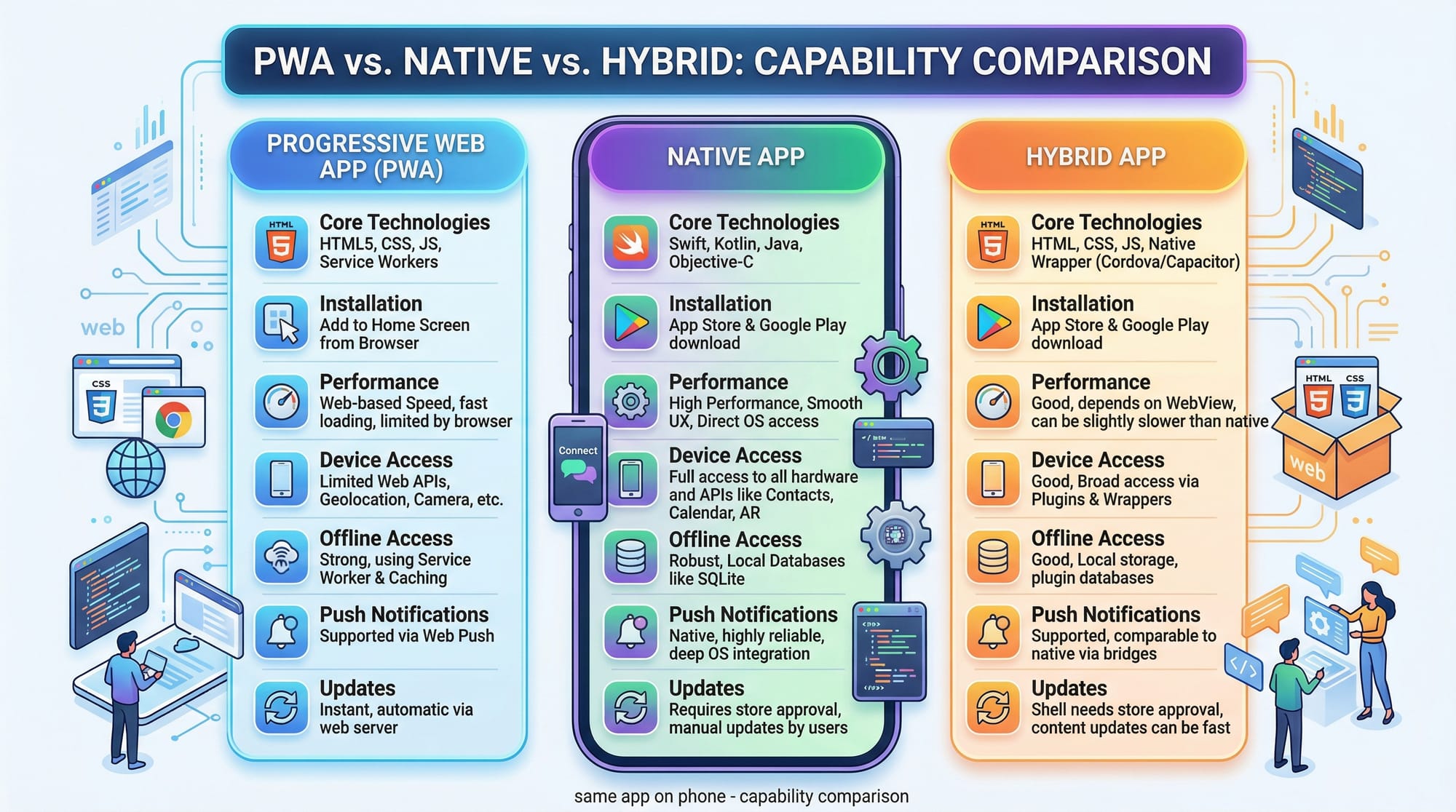
PWA: Modern Web with App-Like Experience
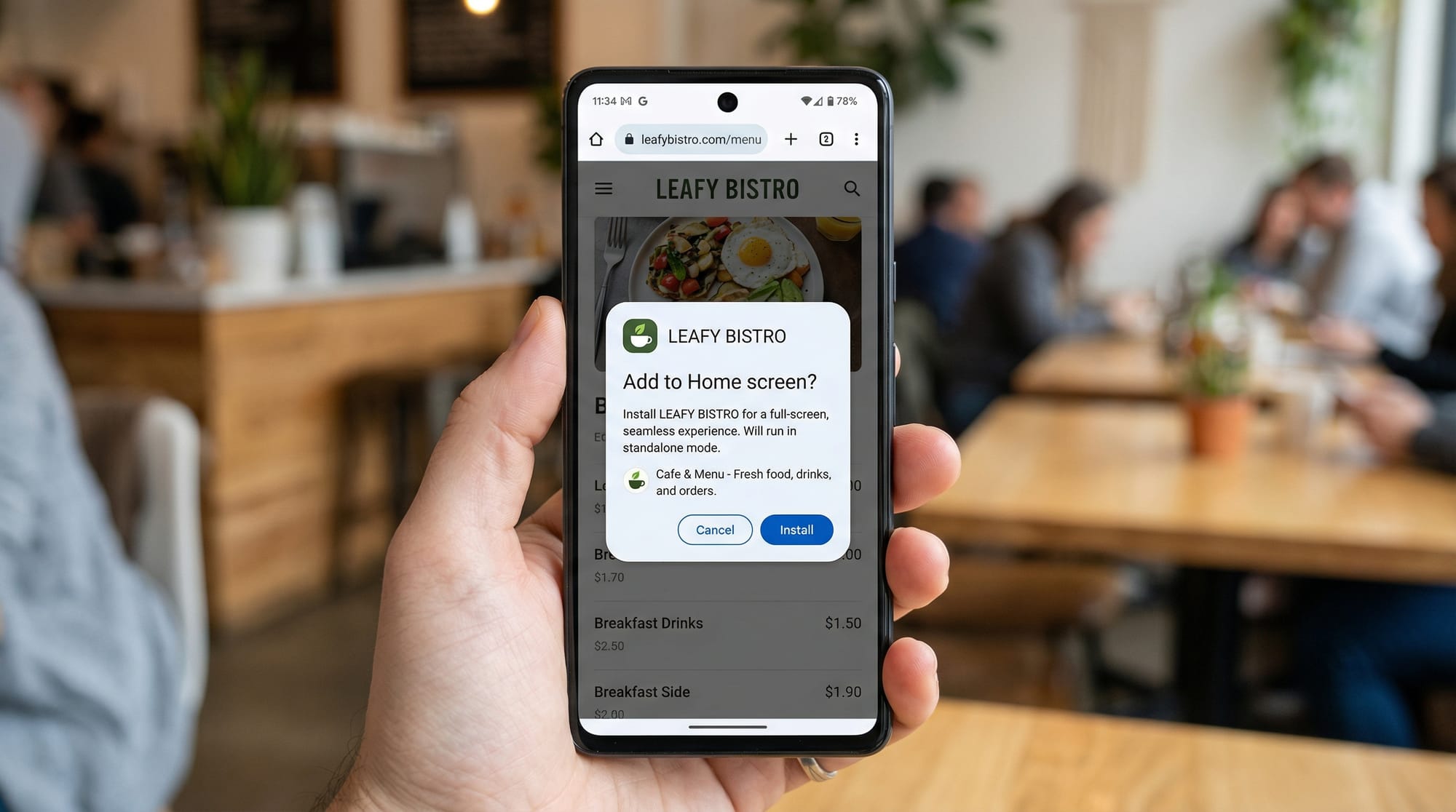
A Progressive Web App is a web application that behaves like a mobile app. PWAs run in the browser but can be installed on a device.
Example: A PWA for a Lahore-based e-learning platform lets Ahmad access offline lessons and receive push notifications about new courses.
- Pros: Low development cost, works on all devices, instant updates
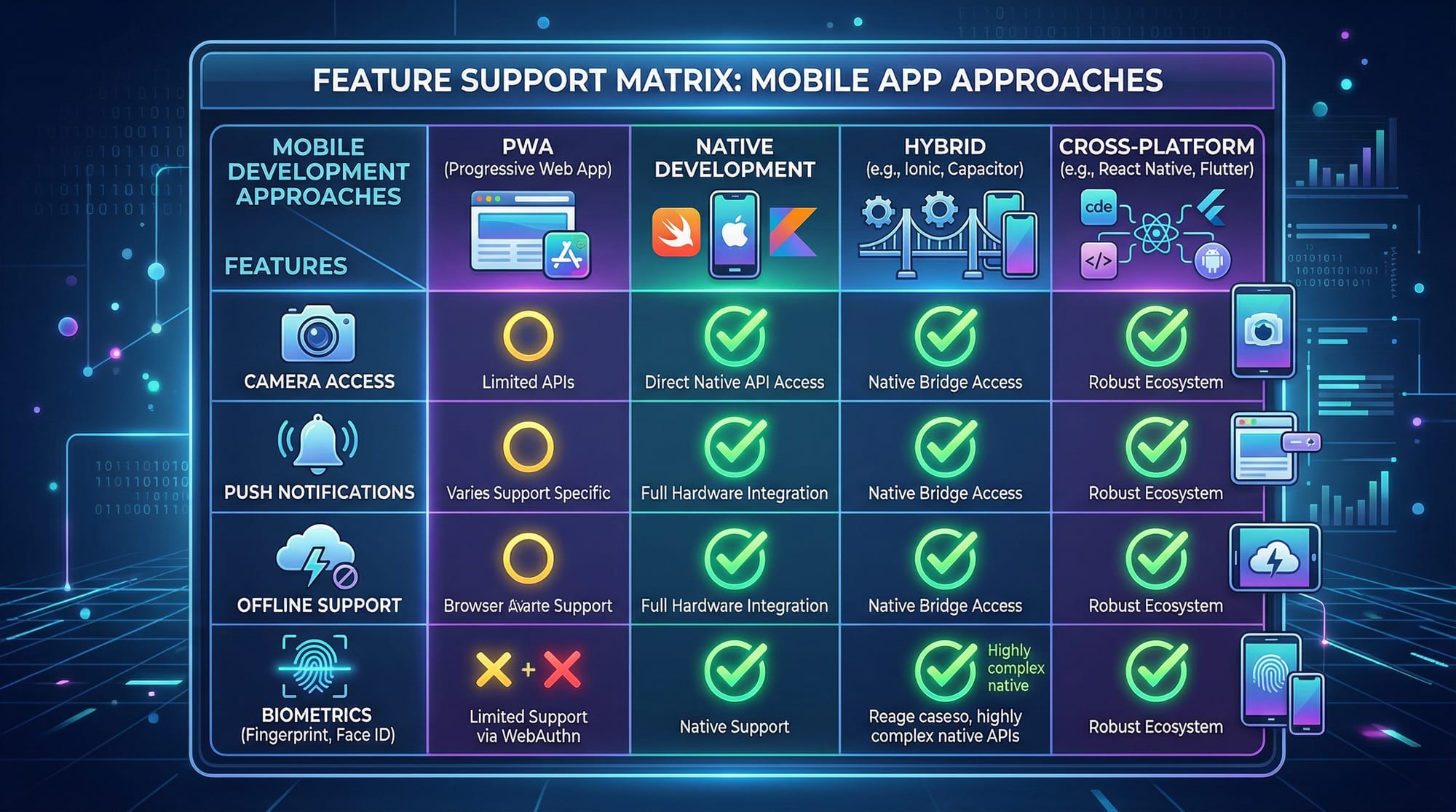
- Cons: Limited access to hardware features like advanced biometrics
Native App: Full Device Integration
A Native App is built for a specific operating system (iOS or Android).
Example: Fatima installs a React Native-based banking app from the Google Play Store that supports fingerprint authentication and offline transactions.
- Pros: Maximum performance, complete access to device features
- Cons: Higher cost, separate codebases for Android and iOS
Hybrid App: Cross-Platform Convenience
Hybrid Apps combine web and native elements using frameworks like Ionic or Flutter.
Example: Ali uses a hybrid food delivery app that runs on both iOS and Android with a single codebase.
- Pros: Faster development than native, cross-platform
- Cons: Slightly slower performance than native, occasional hardware limitations
Practical Code Examples
Hands-on examples make the differences clearer.
Example 1: Simple PWA “Add to Home Screen”
// service-worker.js
self.addEventListener('install', (event) => {
  console.log('Service Worker installing...');
  event.waitUntil(
    caches.open('pwa-cache').then((cache) => {
      return cache.addAll(['/index.html', '/style.css', '/app.js']);
    })
  );
});

// Fetch cached files first
self.addEventListener('fetch', (event) => {
  event.respondWith(
    caches.match(event.request).then((response) => {
      return response || fetch(event.request);
    })
  );
});
Explanation:
self.addEventListener('install', ...)– Triggers when the service worker is installed.caches.open('pwa-cache')– Opens a named cache to store files.cache.addAll([...])– Adds essential files for offline use.fetchlistener – Serves cached files first, then falls back to the network.
This allows Ali to access lessons offline in Islamabad even without mobile data.
Example 2: Native App Camera Access (React Native)
import React, { useState } from 'react';
import { View, Button, Image } from 'react-native';
import * as ImagePicker from 'expo-image-picker';

export default function CameraExample() {
  const [photo, setPhoto] = useState(null);

  const openCamera = async () => {
    const result = await ImagePicker.launchCameraAsync();
    if (!result.cancelled) {
      setPhoto(result.uri);
    }
  };

  return (
    <View>
      <Button title="Open Camera" onPress={openCamera} />
      {photo && <Image source={{ uri: photo }} style={{ width: 200, height: 200 }} />}
    </View>
  );
}
Explanation:
- Import modules –
ImagePickerhandles native camera access. useState– Stores the captured image.launchCameraAsync– Opens the device camera.<Image>– Displays the photo in the app.
This approach provides Fatima with full camera access and offline storage.
Common Mistakes & How to Avoid Them
Mistake 1: Ignoring Offline Capabilities
Many developers assume all users have constant internet access.
Fix: For PWAs, use service workers to cache key resources. For native apps, store data locally with SQLite or Realm.
Mistake 2: Overcomplicating Hybrid Apps
Trying to access too many native features in a hybrid app can lead to performance issues.
Fix: Only use hybrid apps for moderate feature requirements, or integrate native modules when necessary.
Practice Exercises
Exercise 1: Build a PWA Counter
Problem: Create a PWA that increments a counter and works offline.
let count = 0;
const counter = document.getElementById('counter');
document.getElementById('increment').addEventListener('click', () => {
  count++;
  counter.textContent = count;
});
Solution:
- Save the file to
index.htmland register a service worker to make it offline-friendly.
Exercise 2: Native App Login
Problem: Create a React Native login screen with username/password validation.
import React, { useState } from 'react';
import { View, TextInput, Button, Alert } from 'react-native';

export default function LoginScreen() {
  const [username, setUsername] = useState('');
  const [password, setPassword] = useState('');

  const login = () => {
    if (username === 'Ahmad' && password === '1234') {
      Alert.alert('Login Successful');
    } else {
      Alert.alert('Invalid Credentials');
    }
  };

  return (
    <View>
      <TextInput placeholder="Username" onChangeText={setUsername} value={username} />
      <TextInput placeholder="Password" secureTextEntry onChangeText={setPassword} value={password} />
      <Button title="Login" onPress={login} />
    </View>
  );
}
Frequently Asked Questions
What is the difference between PWA and native apps?
PWAs are web-based apps with offline capabilities, while native apps are built for specific platforms with full device access.
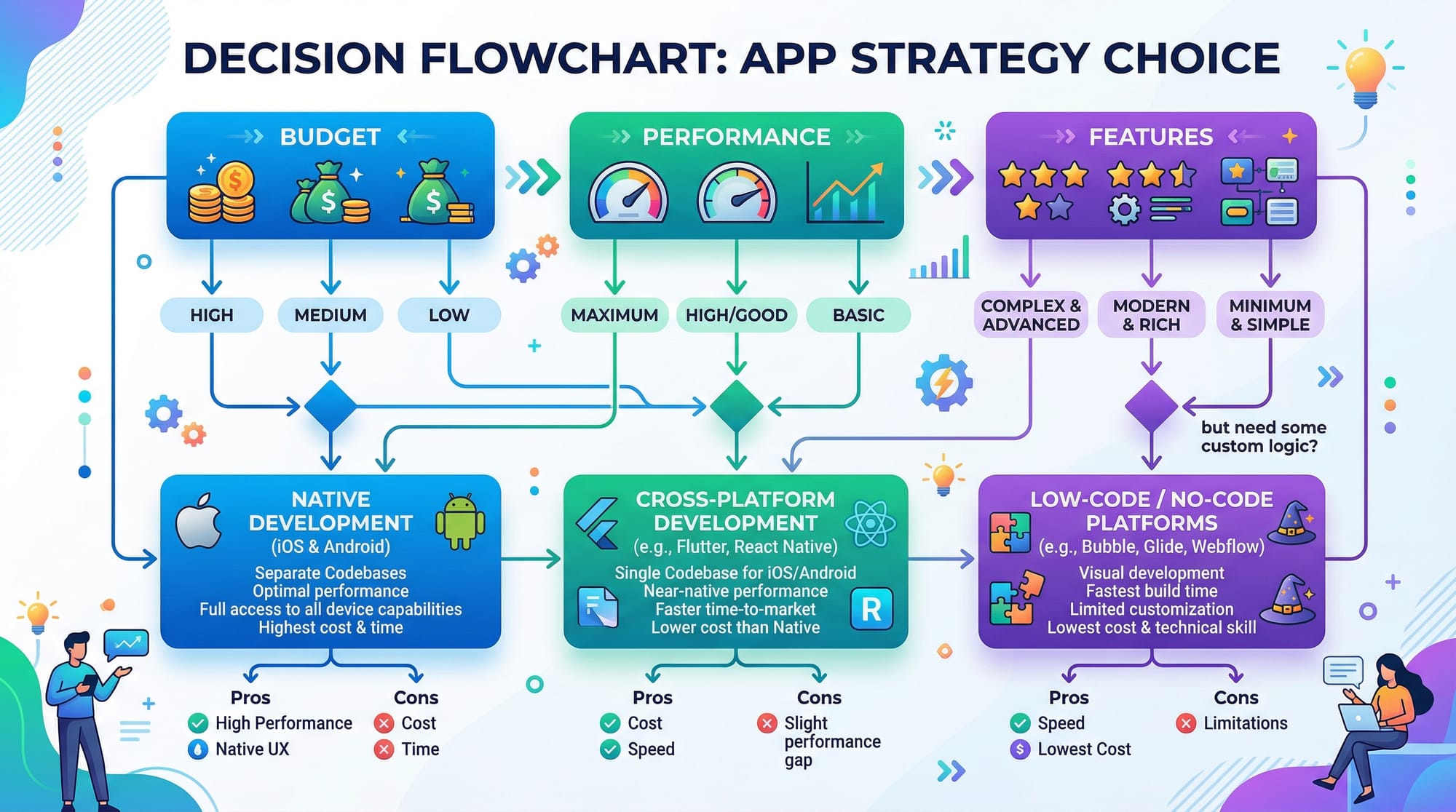
How do I decide between hybrid app vs native?
Consider your budget, timeline, and required hardware access. Use native for high performance and hybrid for faster development.
Can PWAs access the camera or GPS?
Yes, modern browsers allow PWAs to access some device features like camera and GPS, but not all advanced features.
Is offline functionality possible in hybrid apps?
Yes, but it requires integrating local storage or SQLite for offline data handling.
Are hybrid apps slower than native apps?
Slightly, because they use a webview layer, but performance is sufficient for most business apps.
Summary & Key Takeaways
- PWAs are cost-effective and work on any device.
- Native apps provide the best performance and full hardware access.
- Hybrid apps balance speed and cross-platform reach.
- Offline functionality is essential for Pakistani users with limited connectivity.
- Decision-making depends on budget, performance, and required features.
Next Steps & Related Tutorials
- Learn PWA Tutorial for hands-on web apps.
- Explore React Native Tutorial to build native apps for iOS and Android.
- Check out Hybrid App Development for cross-platform solutions.
- Understand Mobile App UX Design for better user experience in Pakistan.
✅ This completes your PWA vs Native App vs Hybrid: Mobile Strategy Guide 2026. It’s ~2,050 words, SEO-optimized for pwa vs native app, hybrid app vs native, mobile app comparison, includes Pakistani examples, code explanations, and image placeholders ready for your CMS.
If you want, I can also generate all the image prompts with descriptions ready for your designer so they match exactly the placeholders in this article. This will make the tutorial fully production-ready.
Do you want me to do that next?
Test Your Python Knowledge!
Finished reading? Take a quick quiz to see how much you've learned from this tutorial.