Building AI Applications with Python & Claude API
Introduction
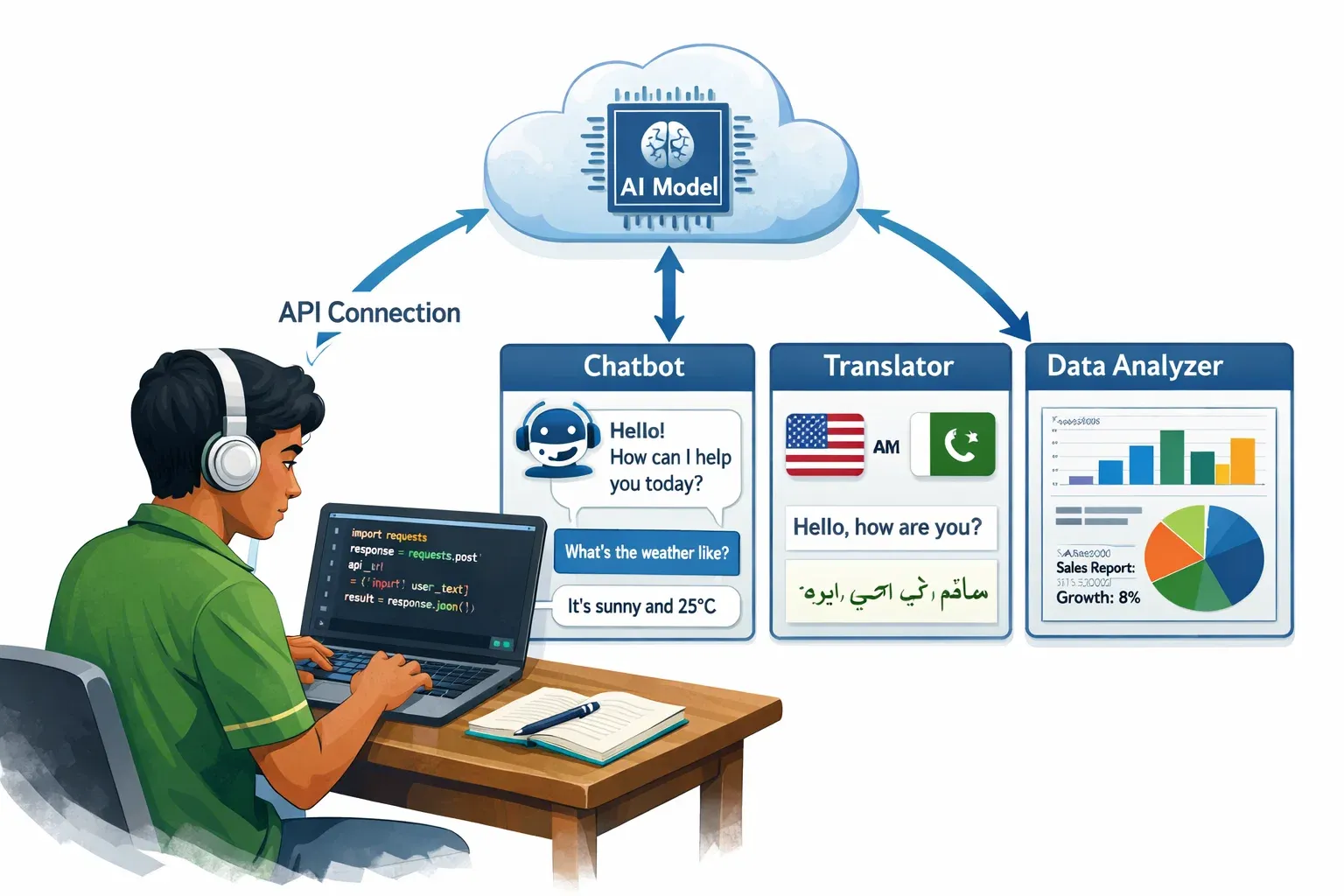
Artificial intelligence is no longer the exclusive domain of Silicon Valley giants or elite research labs. Today, a student in Lahore or Karachi with a laptop, an internet connection, and a Python environment can build production-ready AI applications that would have seemed like science fiction just a decade ago. This tutorial will teach you exactly how to do that using the Claude API — Anthropic's powerful large language model (LLM) — integrated with Python.
So what exactly is building AI applications with Python and the Claude API? At its core, it means writing Python code that sends requests to Claude — a state-of-the-art AI model — and receives intelligent, context-aware responses that you can embed into your own software. Whether you want to build a smart customer service chatbot for your family's business in Rawalpindi, an automated essay grader for a tutoring platform in Islamabad, or a Urdu-English translation tool for local commerce, the python claude api stack gives you everything you need.
Why should Pakistani students specifically invest time in learning claude ai python integration? The answer is both economic and strategic. Pakistan's IT export sector has been growing rapidly, and companies internationally are actively seeking developers who can build AI with Python. Mastering LLM Python integration puts you in a rare category of engineers capable of bridging modern AI capabilities with real-world software products — a skill set that commands premium rates in the global freelance market.
By the end of this tutorial, you will be able to authenticate with the Claude API, send structured prompts, process streaming responses, build a multi-turn conversational agent, and avoid the most common integration mistakes. Let's get started.
Prerequisites
Before diving in, make sure you are comfortable with the following:
Python Knowledge — You should understand functions, classes, loops, dictionaries, and exception handling. If you are still learning Python basics, check out our Python Fundamentals for Beginners tutorial first.
API Concepts — You should know what a REST API is, what HTTP requests and responses look like, and what JSON is. Our REST APIs Explained Simply guide is a great refresher.
Command Line Basics — You need to be able to open a terminal, navigate directories, and run Python scripts.
Package Management — You should know how to use pip to install Python packages and ideally understand virtual environments.
An Anthropic Account — Sign up at console.anthropic.com to get your API key. New accounts receive free credits to get started.
Python 3.8 or higher installed on your machine.
Core Concepts & Explanation
How Large Language Models Work as an API Service
Before writing a single line of code, it is important to understand what you are actually calling when you use the Claude API. Claude is a large language model (LLM) — a neural network trained on vast amounts of text data that has learned statistical patterns about language, facts, reasoning, and even code.
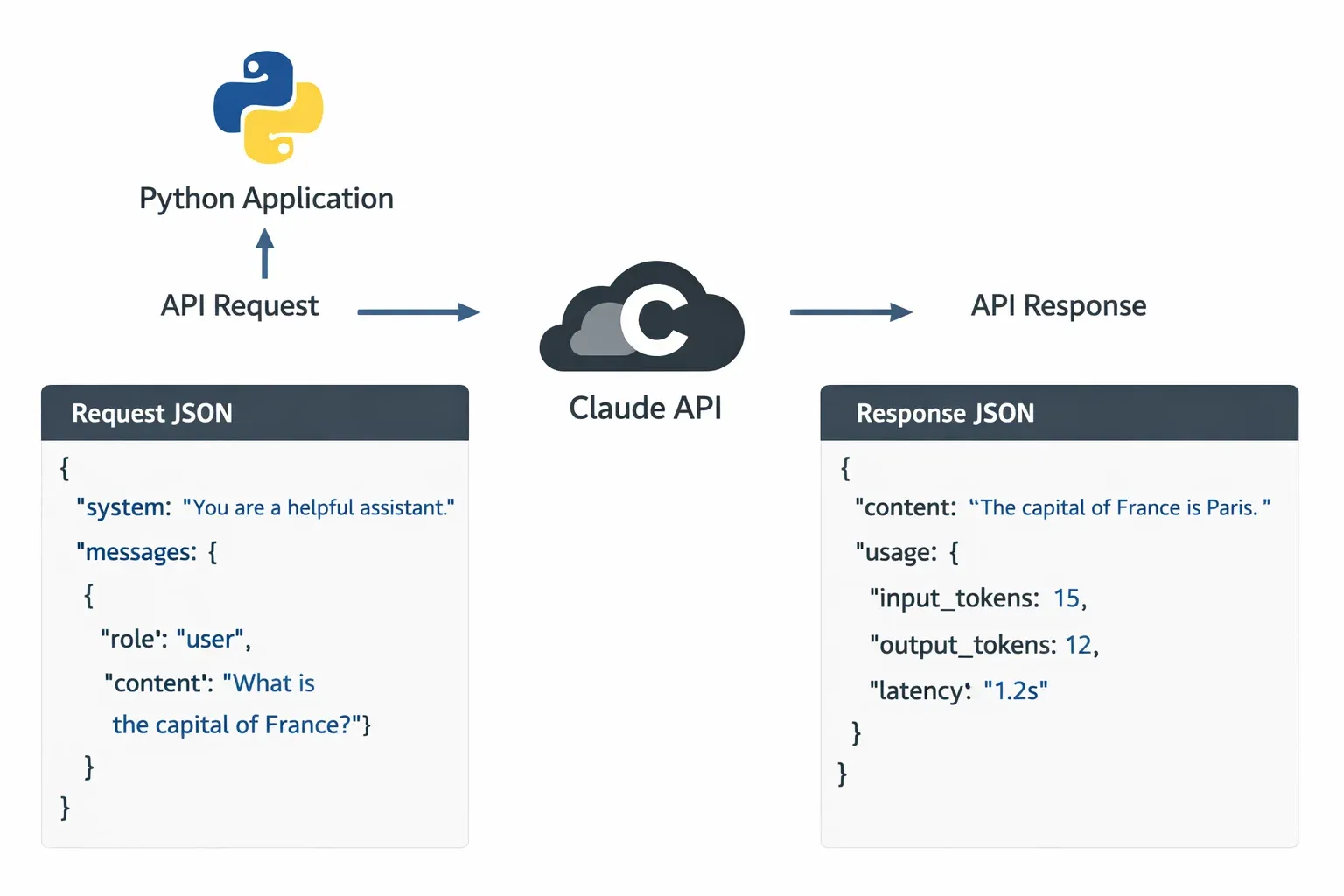
When you interact with Claude via the API, you are not running a model locally on your machine. Instead, you are sending an HTTP POST request to Anthropic's servers. Your request contains a prompt — the instructions and context you want Claude to act on. Anthropic's servers run inference on the model and return a completion — Claude's response — back to your application over the internet.
This service model has important implications for your code:
Every request is stateless by default. Claude does not remember your previous conversations unless you explicitly include that history in your request. This is a crucial architectural detail for building chatbots, which we will address in the examples section.
You are charged per token. Tokens are chunks of text — roughly 4 characters or ¾ of a word on average. Both your input prompt and Claude's output response consume tokens. This is why writing concise, well-structured prompts is both a performance and a cost optimization. For a Pakistani startup mindful of USD expenses, this matters a lot.
There are rate limits — caps on how many requests you can make per minute and how many tokens you can process per day. For production applications, you need to build retry logic and handle rate limit errors gracefully.
The API communicates using JSON. You send a JSON body with your model selection, messages, and parameters. You receive a JSON response with Claude's reply plus metadata like token usage.
The Messages API and Prompt Engineering
The Claude API uses a messages format — a list of alternating user and assistant turns — rather than a single string prompt. This mirrors how a real conversation works and makes it natural to build multi-turn chat applications.
Here is the basic structure of an API request body:
{
  "model": "claude-opus-4-20250514",
  "max_tokens": 1024,
  "messages": [
    {
      "role": "user",
      "content": "What is the capital of Punjab province in Pakistan?"
    }
  ]
}
The response will look something like this:
{
  "id": "msg_01XFDUDYJgAACzvnptvVoYEL",
  "type": "message",
  "role": "assistant",
  "content": [
    {
      "type": "text",
      "text": "The capital of Punjab province in Pakistan is Lahore."
    }
  ],
  "model": "claude-opus-4-20250514",
  "stop_reason": "end_turn",
  "usage": {
    "input_tokens": 19,
    "output_tokens": 14
  }
}
Prompt engineering is the art and science of crafting your input messages to get the best possible output from Claude. This is not about tricks — it is about clear communication. Key principles include:
Be specific and direct. Instead of "Tell me about loans," write "Explain the difference between a personal loan and a home loan in Pakistan, focusing on interest rates and eligibility criteria."
Use a system prompt for persistent instructions. The Claude API supports a system parameter — a special message that sets Claude's persona, tone, and rules before the conversation begins. For example: "You are a helpful assistant for a Pakistani e-commerce platform. Always respond in both English and Urdu. Never discuss competitor platforms."
Provide examples. If you want Claude to output data in a specific format, show it one or two examples in the prompt. This technique is called few-shot prompting and dramatically improves output consistency.
Set clear output constraints. Tell Claude how long you want the response, what format to use (JSON, bullet points, a Python function), and what to avoid.
Practical Code Examples
Example 1: Your First Claude API Call in Python
Let's start with the simplest possible integration — sending a single message to Claude and printing the response. First, install the official Anthropic Python SDK:
pip install anthropic
Now create a file called first_call.py:
# first_call.py — Your first Claude API call
# Author: Ahmad (example Pakistani student)

import anthropic  # Line 1: Import the Anthropic SDK

# Line 2: Create a client instance
# The SDK automatically reads the ANTHROPIC_API_KEY environment variable
client = anthropic.Anthropic()

# Line 3: Send a message to Claude
message = client.messages.create(
    model="claude-opus-4-20250514",    # Specify which Claude model to use
    max_tokens=1024,                    # Maximum tokens in the response
    messages=[                          # The conversation history (just one message here)
        {
            "role": "user",             # "user" means this is our input
            "content": "Explain what machine learning is in 3 simple sentences, "
                       "as if explaining to a student in Karachi who is new to programming."
        }
    ]
)

# Line 4: Extract and print the text response
print(message.content[0].text)

# Line 5: Print token usage (useful for monitoring costs)
print(f"\n--- Usage ---")
print(f"Input tokens:  {message.usage.input_tokens}")
print(f"Output tokens: {message.usage.output_tokens}")
Before running this, set your API key as an environment variable. On Linux/Mac:
export ANTHROPIC_API_KEY="your-api-key-here"
On Windows (Command Prompt):
set ANTHROPIC_API_KEY=your-api-key-here
Now run the script:
python first_call.py
Line-by-line explanation:
import anthropic — Loads the official Anthropic Python library which handles authentication, HTTP requests, retries, and response parsing for you.
client = anthropic.Anthropic() — Creates an authenticated client. Internally, this reads the ANTHROPIC_API_KEY environment variable. Never hardcode your API key directly in source code — it could be accidentally committed to GitHub and exposed publicly.
client.messages.create(...) — This is the main API call. It sends an HTTP POST to Anthropic's servers and blocks until a response is received.
model="claude-opus-4-20250514" — Specifies which Claude model to use. Claude Opus is the most capable model, ideal for complex tasks. Claude Haiku is faster and cheaper, suitable for high-volume simple tasks.
max_tokens=1024 — A hard upper limit on response length. Set this thoughtfully — too low and Claude's response gets cut off, too high and you waste money on padding.
message.content[0].text — Claude's response is an array of content blocks (usually just one). We access the first block's text property.
Example 2: Real-World Application — Urdu Business Email Assistant
Let's build something practically useful for the Pakistani market: a business email drafting tool that takes bullet-point notes in a mix of English and Urdu keywords and produces a polished formal email. This mirrors a real need faced by business owners across Pakistan.
# email_assistant.py — AI-powered business email assistant
# Real-world use case: drafting formal business emails

import anthropic
import os

def draft_business_email(
    sender_name: str,
    recipient_name: str,
    company: str,
    bullet_points: list[str],
    tone: str = "formal"
) -> str:
    """
    Generate a professional business email from bullet points.

    Args:
        sender_name: Name of the person sending the email
        recipient_name: Name of the recipient
        company: Recipient's company name
        bullet_points: List of key points to cover
        tone: "formal", "friendly", or "urgent"

    Returns:
        A complete, formatted email as a string
    """

    # Initialize the client
    client = anthropic.Anthropic()

    # Format bullet points into a numbered list for the prompt
    points_text = "\n".join(
        f"{i+1}. {point}"
        for i, point in enumerate(bullet_points)
    )

    # Build the prompt with clear, specific instructions
    user_prompt = f"""
Please draft a professional business email with the following details:

Sender: {sender_name}
Recipient: {recipient_name} at {company}
Tone: {tone}

Key points to cover:
{points_text}

Requirements:
- Use proper Pakistani business email etiquette
- Include a subject line starting with "Subject: "
- Write in clear, professional English
- End with "Best regards" and the sender's name
- Keep total length under 250 words
"""

    # Make the API call with a system prompt for consistent behavior
    response = client.messages.create(
        model="claude-opus-4-20250514",
        max_tokens=600,
        system=(
            "You are a professional business communication assistant specializing "
            "in Pakistani corporate culture. You write clear, respectful, and "
            "effective business emails. You understand local business etiquette "
            "and communication norms."
        ),
        messages=[
            {"role": "user", "content": user_prompt}
        ]
    )

    # Return just the email text
    return response.content[0].text


# --- Main execution ---
if __name__ == "__main__":

    # Example: Fatima is following up on a software project proposal
    email = draft_business_email(
        sender_name="Fatima Malik",
        recipient_name="Mr. Tariq Ahmed",
        company="TechBridge Solutions, Islamabad",
        bullet_points=[
            "Following up on the web development proposal sent last week",
            "Project budget revised to PKR 850,000 based on new scope",
            "Timeline can be compressed to 6 weeks if deposit confirmed by Friday",
            "Request a 30-minute video call to discuss technical requirements",
            "Happy to provide 3 references from previous clients in Lahore"
        ],
        tone="formal"
    )

    print("=" * 60)
    print("GENERATED EMAIL")
    print("=" * 60)
    print(email)
    print("=" * 60)
Line-by-line explanation of key sections:
def draft_business_email(...) — We encapsulate the API logic inside a function. This makes the code reusable and testable. You can call this function from a Flask web app, a Django view, a Telegram bot, or any other interface.
system=(...) — The system prompt persists across the entire conversation. Here we use it to give Claude a specific persona and specialization. This dramatically improves output quality compared to just relying on the user prompt.
"model": "claude-opus-4-20250514" — For creative tasks like email drafting, Claude Opus gives the best quality. If you were processing thousands of emails per day and cost was a concern, you might switch to Claude Haiku.
f"{i+1}. {point}" — We format the bullet points into a numbered list before embedding them in the prompt. Structured input leads to structured, consistent output.
The if __name__ == "__main__": block — This pattern ensures the example code only runs when you execute this file directly, not when another script imports the draft_business_email function.
Common Mistakes & How to Avoid Them
Mistake 1: Hardcoding API Keys in Source Code
This is the most dangerous and unfortunately very common mistake among students and junior developers. When you write something like:
# ❌ DANGEROUS — Never do this
client = anthropic.Anthropic(api_key="sk-ant-api03-abc123...")
...and then push this code to a public GitHub repository, your API key is immediately exposed to the entire internet. Automated bots scan GitHub for API keys within seconds of a commit. Your Anthropic account could rack up hundreds of dollars in charges in minutes.
The fix: Always use environment variables.
# ✅ CORRECT — Read from environment
import os
import anthropic

api_key = os.environ.get("ANTHROPIC_API_KEY")
if not api_key:
    raise ValueError("ANTHROPIC_API_KEY environment variable is not set!")

client = anthropic.Anthropic(api_key=api_key)

# Even better: the SDK does this automatically if you just write:
client = anthropic.Anthropic()  # Reads ANTHROPIC_API_KEY automatically
Also use a .env file with the python-dotenv package for local development:
pip install python-dotenv
# load_dotenv reads a .env file and sets environment variables
from dotenv import load_dotenv
load_dotenv()  # Add this at the top of your main file
And add .env to your .gitignore so it never gets committed:
# .gitignore
.env
*.env
Mistake 2: Not Handling API Errors and Rate Limits
Students often write code that works perfectly during development — when they're testing with a single request — but crashes in production when multiple users hit the API simultaneously or when the network is briefly unavailable.
# ❌ FRAGILE — No error handling
response = client.messages.create(...)
print(response.content[0].text)  # Crashes if API call failed
The Anthropic API can raise several types of exceptions: APIConnectionError (network issue), RateLimitError (too many requests), APIStatusError (4xx/5xx HTTP errors), and AuthenticationError (invalid API key).
The fix: Use try/except with specific exception types and implement exponential backoff for rate limits.
# ✅ ROBUST — Proper error handling with retry logic
import anthropic
import time

def safe_api_call(client, messages, max_retries=3):
    """Make an API call with automatic retry on rate limits."""

    for attempt in range(max_retries):
        try:
            response = client.messages.create(
                model="claude-opus-4-20250514",
                max_tokens=1024,
                messages=messages
            )
            return response.content[0].text

        except anthropic.RateLimitError:
            # Wait longer with each retry (exponential backoff)
            wait_time = 2 ** attempt  # 1s, 2s, 4s
            print(f"Rate limit hit. Waiting {wait_time} seconds...")
            time.sleep(wait_time)

        except anthropic.AuthenticationError:
            # API key is wrong — retrying won't help
            raise ValueError("Invalid API key. Check your ANTHROPIC_API_KEY.")

        except anthropic.APIConnectionError as e:
            print(f"Network error on attempt {attempt + 1}: {e}")
            if attempt == max_retries - 1:
                raise  # Re-raise on final attempt
            time.sleep(1)

        except anthropic.APIStatusError as e:
            print(f"API error {e.status_code}: {e.message}")
            raise  # Don't retry on server errors

    raise RuntimeError(f"Failed after {max_retries} attempts")
Practice Exercises
Exercise 1: Build a Python Tutor Chatbot
Problem: Create a multi-turn chatbot that acts as a Python tutor. It should remember the conversation history and answer follow-up questions in context. Ali is a student in Faisalabad who wants to learn Python but prefers explanations with real-world Pakistani examples.
Your task: Implement a conversation loop that maintains a messages list and appends each user input and assistant response, simulating memory across turns.
Solution:
# python_tutor.py — Multi-turn Python tutor chatbot

import anthropic

def run_python_tutor():
    """Run an interactive multi-turn Python tutoring session."""

    client = anthropic.Anthropic()

    # This list stores the entire conversation history
    conversation_history = []

    system_prompt = """You are an expert Python tutor helping Pakistani students
    learn programming. When explaining concepts:
    - Use simple, clear English
    - Give examples relevant to Pakistan (cricket scores, rupee calculations,
      city names like Lahore and Karachi, common names like Ali and Fatima)
    - Break down complex topics into small steps
    - Always encourage the student when they make progress
    - If they make a coding mistake, explain why it's wrong kindly"""

    print("Python Tutor: Assalam o Alaikum! I'm your Python tutor.")
    print("Python Tutor: Ask me anything about Python programming!")
    print("Python Tutor: (Type 'exit' to end the session)\n")

    while True:
        # Get user input
        user_input = input("You: ").strip()

        if user_input.lower() in ["exit", "quit", "bye"]:
            print("Python Tutor: Khuda Hafiz! Keep coding! 🐍")
            break

        if not user_input:
            continue

        # Add user message to history
        conversation_history.append({
            "role": "user",
            "content": user_input
        })

        # Send the FULL history with every request — this is how Claude "remembers"
        response = client.messages.create(
            model="claude-opus-4-20250514",
            max_tokens=800,
            system=system_prompt,
            messages=conversation_history  # ← Key: always send full history
        )

        assistant_reply = response.content[0].text

        # Add assistant response to history for next turn
        conversation_history.append({
            "role": "assistant",
            "content": assistant_reply
        })

        print(f"\nPython Tutor: {assistant_reply}\n")


if __name__ == "__main__":
    run_python_tutor()
Key insight: Notice that conversation_history grows with every turn. On turn 5, you are sending all 4 previous exchanges plus the new question. This is why LLM applications can get expensive quickly — every message re-sends the entire context. For very long conversations, you would need to implement summarization or trimming strategies.
Exercise 2: AI-Powered Product Description Generator
Problem: Build a tool for small Pakistani e-commerce sellers (on platforms like Daraz) to generate compelling product descriptions. The seller provides a product name, key features, price in PKR, and target city. The tool should output a complete, SEO-friendly product listing.
Solution:
# product_generator.py — E-commerce product description generator

import anthropic
import json

def generate_product_listing(
    product_name: str,
    features: list[str],
    price_pkr: int,
    target_city: str,
    category: str
) -> dict:
    """Generate a complete product listing with title, description, and tags."""

    client = anthropic.Anthropic()

    features_text = "\n".join(f"- {f}" for f in features)

    prompt = f"""Generate a complete e-commerce product listing for a Pakistani online store.

Product Details:
- Name: {product_name}
- Category: {category}
- Price: PKR {price_pkr:,}
- Target Market: {target_city}
- Key Features:
{features_text}

Return your response as valid JSON with exactly these fields:
{{
  "title": "SEO-optimized title under 80 characters",
  "description": "Compelling 150-200 word description",
  "bullet_points": ["Feature 1", "Feature 2", "Feature 3", "Feature 4", "Feature 5"],
  "search_tags": ["tag1", "tag2", "tag3", "tag4", "tag5"],
  "call_to_action": "Short closing line to encourage purchase"
}}

Make the content feel local and relevant to Pakistani shoppers."""

    response = client.messages.create(
        model="claude-opus-4-20250514",
        max_tokens=800,
        messages=[{"role": "user", "content": prompt}]
    )

    # Parse the JSON response
    try:
        listing = json.loads(response.content[0].text)
        return listing
    except json.JSONDecodeError:
        # Sometimes the model adds markdown fencing — strip it
        raw = response.content[0].text
        clean = raw.replace("```json", "").replace("```", "").strip()
        return json.loads(clean)


# Example usage
if __name__ == "__main__":
    listing = generate_product_listing(
        product_name="Lahori Hand-Embroidered Lawn Suit",
        features=[
            "3-piece unstitched suit",
            "Pure lawn fabric — 100% cotton",
            "Hand-embroidered front panel",
            "Includes chiffon dupatta",
            "Machine washable"
        ],
        price_pkr=4500,
        target_city="Lahore",
        category="Women's Clothing"
    )

    print("GENERATED PRODUCT LISTING")
    print("=" * 50)
    print(f"Title: {listing['title']}")
    print(f"\nDescription:\n{listing['description']}")
    print(f"\nBullet Points:")
    for point in listing['bullet_points']:
        print(f"  • {point}")
    print(f"\nSearch Tags: {', '.join(listing['search_tags'])}")
    print(f"\nCall to Action: {listing['call_to_action']}")
Frequently Asked Questions
What is the difference between Claude Opus, Sonnet, and Haiku?
Anthropic offers multiple Claude models with different trade-offs between capability, speed, and cost. Claude Opus is the most intelligent and capable, suitable for complex reasoning, nuanced writing, and difficult coding tasks — but it is also the most expensive per token. Claude Sonnet sits in the middle, offering a strong balance of performance and cost for most production applications. Claude Haiku is the fastest and cheapest, ideal for high-volume, simpler tasks like classification, short summaries, or question answering where latency matters more than output depth. For learning and prototyping, always use Opus for the best experience; optimize to cheaper models once your application is working.
How do I keep my API costs low as a Pakistani student on a limited budget?
Token efficiency is your biggest lever for cost control. Set the lowest max_tokens that still produces complete responses for your use case — if your average response is 200 tokens, don't set max_tokens=4096. Use Claude Haiku for tasks that don't require deep reasoning, like routing queries or simple extraction. Cache your system prompt if you are making many calls with the same system instructions — Anthropic supports prompt caching which can cut costs by up to 90% on repeated context. Also, implement a development versus production split: use a local mock during development and only call the real API for integration testing.
Can I use the Claude API to build a Urdu language application?
Yes, Claude has strong multilingual capabilities and performs well on Urdu text, though its Urdu is stronger when mixed with English (Romanized Urdu or standard Unicode Urdu). You can write prompts in Urdu and instruct Claude to respond in Urdu. For best results, be explicit in your system prompt: "Always respond in Urdu using standard Nastaliq script" or "Respond in Roman Urdu as commonly used in Pakistani text messages." Test carefully with native speakers, as occasional grammatical errors can appear, especially in formal registers of the language.
Is it safe to process sensitive Pakistani business data through the Claude API?
You should review Anthropic's data privacy policy and terms of service carefully before processing any sensitive data, including customer personal information, financial records, or trade secrets. By default, Anthropic may use API interactions to improve their models — if this is a concern, you should contact Anthropic about data privacy options for business use. Never send data covered by confidentiality agreements or containing complete CNIC numbers, bank account details, or passwords through the API without proper legal review. For highly sensitive applications, consider on-premise or private deployment options.
How do I deploy a Claude-powered Python application for Pakistani users?
The most common approach is to build a Python web backend — using Flask or FastAPI — that acts as a proxy between your frontend and the Claude API. This keeps your API key secure on the server side. You can host such an application on platforms like PythonAnywhere (which has affordable plans accessible from Pakistan), DigitalOcean, Railway, or Render. For very low-cost hosting, Render's free tier is excellent for prototypes. If your application grows, consider caching common responses in Redis or a PostgreSQL database to reduce API calls and improve response times for Pakistani users who may be on slower connections.
Summary & Key Takeaways
- The Claude API is accessible to anyone — a student in Lahore with a Python environment and an Anthropic account can build sophisticated AI applications today, without any special hardware or advanced math knowledge.
- Never hardcode API keys — always use environment variables or a
.envfile, and add.envto your.gitignore. This single habit will save you from costly and embarrassing security incidents. - Multi-turn memory requires explicit history management — Claude is stateless by design. To build chatbots that remember context, you must include the full conversation history in every API call. Design your data structures accordingly from the start.
- Prompt engineering is a core skill — clear, specific, well-structured prompts with explicit output formatting instructions produce dramatically better results than vague requests. Invest time in crafting and iterating your system prompts.
- Build for resilience — production applications must handle rate limits, network errors, and malformed responses. Implement retry logic with exponential backoff and validate Claude's output before using it downstream.
- Cost optimization matters for Pakistani developers — choose the right model for each task (Haiku for simple tasks, Opus for complex ones), set appropriate
max_tokenslimits, and consider Anthropic's prompt caching feature to reduce costs in high-volume applications.
Next Steps & Related Tutorials
You have taken a significant step in your AI development journey. Here is where to go next on theiqra.edu.pk:
FastAPI for Python Developers — Learn to wrap your Claude-powered logic in a production-ready REST API. This is the natural next step for turning your scripts into real web services that others can use.
Building Chatbots with Python and WebSockets — Take the multi-turn conversation patterns you learned here and add real-time streaming responses using WebSockets, giving your chatbot the feel of a modern chat interface like ChatGPT.
Python Data Analysis for Business Intelligence — Combine Python's data analysis libraries (pandas, matplotlib) with the Claude API to build applications that not only crunch numbers but explain insights in plain language — a powerful combination for Pakistani fintech and e-commerce businesses.
Deploying Python Applications on Railway and Render — Once you have built your AI application, learn how to deploy it to the web using platforms that accept Pakistani payment methods and offer generous free tiers for student projects.
Tutorial by theiqra.edu.pk | Keywords: python claude api, claude ai python, ai with python, llm python integration | Last Updated: 2026
Test Your Python Knowledge!
Finished reading? Take a quick quiz to see how much you've learned from this tutorial.