Python Exception Handling: Try Except & Finally

Introduction
Every program you write will eventually encounter something unexpected — a file that doesn't exist, a network connection that drops, or a user who types letters when your program expects numbers. These unexpected situations are called exceptions, and knowing how to handle them is what separates a beginner script from production-ready Python code.
Python exception handling is the mechanism that allows your program to respond gracefully to errors instead of crashing with an ugly traceback. Imagine Ahmad is building an online fee-payment portal for his university in Lahore. Without proper error handling, one bad input from a student could bring down the entire system. With it, the program catches the mistake, shows a helpful message, and keeps running smoothly.
In this tutorial, you will learn how Python's try, except, else, and finally blocks work together, how to raise and create your own custom exceptions, and how to apply these skills to real-world projects that matter to Pakistani students and developers.
Prerequisites
Before diving into this tutorial, make sure you are comfortable with the following:
- Basic Python syntax — variables, data types, and operators. If you need a refresher, check out our Introduction to Python on theiqra.edu.pk.
- Python functions — defining and calling functions with parameters and return values.
- Basic control flow —
if/elif/elsestatements and loops. - Running Python scripts — using IDLE, VS Code, or the terminal.
You do not need to know anything about object-oriented programming to follow most of this tutorial, although the section on custom exceptions will introduce basic class syntax in a beginner-friendly way.
Core Concepts & Explanation
What Is an Exception?
An exception is an event that disrupts the normal flow of a program's execution. When Python encounters an error it cannot resolve on its own — such as dividing a number by zero, accessing a list index that doesn't exist, or opening a file that was never created — it raises an exception.
If that exception is not caught and handled, Python prints a traceback and the program terminates immediately. Here is a simple example of an unhandled exception:
# This will raise a ZeroDivisionError
total_marks = 500
subjects = 0
average = total_marks / subjects  # Crash! ZeroDivisionError: division by zero
print(average)
When you run this code, Python stops at line 3 and prints:
ZeroDivisionError: division by zero
The print(average) line never executes. This is the problem that exception handling solves.
Python has a rich hierarchy of built-in exceptions. Some of the most common ones you will encounter are:
ValueError— raised when a function receives an argument of the correct type but an invalid value (e.g.,int("hello"))TypeError— raised when an operation is applied to an object of an inappropriate typeFileNotFoundError— raised when trying to open a file that does not existIndexError— raised when accessing a list index that is out of rangeKeyError— raised when accessing a dictionary key that does not existZeroDivisionError— raised when dividing by zeroAttributeError— raised when accessing a non-existent attribute on an object
The Try-Except Block
The fundamental tool for Python exception handling is the try-except block. The syntax is straightforward: you put the code that might fail inside the try block, and you put your response to the failure inside the except block.
try:
    # Code that might raise an exception
    risky_operation()
except ExceptionType:
    # Code that runs if the exception occurs
    handle_the_error()
Here is how we fix the division-by-zero problem from before:
total_marks = 500
subjects = 0

try:
    average = total_marks / subjects
    print(f"Average marks: {average}")
except ZeroDivisionError:
    print("Error: Number of subjects cannot be zero. Please enter a valid number.")
Output:
Error: Number of subjects cannot be zero. Please enter a valid number.
Now the program does not crash. It catches the ZeroDivisionError, prints a friendly message, and continues. Let's break down what happened:
- Python enters the
tryblock and executesaverage = total_marks / subjects. - Since
subjectsis0, Python raises aZeroDivisionError. - Python immediately exits the
tryblock — theprintstatement inside it does NOT run. - Python checks the
exceptclause. The exception type matchesZeroDivisionError, so theexceptblock runs. - The friendly error message is printed.
- Execution continues normally after the entire
try-exceptblock.
The Else and Finally Clauses
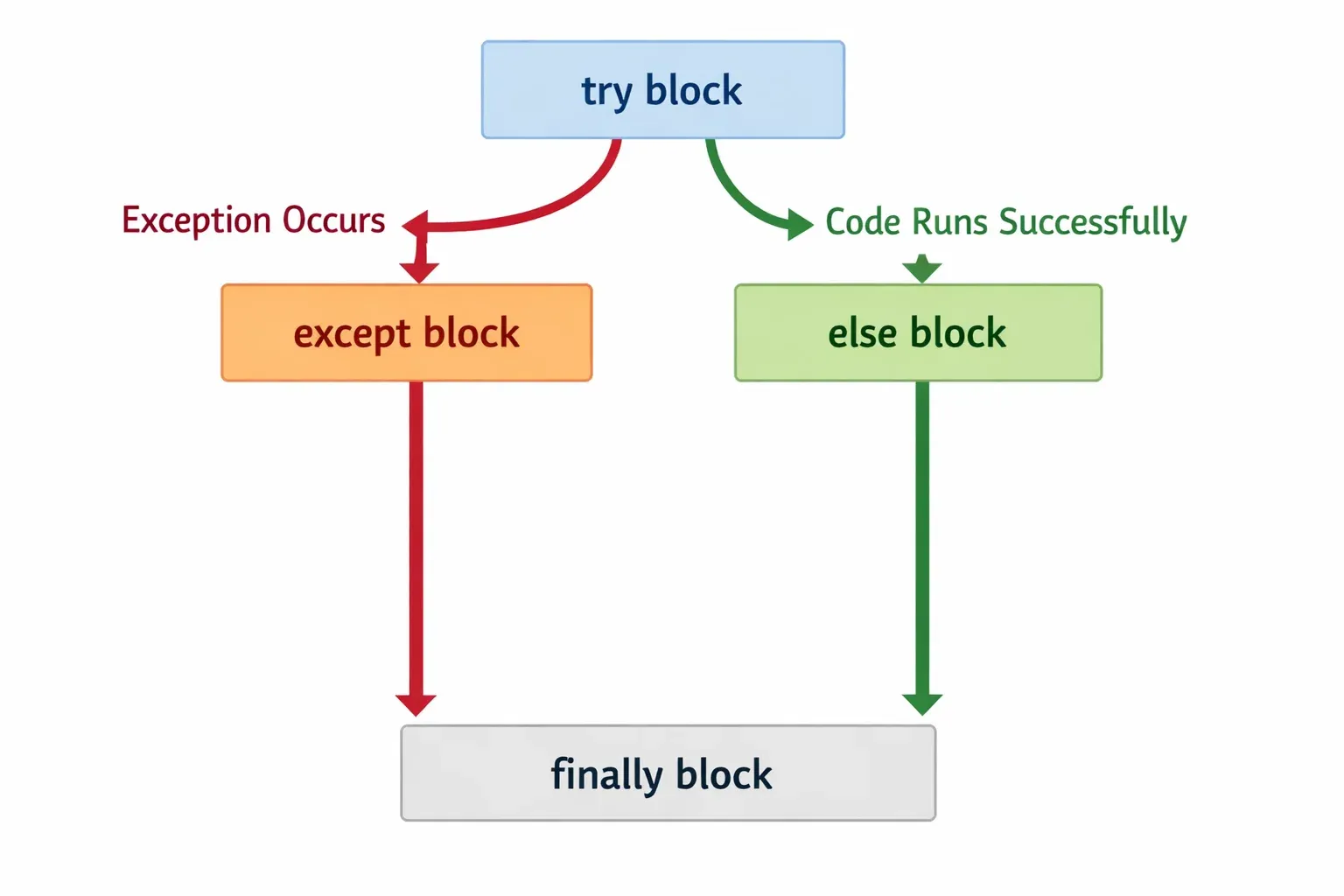
The try-except structure can be extended with two optional clauses: else and finally. Together they give you precise control over what happens in every scenario.
The else clause runs only if the try block completed without raising any exception. It is the "everything went well" branch.
The finally clause always runs — whether an exception was raised or not, whether it was caught or not. This makes it perfect for cleanup tasks like closing files, releasing database connections, or printing a final status message.
# Full structure
try:
    # Risky code
    pass
except SomeException:
    # Runs if the exception occurs
    pass
else:
    # Runs only if NO exception occurred
    pass
finally:
    # ALWAYS runs, no matter what
    pass
Here is a practical example. Fatima is writing a student grade lookup system for her school in Islamabad:
student_grades = {
    "Ahmad": 85,
    "Fatima": 92,
    "Ali": 78
}

student_name = "Sara"  # This student doesn't exist in our records

try:
    grade = student_grades[student_name]
except KeyError:
    print(f"Student '{student_name}' not found in the records.")
else:
    print(f"{student_name}'s grade: {grade}")
finally:
    print("Grade lookup process completed.")
Output:
Student 'Sara' not found in the records.
Grade lookup process completed.
If we change student_name = "Ahmad", the output becomes:
Ahmad's grade: 85
Grade lookup process completed.
Notice that finally runs in both cases. The else block only runs when student_name = "Ahmad" and no exception is raised.
Catching Multiple Exceptions
Real programs can fail in multiple ways, and you often need to handle each failure differently. You can do this in two ways: multiple except clauses, or a single except clause with a tuple of exception types.
Multiple except clauses (recommended when each error needs different handling):
def process_payment(amount_str, balance_str):
    try:
        amount = float(amount_str)
        balance = float(balance_str)
        remaining = balance - amount
        result = 10000 / remaining  # PKR 10,000 bonus calculation
        return result
    except ValueError:
        print("Error: Please enter valid numeric amounts.")
    except ZeroDivisionError:
        print("Error: Remaining balance cannot be zero for this calculation.")
    except Exception as e:
        print(f"An unexpected error occurred: {e}")

process_payment("500abc", "2000")  # Triggers ValueError
process_payment("2000", "2000")    # Triggers ZeroDivisionError
Output:
Error: Please enter valid numeric amounts.
Error: Remaining balance cannot be zero for this calculation.
Notice the except Exception as e at the bottom. This is a catch-all that captures any exception not handled by the previous clauses, and the as e part lets you access the exception object and its message. This is a good safety net, but use it carefully — you don't want to silently swallow unexpected bugs.
Single except with a tuple (when you handle multiple errors the same way):
try:
    value = int(input("Enter a number: "))
    result = 100 / value
except (ValueError, ZeroDivisionError):
    print("Please enter a non-zero integer.")
Raising Exceptions
Sometimes you want to deliberately raise an exception in your own code — for example, to signal that a function received invalid input. You do this with the raise keyword.
def calculate_discount(price, discount_percent):
    if discount_percent < 0 or discount_percent > 100:
        raise ValueError(f"Discount must be between 0 and 100, got {discount_percent}")
    discounted_price = price * (1 - discount_percent / 100)
    return discounted_price

try:
    final_price = calculate_discount(5000, 110)  # 110% discount is invalid
    print(f"Final price: PKR {final_price}")
except ValueError as e:
    print(f"Invalid input: {e}")
Output:
Invalid input: Discount must be between 0 and 100, got 110
Custom Exceptions
For larger applications, you can define your own exception classes by inheriting from Python's built-in Exception class. Custom exceptions make your code more readable and allow calling code to catch specific, meaningful errors.
# Define custom exceptions
class InsufficientFundsError(Exception):
    """Raised when a bank account has insufficient funds for a transaction."""
    def __init__(self, amount, balance):
        self.amount = amount
        self.balance = balance
        super().__init__(
            f"Cannot withdraw PKR {amount:,}. Available balance: PKR {balance:,}."
        )

class InvalidAccountError(Exception):
    """Raised when an account number is invalid."""
    pass

# Use the custom exception
def withdraw(account_number, amount, balance):
    if not account_number.startswith("PK"):
        raise InvalidAccountError(f"Account {account_number} is not a valid Pakistani account.")
    if amount > balance:
        raise InsufficientFundsError(amount, balance)
    return balance - amount

try:
    new_balance = withdraw("PK12345", 15000, 10000)
except InsufficientFundsError as e:
    print(f"Transaction failed: {e}")
except InvalidAccountError as e:
    print(f"Account error: {e}")
Output:
Transaction failed: Cannot withdraw PKR 15,000. Available balance: PKR 10,000.
Practical Code Examples
Example 1: Safe User Input with Retry Logic
One of the most common places you need error handling is when collecting input from a user. Users will type invalid data, and your program must handle it gracefully. This example builds a reusable function for Ali's student enrollment system at a Karachi university:
def get_valid_age(prompt, min_age=15, max_age=60):
    """
    Repeatedly asks the user for a valid age until they provide one.

    Args:
        prompt: The message shown to the user.
        min_age: Minimum acceptable age (default 15).
        max_age: Maximum acceptable age (default 60).

    Returns:
        A valid integer age within the specified range.
    """
    while True:                                    # Line 1: Keep asking until valid input
        try:
            age_str = input(prompt)               # Line 2: Get raw string input from user
            age = int(age_str)                    # Line 3: Try to convert to integer; raises ValueError if it fails

            if age < min_age or age > max_age:    # Line 4: Check if age is in acceptable range
                raise ValueError(                  # Line 5: Manually raise ValueError for out-of-range values
                    f"Age must be between {min_age} and {max_age}."
                )

            return age                            # Line 6: Valid age found — exit the loop and return it

        except ValueError as e:                   # Line 7: Catches both int() failure and our manual raise
            print(f"Invalid input: {e}. Please try again.\n")
            # Line 8: The while loop continues, asking the user again

# --- Main program ---
print("=== Student Enrollment System ===")
print("University of Karachi\n")

student_age = get_valid_age("Enter student age: ", min_age=17, max_age=35)
print(f"\nEnrollment confirmed for student aged {student_age}.")
Sample interaction:
=== Student Enrollment System ===
University of Karachi

Enter student age: hello
Invalid input: invalid literal for int() with base 10: 'hello'. Please try again.

Enter student age: 12
Invalid input: Age must be between 17 and 35. Please try again.

Enter student age: 20
Enrollment confirmed for student aged 20.
Line-by-line explanation:
- Line 1 (
while True): Creates an infinite loop that only exits when valid input is received. - Line 2 (
input(prompt)): Reads the user's input as a string. - Line 3 (
int(age_str)): Attempts conversion to integer. If the user typed "hello", this raisesValueErrorimmediately. - Lines 4–5: Even if the conversion succeeded (e.g., user typed "12"), we check the range and
raise ValueErrormanually if it's out of bounds. - Line 6 (
return age): Only reached if no exception was raised, meaning the age is valid. - Line 7 (
except ValueError as e): Catches both types ofValueError— from failed conversion and from our manual raise. - Line 8: Printing the error message and letting the loop restart.
Example 2: Real-World Application — File-Based Student Records System
This example shows a realistic scenario: reading student records from a file, processing them, and handling every possible file-related error. This is the kind of code Ahmad might write for his school's administration software in Lahore:
import os

def load_student_records(filepath):
    """
    Load student records from a text file.
    Each line should be: StudentName,Marks
    Example: Ahmad,85

    Returns a list of (name, marks) tuples.
    """
    records = []

    try:
        # Attempt to open the file
        with open(filepath, 'r', encoding='utf-8') as file:
            lines = file.readlines()

        # Process each line
        for line_number, line in enumerate(lines, start=1):
            line = line.strip()
            if not line:                          # Skip empty lines
                continue

            try:
                parts = line.split(',')
                if len(parts) != 2:
                    raise ValueError(f"Expected 'Name,Marks' format, got: '{line}'")

                name = parts[0].strip()
                marks = int(parts[1].strip())

                if not (0 <= marks <= 100):
                    raise ValueError(f"Marks must be 0–100, got {marks} for {name}")

                records.append((name, marks))

            except ValueError as e:
                # Log the bad line but continue processing the rest
                print(f"  Warning — Line {line_number} skipped: {e}")

    except FileNotFoundError:
        print(f"Error: File '{filepath}' not found.")
        print("Please check the file path and try again.")
        return []

    except PermissionError:
        print(f"Error: No permission to read '{filepath}'.")
        return []

    except OSError as e:
        print(f"File system error: {e}")
        return []

    else:
        print(f"Successfully loaded {len(records)} record(s) from '{filepath}'.")

    finally:
        print("File loading process finished.\n")

    return records


def display_report(records):
    """Display a formatted report of student records."""
    if not records:
        print("No valid records to display.")
        return

    print("=" * 40)
    print("   STUDENT PERFORMANCE REPORT")
    print("   Punjab Board — Session 2024")
    print("=" * 40)

    total = 0
    for name, marks in records:
        grade = "A" if marks >= 80 else "B" if marks >= 65 else "C" if marks >= 50 else "F"
        print(f"  {name:<15} {marks:>3}/100   Grade: {grade}")
        total += marks

    average = total / len(records)
    print("-" * 40)
    print(f"  Class Average:  {average:.1f}/100")
    print("=" * 40)


# --- Run the program ---
RECORDS_FILE = "students.txt"

print("=== School Records System ===\n")
student_data = load_student_records(RECORDS_FILE)
display_report(student_data)
To test this fully, create a file called students.txt with these contents:
Ahmad,85
Fatima,92
Ali,78
Sara,invalid_marks
Usman,110
Zara,67
Expected output:
=== School Records System ===

  Warning — Line 4 skipped: invalid literal for int() with base 10: 'invalid_marks'
  Warning — Line 5 skipped: Marks must be 0–100, got 110 for Usman
Successfully loaded 4 record(s) from 'students.txt'.
File loading process finished.

========================================
   STUDENT PERFORMANCE REPORT
   Punjab Board — Session 2024
========================================
  Ahmad            85/100   Grade: A
  Fatima           92/100   Grade: A
  Ali              78/100   Grade: C
  Zara             67/100   Grade: B
----------------------------------------
  Class Average:  80.5/100
========================================
This example demonstrates nested try-except blocks (one for the file, one for each line), the else clause for success messaging, and the finally clause as a guaranteed completion notice — all working together in a realistic application.
Common Mistakes & How to Avoid Them
Mistake 1: Using a Bare Except Clause
A bare except: clause (without specifying an exception type) catches everything — including system exits, keyboard interrupts, and errors you didn't expect. This can hide serious bugs and make debugging very difficult.
Wrong:
try:
    result = int(input("Enter marks: "))
except:
    print("Something went wrong.")
Why it's a problem: If the user presses Ctrl+C to quit the program, Python raises a KeyboardInterrupt. A bare except catches this too, so the user can never exit your program normally! It also catches SystemExit, which is raised when you call sys.exit().
Correct — always specify the exception type:
try:
    result = int(input("Enter marks: "))
except ValueError:
    print("Please enter a valid number.")
If you genuinely need a catch-all, use except Exception, which catches most runtime errors but still allows system-level signals like KeyboardInterrupt and SystemExit to propagate:
try:
    risky_operation()
except ValueError:
    print("Bad value.")
except Exception as e:
    print(f"Unexpected error: {e}")
    # Optionally re-raise: raise
Mistake 2: Swallowing Exceptions Silently
Catching an exception and doing nothing (or just printing a vague message) without actually resolving the problem is called "swallowing" the exception. This makes bugs nearly impossible to find.
Wrong:
def calculate_fee(amount):
    try:
        return float(amount) * 1.05  # 5% processing fee
    except:
        pass  # Silent failure — the caller receives None and has no idea why
If calculate_fee("abc") is called, the function silently returns None. Any code that tries to do arithmetic with None will fail with a confusing TypeError far from the original mistake.
Correct — either handle it properly, log it, or re-raise:
import logging

def calculate_fee(amount):
    try:
        return float(amount) * 1.05
    except ValueError as e:
        logging.error(f"calculate_fee received invalid amount '{amount}': {e}")
        raise  # Re-raise the original exception so the caller knows something went wrong

# Alternative: return a sensible default with a clear message
def calculate_fee_safe(amount, default=0.0):
    try:
        return float(amount) * 1.05
    except ValueError:
        print(f"Warning: Invalid amount '{amount}'. Using PKR 0.")
        return default
Mistake 3: Overly Broad Exception Scope in the Try Block
Putting too much code inside a try block makes it hard to know which line actually caused the exception. Keep try blocks as small and focused as possible.
Wrong:
try:
    data = fetch_data_from_api()
    processed = process_data(data)
    filename = generate_filename(processed)
    save_to_file(filename, processed)
    send_email_notification(filename)
except Exception as e:
    print(f"Something failed: {e}")
If this fails, you have no idea which of the five operations caused the problem.
Better — use separate try blocks or nested handling:
try:
    data = fetch_data_from_api()
except ConnectionError as e:
    print(f"Could not connect to API: {e}")
    return

try:
    processed = process_data(data)
    filename = generate_filename(processed)
except (ValueError, KeyError) as e:
    print(f"Data processing error: {e}")
    return

try:
    save_to_file(filename, processed)
except IOError as e:
    print(f"Could not save file: {e}")
    return

send_email_notification(filename)  # This can have its own error handling
Practice Exercises
Exercise 1: Safe Division Calculator
Problem: Write a function called safe_divide(a, b) that takes two arguments and returns the result of a / b. It must handle the following cases:
- If
bis zero, print an error message and returnNone. - If either
aorbis not a number, print an error message and returnNone. - If the division succeeds, print a success message showing the result.
Bonus: Add a finally block that always prints "Calculation attempt complete."
Solution:
def safe_divide(a, b):
    """
    Safely divides a by b with error handling.
    Returns the result or None on failure.
    """
    try:
        result = a / b                         # Will raise ZeroDivisionError if b == 0
                                               # Will raise TypeError if a or b is not a number
    except ZeroDivisionError:
        print("Error: Cannot divide by zero.")
        return None
    except TypeError:
        print(f"Error: Both arguments must be numbers. Got {type(a).__name__} and {type(b).__name__}.")
        return None
    else:
        print(f"Success: {a} / {b} = {result}")
        return result
    finally:
        print("Calculation attempt complete.\n")


# Test cases
print("Test 1:", safe_divide(10, 2))
print("Test 2:", safe_divide(10, 0))
print("Test 3:", safe_divide("hello", 5))
print("Test 4:", safe_divide(7, 3))
Expected Output:
Success: 10 / 2 = 5.0
Calculation attempt complete.

Test 1: 5.0
Error: Cannot divide by zero.
Calculation attempt complete.

Test 2: None
Error: Both arguments must be numbers. Got str and int.
Calculation attempt complete.

Test 3: None
Success: 7 / 3 = 2.3333333333333335
Calculation attempt complete.

Test 4: 2.3333333333333335
Exercise 2: Custom Exception for a Mobile Top-Up System
Problem: Fatima is building a mobile top-up system for a Pakistani telecom company. Create a custom exception class called TopUpError with a subclass InsufficientBalanceError. Write a function top_up_mobile(phone_number, amount, wallet_balance) that:
- Raises a
ValueErrorif thephone_numberdoesn't start with03(Pakistani mobile format). - Raises an
InsufficientBalanceErrorifwallet_balance < amount. - Returns the new wallet balance if everything succeeds.
Solution:
# --- Custom Exceptions ---

class TopUpError(Exception):
    """Base class for all top-up related errors."""
    pass

class InsufficientBalanceError(TopUpError):
    """Raised when wallet balance is less than the requested top-up amount."""
    def __init__(self, requested, available):
        self.requested = requested
        self.available = available
        super().__init__(
            f"Insufficient balance. Requested: PKR {requested:,}, "
            f"Available: PKR {available:,}. "
            f"Please add PKR {requested - available:,} to proceed."
        )

# --- Top-Up Function ---

def top_up_mobile(phone_number, amount, wallet_balance):
    """
    Process a mobile credit top-up.

    Args:
        phone_number: Must start with '03' (Pakistani format)
        amount: Top-up amount in PKR
        wallet_balance: Current wallet balance in PKR

    Returns:
        New wallet balance after deduction.
    """
    # Validate phone number format
    if not str(phone_number).startswith("03") or len(str(phone_number)) != 11:
        raise ValueError(
            f"'{phone_number}' is not a valid Pakistani mobile number. "
            "Must be 11 digits starting with 03."
        )

    # Validate amount
    if amount <= 0:
        raise ValueError("Top-up amount must be greater than zero.")

    # Check balance
    if wallet_balance < amount:
        raise InsufficientBalanceError(amount, wallet_balance)

    new_balance = wallet_balance - amount
    return new_balance


# --- Test the system ---

test_cases = [
    ("03001234567", 200, 1500),    # Should succeed
    ("923001234567", 200, 1500),   # Invalid number format
    ("03001234567", 2000, 1500),   # Insufficient balance
    ("03001234567", -100, 1500),   # Invalid amount
]

print("=== Ufone Mobile Top-Up System ===\n")

for phone, amount, balance in test_cases:
    print(f"Top-up PKR {amount:,} for {phone} (Wallet: PKR {balance:,})")
    try:
        new_balance = top_up_mobile(phone, amount, balance)
        print(f"  ✓ Success! New wallet balance: PKR {new_balance:,}")
    except InsufficientBalanceError as e:
        print(f"  ✗ Balance Error: {e}")
    except ValueError as e:
        print(f"  ✗ Validation Error: {e}")
    except TopUpError as e:
        print(f"  ✗ Top-Up Error: {e}")
    print()
Expected Output:
=== Ufone Mobile Top-Up System ===

Top-up PKR 200 for 03001234567 (Wallet: PKR 1,500)
  ✓ Success! New wallet balance: PKR 1,300

Top-up PKR 200 for 923001234567 (Wallet: PKR 1,500)
  ✗ Validation Error: '923001234567' is not a valid Pakistani mobile number. Must be 11 digits starting with 03.

Top-up PKR 2,000 for 03001234567 (Wallet: PKR 1,500)
  ✗ Balance Error: Insufficient balance. Requested: PKR 2,000, Available: PKR 1,500. Please add PKR 500 to proceed.

Top-up PKR -100 for 03001234567 (Wallet: PKR 1,500)
  ✗ Validation Error: Top-up amount must be greater than zero.
Frequently Asked Questions
What is the difference between errors and exceptions in Python?
In Python, all errors are technically exceptions, but not all exceptions are errors in the programming sense. Python has two main categories: syntax errors (like forgetting a colon or misspelling a keyword) which prevent your code from running at all, and exceptions which occur during execution when something unexpected happens. Exception handling with try/except can only deal with runtime exceptions — syntax errors must be fixed in your code before it runs.
How do I handle multiple exceptions in a single except block?
You can catch multiple exception types in one except clause by grouping them in a tuple: except (ValueError, TypeError, KeyError) as e:. This is useful when different exception types should be handled in exactly the same way. If each exception type needs different handling logic, use separate except clauses instead, as this makes your code clearer and easier to maintain.
When should I use finally versus else in a try-except block?
Use else when you have code that should only run if the try block succeeded — it keeps your success path separate from your error handling. Use finally for cleanup actions that must happen regardless of success or failure, such as closing a file, releasing a database connection, or logging a "process complete" message. A common pattern is to use all three together: try for the risky operation, except for error handling, else for post-success logic, and finally for guaranteed cleanup.
Should I always catch exceptions, or should I let them propagate?
This depends on whether your code can meaningfully respond to the exception. If you can recover from the error, provide a fallback, or give the user a helpful message, then catching it makes sense. If you cannot do anything useful with the exception at the current level of your code, it is often better to let it propagate up to a caller that can handle it more appropriately. Avoid catching exceptions just to silence them — this hides bugs and makes debugging much harder.
What is exception chaining and when should I use it?
Exception chaining lets you raise a new exception while preserving the original one as context. Use raise NewException("message") from original_exception to do this. It is especially useful when you are catching a low-level exception (like IOError) and re-raising it as a higher-level, more meaningful one (like a custom DataLoadError). The from keyword attaches the original exception so developers can see the full chain of what went wrong in the traceback. Python also does implicit chaining when an exception occurs inside an except block.
Summary & Key Takeaways
- Exceptions are normal, not exceptional. Every production program should be designed to handle unexpected inputs and failures gracefully. Writing robust error handling from the start is a sign of an experienced developer.
- Use specific exception types. Always name the exact exception you expect (e.g.,
except ValueError) rather than using a bareexcept:orexcept Exception:as your first clause. This prevents masking unrelated bugs. - The
finallyblock is your cleanup guarantee. Code infinallyalways runs, making it ideal for releasing resources like file handles and database connections. - The
elseclause keeps your code clean. Useelseto separate your "happy path" logic from your error handling, making both easier to read. - Create custom exceptions for meaningful code. In larger projects, custom exception classes with descriptive names and helpful messages make your API far easier to use and debug.
- Never swallow exceptions silently. If you catch an exception, either handle it properly, log it with enough context to debug later, or re-raise it. A silent
except: passis almost always a bug waiting to happen.
Next Steps & Related Tutorials
Now that you have a solid understanding of Python exception handling, here are some recommended tutorials on theiqra.edu.pk to continue building your Python skills:
- Python File Handling: Reading and Writing Files — Exception handling and file operations go hand-in-hand. Learn how to safely open, read, write, and close files using the
withstatement and handle common file-related exceptions likeFileNotFoundErrorandPermissionError. - Object-Oriented Programming in Python — Custom exceptions are just classes. Deepen your understanding of Python classes, inheritance, and
__init__to design more sophisticated exception hierarchies for your applications. - Python Logging Module: Professional Error Tracking — Learn how to replace
print()statements in yourexceptblocks with Python's powerfulloggingmodule, enabling you to write error logs to files, set severity levels, and track issues in production applications. - Building REST APIs with Flask in Python — See how exception handling works in a real web application context, where unhandled exceptions become HTTP 500 errors and proper error handling returns clean JSON responses to mobile and web clients.
Written for theiqra.edu.pk — Pakistan's growing community for programming education. Questions? Use the comments section below or reach out to our community forum.
Test Your Python Knowledge!
Finished reading? Take a quick quiz to see how much you've learned from this tutorial.