Python Inheritance and Polymorphism Explained
Introduction
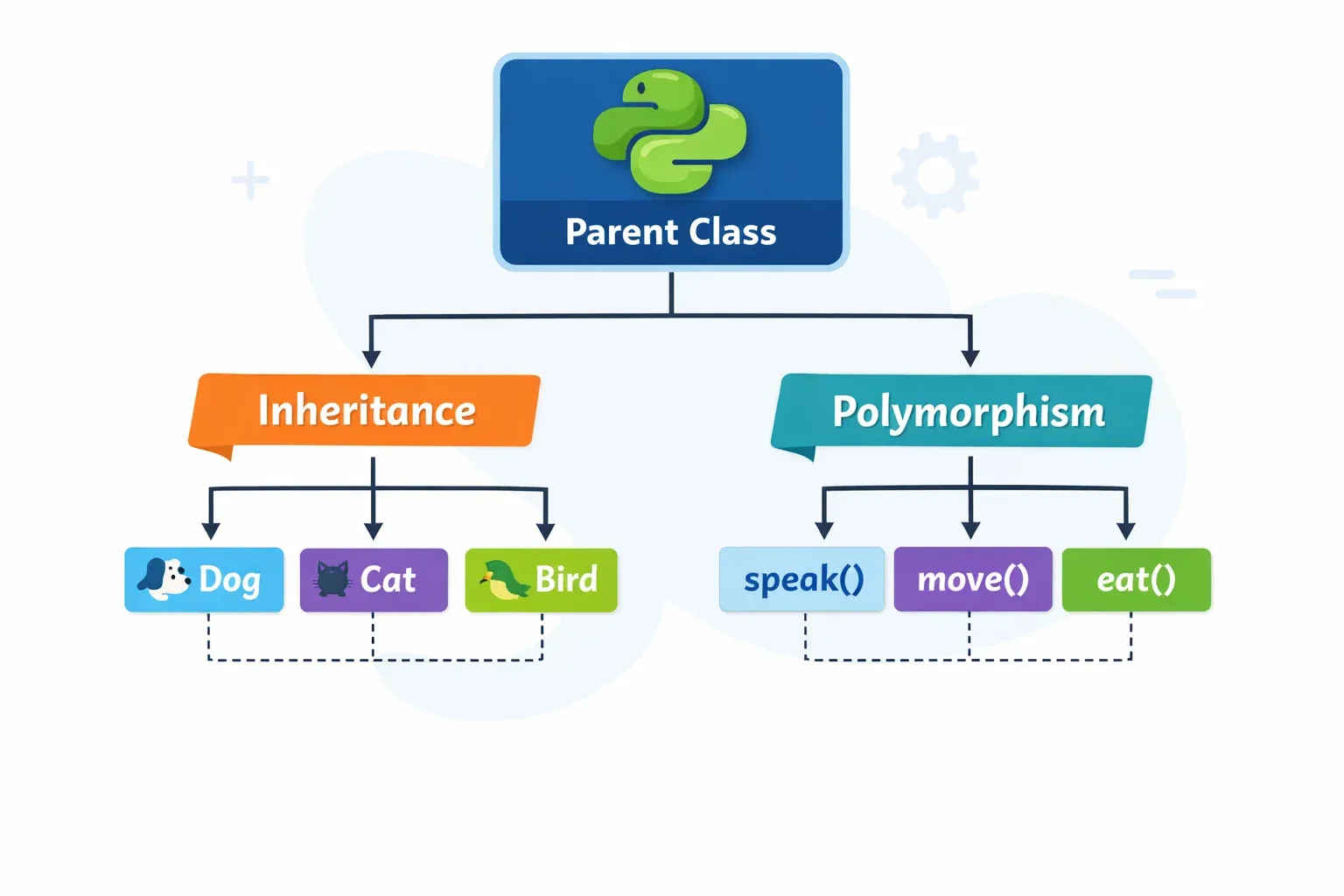
If you have been learning Python for a while, you already know how to create classes and objects. But what happens when you want to build on top of something you have already created — without rewriting everything from scratch? That is exactly where python inheritance comes in. And once you understand inheritance, polymorphism python becomes the superpower that makes your code flexible and powerful.
Think of it this way: suppose Ahmad is building a school management system for a university in Lahore. He has already written a Person class. Now he needs to create a Student class and a Teacher class. Should he rewrite all the common attributes (name, age, CNIC) from scratch? Absolutely not. With inheritance, he can make both Student and Teacher inherit from Person and only add what is unique to each.
In this tutorial, you will learn how to use python inheritance to avoid code repetition, how to use the super keyword to extend parent class behavior, and how polymorphism python allows the same method name to behave differently depending on the object. These are core object-oriented programming (OOP) concepts used in every professional Python project — from Django web applications to data science pipelines.
Prerequisites
Before diving into this tutorial, make sure you are comfortable with the following:
- Basic Python syntax — variables, loops, conditionals, and functions. If you need a refresher, check out our Introduction to Python tutorial on theiqra.edu.pk.
- Python Classes and Objects — you should know how to define a class, create an
__init__method, and instantiate objects. Our Python Classes and Objects tutorial covers this in full detail. - Basic understanding of functions and methods — the difference between a regular function and a class method.
- Python installed — Python 3.8 or above is recommended. If you haven't set it up yet, our Python Installation Guide for Pakistani Students will walk you through it step by step.
Core Concepts & Explanation
What Is Python Inheritance?
Inheritance is an OOP principle that allows one class (called the child class or subclass) to acquire the properties and methods of another class (called the parent class or superclass). This promotes code reuse and models real-world relationships naturally.
The syntax is simple. You define the child class by passing the parent class as an argument:
class ParentClass:
    pass

class ChildClass(ParentClass):
    pass
When ChildClass inherits from ParentClass, it automatically gets all the attributes and methods of ParentClass. You can then add new methods, override existing ones, or extend behavior using the super keyword.
There are several types of inheritance in Python:
Single Inheritance — one child class inherits from one parent class. This is the most common form and what we will focus on primarily.
Multiple Inheritance — a child class inherits from more than one parent class. For example, a TeachingAssistant might inherit from both Teacher and Student. Python handles this using the Method Resolution Order (MRO).
Multilevel Inheritance — a chain of inheritance where ClassC inherits from ClassB, which itself inherits from ClassA.
Hierarchical Inheritance — multiple child classes inherit from a single parent class. For instance, both Student and Teacher inherit from Person.
Here is a concrete example of single inheritance using Pakistani context:
# Parent class
class Person:
    def __init__(self, name, age, city):
        self.name = name
        self.age = age
        self.city = city

    def introduce(self):
        print(f"Mera naam {self.name} hai. Main {self.city} mein rehta/rehti hoon.")

# Child class inheriting from Person
class Student(Person):
    def __init__(self, name, age, city, roll_number):
        super().__init__(name, age, city)  # Call parent constructor
        self.roll_number = roll_number

    def study(self):
        print(f"{self.name} (Roll No: {self.roll_number}) is studying hard!")

# Creating an object
student1 = Student("Ahmad", 20, "Lahore", "CS-2021-045")
student1.introduce()   # Inherited from Person
student1.study()       # Defined in Student
Output:
Mera naam Ahmad hai. Main Lahore mein rehta hoon.
Ahmad (Roll No: CS-2021-045) is studying hard!
Notice that student1 can call introduce() even though it was defined in Person. That is inheritance at work — Ahmad's Student class gets introduce() for free.
What Is Polymorphism in Python?
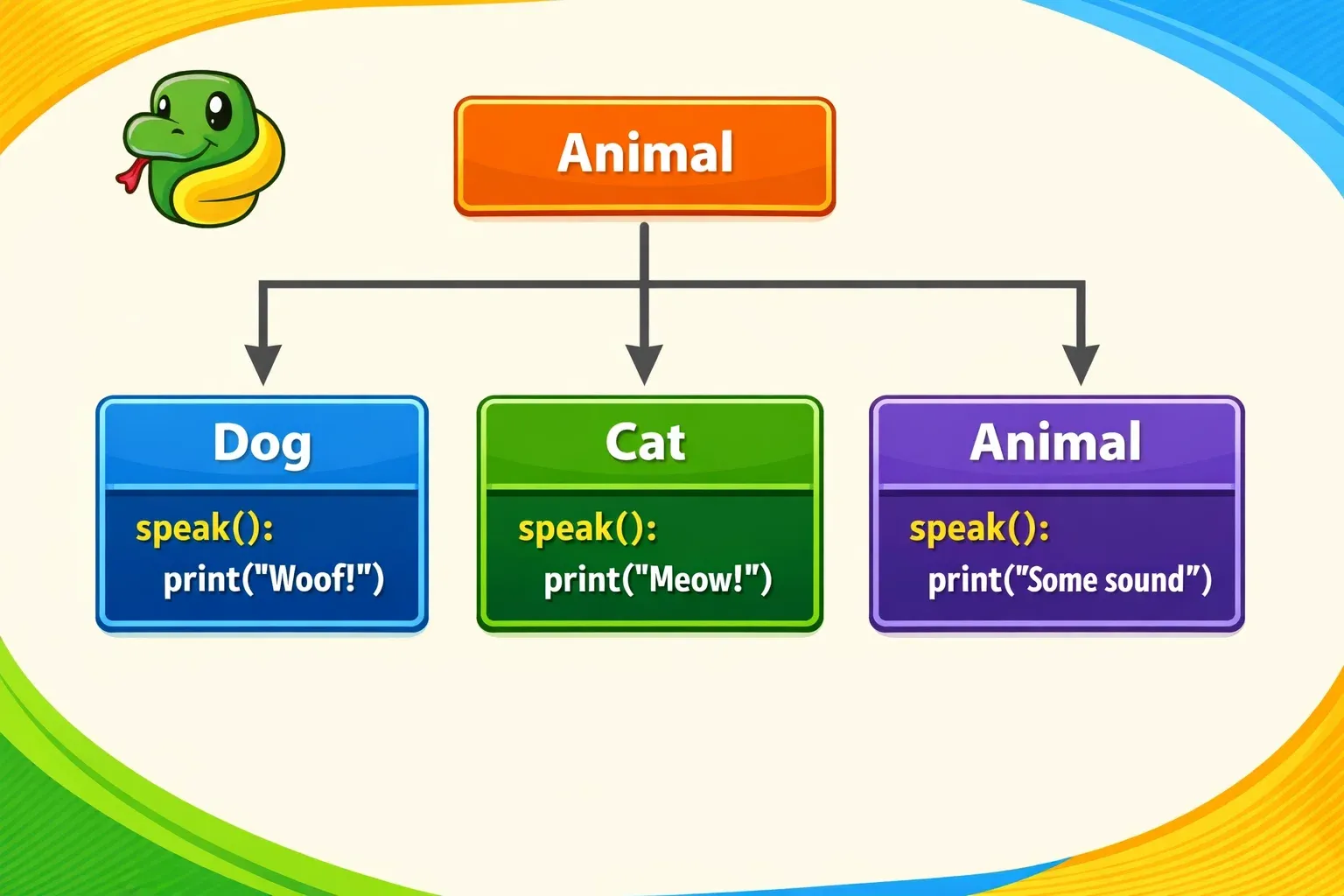
The word polymorphism comes from Greek, meaning "many forms." In Python, polymorphism means that different classes can have methods with the same name that behave differently depending on which object is calling them.
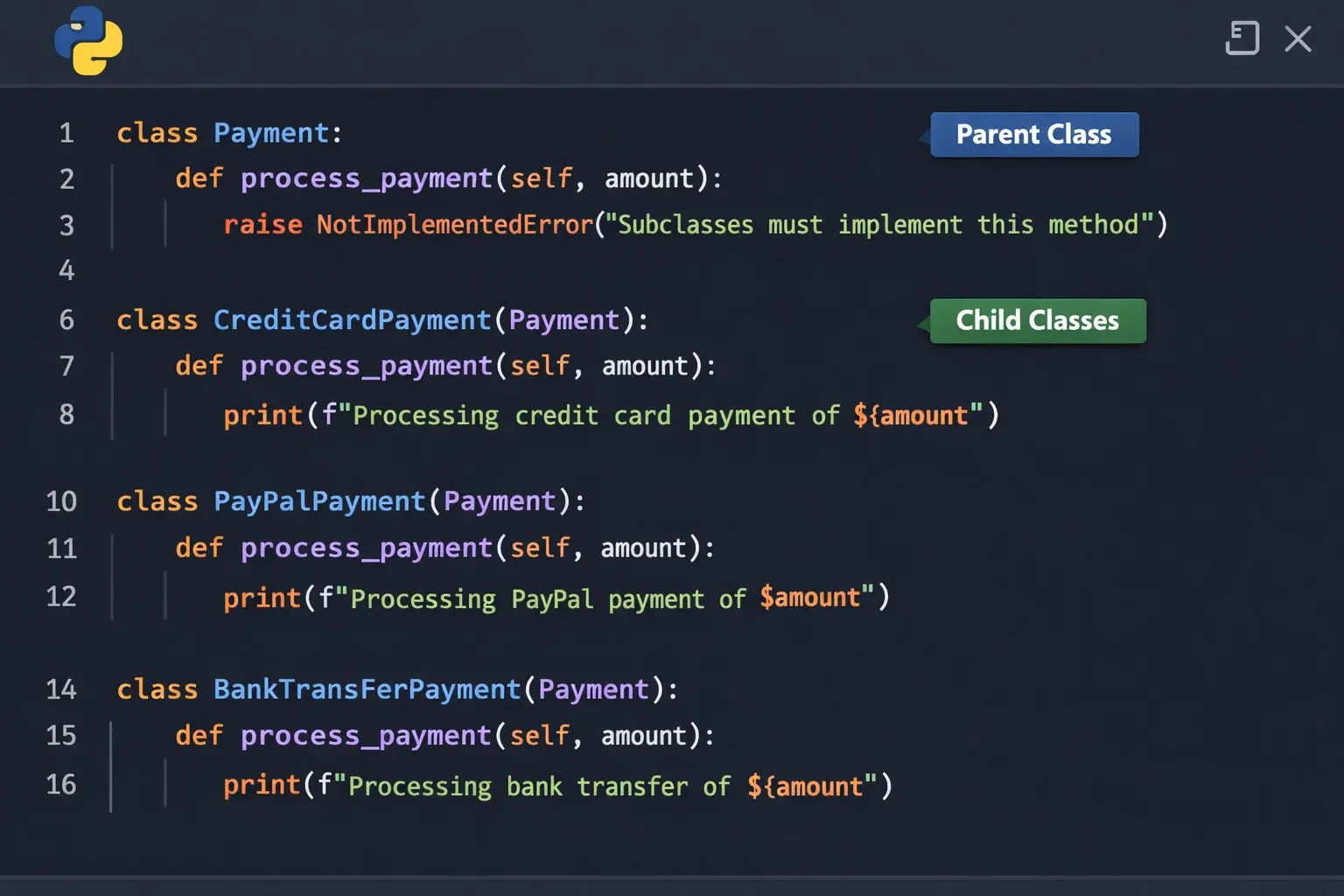
Think of a real-world example: Fatima is a software developer in Karachi building a payment system for an e-commerce app. She has three payment methods: CashOnDelivery, EasyPaisa, and BankTransfer. Each has a process_payment() method, but each works differently. With polymorphism, her code can call process_payment() on any of these objects without knowing which type it is dealing with — the right method gets called automatically.
There are two main ways polymorphism manifests in Python:
Method Overriding — a child class provides its own implementation of a method that already exists in the parent class. When the method is called on the child object, Python uses the child's version.
Duck Typing — Python does not require objects to share a common parent class to be polymorphic. If an object has the right method, it works. "If it walks like a duck and quacks like a duck, it's a duck."
Here is a quick illustration:
class Animal:
    def speak(self):
        print("The animal makes a sound.")

class Dog(Animal):
    def speak(self):           # Method overriding
        print("Woof! Woof!")

class Cat(Animal):
    def speak(self):           # Method overriding
        print("Meow!")

# Polymorphism in action
animals = [Dog(), Cat(), Animal()]

for animal in animals:
    animal.speak()   # Same method name, different behavior!
Output:
Woof! Woof!
Meow!
The animal makes a sound.
Each object responds to speak() in its own way. That is polymorphism.
The super() Keyword in Python
The super() keyword is one of the most important tools when working with inheritance. It allows a child class to call a method from its parent class. This is especially useful in __init__ methods when you want to extend the parent's initialization rather than completely replace it.
Without super(), you would have to manually call the parent class by name, which is fragile and breaks with multiple inheritance. Using super() is always the recommended Pythonic approach.
class Employee:
    def __init__(self, name, employee_id, salary):
        self.name = name
        self.employee_id = employee_id
        self.salary = salary   # In PKR

    def display_info(self):
        print(f"Employee: {self.name}, ID: {self.employee_id}, Salary: PKR {self.salary:,}")

class Manager(Employee):
    def __init__(self, name, employee_id, salary, department):
        super().__init__(name, employee_id, salary)  # Calls Employee.__init__
        self.department = department                  # Adds Manager-specific attribute

    def display_info(self):
        super().display_info()                        # Calls Employee.display_info()
        print(f"Department: {self.department}")       # Adds more info

# Usage
manager = Manager("Ali", "MGR-001", 150000, "Software Engineering")
manager.display_info()
Output:
Employee: Ali, ID: MGR-001, Salary: PKR 150,000
Department: Software Engineering
Here super().__init__() runs the Employee constructor first, so Ali's salary and ID are properly set, and then the Manager class adds the department on top. Similarly, super().display_info() calls the parent's display method and then adds to it — this is a great pattern for extending behavior.
Method Overriding in Detail
Method overriding is when a child class defines a method with the same name as a method in the parent class. Python will always use the most specific (child) version when calling on a child object. This is what makes polymorphism so powerful.
Key rules to remember:
The method name must be exactly the same. The child version completely replaces the parent version for that object, unless you explicitly call super(). You can override any method, including __init__, __str__, __repr__, and other dunder (magic) methods.
class Vehicle:
    def __init__(self, brand, fuel_type):
        self.brand = brand
        self.fuel_type = fuel_type

    def describe(self):
        return f"{self.brand} runs on {self.fuel_type}."

    def start(self):
        return "Starting the vehicle..."

class ElectricCar(Vehicle):
    def __init__(self, brand, battery_capacity):
        super().__init__(brand, "Electricity")
        self.battery_capacity = battery_capacity

    def describe(self):                    # Overrides Vehicle.describe()
        return f"{self.brand} is electric with {self.battery_capacity}kWh battery."

    def start(self):                       # Overrides Vehicle.start()
        return "Silently powering up..."

class PetrolCar(Vehicle):
    def start(self):                       # Overrides Vehicle.start()
        return "Vroom! Engine roaring..."

# Polymorphism via overriding
vehicles = [
    ElectricCar("Audi e-tron", 95),
    PetrolCar("Suzuki Cultus", "Petrol"),
]

for v in vehicles:
    print(v.describe())
    print(v.start())
    print()
Output:
Audi e-tron is electric with 95kWh battery.
Silently powering up...

Suzuki Cultus runs on Petrol.
Vroom! Engine roaring...
Practical Code Examples
Example 1: Pakistani University Management System
This example brings together inheritance, the super keyword, and method overriding in a realistic university scenario relevant to students in Islamabad, Karachi, or Lahore.
# Base class
class Person:
    def __init__(self, name, cnic, city):
        self.name = name      # Full name of the person
        self.cnic = cnic      # Pakistani CNIC number
        self.city = city      # City of residence

    def get_info(self):
        # Returns a formatted string with basic info
        return f"Name: {self.name} | City: {self.city}"

    def __str__(self):
        # String representation for print()
        return f"Person({self.name})"


# Student inherits from Person
class Student(Person):
    def __init__(self, name, cnic, city, program, fees_paid):
        super().__init__(name, cnic, city)   # Initialize Person attributes
        self.program = program               # e.g., "BS Computer Science"
        self.fees_paid = fees_paid           # Amount in PKR

    def get_info(self):
        # Overrides Person.get_info() to include student-specific data
        base_info = super().get_info()       # Get parent's info string
        return f"{base_info} | Program: {self.program} | Fees Paid: PKR {self.fees_paid:,}"

    def __str__(self):
        return f"Student({self.name}, {self.program})"


# Teacher inherits from Person
class Teacher(Person):
    def __init__(self, name, cnic, city, subject, monthly_salary):
        super().__init__(name, cnic, city)    # Initialize Person attributes
        self.subject = subject                # Subject they teach
        self.monthly_salary = monthly_salary  # Monthly salary in PKR

    def get_info(self):
        # Overrides Person.get_info() with teacher-specific data
        base_info = super().get_info()
        return f"{base_info} | Subject: {self.subject} | Salary: PKR {self.monthly_salary:,}/month"

    def __str__(self):
        return f"Teacher({self.name}, {self.subject})"


# Admin inherits from Person
class Admin(Person):
    def __init__(self, name, cnic, city, department):
        super().__init__(name, cnic, city)
        self.department = department

    def get_info(self):
        base_info = super().get_info()
        return f"{base_info} | Department: {self.department}"


# --- Main program ---

# Create instances
student1 = Student("Fatima Malik", "35202-1234567-8", "Lahore", "BS Computer Science", 75000)
teacher1 = Teacher("Prof. Ahmad Khan", "42101-9876543-2", "Karachi", "Data Structures", 120000)
admin1   = Admin("Ali Raza", "61101-5555555-1", "Islamabad", "Finance")

# Polymorphism: same method, different behavior
university_members = [student1, teacher1, admin1]

print("=== University Management System ===\n")
for member in university_members:
    print(member.get_info())   # Calls the correct overridden version automatically
    print()
Output:
=== University Management System ===

Name: Fatima Malik | City: Lahore | Program: BS Computer Science | Fees Paid: PKR 75,000

Name: Prof. Ahmad Khan | City: Karachi | Subject: Data Structures | Salary: PKR 120,000/month

Name: Ali Raza | City: Islamabad | Department: Finance
Line-by-line explanation:
- Lines 2-11:
Personis the base class withname,cnic, andcity.get_info()returns a basic string and__str__controls how the object looks when printed. - Lines 14-25:
Studentcallssuper().__init__()to set the threePersonattributes, then addsprogramandfees_paid. Itsget_info()first callssuper().get_info()to get the parent string, then appends student-specific data. - Lines 28-37:
Teacherfollows the same pattern withsubjectandmonthly_salary. - Lines 53-57: The loop demonstrates polymorphism —
member.get_info()is called on each object, but Python automatically picks the right version for each class type.
Example 2: Real-World Application — E-Commerce Payment System
Imagine Fatima is building an online shopping platform for a Pakistani marketplace. She needs to support multiple payment methods. This example shows how polymorphism makes such a system clean and extensible.
# Abstract-style base class for payment
class PaymentMethod:
    def __init__(self, user_name):
        self.user_name = user_name    # Customer name

    def process_payment(self, amount):
        # Base implementation — to be overridden by child classes
        raise NotImplementedError("Each payment method must implement process_payment()")

    def get_receipt(self, amount):
        # Shared receipt method used by all payment types
        return f"Receipt: PKR {amount:,} processed for {self.user_name}"


# EasyPaisa payment
class EasyPaisa(PaymentMethod):
    def __init__(self, user_name, phone_number):
        super().__init__(user_name)
        self.phone_number = phone_number    # EasyPaisa registered number

    def process_payment(self, amount):
        # Overrides base method with EasyPaisa-specific logic
        print(f"[EasyPaisa] Sending PKR {amount:,} from {self.phone_number}...")
        print(f"[EasyPaisa] OTP sent to {self.phone_number}. Payment authorized.")
        return True


# Bank Transfer
class BankTransfer(PaymentMethod):
    def __init__(self, user_name, account_number, bank_name):
        super().__init__(user_name)
        self.account_number = account_number   # Bank account number
        self.bank_name = bank_name             # e.g., "HBL", "MCB", "Meezan Bank"

    def process_payment(self, amount):
        # Overrides base method with bank-specific logic
        print(f"[{self.bank_name}] Initiating transfer of PKR {amount:,}...")
        print(f"[{self.bank_name}] Transaction from account ending {self.account_number[-4:]} approved.")
        return True


# Cash on Delivery
class CashOnDelivery(PaymentMethod):
    def __init__(self, user_name, address):
        super().__init__(user_name)
        self.address = address    # Delivery address

    def process_payment(self, amount):
        # No online transaction needed — just schedule delivery
        print(f"[COD] Order for PKR {amount:,} to be collected at: {self.address}")
        print(f"[COD] Delivery agent will collect cash on arrival.")
        return True


# --- Checkout function — works with ANY payment type ---
def checkout(cart_total, payment_method):
    print(f"\n--- Checkout for {payment_method.user_name} ---")
    success = payment_method.process_payment(cart_total)   # Polymorphic call
    if success:
        print(payment_method.get_receipt(cart_total))      # Inherited from base
    print("--- Done ---\n")


# Simulating different customers
customer1_payment = EasyPaisa("Ahmad", "0300-1234567")
customer2_payment = BankTransfer("Fatima", "PK36MEZN0001234567890101", "Meezan Bank")
customer3_payment = CashOnDelivery("Ali", "House 5, Street 7, F-8/4, Islamabad")

checkout(3500, customer1_payment)
checkout(12000, customer2_payment)
checkout(850, customer3_payment)
Output:
--- Checkout for Ahmad ---
[EasyPaisa] Sending PKR 3,500 from 0300-1234567...
[EasyPaisa] OTP sent to 0300-1234567. Payment authorized.
Receipt: PKR 3,500 processed for Ahmad
--- Done ---

--- Checkout for Fatima ---
[Meezan Bank] Initiating transfer of PKR 12,000...
[Meezan Bank] Transaction from account ending 0101 approved.
Receipt: PKR 12,000 processed for Fatima
--- Done ---

--- Checkout for Ali ---
[COD] Order for PKR 850 to be collected at: House 5, Street 7, F-8/4, Islamabad
[COD] Delivery agent will collect cash on arrival.
Receipt: PKR 850 processed for Ali
--- Done ---
The checkout() function does not need to know which type of payment is being used. It just calls process_payment() and Python handles the rest — that is the power of polymorphism in real applications.
Common Mistakes & How to Avoid Them
Mistake 1: Forgetting to Call super().init() in the Child Class
This is the most common error for students learning inheritance. When you override __init__ in a child class without calling super().__init__(), the parent's attributes never get initialized, leading to AttributeError crashes.
Wrong approach:
class Person:
    def __init__(self, name, city):
        self.name = name
        self.city = city

class Student(Person):
    def __init__(self, name, city, program):
        # MISTAKE: Forgot super().__init__()!
        self.program = program

s = Student("Ahmad", "Lahore", "BS CS")
print(s.name)   # AttributeError: 'Student' object has no attribute 'name'
Correct approach:
class Student(Person):
    def __init__(self, name, city, program):
        super().__init__(name, city)   # Always call this first!
        self.program = program

s = Student("Ahmad", "Lahore", "BS CS")
print(s.name)   # Works perfectly: Ahmad
Always call super().__init__() as the first line of your child __init__ method, and pass all required arguments that the parent expects.
Mistake 2: Confusing Method Overriding with Method Overloading
Students who come from Java or C++ backgrounds sometimes expect Python to support method overloading (same method name, different parameter counts). Python does not support traditional method overloading. If you define a method twice in the same class, the second one silently replaces the first.
Wrong approach (thinking this is overloading):
class Calculator:
    def add(self, a, b):
        return a + b

    def add(self, a, b, c):       # This REPLACES the first add()!
        return a + b + c

calc = Calculator()
print(calc.add(10, 20))           # TypeError: add() missing 1 required argument: 'c'
Correct approach — use default arguments:
class Calculator:
    def add(self, a, b, c=0):     # c defaults to 0 if not provided
        return a + b + c

calc = Calculator()
print(calc.add(10, 20))           # 30 — works!
print(calc.add(10, 20, 30))       # 60 — also works!
Method overriding (child redefines a parent method) is different from method overloading (same class, same name, different parameters). Python supports the former natively, not the latter.
Mistake 3: Hardcoding the Parent Class Name Instead of Using super()
Some students avoid super() and call the parent class directly by name. This works for simple single inheritance but breaks badly with multiple inheritance or when the class hierarchy changes.
Fragile approach:
class Student(Person):
    def __init__(self, name, city, program):
        Person.__init__(self, name, city)   # Works but is brittle
        self.program = program
Preferred approach:
class Student(Person):
    def __init__(self, name, city, program):
        super().__init__(name, city)        # Clean, flexible, Pythonic
        self.program = program
Using super() respects Python's Method Resolution Order (MRO) and is the professionally accepted way to handle inheritance chains.
Practice Exercises
Exercise 1: Build a Bank Account Hierarchy
Problem: Create a BankAccount base class with attributes account_holder (name), balance (in PKR), and methods deposit(amount), withdraw(amount), and get_balance(). Then create two child classes: SavingsAccount that adds an interest_rate attribute and a calculate_interest() method, and CurrentAccount that adds an overdraft_limit attribute and allows withdrawals beyond the balance up to the overdraft limit. Use Pakistani names and PKR amounts.
Solution:
class BankAccount:
    def __init__(self, account_holder, balance=0):
        self.account_holder = account_holder
        self.balance = balance              # Balance in PKR

    def deposit(self, amount):
        self.balance += amount
        print(f"PKR {amount:,} deposited. New balance: PKR {self.balance:,}")

    def withdraw(self, amount):
        if amount > self.balance:
            print(f"Insufficient funds! Balance: PKR {self.balance:,}")
        else:
            self.balance -= amount
            print(f"PKR {amount:,} withdrawn. Remaining: PKR {self.balance:,}")

    def get_balance(self):
        return self.balance


class SavingsAccount(BankAccount):
    def __init__(self, account_holder, balance, interest_rate):
        super().__init__(account_holder, balance)
        self.interest_rate = interest_rate   # Annual rate, e.g., 0.10 for 10%

    def calculate_interest(self):
        interest = self.balance * self.interest_rate
        print(f"Annual interest for {self.account_holder}: PKR {interest:,.0f}")
        return interest


class CurrentAccount(BankAccount):
    def __init__(self, account_holder, balance, overdraft_limit):
        super().__init__(account_holder, balance)
        self.overdraft_limit = overdraft_limit   # How much can be overdrawn

    def withdraw(self, amount):    # Overrides BankAccount.withdraw()
        if amount > (self.balance + self.overdraft_limit):
            print(f"Exceeds overdraft limit of PKR {self.overdraft_limit:,}!")
        else:
            self.balance -= amount
            status = "(overdraft)" if self.balance < 0 else ""
            print(f"PKR {amount:,} withdrawn {status}. Balance: PKR {self.balance:,}")


# Test the classes
savings = SavingsAccount("Fatima Malik", 50000, 0.08)
current = CurrentAccount("Ahmad Shah", 10000, 25000)

savings.deposit(20000)
savings.calculate_interest()

print()
current.withdraw(15000)    # Within limits
current.withdraw(25000)    # This will use overdraft
Expected Output:
PKR 20,000 deposited. New balance: PKR 70,000
Annual interest for Fatima Malik: PKR 5,600

PKR 15,000 withdrawn. Balance: PKR -5,000
PKR 25,000 withdrawn (overdraft). Balance: PKR -30,000
Exercise 2: Shape Area Calculator
Problem: Create a Shape base class with a color attribute and an abstract-style area() method. Create three child classes: Circle (needs radius), Rectangle (needs width and height), and Triangle (needs base and height). Override area() in each. Then write a function that takes a list of shapes and prints the area of each using polymorphism.
Solution:
import math

class Shape:
    def __init__(self, color):
        self.color = color

    def area(self):
        raise NotImplementedError("Subclasses must implement area()")

    def describe(self):
        print(f"A {self.color} {self.__class__.__name__} with area: {self.area():.2f} sq units")


class Circle(Shape):
    def __init__(self, color, radius):
        super().__init__(color)
        self.radius = radius

    def area(self):    # Overrides Shape.area()
        return math.pi * self.radius ** 2


class Rectangle(Shape):
    def __init__(self, color, width, height):
        super().__init__(color)
        self.width = width
        self.height = height

    def area(self):    # Overrides Shape.area()
        return self.width * self.height


class Triangle(Shape):
    def __init__(self, color, base, height):
        super().__init__(color)
        self.base = base
        self.height = height

    def area(self):    # Overrides Shape.area()
        return 0.5 * self.base * self.height


# Polymorphic function
def print_all_areas(shapes):
    print("=== Shape Report ===")
    for shape in shapes:
        shape.describe()    # Calls the correct area() for each shape

# Create shapes
shapes = [
    Circle("red", 7),
    Rectangle("blue", 5, 10),
    Triangle("green", 6, 8)
]

print_all_areas(shapes)
Expected Output:
=== Shape Report ===
A red Circle with area: 153.94 sq units
A blue Rectangle with area: 50.00 sq units
A green Triangle with area: 24.00 sq units
Frequently Asked Questions
What is the difference between inheritance and composition in Python?
Inheritance models an "is-a" relationship: a Student is a Person. Composition models a "has-a" relationship: a Car has an Engine. Both are important OOP patterns. Inheritance is best when objects truly share a parent-child relationship. Composition is preferred when you want more flexibility — it avoids tight coupling between classes and is generally easier to maintain in large projects.
How does Python decide which method to call with multiple inheritance?
Python uses the Method Resolution Order (MRO), which is determined using the C3 linearization algorithm. When a method is called on an object, Python searches the class hierarchy in a specific order — always checking the class itself first, then its parents from left to right. You can inspect a class's MRO using ClassName.__mro__ or help(ClassName). Using super() always respects this order, which is why it is preferred over calling parent classes by name directly.
What is the difference between method overriding and method overloading?
Method overriding occurs when a child class defines a method with the same name as one in its parent class, replacing the parent's behavior for child objects. Method overloading means having multiple methods with the same name but different parameters in the same class. Python does not support traditional method overloading — defining a method twice just replaces the first. Instead, use default parameter values (def method(self, a, b=None)) to achieve similar flexibility.
Can a child class inherit from multiple parent classes in Python?
Yes, Python supports multiple inheritance. You can write class C(A, B) to inherit from both A and B. Python resolves method conflicts using MRO. While powerful, multiple inheritance can make code harder to understand, so use it carefully. A common real-world use case is mixins — small helper classes that add specific behavior (like logging or serialization) to other classes without forming a deep hierarchy.
What happens if I do not override a method in the child class?
If you do not override a method in the child class, the child simply inherits the parent's version and uses it as-is. You only need to override when you want the child to behave differently. This is one of the key benefits of inheritance — you can reuse parent methods across many child classes without duplication, and only customize what needs to change.
Summary & Key Takeaways
- Python inheritance allows child classes to reuse code from parent classes, modeling real-world "is-a" relationships and eliminating duplication. Use
class Child(Parent)syntax to establish the link. - The
super()keyword is the correct, Pythonic way to call parent class methods from a child class. Always usesuper().__init__()in child constructors to properly initialize inherited attributes. - Method overriding lets child classes customize behavior by redefining a method from the parent. Python automatically calls the most specific (child) version based on the object's type.
- Polymorphism in Python means one interface, many behaviors. The same method name produces different results depending on the object calling it — making your code flexible, extensible, and clean.
- Common pitfalls to avoid: forgetting
super().__init__(), confusing overriding with overloading, and hardcoding parent class names instead of usingsuper(). - These OOP principles are the backbone of major Python frameworks. Django's model system, Flask blueprints, and libraries like
requestsall use inheritance and polymorphism extensively — mastering them now will make you a stronger developer.
Next Steps & Related Tutorials
You have taken a big step forward in your Python journey! Here is what to explore next on theiqra.edu.pk:
To deepen your OOP knowledge, check out our Python Abstract Classes and Interfaces tutorial — you will learn how to enforce method overriding using ABC and @abstractmethod, taking polymorphism to the next level.
If you want to see inheritance in action inside a real web framework, our Django Models and Database tutorial shows how Django's Model class uses inheritance so you can build database tables with just a few lines of code.
For a deeper understanding of how Python handles multiple inheritance internally, our Python MRO and Multiple Inheritance tutorial explains the C3 linearization algorithm with clear diagrams and examples.
Finally, if you are ready to build complete projects, our Python OOP Project — Build a School Management System ties everything together — classes, inheritance, polymorphism, file handling, and more — in one step-by-step guided project perfect for your portfolio.
Keep coding, keep learning. You are doing great!
Test Your Python Knowledge!
Finished reading? Take a quick quiz to see how much you've learned from this tutorial.