Python List Comprehensions and Generator Expressions
Published on theiqra.edu.pk | Difficulty: Intermediate | ~2600 words
Introduction
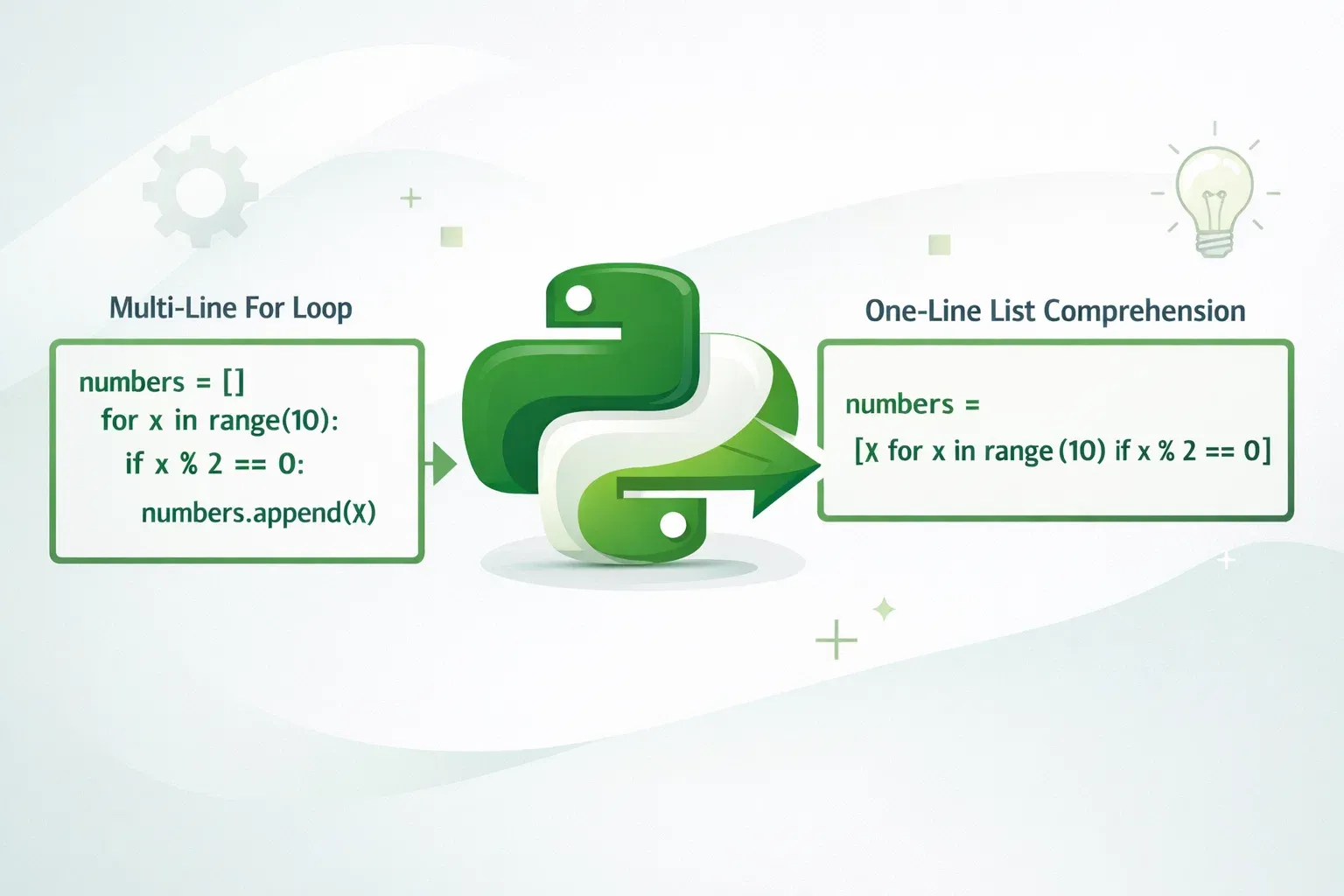
If you have been writing Python for a while, you have probably written loops that build lists one element at a time. It works, but there is a cleaner, faster, and more "Pythonic" way to do the same thing — list comprehensions and generator expressions.
A list comprehension lets you create a new list by writing a single, readable line of code instead of a multi-line for loop. A generator expression looks almost identical but works differently under the hood: instead of building the entire list in memory at once, it generates values one by one as you need them. This makes generator expressions incredibly efficient when dealing with large datasets.
Why should Pakistani students care about these features? Whether you are building data tools for analyzing OGDCL stock prices, processing student records for a university system in Islamabad, or scraping e-commerce prices from Daraz, list comprehensions and generators will make your Python code shorter, faster, and much easier to read. These are also topics that regularly appear in Python technical interviews at companies like Systems Limited, NetSol, and Arbisoft.
By the end of this tutorial, you will be able to write list comprehensions, apply filtering conditions to them, nest them, and choose between a list comprehension and a generator expression based on the situation.
Prerequisites
Before diving in, make sure you are comfortable with the following concepts. If any of these feel unfamiliar, check out the linked tutorials on theiqra.edu.pk first.
- Python for loops — you should be able to write a basic
forloop and understand how iteration works - Python lists — creating lists, accessing elements, and using
append() - Python functions — defining functions with
defand understandingreturn - Conditional statements — writing
if/elseexpressions - Basic Python data types — strings, integers, floats, and booleans
If you have worked through the Python for Loops tutorial and the Python Lists and Indexing tutorial on theiqra.edu.pk, you are fully ready for this one.
Core Concepts & Explanation
What Is a List Comprehension?
A list comprehension is a concise way to create a list from any iterable (a list, range, string, tuple, etc.) using a single expression. The basic syntax looks like this:
new_list = [expression for item in iterable]
Let's compare the traditional approach with a list comprehension. Suppose Ahmad wants to create a list of squares of numbers from 1 to 10.
Traditional approach using a for loop:
squares = []
for number in range(1, 11):
    squares.append(number ** 2)

print(squares)
# Output: [1, 4, 9, 16, 25, 36, 49, 64, 81, 100]
Using a list comprehension:
squares = [number ** 2 for number in range(1, 11)]

print(squares)
# Output: [1, 4, 9, 16, 25, 36, 49, 64, 81, 100]
Both produce exactly the same result. But the list comprehension is shorter and — once you get used to reading them — actually more readable. Python's creator, Guido van Rossum, designed this syntax intentionally to resemble the mathematical notation for sets: "the set of x-squared for all x in the range 1 to 10."
You can also add a filter condition to a list comprehension using an if clause:
new_list = [expression for item in iterable if condition]
For example, Fatima only wants the even squares:
even_squares = [n ** 2 for n in range(1, 11) if n % 2 == 0]

print(even_squares)
# Output: [4, 16, 36, 64, 100]
The if n % 2 == 0 part filters the numbers before squaring them, keeping only the even ones.
What Is a Generator Expression?
A generator expression has almost the same syntax as a list comprehension, but uses parentheses instead of square brackets:
generator = (expression for item in iterable)
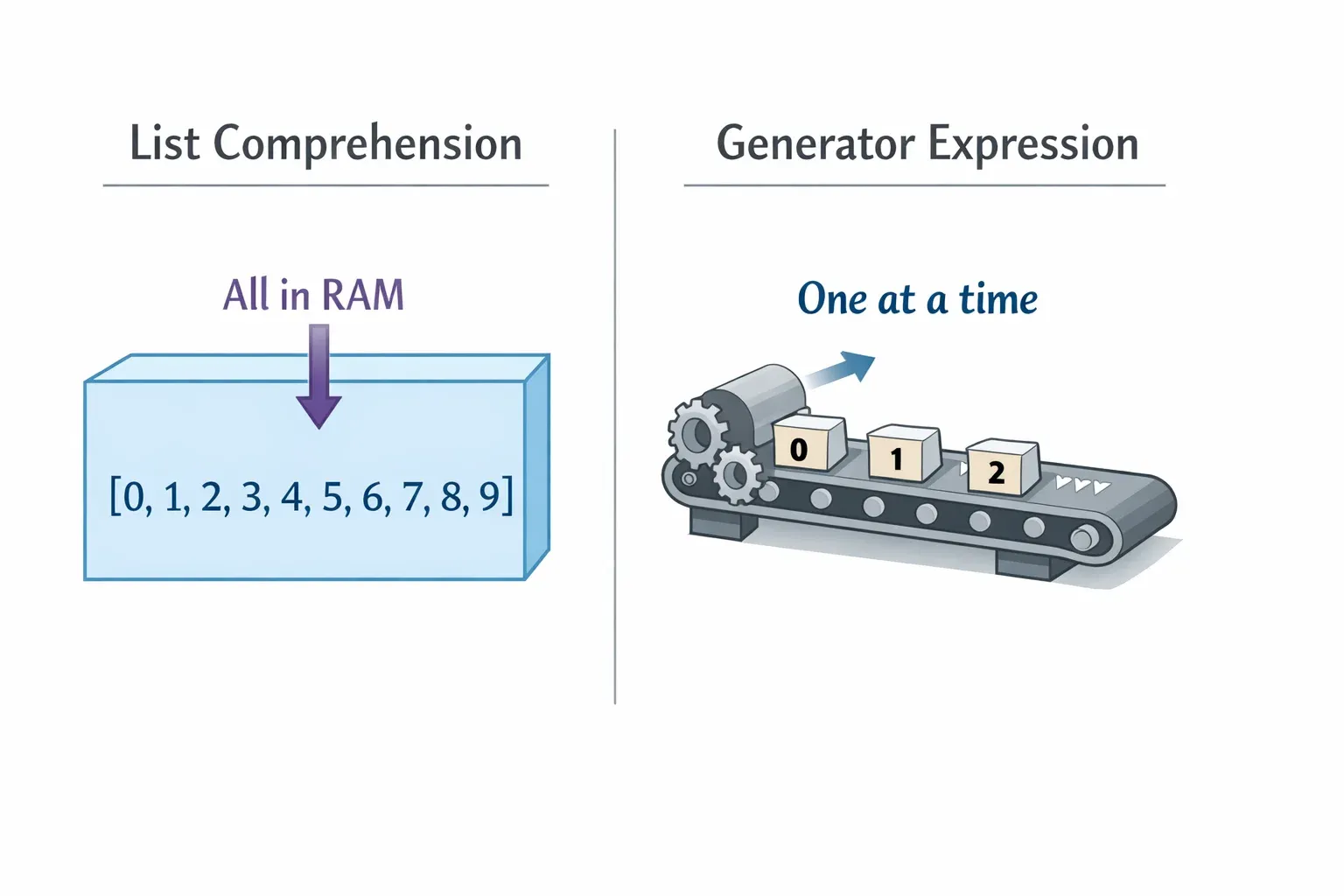
The crucial difference is in how memory is used. A list comprehension builds the entire list and stores it in memory immediately. A generator expression creates a generator object that produces values one at a time, only when you ask for the next one. This is called lazy evaluation.
# List comprehension — builds everything in memory NOW
squares_list = [n ** 2 for n in range(1_000_000)]

# Generator expression — builds nothing yet, evaluates lazily
squares_gen = (n ** 2 for n in range(1_000_000))
If you check the type and size of each:
import sys

squares_list = [n ** 2 for n in range(10_000)]
squares_gen  = (n ** 2 for n in range(10_000))

print(type(squares_list))        # <class 'list'>
print(type(squares_gen))         # <class 'generator'>

print(sys.getsizeof(squares_list))  # ~87,624 bytes (~85 KB)
print(sys.getsizeof(squares_gen))   # 104 bytes (just the generator object!)
The generator object takes up only 104 bytes regardless of how many elements it can produce. This is why generators are the right choice when you are processing millions of rows — common when working with national-level datasets like Pakistan Bureau of Statistics data.
To get values out of a generator, you can use next(), a for loop, or pass it to a function like sum():
gen = (n ** 2 for n in range(5))

print(next(gen))   # 0
print(next(gen))   # 1
print(next(gen))   # 4

# Or iterate over it
for value in (n ** 2 for n in range(5)):
    print(value)
One important limitation: generators can only be iterated once. Once exhausted, they are empty. Lists, of course, can be iterated as many times as you like.
Practical Code Examples
Example 1: Processing Student Grades
Ali is a teaching assistant at a university in Lahore. He has a list of raw scores (out of 100) and needs to convert them to letter grades, but only for students who actually appeared in the exam (score > 0).
# Raw scores — 0 means the student was absent
raw_scores = [85, 0, 72, 91, 0, 55, 68, 0, 88, 45]

# Step 1: Filter out absent students and convert to letter grades
def get_grade(score):
    """Convert a numeric score to a letter grade."""
    if score >= 80:
        return 'A'
    elif score >= 65:
        return 'B'
    elif score >= 50:
        return 'C'
    else:
        return 'D'

# List comprehension with filter
letter_grades = [get_grade(score) for score in raw_scores if score > 0]

print(letter_grades)
# Output: ['A', 'B', 'A', 'C', 'B', 'A', 'D']
Line-by-line explanation:
get_grade(score)— calls our helper function for each scorefor score in raw_scores— iterates through every score in the listif score > 0— the filter: only includes scores where the student was present (score greater than zero)- The result is a new list of letter grades for the seven students who attended
This replaces what would have been an 8-line for loop with a single, readable line.
Example 2: Real-World Application — PKR Currency Converter
Fatima runs a small online store in Karachi. She has product prices in USD and needs to convert them to PKR for display, apply a 10% import duty, and filter out any products priced above PKR 50,000 (since her store targets budget-conscious buyers). The current exchange rate is 278 PKR per USD.
EXCHANGE_RATE = 278   # 1 USD = 278 PKR
IMPORT_DUTY   = 0.10  # 10% import duty

# Product data: (name, price_in_usd)
products = [
    ("Headphones",   45),
    ("Laptop",       899),
    ("USB Hub",      18),
    ("Smartphone",   149),
    ("Keyboard",     35),
    ("Monitor",      310),
]

# Convert to PKR, apply duty, filter by budget
affordable_products = [
    (name, round(price_usd * EXCHANGE_RATE * (1 + IMPORT_DUTY)))
    for name, price_usd in products
    if price_usd * EXCHANGE_RATE * (1 + IMPORT_DUTY) <= 50_000
]

print("Affordable products (under PKR 50,000):")
for name, price_pkr in affordable_products:
    print(f"  {name}: PKR {price_pkr:,}")
Output:
Affordable products (under PKR 50,000):
  Headphones: PKR 13,761
  USB Hub: PKR 5,504
  Smartphone: PKR 45,617
  Keyboard: PKR 10,703
Line-by-line explanation:
(name, round(...))— the expression creates a tuple of (product name, price in PKR rounded to nearest rupee)for name, price_usd in products— tuple unpacking inside the comprehension; each element ofproductsis a tuple, and we unpack it directly intonameandprice_usdprice_usd * EXCHANGE_RATE * (1 + IMPORT_DUTY)— converts USD to PKR and adds the 10% dutyif ... <= 50_000— the filter removes products that exceed PKR 50,000- The Laptop (PKR ~274,000) and Monitor (PKR ~94,776) are automatically excluded
Now imagine doing this with a generator expression when the product catalog has 500,000 items — you would simply replace [ with ( and use sum() or iteration instead of storing the whole result.
Common Mistakes & How to Avoid Them
Mistake 1: Using a List Comprehension When a Generator Would Do
A very common mistake is to wrap a generator expression in a list() call unnecessarily when you only need a single computed value like a sum or max.
# ❌ Inefficient — builds the entire list just to sum it
total = sum([n ** 2 for n in range(1_000_000)])

# ✅ Efficient — generator expression avoids storing the list
total = sum(n ** 2 for n in range(1_000_000))
Notice that when passing a generator expression directly to a function like sum(), max(), min(), or any(), you do not need the extra parentheses — Python is smart enough to recognize the inner (...) belongs to the function call. This saves both memory and time. As a rule: if you are going to consume the result only once, prefer a generator expression.
Mistake 2: Trying to Iterate a Generator Twice
Generators are one-time-use objects. Once all values have been yielded, the generator is exhausted. Trying to iterate it again gives you nothing — no error, just silence — which can cause subtle bugs.
# ❌ This is a trap
prices_gen = (price * 278 for price in [10, 20, 30])

print(list(prices_gen))   # [2780, 5560, 8340]  ✅ Works
print(list(prices_gen))   # []  ❌ Empty! Generator is exhausted

# ✅ If you need to iterate multiple times, use a list comprehension
prices_list = [price * 278 for price in [10, 20, 30]]

print(prices_list)   # [2780, 5560, 8340]
print(prices_list)   # [2780, 5560, 8340]  ✅ Works again
The fix is simple: if you need to iterate the result more than once — for example, to first find the maximum price and then print all items below it — use a list comprehension instead. If you only need a single pass, a generator is the better choice.
Practice Exercises
Exercise 1: Filtering City Names
Problem: You are given a list of Pakistani cities. Using a list comprehension, create a new list that contains only cities whose names are longer than 6 characters, and convert them to uppercase.
cities = ["Lahore", "Karachi", "Islamabad", "Multan", "Peshawar", "Quetta", "Faisalabad"]
Solution:
cities = ["Lahore", "Karachi", "Islamabad", "Multan", "Peshawar", "Quetta", "Faisalabad"]

# Filter cities with more than 6 characters and convert to uppercase
long_cities = [city.upper() for city in cities if len(city) > 6]

print(long_cities)
# Output: ['KARACHI', 'ISLAMABAD', 'PESHAWAR', 'FAISALABAD']
len(city) > 6 filters out Lahore (6 letters), Multan (6 letters), and Quetta (6 letters). The remaining cities are converted to uppercase using .upper().
Exercise 2: Generating a Multiplication Table
Problem: Ahmad's younger brother is studying his times tables. Use a nested list comprehension to generate a 5×5 multiplication table as a list of lists, then print it neatly.
Solution:
# Nested list comprehension: outer loop = rows, inner loop = columns
table = [[row * col for col in range(1, 6)] for row in range(1, 6)]

# Print the table neatly
for row in table:
    print("  ".join(f"{val:2}" for val in row))
Output:
 1   2   3   4   5
 2   4   6   8  10
 3   6   9  12  15
 4   8  12  16  20
 5  10  15  20  25
The outer comprehension [... for row in range(1, 6)] creates 5 rows. The inner comprehension [row * col for col in range(1, 6)] fills each row with 5 products. The f"{val:2}" format specification pads each number to 2 characters wide for neat alignment.
Frequently Asked Questions
What is the difference between a list comprehension and a generator expression?
A list comprehension (uses square brackets []) creates the entire list immediately and stores it in memory. A generator expression (uses parentheses ()) creates a lazy iterator that produces values one at a time. Use a list comprehension when you need random access (indexing) or multiple iterations; use a generator expression when you only need a single pass and want to minimize memory usage.
How do I use an if-else inside a list comprehension?
When you want to transform values conditionally (rather than filter them), place the if-else expression before the for keyword, not after. For example: [x if x > 0 else 0 for x in values] replaces negative numbers with zero. When the if appears after the for, it acts as a filter and excludes items entirely.
Are list comprehensions always faster than for loops?
List comprehensions are generally faster than equivalent for loops because they are optimized internally by the Python interpreter. However, the difference becomes negligible for very small lists. The bigger benefit is code readability. For extremely large datasets where memory matters, generator expressions are even faster than list comprehensions because they avoid allocating memory for the full list.
Can I nest list comprehensions?
Yes, you can nest list comprehensions by adding multiple for clauses. The syntax is [expression for x in outer for y in inner], which reads left-to-right like nested for loops. For example, [(x, y) for x in [1,2] for y in ['a','b']] produces [(1,'a'), (1,'b'), (2,'a'), (2,'b')]. However, keep nesting to a maximum of two levels — deeper nesting becomes hard to read and should be replaced by a regular loop.
When should I NOT use a list comprehension?
Avoid list comprehensions when the logic is complex enough that it needs multiple lines or comments to understand. If your comprehension requires more than one if condition or the expression itself is long, a regular for loop with clear variable names is more maintainable. Also avoid using list comprehensions for their side effects (like printing or writing to a file) — use a for loop for side effects and a comprehension only when you need the resulting list.
Summary & Key Takeaways
- List comprehensions replace multi-line
forloops with a single readable expression using the syntax[expression for item in iterable if condition]. - Generator expressions use the same syntax with parentheses
()instead of[]and produce values lazily — one at a time — making them far more memory-efficient for large datasets. - Use a list comprehension when you need the full list in memory, need to index into it, or need to iterate over it multiple times.
- Use a generator expression when you only need one pass through the data, especially when calling functions like
sum(),max(), orany()that consume iterables. - Generators are exhausted after one iteration — iterating a generator twice gives you nothing on the second pass. When in doubt, use a list.
- Avoid over-nesting — one or two levels of nesting in a comprehension is fine; beyond that, switch to regular loops for the sake of readability.
Next Steps & Related Tutorials
Now that you are comfortable with list comprehensions and generators, you are ready to explore more powerful Python features. Here are some great next reads on theiqra.edu.pk:
- Python Dictionary Comprehensions — the same idea applied to dictionaries using
{key: value for ...}syntax, perfect for transforming and filtering structured data - Python Generator Functions with yield — go deeper into generators by writing your own generator functions using the
yieldkeyword, enabling custom lazy sequences - Python Lambda Functions and map/filter — understand how list comprehensions relate to the older functional-style
map()andfilter()functions, and when each is appropriate - Python File Handling for Data Processing — put generator expressions to practical use by processing large CSV files line by line without loading everything into memory, a skill essential for working with real-world Pakistani datasets
Was this tutorial helpful? Share it with your classmates and leave your questions in the comments below. Happy coding! 🐍
Test Your Python Knowledge!
Finished reading? Take a quick quiz to see how much you've learned from this tutorial.