Python Multiprocessing & Threading: Concurrent Programming
Introduction
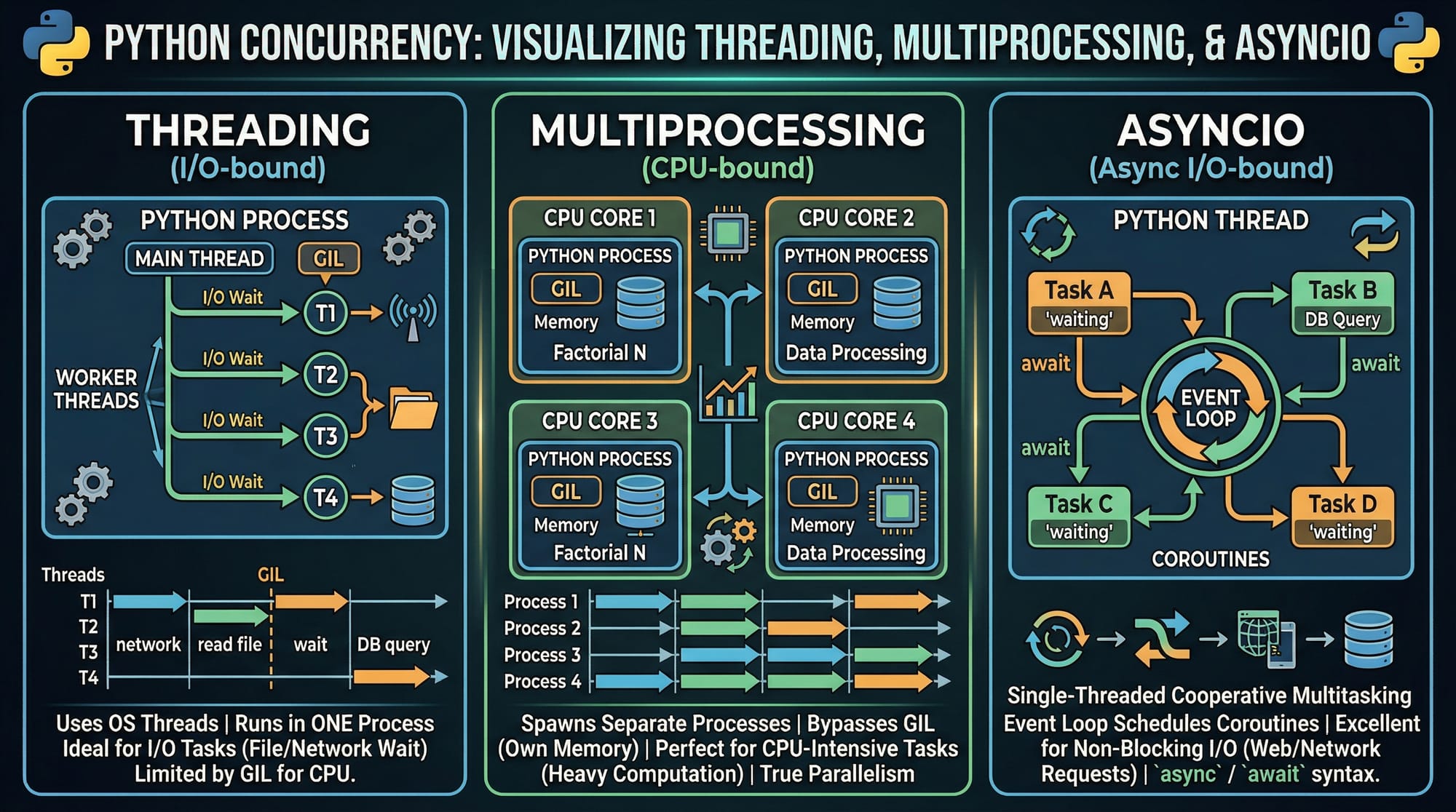
Python Multiprocessing & Threading: Concurrent Programming is the practice of running multiple tasks at the same time to improve performance and efficiency in Python applications. Instead of executing tasks one after another (sequentially), concurrent programming allows tasks to overlap—making programs faster and more responsive.
For Pakistani students, especially those in cities like Lahore, Karachi, and Islamabad, learning concurrency is highly valuable. Whether you're building web scrapers, automation tools, fintech apps handling PKR transactions, or data-processing systems, concurrency helps you handle real-world workloads efficiently.
Python provides three main approaches to concurrency:
- Threading (best for I/O-bound tasks)
- Multiprocessing (best for CPU-bound tasks)
- Asyncio (for asynchronous programming)
Prerequisites
Before starting this tutorial, you should have:
- Strong understanding of Python basics (variables, loops, functions)
- Familiarity with file handling and APIs
- Basic knowledge of how operating systems work (process vs thread)
- Understanding of Python modules and packages
- Some experience writing medium-sized Python programs
Core Concepts & Explanation
Threading in Python (I/O-Bound Concurrency)
Threading allows multiple threads (lightweight processes) to run within the same program. Threads share the same memory space, making them fast but sometimes tricky.
Best for:
- File reading/writing
- Network requests (e.g., APIs, web scraping)
- Waiting operations (I/O-bound tasks)
import threading

def print_numbers():
    for i in range(5):
        print(f"Number: {i}")

thread = threading.Thread(target=print_numbers)
thread.start()
thread.join()
Explanation:
import threading→ Imports threading moduledef print_numbers()→ Function to run in a threadthreading.Thread(target=...)→ Creates a new threadthread.start()→ Starts executionthread.join()→ Waits for thread to finish
Multiprocessing in Python (CPU-Bound Concurrency)
Multiprocessing creates separate processes, each with its own memory space. This bypasses Python’s GIL limitation.
Best for:
- Heavy calculations
- Data processing
- Machine learning tasks
from multiprocessing import Process

def square_numbers():
    for i in range(5):
        print(f"Square: {i*i}")

process = Process(target=square_numbers)
process.start()
process.join()
Explanation:
from multiprocessing import Process→ Imports multiprocessingProcess(target=...)→ Creates a new processprocess.start()→ Starts processprocess.join()→ Waits for completion
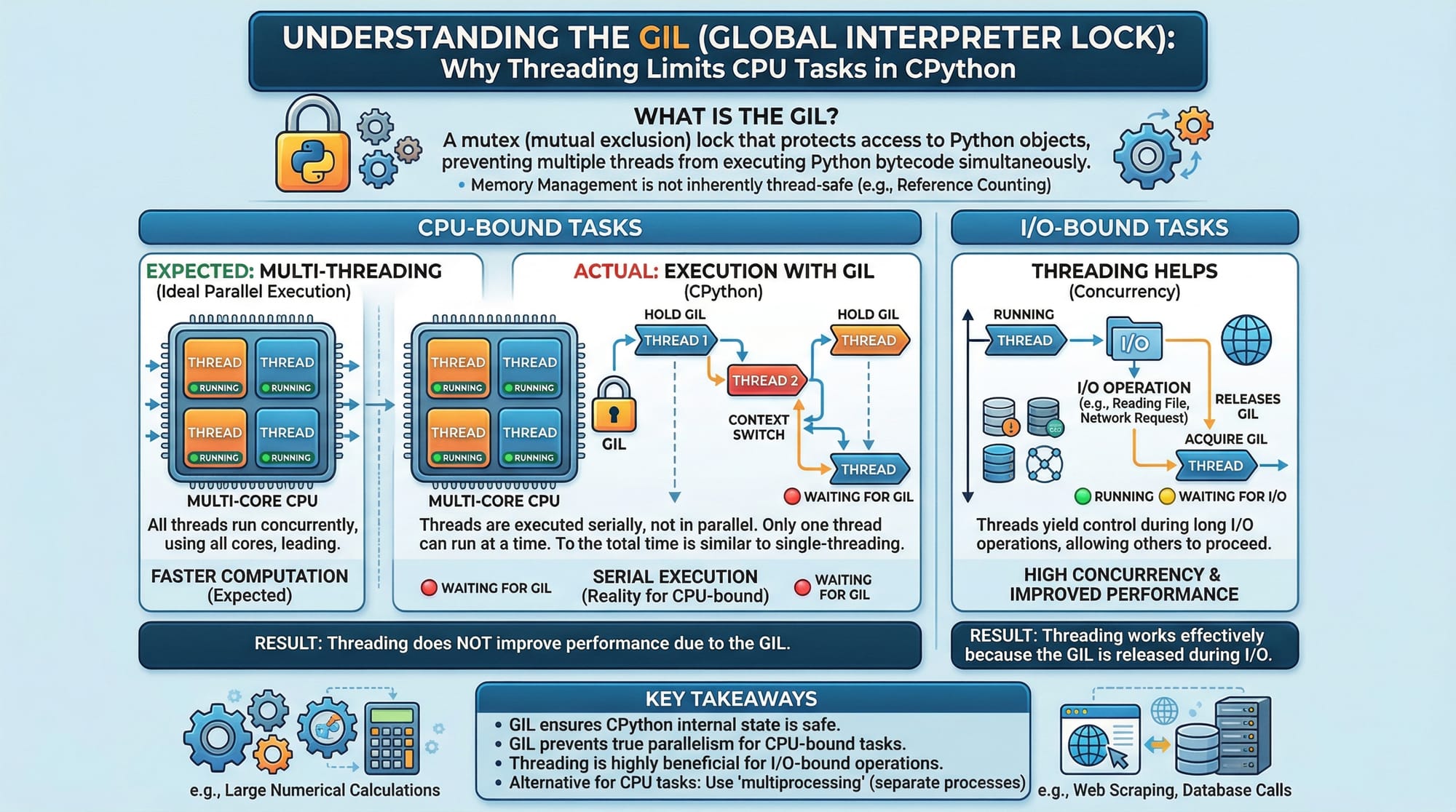
Global Interpreter Lock (GIL) Explained
The GIL ensures only one thread executes Python bytecode at a time. This is why threading doesn’t speed up CPU-heavy tasks.
Key Insight:
- Threading = good for I/O
- Multiprocessing = good for CPU
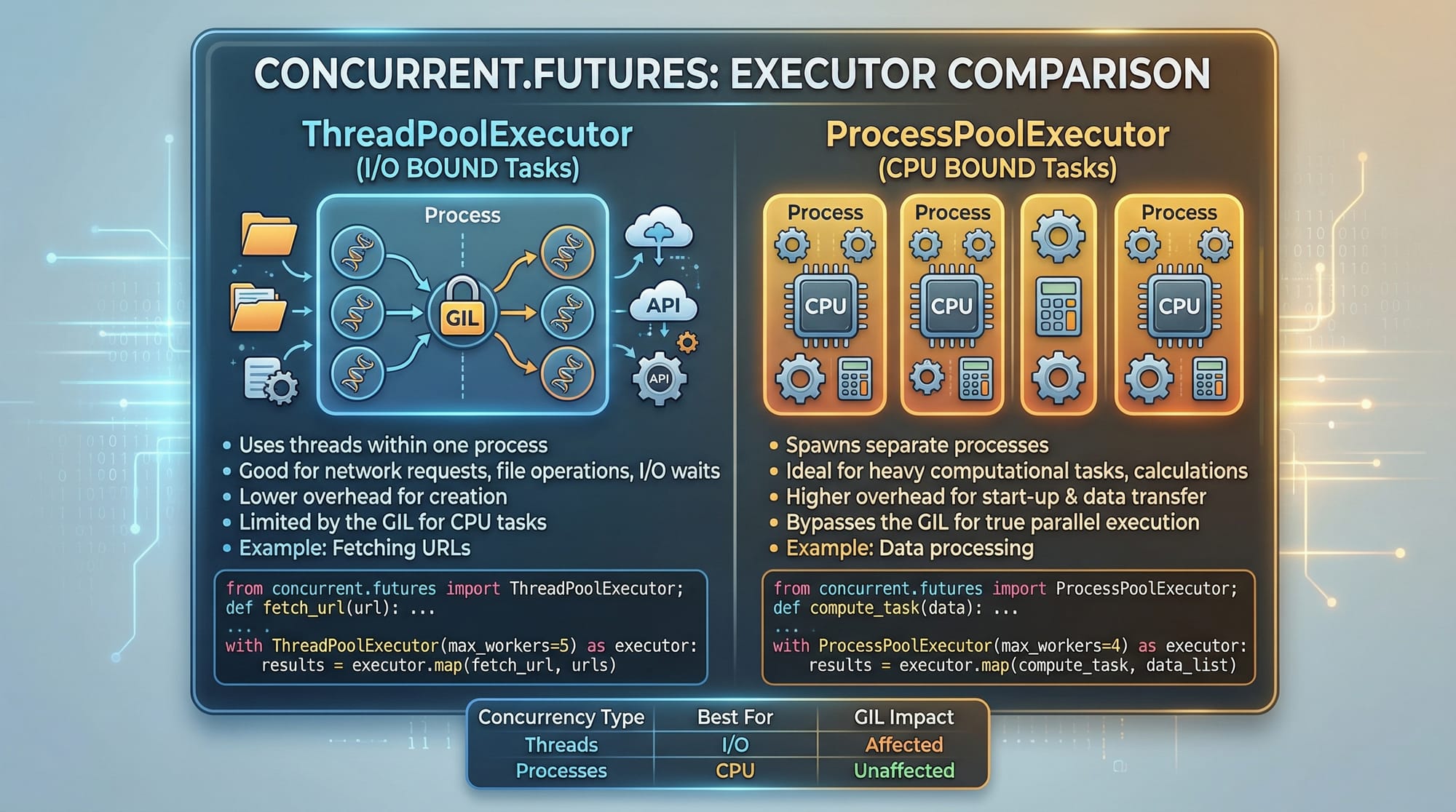
Using concurrent.futures (Modern Approach)
Python provides a higher-level API for concurrency.
from concurrent.futures import ThreadPoolExecutor

def task(n):
    return n * n

with ThreadPoolExecutor() as executor:
    results = list(executor.map(task, range(5)))

print(results)
Explanation:
ThreadPoolExecutor()→ Creates thread poolexecutor.map()→ Applies function to iterablelist(...)→ Collects results
Practical Code Examples
Example 1: Parallel API Fetching (Threading)
Imagine Ahmad is building a weather app for different cities in Pakistan.
import threading
import requests

urls = [
    "https://api.example.com/lahore",
    "https://api.example.com/karachi",
    "https://api.example.com/islamabad"
]

def fetch_data(url):
    response = requests.get(url)
    print(f"Data from {url}: {response.status_code}")

threads = []

for url in urls:
    thread = threading.Thread(target=fetch_data, args=(url,))
    threads.append(thread)
    thread.start()

for thread in threads:
    thread.join()
Explanation:
urls→ List of API endpointsfetch_data()→ Fetches datathreading.Thread(..., args=...)→ Pass argumentsthreads.append(thread)→ Store threadsthread.start()→ Run threadsthread.join()→ Wait for all
Example 2: Data Processing with Multiprocessing
Fatima processes large student exam data.
from multiprocessing import Pool

def calculate_square(n):
    return n * n

numbers = [1, 2, 3, 4, 5]

with Pool() as pool:
    results = pool.map(calculate_square, numbers)

print(results)
Explanation:
Pool()→ Creates worker processespool.map()→ Distributes taskscalculate_square()→ Function executed in parallelresults→ Collected output
Common Mistakes & How to Avoid Them
Mistake 1: Using Threading for CPU Tasks
Problem:
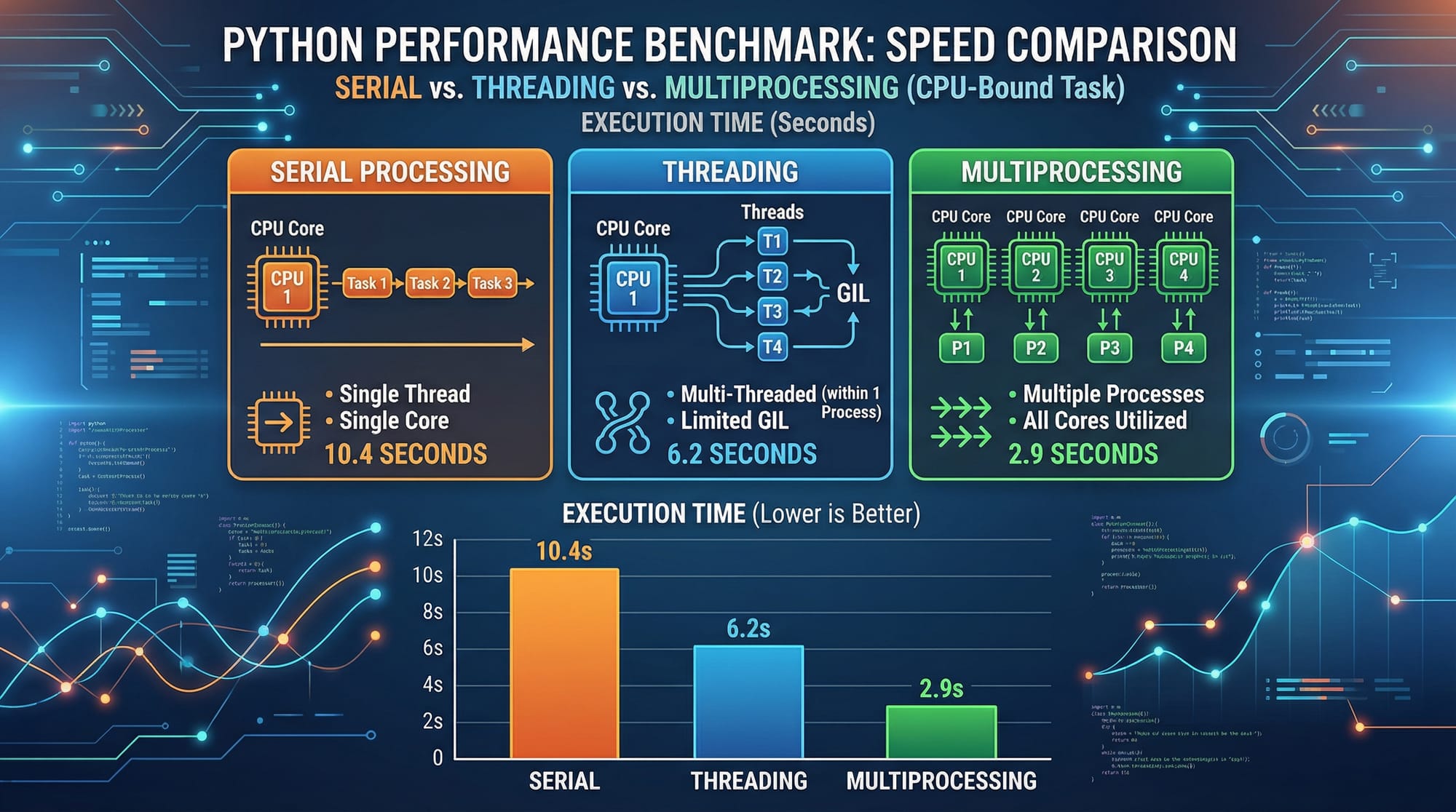
Threading won’t speed up CPU-heavy tasks due to GIL.
Wrong Approach:
# Slow for CPU-heavy work
threading.Thread(target=heavy_computation)
Fix:
from multiprocessing import Process
Process(target=heavy_computation)
Mistake 2: Forgetting join()
Problem:
Program exits before threads/processes complete.
Wrong:
thread.start()
Fix:
thread.start()
thread.join()
Mistake 3: Shared Data Issues
Threads share memory, causing race conditions.
Fix using Lock:
import threading

lock = threading.Lock()

def safe_task():
    with lock:
        print("Thread-safe operation")
Explanation:
Lock()→ Prevents conflictswith lock:→ Ensures one thread at a time
Practice Exercises
Exercise 1: Download Multiple Files
Problem:
Write a program that downloads 5 files simultaneously.
Solution:
import threading
import requests

urls = ["url1", "url2", "url3", "url4", "url5"]

def download(url):
    print(f"Downloading {url}")

threads = []

for url in urls:
    t = threading.Thread(target=download, args=(url,))
    threads.append(t)
    t.start()

for t in threads:
    t.join()
Explanation:
- Create threads for each file
- Start all threads
- Wait for completion
Exercise 2: Parallel Sum Calculation
Problem:
Calculate sum of squares using multiprocessing.
Solution:
from multiprocessing import Pool

def square(n):
    return n*n

numbers = [1,2,3,4,5]

with Pool() as p:
    result = p.map(square, numbers)

print(sum(result))
Explanation:
square()→ Calculates squarePool.map()→ Parallel executionsum(result)→ Final output
Frequently Asked Questions
What is Python threading?
Python threading allows multiple tasks to run concurrently within a single process. It is best suited for I/O-bound operations like network calls or file handling.
What is multiprocessing in Python?
Multiprocessing runs tasks in separate processes with independent memory. It is ideal for CPU-intensive tasks like data analysis or heavy computations.
How do I choose between threading and multiprocessing?
Use threading for I/O tasks (like API calls) and multiprocessing for CPU-heavy tasks (like calculations). The decision depends on your workload.
What is the GIL in Python?
The Global Interpreter Lock ensures only one thread executes Python code at a time. It limits threading performance for CPU-bound tasks.
How do I avoid race conditions?
Use synchronization tools like locks, semaphores, or queues to ensure safe access to shared data between threads.
Summary & Key Takeaways
- Threading is ideal for I/O-bound tasks like web requests
- Multiprocessing is best for CPU-intensive operations
- The GIL limits threading performance for heavy computations
concurrent.futuresprovides a simpler API for concurrency- Always use
join()to avoid incomplete execution - Synchronization tools like locks prevent data corruption
Next Steps & Related Tutorials
To deepen your understanding, explore these tutorials on theiqra.edu.pk:
- Learn asynchronous programming with Python asyncio for beginners
- Master fundamentals in the Complete Python Tutorial for Pakistani students
- Build automation scripts using Python Automation Projects
- Understand advanced concepts in Python Performance Optimization Guide
This tutorial equips you with advanced concurrency skills that are highly valuable in modern software development. Keep practicing with real-world projects—like building a multi-threaded scraper for Pakistani e-commerce websites or processing large datasets—and you'll gain confidence quickly.
Test Your Python Knowledge!
Finished reading? Take a quick quiz to see how much you've learned from this tutorial.