Python Operators: Arithmetic, Logical & Comparison
Introduction
If you have ever used a calculator, you already understand the basic idea behind Python operators. In programming, operators are special symbols that tell Python to perform specific operations on values or variables. Whether you are adding two numbers, checking if a student passed an exam, or deciding whether someone qualifies for a scholarship, Python operators are doing the heavy lifting behind the scenes.
For Pakistani students stepping into the world of programming, understanding operators is one of the most important early milestones. Almost every real-world program — from a simple marks calculator for your FSc results to a shop billing system in Lahore's Liberty Market — relies on operators to function. Once you master them, you will be able to write programs that make decisions, perform calculations, and process data with confidence.
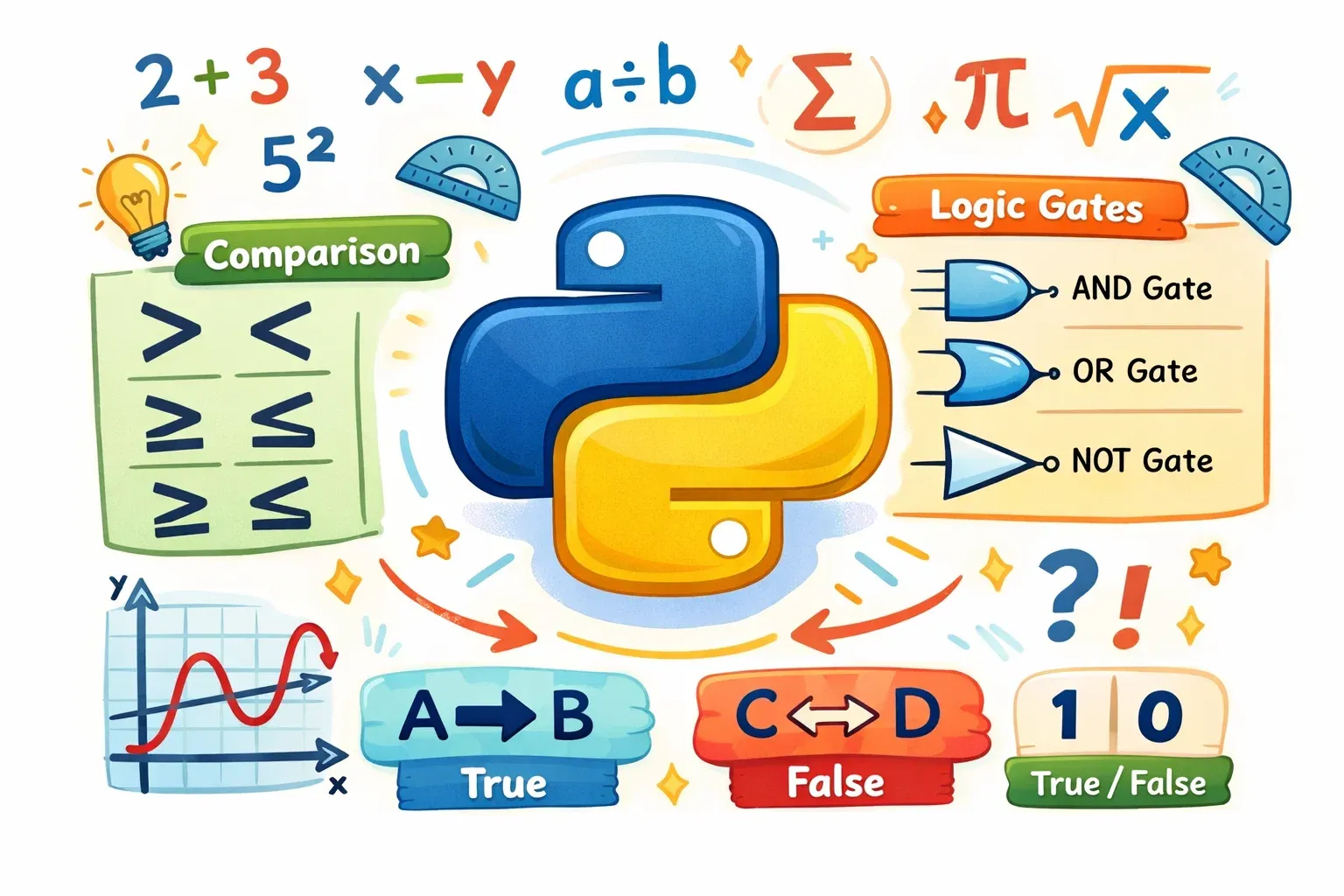
In this tutorial, we will cover the three most essential types of Python operators: arithmetic operators (for math), comparison operators (for making comparisons), and logical operators (for combining conditions). By the end, you will be writing Python code that solves practical, everyday problems.
Prerequisites
Before diving into this tutorial, you should be comfortable with the following:
- Basic Python syntax — You know how to open a Python file or use an IDE like VS Code or Thonny.
- Variables and data types — You understand what integers, floats, and strings are and how to assign values to variables.
- The
print()function — You can display output on the screen.
If any of these feel unfamiliar, we recommend reading our Introduction to Python Variables and Python Data Types tutorials first. Once you are confident with those basics, come right back — you are going to enjoy this one.
Core Concepts & Explanation
Arithmetic Operators — Performing Mathematical Calculations
Arithmetic operators are the most straightforward category. They work exactly like the math you learned in school, just written in Python syntax. Here are all the arithmetic operators Python supports:
| Operator | Name | Example | Result |
|---|---|---|---|
+ |
Addition | 10 + 5 |
15 |
- |
Subtraction | 10 - 5 |
5 |
* |
Multiplication | 10 * 5 |
50 |
/ |
Division | 10 / 3 |
3.333... |
// |
Floor Division | 10 // 3 |
3 |
% |
Modulus | 10 % 3 |
1 |
** |
Exponentiation | 2 ** 4 |
16 |
A few of these deserve a closer look. The / (division) operator in Python 3 always returns a float, even if the result is a whole number — so 10 / 2 gives you 5.0, not 5. The // (floor division) operator rounds the result down to the nearest whole number, which is useful when you need a clean integer answer.
The % (modulus) operator returns the remainder after division. So 10 % 3 gives 1 because 10 divided by 3 is 3 with a remainder of 1. This operator is incredibly useful — for example, you can use it to check whether a number is even or odd (number % 2 == 0 means even).
Finally, ** is Python's exponentiation operator. 2 ** 10 calculates 2 to the power of 10, giving you 1024. This is handy for scientific calculations or when working with compound interest formulas relevant to banking and finance.
Comparison Operators — Asking Yes or No Questions
Comparison operators compare two values and always return a Boolean result: either True or False. They are the foundation of decision-making in Python — every if statement you write will use them.
| Operator | Meaning | Example | Result |
|---|---|---|---|
== |
Equal to | 5 == 5 |
True |
!= |
Not equal to | 5 != 3 |
True |
> |
Greater than | 10 > 7 |
True |
< |
Less than | 3 < 1 |
False |
>= |
Greater than or equal to | 5 >= 5 |
True |
<= |
Less than or equal to | 4 <= 3 |
False |
One of the most common mistakes beginners make is confusing = with ==. Remember: a single = is the assignment operator — it stores a value in a variable. A double == is the comparison operator — it checks whether two values are equal. Writing if marks = 50: will give you an error; the correct form is if marks == 50:.
Think of comparison operators as questions. marks >= 40 is asking: "Are the marks greater than or equal to 40?" Python answers with True or False, and your program responds accordingly.
Logical Operators — Combining Multiple Conditions
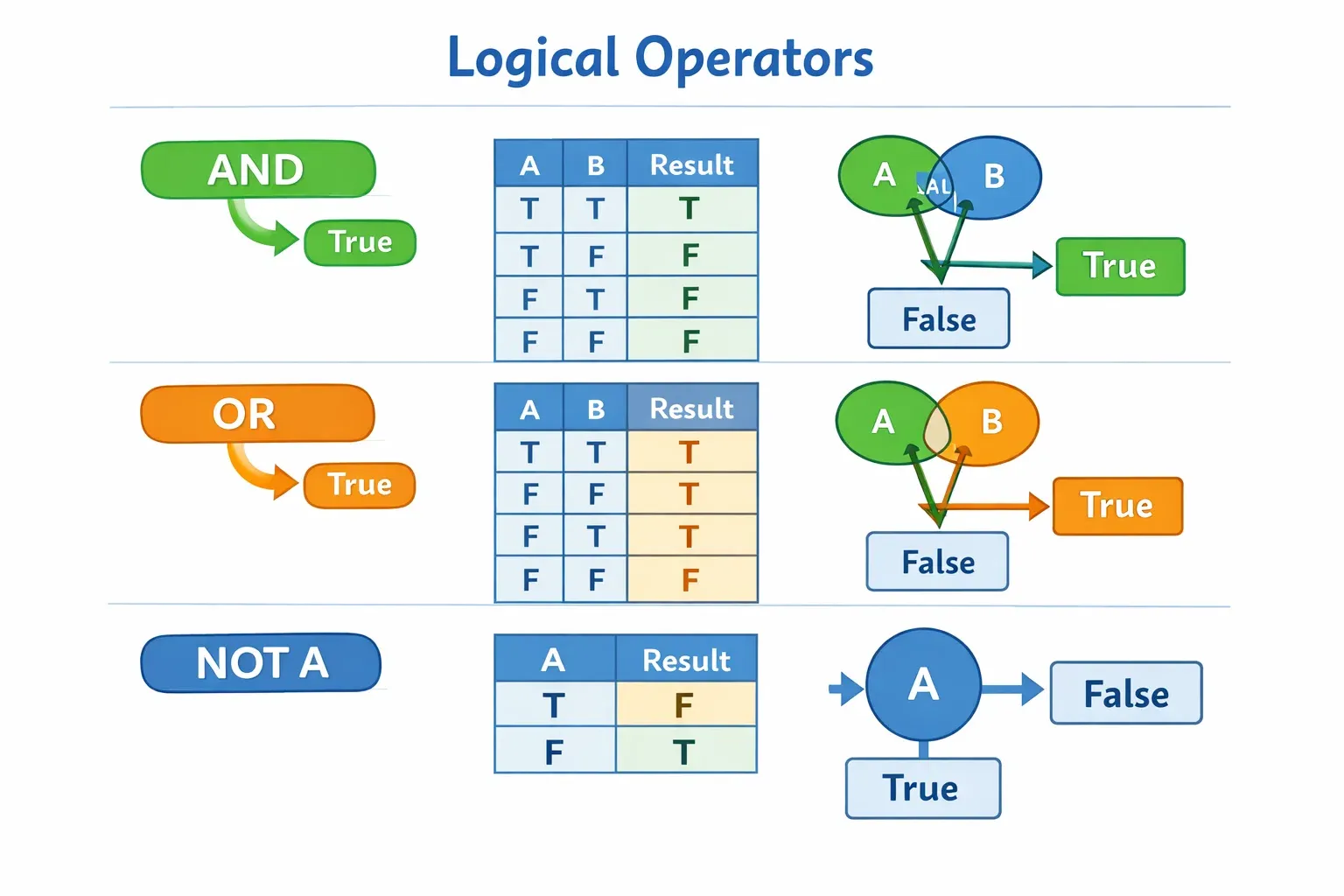
Logical operators let you combine multiple comparison expressions into a single condition. Python has three logical operators: and, or, and not.
The and operator returns True only when both conditions are true. For example, to check that a student has both passed the exam and submitted their assignment:
passed_exam = True
submitted_assignment = True
result = passed_exam and submitted_assignment  # True
The or operator returns True when at least one condition is true. For example, a student qualifies for a discount if they are either a government employee or a student:
is_government_employee = False
is_student = True
gets_discount = is_government_employee or is_student  # True
The not operator flips the Boolean value. not True becomes False, and not False becomes True. It is useful for reversing a condition cleanly:
is_absent = False
is_present = not is_absent  # True
Here is a quick truth table to keep in mind:
| A | B | A and B | A or B | not A |
|---|---|---|---|---|
| True | True | True | True | False |
| True | False | False | True | False |
| False | True | False | True | True |
| False | False | False | False | True |
Practical Code Examples
Example 1: Student Marks Calculator with Grade Assignment
Let us build a realistic marks calculator that Pakistani students can relate to — the kind of program a teacher at a school in Islamabad might write to automatically assign grades.
# Student Marks Calculator
# This program calculates total marks and assigns a grade

student_name = "Ahmad"
marks_urdu = 78
marks_english = 85
marks_math = 92
marks_science = 88
marks_pakistan_studies = 74

# Arithmetic operators to calculate total and percentage
total_marks = marks_urdu + marks_english + marks_math + marks_science + marks_pakistan_studies
full_marks = 500
percentage = (total_marks / full_marks) * 100

print(f"Student: {student_name}")
print(f"Total Marks: {total_marks}/500")
print(f"Percentage: {percentage:.2f}%")

# Comparison and logical operators to determine grade
if percentage >= 80:
    grade = "A+"
elif percentage >= 70 and percentage < 80:
    grade = "A"
elif percentage >= 60 and percentage < 70:
    grade = "B"
elif percentage >= 50 and percentage < 60:
    grade = "C"
elif percentage >= 40 and percentage < 50:
    grade = "D"
else:
    grade = "F"

print(f"Grade: {grade}")

# Check if the student passed
passed = percentage >= 40
print(f"Passed: {passed}")
Line-by-line explanation:
- Lines 4–8: We store each subject's marks in separate variables. Using descriptive names makes the code easy to read.
- Line 11: The
+arithmetic operator adds all five subject marks together. - Line 13: We calculate the percentage using division (
/) and multiplication (*). Parentheses control the order of operations just like in regular math. - Lines 19–30: A chain of
if/elif/elsestatements uses comparison operators (>=,<) and theandlogical operator to assign the correct grade based on percentage ranges. - Line 33: A single comparison (
>=) returns a Boolean that tells us whether the student passed, stored directly in thepassedvariable.
Sample Output:
Student: Ahmad
Total Marks: 417/500
Percentage: 83.40%
Grade: A+
Passed: True
Example 2: Real-World Application — Online Shopping Discount System
Here is a practical scenario straight from Pakistani e-commerce: a discount system for an online store, similar to what you might find on Daraz.pk. The system checks whether a customer qualifies for a discount based on their purchase amount and membership status.
# Online Shopping Discount System (PKR)
# Simulates a discount checker for a Pakistani e-commerce store

customer_name = "Fatima"
purchase_amount = 8500       # Amount in PKR
is_member = True             # Is the customer a registered member?
is_sale_season = False       # Is it currently a sale period?

MINIMUM_FOR_DISCOUNT = 5000  # PKR threshold for discount
MEMBER_DISCOUNT = 0.15       # 15% discount for members
REGULAR_DISCOUNT = 0.10      # 10% discount for non-members
SALE_BONUS_DISCOUNT = 0.05   # Extra 5% during sale season

# Check if customer qualifies for any discount
qualifies_for_discount = purchase_amount >= MINIMUM_FOR_DISCOUNT

# Check eligibility conditions using logical operators
if qualifies_for_discount and is_member:
    discount_rate = MEMBER_DISCOUNT
elif qualifies_for_discount and not is_member:
    discount_rate = REGULAR_DISCOUNT
else:
    discount_rate = 0

# Add sale bonus if applicable
if is_sale_season and qualifies_for_discount:
    discount_rate = discount_rate + SALE_BONUS_DISCOUNT

# Calculate final price using arithmetic operators
discount_amount = purchase_amount * discount_rate
final_price = purchase_amount - discount_amount

# Display results
print(f"Customer: {customer_name}")
print(f"Original Price: PKR {purchase_amount:,.0f}")
print(f"Discount Rate: {discount_rate * 100:.0f}%")
print(f"Discount Amount: PKR {discount_amount:,.0f}")
print(f"Final Price: PKR {final_price:,.0f}")
Line-by-line explanation:
- Lines 5–7: We define customer details. Using clear variable names makes the logic easy to follow and modify later.
- Lines 9–12: Constants (written in ALL_CAPS by convention) store our business rules. Keeping these separate from the logic makes the program easy to update.
- Line 15: A single comparison operator checks the purchase threshold and stores the Boolean result.
- Lines 18–23: Logical operators
andandnothandle three distinct scenarios: member with qualifying purchase, non-member with qualifying purchase, and no discount. - Lines 26–27: The
andoperator ensures the sale bonus only applies when both conditions are true simultaneously. - Lines 30–31: Arithmetic operators compute the discount amount and subtract it from the original price.
Sample Output:
Customer: Fatima
Original Price: PKR 8,500
Discount Rate: 15%
Discount Amount: PKR 1,275
Final Price: PKR 7,225
Common Mistakes & How to Avoid Them
Mistake 1: Using = Instead of == in Conditions
This is the most frequent error beginners make, and it will cause your program to crash with a SyntaxError.
# WRONG — This will cause a SyntaxError
marks = 75
if marks = 75:
    print("Full marks!")

# CORRECT — Use == to compare
marks = 75
if marks == 75:
    print("Full marks!")
A helpful way to remember: think of = as "becomes" (the variable becomes this value) and == as "equals?" (is this value equal to that value?). Every time you write an if statement, ask yourself: am I comparing or assigning?
Mistake 2: Misunderstanding Floor Division and Regular Division
Many students assume 10 / 2 gives 5, but in Python 3 it gives 5.0 — a float. This can cause unexpected bugs when you need a whole number, for example when using the result as a list index.
# Potential problem — division always returns float in Python 3
students = 30
groups = 6
members_per_group = students / groups
print(members_per_group)        # Output: 5.0 (float, not int)
print(type(members_per_group))  # <class 'float'>

# CORRECT — Use floor division when you need an integer
members_per_group = students // groups
print(members_per_group)        # Output: 5 (integer)
print(type(members_per_group))  # <class 'int'>
Use // whenever your result must be a whole number, and use / when decimal precision matters, such as in percentage or financial calculations.
Practice Exercises
Exercise 1: Fee Installment Calculator
Problem: Ali is studying at a private university in Lahore. His total semester fee is PKR 85,000. He wants to pay it in 4 equal installments. Write a Python program that calculates: (a) the amount per installment, (b) whether each installment is greater than PKR 20,000, and (c) whether he qualifies for an early payment discount if he pays before the deadline (paid_early = True) and his installment is less than PKR 25,000.
Solution:
# Fee Installment Calculator
student_name = "Ali"
total_fee = 85000        # PKR
installments = 4
paid_early = True

# Arithmetic: Calculate per installment amount
per_installment = total_fee / installments

# Comparison: Check if installment exceeds 20,000
exceeds_threshold = per_installment > 20000

# Logical: Check early payment discount eligibility
discount_eligible = paid_early and (per_installment < 25000)

print(f"Student: {student_name}")
print(f"Total Fee: PKR {total_fee:,}")
print(f"Per Installment: PKR {per_installment:,.2f}")
print(f"Exceeds PKR 20,000: {exceeds_threshold}")
print(f"Early Payment Discount: {discount_eligible}")
Output:
Student: Ali
Total Fee: PKR 85,000
Per Installment: PKR 21,250.00
Exceeds PKR 20,000: True
Early Payment Discount: True
Exercise 2: Electricity Bill Tier Calculator
Problem: LESCO (Lahore Electric Supply Company) charges different rates based on units consumed. Write a program that takes units consumed as input and determines: (a) the total bill using a flat rate of PKR 20 per unit, (b) whether the bill falls in the "high usage" category (above 300 units), and (c) whether a surcharge applies — it applies only when usage exceeds 300 units AND the customer is not on a subsidized plan.
Solution:
# Electricity Bill Calculator (LESCO-inspired)
customer_name = "Fatima"
units_consumed = 340
rate_per_unit = 20       # PKR per unit
is_subsidized = False    # Is this customer on a subsidy plan?
SURCHARGE_RATE = 0.10    # 10% surcharge on high usage

# Arithmetic: Calculate base bill
base_bill = units_consumed * rate_per_unit

# Comparison: Check usage category
high_usage = units_consumed > 300

# Logical: Check surcharge condition
surcharge_applies = high_usage and not is_subsidized

# Arithmetic: Calculate final bill
surcharge_amount = base_bill * SURCHARGE_RATE if surcharge_applies else 0
final_bill = base_bill + surcharge_amount

print(f"Customer: {customer_name}")
print(f"Units Consumed: {units_consumed}")
print(f"Base Bill: PKR {base_bill:,}")
print(f"High Usage Category: {high_usage}")
print(f"Surcharge Applied: {surcharge_applies}")
print(f"Surcharge Amount: PKR {surcharge_amount:,.0f}")
print(f"Final Bill: PKR {final_bill:,.0f}")
Output:
Customer: Fatima
Units Consumed: 340
Base Bill: PKR 6,800
High Usage Category: True
Surcharge Applied: True
Surcharge Amount: PKR 680
Final Bill: PKR 7,480
Frequently Asked Questions
What is the difference between = and == in Python?
The single = is the assignment operator — it stores a value inside a variable, like marks = 90. The double == is the comparison operator — it checks whether two values are equal and returns True or False, like if marks == 90:. Mixing these up is one of the most common errors in beginner Python code, so always double-check which one you need.
What are Python operators and why are they important?
Python operators are symbols that instruct Python to perform operations on one or more values. They are fundamental to almost every program you will ever write — without them, you could not do math, make decisions, or combine conditions. Arithmetic, comparison, and logical operators together form the core of Python's ability to process data and respond intelligently.
How do logical operators work in Python?
Python's three logical operators — and, or, and not — combine or modify Boolean expressions. and returns True only if both conditions are true, or returns True if at least one condition is true, and not reverses the Boolean value of whatever follows it. They are essential for building complex conditions in if statements and other control flow structures.
What is the modulus operator and when should I use it?
The modulus operator % returns the remainder after division. For example, 17 % 5 gives 2 because 17 divided by 5 is 3 with a remainder of 2. It is commonly used to check whether a number is even (n % 2 == 0), to cycle through values within a fixed range, or to extract the last few digits of a number like a phone number or ID.
Can I combine arithmetic and comparison operators in one expression?
Yes, and Python handles this naturally using operator precedence — the same concept as BODMAS in mathematics. Arithmetic operations are always evaluated before comparison operators. So in total_marks / 5 >= 40, Python first calculates total_marks / 5, then checks whether the result is >= 40. You can always use parentheses to make the order of operations explicit and your code easier to read.
Summary & Key Takeaways
- Arithmetic operators (
+,-,*,/,//,%,**) perform mathematical calculations. Remember that/always returns a float in Python 3, while//returns a whole number via floor division. - Comparison operators (
==,!=,>,<,>=,<=) compare two values and always return a Boolean (TrueorFalse). Never confuse=(assignment) with==(comparison). - Logical operators (
and,or,not) combine or reverse Boolean expressions, allowing you to build complex multi-condition checks in a single line. - Operator precedence follows a defined order — arithmetic before comparison before logical — but parentheses can always be used to control evaluation order explicitly.
- All three types of operators work together in real-world programs. A single meaningful program will typically use arithmetic to compute values, comparison to evaluate them, and logical operators to make decisions.
- Mastering operators is a foundational step. Every advanced Python concept — from loops to functions to data science — builds on this knowledge.
Next Steps & Related Tutorials
Now that you have a solid understanding of Python operators, you are ready to put them to real use. Here are the tutorials we recommend exploring next on theiqra.edu.pk:
Start with our Python if-else Statements tutorial to learn how comparison and logical operators power real decision-making structures in your programs. From there, move on to Python Loops: for and while where arithmetic operators become essential for controlling loop counters and conditions.
Once you are comfortable with flow control, our Python Functions for Beginners tutorial will teach you how to package your operator-powered logic into reusable blocks of code — a huge step toward writing professional programs. Finally, if you are interested in applying your skills to data, check out Python Lists and List Operations, where operators play a key role in filtering, sorting, and processing collections of data.
Keep practicing, keep building, and remember — every great Pakistani software engineer started exactly where you are right now. You are on the right path.
Test Your Python Knowledge!
Finished reading? Take a quick quiz to see how much you've learned from this tutorial.