Python Testing Advanced Fixtures Mocking & Coverage
Introduction
Advanced testing in Python—covering fixtures, mocking, and test coverage—is a crucial skill for developers who want to build reliable, production-ready applications. While basic testing checks if your code works, python advanced testing ensures your code behaves correctly in complex, real-world situations.
For Pakistani students in cities like Lahore, Karachi, and Islamabad, mastering these techniques can significantly improve job prospects in software houses and freelancing platforms. Companies expect developers not just to write code, but to write tested, maintainable code.
In this tutorial, you will learn:
- How to use pytest fixtures for clean and reusable test setup
- How to apply pytest mocking to isolate dependencies
- How to measure and improve python test coverage
Prerequisites
Before starting this advanced tutorial, you should have:
- Basic knowledge of Python programming
- Understanding of functions, classes, and modules
- Familiarity with basic testing using
unittestorpytest - Basic command-line usage
Installed tools:
pip install pytest pytest-mock coverage
Core Concepts & Explanation
Pytest Fixtures for Reusable Test Setup
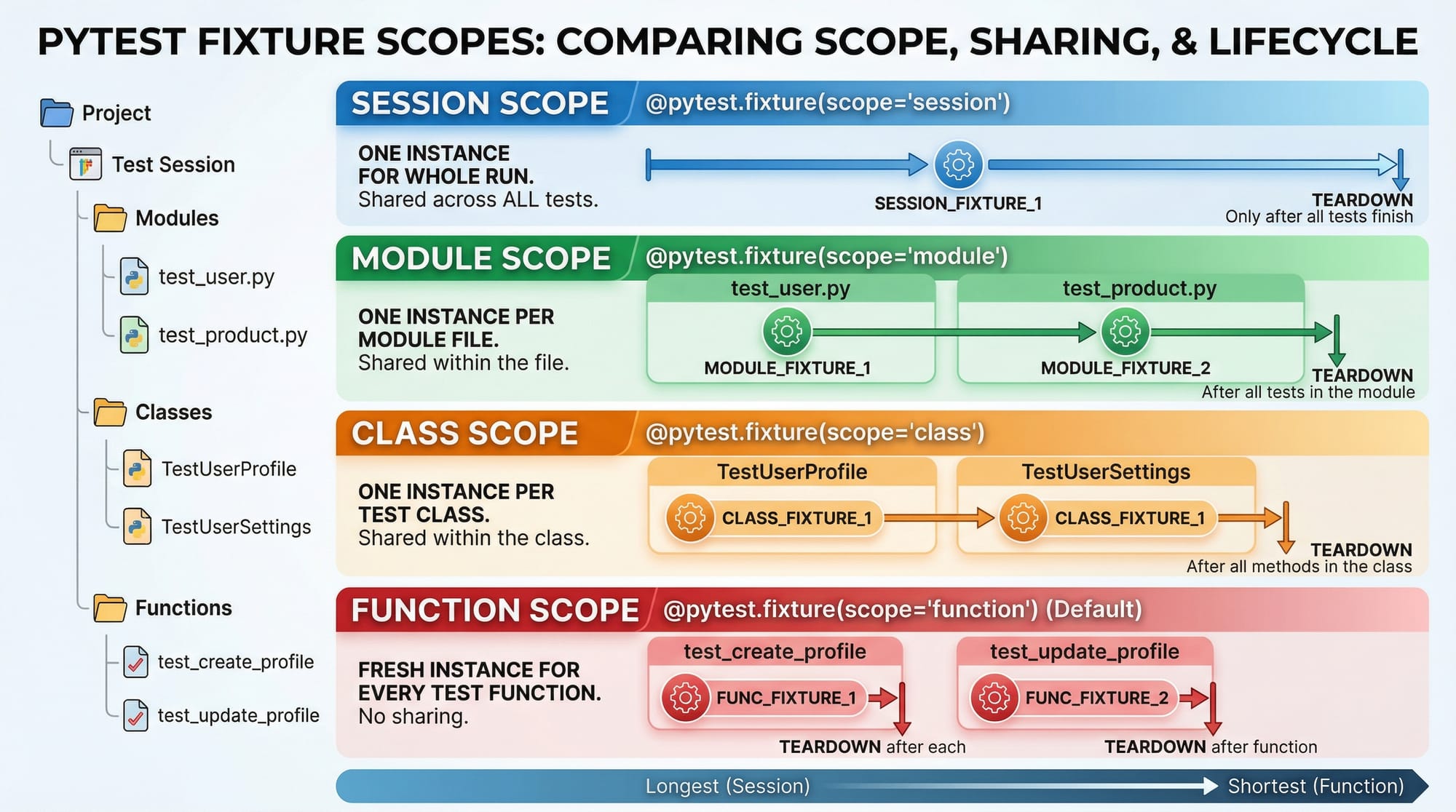
Fixtures in pytest allow you to define reusable setup logic that can be shared across multiple tests.
Example:
import pytest

@pytest.fixture
def sample_data():
    return {"name": "Ahmad", "age": 22}
Explanation:
@pytest.fixture→ Marks the function as a fixturesample_data()→ Returns reusable test data- Any test can use this fixture by adding it as a parameter
Usage:
def test_name(sample_data):
    assert sample_data["name"] == "Ahmad"
Explanation:
sample_data→ Injected automatically by pytest- No need to manually call the fixture
- Improves code reusability and readability
Mocking Dependencies with pytest-mock
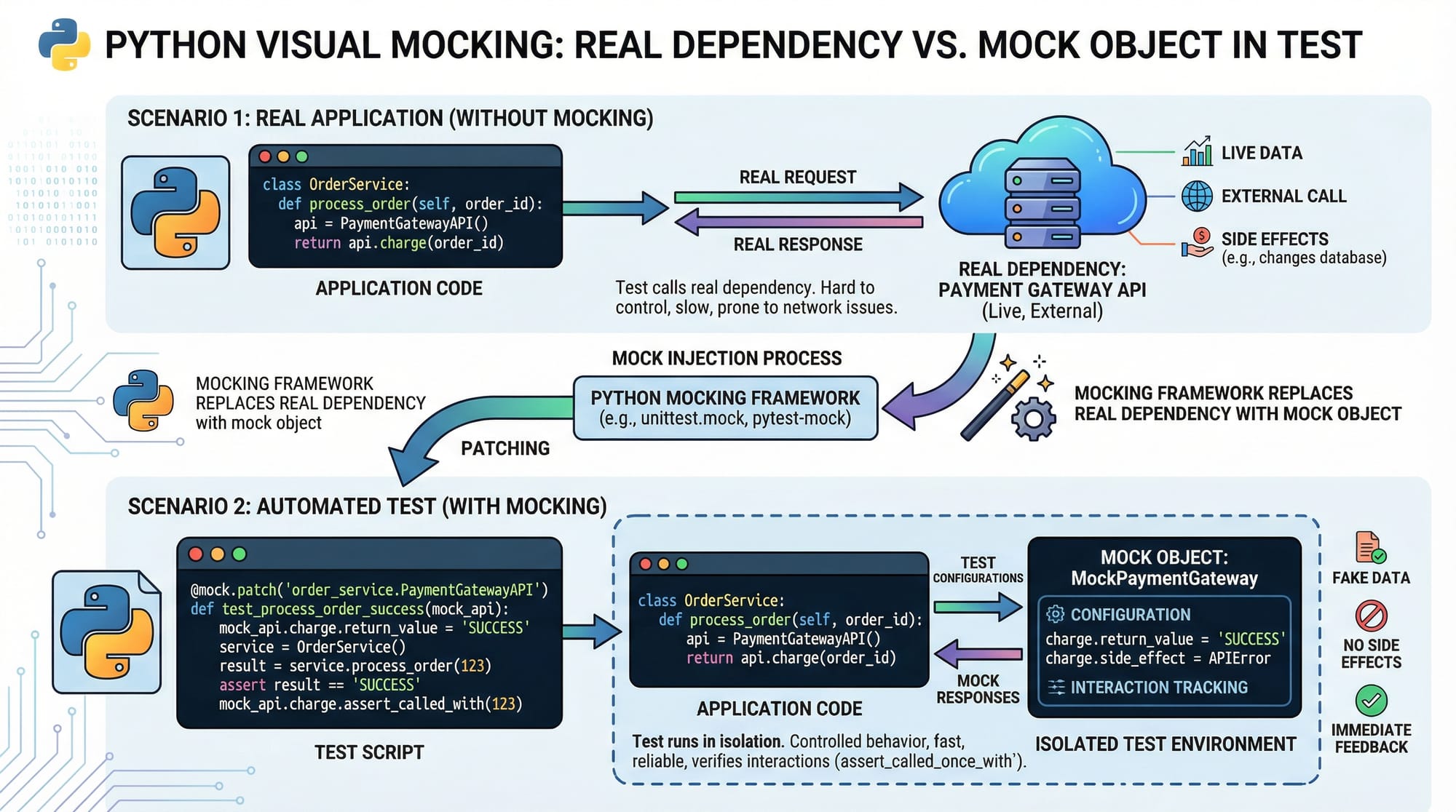
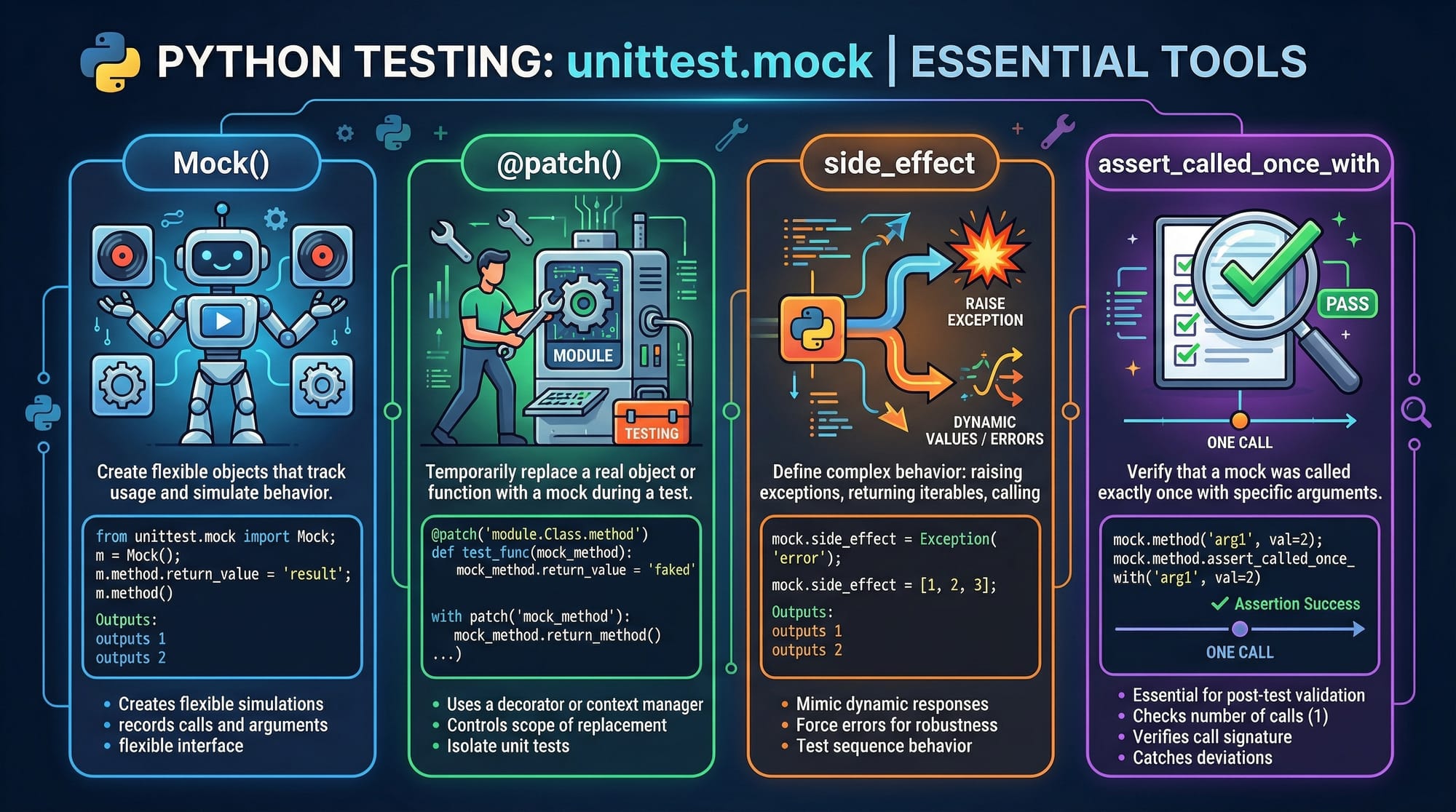
Mocking replaces real objects (like APIs or databases) with fake ones to isolate tests.
Example:
def get_exchange_rate():
    return 280  # PKR to USD (example)

def convert_to_usd(amount):
    rate = get_exchange_rate()
    return amount / rate
Now we mock get_exchange_rate.
def test_convert(mocker):
    mocker.patch("__main__.get_exchange_rate", return_value=300)
    result = convert_to_usd(6000)
    assert result == 20
Explanation:
mocker.patch()→ Replaces real functionreturn_value=300→ Fake exchange rate- Ensures test is independent of real data
Measuring Test Coverage
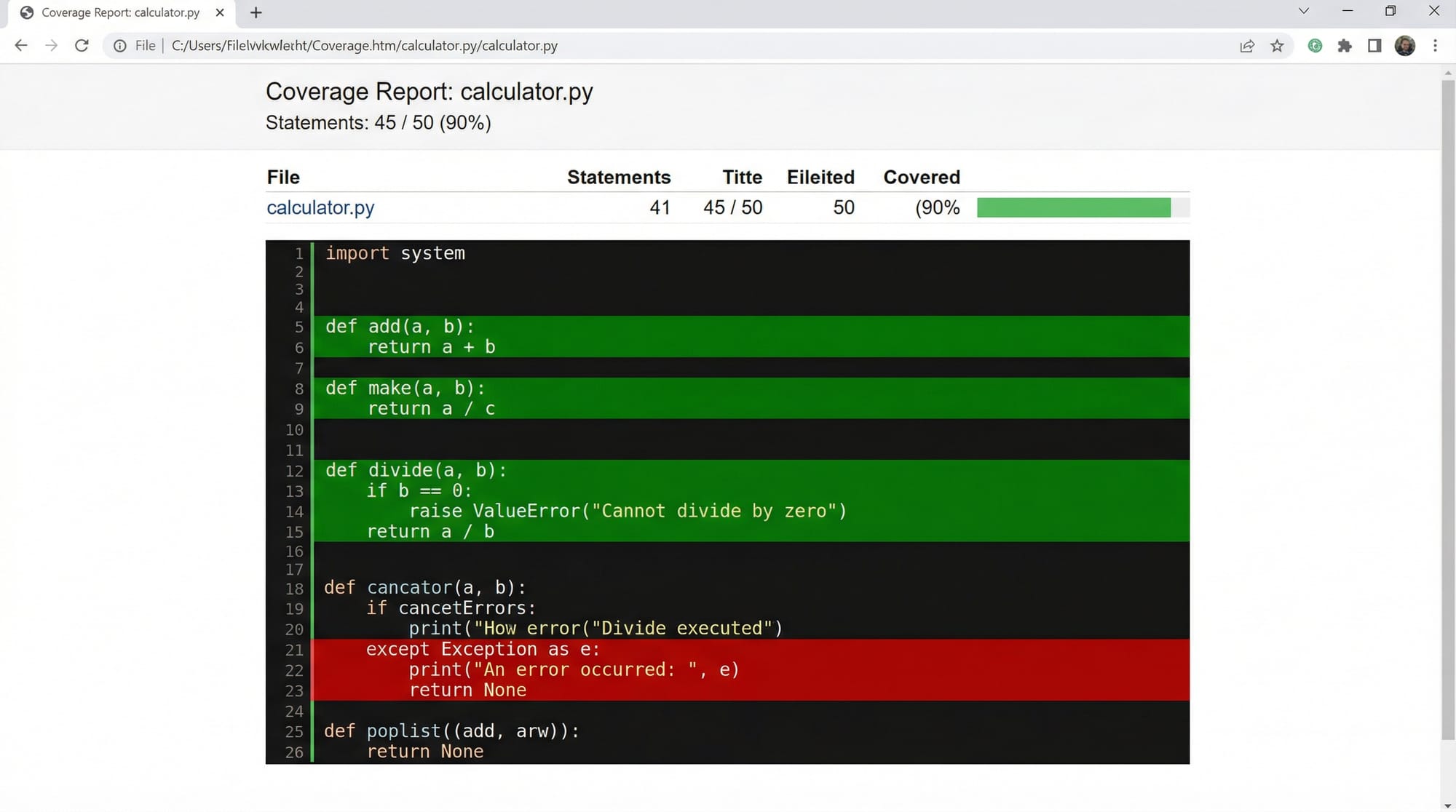
Test coverage shows how much of your code is tested.
Run coverage:
coverage run -m pytest
coverage report
Example Output:
Name        Stmts   Miss  Cover
app.py         10      2    80%
Explanation:
Stmts→ Total linesMiss→ Lines not testedCover→ Percentage covered
Higher coverage means more reliable code.
Practical Code Examples
Example 1: Using Fixtures for Database Simulation
import pytest

@pytest.fixture
def db_connection():
    connection = {"status": "connected"}
    yield connection
    connection["status"] = "closed"

def test_db(db_connection):
    assert db_connection["status"] == "connected"
Line-by-line explanation:
@pytest.fixture→ Declares fixtureconnection = {...}→ Simulates databaseyield connection→ Provides resource to test- After test → cleanup runs automatically
test_db()→ Uses fixture- Assertion → checks connection state
Example 2: Real-World Application (E-commerce Discount System)
Imagine Fatima is building an online store in Karachi.
def get_discount(user_type):
    if user_type == "student":
        return 0.2
    return 0

def calculate_price(price, user_type):
    discount = get_discount(user_type)
    return price * (1 - discount)
Test with mocking:
def test_price_with_mock(mocker):
    mocker.patch("__main__.get_discount", return_value=0.5)
    result = calculate_price(1000, "student")
    assert result == 500
Explanation:
patch()→ Overrides discount logic- Forces 50% discount
- Ensures calculation logic works independently
Common Mistakes & How to Avoid Them
Mistake 1: Overusing Fixtures
Using too many fixtures can make tests confusing.
Problem:
def test_example(a, b, c, d):
    pass
Fix:
- Combine related fixtures
- Use descriptive names
@pytest.fixture
def user_data():
    return {"name": "Ali", "city": "Lahore"}
Mistake 2: Incorrect Mock Target
Mocking the wrong import path is a common issue.
Problem:
mocker.patch("module.get_data")
Fix:
Mock where it is used, not where defined:
mocker.patch("main.get_data")
Practice Exercises
Exercise 1: Fixture Creation
Problem:
Create a fixture that returns a Pakistani student dictionary.
Solution:
import pytest

@pytest.fixture
def student():
    return {"name": "Ali", "city": "Islamabad"}
Explanation:
- Fixture provides reusable student data
- Can be used across multiple tests
Exercise 2: Mock API Call
Problem:
Mock a function that fetches currency rates.
Solution:
def get_rate():
    return 280

def test_rate(mocker):
    mocker.patch("__main__.get_rate", return_value=300)
    assert get_rate() == 300
Explanation:
- Overrides real function
- Ensures predictable output
- Useful for external APIs
Frequently Asked Questions
What is pytest fixture?
A pytest fixture is a reusable function that provides test data or setup logic to multiple tests. It helps reduce code duplication and improves readability.
How do I use mocking in pytest?
You can use the pytest-mock plugin and the mocker fixture to replace real functions or objects with fake ones during tests.
What is test coverage in Python?
Test coverage measures how much of your code is executed during testing. It helps identify untested parts of your application.
How much test coverage is enough?
Generally, 80% or higher is considered good, but critical systems may require near 100% coverage.
Why is mocking important?
Mocking allows you to isolate parts of your code, making tests faster, more reliable, and independent of external systems like APIs or databases.
Summary & Key Takeaways
- Fixtures make your tests clean, reusable, and maintainable
- Mocking helps isolate dependencies and simulate real-world scenarios
- Test coverage ensures your code is fully tested
- Always mock external services like APIs and databases
- Avoid overcomplicating tests with too many fixtures
- Aim for high coverage but focus on meaningful tests
Next Steps & Related Tutorials
To continue your journey in Python testing, explore these tutorials on theiqra.edu.pk:
- Learn the basics in the Pytest Tutorial to strengthen your foundation
- Understand core concepts in Software Testing for industry practices
- Dive into Unit Testing in Python for structured test development
- Explore Automation Testing with Python for real-world QA workflows
By mastering python advanced testing, including pytest mocking and python test coverage, you are preparing yourself for professional software development roles in Pakistan and beyond. Keep practicing, and soon you'll be writing robust, production-level Python applications 🚀
Test Your Python Knowledge!
Finished reading? Take a quick quiz to see how much you've learned from this tutorial.