Python Web Scraping BeautifulSoup & Scrapy Guide
Introduction
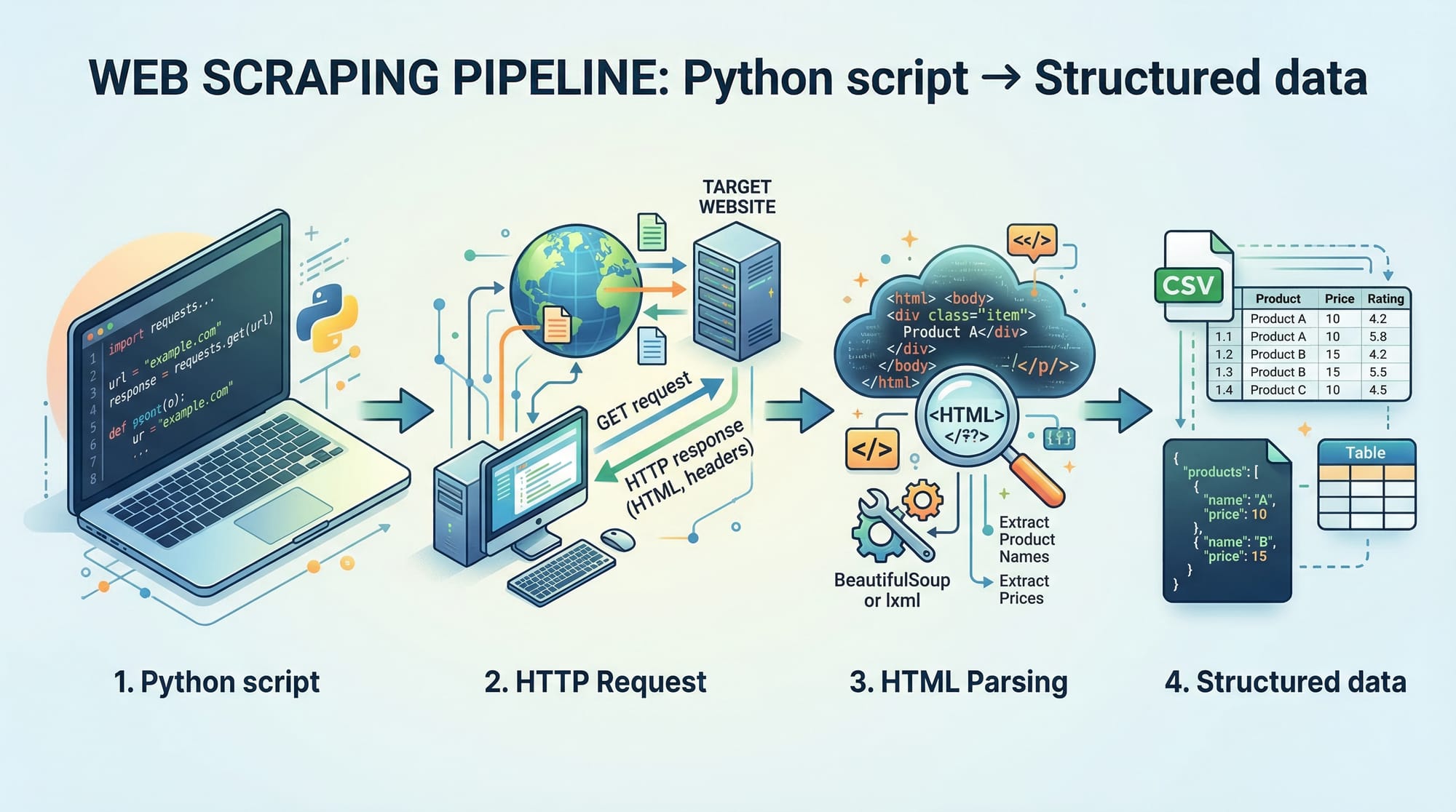
Python web scraping is the process of extracting data from websites using Python programs. In this Python Web Scraping: BeautifulSoup & Scrapy Guide, you’ll learn how to collect, process, and store web data efficiently using two powerful tools: BeautifulSoup and Scrapy.
For Pakistani students, web scraping is a highly valuable skill. Whether you want to track product prices in PKR on Daraz, collect job listings in Lahore, or analyze news trends in Karachi, scraping allows you to automate data collection instead of doing it manually.
Web scraping is widely used in:
- Data analysis and research
- E-commerce price tracking
- Job market insights
- Academic projects
Prerequisites
Before starting this beautifulsoup tutorial and scrapy tutorial, you should have:
- Basic knowledge of Python (variables, loops, functions)
- Understanding of HTML structure (tags like
<div>,<p>,<a>) - Familiarity with installing Python packages using
pip - A code editor like VS Code or PyCharm
- Internet connection for testing scraping scripts
Optional but helpful:
- Basic understanding of HTTP requests
- JSON data format knowledge
Core Concepts & Explanation
Understanding HTTP Requests & Responses
When you visit a website, your browser sends an HTTP request to a server, and the server responds with HTML content.
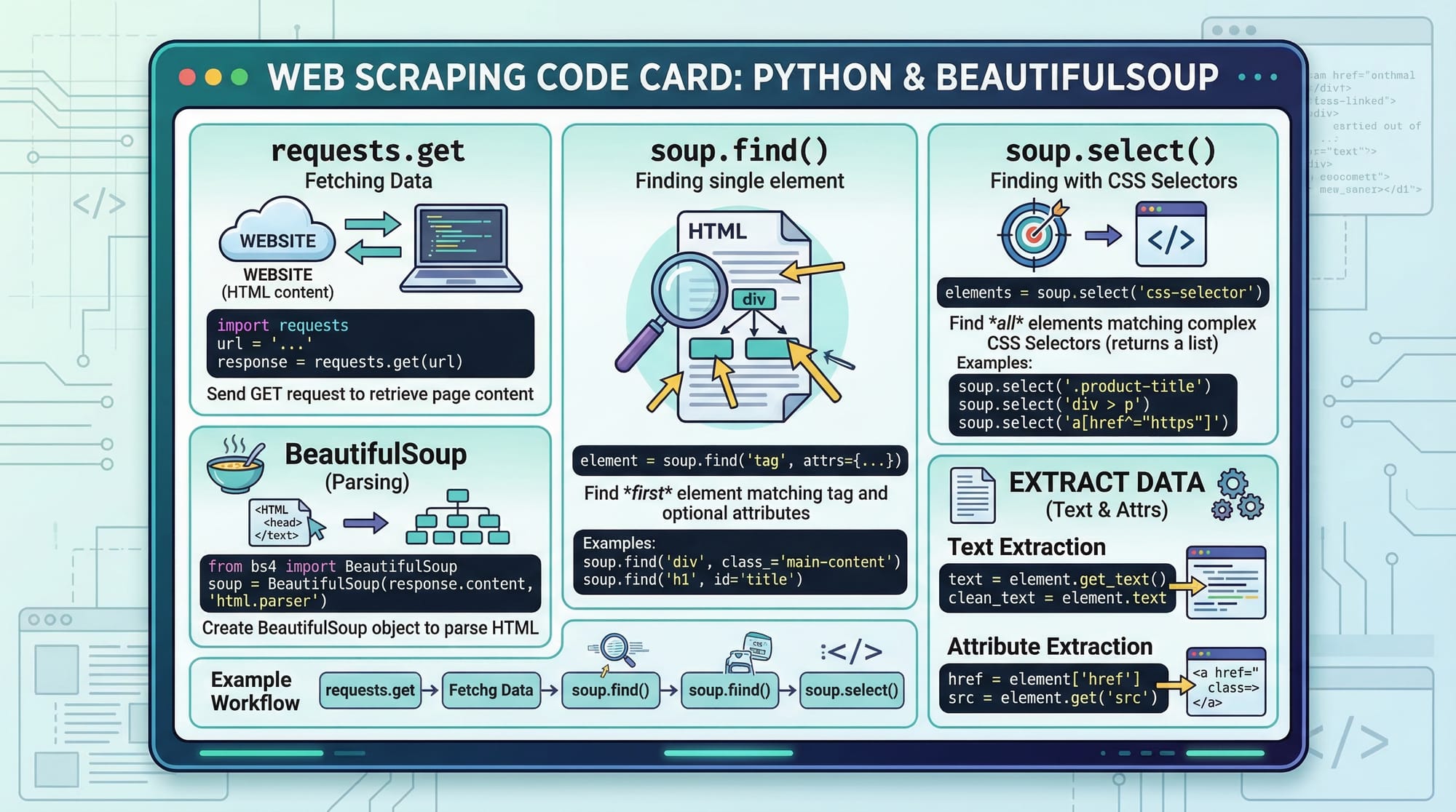
In Python, we use the requests library:
import requests

response = requests.get("https://example.com")
print(response.text)
Line-by-line explanation:
import requests→ Imports the library to send HTTP requestsrequests.get()→ Sends a GET request to the websiteresponse.text→ Contains the HTML content of the page
HTML Parsing with BeautifulSoup
Once we get HTML, we need to extract useful data. This is where BeautifulSoup comes in.
from bs4 import BeautifulSoup

html = "<html><body><h1>Hello Pakistan</h1></body></html>"
soup = BeautifulSoup(html, "html.parser")

print(soup.h1.text)
Explanation:
BeautifulSoup(html, "html.parser")→ Parses HTMLsoup.h1→ Finds the first<h1>tag.text→ Extracts text inside the tag
Selecting Elements Using CSS Selectors
You can target elements using CSS selectors:
soup.select("div.product")
This selects all <div> elements with class product.
Introduction to Scrapy Framework
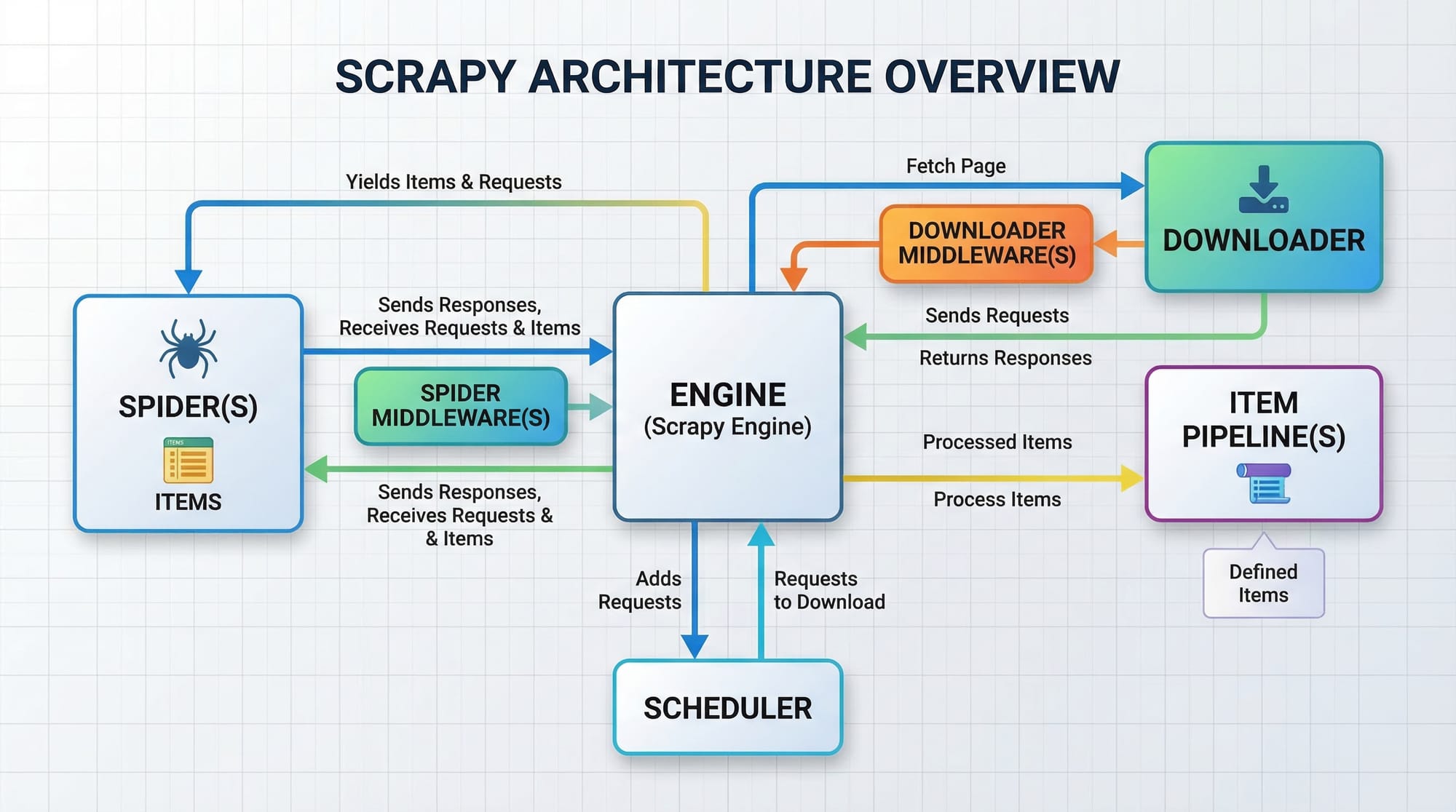
Scrapy is a powerful framework for large-scale scraping. Unlike BeautifulSoup, it provides:
- Built-in crawling system
- Data pipelines
- Asynchronous requests
Scrapy is ideal for scraping multiple pages efficiently.
Practical Code Examples
Example 1: Scraping Product Prices (BeautifulSoup)
Let’s scrape product titles from a sample e-commerce page.
import requests
from bs4 import BeautifulSoup

url = "https://example.com/products"
response = requests.get(url)

soup = BeautifulSoup(response.text, "html.parser")

products = soup.find_all("h2", class_="product-title")

for product in products:
    print(product.text)
Line-by-line explanation:
url = ...→ Target websiterequests.get(url)→ Fetches webpageBeautifulSoup(...)→ Parses HTMLfind_all()→ Finds all product titlesfor product in products:→ Loops through resultsprint(product.text)→ Prints each product name
Example 2: Real-World Application – Job Scraper in Lahore
Let’s simulate scraping job listings.
import requests
from bs4 import BeautifulSoup

url = "https://example.com/jobs-lahore"
response = requests.get(url)

soup = BeautifulSoup(response.text, "html.parser")

jobs = soup.find_all("div", class_="job-card")

for job in jobs:
    title = job.find("h2").text
    company = job.find("p", class_="company").text

    print("Job:", title)
    print("Company:", company)
    print("-" * 20)
Explanation:
- Finds job cards
- Extracts job title and company
- Displays structured output
Example 3: Basic Scrapy Spider
import scrapy

class JobSpider(scrapy.Spider):
    name = "jobs"
    start_urls = ["https://example.com/jobs"]

    def parse(self, response):
        for job in response.css("div.job-card"):
            yield {
                "title": job.css("h2::text").get(),
                "company": job.css("p.company::text").get()
            }
Explanation:
class JobSpider→ Defines spiderstart_urls→ Initial pages to crawlparse()→ Extracts datayield→ Outputs structured data
Common Mistakes & How to Avoid Them
Mistake 1: Not Handling Missing Elements
Sometimes elements don’t exist, causing errors.
❌ Wrong:
title = job.find("h2").text
✅ Correct:
title = job.find("h2")
if title:
    print(title.text)
Fix: Always check if element exists before accessing .text
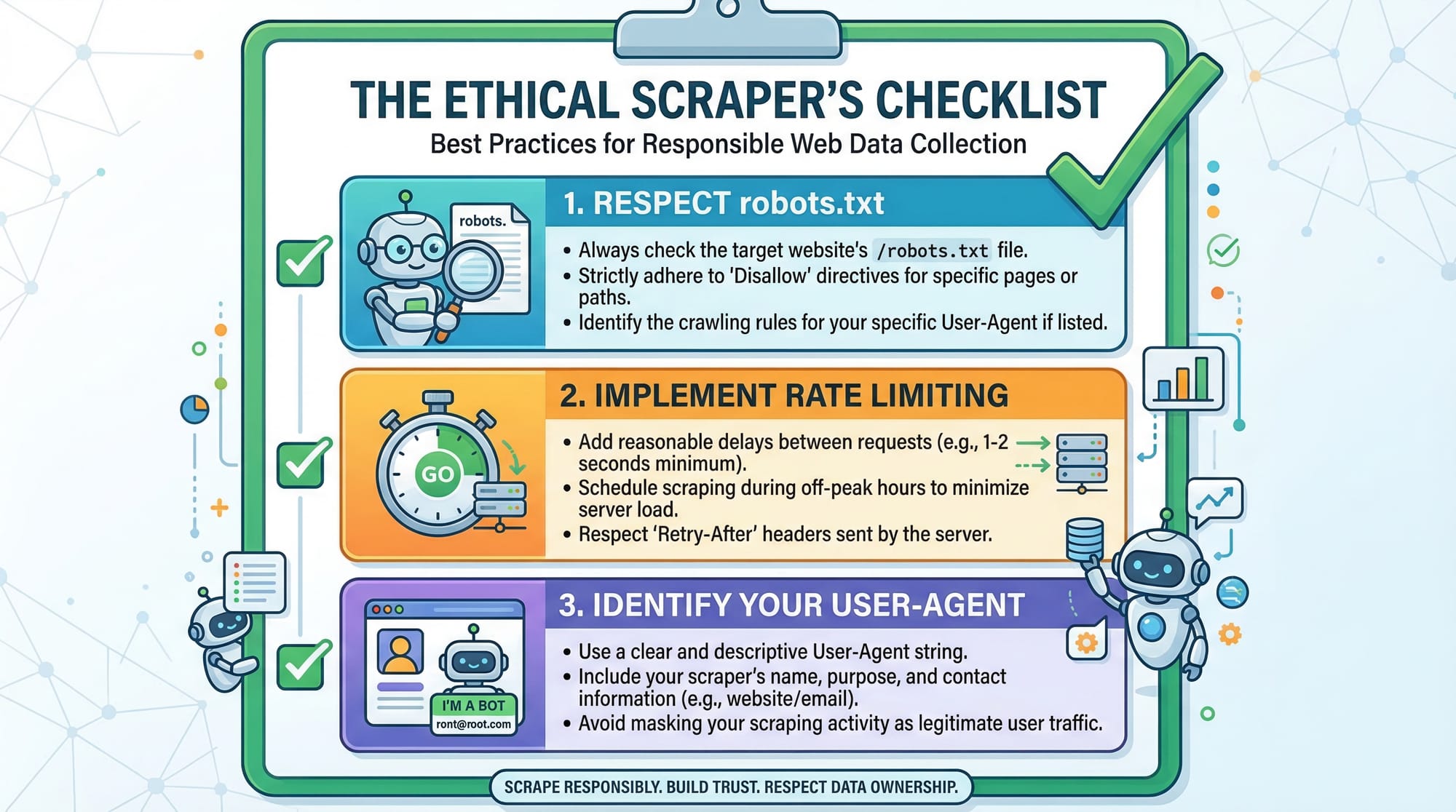
Mistake 2: Sending Too Many Requests Quickly
Websites may block your IP.
❌ Wrong:
for url in urls:
    requests.get(url)
✅ Correct:
import time

for url in urls:
    requests.get(url)
    time.sleep(2)
Fix: Add delays between requests
Practice Exercises
Exercise 1: Scrape News Headlines
Problem: Extract headlines from a news website.
Solution:
import requests
from bs4 import BeautifulSoup

response = requests.get("https://example.com/news")
soup = BeautifulSoup(response.text, "html.parser")

headlines = soup.find_all("h2")

for h in headlines:
    print(h.text)
Exercise 2: Extract Links from a Page
Problem: Get all links from a webpage.
Solution:
import requests
from bs4 import BeautifulSoup

response = requests.get("https://example.com")
soup = BeautifulSoup(response.text, "html.parser")

links = soup.find_all("a")

for link in links:
    print(link.get("href"))
Frequently Asked Questions
What is Python web scraping?
Python web scraping is the process of automatically extracting data from websites using Python libraries like BeautifulSoup and Scrapy. It helps save time and automate repetitive tasks.
How do I install BeautifulSoup?
You can install it using pip:pip install beautifulsoup4
It works along with the requests library.
What is the difference between BeautifulSoup and Scrapy?
BeautifulSoup is a simple HTML parser, while Scrapy is a full scraping framework with built-in crawling and pipelines. Use BeautifulSoup for small projects and Scrapy for large-scale scraping.
Is web scraping legal in Pakistan?
Web scraping is generally legal if you follow website terms, respect robots.txt, and avoid misuse of data. Always scrape ethically.
How do I avoid getting blocked?
Use delays, rotate user agents, and avoid sending too many requests quickly. Scrapy also provides built-in tools for this.
Summary & Key Takeaways
- Python web scraping allows automation of data collection
- BeautifulSoup is best for beginners and small projects
- Scrapy is powerful for large-scale scraping
- Always handle missing data and errors carefully
- Follow ethical scraping practices
- Real-world use cases include job scraping, price tracking, and research
Next Steps & Related Tutorials
To continue your journey, explore these tutorials on theiqra.edu.pk:
- Learn Python fundamentals in our Python Tutorial (perfect if you want to strengthen your basics)
- Build APIs with our FastAPI Tutorial
- Explore backend development using Django
- Learn data analysis with Pandas for processing scraped data
These tutorials will help you move from beginner to advanced level and build real-world projects relevant to Pakistan’s tech industry 🚀
Test Your Python Knowledge!
Finished reading? Take a quick quiz to see how much you've learned from this tutorial.