Building Complex React Applications Patterns & Best Practices
Introduction
Modern web applications are no longer simple pages with a few buttons and forms. Today’s applications — such as e-commerce platforms, dashboards, learning portals, and social media systems — require complex architecture, reusable components, and optimized performance.
This is where React architecture and advanced React patterns become extremely important.
React is widely used by companies around the world to build scalable and maintainable user interfaces. When applications grow larger, developers must apply React best practices, component patterns, and optimization techniques to keep code organized and performant.
For Pakistani students studying web development, learning advanced React patterns can significantly improve career opportunities. Many startups and software houses in Lahore, Karachi, and Islamabad build complex SaaS products, dashboards, and enterprise tools using React. Understanding proper React architecture helps developers work efficiently in real-world development teams.
For example:
- Ahmad is building a student management dashboard
- Fatima is working on a React e-commerce store
- Ali is creating a course portal
Without proper patterns, their applications may become messy and difficult to maintain.
In this tutorial, you will learn:
- Modern React patterns
- Real-world React architecture strategies
- Component design best practices
- Performance optimization techniques
- How to build scalable React applications
By the end, you will understand how professional developers structure large-scale React applications.
Prerequisites
Before learning advanced React architecture and patterns, you should already understand some basic concepts.
Make sure you are comfortable with:
JavaScript Fundamentals
You should know:
- Variables
- Functions
- Arrow functions
- Arrays and objects
- ES6 modules
Basic React Knowledge
You should understand:
- React components
- JSX syntax
- Props and state
- Event handling
- useState and useEffect hooks
Development Tools
You should also know how to use:
- Node.js
- npm
- Visual Studio Code
- Git
If you are new to React, first read the tutorials on:
- React Components
- React State and Props
- React Hooks
These foundational concepts will make this advanced guide easier to understand.
Core Concepts & Explanation
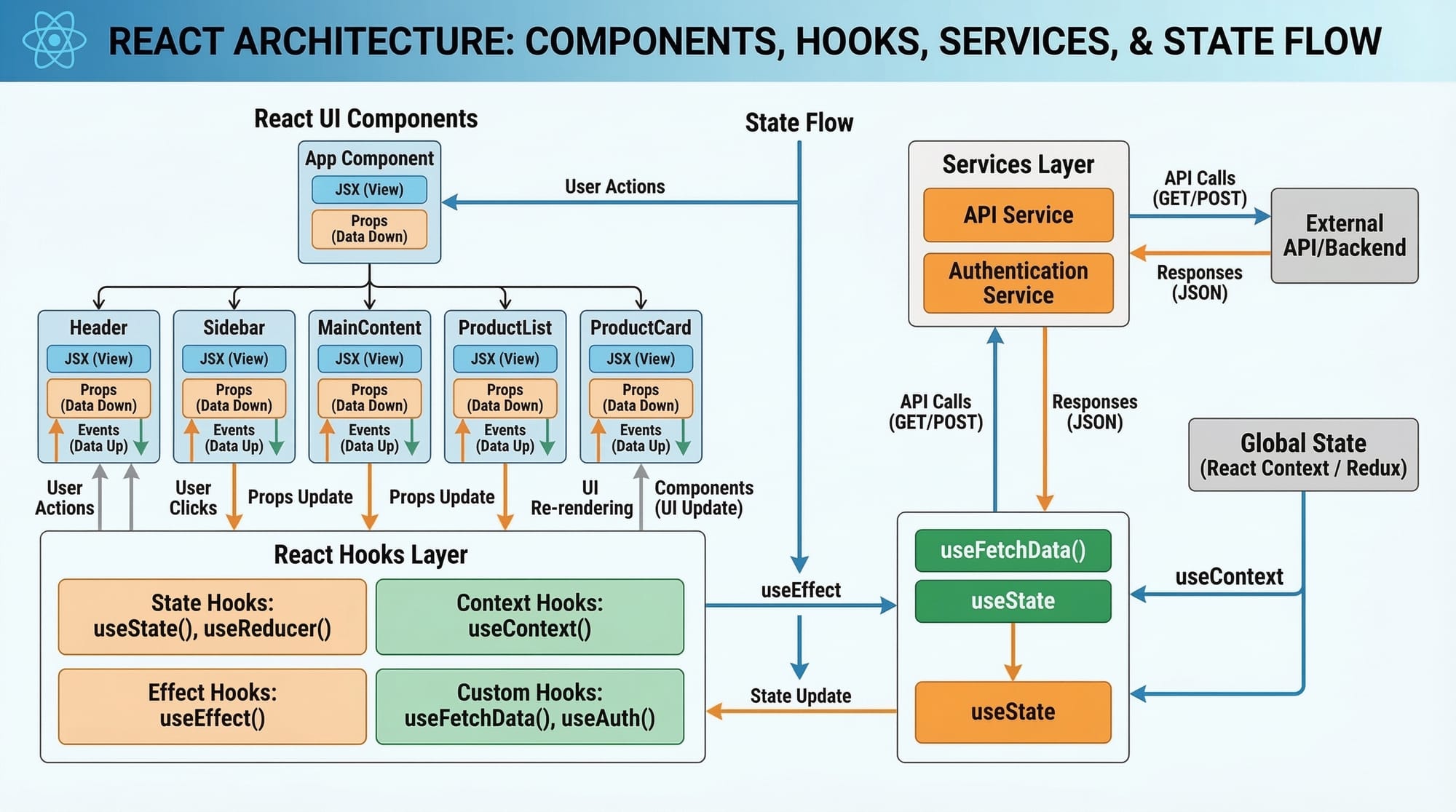
Complex React applications require proper architecture and design patterns.
Let’s explore some of the most important ones.
Component Composition Pattern
One of the most powerful React patterns is component composition.
Instead of creating large, complicated components, developers break them into small reusable components.
Example:
Instead of creating one large dashboard component, we divide it into:
- Header
- Sidebar
- Content area
- Footer
Example structure:
Dashboard
 ├── Header
 ├── Sidebar
 ├── Content
 └── Footer
Code example:
function Dashboard() {
  return (
    <div>
      <Header />
      <Sidebar />
      <Content />
      <Footer />
    </div>
  );
}
Explanation:
function Dashboard()creates a React component.<Header />renders the header component.<Sidebar />renders the navigation menu.<Content />displays main page content.<Footer />shows footer information.
This approach improves:
- Code readability
- Reusability
- Maintainability
For example, Fatima can reuse the Header component across multiple pages in her e-commerce site.
Smart vs Dumb Components Pattern
Another important React best practice is separating logic from UI.
We divide components into:
Container Components (Smart)
Handle logic, state, and API calls.
Presentational Components (Dumb)
Handle UI rendering only.
Example:
Container component:
function UserContainer() {
  const [users, setUsers] = React.useState([]);

  React.useEffect(() => {
    fetch("/api/users")
      .then(res => res.json())
      .then(data => setUsers(data));
  }, []);

  return <UserList users={users} />;
}
Explanation:
useState([])stores user data.useEffect()fetches users from API.- Data is passed to the UI component.
Presentational component:
function UserList({ users }) {
  return (
    <ul>
      {users.map(user => (
        <li key={user.id}>{user.name}</li>
      ))}
    </ul>
  );
}
Explanation:
usersare received as props.map()loops through users.- Each user is displayed in
<li>.
Benefits:
- Cleaner architecture
- Easier testing
- Reusable UI components
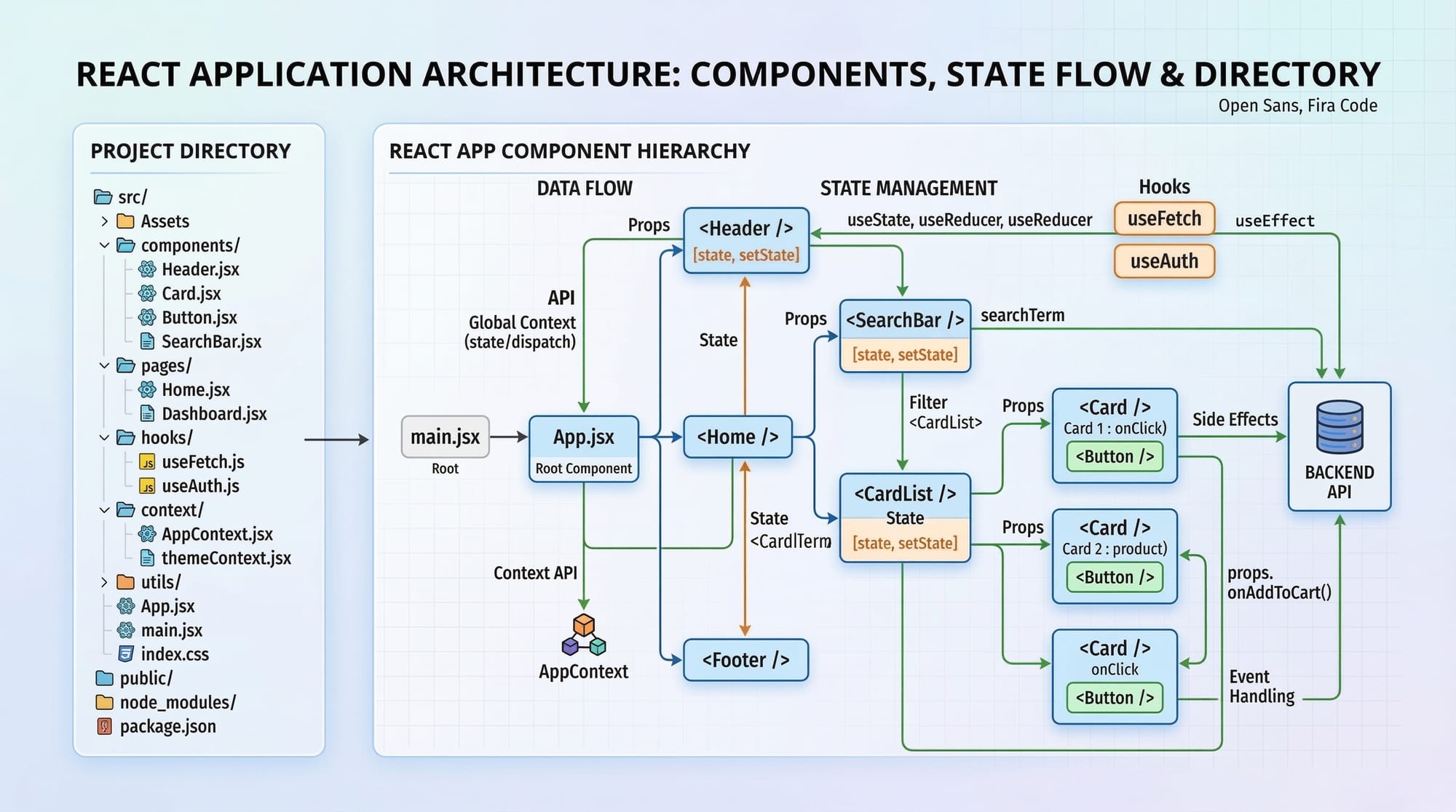
Folder Structure Architecture
A well-organized project folder is crucial for large React apps.
Example professional folder structure:
src
 ├── components
 ├── pages
 ├── hooks
 ├── services
 ├── utils
 └── assets
Explanation:
components
Reusable UI components.
pages
Application pages like Dashboard, Login, Profile.
hooks
Custom React hooks.
services
API calls.
utils
Helper functions.
Example:
Ali’s online learning platform might include:
pages
 ├── Courses
 ├── Dashboard
 └── Login
This structure improves scalability.
React Performance Optimization
Large applications must be optimized to avoid slow performance.
Key techniques include:
React.memo
Prevents unnecessary re-renders.
const UserCard = React.memo(function UserCard({ user }) {
  return <div>{user.name}</div>;
});
Explanation:
React.memo()caches the component.- Component re-renders only if props change.
useCallback
Optimizes functions.
const handleClick = React.useCallback(() => {
  console.log("Clicked");
}, []);
Explanation:
useCallback()memoizes the function.- Prevents unnecessary function recreation.
Lazy Loading
Load components only when needed.
const Dashboard = React.lazy(() => import("./Dashboard"));
Explanation:
- Component loads dynamically.
- Improves initial page speed.
Practical Code Examples
Let’s implement these patterns in real-world scenarios.
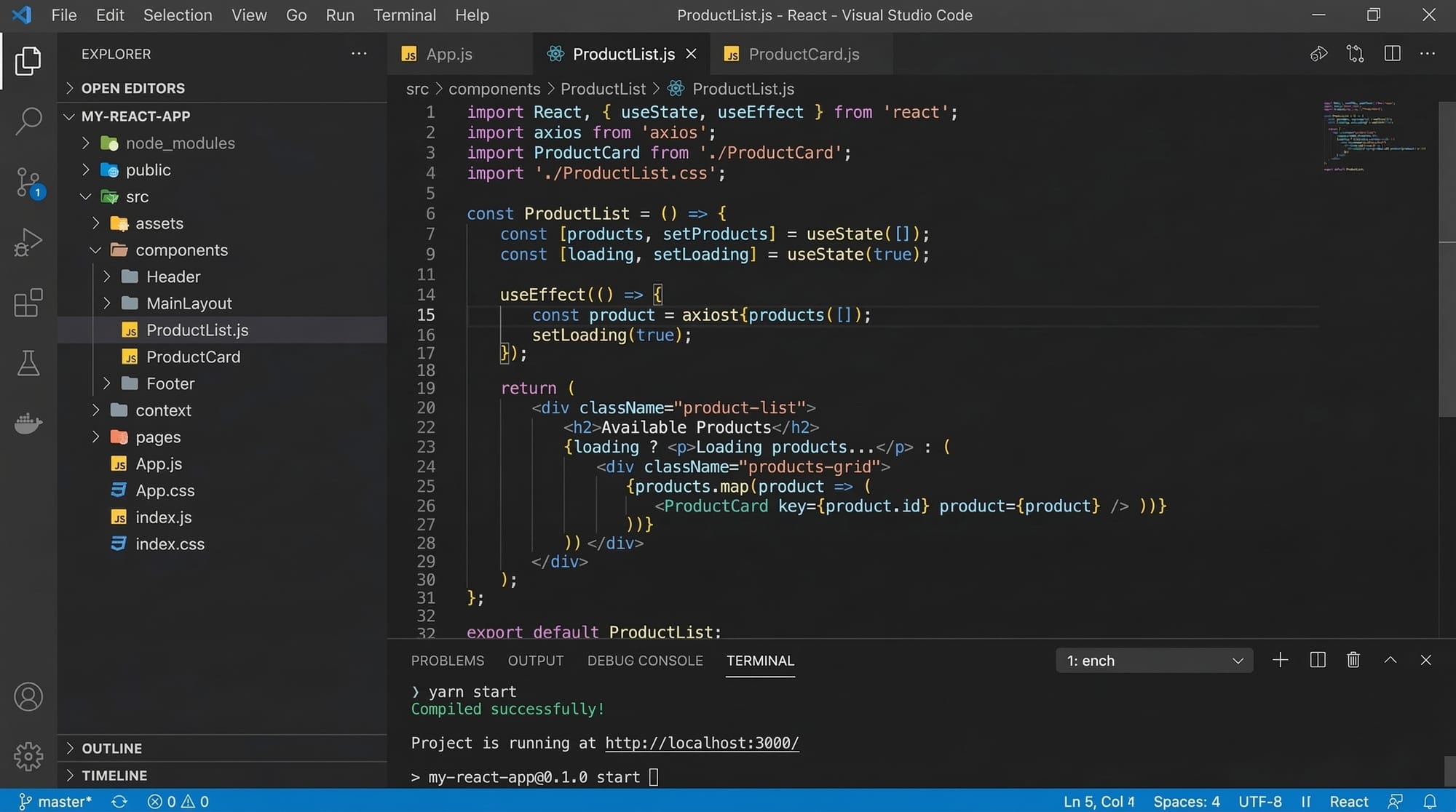
Example 1: Reusable Product Card Component
Suppose Ahmad is building an online store in Karachi.
ProductCard component:
function ProductCard({ name, price }) {
  return (
    <div className="product">
      <h2>{name}</h2>
      <p>Price: PKR {price}</p>
    </div>
  );
}
Line-by-line explanation:
function ProductCard({ name, price })
Creates a reusable component receiving product details.
<div className="product">
Container for product UI.
<h2>{name}</h2>
Displays the product name.
<p>Price: PKR {price}</p>
Displays price in Pakistani currency.
Using the component:
function Store() {
  return (
    <div>
      <ProductCard name="Laptop" price={120000} />
      <ProductCard name="Phone" price={80000} />
    </div>
  );
}
Explanation:
- Two product cards are rendered.
- Each card receives different props.
This demonstrates component reusability.
Example 2: Real-World Application — Student Dashboard
Fatima is building a student portal for a Lahore institute.
function StudentDashboard() {
  const [students, setStudents] = React.useState([]);

  React.useEffect(() => {
    fetch("/api/students")
      .then(res => res.json())
      .then(data => setStudents(data));
  }, []);

  return (
    <div>
      <h1>Student List</h1>
      {students.map(student => (
        <div key={student.id}>
          {student.name}
        </div>
      ))}
    </div>
  );
}
Line-by-line explanation:
useState([])
Creates state to store students.
useEffect()
Runs when component loads.
fetch("/api/students")
Calls backend API.
.then(res => res.json())
Converts response to JSON.
setStudents(data)
Stores student data.
students.map()
Loops through students.
key={student.id}
Unique identifier required by React.
This example demonstrates data fetching architecture in React applications.
Common Mistakes & How to Avoid Them
Even experienced developers sometimes make mistakes when building large React applications.
Mistake 1: Large Monolithic Components
Bad example:
function Dashboard() {
  // 500 lines of code
}
Problems:
- Difficult to maintain
- Hard to debug
- Not reusable
Solution:
Break components into smaller parts.
Dashboard
 ├── Sidebar
 ├── Header
 ├── Content
Benefits:
- Easier maintenance
- Better readability
- Reusability
Mistake 2: Unnecessary Re-renders
Example problem:
function App() {
  const handleClick = () => {
    console.log("Clicked");
  };
}
This function recreates every render.
Better solution:
const handleClick = React.useCallback(() => {
  console.log("Clicked");
}, []);
Explanation:
useCallback()memoizes the function.- Prevents unnecessary re-renders.
Practice Exercises
Practice is essential for mastering React architecture and patterns.
Exercise 1: Create a Reusable Card Component
Problem:
Create a component that displays:
- Course name
- Instructor name
- Price in PKR
Solution:
function CourseCard({ course, instructor, price }) {
  return (
    <div>
      <h2>{course}</h2>
      <p>{instructor}</p>
      <p>PKR {price}</p>
    </div>
  );
}
Explanation:
- Receives props
- Displays course information
- Can be reused across multiple pages
Exercise 2: Optimize a List Rendering
Problem:
Display a list of students efficiently.
Solution:
const StudentItem = React.memo(({ name }) => {
  return <li>{name}</li>;
});
Explanation:
React.memo()prevents unnecessary re-renders.- Optimizes list performance.
Frequently Asked Questions
What is React architecture?
React architecture refers to how components, folders, state management, and APIs are structured in a React project. Good architecture ensures applications remain scalable, maintainable, and easy to understand.
How do I optimize React performance?
Use techniques such as React.memo, useCallback, lazy loading, and proper component structure. Avoid unnecessary state updates and break large components into smaller reusable ones.
What are React component patterns?
Component patterns are reusable design strategies used to structure React components effectively. Examples include container/presentational components, composition patterns, and higher-order components.
Why are React best practices important?
Best practices ensure code quality, maintainability, and team collaboration. Following proper patterns helps developers avoid bugs and build scalable applications.
How do large companies structure React projects?
Large companies typically use modular folder structures, reusable component libraries, custom hooks, API service layers, and performance optimization techniques to maintain large React codebases.
Summary & Key Takeaways
- React patterns help organize large-scale applications
- Use component composition for reusable UI
- Separate logic and presentation components
- Implement proper folder architecture
- Optimize performance using React.memo and hooks
- Follow React best practices to maintain clean code
Next Steps & Related Tutorials
To continue improving your React skills, explore these tutorials on theiqra.edu.pk:
- Learn React Components and JSX for Beginners
- Master React State and Props Explained
- Build dynamic apps with React Hooks Tutorial
- Improve performance with React Performance Optimization Guide
These tutorials will help you move from beginner React developer to advanced React architect.
Test Your Python Knowledge!
Finished reading? Take a quick quiz to see how much you've learned from this tutorial.