React & API Integration Fetching Data & Handling State
Introduction
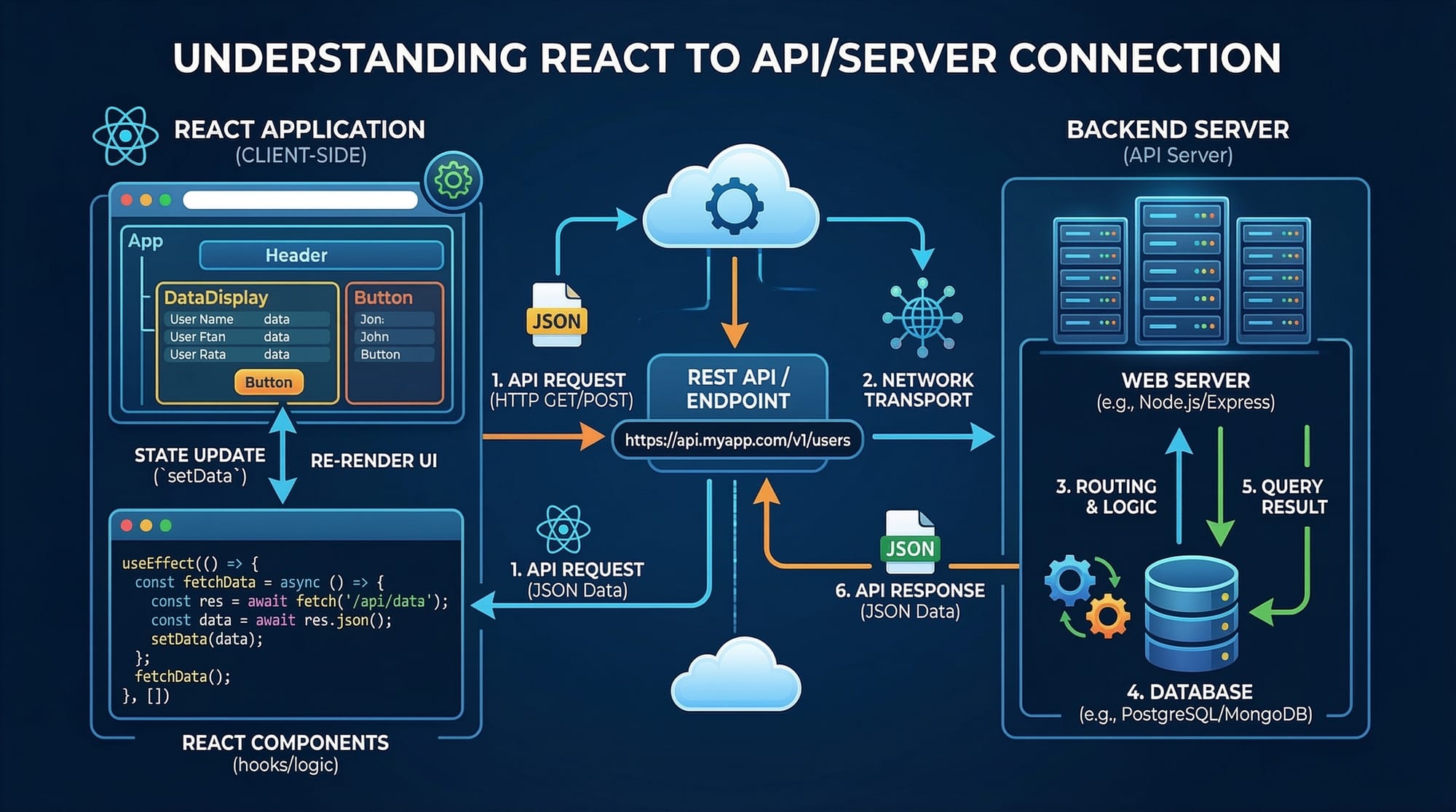
Modern web applications rarely work in isolation. Most apps depend on external data such as user profiles, product listings, weather information, or payment details. This is where React & API integration becomes essential.
In simple terms, React API integration means connecting a React application to an external server or service to retrieve or send data. React applications commonly interact with APIs using tools like the Fetch API or libraries such as Axios.
For example:
- A university portal in Islamabad may fetch student results from a backend server.
- A shopping app in Karachi might retrieve product prices in PKR from an online database.
- A food delivery platform in Lahore could fetch restaurant menus dynamically.
Instead of hardcoding data into the application, React allows developers to fetch real-time information using API calls in React.
Learning data fetching in React is extremely important for Pakistani students because:
- Nearly all modern web apps use APIs
- It is a core skill for frontend developers
- Freelancing platforms like Upwork and Fiverr frequently require React API integration
- It prepares students for full-stack development
By the end of this tutorial, you will understand:
- How APIs work with React
- How to fetch data using Fetch API
- How to use Axios in React
- How to manage API data using React state
- How to avoid common API-related mistakes
Prerequisites
Before learning React API integration, you should already be comfortable with the following concepts:
Basic JavaScript
You should understand:
- Variables
- Functions
- Arrays and objects
- Promises
- Async/Await
Example of async/await in JavaScript:
async function getData() {
  const response = await fetch("https://api.example.com/data");
  const data = await response.json();
  console.log(data);
}
React Fundamentals
Students should know:
- React components
- JSX syntax
- Props
- State
- Basic React project setup
Example component:
function Welcome() {
  return <h1>Hello React!</h1>;
}
Node.js and npm
React projects are usually created using tools like:
- Create React App
- Vite
Students should know how to run commands such as:
npm install
npm start
Basic Understanding of APIs
You should know what an API (Application Programming Interface) is.
Example API:
https://jsonplaceholder.typicode.com/posts
This API returns sample post data.
Once you understand these prerequisites, you are ready to start learning React data fetching techniques.
Core Concepts & Explanation
Understanding APIs and HTTP Requests in React
An API (Application Programming Interface) allows different software systems to communicate with each other.
When a React app needs data, it sends an HTTP request to a server.
Common HTTP methods include:
| Method | Purpose |
|---|---|
| GET | Retrieve data |
| POST | Send new data |
| PUT | Update existing data |
| DELETE | Remove data |
Example scenario:
Ali is building a student portal in Lahore.
His React app sends a request:
GET https://api.university.com/students
The server responds with JSON data.
Example response:
[
  {
    "name": "Ahmad",
    "city": "Karachi"
  },
  {
    "name": "Fatima",
    "city": "Islamabad"
  }
]
React then displays this data on the webpage.
React State and Data Fetching
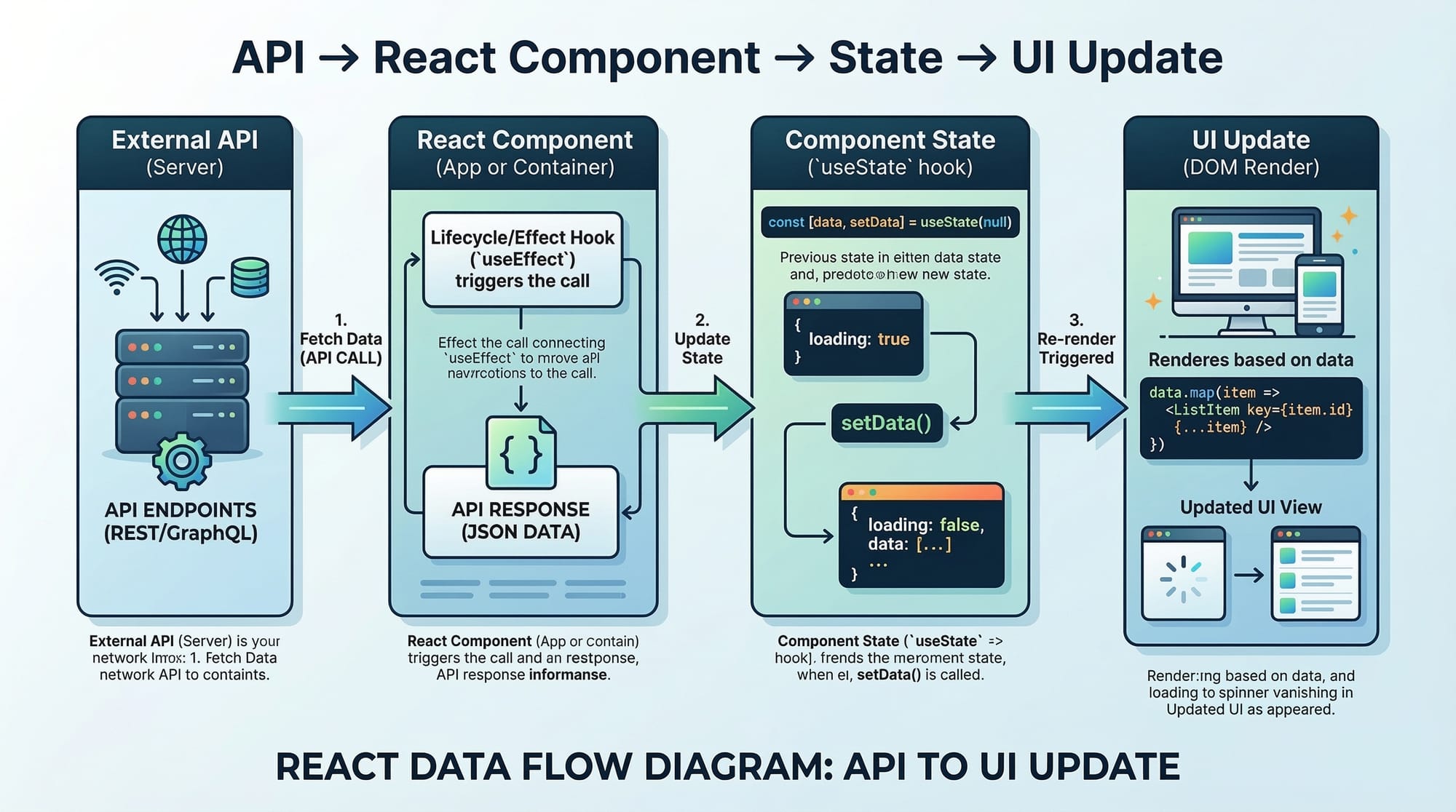
In React, fetched data is usually stored in state.
State allows components to store dynamic information and update the UI automatically.
Example:
import { useState } from "react";

function Example() {
  const [data, setData] = useState([]);

  return <div>{data.length}</div>;
}
Explanation:
import { useState } from "react";
This line imports the useState hook from React.
const [data, setData] = useState([]);
datastores the fetched information.setDataupdates the data.[]initializes the state as an empty array.
return <div>{data.length}</div>;
This displays the number of items stored in the state.
When the API returns data, we call setData() to update the state.
React then re-renders the UI automatically.
Fetch API vs Axios in React
Two popular ways to make API calls in React are:
- Fetch API
- Axios
Fetch API
Fetch API is built into JavaScript.
Example:
fetch("https://api.example.com/users")
  .then(response => response.json())
  .then(data => console.log(data));
Advantages:
- No installation required
- Native browser feature
Disadvantages:
- More verbose code
- Manual error handling
Axios
Axios is a popular library used in many React applications.
Install Axios:
npm install axios
Example Axios request:
import axios from "axios";

axios.get("https://api.example.com/users")
  .then(response => {
    console.log(response.data);
  });
Advantages:
- Cleaner syntax
- Automatic JSON parsing
- Better error handling
Many production React applications prefer Axios React integration.
Practical Code Examples
Example 1: Fetching Data with Fetch API
Let’s build a simple React component that retrieves posts from an API.
import { useState, useEffect } from "react";

function Posts() {

  const [posts, setPosts] = useState([]);

  useEffect(() => {
    fetch("https://jsonplaceholder.typicode.com/posts")
      .then(response => response.json())
      .then(data => setPosts(data));
  }, []);

  return (
    <div>
      <h2>Posts</h2>
      {posts.slice(0,5).map(post => (
        <p key={post.id}>{post.title}</p>
      ))}
    </div>
  );
}

export default Posts;
Line-by-line explanation:
import { useState, useEffect } from "react";
Imports React hooks needed for state and lifecycle behavior.
const [posts, setPosts] = useState([]);
Creates a state variable to store API data.
useEffect(() => {
Runs code when the component loads.
fetch("https://jsonplaceholder.typicode.com/posts")
Sends a GET request to the API.
.then(response => response.json())
Converts the response to JSON format.
.then(data => setPosts(data));
Stores the fetched data in React state.
posts.slice(0,5).map(post => (
Displays the first 5 posts.
<p key={post.id}>{post.title}</p>
Shows each post title on the screen.
Example 2: Real-World Application (Student Data Viewer)
Suppose Ahmad is building a student list dashboard for a university in Islamabad.
Using Axios React API calls, he fetches student data.
First install Axios:
npm install axios
React component:
import { useState, useEffect } from "react";
import axios from "axios";

function Students() {

  const [students, setStudents] = useState([]);

  useEffect(() => {
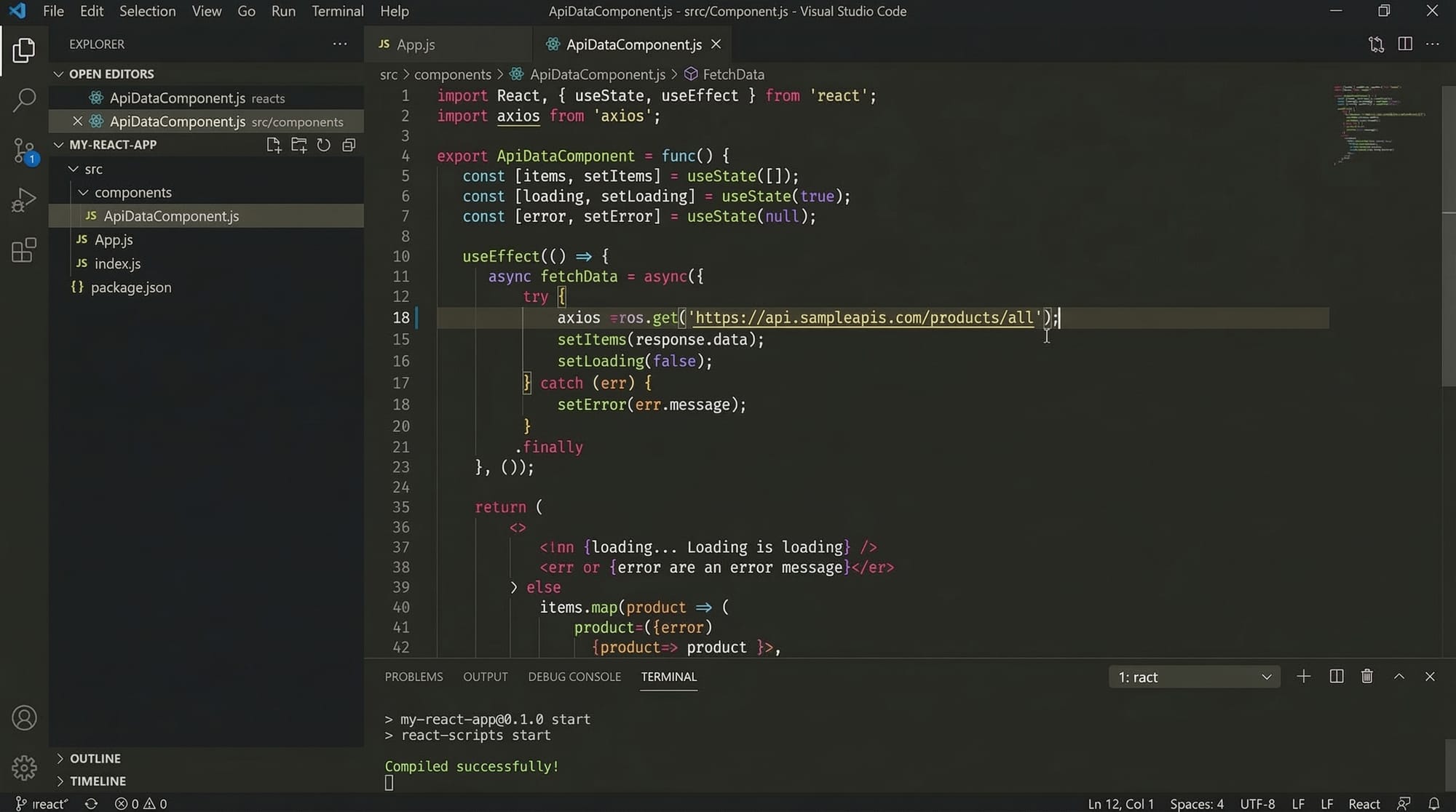
    axios.get("https://jsonplaceholder.typicode.com/users")
      .then(response => {
        setStudents(response.data);
      })
      .catch(error => {
        console.error("Error fetching data:", error);
      });
  }, []);

  return (
    <div>
      <h2>Student List</h2>

      {students.map(student => (
        <div key={student.id}>
          <h3>{student.name}</h3>
          <p>{student.email}</p>
        </div>
      ))}

    </div>
  );
}

export default Students;
Explanation:
import axios from "axios";
Imports the Axios library.
const [students, setStudents] = useState([]);
Creates state to store student data.
axios.get("https://jsonplaceholder.typicode.com/users")
Sends a GET request to the API.
setStudents(response.data);
Updates the state with returned data.
.catch(error => {
Handles errors such as network failure.
students.map(student => (
Loops through the student list.
<h3>{student.name}</h3>
Displays student names.
Common Mistakes & How to Avoid Them
Mistake 1: Fetching Data Without useEffect
Incorrect code:
function App() {
  fetch("https://api.example.com/data");
}
Problem:
The request runs every time the component renders.
Correct solution:
useEffect(() => {
  fetch("https://api.example.com/data")
    .then(res => res.json())
    .then(data => console.log(data));
}, []);
Explanation:
useEffectruns only once when the component mounts.
Mistake 2: Not Handling Errors
Incorrect code:
axios.get("https://api.example.com/users")
  .then(response => setUsers(response.data));
Problem:
If the API fails, the application crashes.
Correct solution:
axios.get("https://api.example.com/users")
  .then(response => setUsers(response.data))
  .catch(error => {
    console.error("API Error:", error);
  });
Explanation:
.catch()handles errors properly.
Practice Exercises
Exercise 1: Fetch Products
Problem:
Create a React component that fetches products from:
https://fakestoreapi.com/products
Display:
- Product title
- Price in PKR
Solution:
import { useState, useEffect } from "react";

function Products() {

  const [products, setProducts] = useState([]);

  useEffect(() => {
    fetch("https://fakestoreapi.com/products")
      .then(res => res.json())
      .then(data => setProducts(data));
  }, []);

  return (
    <div>
      {products.map(product => (
        <p key={product.id}>
          {product.title} - PKR {product.price}
        </p>
      ))}
    </div>
  );
}
Exercise 2: Build a User Directory
Problem:
Create a user directory that displays:
- Name
- City
Solution:
import axios from "axios";
import { useState, useEffect } from "react";

function Directory() {

  const [users, setUsers] = useState([]);

  useEffect(() => {
    axios.get("https://jsonplaceholder.typicode.com/users")
      .then(res => setUsers(res.data));
  }, []);

  return (
    <div>
      {users.map(user => (
        <div key={user.id}>
          <h4>{user.name}</h4>
          <p>{user.email}</p>
          <p>{user.address.city}</p>
        </div>
      ))}
    </div>
  );
}
Frequently Asked Questions
What is React API integration?
React API integration means connecting a React application with external services or servers to retrieve or send data. This is usually done using tools like Fetch API or Axios.
How do I fetch data in React?
You typically use the useEffect hook along with Fetch API or Axios to request data from an API when the component loads.
What is Axios in React?
Axios is a popular JavaScript library used for making HTTP requests. It simplifies API calls in React by providing a cleaner syntax and built-in error handling.
Why use useEffect for API calls?
The useEffect hook ensures that API requests run after the component renders, preventing unnecessary repeated calls.
Is Fetch API better than Axios?
Both are useful. Fetch API is built into browsers, while Axios provides easier syntax and better error handling, which is why many React developers prefer Axios.
Summary & Key Takeaways
- React applications frequently rely on APIs to retrieve dynamic data.
- The two most common methods for data fetching in React are Fetch API and Axios.
- API responses are usually stored in React state using useState.
- The useEffect hook ensures API calls run at the correct time.
- Proper error handling prevents application crashes.
- Mastering React API integration is essential for real-world development.
Next Steps & Related Tutorials
If you want to deepen your React knowledge, explore these tutorials on theiqra.edu.pk:
- Learn how components work in React Components Explained: A Beginner’s Guide
- Understand application structure in React State & Props Explained
- Improve your workflow with GitHub Copilot for React Developers
- Discover modern development tools in Top AI Tools for Programmers in 2026
These tutorials will help you progress from React basics to advanced application development.
Test Your Python Knowledge!
Finished reading? Take a quick quiz to see how much you've learned from this tutorial.