React Components Functional vs Class Components
Introduction
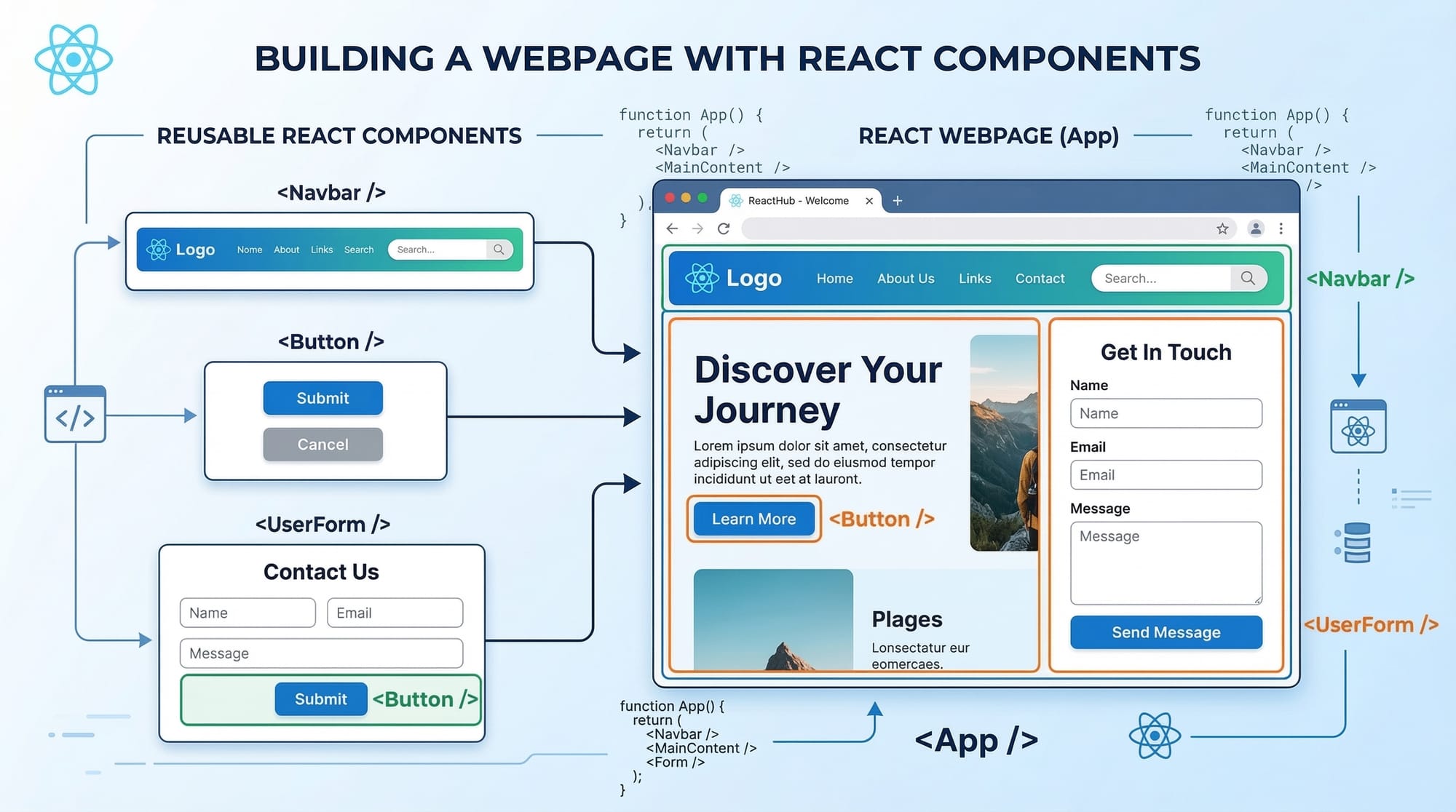
React components are the building blocks of modern web applications created using React. Every interface element you see in a React application—buttons, navigation bars, forms, or entire pages—is created using components.
If you imagine a website like a Lego structure, React components are the individual Lego blocks. Developers combine these blocks to create complex user interfaces while keeping the code organized and reusable.
For Pakistani students learning modern web development, understanding React component types is an essential skill. Many startups and software houses in cities like Lahore, Karachi, and Islamabad are actively hiring developers with React experience. Knowing the difference between functional components and class components will help you write efficient, modern, and maintainable React applications.
In this tutorial, you will learn:
- What React components are
- The difference between functional components and class components
- When to use each type
- Practical coding examples
- Common mistakes beginners make
- Practice exercises to strengthen your skills
By the end of this guide, you will confidently understand React component architecture and be ready to build your own React applications.
Prerequisites
Before learning about functional components vs class components, you should have basic knowledge of the following topics:
- Basic HTML and CSS
- Intermediate JavaScript (ES6)
- Understanding of variables, functions, and arrays
- Basic knowledge of JavaScript modules
- Installation of Node.js and npm
- Basic familiarity with React project setup
If you are completely new to React, it is recommended to first learn:
- React basics
- JSX syntax
- How React renders UI components
These concepts will make this tutorial much easier to understand.
Core Concepts & Explanation
Understanding React Components
A React component is a reusable piece of code that returns UI elements.
In React, components allow developers to:
- Break complex interfaces into smaller pieces
- Reuse UI elements across the application
- Maintain clean and readable code
For example, a university website might include components like:
- Navbar
- Student Profile Card
- Course List
- Login Form
Each of these pieces can be built as a separate component.
There are two main types of React components:
- Functional Components
- Class Components
Both achieve similar results but use different syntax and features.
Functional Components
Functional components are JavaScript functions that return JSX.
In modern React development, functional components are the preferred approach because they are simpler and support powerful features through React Hooks.
Example:
function Welcome() {
  return <h1>Welcome to Iqra University</h1>;
}
Explanation:
function Welcome()defines a JavaScript function- The function returns JSX, which looks like HTML
- React renders this JSX on the webpage
Functional components are widely used in modern React applications.
Advantages:
- Simpler syntax
- Less code
- Easier to understand
- Works with React Hooks
- Better performance in many scenarios
Class Components
Before React Hooks were introduced, developers used class components to manage state and lifecycle methods.
Class components use ES6 classes and extend React.Component.
Example:
import React, { Component } from "react";

class Welcome extends Component {
  render() {
    return <h1>Welcome to Iqra University</h1>;
  }
}
Explanation:
class Welcomecreates a class componentextends Componentallows the class to inherit React featuresrender()is required to return JSX- The JSX inside
render()is displayed in the browser
Class components are still used in many older React projects.
Advantages:
- Supports lifecycle methods
- Works well in large legacy projects
However, modern React development prefers functional components with hooks.
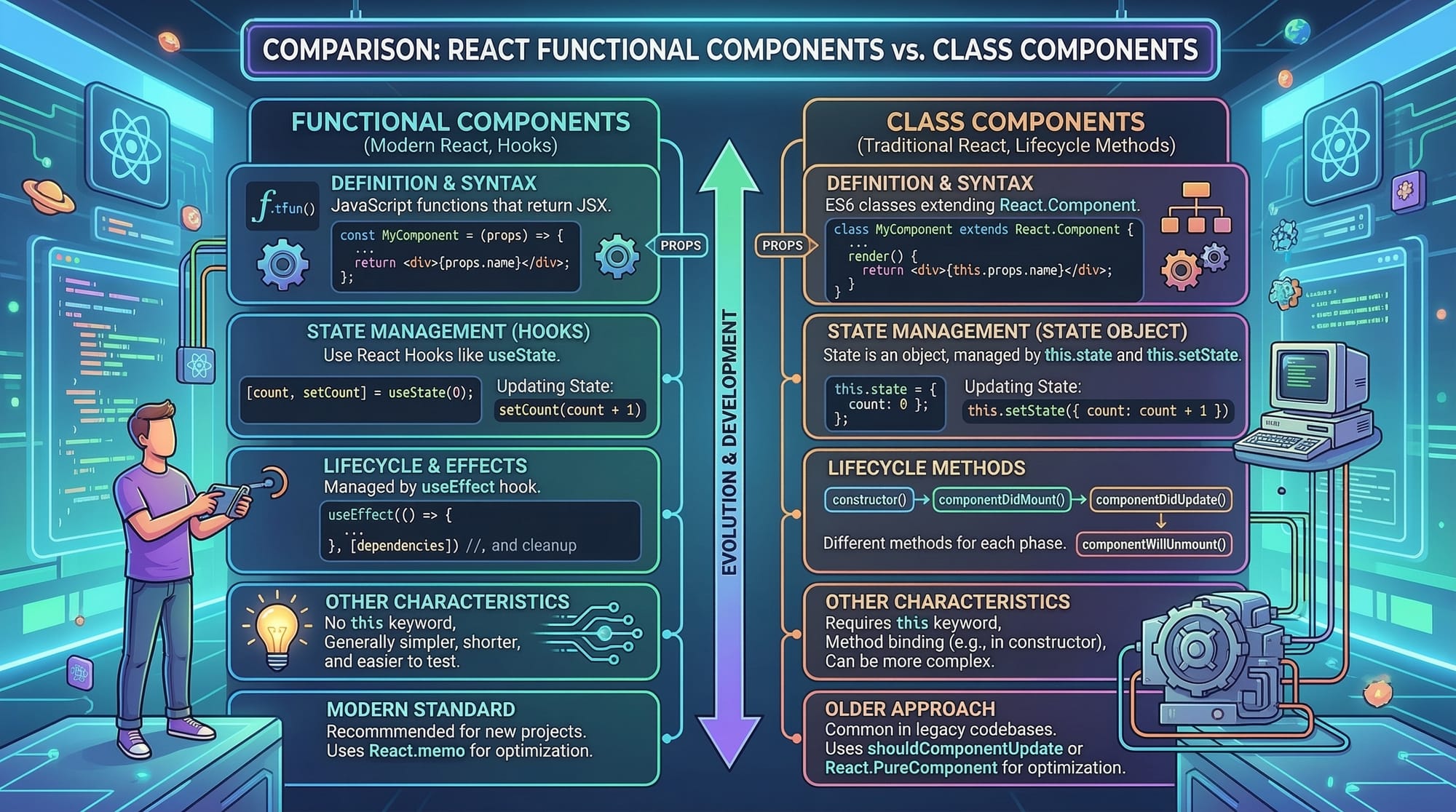
Key Differences Between Functional and Class Components
| Feature | Functional Components | Class Components |
|---|---|---|
| Syntax | JavaScript function | ES6 class |
| State Management | React Hooks | this.state |
| Lifecycle Methods | useEffect Hook | lifecycle methods |
| Code Length | Shorter | Longer |
| Modern Usage | Preferred | Mostly legacy |
Practical Code Examples
Example 1: Creating a Functional Component
Let's create a simple React component for a student welcome message.
function StudentWelcome() {
  const studentName = "Ahmad";

  return (
    <div>
      <h1>Hello {studentName}</h1>
      <p>Welcome to the React course.</p>
    </div>
  );
}

export default StudentWelcome;
Line-by-line explanation:
function StudentWelcome()defines a functional componentconst studentName = "Ahmad"stores a variable with the student's name<div>is the container element<h1>Hello {studentName}</h1>displays the student's name using JSX expressions<p>shows a welcome messageexport default StudentWelcomeallows other files to import this component
Usage in another file:
import StudentWelcome from "./StudentWelcome";

function App() {
  return (
    <div>
      <StudentWelcome />
    </div>
  );
}

export default App;
Explanation:
import StudentWelcomeloads the component<StudentWelcome />renders it inside the main app
Example 2: Real-World Application
Imagine Fatima is building a fee calculator for students in Lahore.
Below is a functional component that calculates tuition fees.
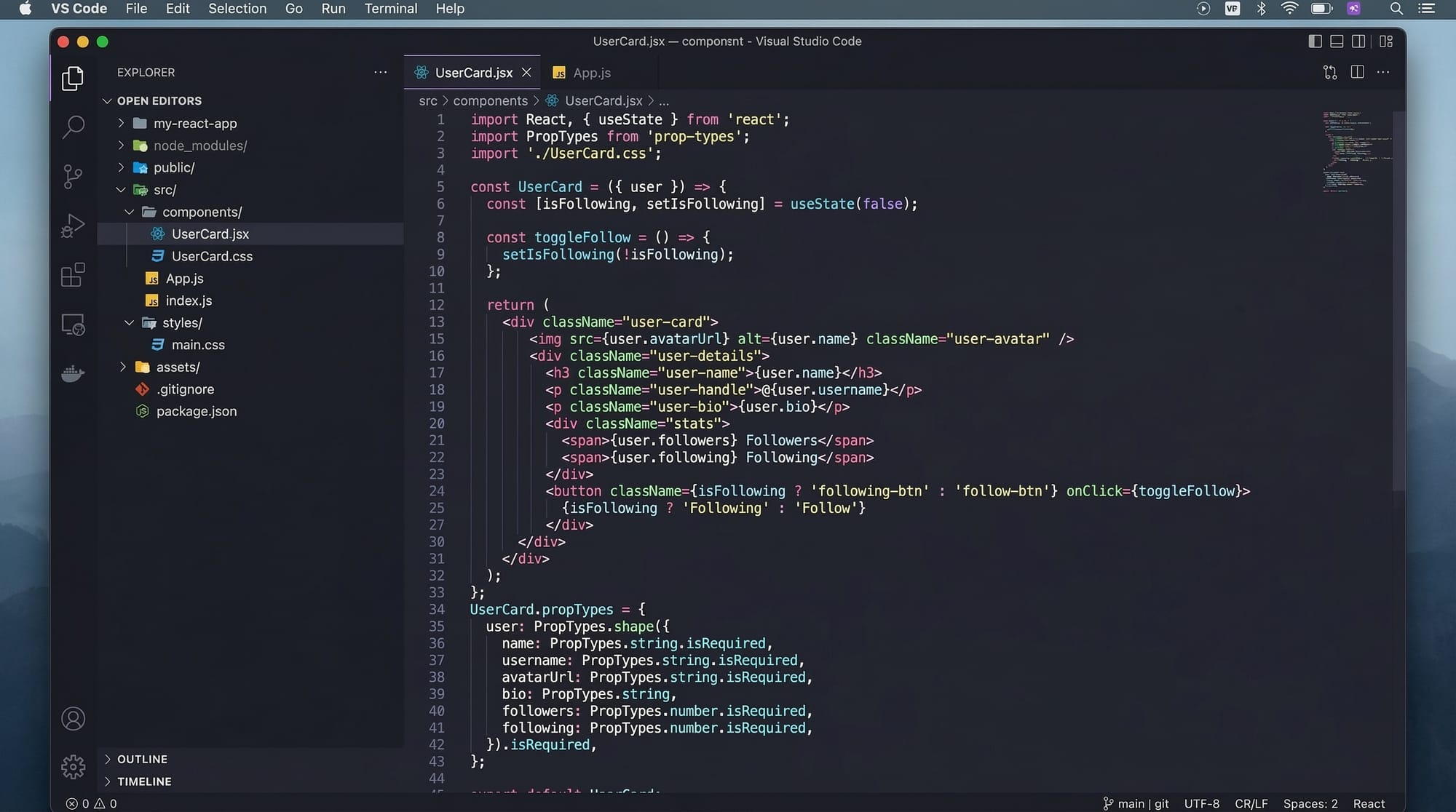
import React, { useState } from "react";

function FeeCalculator() {
  const [fee, setFee] = useState(50000);

  return (
    <div>
      <h2>University Fee Calculator</h2>
      <p>Total Fee: PKR {fee}</p>

      <button onClick={() => setFee(fee + 5000)}>
        Add Lab Charges
      </button>
    </div>
  );
}

export default FeeCalculator;
Line-by-line explanation:
import React, { useState }imports React and the useState hookfunction FeeCalculator()defines a functional componentconst [fee, setFee] = useState(50000)creates a state variablefeestores the current fee valuesetFeeupdates the fee<h2>displays the title<p>shows the fee in PKR<button>adds lab charges when clickedonClick={() => setFee(fee + 5000)}updates the fee
This example demonstrates how functional components handle dynamic data.
Common Mistakes & How to Avoid Them
Mistake 1: Forgetting to Return JSX
Many beginners forget to return JSX in functional components.
Incorrect code:
function Hello() {
  <h1>Hello World</h1>
}
Problem:
The component does not return anything.
Correct code:
function Hello() {
  return <h1>Hello World</h1>;
}
Solution:
Always ensure your component returns JSX.
Mistake 2: Using this in Functional Components
Beginners sometimes try to use this inside functional components.
Incorrect code:
function Welcome() {
  return <h1>Hello {this.name}</h1>;
}
Problem:
Functional components do not use this.
Correct approach:
function Welcome() {
  const name = "Ali";
  return <h1>Hello {name}</h1>;
}
Use variables and hooks instead of this.
Practice Exercises
Exercise 1: Student Profile Component
Problem:
Create a React functional component that displays:
- Student Name: Fatima
- City: Karachi
- Course: Web Development
Solution:
function StudentProfile() {
  return (
    <div>
      <h2>Fatima</h2>
      <p>City: Karachi</p>
      <p>Course: Web Development</p>
    </div>
  );
}

export default StudentProfile;
Explanation:
- The component returns JSX containing student information.
<h2>displays the name.<p>elements show city and course.
Exercise 2: Counter Component
Problem:
Create a counter that increases when a button is clicked.
Solution:
import React, { useState } from "react";

function Counter() {
  const [count, setCount] = useState(0);

  return (
    <div>
      <h2>Counter: {count}</h2>

      <button onClick={() => setCount(count + 1)}>
        Increase
      </button>
    </div>
  );
}

export default Counter;
Explanation:
useStatecreates a counter variable.countstores the current number.setCountupdates the number.- Clicking the button increases the value.
Frequently Asked Questions
What is a React component?
A React component is a reusable piece of UI that returns JSX. Components allow developers to break large interfaces into smaller, manageable pieces.
What is the difference between functional and class components?
Functional components are JavaScript functions that return JSX and use hooks for state management. Class components use ES6 classes and lifecycle methods.
Are class components still used in React?
Yes, class components are still used in older React projects. However, modern development mostly uses functional components with hooks.
How do I create a functional component in React?
You can create a functional component by writing a JavaScript function that returns JSX. For example: function MyComponent(){ return <h1>Hello</h1>; }.
Should beginners learn class components?
It is useful to understand class components because many legacy React applications use them. However, beginners should primarily focus on functional components.
Summary & Key Takeaways
- React components are reusable building blocks of user interfaces.
- There are two main React component types: functional and class components.
- Functional components are simpler and preferred in modern React development.
- Class components use ES6 classes and lifecycle methods.
- React Hooks allow functional components to manage state and side effects.
- Understanding components is essential for building scalable React applications.
Next Steps & Related Tutorials
To continue your React learning journey on theiqra.edu.pk, explore these tutorials:
- Learn JSX syntax and how React renders UI in our guide on React JSX Fundamentals
- Understand state management with React Hooks in Mastering useState and useEffect
- Build real projects with our tutorial on Creating Your First React Web Application
- Improve code organization in Reusable Components in React
These tutorials will help you become a confident React developer ready for modern web development careers in Pakistan.
Test Your Python Knowledge!
Finished reading? Take a quick quiz to see how much you've learned from this tutorial.