React Hooks Use State Use Effect & Custom Hooks

Introduction
React Hooks revolutionized how developers write React components when they were introduced in React 16.8. Before hooks, React developers had to choose between functional components (which were stateless) and class components (which could manage state and lifecycle methods). Hooks bridge this gap by allowing functional components to use state and other React features without writing classes. This represents a fundamental shift in React development philosophy, making code more readable, reusable, and easier to test. For Pakistani students entering the global tech market, mastering React Hooks is essential because modern React applications overwhelmingly use hooks as the standard approach for component logic.
The importance of learning React Hooks for Pakistani developers cannot be overstated. As Pakistan's IT sector continues to grow, with cities like Karachi, Lahore, and Islamabad becoming hubs for software development, the demand for React developers has increased significantly. Companies like Systems Limited, 10Pearls, and Arbisoft actively seek developers proficient in modern React patterns. Furthermore, freelance platforms show a consistent demand for React developers from Pakistan, with many developers earning in USD while working remotely for international clients. Understanding hooks like useState, useEffect, and the ability to create custom hooks positions you as a competitive candidate in both local and international job markets.
Prerequisites
Before diving into React Hooks, you should have a solid foundation in several key areas. This ensures you can focus on understanding hooks without struggling with fundamental concepts. The following prerequisites will help you get the most out of this tutorial:
1. JavaScript ES6 Fundamentals: Arrow functions, destructuring assignment, template literals, spread/rest operators, and module imports/exports are used extensively throughout React and hooks. Understanding these concepts is non-negotiable for writing modern React code.
2. Basic React Knowledge: You should understand what components are, how JSX works, props passing between components, and the basic component lifecycle. If you're new to React, we recommend completing our Introduction to React tutorial first on theiqra.edu.pk.
3. Node.js and npm: Basic familiarity with running commands in a terminal, installing packages with npm, and understanding package.json will help you set up projects and follow along with code examples.
4. HTML and CSS: Since React outputs HTML and uses CSS for styling, basic knowledge of HTML structure and CSS selectors is necessary for building complete React applications.
Core Concepts & Explanation
Understanding useState: Managing Component State
The useState hook is the most fundamental hook in React, allowing functional components to manage their own state. Before hooks, state management was only possible in class components using this.state and this.setState(). With useState, you can add state to any functional component with minimal boilerplate code. The hook returns an array containing two elements: the current state value and a function to update that value. This pattern follows React's philosophy of making state updates explicit and predictable.
The syntax for useState is straightforward: const [state, setState] = useState(initialValue);. Here, state is the current value, setState is the updater function, and initialValue is the starting value for your state. You can use any JavaScript value as state: numbers, strings, booleans, objects, or arrays. The key difference from class components is that useState doesn't merge new state with old state automatically—you must handle object and array updates manually using the spread operator.
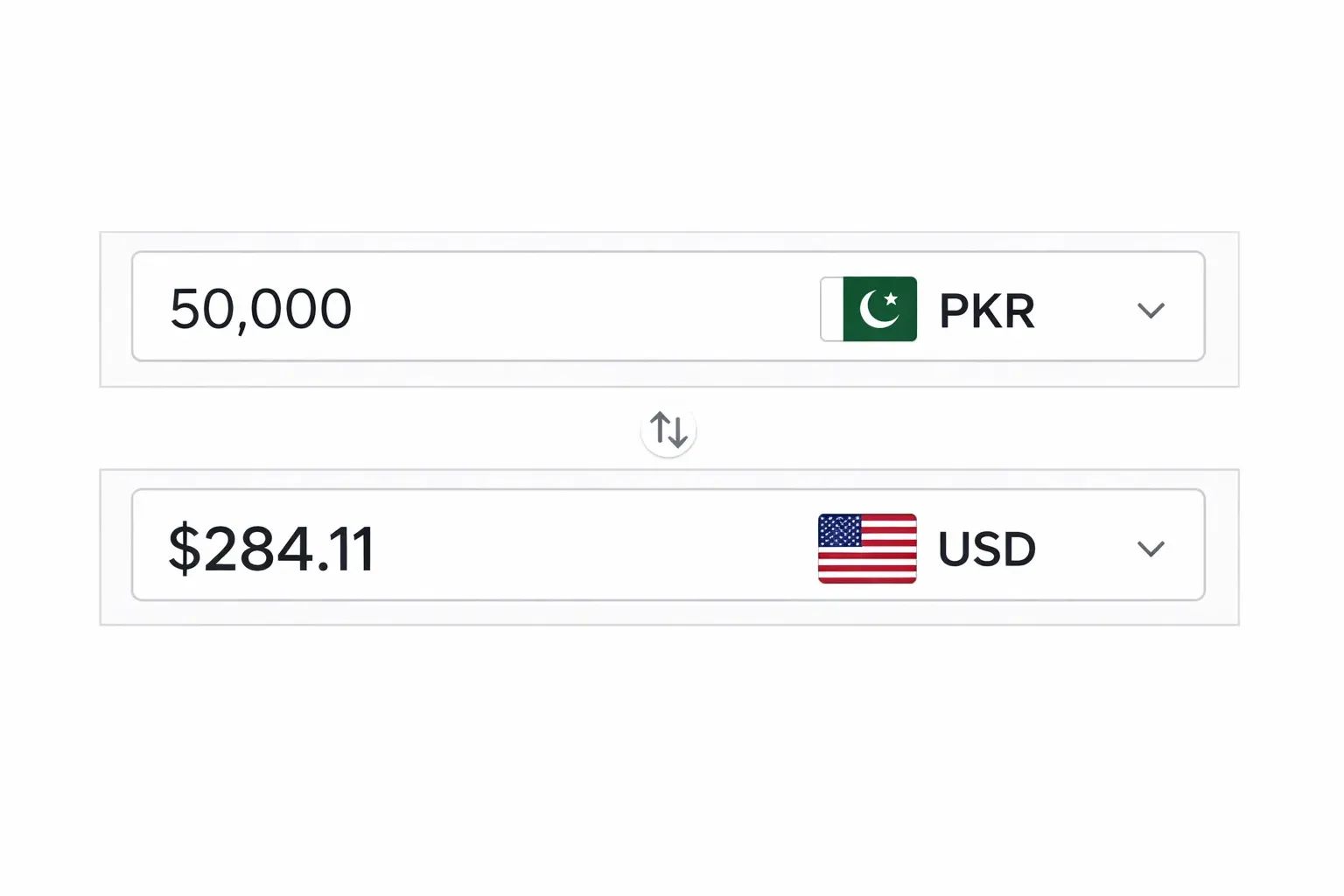
Consider a practical example relevant to Pakistani developers: building a currency converter that converts PKR to USD. You would use useState to track the PKR amount input by the user and the calculated USD value. Each time the user types a number, the state updates, triggering a re-render that shows the converted amount. This reactive pattern—state change triggers re-render—is the core of React's declarative approach to building user interfaces.
Understanding useEffect: Handling Side Effects
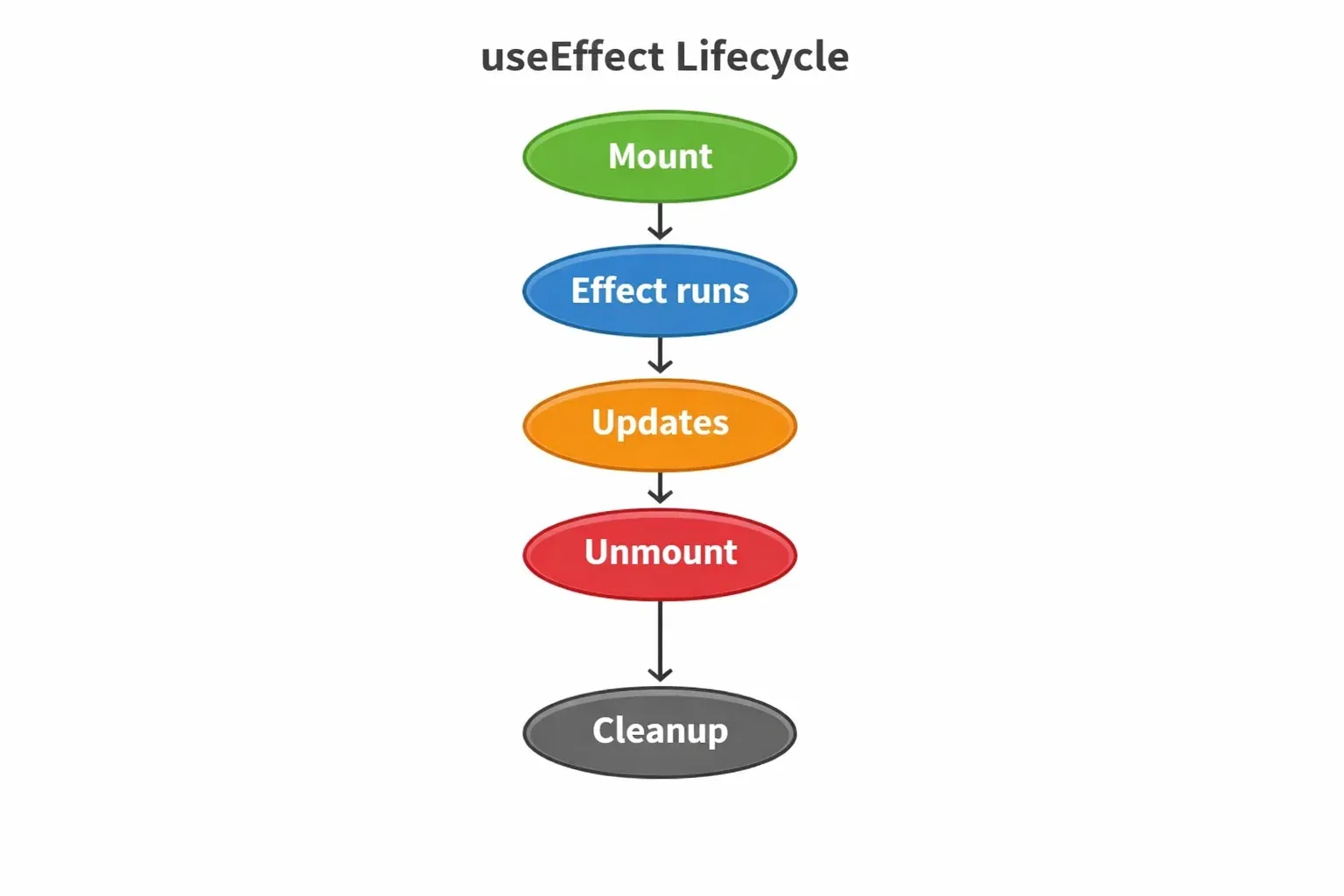
The useEffect hook lets you perform side effects in functional components. Side effects are operations that affect something outside the scope of the function being executed, such as fetching data from an API, subscribing to events, manually changing the DOM, or setting timers. In class components, these operations were typically handled in lifecycle methods like componentDidMount, componentDidUpdate, and componentWillUnmount. useEffect unifies all these use cases into a single, more intuitive API.
The basic syntax is useEffect(() => { /* effect code */ }, [dependencies]);. The first argument is a callback function containing your side effect logic. The second argument, the dependency array, controls when the effect runs. An empty array [] means the effect runs only once (on mount). Including variables like [count] means the effect runs when those variables change. Omitting the array entirely makes the effect run after every render. Understanding this dependency array is crucial for controlling when your effects execute and preventing common bugs like infinite loops.
Creating Custom Hooks: Reusable Logic
Custom hooks are JavaScript functions that start with the prefix "use" and can call other hooks. They allow you to extract component logic into reusable functions, following the DRY (Don't Repeat Yourself) principle. Custom hooks are powerful because they let you share stateful logic between components without changing your component hierarchy. This is different from patterns like render props or higher-order components, which can make your code more complex.
Imagine you're building multiple components that need to fetch weather data for different Pakistani cities. Instead of repeating the fetch logic in each component, you create a useWeather custom hook. This hook handles the API call, manages loading and error states, and returns the weather data. Any component can now call useWeather('Karachi') or useWeather('Lahore') and receive consistent, pre-processed data. Custom hooks encapsulate complexity and make your components cleaner and more focused on presentation.
Practical Code Examples
Example 1: Building a Student Counter with useState
Let's build a practical example—a counter that tracks student attendance at a coding bootcamp in Islamabad. This example demonstrates how useState works with both simple values and object state.
```jsx
import React, { useState } from 'react';
function StudentCounter() {
// Line 4: Initialize state with an object
const [attendance, setAttendance] = useState({
present: 0,
absent: 0,
courseName: 'React Fundamentals'
});
// Line 11: Function to mark student present
const markPresent = () => {
setAttendance(prev => ({
...prev,
present: prev.present + 1
}));
};
// Line 20: Function to mark student absent
const markAbsent = () => {
setAttendance(prev => ({
...prev,
absent: prev.absent + 1
}));
};
return (
<div className="counter-container">
<h2>{attendance.courseName} - Attendance</h2>
<p>Present: {attendance.present} students</p>
<p>Absent: {attendance.absent} students</p>
<button onClick={markPresent}>Mark Present</button>
<button onClick={markAbsent}>Mark Absent</button>
</div>
);
}
```
Line-by-line explanation:
• Line 1: We import useState from React. This hook comes built-in with React, so no additional installation is needed.
• Lines 5-9: We initialize state with an object containing present count, absent count, and course name. useState accepts any JavaScript value as its initial state.
• Lines 12-17: The markPresent function updates state using the functional form. We use the spread operator ...prev to preserve existing properties while updating only the present count.
• Lines 28-31: The JSX displays the current state values. When state changes, React automatically re-renders these values.
Example 2: Real-World Currency Converter (PKR to USD)
This example demonstrates a practical application combining useState and useEffect. We'll build a currency converter that fetches real exchange rates and allows Pakistani users to convert PKR to various currencies.
```jsx
import React, { useState, useEffect } from 'react';
function CurrencyConverter() {
// State for PKR amount input by user
const [pkrAmount, setPkrAmount] = useState('');
// State for exchange rates fetched from API
const [exchangeRate, setExchangeRate] = useState(null);
// State for loading status
const [loading, setLoading] = useState(true);
// useEffect to fetch exchange rate on component mount
useEffect(() => {
fetch('https://api.exchangerate-api.com/v4/latest/USD')
.then(response => response.json())
.then(data => {
setExchangeRate(data.rates.PKR);
setLoading(false);
})
.catch(error => console.error('Error:', error));
}, []); // Empty array = runs only once on mount
// Calculate converted amount
const convertedUSD = exchangeRate
? (parseFloat(pkrAmount) / exchangeRate).toFixed(2)
: 0;
return (
<div className="converter">
<h2>PKR to USD Converter</h2>
{loading ? (
<p>Loading exchange rate...</p>
) : (
<>
<p>Current Rate: 1 USD = {exchangeRate} PKR</p>
<input
type="number"
value={pkrAmount}
onChange={(e) => setPkrAmount(e.target.value)}
placeholder="Enter amount in PKR"
/>
<h3>{pkrAmount} PKR = ${convertedUSD} USD</h3>
</>
)}
</div>
);
}
```
Key concepts demonstrated:
• Multiple useState calls: We manage three separate pieces of state: the input amount, the exchange rate, and a loading flag. Each serves a distinct purpose in the component's logic.
• useEffect for API calls: The effect runs once on mount (empty dependency array) to fetch the current exchange rate. This is a common pattern for initial data loading.
• Conditional rendering: We show a loading message while fetching data, then display the converter UI once the rate is available.
• Derived state: The convertedUSD value is calculated directly from existing state rather than stored separately, following React best practices.
Common Mistakes & How to Avoid Them
Mistake 1: Infinite Loops in useEffect
One of the most common mistakes beginners make is creating infinite loops with useEffect. This happens when you update state inside an effect that depends on that same state, causing the effect to run repeatedly. Consider this problematic code where Ahmad, a student from Lahore, tried to create a counter that automatically increments:
```jsx // WRONG - Causes infinite loop!
useEffect(() => {
setCount(count + 1); // Updates state
}, [count]); // Runs when count changes - INFINITE LOOP!
```
The fix: Remove the state variable from the dependency array if you only want the effect to run once, or restructure your logic to avoid the circular dependency. Here's the corrected approach:
```jsx // CORRECT - No infinite loop
useEffect(() => {
const interval = setInterval(() => {
setCount(prev => prev + 1); // Use functional update
}, 1000);
return () => clearInterval(interval); // Cleanup
}, []); // Empty array = runs once
```
Mistake 2: Not Cleaning Up Side Effects
Another critical mistake is forgetting to clean up side effects like subscriptions, event listeners, or timers. When a component unmounts, these effects continue running in the background, causing memory leaks and potential errors. Fatima, a developer from Karachi, encountered this when building a real-time chat application:
```jsx // WRONG - Memory leak!
useEffect(() => {
window.addEventListener('resize', handleResize);
// No cleanup - listener stays active after unmount!
}, []);
```
The fix: Always return a cleanup function from useEffect. This function runs when the component unmounts, removing listeners and preventing memory leaks:
```jsx // CORRECT - Proper cleanup
useEffect(() => {
window.addEventListener('resize', handleResize);
// Cleanup function removes listener on unmount
return () => {
window.removeEventListener('resize', handleResize);
};
}, []);
```
Practice Exercises
Exercise 1: Build a Todo List Manager
Problem: Create a todo list application where users can add tasks, mark them complete, and delete them. Use useState to manage the todo items array. Each todo should have an id, text, and completed status.
Solution:
```jsx
function TodoList() {
const [todos, setTodos] = useState([]);
const [input, setInput] = useState('');
const addTodo = () => {
if (input.trim()) {
setTodos([...todos, {
id: Date.now(),
text: input,
completed: false
}]);
setInput('');
}
};
const toggleComplete = (id) => {
setTodos(todos.map(todo =>
todo.id === id ? {...todo, completed: !todo.completed} : todo
));
};
return (
<div>
<input value={input} onChange={(e) => setInput(e.target.value)} />
<button onClick={addTodo}>Add Task</button>
{todos.map(todo => (
<div key={todo.id} onClick={() => toggleComplete(todo.id)}>
<span style={{ textDecoration: todo.completed ? 'line-through' : 'none' }}>
{todo.text}
</span>
</div>
))}
</div>
);
}
```
Exercise 2: Create a Custom useLocalStorage Hook
Problem: Build a custom hook that persists state to localStorage. This is useful for saving user preferences like theme (dark/light mode) that should persist across browser sessions.
Solution:
```jsx
function useLocalStorage(key, initialValue) {
// Initialize state with value from localStorage or initialValue
const [storedValue, setStoredValue] = useState(() => {
try {
const item = window.localStorage.getItem(key);
return item ? JSON.parse(item) : initialValue;
} catch (error) {
return initialValue;
}
});
// Update localStorage whenever state changes
const setValue = (value) => {
setStoredValue(value);
window.localStorage.setItem(key, JSON.stringify(value));
};
return [storedValue, setValue];
}
```
Frequently Asked Questions
What is the difference between useState and useEffect?
Answer: useState is used for managing component state—data that changes over time and affects what the component renders. useEffect, on the other hand, is for handling side effects like API calls, subscriptions, or DOM manipulation. Think of useState as 'what data do I need to remember?' and useEffect as 'what should I do when something happens?' They work together: state changes trigger re-renders, and effects can respond to those changes.
How do I know what to include in the useEffect dependency array?
Answer: Include any variable from outside the effect that your effect uses—props, state, or any other values. The ESLint plugin 'eslint-plugin-react-hooks' automatically identifies missing dependencies and warns you. A good rule of thumb: if you reference it in the effect, include it in the dependency array. For effects that should only run once on mount, use an empty array [].
Can I use hooks inside conditional statements?
Answer: No, hooks must always be called at the top level of your component, never inside conditions, loops, or nested functions. This is because React relies on the order of hook calls to correctly associate state with each hook. Breaking this rule causes bugs where state gets mixed up. If you need conditional logic, put the condition inside the hook or use early returns before declaring hooks.
When should I create a custom hook?
Answer: Create a custom hook when you find yourself duplicating stateful logic across multiple components. If two or more components share similar state management patterns—like form handling, API calls, or window size tracking—extract that logic into a custom hook. Custom hooks promote code reuse, improve testability, and keep your components focused on presentation rather than complex logic.
How do hooks compare to class component lifecycle methods?
Answer: useEffect combines the functionality of componentDidMount, componentDidUpdate, and componentWillUnmount into a single API. An effect with an empty dependency array [] is equivalent to componentDidMount. An effect with dependencies [value] runs after mount and whenever 'value' changes (like componentDidUpdate). The cleanup function returned from useEffect runs before unmount (componentWillUnmount). This unified approach is more intuitive and reduces the chance of bugs from forgotten lifecycle methods.
Summary & Key Takeaways
Congratulations on completing this comprehensive tutorial on React Hooks! You've taken a significant step toward mastering modern React development. Here are the essential concepts to remember as you continue your journey:
1. useState manages component state: Use it to store any data that changes over time and affects rendering. Remember that useState doesn't merge objects automatically—you must handle updates with the spread operator or callback form.
2. useEffect handles side effects: This hook replaces lifecycle methods for data fetching, subscriptions, timers, and DOM manipulation. Always consider the dependency array and cleanup function to avoid bugs.
3. Custom hooks enable code reuse: Extract repeated stateful logic into custom hooks starting with 'use'. This makes your code more maintainable and your components cleaner.
4. Follow the rules of hooks: Always call hooks at the top level of your component, never inside conditions or loops. This ensures React can properly track your state.
5. Practice builds mastery: Build projects using hooks—start with simple counters and forms, then progress to more complex applications. Each project will deepen your understanding and reveal new patterns.
Next Steps & Related Tutorials
Now that you've mastered the fundamentals of React Hooks, you're ready to explore more advanced topics. Theiqra.edu.pk offers several related tutorials that will help you build on this knowledge and become a proficient React developer:
• Advanced React Hooks: Learn about useContext, useReducer, useMemo, and useCallback to optimize performance and manage complex state. These hooks are essential for building large-scale applications efficiently.
• State Management with Redux: When your application grows beyond simple state needs, Redux provides predictable state management. Our comprehensive Redux tutorial shows you how to integrate it with React hooks using Redux Toolkit.
• Building REST APIs with Node.js: Complete your full-stack skills by learning backend development. This tutorial teaches you how to create APIs that your React applications can consume using useEffect.
• React Native for Mobile Development: Transfer your React Hooks knowledge to mobile app development. React Native uses the same hook patterns, making it easy for React developers to build cross-platform mobile applications.
We encourage you to practice these concepts by building real projects. Start small—a weather app for Lahore, a prayer time tracker, or a simple expense tracker in PKR. Share your projects with the theiqra.edu.pk community, ask questions in our forums, and help fellow Pakistani developers learn. Remember: every expert was once a beginner. Your journey in React development starts with the code you write today!
Test Your Python Knowledge!
Finished reading? Take a quick quiz to see how much you've learned from this tutorial.