React Performance Profiler Memoization & Code Splitting
Introduction
React performance optimization is a critical skill for advanced developers building scalable, fast web applications. In this tutorial, we’ll explore React Profiler, Memoization, and Code Splitting—three powerful techniques that help you identify bottlenecks, prevent unnecessary re-renders, and reduce bundle size.
For Pakistani students—whether you're Ahmad building an e-commerce store in Lahore or Fatima developing a dashboard in Karachi—performance directly impacts user experience. Slow apps can lead to higher bounce rates, especially on slower internet connections common in some areas of Pakistan.
By mastering react performance optimization, using the react profiler, and implementing react code splitting, you can build apps that feel fast, smooth, and professional.
Prerequisites
Before starting, you should have:
- Strong understanding of React fundamentals (components, props, state)
- Experience with React Hooks (
useState,useEffect) - Basic knowledge of JavaScript ES6+ (arrow functions, destructuring)
- Familiarity with browser DevTools
- Basic understanding of performance concepts (rendering, re-renders)
Core Concepts & Explanation
Understanding React Rendering & Reconciliation
React uses a virtual DOM to efficiently update the UI. When state or props change:
- React re-renders the component
- Compares the virtual DOM with the previous version
- Updates only the changed parts in the real DOM
Problem:
Unnecessary re-renders can slow down apps—especially large dashboards (e.g., a student portal showing results, fees in PKR, and attendance).
Example:
function Parent() {
  const [count, setCount] = React.useState(0);
  return (
    <>
      <Child />
      <button onClick={() => setCount(count + 1)}>Click</button>
    </>
  );
}
Even though Child doesn’t use count, it still re-renders.
React Profiler for Performance Analysis
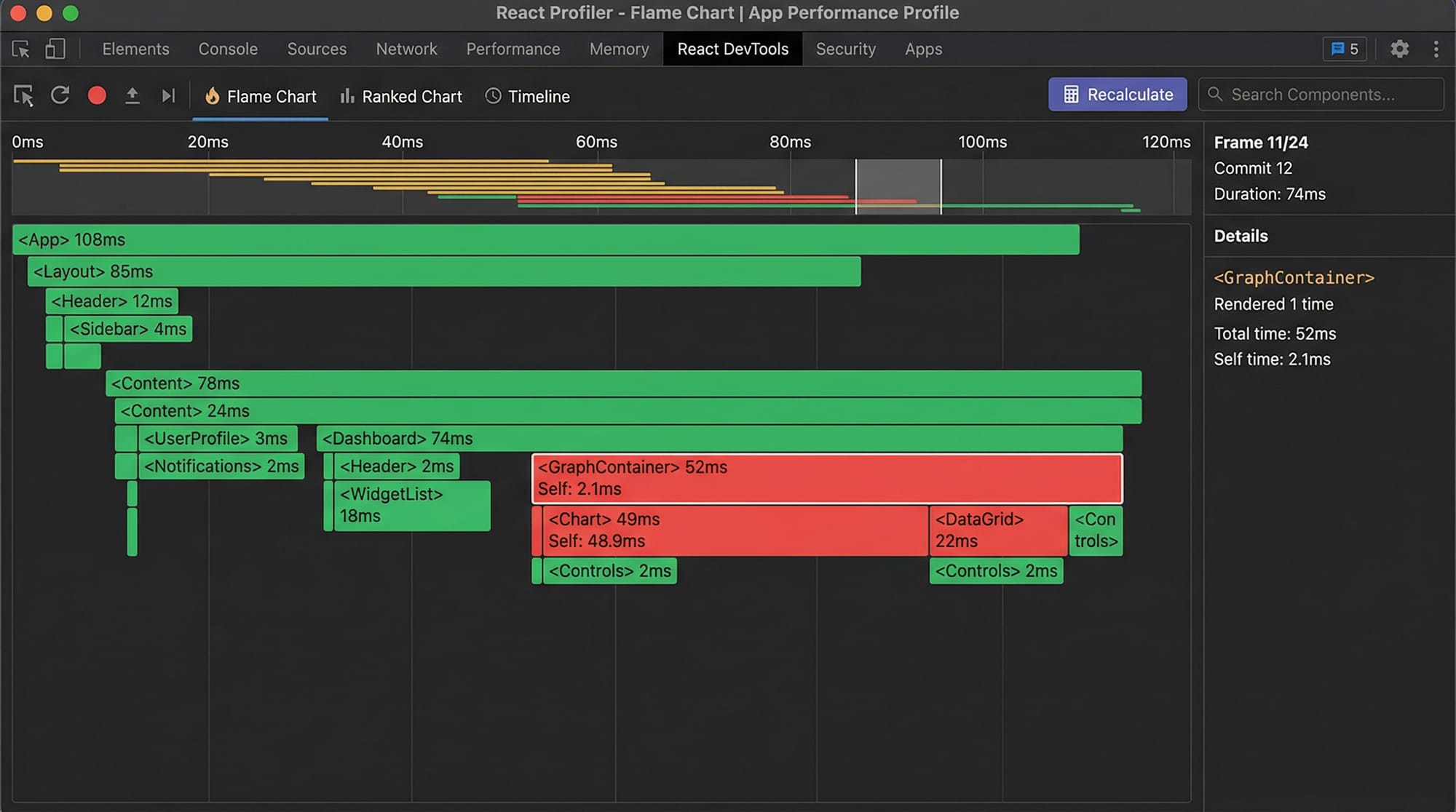
The React Profiler (available in React DevTools) helps you:
- Measure render times
- Identify slow components
- Detect unnecessary re-renders
How to use:
- Open React DevTools
- Go to “Profiler” tab
- Click “Record”
- Interact with your app
What you’ll see:
- Flame charts
- Component render durations
- Highlighted expensive renders
Real-world insight:
Ali notices his Karachi-based delivery app is slow. Using the profiler, he finds a list component re-rendering 100+ items unnecessarily.
Memoization in React (React.memo, useMemo, useCallback)
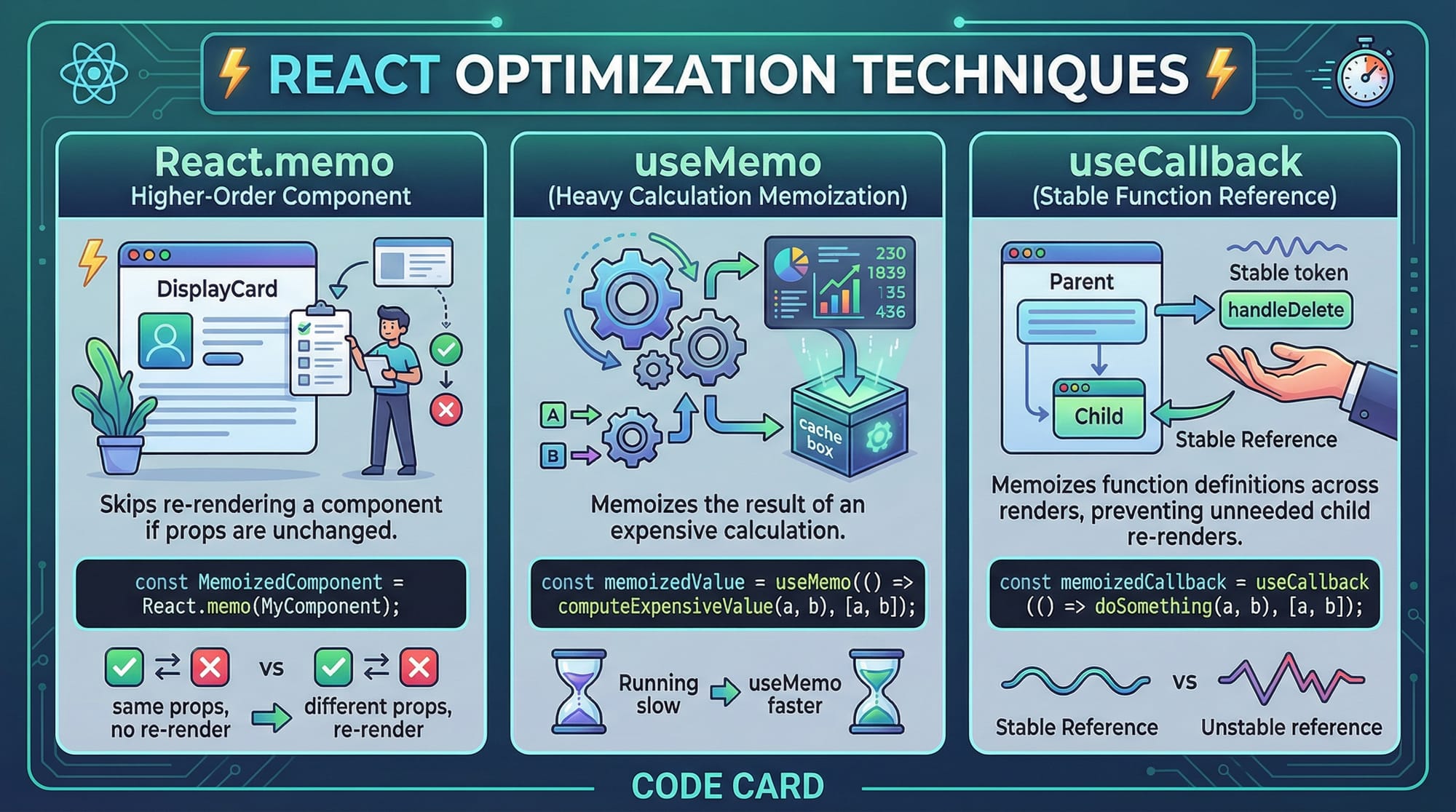
Memoization helps avoid recomputation or re-rendering when data hasn’t changed.
1. React.memo (Component-level memoization)
Prevents re-render if props are unchanged.
const Child = React.memo(function Child({ name }) {
  return <p>{name}</p>;
});
2. useMemo (Value memoization)
Caches expensive calculations.
const result = useMemo(() => expensiveFunction(data), [data]);
3. useCallback (Function memoization)
Keeps function reference stable.
const handleClick = useCallback(() => {
  console.log("Clicked");
}, []);
Code Splitting for Faster Load Times
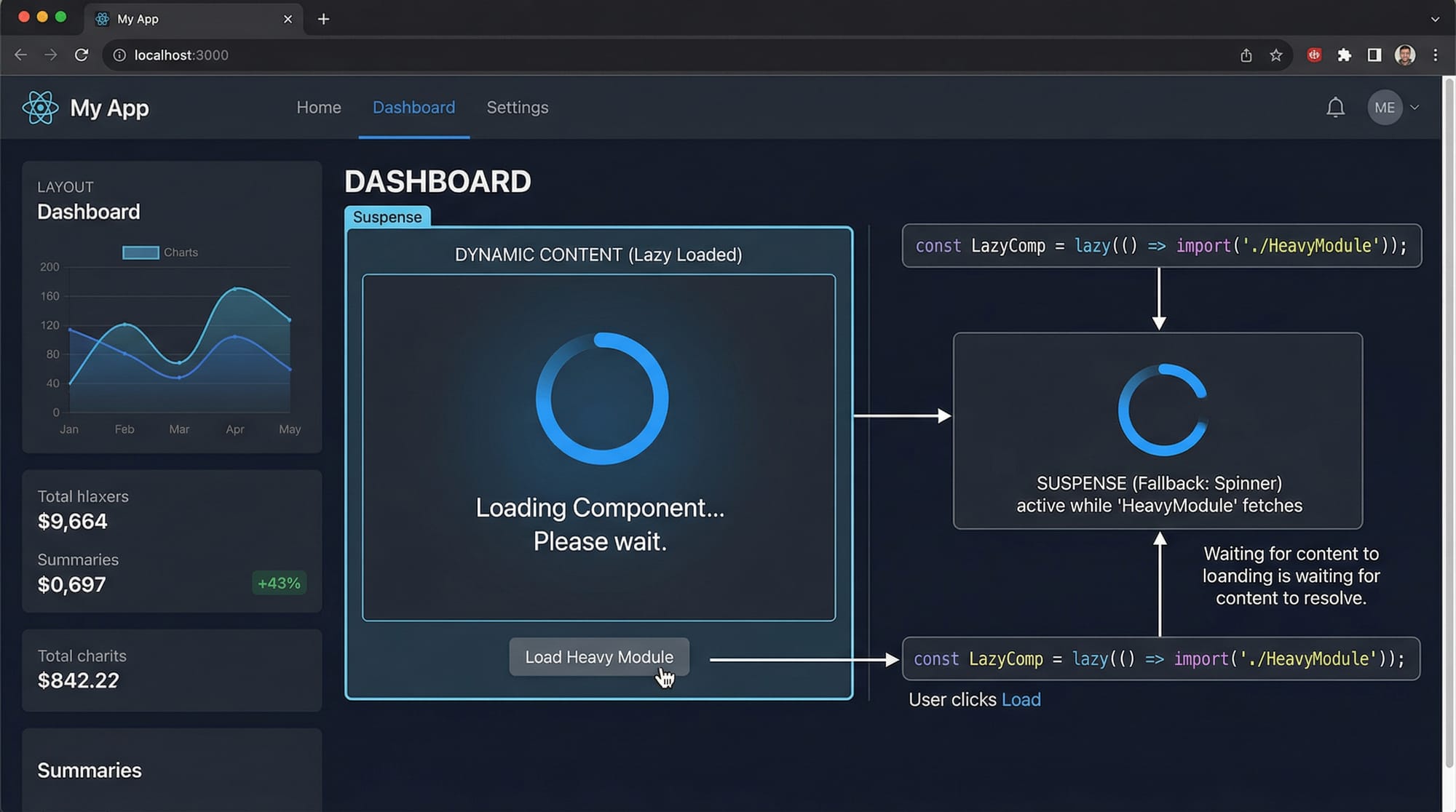
Code splitting reduces bundle size by loading components only when needed.
Why important in Pakistan?
- Slower networks in rural areas
- Mobile users with limited data
Technique:
React.lazy()Suspense
const LazyComponent = React.lazy(() => import('./LazyComponent'));
Practical Code Examples
Example 1: Optimizing Re-renders with React.memo
import React, { useState } from 'react';

// Line 1: Define Child component and wrap with React.memo
const Child = React.memo(({ name }) => {
  console.log("Child rendered");
  return <h2>Hello {name}</h2>;
});

function App() {
  // Line 6: Create state
  const [count, setCount] = useState(0);

  return (
    <div>
      {/* Line 10: Child component with static prop */}
      <Child name="Ahmad" />

      {/* Line 13: Button updates count */}
      <button onClick={() => setCount(count + 1)}>
        Click {count}
      </button>
    </div>
  );
}

export default App;
Explanation:
- Line 1:
React.memoprevents re-render if props don’t change - Line 6:
useStatemanages count - Line 10: Child receives static prop "Ahmad"
- Line 13: Clicking button updates parent but NOT child
Result:
Child doesn’t re-render unnecessarily → better performance
Example 2: Real-World Application (Code Splitting Dashboard)
import React, { Suspense } from 'react';

// Line 1: Lazy load heavy components
const Reports = React.lazy(() => import('./Reports'));
const Analytics = React.lazy(() => import('./Analytics'));

function Dashboard() {
  return (
    <div>
      <h1>Student Dashboard</h1>

      {/* Line 8: Suspense shows fallback while loading */}
      <Suspense fallback={<p>Loading...</p>}>
        {/* Line 10: Components loaded only when needed */}
        <Reports />
        <Analytics />
      </Suspense>
    </div>
  );
}

export default Dashboard;
Explanation:
- Line 1:
React.lazyloads components dynamically - Line 8:
Suspenseshows loading text - Line 10: Components load only when rendered
Real-world use:
Fatima builds a university dashboard in Islamabad. Reports and analytics are heavy, so she loads them only when needed → faster initial load.
Common Mistakes & How to Avoid Them
Mistake 1: Overusing Memoization
Problem:
Using useMemo everywhere adds complexity and can slow performance.
Wrong:
const value = useMemo(() => count + 1, [count]);
Fix:
Use memoization only for expensive calculations.
const value = count + 1;
Mistake 2: Ignoring Dependency Arrays
Problem:
Incorrect dependencies cause bugs or unnecessary recalculations.
Wrong:
useEffect(() => {
  fetchData();
}, []);
Fix:
useEffect(() => {
  fetchData();
}, [fetchData]);
Mistake 3: Not Using Code Splitting
Problem:
Large bundle size slows loading.
Fix:
Use lazy loading for routes and heavy components.
Mistake 4: Passing Inline Functions
Problem:
Causes re-renders due to new function references.
Wrong:
<Child onClick={() => console.log("Click")} />
Fix:
const handleClick = useCallback(() => {
  console.log("Click");
}, []);

<Child onClick={handleClick} />

Practice Exercises
Exercise 1: Prevent Unnecessary Re-renders
Problem:
A child component re-renders when parent state changes.
Solution:
const Child = React.memo(({ value }) => {
  return <p>{value}</p>;
});
Explanation:
Using React.memo ensures child only updates when value changes.
Exercise 2: Implement Code Splitting
Problem:
A large component slows initial load.
Solution:
const Profile = React.lazy(() => import('./Profile'));

<Suspense fallback={<p>Loading...</p>}>
  <Profile />
</Suspense>
Explanation:
Component loads only when needed → faster app load.
Frequently Asked Questions
What is React Profiler?
React Profiler is a tool in React DevTools that helps you measure rendering performance and identify slow components.
How do I improve React performance?
Use memoization (React.memo, useMemo), avoid unnecessary re-renders, and implement code splitting.
What is code splitting in React?
Code splitting divides your app into smaller chunks that load only when needed, improving load speed.
When should I use useMemo?
Use useMemo for expensive calculations that don’t need to run on every render.
Is React.memo always beneficial?
No, it adds overhead. Use it only when components re-render unnecessarily and performance is impacted.
Summary & Key Takeaways
- React performance optimization is essential for scalable apps
- React Profiler helps identify performance bottlenecks
- Memoization prevents unnecessary re-renders
- Code splitting reduces bundle size and improves load time
- Avoid overusing optimization techniques—measure first
- Optimize based on real-world usage, especially for mobile users in Pakistan
Next Steps & Related Tutorials
To continue improving your React skills, explore:
- Learn React Hooks in depth for better state management
- Study React State Management (Redux, Context API)
- Explore React Routing and Lazy Loading for large apps
- Dive into Web Performance Optimization techniques
These tutorials are available on theiqra.edu.pk and will help you become a professional React developer ready for real-world projects in Pakistan and beyond 🚀
Test Your Python Knowledge!
Finished reading? Take a quick quiz to see how much you've learned from this tutorial.