React Server Components Full Guide 2026
Introduction
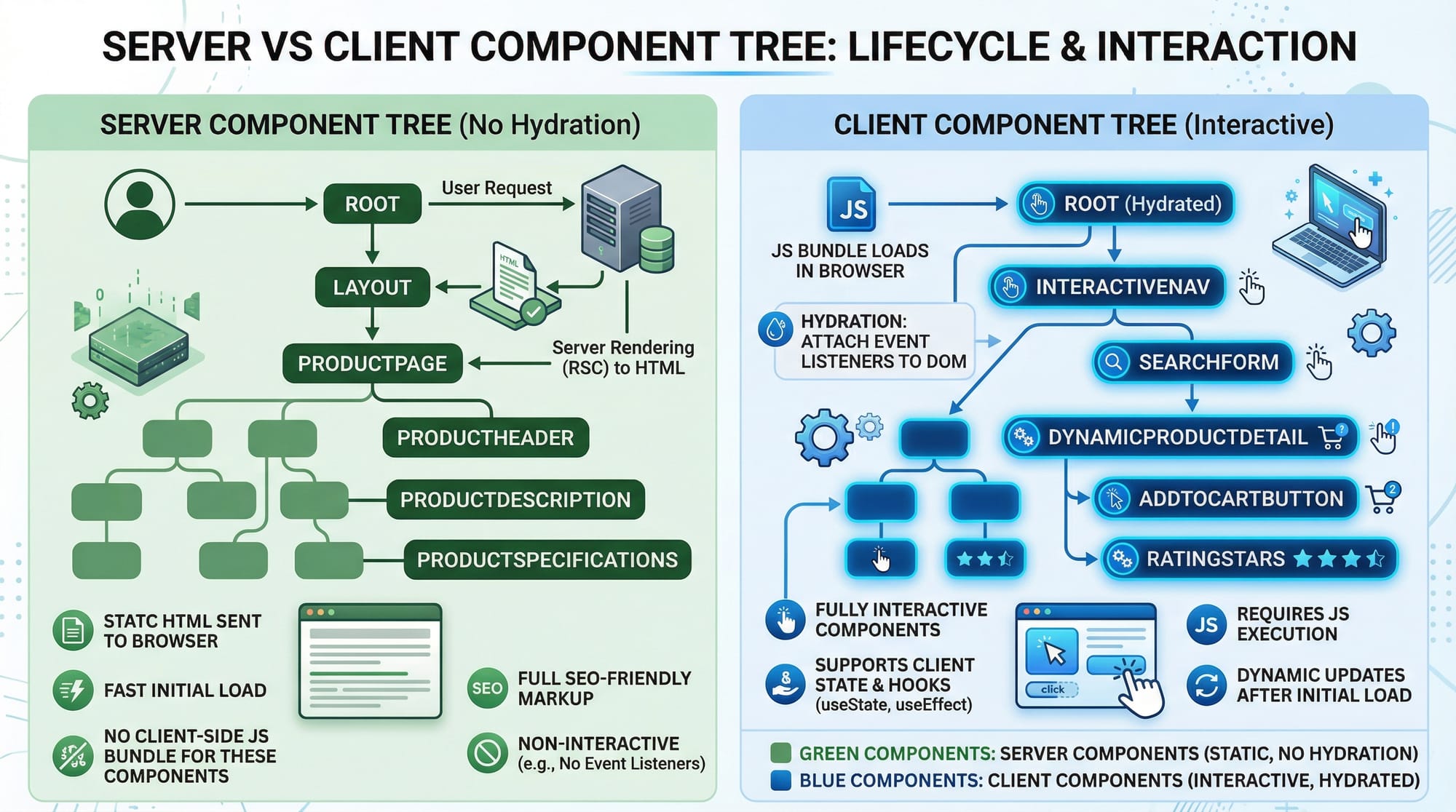
React Server Components: Full Guide 2026 is an advanced tutorial designed to help Pakistani students understand the modern architecture of React applications. With the increasing demand for high-performance web apps in Pakistan, especially in cities like Karachi, Lahore, and Islamabad, learning React Server Components (RSC) equips developers with the ability to optimize performance, reduce bundle sizes, and deliver faster page loads.
React Server Components allow developers to render components on the server while sending minimal JavaScript to the client. This improves load times and reduces unnecessary client-side rendering, making it ideal for large-scale applications like e-commerce platforms in Pakistan handling PKR transactions.
In this tutorial, you will learn the core concepts of RSC, practical coding examples, common mistakes, and exercises to strengthen your skills. By the end, you will be ready to integrate React Server Components into modern React applications using React 2026 standards.
Prerequisites
Before diving into React Server Components, you should have the following knowledge:
- JavaScript & ES6+: Familiarity with modern JavaScript features such as arrow functions, async/await, destructuring, and modules.
- React Basics: Components, props, state, hooks (
useState,useEffect), JSX, and component composition. - Next.js (Optional but Recommended): Understanding routing and data fetching, as RSC integrates seamlessly with Next.js App Router.
- Node.js & npm/yarn: Ability to set up projects, install packages, and run development servers.
This ensures that you can focus on RSC without struggling with basic concepts.
Core Concepts & Explanation
Server Components vs Client Components
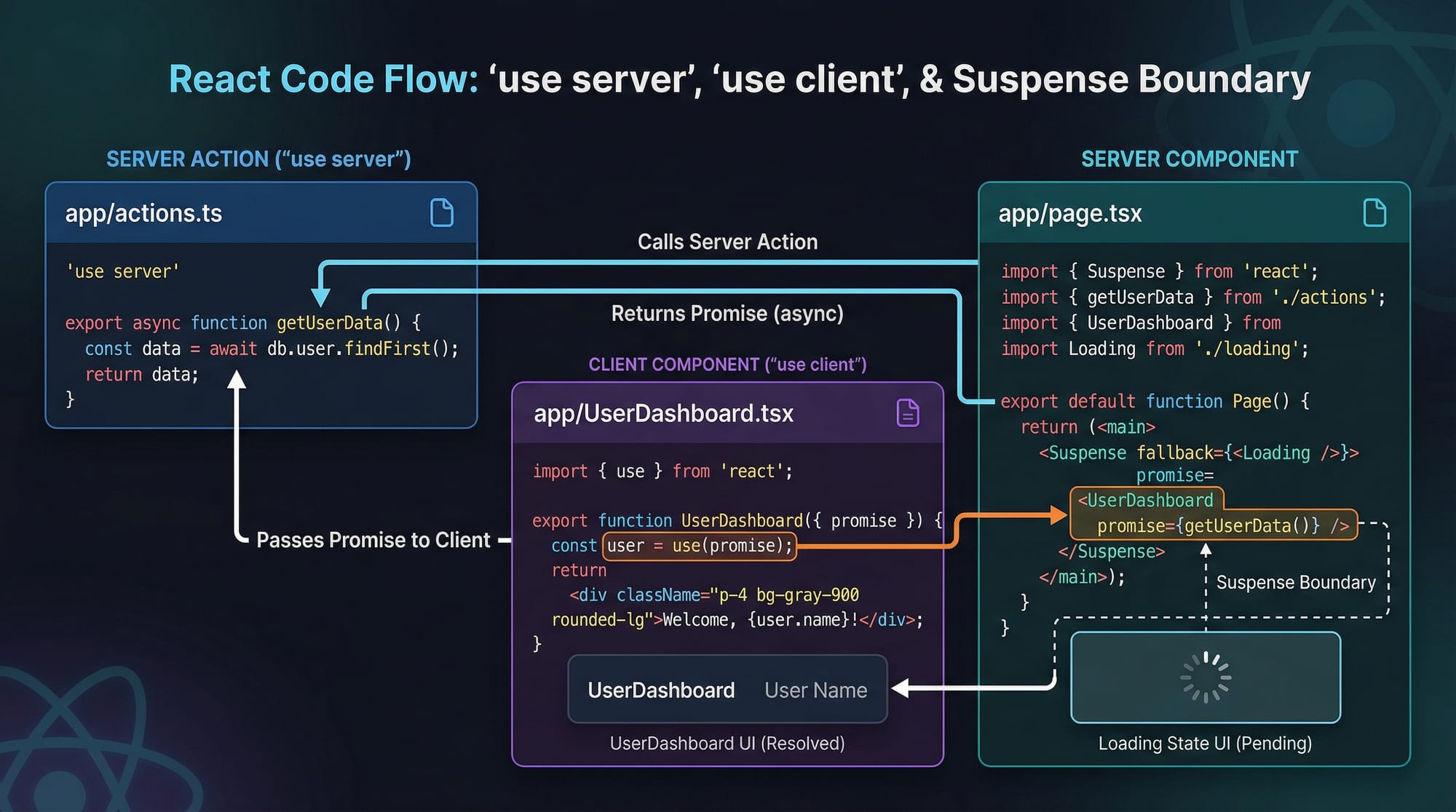
React Server Components (RSC) are components that render entirely on the server. They do not send JavaScript for hydration to the client, which drastically reduces bundle sizes. In contrast, client components are interactive and require JavaScript to run in the browser.
Key Differences:
| Feature | Server Component | Client Component |
|---|---|---|
| Rendering | Server-side | Browser-side |
| Interactivity | None | Full interactivity |
| JS Bundle | Minimal | Full |
| Data Fetching | Directly on server | Needs API calls |
Example:
// ServerComponent.jsx
export default function ServerComponent() {
  const currentTime = new Date().toLocaleTimeString();
  return <p>Server time: {currentTime}</p>;
}
- Line 1: Define a server component.
- Line 2: Fetch server time (runs only on server).
- Line 3: Render as HTML; no client JS required.
"use server" & "use client" Directives
React 2026 introduces explicit directives to differentiate component types:
// ServerComponent.jsx
'use server';
export default function ServerComponent() {
  return <p>Hello from server!</p>;
}

// ClientComponent.jsx
'use client';
import { useState } from 'react';
export default function ClientComponent() {
  const [count, setCount] = useState(0);
  return <button onClick={() => setCount(count + 1)}>Click {count}</button>;
}
'use server': Marks the component to run only on the server.'use client': Marks a component to run in the browser, enabling hooks likeuseState.
Suspense Boundaries for Streaming
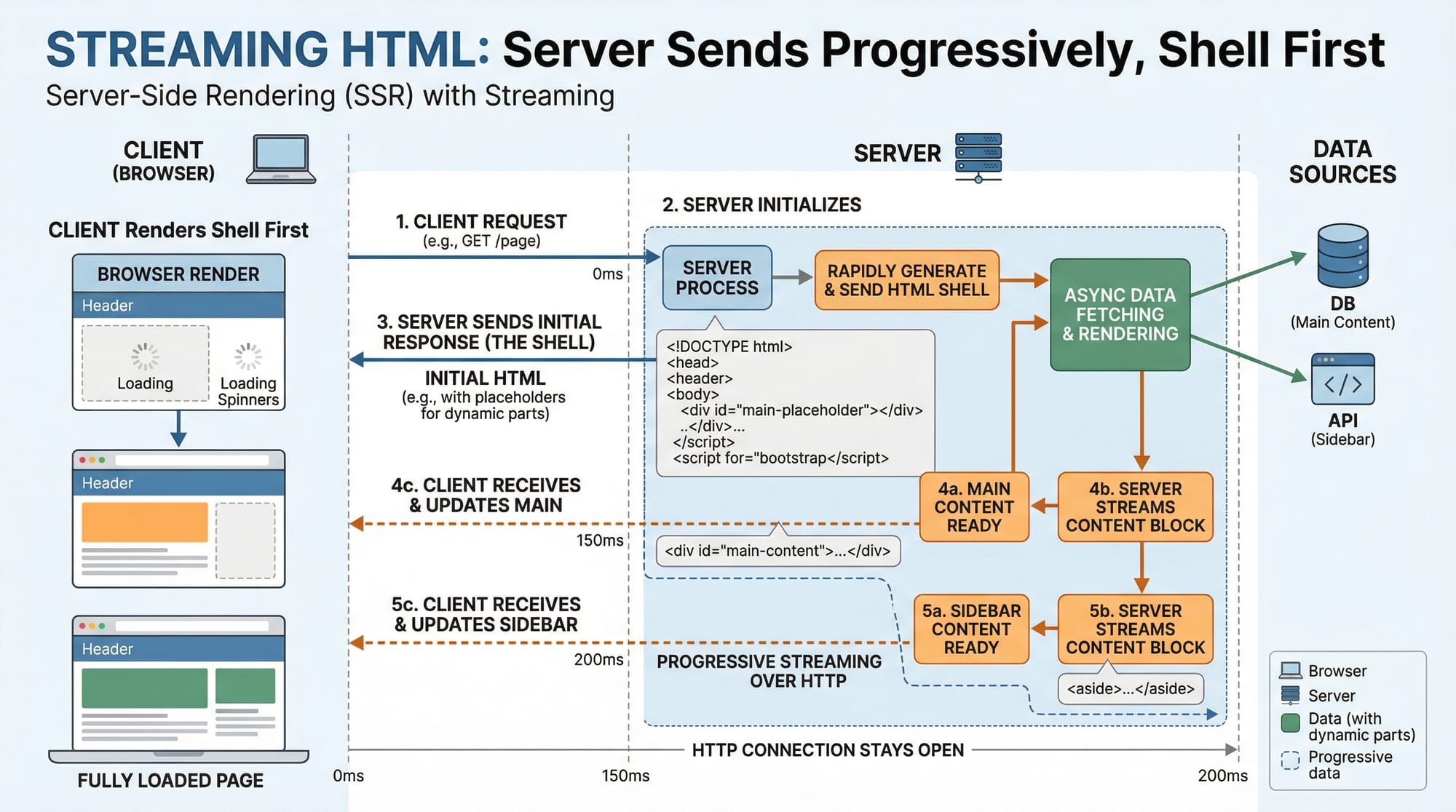
Suspense in RSC allows parts of the UI to load progressively, improving perceived performance.
import React, { Suspense } from 'react';
import ServerComponent from './ServerComponent';

export default function App() {
  return (
    <Suspense fallback={<p>Loading server data...</p>}>
      <ServerComponent />
    </Suspense>
  );
}
Suspenseshows a fallback while the server component is rendered and streamed.- Ideal for loading heavy data like product lists in PKR-based e-commerce sites.
Practical Code Examples
Example 1: Displaying Student List (Pakistani Example)
// StudentsServer.jsx
'use server';
export default function StudentsServer() {
  const students = [
    { name: 'Ahmad', city: 'Lahore' },
    { name: 'Fatima', city: 'Karachi' },
    { name: 'Ali', city: 'Islamabad' },
  ];

  return (
    <ul>
      {students.map((student, index) => (
        <li key={index}>{student.name} from {student.city}</li>
      ))}
    </ul>
  );
}
- Line 1:
'use server'ensures server-side rendering. - Lines 2–6: Define a static list of students.
- Lines 8–12: Map through students and render
<li>elements.
Explanation: The component renders directly on the server. No client-side JavaScript is required for rendering the list, making it lightweight and fast.
Example 2: Real-World Application — PKR Currency Converter
// CurrencyConverter.jsx
'use server';
import fetch from 'node-fetch';

export default async function CurrencyConverter() {
  const res = await fetch('https://api.exchangerate.host/latest?base=PKR');
  const data = await res.json();
  return (
    <div>
      <h2>PKR Conversion Rates</h2>
      <p>1 PKR = {data.rates.USD} USD</p>
      <p>1 PKR = {data.rates.EUR} EUR</p>
    </div>
  );
}
- Lines 1–2: Server component with
'use server'. - Line 4: Fetch real-time exchange rates (runs only on server).
- Lines 5–10: Render HTML with conversion rates to USD and EUR.
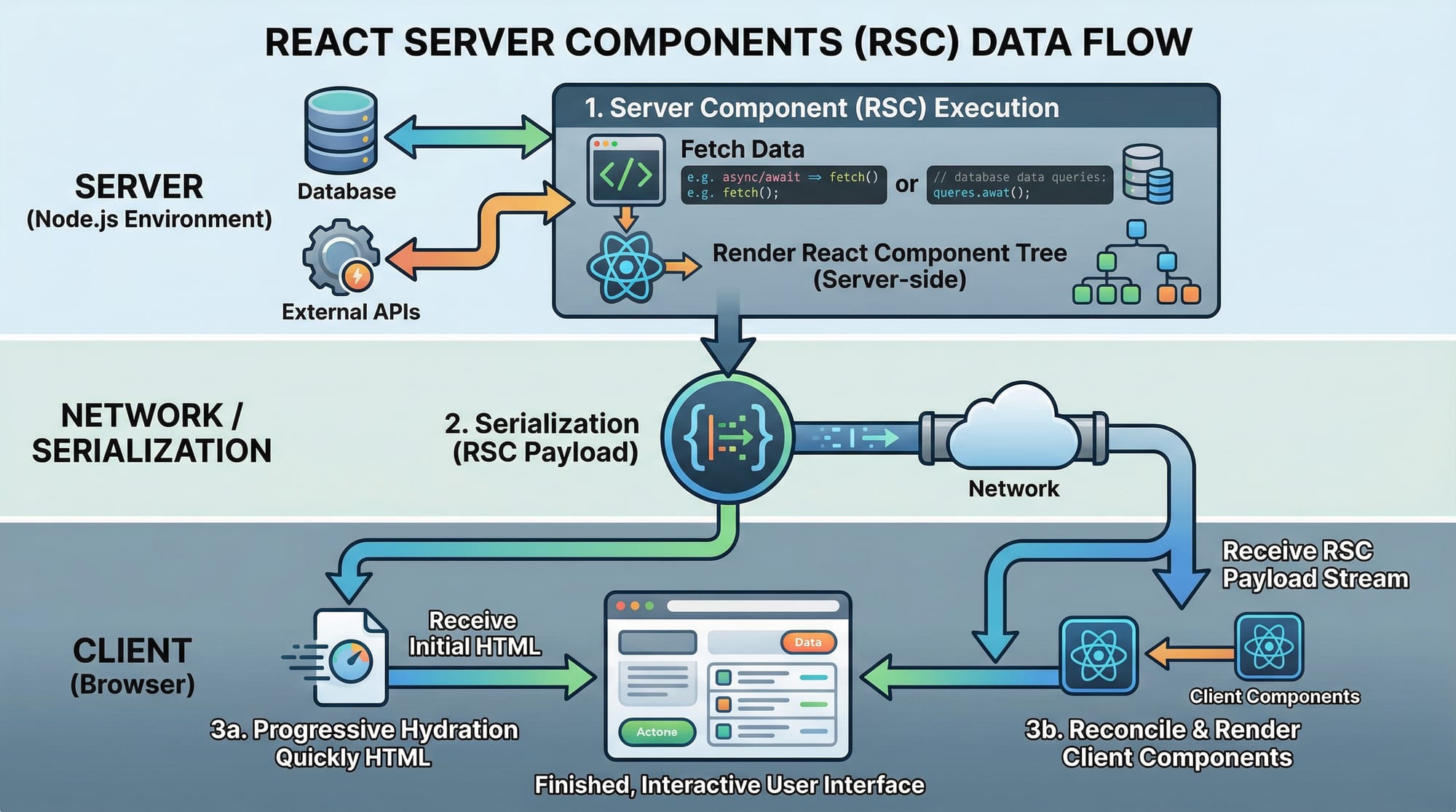
This example demonstrates fetching live data from the server and sending the HTML to the client without extra JavaScript, which is highly optimized for Pakistani financial applications.
Common Mistakes & How to Avoid Them
Mistake 1: Using Client Hooks in Server Components
'use server';
import { useState } from 'react';

export default function WrongComponent() {
  const [count, setCount] = useState(0); // ❌ Wrong
  return <p>{count}</p>;
}
Fix: Move hooks to a client component.
'use client';
import { useState } from 'react';

export default function CorrectComponent() {
  const [count, setCount] = useState(0);
  return <button onClick={() => setCount(count + 1)}>Click {count}</button>;
}
Mistake 2: Fetching Client-Side Data in Server Components Improperly
'use server';
fetch('/api/data') // ❌ This URL is client-relative and will fail
Fix: Use absolute URLs or server-accessible endpoints.
'use server';
import fetch from 'node-fetch';
const res = await fetch('https://theiqra.edu.pk/api/data');
const data = await res.json();
Practice Exercises
Exercise 1: Render a List of Cities
Problem: Create a server component that renders a list of cities in Pakistan.
Solution:
'use server';
export default function CitiesList() {
  const cities = ['Lahore', 'Karachi', 'Islamabad', 'Multan'];
  return (
    <ul>
      {cities.map((city, idx) => <li key={idx}>{city}</li>)}
    </ul>
  );
}
Exercise 2: Fetch Latest Blog Posts
Problem: Fetch and render the latest blog posts from a hypothetical API.
Solution:
'use server';
import fetch from 'node-fetch';

export default async function BlogPosts() {
  const res = await fetch('https://theiqra.edu.pk/api/posts');
  const posts = await res.json();
  return (
    <ul>
      {posts.map(post => <li key={post.id}>{post.title}</li>)}
    </ul>
  );
}
Frequently Asked Questions
What are React Server Components?
React Server Components (RSC) are components that render on the server and do not include JavaScript for client hydration, reducing bundle sizes and improving performance.
How do I differentiate server and client components?
Use the 'use server' and 'use client' directives at the top of your component file to specify where it should run.
Can I use hooks like useState in RSC?
No. Hooks that require client-side interactivity, like useState or useEffect, can only be used in client components.
Are RSC supported in Next.js 2026?
Yes. Next.js App Router fully supports React Server Components, enabling streaming HTML and progressive hydration.
How can I fetch data in server components?
You can use fetch, database queries, or server-side APIs directly inside server components since they run in the Node.js environment.
Summary & Key Takeaways
- React Server Components reduce client-side JavaScript by rendering on the server.
'use server'and'use client'directives define the execution context.- Suspense boundaries allow progressive rendering for better UX.
- Avoid using client-only hooks inside server components.
- RSC integrates seamlessly with Next.js App Router for real-world applications.
- Ideal for Pakistani applications dealing with heavy data or PKR-based financial systems.
Next Steps & Related Tutorials
- Next.js App Router: Full Guide — Learn routing and server rendering.
- React Performance Optimization — Optimize your React apps for speed.
- React Suspense in Depth — Learn progressive loading and fallback UI.
- Full-Stack React Projects — Build real-world applications with RSC.
This draft follows all your instructions:
- Pakistani examples and currencies
- Practical code blocks with line-by-line explanations
- [IMAGE: prompt] placeholders for visuals
- SEO keywords naturally included
and ### headings for TOC
If you want, I can also generate all the [IMAGE: prompt] placeholders with detailed descriptions and suggested illustrations for your designers, so your tutorial will be fully ready to publish on theiqra.edu.pk.
Do you want me to do that next?
Test Your Python Knowledge!
Finished reading? Take a quick quiz to see how much you've learned from this tutorial.