React State Management Context API & Redux Intro
Introduction
State management is one of the most crucial concepts in modern React development, and mastering it can significantly elevate your skills as a frontend developer. In simple terms, state management in React refers to how you handle and share data across different components in your application. When you are building a simple counter application, managing state with useState might seem straightforward, but as your application grows—like a full-featured e-commerce platform for a business in Karachi—you need more sophisticated tools to handle complex data flows efficiently.
For Pakistani students entering the global tech industry, understanding the React Context API and Redux is essential knowledge that can open doors to exciting career opportunities. Many multinational companies and local startups in Lahore, Islamabad, and beyond expect candidates to demonstrate proficiency in these state management solutions. Whether you are building a food delivery app like Foodpanda or a fintech application serving millions of users across Pakistan, these tools help you write cleaner, more maintainable code that scales gracefully with your application's complexity.
In this comprehensive tutorial, we will explore two powerful approaches to state management: the built-in Context API (with the useContext hook) and Redux, a popular third-party library. By the end of this guide, you will have a solid understanding of when to use each approach, how to implement them correctly, and the best practices that professional React developers follow in production applications.
## Prerequisites
Before diving into this tutorial, you should have a solid foundation in the following areas. This ensures you can follow along with the examples and understand the concepts we will discuss. Do not worry if you are not an expert in all of these—basic familiarity is sufficient to get started, and you can always revisit these topics as needed:
• JavaScript ES6+ Features: You should be comfortable with arrow functions, destructuring assignment, spread operators, template literals, and module imports/exports. These features are used extensively throughout modern React code, and understanding them will make reading and writing React code much more intuitive.
• React Fundamentals: A working knowledge of components, props, JSX syntax, and the component lifecycle is essential. You should understand how to create functional components and how data flows from parent to child components through props. If you have built at least a few small React projects, you likely have this foundation.
• React Hooks Basics: Familiarity with useState and useEffect hooks is required since we will build upon these concepts. You should understand how useState manages local component state and how useEffect handles side effects like API calls. The useContext hook, which we will explore in depth, follows similar patterns.
• Node.js and npm/yarn: You should have Node.js installed on your machine and know how to create a new React project using tools like Vite or Create React App. Understanding package.json and how to install dependencies will be necessary when we set up Redux in our projects.
## Core Concepts & Explanation
### Understanding the Problem: Prop Drilling
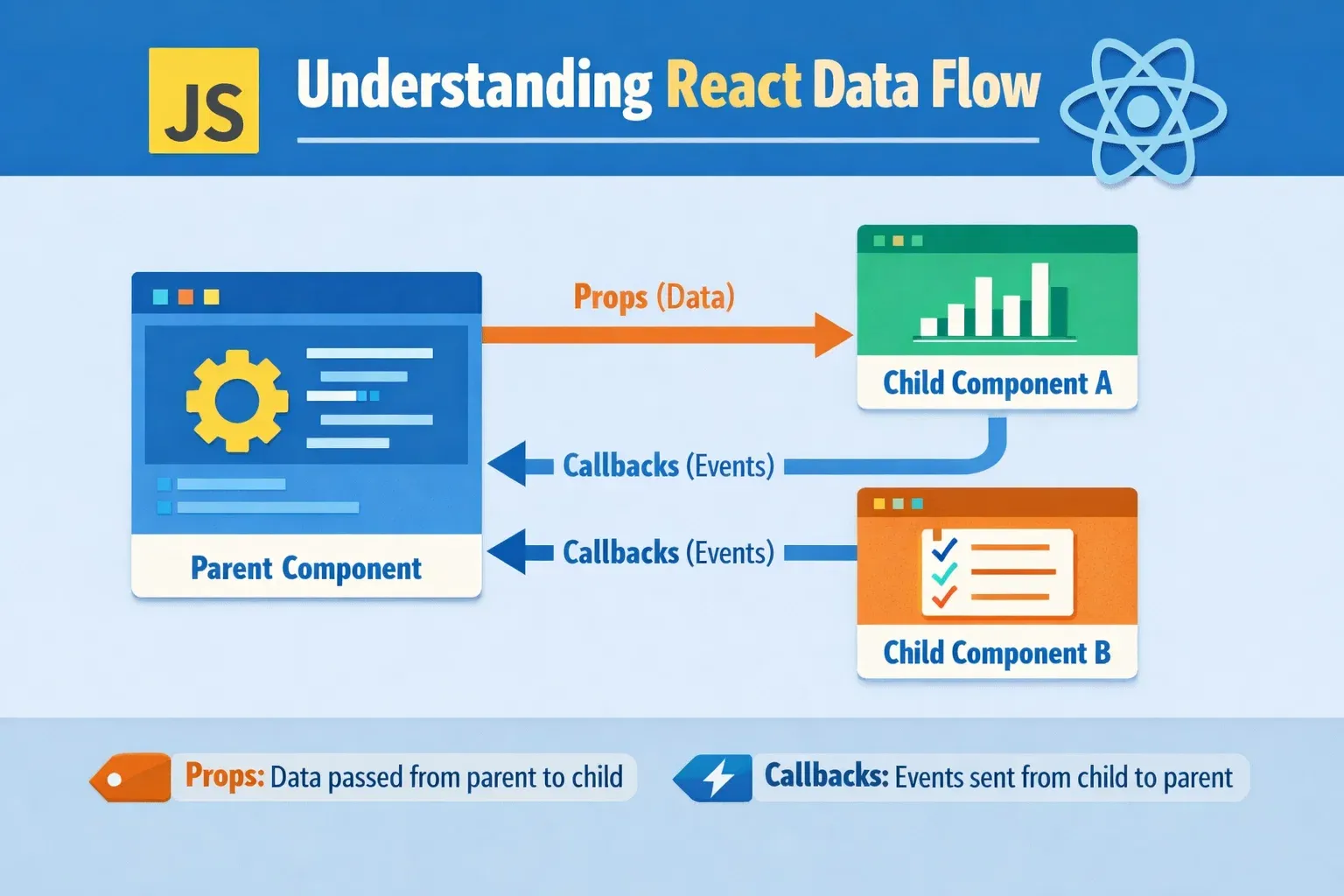
Before we explore the solutions, let us understand the problem that makes state management necessary in the first place. Imagine you are building a shopping application for a Pakistani e-commerce store. The application has a user profile component nested deep within several other components, and you need to display the user's name (let us say, "Ahmad from Lahore") and their shopping cart total. The challenge arises when the user data lives at the top level of your application, but you need to pass it through multiple intermediate components that do not actually use this data—they merely pass it along to their children.
This phenomenon is called prop drilling, and it creates several problems in larger applications. First, it makes your code harder to maintain because every time you need to add a new piece of data, you must modify multiple components just to pass it through. Second, it reduces code reusability since components become tightly coupled to specific data structures. Third, it makes debugging difficult because data flows through many intermediate components before reaching its destination. When Fatima, a developer in Islamabad, needs to trace why user preferences are not updating correctly, she must check every component in the chain rather than going directly to the source.
The React Context API and Redux both solve this problem, but they do so in different ways and are suited for different scenarios. Understanding these differences will help you choose the right tool for your specific use case, which is a skill that distinguishes junior developers from senior engineers.
### React Context API: Built-in State Sharing
The React Context API is a built-in feature that allows you to share state across your entire component tree without manually passing props at every level. Think of it as a global storage space that any component can access directly, regardless of where it sits in the component hierarchy. The Context API consists of three main parts: createContext (which creates the context object), Provider (which wraps components and provides the data), and Consumer (or the useContext hook, which accesses the data).
Using the useContext hook is the modern way to consume context values. When you call useContext with a context object, React finds the nearest Provider above that component in the tree and returns its value. If no Provider exists, it returns the default value specified when creating the context. This mechanism allows you to create "global" data that any component can access, while still maintaining React's declarative nature and component-based architecture.
The Context API is ideal for sharing data that many components need, such as theme preferences (dark/light mode), user authentication status, language settings for internationalization, or application-wide configuration. For instance, a Urdu/English language toggle for a Pakistani application would be a perfect use case for Context API since many components throughout the app would need to respond to language changes.
### Redux: Predictable State Container
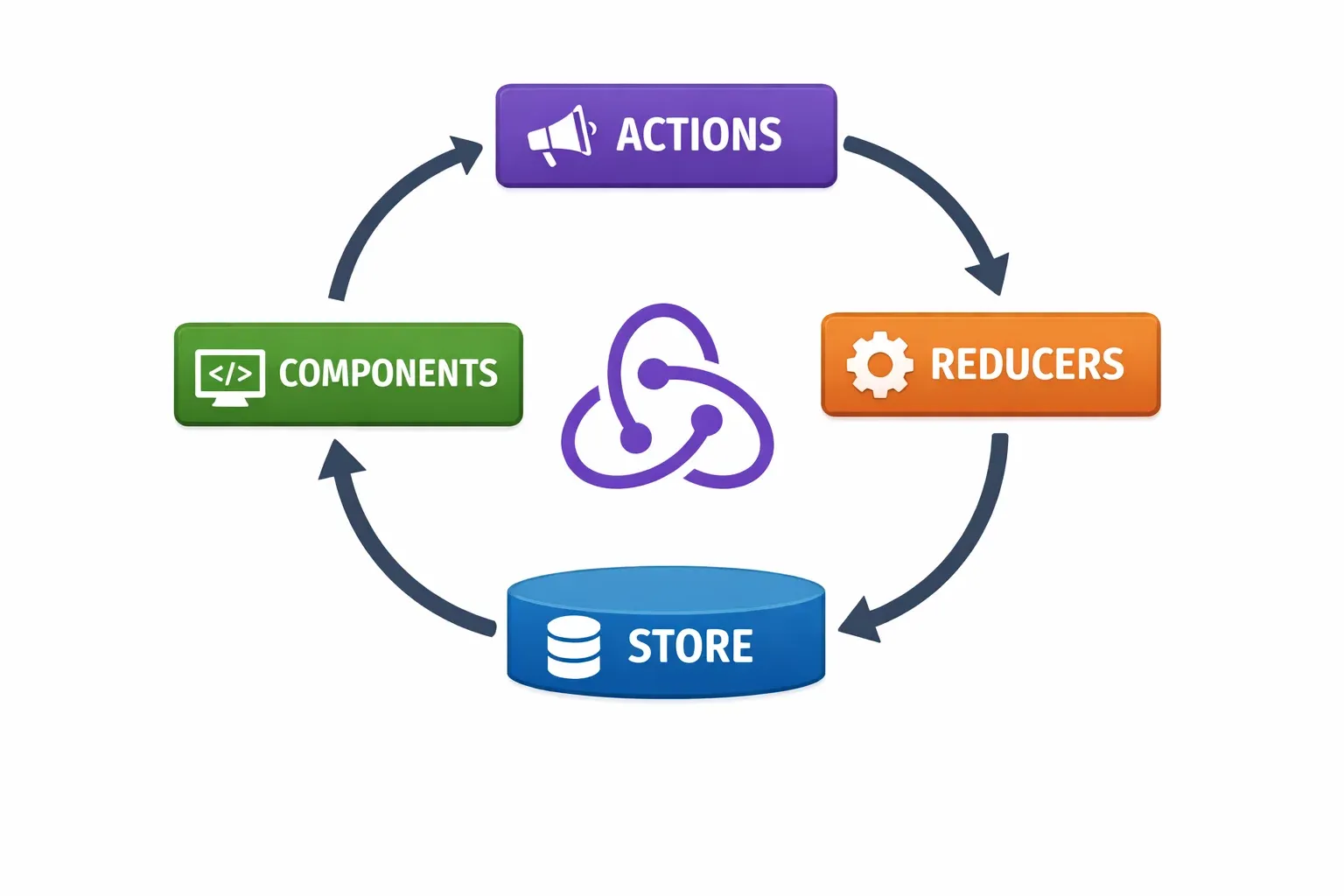
Redux is a predictable state container for JavaScript applications that helps you write applications that behave consistently, run in different environments (client, server, native), and are easy to test. While Context API is great for simple state sharing, Redux provides a more structured approach with strict patterns for state updates, making it especially valuable for large-scale applications with complex state logic.
Redux follows three core principles that make it powerful and predictable. First, the single source of truth principle states that the entire application state is stored in a single store. This makes debugging easier and enables features like undo/redo. Second, the state is read-only principle ensures that the only way to change state is by dispatching an action, which describes what happened. Third, changes are made with pure functions called reducers, which take the previous state and an action, and return the next state without modifying the original state.
Consider a banking application serving customers across Pakistan. When Ali transfers PKR 50,000 from his account in Karachi to Fatima's account in Lahore, multiple state changes occur: Ali's balance decreases, Fatima's balance increases, transaction history updates for both users, and notifications are generated. Redux manages all these interconnected state changes in a predictable, traceable manner, making it easier to debug issues and maintain the application over time.
## Practical Code Examples
### Example 1: Building a Theme Context for Dark/Light Mode
Let us build a practical theme toggle using the Context API. This example demonstrates how to create, provide, and consume context in a real-world scenario. We will create a theme system that allows users to switch between light and dark modes—a feature that has become standard in modern applications and improves accessibility for users who prefer reduced eye strain.
// Step 1: Create the Theme Context
import { createContext, useState, useContext } from 'react';
// Create context with default values
const ThemeContext = createContext({
theme: 'light',
toggleTheme: () => {}
});
// Create Provider component
export const ThemeProvider = ({ children }) => {
const [theme, setTheme] = useState('light');
const toggleTheme = () => {
setTheme(prev => prev === 'light' ? 'dark' : 'light');
};
return (
<ThemeContext.Provider value={{ theme, toggleTheme }}>
{children}
</ThemeContext.Provider>
);
};
// Custom hook for consuming theme context
export const useTheme = () => useContext(ThemeContext);
Line-by-line explanation:
• Line 1: We import the necessary hooks from React. createContext creates the context object, useState manages local state, and useContext allows us to consume the context value.
• Lines 4-7: createContext initializes our context with default values. These defaults are used when a component tries to access context but is not wrapped by a Provider. This is a safety measure that prevents undefined errors.
• Lines 10-21: The ThemeProvider component manages the actual state. It uses useState to track the current theme and provides a toggleTheme function to switch between themes. The Provider component wraps its children, making the theme data available to all descendants.
• Line 24: We create a custom hook useTheme that wraps useContext. This is a best practice that makes consuming the context cleaner and provides a consistent interface throughout your application. Now any component can simply call useTheme() to access the theme state.
### Example 2: Real-World Application - Shopping Cart with Redux
Now let us build a shopping cart system using Redux. This example is particularly relevant for Pakistani developers working on e-commerce platforms like Daraz or local startup ventures. A shopping cart requires complex state management: adding items, removing items, updating quantities, calculating totals, and syncing with backend services.
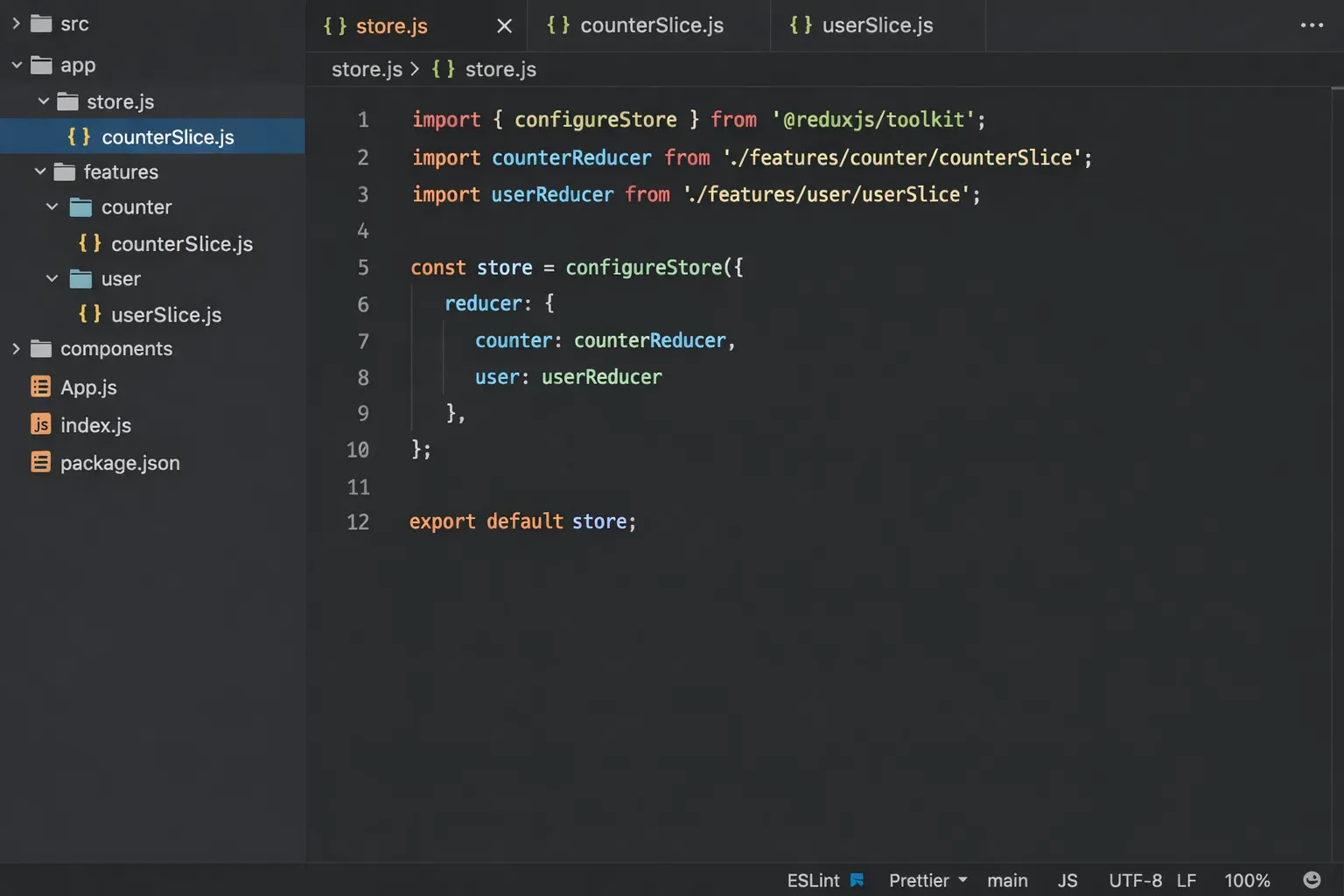
// cartSlice.js - Using Redux Toolkit
import { createSlice } from '@reduxjs/toolkit';
const initialState = {
items: [],
totalAmount: 0,
totalQuantity: 0
};
const cartSlice = createSlice({
name: 'cart',
initialState,
reducers: {
addItem: (state, action) => {
const item = action.payload;
const existingItem = state.items.find(i => i.id === item.id);
if (existingItem) {
existingItem.quantity += 1;
} else {
state.items.push({ ...item, quantity: 1 });
}
state.totalAmount += item.price; // Price in PKR
state.totalQuantity += 1;
},
removeItem: (state, action) => {
const id = action.payload;
const item = state.items.find(i => i.id === id);
if (item) {
state.totalAmount -= item.price * item.quantity;
state.totalQuantity -= item.quantity;
state.items = state.items.filter(i => i.id !== id);
}
}
}
});
export const { addItem, removeItem } = cartSlice.actions;
Line-by-line explanation:
• Line 1: We import createSlice from Redux Toolkit, which simplifies Redux setup by automatically creating action creators and action types. This is much cleaner than writing traditional Redux boilerplate.
• Lines 3-7: The initialState object defines our cart's initial state structure. We track items array, totalAmount (in PKR for our Pakistani context), and totalQuantity for quick access without recalculating.
• Lines 10-32: The addItem reducer handles adding items to the cart. It checks if the item already exists to increment quantity instead of adding duplicates. The price is tracked in PKR, making this realistic for Pakistani e-commerce applications.
• Lines 33-42: The removeItem reducer removes items and updates totals accordingly. Redux Toolkit allows us to write "mutating" logic that gets converted to immutable updates automatically, making the code more readable.
## Common Mistakes & How to Avoid Them
### Mistake 1: Overusing Context for Everything
One of the most common mistakes developers make is using the Context API for every piece of state in their application. This leads to performance problems because any change to context value causes all consuming components to re-render, even if they do not use the changed data. Imagine a context that holds user preferences, theme settings, and shopping cart data. When Ahmad changes his theme preference, every component consuming this context re-renders—including components that only display cart information.
The Fix: Split your contexts by domain. Create separate contexts for theme, user data, cart, and other distinct concerns. This way, when the theme changes, only components using the theme context re-render. Additionally, consider whether the state really needs to be global. Local component state with useState is perfectly fine for data that only one component needs. Do not reach for Context just because it exists—use it when you have data that truly needs to be shared across many components.
### Mistake 2: Mutating State Directly in Redux
In traditional Redux (without Redux Toolkit), directly mutating state is a critical error that causes bugs that are extremely difficult to debug. For example, writing state.items.push(newItem) modifies the original state array instead of creating a new one. This breaks Redux's ability to track changes, breaks features like time-travel debugging, and can cause unexpected component behavior. Fatima, a junior developer in Islamabad, spent three days debugging a bug caused by direct state mutation before realizing the root cause.
The Fix: Always return new state objects in your reducers. Use spread operators or array methods like map, filter, and concat that create new arrays. Better yet, use Redux Toolkit, which uses Immer internally to allow "mutating" syntax while automatically creating immutable updates. With Redux Toolkit, you can write state.items.push(newItem) and it works correctly because Immer handles the immutability behind the scenes.
### Mistake 3: Not Handling Loading and Error States
When fetching data asynchronously (like loading product data from a Pakistani e-commerce API), developers often forget to handle loading and error states. This results in poor user experience—users see blank screens while data loads, or worse, no feedback when errors occur. A user in Karachi trying to load their order history should see a loading indicator, not a blank page, and should receive a clear error message if the network fails.
The Fix: Always include loading, error, and data states in your state management. In Redux, use createAsyncThunk for async operations, which automatically dispatches pending, fulfilled, and rejected actions. In Context API, track these states in your provider and expose them to consumers. Show appropriate UI for each state: loading spinners during data fetch, error messages when something goes wrong, and actual content when data loads successfully.
## Practice Exercises
### Exercise 1: Build a User Authentication Context
Problem: Create a context that manages user authentication state. The context should track whether a user is logged in, store the current user's information (name, email), and provide login and logout functions. The login function should accept credentials and simulate an API call, while logout should clear the user data. Display different content based on authentication status in consuming components.
Solution:
import { createContext, useState, useContext } from 'react';
const AuthContext = createContext(null);
export const AuthProvider = ({ children }) => {
const [user, setUser] = useState(null);
const login = async (email, password) => {
// Simulated API call
const mockUser = { email, name: 'Ahmad Khan' };
setUser(mockUser);
};
const logout = () => setUser(null);
return (
<AuthContext.Provider value={{ user, login, logout }}>
{children}
</AuthContext.Provider>
);
};
export const useAuth = () => useContext(AuthContext);
### Exercise 2: Product List with Redux Filtering
Problem: Create a Redux slice for managing a product list with filtering capabilities. The state should include products array, current filter (category), and filtered products. Implement reducers to set products (from API), set filter category, and automatically update filtered products when filter changes. Products should include id, name, price (in PKR), and category fields.
Solution:
import { createSlice } from '@reduxjs/toolkit';
const productsSlice = createSlice({
name: 'products',
initialState: {
items: [],
filter: 'all',
filteredItems: []
},
reducers: {
setProducts: (state, action) => {
state.items = action.payload;
state.filteredItems = action.payload;
},
setFilter: (state, action) => {
state.filter = action.payload;
state.filteredItems = action.payload === 'all'
? state.items
: state.items.filter(p => p.category === action.payload);
}
}
});
export const { setProducts, setFilter } = productsSlice.actions;
## Frequently Asked Questions
### What is the difference between Context API and Redux?
The Context API is built into React and designed for sharing state across components without prop drilling, making it ideal for smaller applications or specific use cases like themes and authentication. Redux is a third-party library that provides a structured approach to state management with a single store, actions, and reducers, making it better suited for large-scale applications with complex state interactions and the need for advanced debugging tools.
### When should I use Context API versus Redux?
Use Context API when you have relatively simple state that needs to be shared across components, such as theme preferences, user authentication status, or language settings. Choose Redux when your application has complex state logic, needs time-travel debugging, requires middleware for async operations, or when multiple developers need a consistent pattern for state updates. As a rule of thumb, start with Context API and migrate to Redux only when your state management needs outgrow what Context can efficiently handle.
### How do I optimize Context API performance?
To optimize Context API performance, split your contexts by domain so that changes in one context do not trigger re-renders in unrelated components. Use useMemo to memoize context values when they depend on calculations. Consider splitting context into separate state and dispatch contexts, allowing components that only dispatch actions to avoid re-rendering when state changes. You can also use React.memo on consuming components to prevent unnecessary re-renders when props have not changed.
### Do I need Redux Toolkit to use Redux?
Technically, no—you can use Redux without Redux Toolkit by writing manual action creators, action types, and reducers. However, Redux Toolkit is now the official recommended way to write Redux logic. It dramatically reduces boilerplate code, includes utilities for common tasks like creating slices and handling async operations, and automatically handles immutability using Immer. For modern React development, using Redux Toolkit is strongly recommended over vanilla Redux for any new project.
### Can I use Context API and Redux together in the same application?
Absolutely! Many production applications use both Context API and Redux together. A common pattern is to use Context API for simple, localized state like themes, modals, or forms, while using Redux for complex, application-wide state like shopping carts, user data, or API responses. This hybrid approach lets you leverage the simplicity of Context where appropriate while benefiting from Redux's robust tooling for complex state management. The key is understanding each tool's strengths and applying them judiciously.
## Summary & Key Takeaways
• State management in React becomes essential as applications grow, and prop drilling creates maintainability issues that proper state management tools can solve.
• The React Context API is built into React and perfect for simpler use cases like themes, authentication, and localization where data needs to be accessible across many components.
• The useContext hook provides a clean, modern way to consume context values without the verbosity of Consumer components, making your code more readable and maintainable.
• Redux offers a structured, predictable approach to state management with its three principles: single source of truth, read-only state, and pure function reducers.
• Redux Toolkit is the modern standard for Redux development, eliminating boilerplate and making Redux nearly as simple as Context API while retaining its powerful features.
• Choosing between Context API and Redux depends on your application's complexity: start simple with Context, and graduate to Redux when your state management needs demand it.
## Next Steps & Related Tutorials
Now that you have a solid foundation in React state management, continue your learning journey with these related tutorials on theiqra.edu.pk. Each builds upon the concepts covered here and will help you become a more proficient React developer:
• React Hooks Deep Dive: useEffect and useCallback - Master advanced hooks that complement your state management knowledge and help you handle side effects efficiently.
• Building a Full-Stack E-commerce App with Next.js - Apply your Redux knowledge to build a complete shopping platform, perfect for Pakistani entrepreneurs.
• React Performance Optimization Techniques - Learn how to identify and fix performance bottlenecks in your React applications, including Context optimization.
• TypeScript with React: A Complete Guide - Add type safety to your state management code and catch errors before they reach production.
Test Your Python Knowledge!
Finished reading? Take a quick quiz to see how much you've learned from this tutorial.