React Testing Library Unit & Integration Testing Guide
Introduction
React applications are becoming increasingly popular among Pakistani developers—from freelance projects in Lahore to startup dashboards in Karachi. But writing React code is only half the job. Ensuring your app works correctly is just as important, and that’s where this React Testing Library: Unit & Integration Testing Guide comes in.
This tutorial will help you understand how to write reliable tests using React Testing Library along with Jest, focusing on real-world scenarios Pakistani students can relate to.
If you're searching for a complete react testing library tutorial, or want to master jest react testing and write effective react unit tests, you're in the right place.
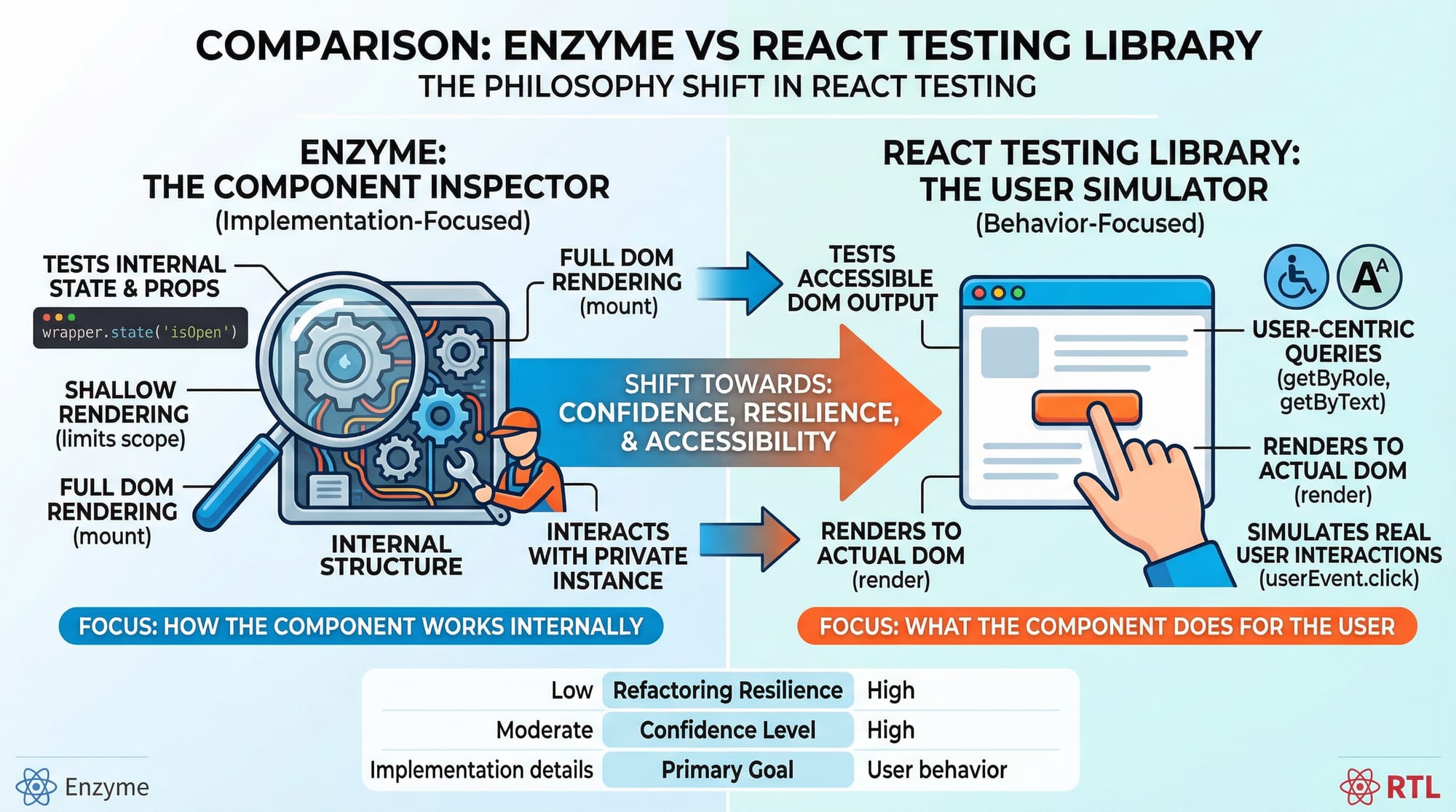
React Testing Library focuses on testing your app the way users interact with it—clicking buttons, typing in inputs, and viewing content—rather than testing internal implementation details.
Prerequisites
Before starting this guide, you should have:
- Basic understanding of JavaScript (ES6+)
- Familiarity with React (components, props, state)
- Knowledge of React Hooks (useState, useEffect)
- Basic understanding of Node.js and npm
- Some exposure to testing concepts (optional but helpful)
Core Concepts & Explanation
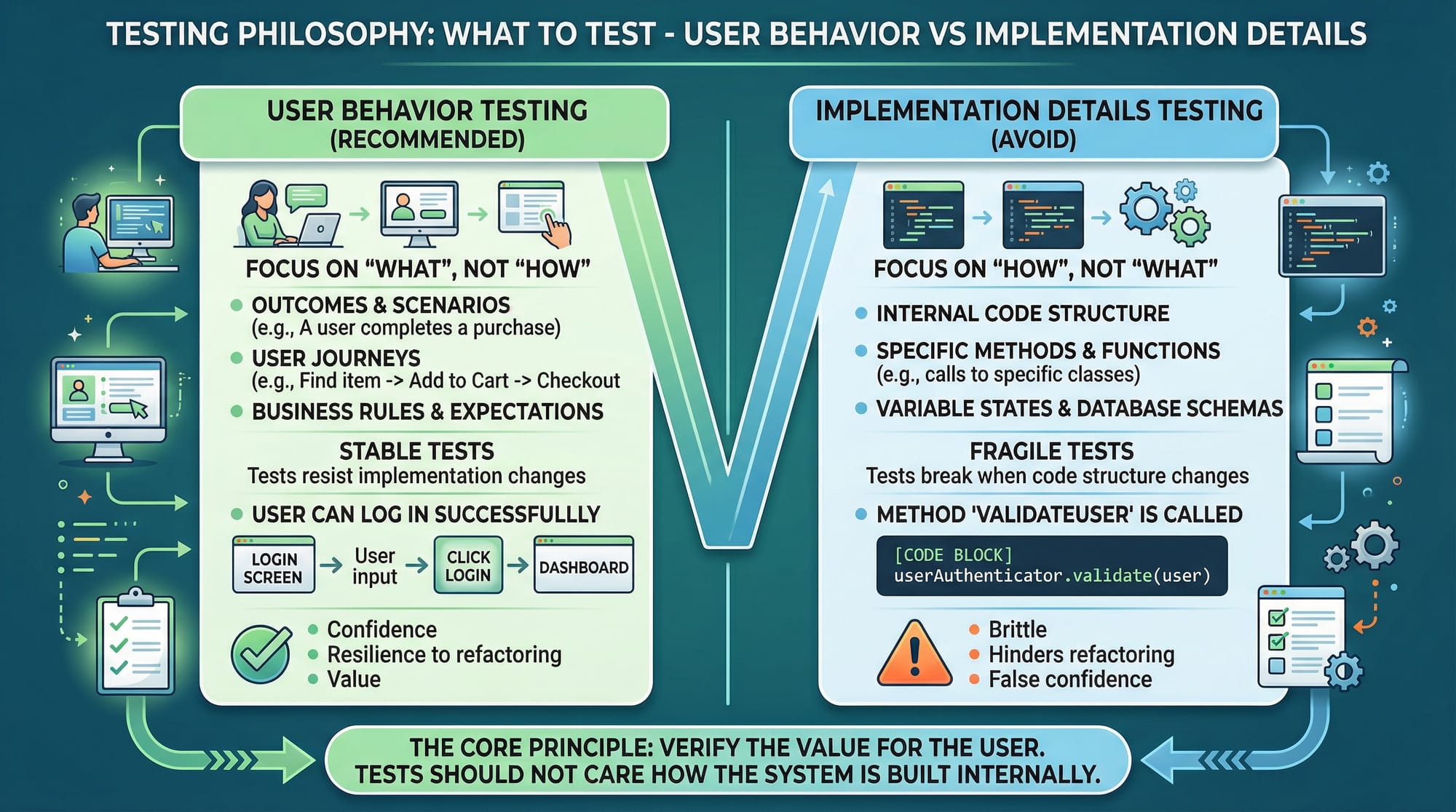
Testing User Behavior Instead of Implementation
React Testing Library encourages testing what users see and do.
❌ Avoid testing internal state:
expect(component.state.isLoggedIn).toBe(true);
✅ Test what the user experiences:
expect(screen.getByText("Welcome Ahmad")).toBeInTheDocument();
This approach ensures your tests don’t break when implementation changes.
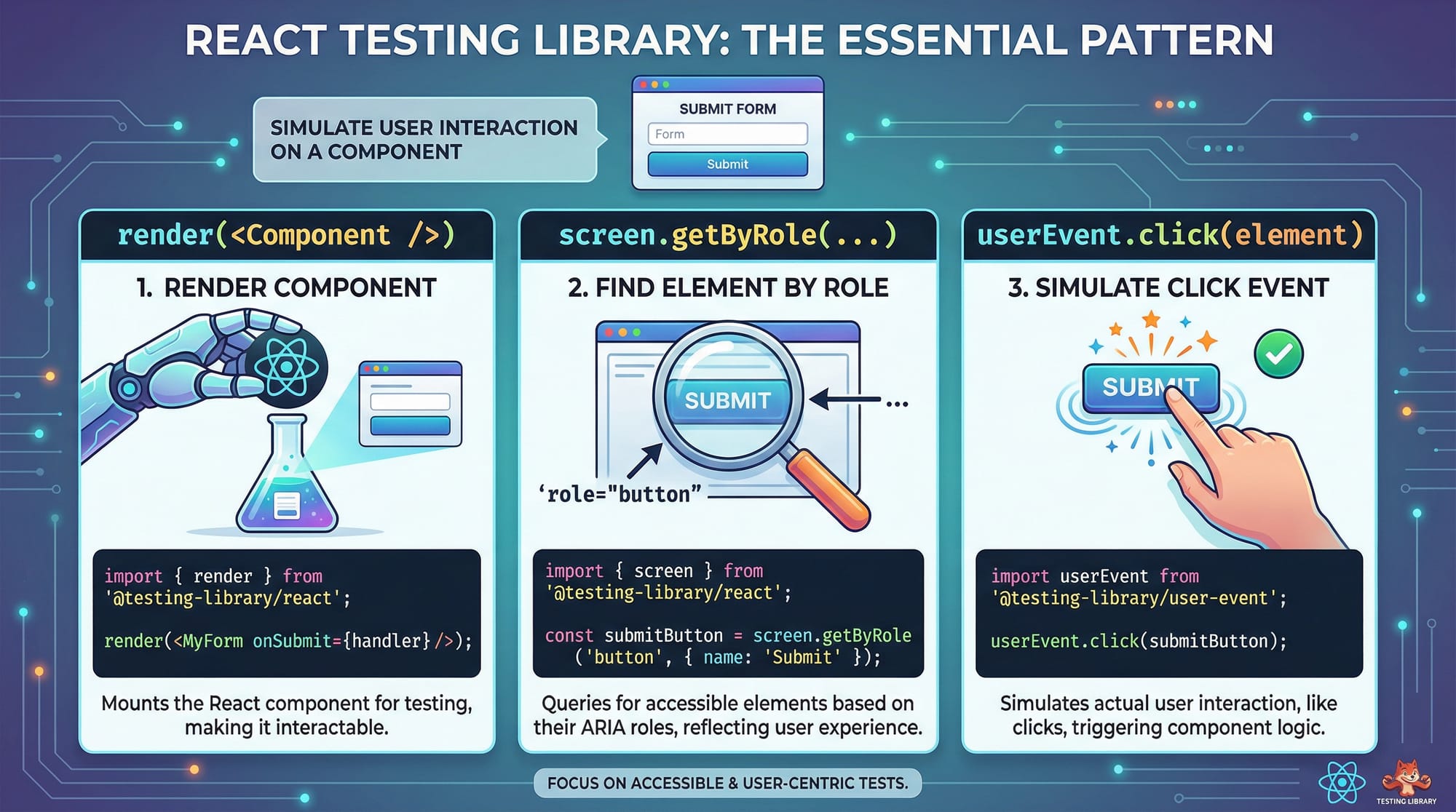
Queries: Finding Elements Like a User
React Testing Library provides different query methods:
getByRole(preferred)getByTextgetByLabelTextfindBy...(for async)queryBy...(for optional elements)
Example:
const button = screen.getByRole("button", { name: /submit/i });
Explanation:
getByRole→ finds element by semantic role"button"→ looks for button elements{ name: /submit/i }→ matches text "submit" (case insensitive)
User Events: Simulating Real Interactions
Instead of manually triggering events, use userEvent.
import userEvent from "@testing-library/user-event";

userEvent.click(button);
Explanation:
- Simulates a real user clicking the button
- Handles focus, events, and timing correctly
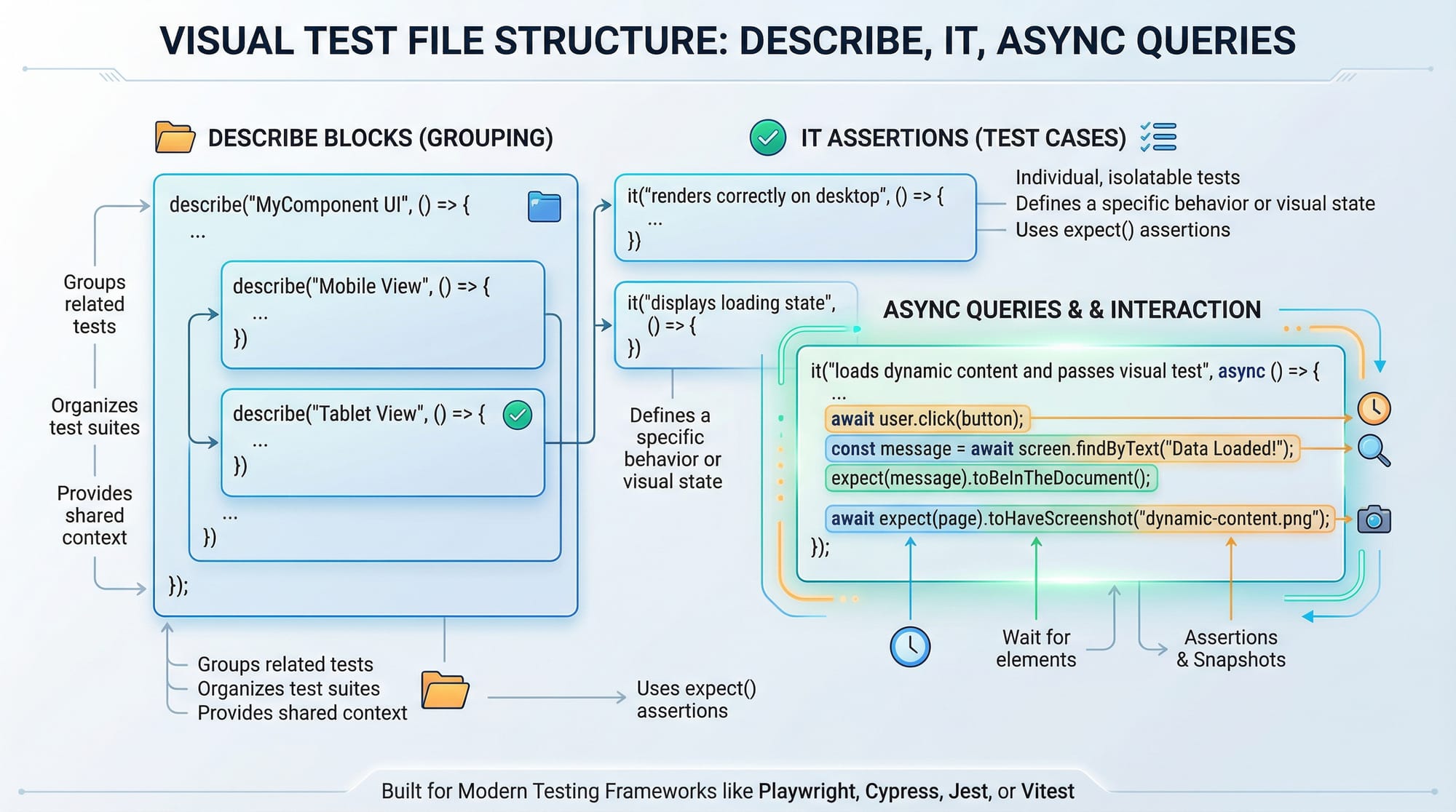
Async Testing with findBy
When dealing with APIs or delayed UI:
const message = await screen.findByText("Data loaded");
Explanation:
- Waits until element appears
- Useful for API responses or loading states
Unit vs Integration Testing in React
- Unit Tests → test a single component
- Integration Tests → test multiple components working together
Example:
- Unit: Login button click
- Integration: Login form + API + dashboard navigation
Practical Code Examples
Example 1: Testing a Simple Button Click
Let’s test a component used in a small Islamabad-based startup app.
// Button.js
import React, { useState } from "react";

export default function Button() {
  const [count, setCount] = useState(0);

  return (
    <div>
      <p>Clicked {count} times</p>
      <button onClick={() => setCount(count + 1)}>Click Me</button>
    </div>
  );
}
Now the test:
// Button.test.js
import { render, screen } from "@testing-library/react";
import userEvent from "@testing-library/user-event";
import Button from "./Button";

test("increments count on click", () => {
  render(<Button />);

  const button = screen.getByRole("button", { name: /click me/i });

  userEvent.click(button);

  expect(screen.getByText(/clicked 1 times/i)).toBeInTheDocument();
});
Line-by-line Explanation:
render(<Button />);→ renders component in virtual DOMscreen.getByRole(...)→ finds button elementuserEvent.click(button)→ simulates clickexpect(...).toBeInTheDocument()→ checks if updated text appears
Example 2: Real-World Application (Login Form)
Imagine Fatima is building a login form for a Karachi e-commerce site.
// Login.js
import React, { useState } from "react";

export default function Login() {
  const [message, setMessage] = useState("");

  const handleLogin = () => {
    setTimeout(() => {
      setMessage("Welcome Ali!");
    }, 1000);
  };

  return (
    <div>
      <button onClick={handleLogin}>Login</button>
      {message && <p>{message}</p>}
    </div>
  );
}
Test file:
// Login.test.js
import { render, screen } from "@testing-library/react";
import userEvent from "@testing-library/user-event";
import Login from "./Login";

test("shows welcome message after login", async () => {
  render(<Login />);

  const button = screen.getByRole("button", { name: /login/i });

  userEvent.click(button);

  const message = await screen.findByText(/welcome ali/i);

  expect(message).toBeInTheDocument();
});
Line-by-line Explanation:
render(<Login />)→ renders login componentgetByRole→ selects login buttonuserEvent.click()→ simulates loginfindByText→ waits for async updateexpect(...)→ verifies result
Common Mistakes & How to Avoid Them
Mistake 1: Testing Implementation Details
❌ Wrong:
expect(component.state.value).toBe("Ali");
✅ Correct:
expect(screen.getByDisplayValue("Ali")).toBeInTheDocument();
Fix:
Always test what the user sees, not internal state.
Mistake 2: Using getBy Instead of findBy for Async
❌ Wrong:
const message = screen.getByText("Loaded");
✅ Correct:
const message = await screen.findByText("Loaded");
Fix:
Use findBy for async UI updates.
Mistake 3: Not Cleaning Up Tests
Jest usually handles cleanup, but forgetting async handling causes issues.
Fix:
Use await properly and avoid race conditions.
Mistake 4: Overusing querySelector
❌ Avoid:
document.querySelector(".btn");
✅ Use:
screen.getByRole("button");
Practice Exercises
Exercise 1: Counter Reset
Problem:
Create a component with increment and reset buttons.
Solution:
test("resets counter", () => {
  render(<Counter />);

  const increment = screen.getByText("Increment");
  const reset = screen.getByText("Reset");

  userEvent.click(increment);
  userEvent.click(reset);

  expect(screen.getByText("0")).toBeInTheDocument();
});
Explanation:
- Click increment → increases value
- Click reset → sets to 0
- Assert final state
Exercise 2: Form Input Test
Problem:
Test input field updates.
Solution:
test("updates input value", () => {
  render(<input />);

  const input = screen.getByRole("textbox");

  userEvent.type(input, "Ahmad");

  expect(input).toHaveValue("Ahmad");
});
Explanation:
- Select textbox
- Simulate typing
- Check value update
Frequently Asked Questions
What is React Testing Library?
React Testing Library is a tool that helps you test React components by simulating how users interact with your app instead of testing internal code structure.
How do I use Jest with React Testing Library?
Jest is the test runner. React Testing Library works with it to render components and perform assertions. Most React apps (like Create React App) already include Jest by default.
What is the difference between unit and integration tests?
Unit tests check individual components, while integration tests verify how multiple components work together, such as a login form and dashboard.
How do I test API calls in React?
You can mock API calls using Jest and then use findBy queries to verify UI updates after data loads.
Why should I avoid testing implementation details?
Because implementation can change without affecting user experience. Testing behavior ensures your tests remain stable and meaningful.
Summary & Key Takeaways
- React Testing Library focuses on user behavior, not internal code
- Use getByRole for selecting elements whenever possible
- Use userEvent to simulate real interactions
- Use findBy for async operations like API calls
- Avoid testing internal state or DOM structure directly
- Combine Jest + React Testing Library for powerful testing
Next Steps & Related Tutorials
To deepen your knowledge, explore these tutorials on theiqra.edu.pk:
- Learn how to write powerful tests in our Jest Tutorial (perfect for mastering assertions and mocks)
- Understand component logic with our React Hooks Guide
- Build scalable apps with our Full-Stack Web Development Tutorial
- Improve UI performance with our React Performance Optimization Guide
Keep practicing—testing is a skill that improves with real-world projects. Whether you're building freelance apps in Islamabad or contributing to startups in Karachi, strong testing skills will set you apart 🚀
Test Your Python Knowledge!
Finished reading? Take a quick quiz to see how much you've learned from this tutorial.