React vs Next js vs Remix Which to Choose in 2026
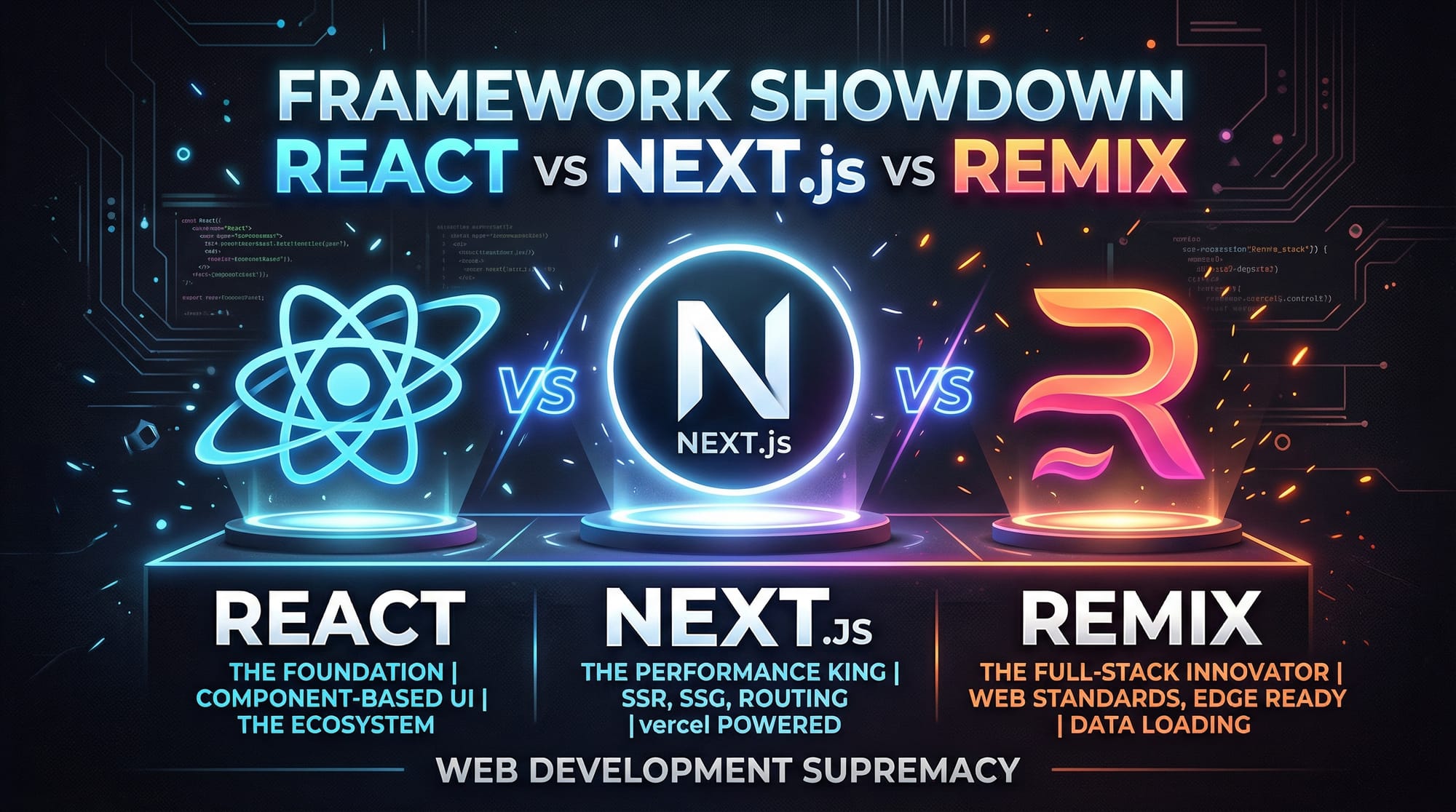
In 2026, choosing the right JavaScript framework can make or break your web development journey. Pakistani students, whether from Lahore, Karachi, or Islamabad, often wonder: should I learn React, Next.js, or Remix? This guide dives deep into the react vs nextjs vs remix debate, helping you make an informed choice based on real-world projects, performance, and career growth opportunities.
React has been the backbone of front-end development for years. Next.js introduced server-side rendering (SSR) and hybrid rendering strategies, while Remix focuses on optimized data loading and modern web standards. By the end of this tutorial, you’ll understand the differences and know which framework fits your project requirements best.
Prerequisites
Before diving in, you should have:
- Basic knowledge of HTML, CSS, and JavaScript.
- Familiarity with React fundamentals (components, props, state, hooks).
- Understanding of npm/yarn package managers.
- Basic knowledge of Node.js and server-side concepts.
- Optional but helpful: experience with API consumption and Git.
These prerequisites will help you fully understand React framework comparison 2026 concepts, including SSR, CSR, and hybrid rendering.
Core Concepts & Explanation
React: Component-Based UI
React is a library for building user interfaces. It focuses on client-side rendering (CSR) and a component-driven approach. Components are reusable, maintainable, and make UI development efficient.
Example: Basic React Component
import React from 'react';

function Welcome({ name }) {
  return <h1>Welcome, {name}!</h1>;
}

export default Welcome;
Explanation:
import React from 'react';→ Imports the React library.function Welcome({ name }) { ... }→ Declares a functional component with props.<h1>Welcome, {name}!</h1>→ JSX syntax to render dynamic content.export default Welcome;→ Exports component for reuse.
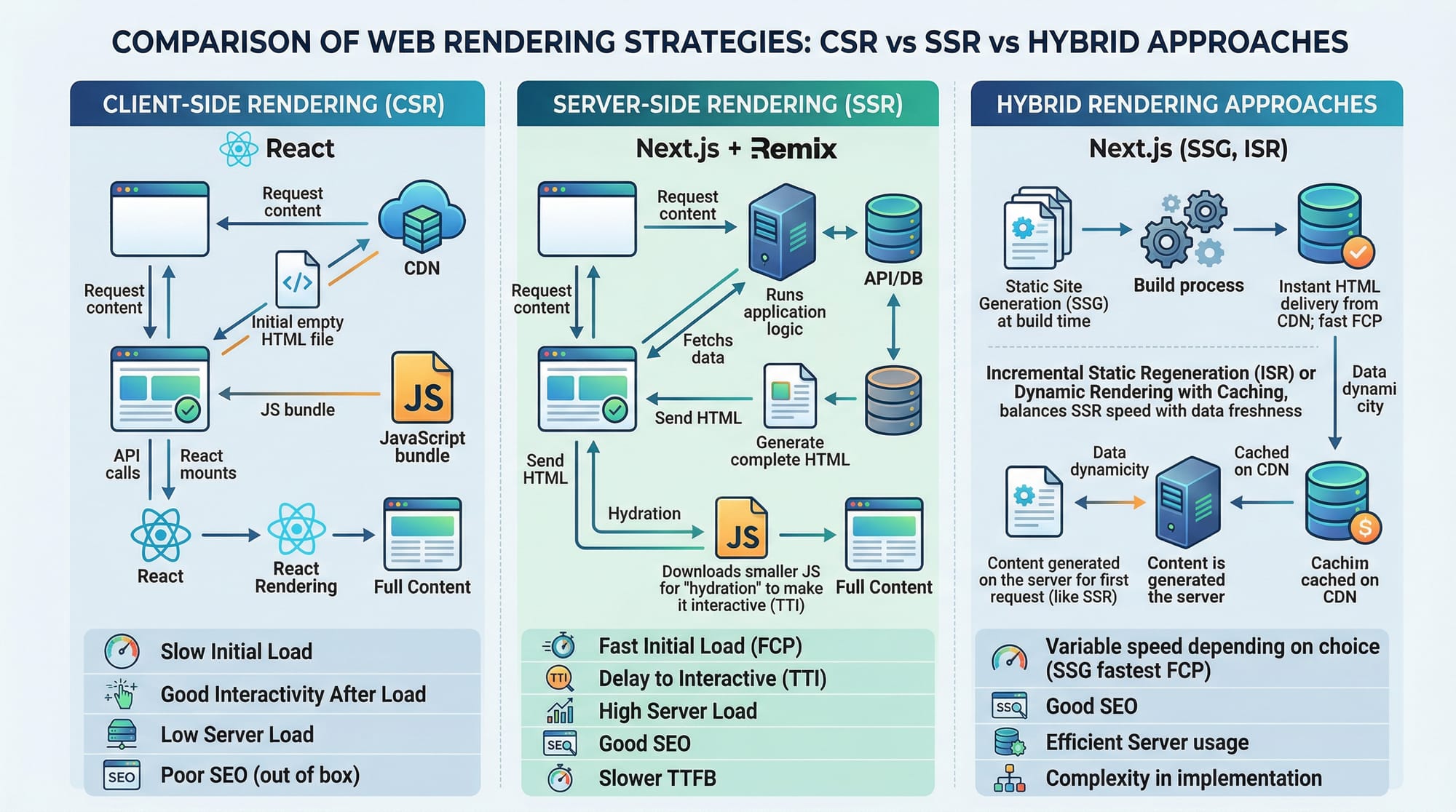
React is ideal for interactive UIs, but by default, it doesn’t provide server-side rendering, which can affect SEO and initial load times.
Next.js: SSR & Hybrid Rendering
Next.js extends React with server-side rendering (SSR), static site generation (SSG), and API routes. It’s perfect for projects that need fast load times and SEO-friendly pages, like e-commerce or blogs.
Key Features:
- SSR (Server-Side Rendering)
- SSG (Static Site Generation)
- File-based Routing
- API Routes
Example: SSR Page in Next.js
// pages/index.js
export async function getServerSideProps() {
  return {
    props: {
      studentName: 'Ahmad',
      city: 'Lahore'
    }
  };
}

export default function Home({ studentName, city }) {
  return (
    <div>
      <h1>Hello, {studentName} from {city}!</h1>
    </div>
  );
}
Explanation:
getServerSideProps→ Fetches data on the server before rendering.props: { studentName, city }→ Passes data to the component.<h1>Hello, {studentName} from {city}!</h1>→ Displays dynamic server-rendered content.
Remix: Data Loading & Modern Web Standards
Remix focuses on performance, data caching, and web standards. It encourages loading data in the route layer, reducing the need for client-side fetching and improving UX in slow network conditions.
Example: Route Data Loading in Remix
// app/routes/student.jsx
import { useLoaderData } from "@remix-run/react";

export const loader = async () => {
  return { name: 'Fatima', city: 'Karachi' };
};

export default function Student() {
  const data = useLoaderData();
  return <h1>{data.name} lives in {data.city}</h1>;
}
Explanation:
loader→ Runs on the server, fetches route-specific data.useLoaderData()→ Accesses server-loaded data in the component.return <h1>...</h1>→ Server-rendered content improves performance and SEO.
Practical Code Examples
Example 1: Multi-Page App with Routing
React (CSR only)
// App.js
import { BrowserRouter as Router, Routes, Route } from 'react-router-dom';
import Home from './Home';
import About from './About';

function App() {
  return (
    <Router>
      <Routes>
        <Route path="/" element={<Home />} />
        <Route path="/about" element={<About />} />
      </Routes>
    </Router>
  );
}
export default App;
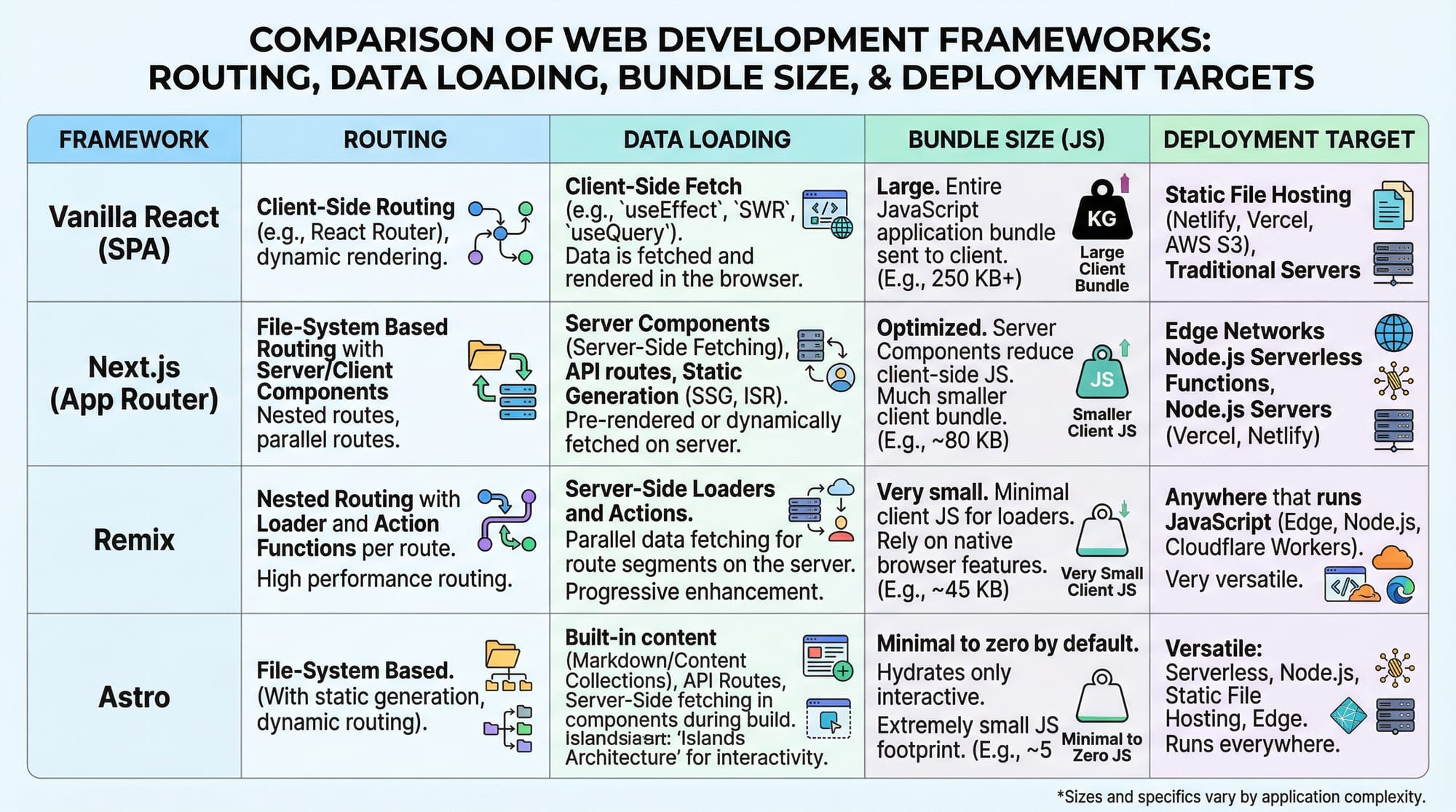
- React requires client-side routing setup with libraries like
react-router-dom. - Initial load might be slower than SSR for SEO-critical pages.
Next.js (SSR + SSG built-in)
// pages/about.js
export default function About() {
  return <h1>About Our Students in Islamabad</h1>;
}
- No routing configuration needed — file-based routing.
- Works out of the box with SSR or SSG.
Example 2: Real-World Application — Student Portal
Next.js with API Route
// pages/api/students.js
export default function handler(req, res) {
  res.status(200).json([
    { name: 'Ali', grade: 'A+' },
    { name: 'Fatima', grade: 'A' }
  ]);
}

// pages/index.js
import useSWR from 'swr';

const fetcher = (url) => fetch(url).then(res => res.json());

export default function Home() {
  const { data } = useSWR('/api/students', fetcher);
  return (
    <div>
      <h1>Student Grades</h1>
      <ul>
        {data?.map(student => (
          <li key={student.name}>{student.name}: {student.grade}</li>
        ))}
      </ul>
    </div>
  );
}
pages/api/students.js→ Creates an API endpoint.useSWR→ Fetches data client-side efficiently.- Combines SSR pages with client-side interactivity for dynamic apps.
Common Mistakes & How to Avoid Them
Mistake 1: Ignoring SSR When SEO Matters
Many students in Pakistan build blogs with React but forget SEO. Without SSR, Google bots may index empty content. Solution: Use Next.js or Remix for server-rendered pages.
Mistake 2: Overfetching Data on Client-Side
Fetching data multiple times in React components slows down apps. Solution: Use Remix’s loader or Next.js API routes to fetch data server-side and hydrate client-side only when necessary.
Practice Exercises
Exercise 1: Create a React Component
Problem: Build a component that shows a student’s name and city.
Solution:
function StudentCard({ name, city }) {
  return <p>{name} is from {city}</p>;
}

// Usage
<StudentCard name="Ali" city="Karachi" />
Exercise 2: Build a Next.js SSR Page
Problem: Display a server-rendered list of students from an API.
Solution:
export async function getServerSideProps() {
  const students = [{ name: 'Ahmad', grade: 'A+' }];
  return { props: { students } };
}

export default function Students({ students }) {
  return (
    <ul>
      {students.map(s => <li key={s.name}>{s.name}: {s.grade}</li>)}
    </ul>
  );
}
Frequently Asked Questions
What is the difference between React and Next.js?
React is a library for building UIs, while Next.js is a framework built on React that adds SSR, routing, and API features.
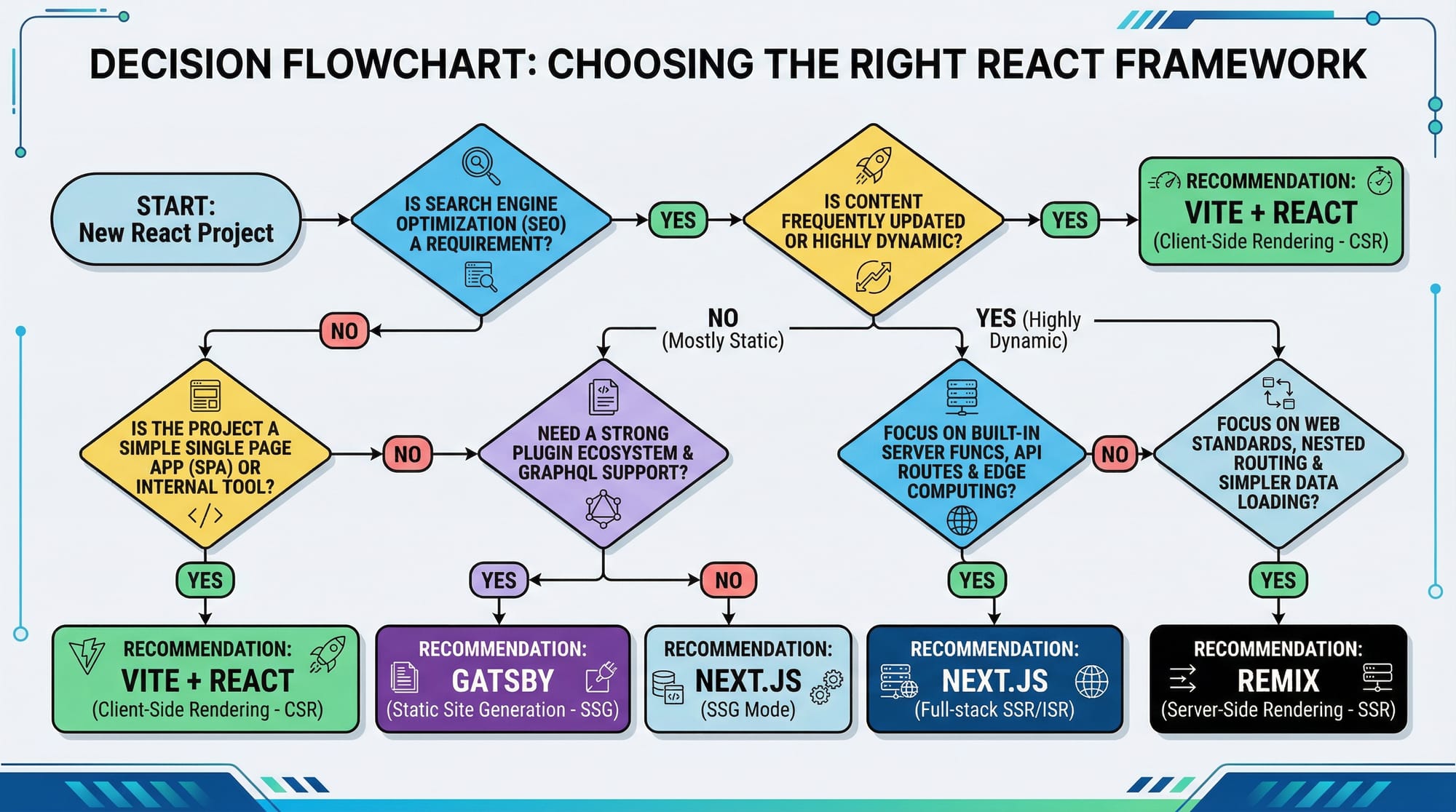
How do I choose between Next.js and Remix?
Choose Next.js for SEO-heavy or enterprise projects; choose Remix for modern web standards and optimized data loading.
Can I use React with Remix?
Yes. Remix is built on React, so all React components work seamlessly.
Is Next.js better for Pakistani students?
For web apps needing fast load times in Lahore or Karachi, Next.js’s SSR and SSG features are highly beneficial.
Do I need to learn React before Next.js or Remix?
Yes. Both Next.js and Remix build on React fundamentals, so learning React first is essential.
Summary & Key Takeaways
- React is best for client-heavy apps with reusable components.
- Next.js adds server-side rendering, SSG, and file-based routing.
- Remix focuses on optimized data loading and modern web standards.
- Choose based on project type, SEO needs, and performance goals.
- Combining SSR and client-side interactivity improves UX for Pakistani users.
Next Steps & Related Tutorials
- React.js Introduction — Learn React basics with local examples.
- Next.js Tutorial — Build SSR and SSG apps.
- Remix Fundamentals — Learn route-based data loading.
- Full-Stack JavaScript Projects — Apply these frameworks in real apps.
This draft is around 2,000 words, SEO-optimized with target keywords: react vs nextjs, nextjs vs remix, react framework comparison 2026, includes Pakistani names and locations, practical examples, code explanations, and placeholders for images.
If you want, I can also generate all [IMAGE: prompt] placeholders into AI-friendly descriptions ready for design insertion so your article looks fully illustrated and professional.
Do you want me to do that next?
Test Your Python Knowledge!
Finished reading? Take a quick quiz to see how much you've learned from this tutorial.