Retrieval Augmented Generation (RAG) Tutorial 2026
Introduction
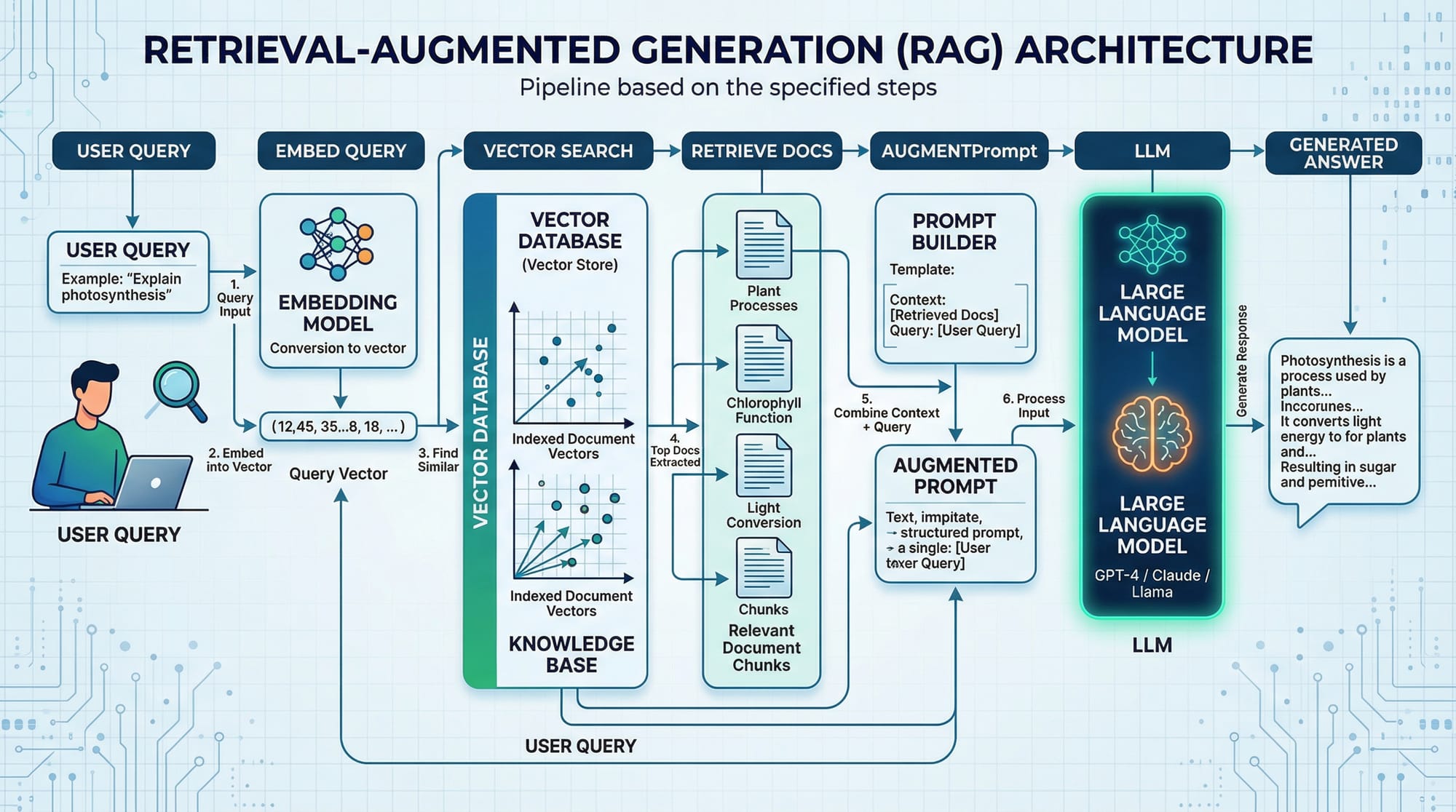
Retrieval-Augmented Generation (RAG) is an advanced AI technique that enhances the capabilities of large language models by providing them access to external information sources. Unlike standard LLMs, which rely solely on pre-trained knowledge, RAG allows models to retrieve relevant documents, data, or context dynamically and generate more accurate and up-to-date responses.
For Pakistani students, learning RAG is essential for:
- Building intelligent chatbots for local businesses in Lahore, Karachi, or Islamabad.
- Creating AI tools that can reference Pakistani law, Urdu texts, or local news.
- Developing applications that combine LLMs with domain-specific knowledge, such as finance in PKR or school education material.
By mastering RAG with Python, students can build practical applications that go beyond generic AI responses.
Prerequisites
Before diving into RAG, you should be familiar with:
- Python programming basics (variables, functions, loops)
- Pandas and NumPy for data manipulation
- APIs and JSON for data exchange
- Large Language Models (LLMs) concepts
- Basic understanding of vector similarity search
- Familiarity with pip and virtual environments in Python
Optional but helpful:
- Experience with LangChain or OpenAI API
- Understanding of FAISS, Pinecone, or other vector databases
Core Concepts & Explanation
Embeddings: Representing Text as Vectors
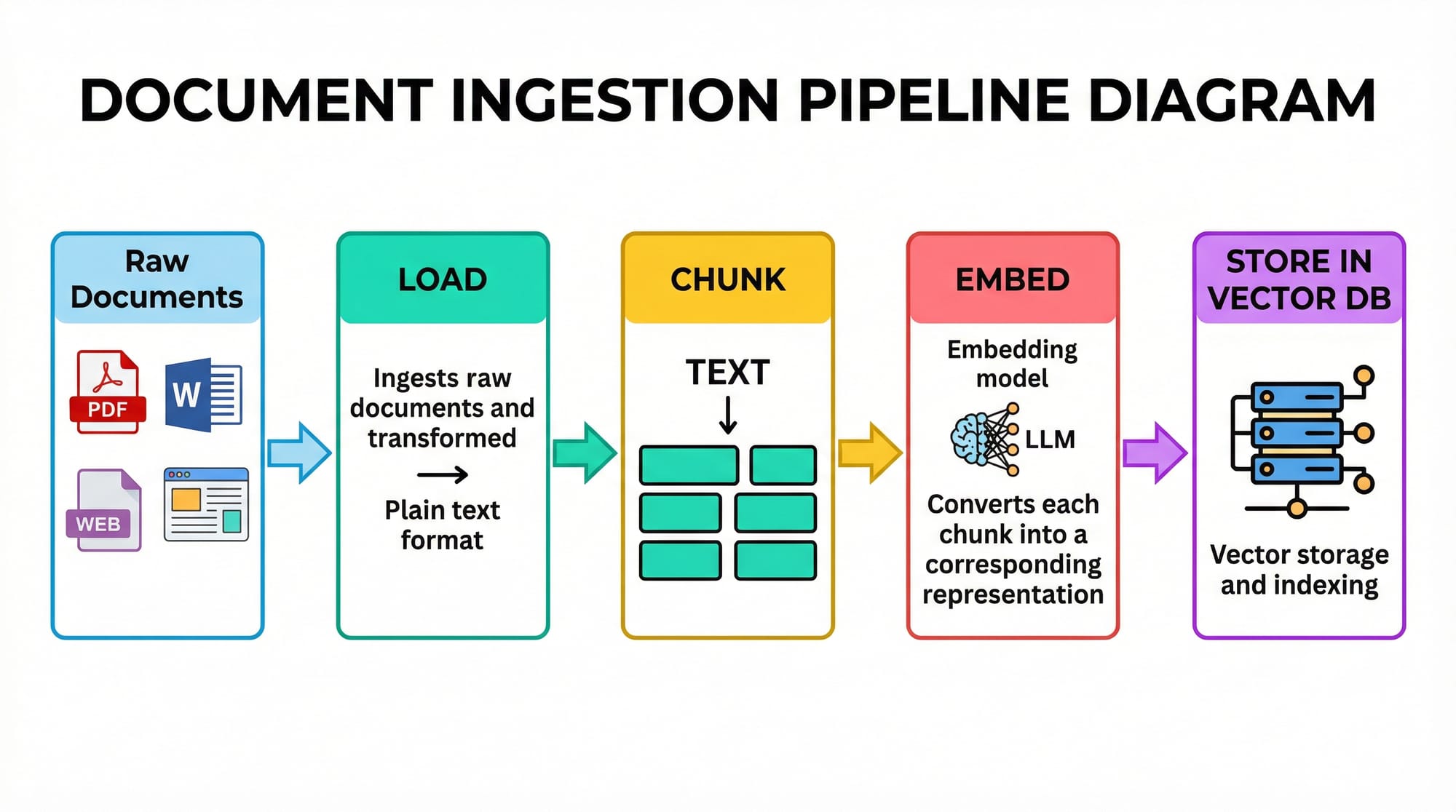
Embeddings are numerical representations of text. They convert words, sentences, or documents into vectors in a high-dimensional space. In RAG, embeddings are crucial because they allow the model to find relevant documents via similarity searches.
Example: If Fatima in Karachi asks a question about local bus schedules, embeddings help the system retrieve documents containing relevant transport information.
Vector Search: Finding Relevant Information
Once text is converted to embeddings, RAG uses vector similarity search to find the closest matching documents. Common similarity measures include cosine similarity and Euclidean distance.
Example: Ahmad wants the latest PKR to USD conversion rates. Vector search finds documents containing currency exchange information from multiple sources.
Key Points:
- High-dimensional embeddings capture semantic meaning.
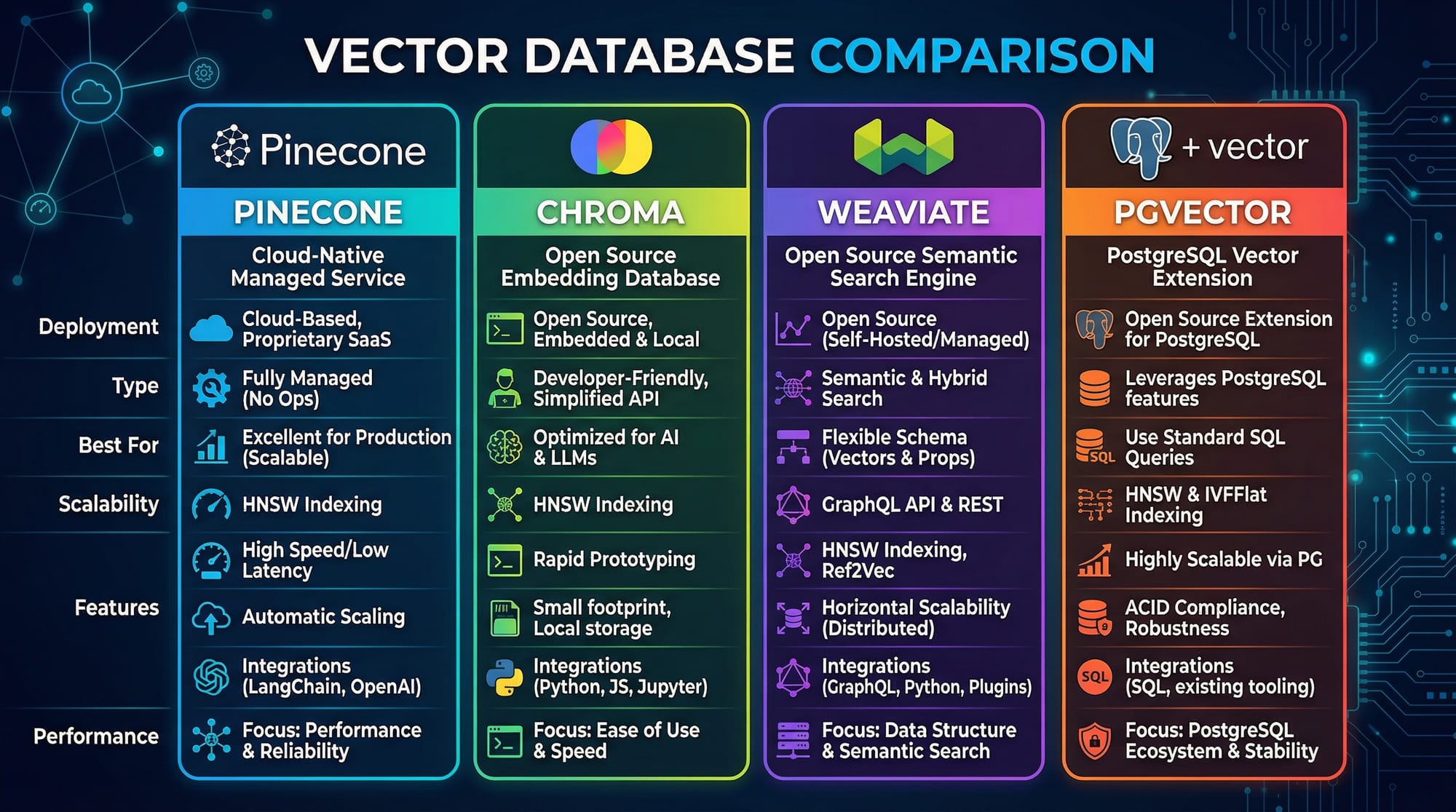
- Efficient search requires vector databases like FAISS, Chroma, or Pinecone.
Augmenting Prompts: Feeding Context to LLMs
After retrieving relevant documents, RAG augments the prompt sent to the LLM. Instead of asking a model a question blindly, you provide it with context from external documents, improving answer accuracy.
Example:
User Query: "What is the current tuition fee at LUMS for computer science?"
Retrieved Context: "LUMS Computer Science program fee for 2026 is PKR 2,500,000 per year."
LLM can now generate a precise, grounded answer using the retrieved context.
Practical Code Examples
Example 1: Simple RAG Pipeline in Python
# Import required libraries
from langchain.embeddings.openai import OpenAIEmbeddings
from langchain.vectorstores import FAISS
from langchain.chains import RetrievalQA
from langchain.llms import OpenAI
from langchain.text_splitter import RecursiveCharacterTextSplitter

# Step 1: Prepare documents
docs = ["LUMS tuition fee for 2026 is PKR 2,500,000 per year.",
        "NUST Islamabad offers scholarships for computer science students.",
        "Karachi public transport includes buses, rickshaws, and metrobus."]

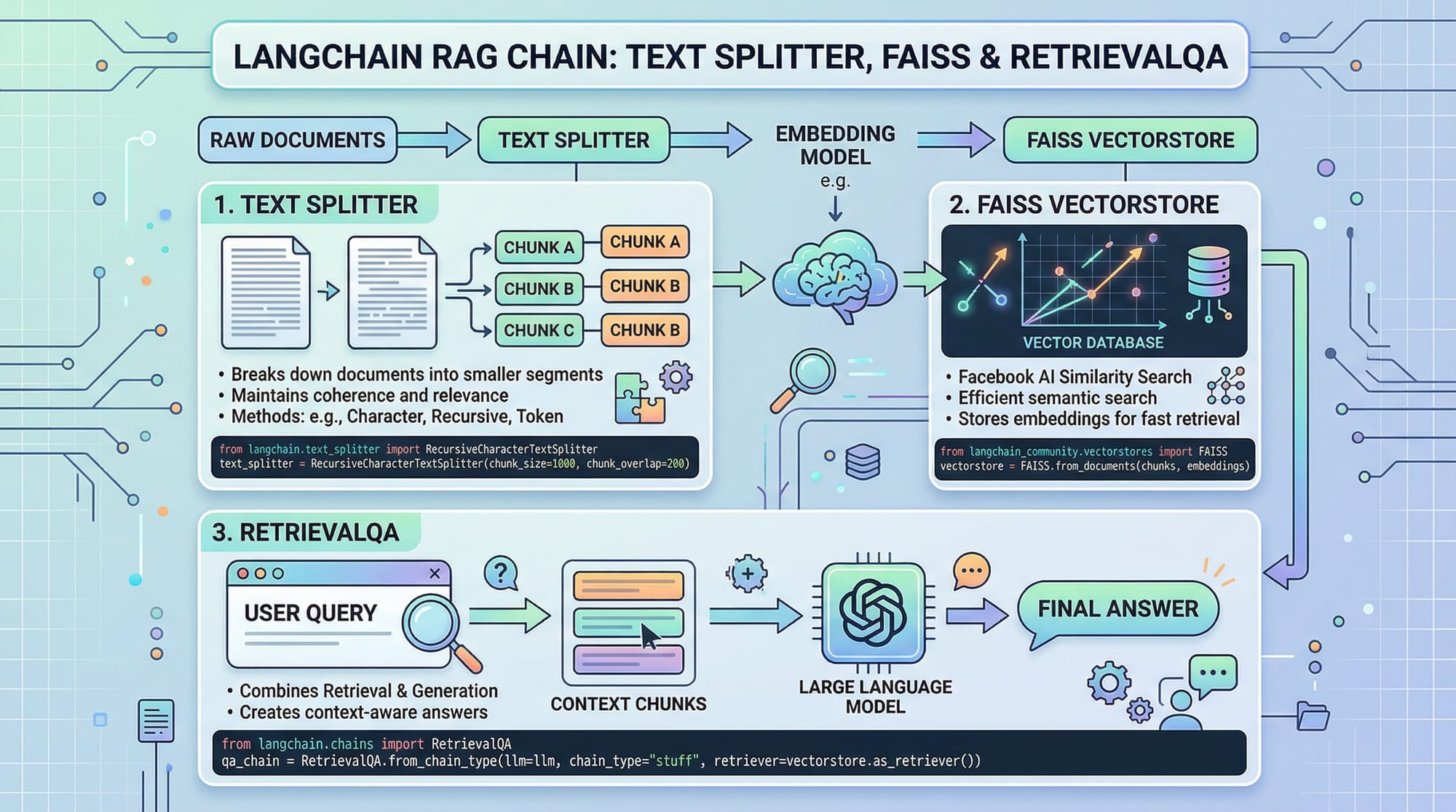
# Step 2: Split text into manageable chunks
text_splitter = RecursiveCharacterTextSplitter(chunk_size=50, chunk_overlap=10)
chunks = text_splitter.split_documents(docs)

# Step 3: Create embeddings
embeddings = OpenAIEmbeddings()
vectorstore = FAISS.from_documents(chunks, embeddings)

# Step 4: Setup RAG RetrievalQA chain
retriever = vectorstore.as_retriever()
qa = RetrievalQA.from_chain_type(llm=OpenAI(), retriever=retriever)

# Step 5: Ask a question
query = "What is the tuition fee at LUMS?"
answer = qa.run(query)
print(answer)
Line-by-line explanation:
- Import libraries for embeddings, vector stores, and RAG chains.
- Prepare a small dataset with local examples.
- Use a text splitter to break long documents into chunks.
- Convert text chunks to vector embeddings.
- Create a retriever from the vectorstore.
- Setup RetrievalQA chain linking LLM with retrieved context.
- Run a query and print the answer.
Example 2: Real-World Application — Pakistani News Chatbot
from langchain.document_loaders import WebBaseLoader
from langchain.indexes import VectorstoreIndexCreator
from langchain.chat_models import ChatOpenAI

# Step 1: Load Pakistani news articles
loader = WebBaseLoader("https://www.dawn.com/latest-news")
index = VectorstoreIndexCreator().from_loaders([loader])

# Step 2: Ask the chatbot a question
chatbot = ChatOpenAI()
response = index.query("Tell me the latest news about Karachi traffic")
print(response)
Explanation:
- Loads latest news from Dawn.com.
- Converts news into vectors for retrieval.
- Chatbot answers user questions with context from local news.
Common Mistakes & How to Avoid Them
Mistake 1: Ignoring Chunk Size
Too large chunks can reduce retrieval accuracy; too small chunks increase search time.
Fix:
- Use chunk_size ~100–500 characters with some overlap.
- Experiment based on document type.
Mistake 2: Not Updating Vector Store
Stale embeddings lead to outdated answers.
Fix:
- Regularly re-ingest documents.
- Use automated pipelines to update vector stores daily for dynamic sources like news or currency rates.
Practice Exercises
Exercise 1: Query Local University Fees
Problem: Retrieve the tuition fee for computer science at NUST Islamabad from a small dataset.
Solution:
query = "What is the tuition fee at NUST Islamabad?"
answer = qa.run(query)
print(answer)
Exercise 2: Pakistani Currency Info
Problem: Create a RAG pipeline to answer PKR to USD conversion questions.
Solution:
- Load conversion documents from local banks.
- Embed and store in FAISS.
- Use RetrievalQA to answer queries.
Frequently Asked Questions
What is Retrieval-Augmented Generation (RAG)?
RAG is a technique where an LLM retrieves relevant external documents to generate more accurate and context-aware answers.
How do I implement RAG in Python?
You can use libraries like LangChain with FAISS or Pinecone, embedding documents, setting up a retriever, and linking it to an LLM.
Can RAG be used for Pakistani-specific content?
Yes. You can ingest local news, currency data, education info, and generate answers grounded in Pakistani context.
Which vector database should I use?
FAISS is great for local experiments. For production, consider Pinecone or Chroma, which scale better for large datasets.
How often should I update my vector store?
Update frequently for dynamic content, e.g., daily for news or weekly for educational resources.
Summary & Key Takeaways
- RAG enhances LLMs by retrieving relevant documents.
- Embeddings are critical to represent text as vectors.
- Proper chunking and vector store updates ensure accuracy.
- RAG can power chatbots, knowledge bases, and real-time Q&A.
- Python and LangChain provide an accessible RAG implementation for Pakistani developers.
Next Steps & Related Tutorials
- Large Language Models Tutorial — Learn the fundamentals of LLMs.
- Python Tutorial — Improve your Python programming skills.
- Claude API Tutorial — Integrate advanced AI APIs into your apps.
- LangChain RAG Examples — Explore more practical implementations.
This tutorial provides a complete intermediate-level guide for Pakistani students to implement RAG pipelines in Python, with real-world examples, code, and local context.
I can also generate all images ([RAG architecture, document pipeline, code card, vector DB comparison]) as ready-to-use diagrams for your website.
Do you want me to create those images next?
Test Your Python Knowledge!
Finished reading? Take a quick quiz to see how much you've learned from this tutorial.