Rust & WebAssembly Build High Performance Web Apps
Introduction
Rust & WebAssembly: Build High-Performance Web Apps is an advanced development approach that combines the memory safety and performance of Rust with the portability of WebAssembly (WASM). Together, they allow developers to run near-native speed code directly inside the browser.
In traditional web development, JavaScript handles most frontend logic. However, when applications become computationally heavy—such as image processing, game engines, data visualization, or cryptography—JavaScript can become slow. This is where WebAssembly Rust shines.
For Pakistani students learning modern web development, especially those from universities in Lahore, Karachi, Islamabad, and online platforms like theiqra.edu.pk, mastering rust wasm tutorial concepts can significantly boost career opportunities. Companies worldwide now hire WASM developers for high-performance web apps, blockchain systems, and AI-based browser tools.
By the end of this tutorial, you will understand how Rust compiles to WebAssembly, how to integrate it into web projects, and how to build optimized applications that outperform standard JavaScript in heavy workloads.
Prerequisites
Before starting this advanced webassembly rust tutorial, you should already be familiar with:
- Basic Rust programming (variables, functions, ownership, structs)
- JavaScript and basic DOM manipulation
- Understanding of how browsers work
- Basic HTML/CSS knowledge
- Node.js and npm (for frontend integration)
Recommended setup:
- Rust installed via
rustup wasm-packinstalled- Node.js (LTS version)
- A modern browser like Chrome or Firefox
If you are completely new to Rust, first complete the Rust Tutorial for Beginners on theiqra.edu.pk before continuing.
Core Concepts & Explanation
WebAssembly (WASM) Runtime Model
WebAssembly is a low-level binary format that runs inside the browser at near-native speed. It is not meant to replace JavaScript but to complement it.
Key idea:
- JavaScript = UI + DOM interaction
- WebAssembly = heavy computation
When Rust compiles to WASM, it produces a .wasm binary that browsers can execute efficiently.
Rust-to-WASM Toolchain
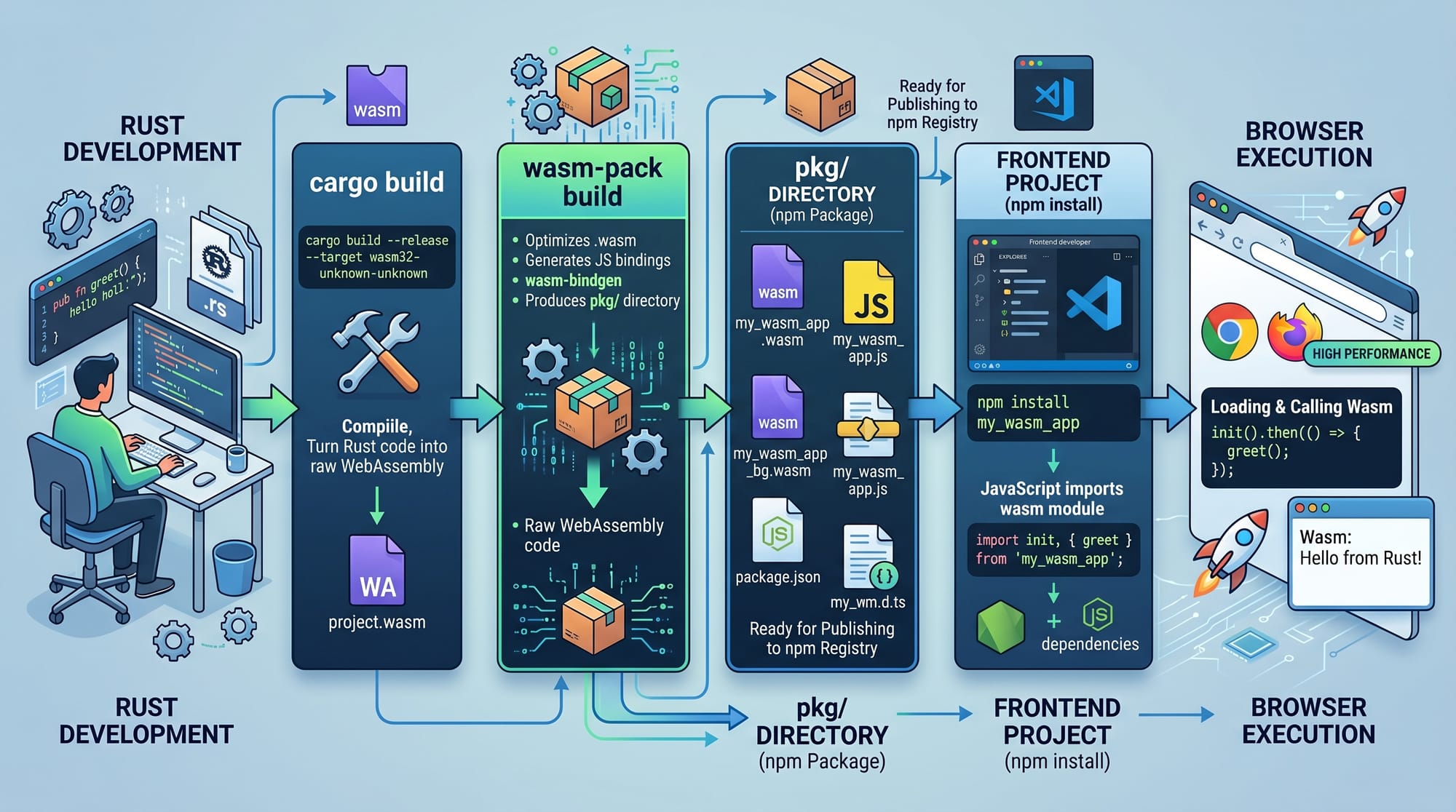
The Rust ecosystem provides excellent tooling for WebAssembly:
wasm-bindgen: Connects Rust and JavaScriptwasm-pack: Builds and packages Rust into npm modulesweb-sys: Allows Rust to interact with browser APIs
Example flow:
- Write Rust code
- Compile to WASM using
wasm-pack - Generate JavaScript bindings
- Import into frontend app
This workflow is what makes wasm web performance optimization practical in real applications.
Memory Safety and Performance Advantage
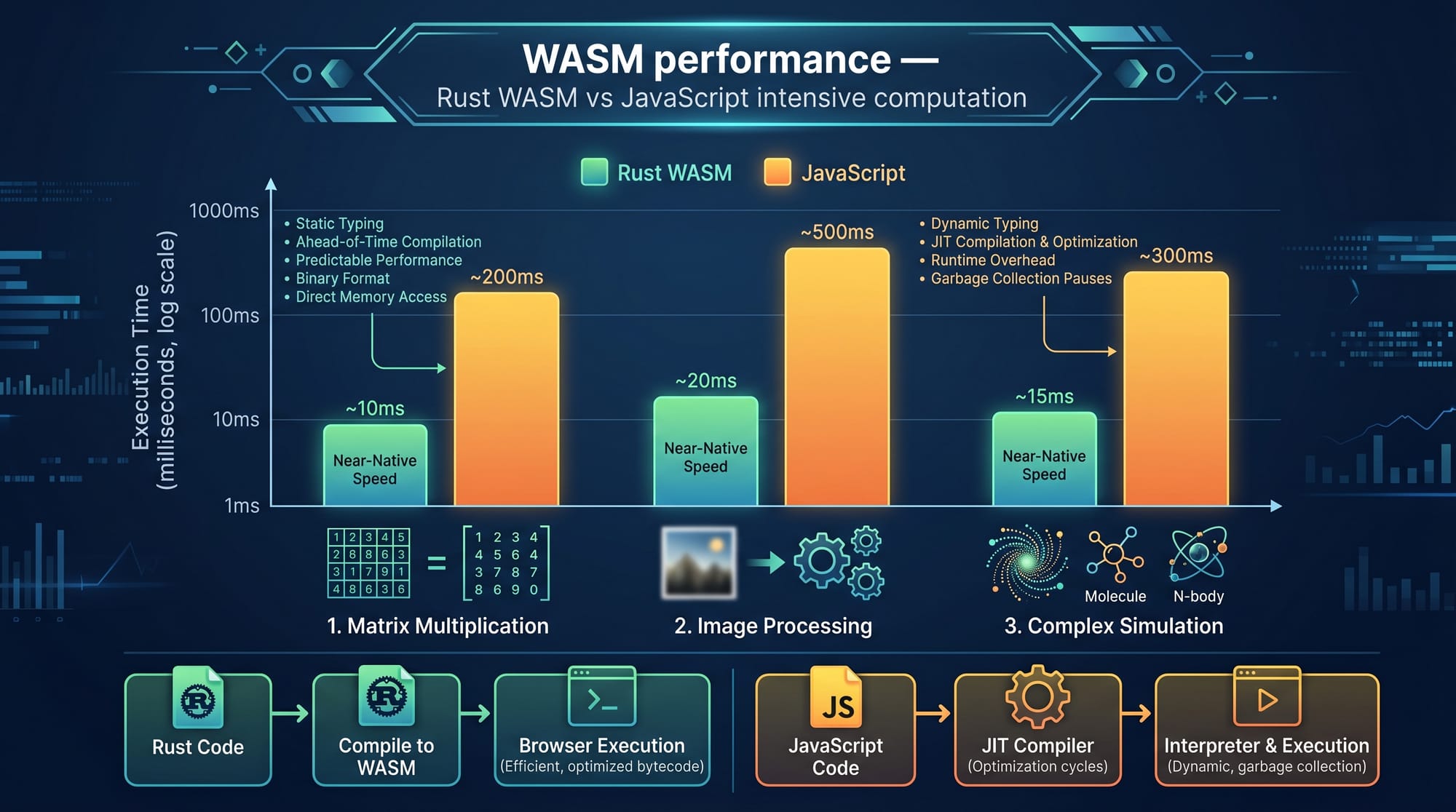
Rust ensures memory safety without garbage collection. This is a huge advantage over JavaScript.
Why it matters:
- No runtime garbage collection pauses
- Predictable performance
- Efficient CPU usage
For example, a heavy image processing task in Karachi-based startup app can run 3–10x faster using Rust WASM compared to pure JavaScript.
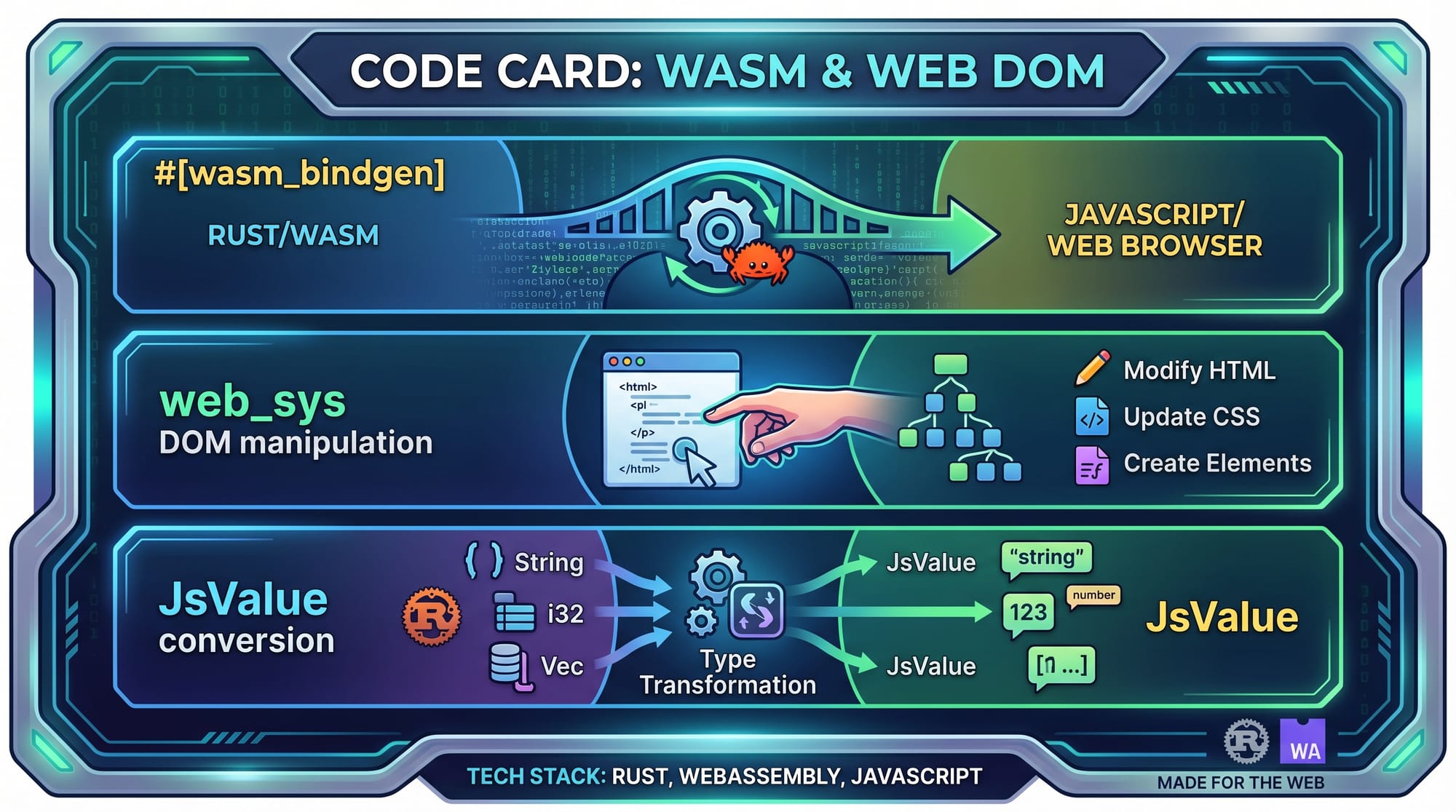
JavaScript ↔ WASM Communication
Rust and JavaScript communicate using:
wasm-bindgenJsValue- Shared memory buffers
Data must be converted between formats, which introduces overhead. Therefore, best practice is:
👉 Keep computation in Rust
👉 Keep UI logic in JavaScript
Practical Code Examples
Example 1: Basic Rust Function Compiled to WASM
// lib.rs

use wasm_bindgen::prelude::*;

// Expose function to JavaScript
#[wasm_bindgen]
pub fn add_numbers(a: i32, b: i32) -> i32 {
    a + b
}
Line-by-line explanation:
use wasm_bindgen::prelude::*;
Imports tools needed to connect Rust with JavaScript.#[wasm_bindgen]
Marks the function so it can be accessed from JavaScript.pub fn add_numbers(a: i32, b: i32) -> i32
Defines a public function that takes two integers and returns their sum.a + b
Performs fast native computation compiled into WebAssembly.
JavaScript Usage:
import init, { add_numbers } from "./pkg/rust_wasm_demo.js";

async function run() {
  await init();

  const result = add_numbers(10, 20);
  console.log("Result:", result);
}

run();
Explanation:
init()loads the WASM moduleadd_numbers(10, 20)calls Rust function- Output is logged in browser console
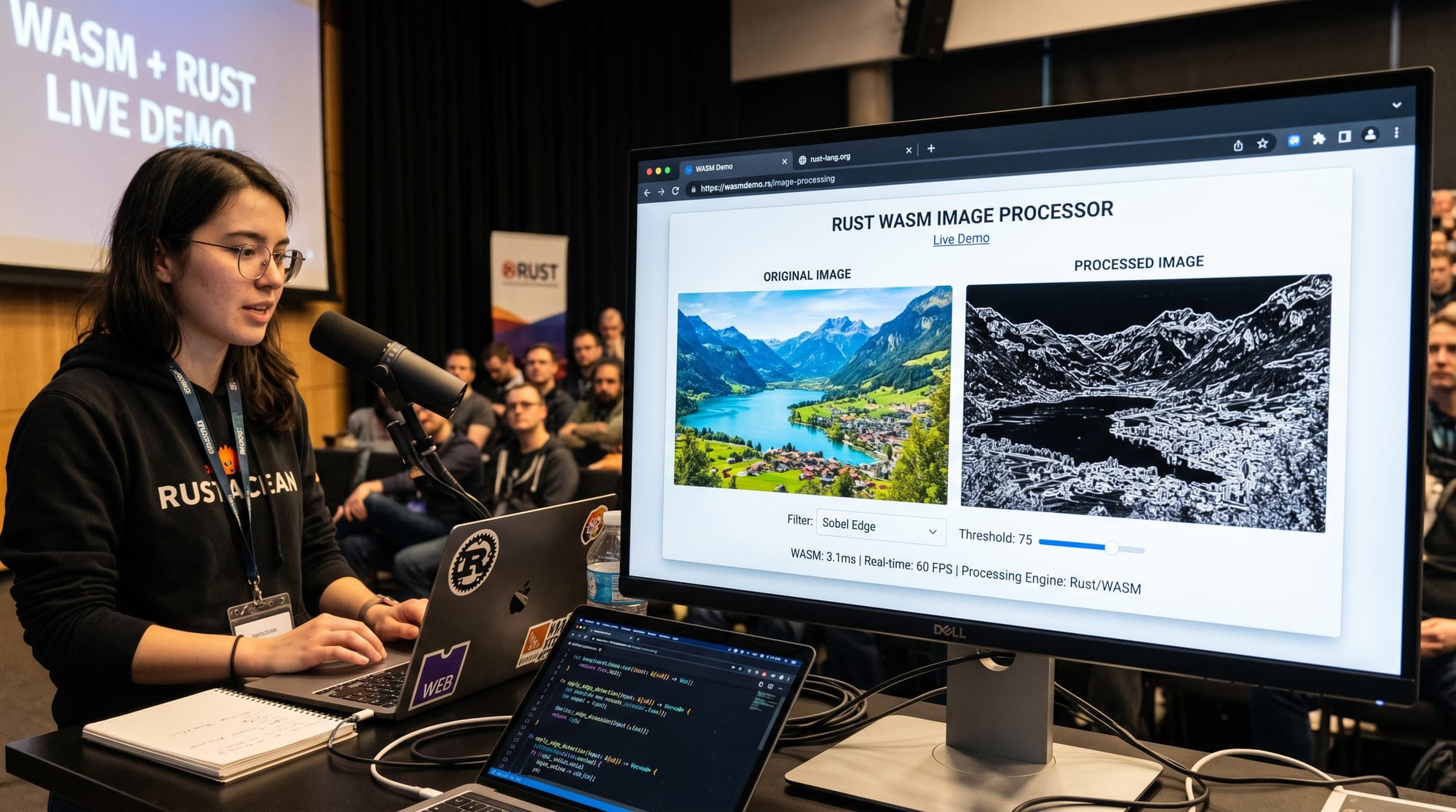
Example 2: Real-World Application — Image Brightness Filter
use wasm_bindgen::prelude::*;

#[wasm_bindgen]
pub fn adjust_brightness(pixels: &mut [u8], value: i16) {
    for i in (0..pixels.len()).step_by(4) {
        pixels[i] = (pixels[i] as i16 + value).clamp(0, 255) as u8;     // Red
        pixels[i + 1] = (pixels[i + 1] as i16 + value).clamp(0, 255) as u8; // Green
        pixels[i + 2] = (pixels[i + 2] as i16 + value).clamp(0, 255) as u8; // Blue
    }
}
Explanation line-by-line:
pixels: &mut [u8]
Mutable image pixel buffer from JavaScriptstep_by(4)
Skips RGBA channels (Red, Green, Blue, Alpha)clamp(0, 255)
Ensures valid pixel values- Each line modifies image brightness efficiently in WASM
JavaScript Integration:
const imgData = ctx.getImageData(0, 0, canvas.width, canvas.height);

adjust_brightness(imgData.data, 40);

ctx.putImageData(imgData, 0, 0);
This is a real-world use case where WASM significantly improves performance.
Common Mistakes & How to Avoid Them
Mistake 1: Overusing WASM for Simple Tasks
Many beginners assume everything should be written in Rust WASM.
Problem:
Using WASM for simple DOM updates slows performance due to communication overhead.
Fix:
Use WASM only for:
- Image processing
- Physics simulations
- Cryptography
- Data analysis
Keep UI logic in JavaScript.
Mistake 2: Poor Memory Transfer Between JS and WASM
Problem:
Frequent data exchange between JS and WASM slows down performance.
Fix:
- Use shared memory buffers
- Batch operations instead of per-item calls
- Minimize cross-boundary function calls
Practice Exercises
Exercise 1: Simple Calculator in WASM
Problem:
Create a Rust function that multiplies two numbers and expose it to JavaScript.
Solution:
#[wasm_bindgen]
pub fn multiply(a: i32, b: i32) -> i32 {
    a * b
}
JavaScript:
multiply(6, 7); // Output: 42
Exercise 2: Temperature Converter
Problem:
Convert Celsius to Fahrenheit using Rust WASM.
Solution:
#[wasm_bindgen]
pub fn celsius_to_fahrenheit(c: f64) -> f64 {
    (c * 9.0 / 5.0) + 32.0
}
JavaScript:
celsius_to_fahrenheit(30); // Output: 86
Frequently Asked Questions
What is WebAssembly in simple terms?
WebAssembly is a technology that allows high-performance code written in languages like Rust to run inside web browsers. It works alongside JavaScript to improve speed for heavy tasks.
Why should Pakistani students learn Rust WebAssembly?
Learning WASM gives students from Pakistan a competitive edge in global freelancing and remote jobs. It is highly demanded in performance-critical industries like fintech and gaming.
How does Rust improve web performance?
Rust compiles to native machine-like code via WebAssembly, eliminating JavaScript bottlenecks and garbage collection delays, resulting in faster execution.
Is WebAssembly replacing JavaScript?
No. WebAssembly complements JavaScript. JavaScript is still needed for UI and DOM manipulation, while WASM handles performance-heavy logic.
How do I start learning Rust WASM development?
Start with Rust basics, then install wasm-pack, and build small projects like calculators or image filters. You can follow the WebAssembly Tutorial on theiqra.edu.pk for structured learning.
Summary & Key Takeaways
- WebAssembly allows Rust code to run in browsers at near-native speed
- Rust provides memory safety and performance advantages over JavaScript
- WASM is best for heavy computation, not UI logic
- Communication between JS and WASM should be minimized for best performance
- Tools like
wasm-bindgenandwasm-packsimplify development - Pakistani students can leverage WASM skills for global job opportunities
Next Steps & Related Tutorials
To strengthen your understanding, continue learning from these tutorials on theiqra.edu.pk:
- Learn the fundamentals in [Rust Tutorial for Beginners]
- Understand browser execution in [WebAssembly Tutorial]
- Explore backend systems with [Advanced Systems Programming in Rust]
- Build real projects using [Full-Stack Rust Development Guide]
If you want, I can also convert this into a blog-ready HTML page for theiqra.edu.pk or generate a quiz + assignments based on this tutorial.
Test Your Python Knowledge!
Finished reading? Take a quick quiz to see how much you've learned from this tutorial.