Searching Algorithms Linear Search Binary Search & More
Introduction
Searching algorithms are methods used to find a specific element within a data structure such as an array or list. Whether you're looking for a student’s roll number, a product price in an online store, or a record in a database, searching is a fundamental operation in programming.
In this tutorial, “Searching Algorithms: Linear Search, Binary Search & More”, we’ll explore two of the most important searching algorithms: linear search and the binary search algorithm, along with a few additional techniques.
For Pakistani students learning Data Structures and Algorithms (DSA), mastering searching algorithms is essential. These concepts frequently appear in university exams, coding interviews, and real-world applications such as banking systems in Karachi or e-commerce platforms in Lahore.
Prerequisites
Before starting this tutorial, you should have:
- Basic understanding of programming (Python preferred)
- Knowledge of arrays or lists
- Familiarity with loops (
for,while) - Basic understanding of conditional statements (
if,else)
Core Concepts & Explanation
Linear Search: The Simplest Searching Technique
Linear search is the most basic searching algorithm. It checks each element one by one until the target is found or the list ends.
Example:
Suppose Ahmad is searching for his exam score in this list:
[45, 67, 89, 23, 90]
To find 23, the algorithm will:
- Check 45 ❌
- Check 67 ❌
- Check 89 ❌
- Check 23 ✅ (found)
Key Characteristics:
- Works on unsorted data
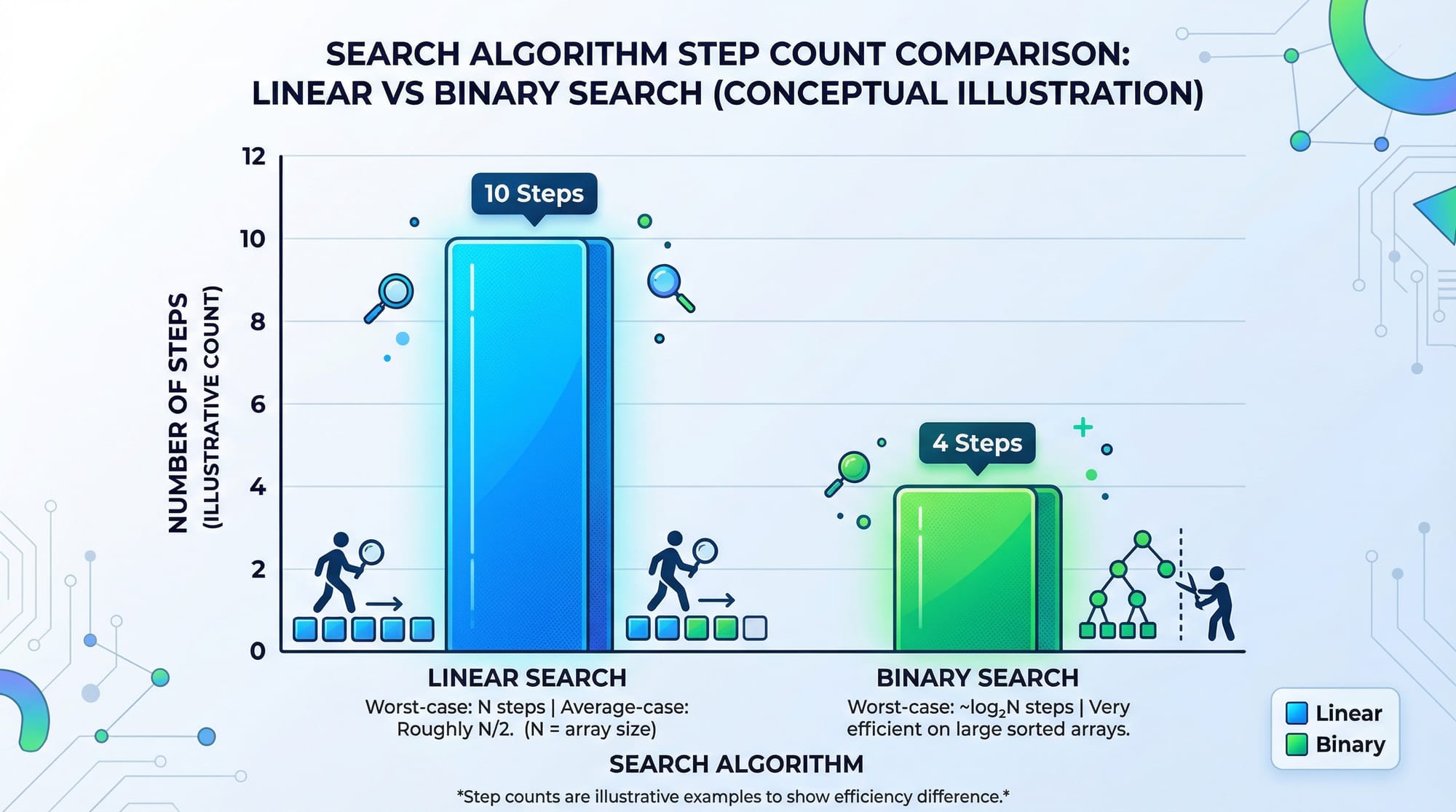
- Time Complexity: O(n)
- Simple but inefficient for large datasets
Binary Search Algorithm: Faster Searching on Sorted Data
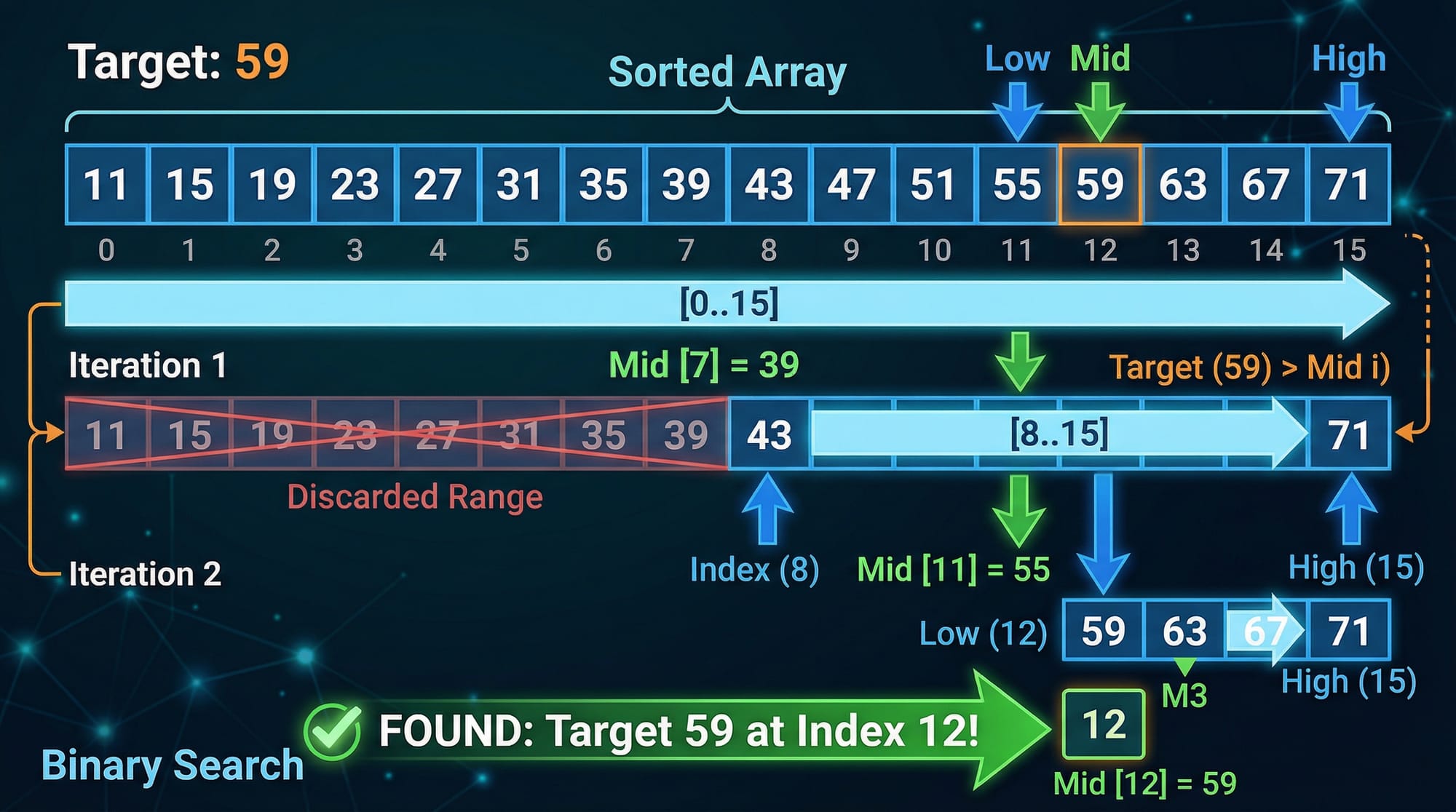
The binary search algorithm is much faster but requires the data to be sorted.
It works by repeatedly dividing the search space in half.
Example:
Fatima is searching for 50 in this sorted list:
[10, 20, 30, 40, 50, 60, 70]
Steps:
- Middle = 40 → 50 > 40 → search right half
- Middle = 60 → 50 < 60 → search left half
- Middle = 50 → Found ✅
Key Characteristics:
- Requires sorted array
- Time Complexity: O(log n)
- Much faster than linear search
Other Searching Algorithms (Brief Overview)
Jump Search
- Skips elements in blocks
- Faster than linear search
- Requires sorted data
Interpolation Search
- Estimates position based on value
- Works well for uniformly distributed data
Exponential Search
- Finds range first, then applies binary search
Practical Code Examples
Example 1: Linear Search in Python
def linear_search(arr, target):
    for i in range(len(arr)):
        if arr[i] == target:
            return i
    return -1

numbers = [10, 20, 30, 40, 50]
result = linear_search(numbers, 30)

print("Index:", result)
Line-by-line Explanation:
def linear_search(arr, target):→ Defines the functionfor i in range(len(arr)):→ Loop through each elementif arr[i] == target:→ Check if current element matches targetreturn i→ Return index if foundreturn -1→ Return -1 if not found- Function call and print display result
Example 2: Binary Search (Iterative)
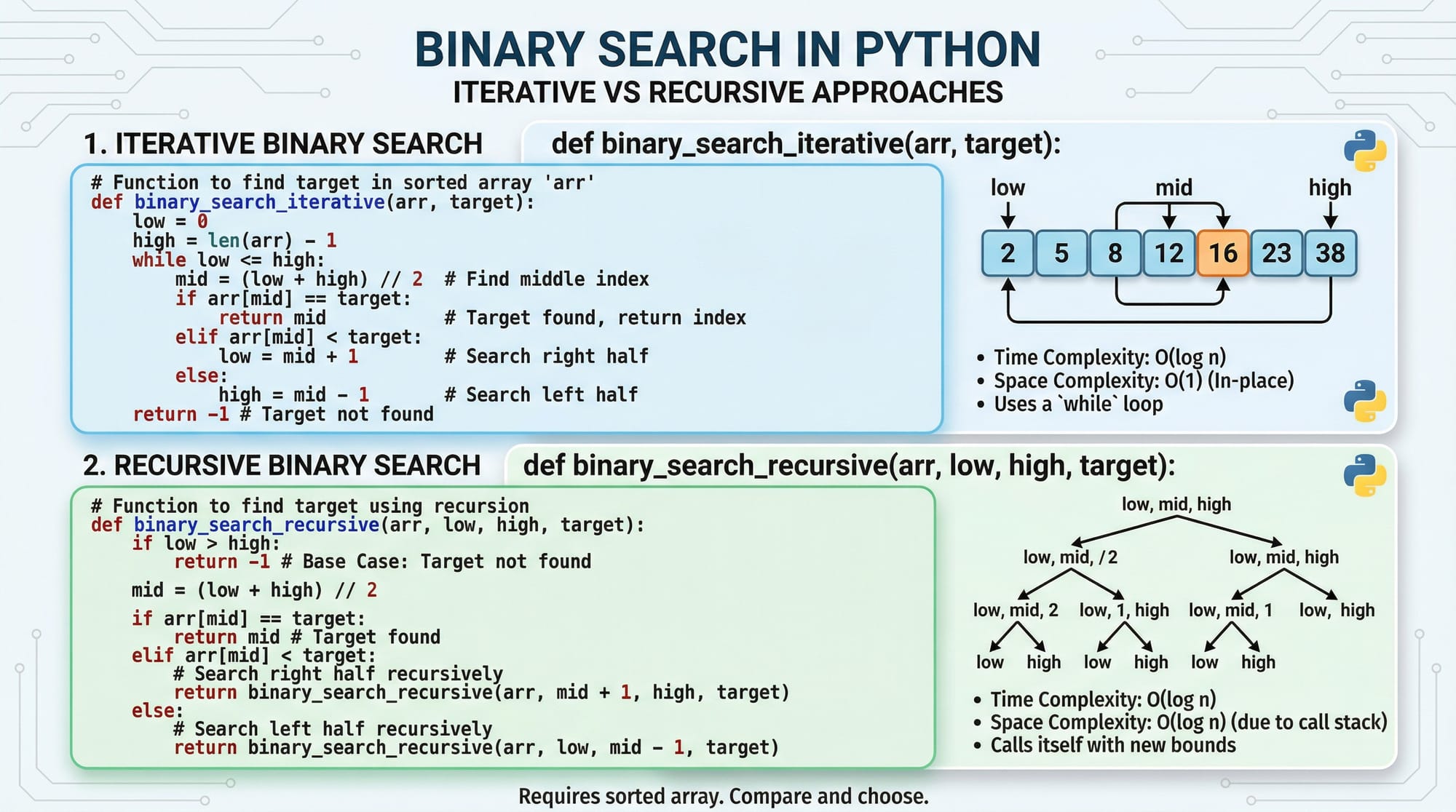
def binary_search(arr, target):
    left = 0
    right = len(arr) - 1

    while left <= right:
        mid = (left + right) // 2

        if arr[mid] == target:
            return mid
        elif arr[mid] < target:
            left = mid + 1
        else:
            right = mid - 1

    return -1

numbers = [10, 20, 30, 40, 50, 60]
result = binary_search(numbers, 50)

print("Index:", result)
Line-by-line Explanation:
left = 0→ Start of arrayright = len(arr) - 1→ End of arraywhile left <= right:→ Continue searchingmid = (left + right) // 2→ Find middle indexif arr[mid] == target:→ Check matchleft = mid + 1→ Move right if target largerright = mid - 1→ Move left if target smaller- Return -1 if not found
Example 3: Real-World Application (Student Record Search)
Ali is searching for a student's roll number in a sorted list:
def find_student(roll_numbers, target):
    left = 0
    right = len(roll_numbers) - 1

    while left <= right:
        mid = (left + right) // 2

        if roll_numbers[mid] == target:
            return "Student Found at index " + str(mid)
        elif roll_numbers[mid] < target:
            left = mid + 1
        else:
            right = mid - 1

    return "Student Not Found"

students = [101, 102, 103, 104, 105]
print(find_student(students, 104))
Explanation:
- Simulates searching in a university database
- Efficient for large student records
- Practical for systems used in Islamabad universities
Common Mistakes & How to Avoid Them
Mistake 1: Using Binary Search on Unsorted Data
Binary search only works on sorted arrays.
Wrong:
arr = [50, 10, 40, 20]
Fix:
arr = sorted(arr)
Always sort before applying binary search.
Mistake 2: Incorrect Mid Calculation
Some students write:
mid = left + right // 2
This is incorrect due to operator precedence.
Fix:
mid = (left + right) // 2
Mistake 3: Infinite Loop in Binary Search
If you forget to update left or right, the loop never ends.
Fix:
Always adjust bounds:
left = mid + 1
right = mid - 1
Practice Exercises
Exercise 1: Find a Number Using Linear Search
Problem:
Find the index of 25 in [5, 10, 15, 20, 25]
Solution:
arr = [5, 10, 15, 20, 25]

for i in range(len(arr)):
    if arr[i] == 25:
        print(i)
Exercise 2: Binary Search Implementation
Problem:
Search for 70 in a sorted array.
Solution:
arr = [10, 20, 30, 40, 50, 60, 70]

left = 0
right = len(arr) - 1

while left <= right:
    mid = (left + right) // 2

    if arr[mid] == 70:
        print("Found at", mid)
        break
    elif arr[mid] < 70:
        left = mid + 1
    else:
        right = mid - 1
Frequently Asked Questions
What is a searching algorithm?
A searching algorithm is a method used to find a specific element in a data structure. Examples include linear search and binary search.
How do I choose between linear and binary search?
Use linear search for small or unsorted data. Use binary search when the data is sorted and large.
Why is binary search faster?
Binary search reduces the search space by half each time, making it much faster than checking every element.
Can binary search work on unsorted arrays?
No, binary search requires the array to be sorted before it can be applied.
Where are searching algorithms used in real life?
They are used in databases, search engines, banking systems, and e-commerce platforms across Pakistan.
Summary & Key Takeaways
- Searching algorithms help find data efficiently
- Linear search is simple but slow (O(n))
- Binary search is fast but requires sorted data (O(log n))
- Always verify conditions before choosing an algorithm
- Avoid common mistakes like unsorted input or incorrect mid calculation
- These concepts are crucial for coding interviews and exams
Next Steps & Related Tutorials
To continue your DSA journey on theiqra.edu.pk, explore:
- Learn more about sorting techniques in our guide on Sorting Algorithms
- Understand complete fundamentals in DSA Tutorial for Beginners
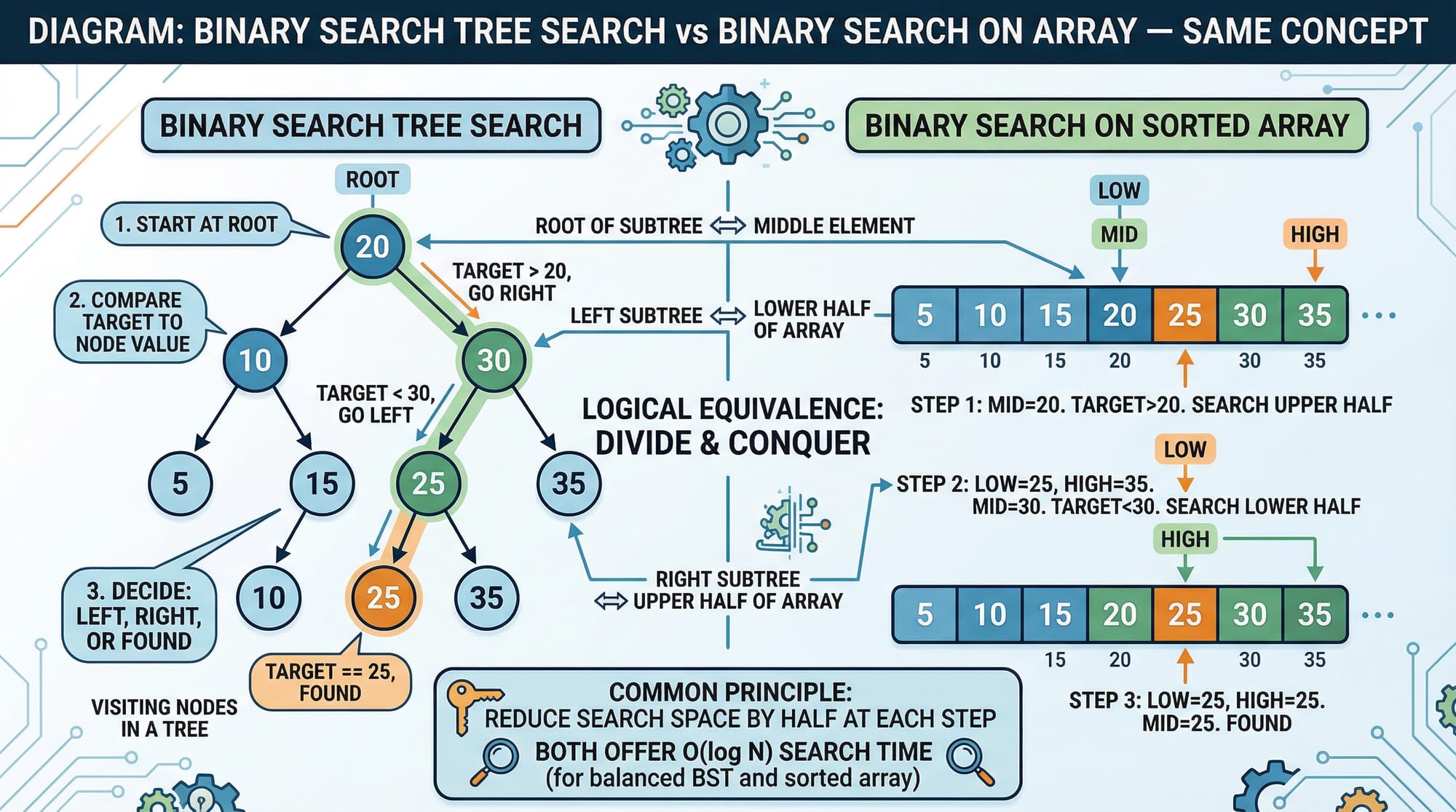
- Dive deeper into data structures like arrays and trees
- Practice problems regularly to strengthen your concepts
Keep practicing, and soon you’ll be solving real-world problems like a pro 🚀
Test Your Python Knowledge!
Finished reading? Take a quick quiz to see how much you've learned from this tutorial.