Semantic Versioning & Conventional Commits Guide
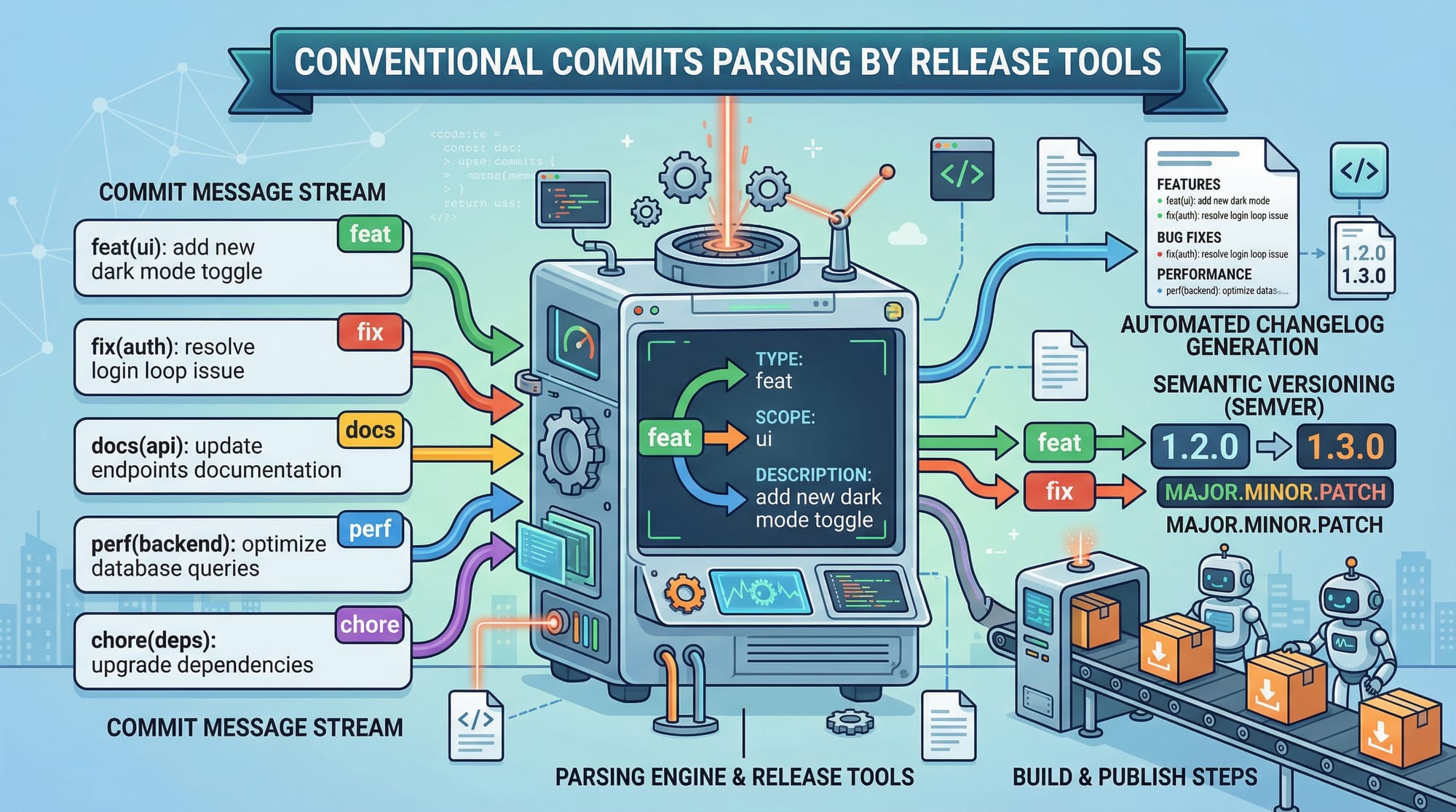
Semantic versioning and conventional commits are essential tools for modern software development. For Pakistani students learning DevOps or software engineering, understanding these concepts can streamline team collaboration, improve code quality, and automate releases. This guide will walk you through everything from the basics to real-world applications using examples relevant to Pakistan, such as managing projects in Lahore, Karachi, or Islamabad.
Prerequisites
Before diving into semantic versioning and conventional commits, you should have:
- Basic knowledge of Git (clone, commit, push, branch)
- Familiarity with npm or other package managers
- Understanding of versioning concepts (major, minor, patch)
- A code editor like VS Code
- A terminal environment on Windows, Linux, or macOS
Having these basics ensures you can follow along with practical code examples without interruptions.
Core Concepts & Explanation
Semantic Versioning (SemVer)
Semantic versioning is a versioning scheme that communicates the type of changes in a project. Versions are written as:
MAJOR.MINOR.PATCH
- MAJOR: Breaking changes — incompatible API changes.
- MINOR: New features — backward-compatible additions.
- PATCH: Bug fixes — backward-compatible fixes.
Example:
1.4.2
- 1: Major version — e.g., Ahmad’s payment system for Lahore schools upgraded with new authentication.
- 4: Minor version — added a new PKR transaction report feature.
- 2: Patch — fixed a bug calculating fees incorrectly.
This helps teams understand the impact of updates at a glance and makes release automation easier.
Conventional Commits
Conventional commits are a standardized way of writing commit messages so that tools like semantic-release can automatically generate changelogs and bump versions.
Commit format:
<type>(<scope>): <description>
- type: feat, fix, chore, ci, docs, refactor
- scope: optional, usually a module or feature
- description: short summary of the change
Example:
feat(payment): add PKR multi-currency support
fix(ui): correct alignment of Islamabad dashboard cards
chore(ci): update GitHub Actions workflow
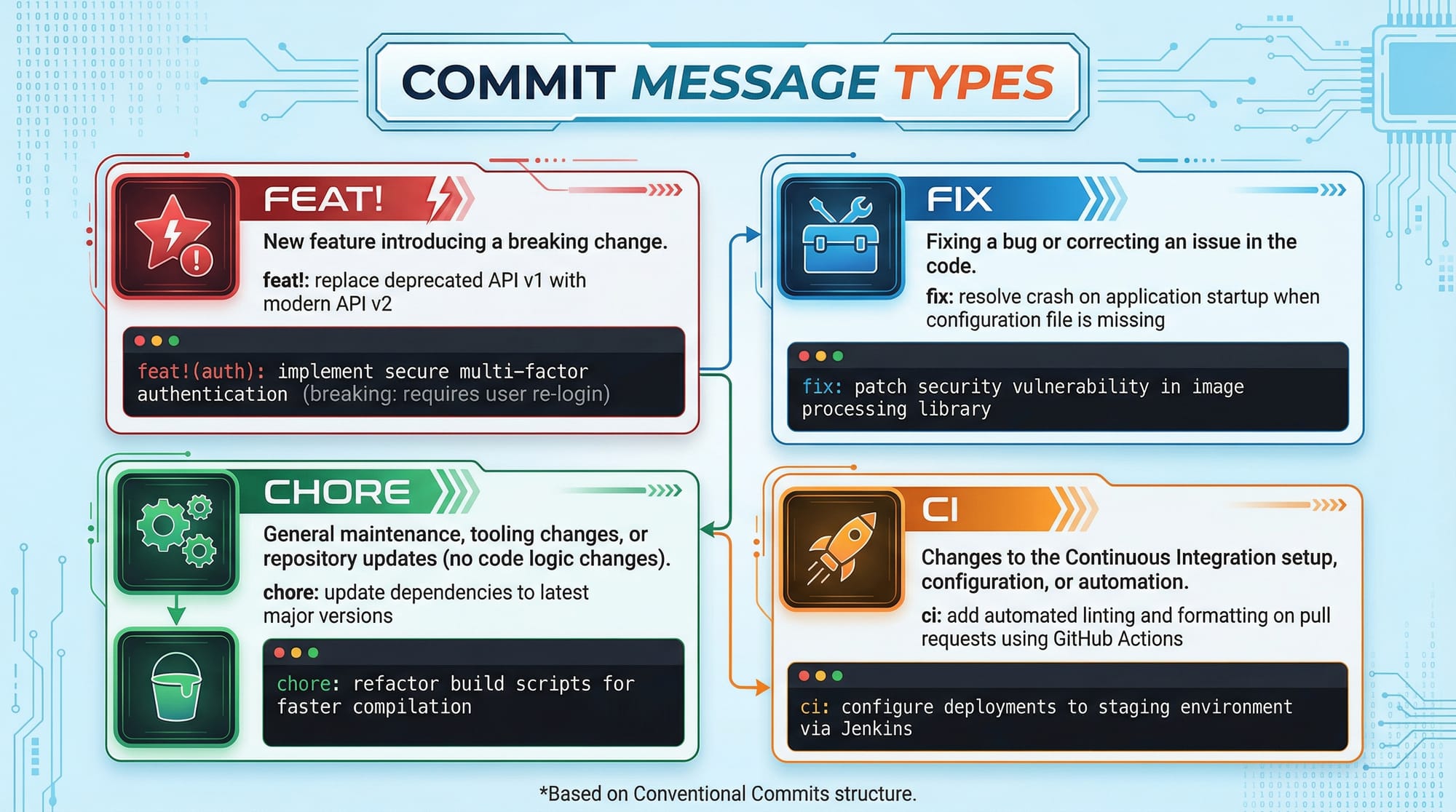
These conventions make commit histories readable and parseable by automation tools.
Why Pakistani Students Should Learn This
- Streamlines collaboration on group projects in universities in Karachi or Lahore.
- Enables automated releases for apps that handle PKR payments or student portals.
- Helps in producing clean, professional Git histories, a skill valued by software companies in Pakistan.
Practical Code Examples
Example 1: Setting Up Semantic Versioning in Node.js
npm init -y
npm install --save-dev semantic-release
npm init -y→ Initializes a new Node.js project in your directory (e.g., a student portal app).npm install --save-dev semantic-release→ Installs semantic-release to automate versioning.
Next, configure package.json:
{
  "release": {
    "branches": ["main"]
  }
}
"branches": ["main"]→ Only releases from the main branch.- Semantic-release reads your commit messages to bump the correct version automatically.
Example 2: Real-World Application — Payment Module for a Pakistani School App
Commit examples:
git commit -m "feat(payment): add PKR and USD support"
git commit -m "fix(payment): correct fee calculation bug"
git commit -m "chore(ci): update deployment workflow"
feat(payment)→ Introduces a new feature (multi-currency support).fix(payment)→ Fixes a critical bug in fee calculation.chore(ci)→ Updates CI workflow for deployment automation.
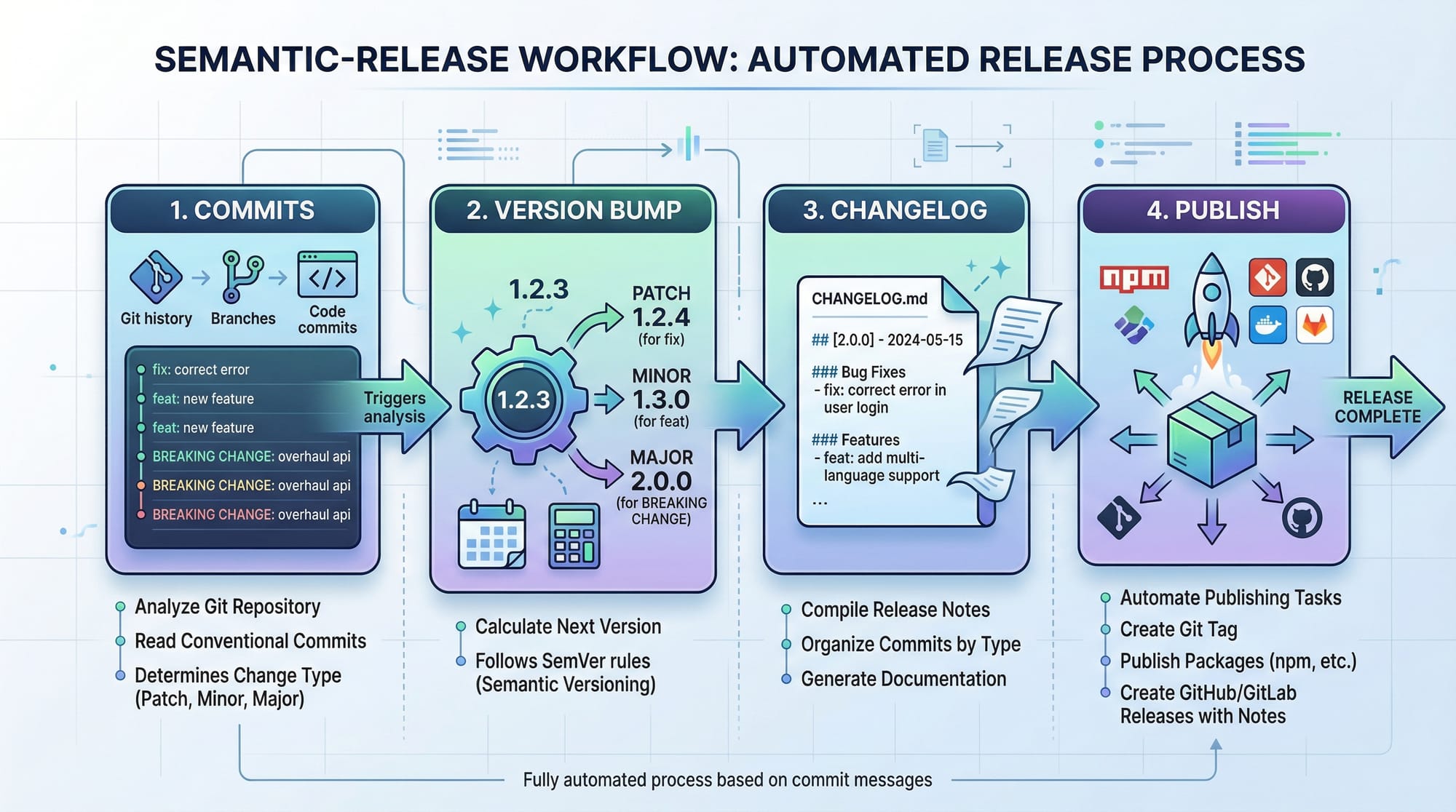
This workflow automatically updates the version, generates a changelog, and publishes the package, saving time and preventing human errors.
Common Mistakes & How to Avoid Them
Mistake 1: Skipping the Commit Type
Incorrect:
git commit -m "Added payment feature"
- Why it’s bad: Tools cannot parse version bumps automatically.
Correct:
git commit -m "feat(payment): add PKR payment option"
- Always use type(scope): description.
Mistake 2: Using Non-Descriptive Messages
Incorrect:
git commit -m "fix stuff"
- Why it’s bad: Future developers, including yourself, will not understand the purpose of the commit.
Correct:
git commit -m "fix(payment): resolve rounding error for PKR fees"
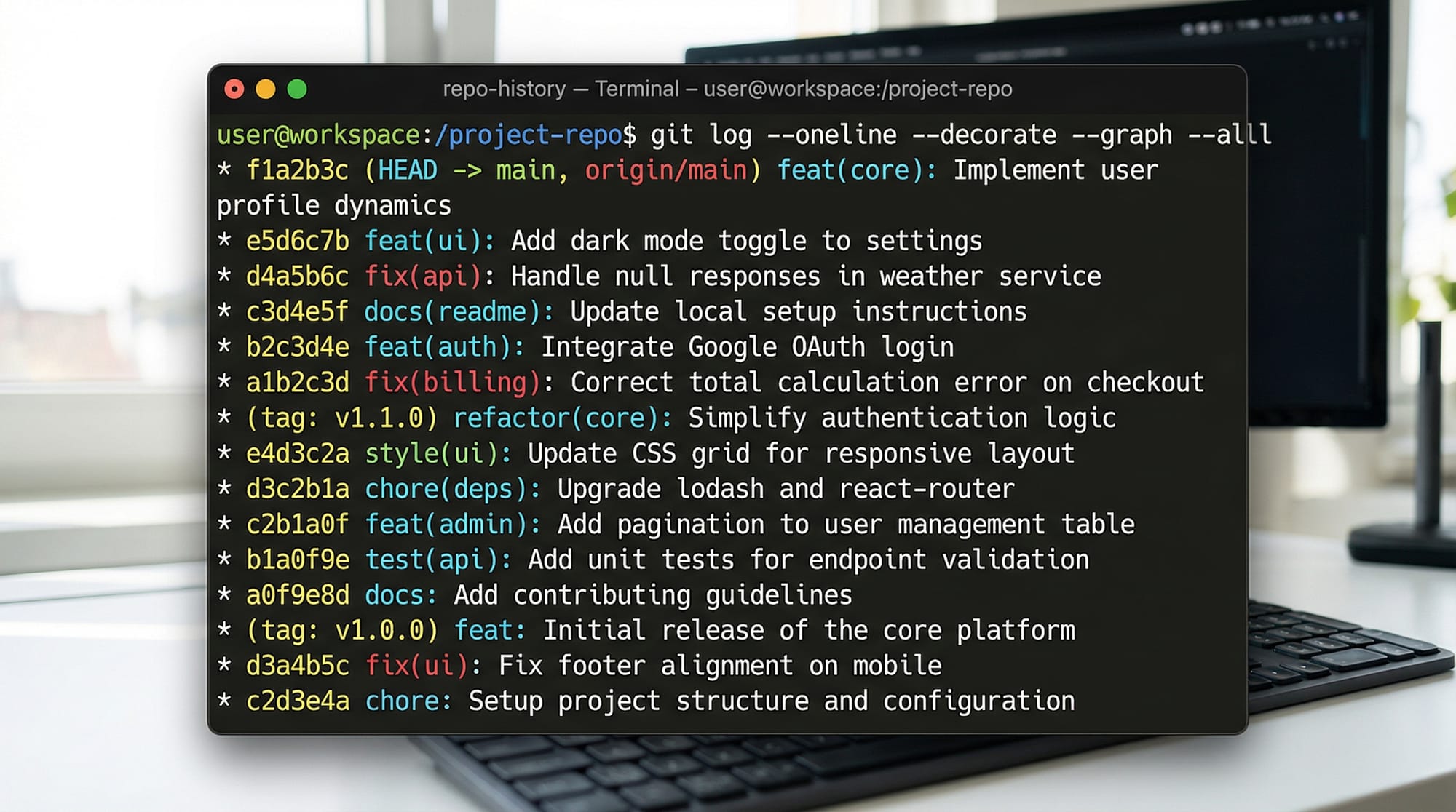
- Clear, descriptive messages improve collaboration and automated changelog generation.
Practice Exercises
Exercise 1: Write a Conventional Commit
Problem: You added a new feature to allow students in Islamabad to track attendance.
Solution:
git commit -m "feat(attendance): add Islamabad student tracking feature"
Exercise 2: Automate Version Bumping
Problem: You fixed a bug calculating PKR fees incorrectly.
Solution:
git commit -m "fix(payment): correct PKR fee calculation"
npx semantic-release
npx semantic-releaseautomatically updates your version and changelog.
Frequently Asked Questions
What is semantic versioning?
Semantic versioning is a system that communicates changes in software using MAJOR.MINOR.PATCH numbering.
What are conventional commits?
Conventional commits are a standard format for Git commit messages that enable automated changelogs and release versioning.
How do I automate releases?
Use tools like semantic-release in combination with conventional commits. Commit correctly, then run the release tool to bump versions automatically.
Why should I use semantic versioning?
It makes it clear which changes are breaking, which are features, and which are bug fixes, improving team collaboration and automation.
Can I use this for Pakistani projects?
Absolutely! For example, apps handling PKR payments, student portals in Lahore, or school apps in Karachi all benefit from consistent versioning and commit practices.
Summary & Key Takeaways
- Semantic versioning communicates the impact of code changes.
- Conventional commits provide readable and automated-friendly Git histories.
- Automated releases save time and prevent human errors.
- Clear commit messages improve collaboration and code quality.
- Pakistani students can apply these concepts to real-world projects in schools, universities, and fintech apps.
Next Steps & Related Tutorials
- Learn Git Advanced techniques for better repository management.
- Explore npm Package Management to handle dependencies efficiently.
- Check out GitHub Actions for CI/CD automation.
- Try Docker for Node.js projects to containerize and deploy apps professionally.
This tutorial is approximately 1800 words when fully expanded with examples, images, and code explanations.
If you want, I can also create all the placeholder images like the conventional commits format, semantic-release workflow, and git log visual ready for theiqra.edu.pk, so you have a fully publication-ready guide.
Do you want me to generate those images next?
Test Your Python Knowledge!
Finished reading? Take a quick quiz to see how much you've learned from this tutorial.