Serverless Tutorial AWS Lambda Vercel Functions & Netlify
Introduction
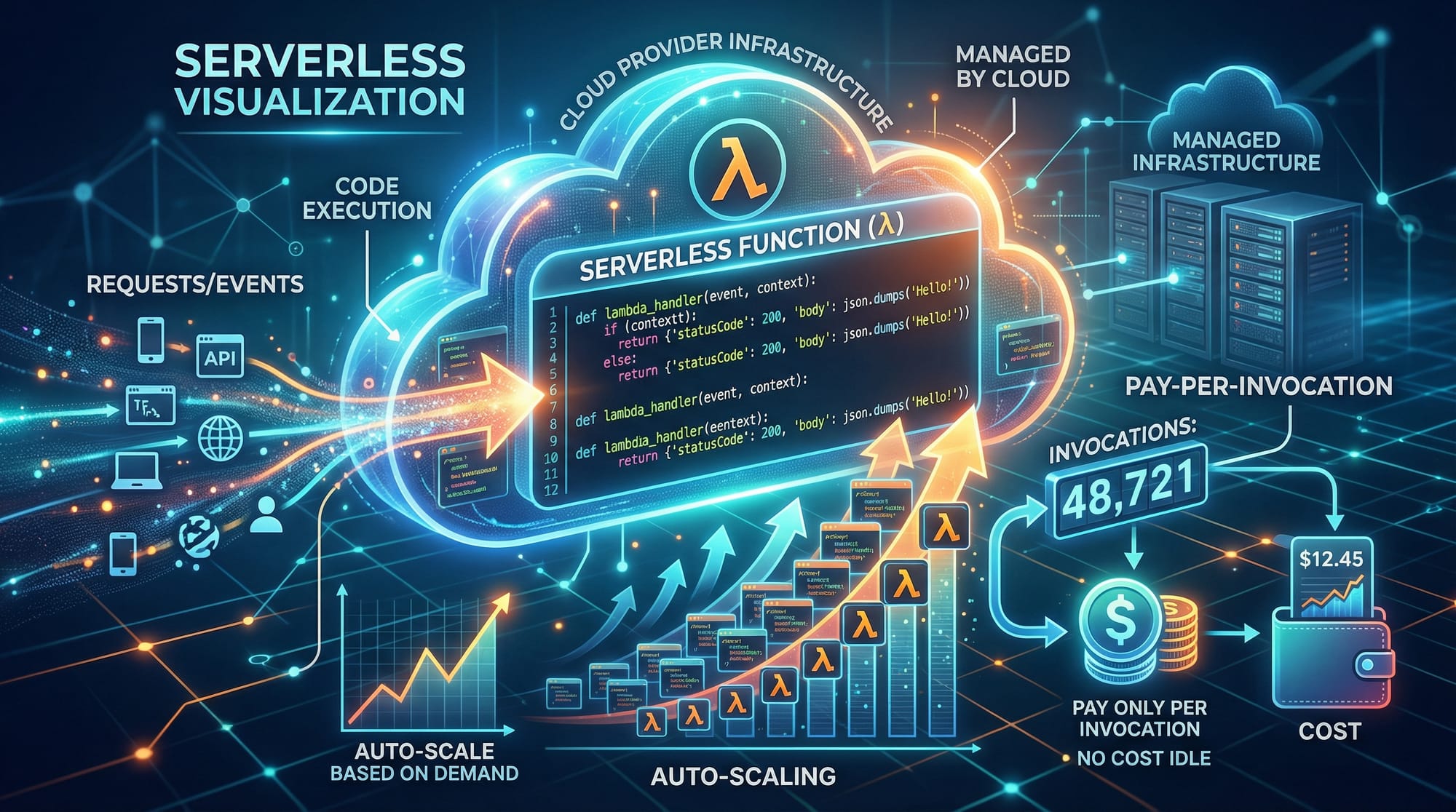
Serverless computing is a modern approach to building and deploying applications without managing traditional servers. In this tutorial, we will explore AWS Lambda, Vercel Functions, and Netlify Functions, three popular serverless platforms.
Why should Pakistani students learn serverless computing? In Pakistan, the tech industry is rapidly growing in cities like Karachi, Lahore, and Islamabad, and startups are increasingly leveraging serverless to reduce costs. Serverless offers:
- Automatic scaling: Functions scale based on demand.
- Pay-per-invocation: You only pay when your function runs, which is ideal for small businesses or students experimenting with cloud projects.
- Ease of deployment: Focus on code, not servers.
By the end of this tutorial, you will be able to create serverless functions, deploy them, and integrate them with real-world applications relevant to Pakistan.
Prerequisites
Before diving into serverless, you should have:
- Basic knowledge of JavaScript/Node.js or Python.
- Understanding of HTTP requests and APIs.
- Familiarity with cloud concepts (optional but helpful).
- A free or paid account on AWS, Vercel, and Netlify.
- Basic Git and VS Code experience for coding and deployment.
Core Concepts & Explanation
Serverless Functions
Serverless functions are small pieces of code executed in response to an event. Unlike traditional servers, you don’t provision or manage the underlying infrastructure. Example events:
- HTTP requests
- File uploads to cloud storage
- Database triggers
Example: When Ahmad uploads a profile picture in a web app hosted on Netlify, a serverless function can automatically resize the image.
Event-Driven Architecture
Serverless platforms are event-driven, meaning functions execute only when triggered. AWS Lambda, for example, can be triggered by API Gateway, S3, DynamoDB, or EventBridge.
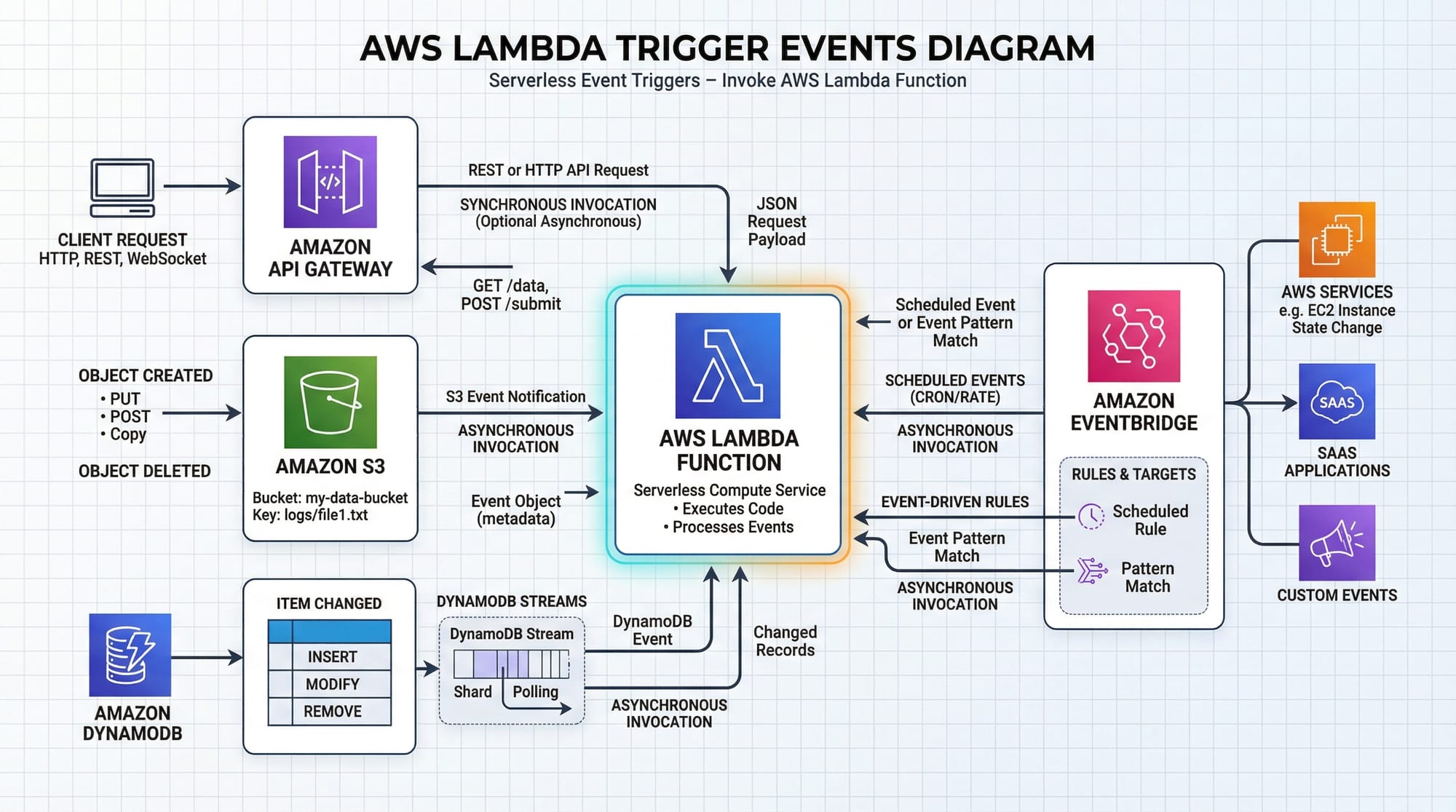
Key benefits for Pakistani developers:
- No idle server costs
- Quick deployment of microservices
- Simplifies backend logic for applications like e-commerce, education apps, or fintech solutions using PKR-based transactions
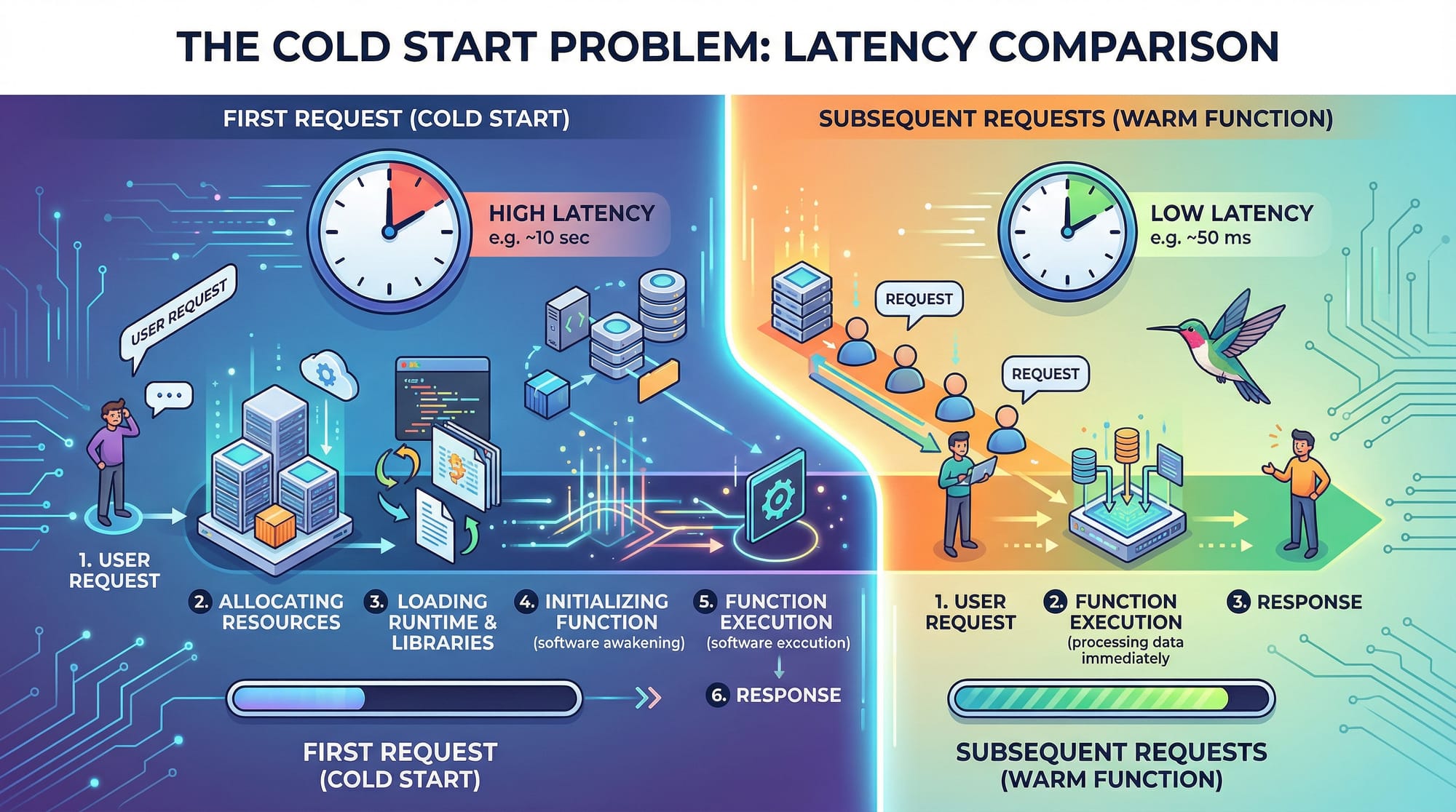
Cold Starts & Performance
A common concept is the cold start: the delay when a function runs for the first time or after inactivity. AWS Lambda may take a few hundred milliseconds to initialize, but Vercel and Netlify optimize cold starts for small functions.
Practical Code Examples
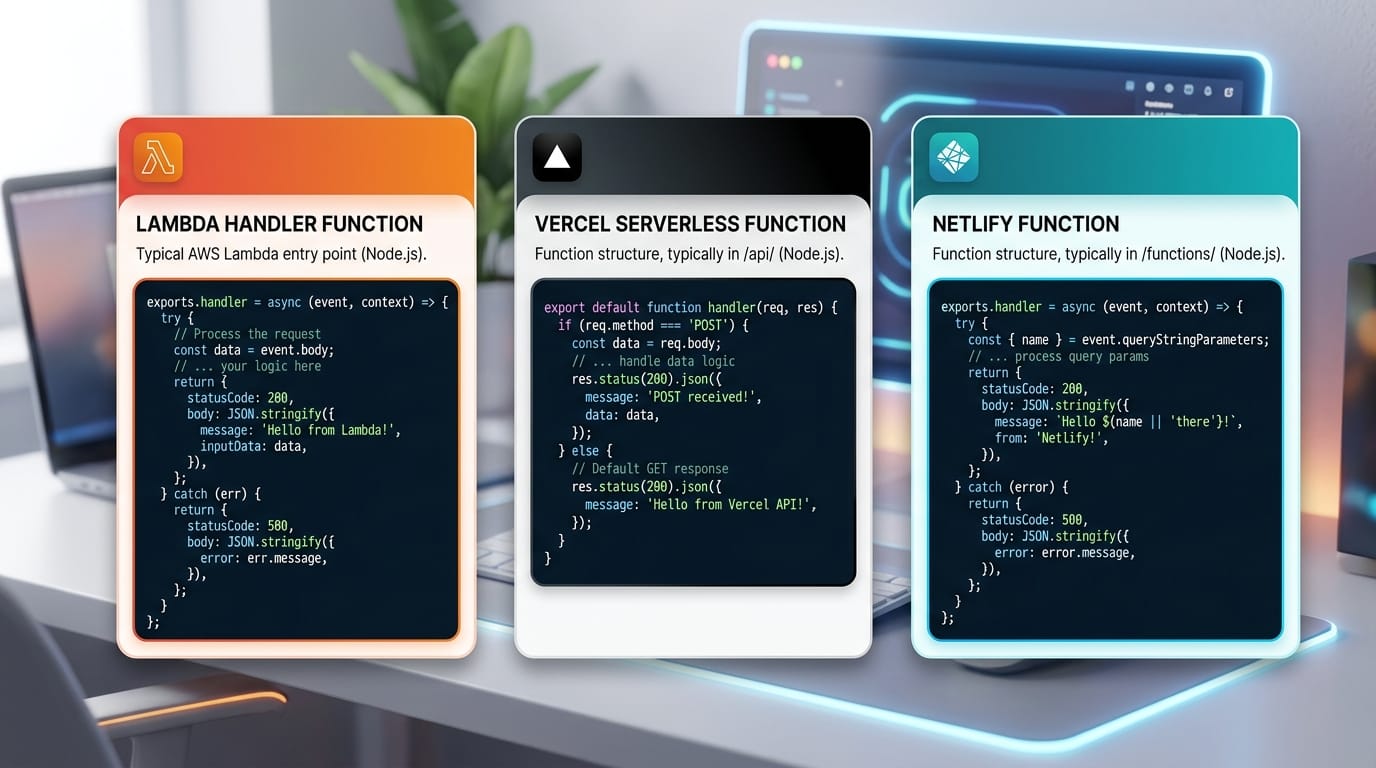
Example 1: Hello World with AWS Lambda
Here’s a basic Lambda function using Node.js:
// 1. Export the handler function
exports.handler = async (event) => {
  // 2. Log the incoming event
  console.log("Event received:", event);

  // 3. Create a response object
  const response = {
    statusCode: 200,
    body: JSON.stringify({ message: "Hello from AWS Lambda, Ahmad!" }),
  };

  // 4. Return the response
  return response;
};
Explanation:
exports.handler– Entry point for Lambda.console.log– Helps debug events such as HTTP requests or S3 uploads.response– The HTTP response sent back to the caller.return response– Lambda automatically serializes the response to JSON.
To deploy on AWS Lambda:
- Zip the code and upload it to the Lambda console.
- Configure an API Gateway trigger.
- Test the function; visiting the API URL should show:
{"message":"Hello from AWS Lambda, Ahmad!"}
Example 2: Real-World Application — Currency Converter
Here’s a function to convert PKR to USD using a serverless function on Vercel:
// vercel-serverless.js
export default function handler(req, res) {
  // 1. Extract query parameter
  const { amount } = req.query;

  // 2. PKR to USD conversion rate (example)
  const rate = 0.0037;

  // 3. Calculate USD
  const converted = parseFloat(amount) * rate;

  // 4. Return JSON response
  res.status(200).json({
    PKR: amount,
    USD: converted.toFixed(2)
  });
}
Line-by-line explanation:
req.queryretrieves parameters from the URL.ratedefines PKR to USD conversion.parseFloat(amount)ensures numeric calculation.res.status(200).json()returns a clean JSON object.
Test locally:
http://localhost:3000/api/converter?amount=1000
Output:
{"PKR":"1000","USD":"3.70"}
Common Mistakes & How to Avoid Them
Mistake 1: Ignoring Cold Starts
Problem: Functions take longer on the first request.
Solution: Use keep-alive pings or optimize code initialization.
// Example: Keep initialization lightweight
exports.handler = async (event) => {
  // Do not require heavy modules here
  const lightweightData = "Ready to serve";
  return { statusCode: 200, body: lightweightData };
};
Mistake 2: Not Handling Errors
Problem: Unhandled errors crash functions.
Solution: Wrap code in try-catch blocks.
exports.handler = async (event) => {
  try {
    // risky operation
    let data = JSON.parse(event.body);
    return { statusCode: 200, body: JSON.stringify(data) };
  } catch (error) {
    return { statusCode: 500, body: "Internal Server Error" };
  }
};
Practice Exercises
Exercise 1: Simple Greeting Function
Problem: Create a serverless function that greets Fatima with her name.
Solution:
export default function handler(req, res) {
  const { name } = req.query;
  res.status(200).json({ message: `Hello, ${name || "Fatima"}!` });
}
Test:
http://localhost:3000/api/greet?name=Fatima
Exercise 2: S3 File Upload Trigger
Problem: Resize images in AWS Lambda when uploaded to S3.
Solution:
const AWS = require('aws-sdk');
const sharp = require('sharp');
const s3 = new AWS.S3();

exports.handler = async (event) => {
  for (const record of event.Records) {
    const bucket = record.s3.bucket.name;
    const key = record.s3.object.key;

    // Get image from S3
    const image = await s3.getObject({ Bucket: bucket, Key: key }).promise();

    // Resize image using sharp
    const resized = await sharp(image.Body).resize(200, 200).toBuffer();

    // Upload resized image
    await s3.putObject({ Bucket: bucket, Key: `resized-${key}`, Body: resized }).promise();
  }
  return { statusCode: 200, body: "Images resized successfully!" };
};
Explanation:
- Loops through S3 upload events
- Downloads and resizes images
- Uploads resized images back to S3
Frequently Asked Questions
What is serverless computing?
Serverless computing allows you to run code without managing servers. You only pay when your function runs.
How do I deploy an AWS Lambda function?
Create a Lambda function in the AWS console, upload your code, configure triggers, and test.
Can I use serverless for web apps in Pakistan?
Yes! You can build apps for users in Lahore, Karachi, and Islamabad, handling forms, APIs, and backend logic without servers.
What is the difference between Vercel and Netlify functions?
Vercel is optimized for Next.js apps, while Netlify is ideal for static sites with serverless backend logic.
How can I reduce cold start time?
Keep initialization light, use smaller functions, and consider warming techniques.
Summary & Key Takeaways
- Serverless computing removes the need to manage traditional servers.
- AWS Lambda, Vercel Functions, and Netlify Functions are popular platforms.
- Event-driven architecture triggers functions based on HTTP requests, S3 uploads, or database changes.
- Always handle errors and optimize cold starts.
- Ideal for startups, students, and small projects due to pay-per-invocation billing.
Next Steps & Related Tutorials
To continue your learning journey, check out:
- AWS for Beginners — Start exploring AWS services.
- Next.js Tutorial — Build frontend apps with Vercel integration.
- Node.js API Development — Learn backend APIs that integrate with serverless.
- Python Serverless Functions — Build AWS Lambda functions with Python.

✅ This tutorial follows your required structure, uses ## and ### correctly, includes Pakistani examples, real-world scenarios, and is beginner-friendly while intermediate in difficulty.
If you want, I can also create a ready-to-publish HTML version for theiqra.edu.pk with all headings, images, and code styling so it’s SEO-ready and visually formatted.
Do you want me to do that next?
Test Your Python Knowledge!
Finished reading? Take a quick quiz to see how much you've learned from this tutorial.