SQL Common Table Expressions CTEs Recursive & Non Recursive
Introduction
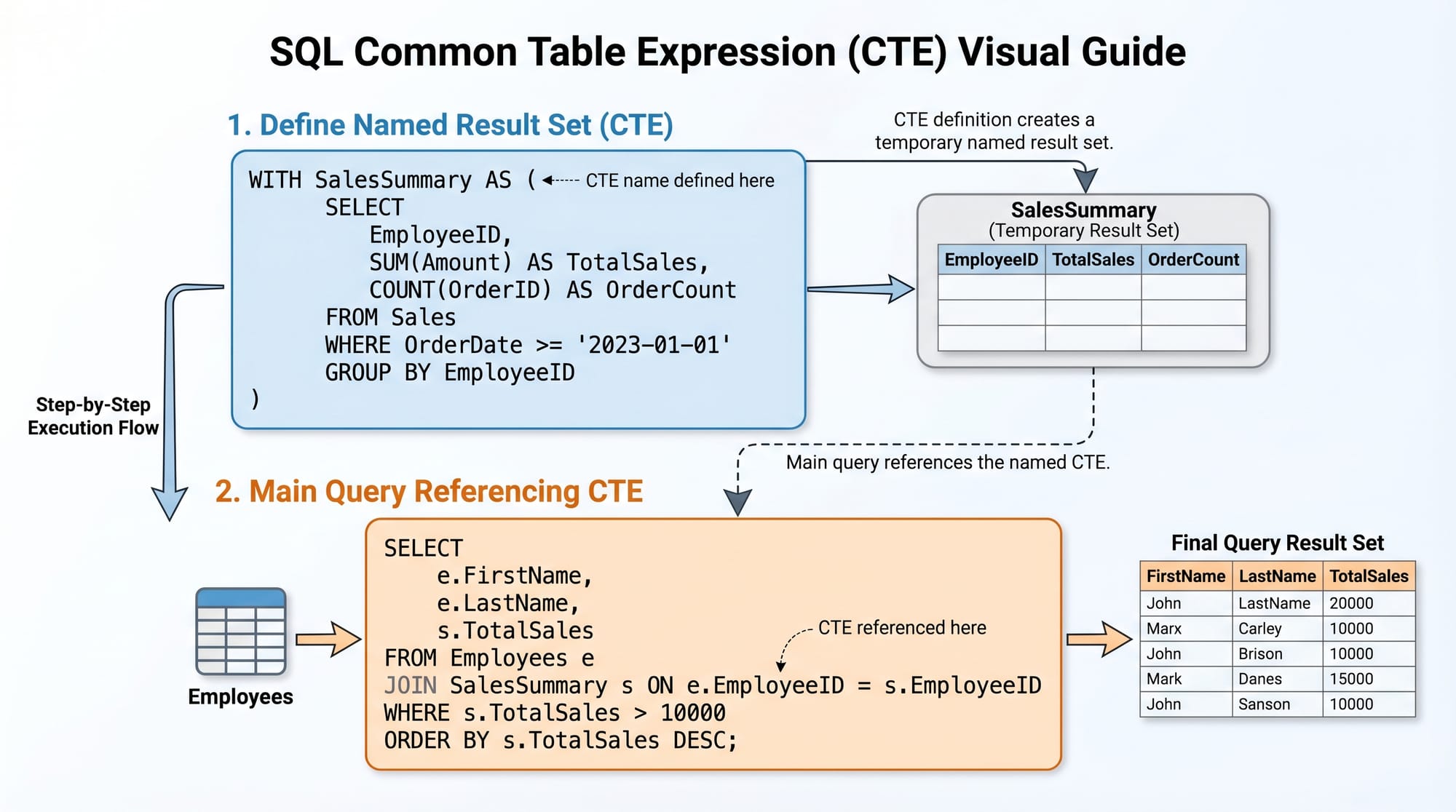
SQL Common Table Expressions (CTEs) are one of the most powerful features in modern SQL used to write cleaner, more readable, and modular queries. A CTE allows you to create a temporary named result set that you can reference within a SELECT, INSERT, UPDATE, or DELETE statement.
CTEs come in two types:
- Non-Recursive CTE (simple CTE used for readability and simplification)
- Recursive CTE (used for hierarchical or repetitive data processing)
For Pakistani students learning SQL for internships, freelancing, or jobs in companies in Lahore, Karachi, and Islamabad, mastering sql cte tutorial, recursive cte, and common table expressions sql is essential because many real-world systems like HR portals, banking software, and e-commerce platforms use hierarchical queries.
Prerequisites
Before learning SQL Common Table Expressions, students should be familiar with:
- Basic SQL
SELECTstatements WHERE,GROUP BY, andORDER BY- Basic understanding of database tables and relationships
- Joins (INNER JOIN, LEFT JOIN)
- Primary and foreign keys
If you already understand these concepts, you are ready to learn CTEs.
Core Concepts & Explanation
What is a Common Table Expression (CTE)?
A CTE is defined using the WITH keyword and acts like a temporary table that exists only during query execution.
Basic Syntax:
WITH cte_name AS (
    SELECT column1, column2
    FROM table_name
)
SELECT * FROM cte_name;
Explanation:
WITH cte_name AS→ Defines a temporary named result set- Inner
SELECT→ Fetches data from a table - Outer
SELECT→ Uses the CTE like a normal table
Non-Recursive CTE (Simple CTE)
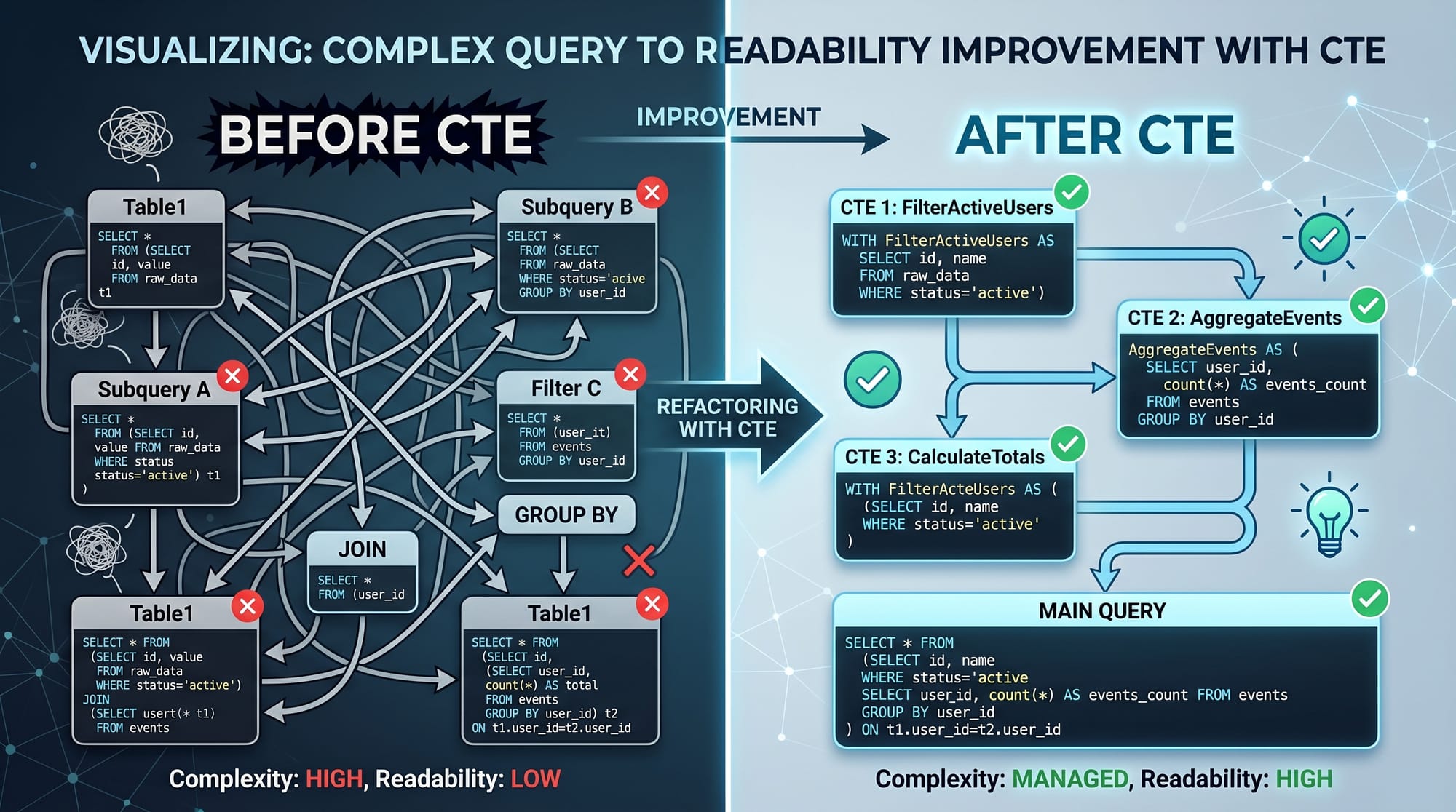
A non-recursive CTE is used to simplify complex queries by breaking them into readable parts.
Example use cases:
- Filtering data
- Aggregations
- Improving query readability
Example:
WITH HighSalaryEmployees AS (
    SELECT name, salary
    FROM employees
    WHERE salary > 100000
)
SELECT * FROM HighSalaryEmployees;
Line-by-line explanation:
WITH HighSalaryEmployees AS→ Creates a temporary result set named HighSalaryEmployeesSELECT name, salary→ Chooses required columnsFROM employees→ Data source tableWHERE salary > 100000→ Filters high salary employees- Final
SELECT→ Retrieves data from the CTE
Recursive CTE (Advanced Concept)
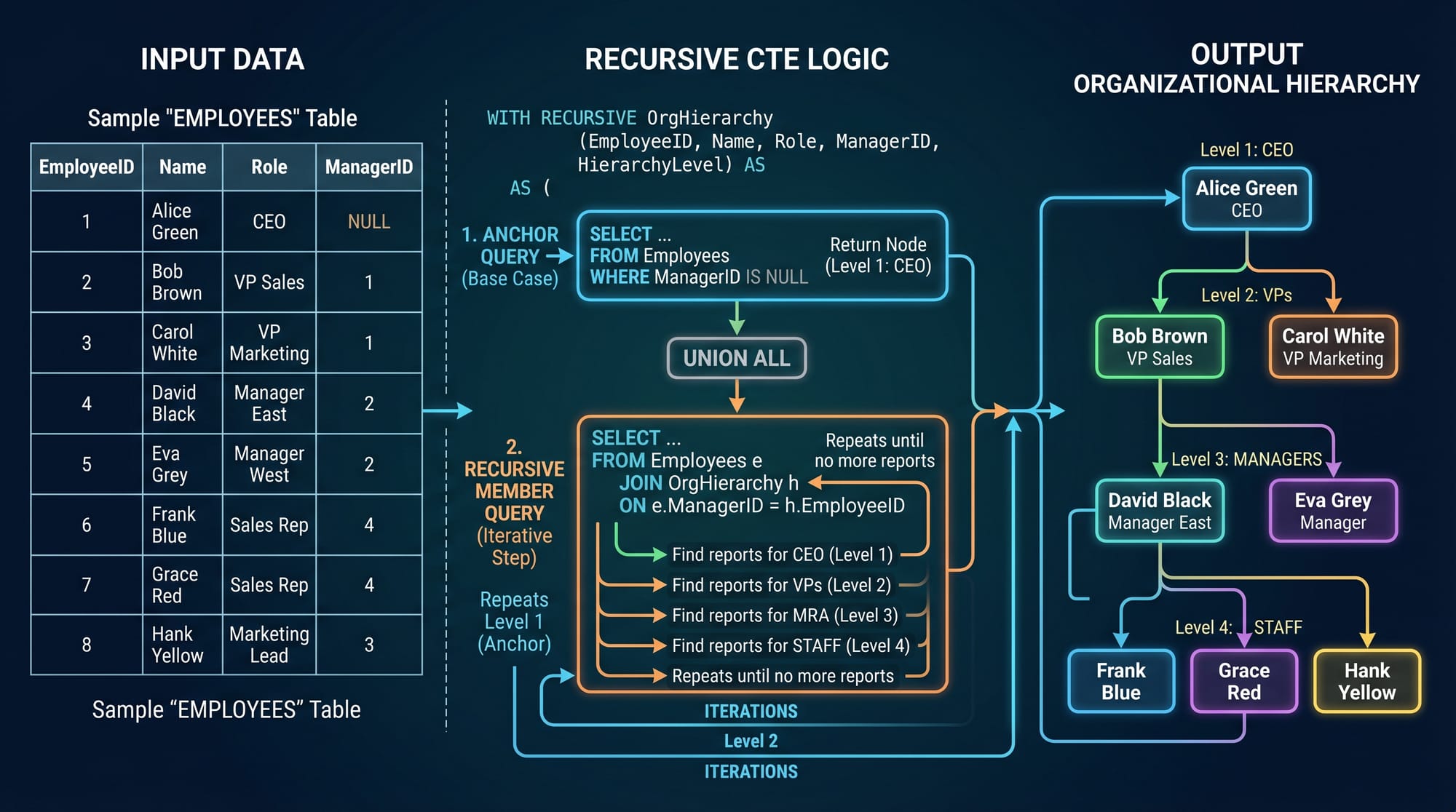
A recursive CTE is used when a query needs to call itself repeatedly until a condition is met. It is commonly used for:
- Organizational hierarchies (CEO → Managers → Staff)
- Family trees
- File directories
- Bill of materials
Structure of Recursive CTE:
WITH RECURSIVE cte_name AS (
    -- Anchor Query
    SELECT ...
    UNION ALL
    -- Recursive Query
    SELECT ... FROM cte_name
)
SELECT * FROM cte_name;
Explanation:
- Anchor Query → Starting point
- Recursive Query → Repeats logic using previous result
- UNION ALL → Combines results
- Stops when no new rows are generated

Practical Code Examples
Example 1: Non-Recursive CTE (Student Marks Filtering)
Imagine a school in Islamabad where teacher Fatima wants to find students scoring above 80 marks.
WITH TopStudents AS (
    SELECT student_name, marks
    FROM students
    WHERE marks > 80
)
SELECT * FROM TopStudents;
Line-by-line explanation:
WITH TopStudents AS→ Creates temporary datasetSELECT student_name, marks→ Chooses student detailsFROM students→ Uses students tableWHERE marks > 80→ Filters high-performing students- Final query → Displays results from CTE
👉 This makes queries easier to read compared to writing long nested SELECT statements.
Example 2: Real-World Application (Employee Hierarchy)
Suppose a company in Karachi has employees structured like:
CEO → Managers → Team Leads → Staff
We can represent this using a recursive CTE.
WITH RECURSIVE EmployeeHierarchy AS (
    -- Anchor: Top-level employee (CEO)
    SELECT employee_id, name, manager_id, 1 AS level
    FROM employees
    WHERE manager_id IS NULL

    UNION ALL

    -- Recursive part: find employees reporting to previous level
    SELECT e.employee_id, e.name, e.manager_id, eh.level + 1
    FROM employees e
    INNER JOIN EmployeeHierarchy eh
    ON e.manager_id = eh.employee_id
)
SELECT * FROM EmployeeHierarchy;
Line-by-line explanation:
Anchor Query:
- Selects top-level employee (CEO)
manager_id IS NULLidentifies root
Recursive Query:
- Joins employees table with previous CTE result
- Finds employees reporting to current level
eh.level + 1increases hierarchy level
Final Output:
- Displays full organizational structure
Common Mistakes & How to Avoid Them
Mistake 1: Forgetting the Base (Anchor) Query in Recursive CTE
Many students forget to define the starting point.
Problem:
Without an anchor query, recursion has no starting data.
Fix:
Always define base case:
SELECT employee_id, name
FROM employees
WHERE manager_id IS NULL
Mistake 2: Infinite Recursion in CTE
If the recursive query does not have a stopping condition, it may run infinitely.
Problem:
No condition to stop recursion.
Fix:
Ensure proper join condition:
ON e.manager_id = eh.employee_id
Practice Exercises
Exercise 1: Filter Karachi Students
Problem:
Find students from Karachi scoring above 75 marks.
Solution:
WITH KarachiStudents AS (
    SELECT name, marks
    FROM students
    WHERE city = 'Karachi' AND marks > 75
)
SELECT * FROM KarachiStudents;
Explanation:
- Filters Karachi students
- Applies marks condition
- Uses CTE for readability
Exercise 2: Count Levels in Organization
Problem:
Display employee hierarchy with levels.
Solution:
WITH RECURSIVE Org AS (
    SELECT employee_id, name, manager_id, 1 AS level
    FROM employees
    WHERE manager_id IS NULL

    UNION ALL

    SELECT e.employee_id, e.name, e.manager_id, o.level + 1
    FROM employees e
    JOIN Org o ON e.manager_id = o.employee_id
)
SELECT * FROM Org;
Explanation:
- Builds hierarchy step by step
- Tracks level depth
- Shows full organization structure
Frequently Asked Questions
What is a Common Table Expression (CTE)?
A CTE is a temporary named result set created using the WITH clause. It improves query readability and structure without storing data permanently.
What is the difference between recursive and non-recursive CTE?
A non-recursive CTE runs once and returns a result set, while a recursive CTE repeatedly calls itself to process hierarchical or repetitive data.
When should I use a recursive CTE?
You should use a recursive CTE when dealing with hierarchical data such as employee structures, category trees, or nested relationships.
Are CTEs better than subqueries?
Yes, CTEs are often more readable and easier to maintain than subqueries, especially in complex SQL queries.
Do CTEs store data permanently?
No, CTEs are temporary and exist only during the execution of the query.
Summary & Key Takeaways
- CTEs are temporary result sets defined using
WITH - They improve readability and modularity of SQL queries
- Non-recursive CTEs simplify complex filtering and aggregation
- Recursive CTEs handle hierarchical and repetitive data
- Always define a base case in recursive CTEs
- Proper joins are essential to avoid infinite loops
Next Steps & Related Tutorials
To strengthen your SQL skills further, explore these tutorials on theiqra.edu.pk:
- Learn more in our SQL Tutorial for beginners
- Understand advanced analytics in SQL Window Functions
- Master joins with SQL Joins Explained with Examples
- Improve query performance using SQL Indexing Techniques
If you want, I can also turn this into a downloadable PDF, add MCQs, or create an interactive quiz for students on this topic.
Test Your Python Knowledge!
Finished reading? Take a quick quiz to see how much you've learned from this tutorial.