SQL JSON Functions Query JSON Data in PostgreSQL & MySQL
Introduction
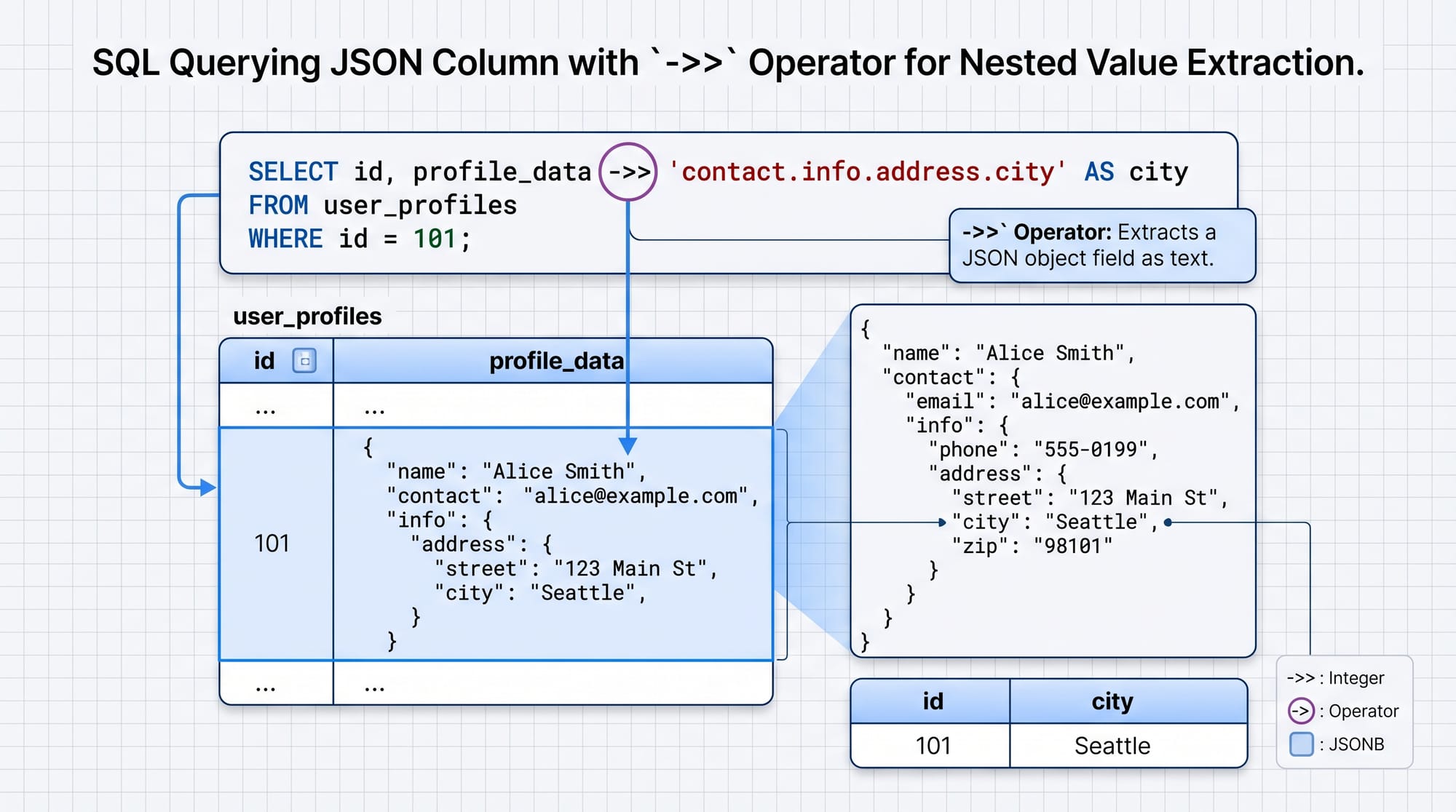
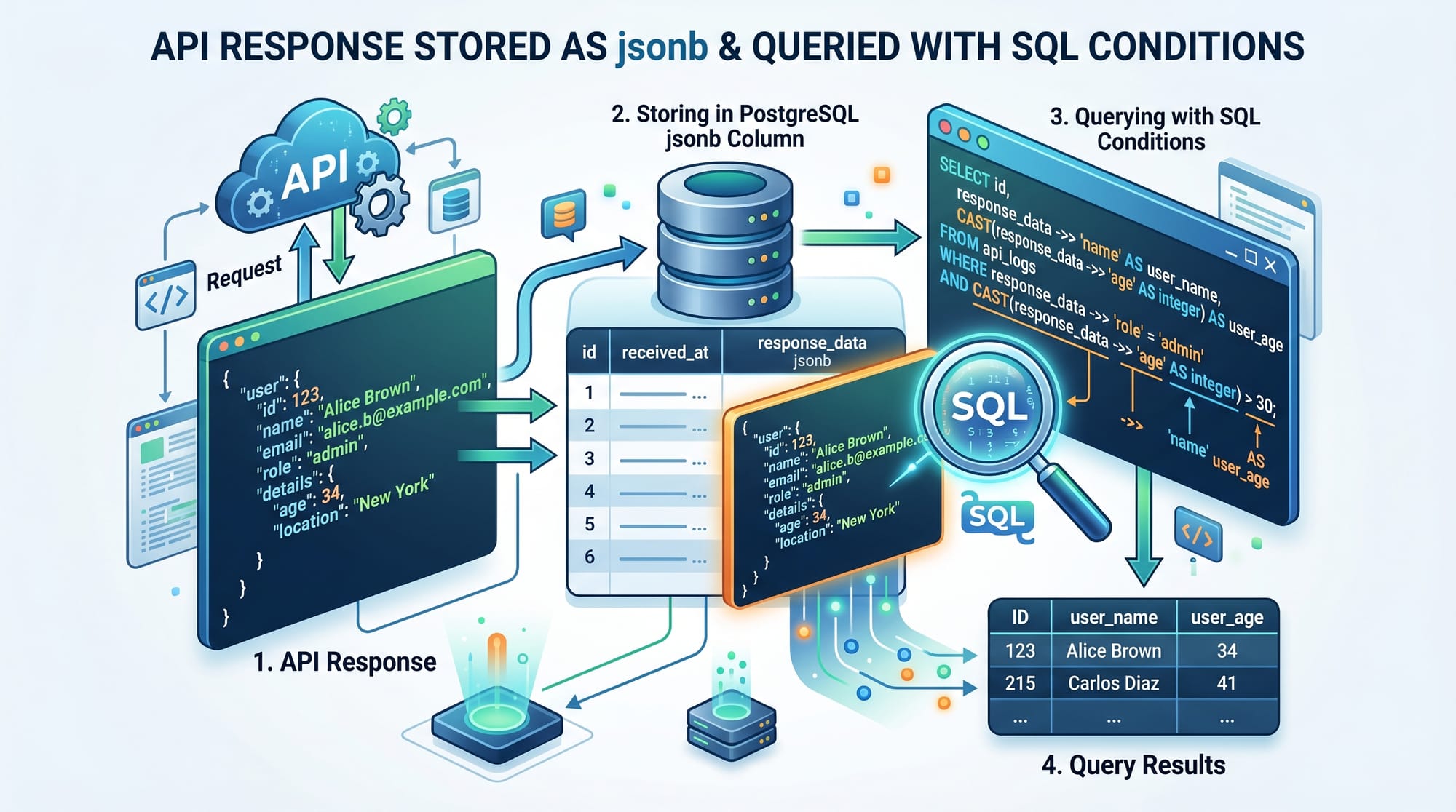
Working with modern applications often means dealing with flexible, semi-structured data—like API responses, user preferences, or product metadata. This is where SQL JSON functions come in. They allow you to store, query, and manipulate JSON data directly inside relational databases such as PostgreSQL and MySQL.
In this tutorial, “SQL JSON Functions: Query JSON Data in PostgreSQL & MySQL,” you’ll learn how to efficiently work with JSON data using powerful built-in functions like ->>, jsonb_path_query, and JSON_EXTRACT.
For Pakistani students, learning SQL JSON is especially valuable because:
- Many local startups in Lahore, Karachi, and Islamabad use APIs and NoSQL-like data structures.
- It bridges the gap between relational databases and modern web development.
- It improves your job readiness for backend and data roles.
Prerequisites
Before starting this tutorial, you should have:
- Basic knowledge of SQL (SELECT, WHERE, INSERT)
- Understanding of relational databases (tables, rows, columns)
- Familiarity with JSON structure (key-value pairs, arrays)
- Basic exposure to either PostgreSQL or MySQL
Core Concepts & Explanation
JSON Data Types in SQL (PostgreSQL vs MySQL)
Both PostgreSQL and MySQL support JSON, but with some differences.
PostgreSQL:
JSON: stores raw JSON textJSONB: stores binary format (faster, indexable)
CREATE TABLE students (
    id SERIAL PRIMARY KEY,
    data JSONB
);
MySQL:
- Only one
JSONtype
CREATE TABLE students (
    id INT AUTO_INCREMENT PRIMARY KEY,
    data JSON
);
💡 Tip: Use JSONB in PostgreSQL for better performance and indexing.
Querying JSON Data with Operators & Functions
Let’s understand how to extract data from JSON.
PostgreSQL Operators:
->: returns JSON object->>: returns text value
SELECT data->>'name' FROM students;
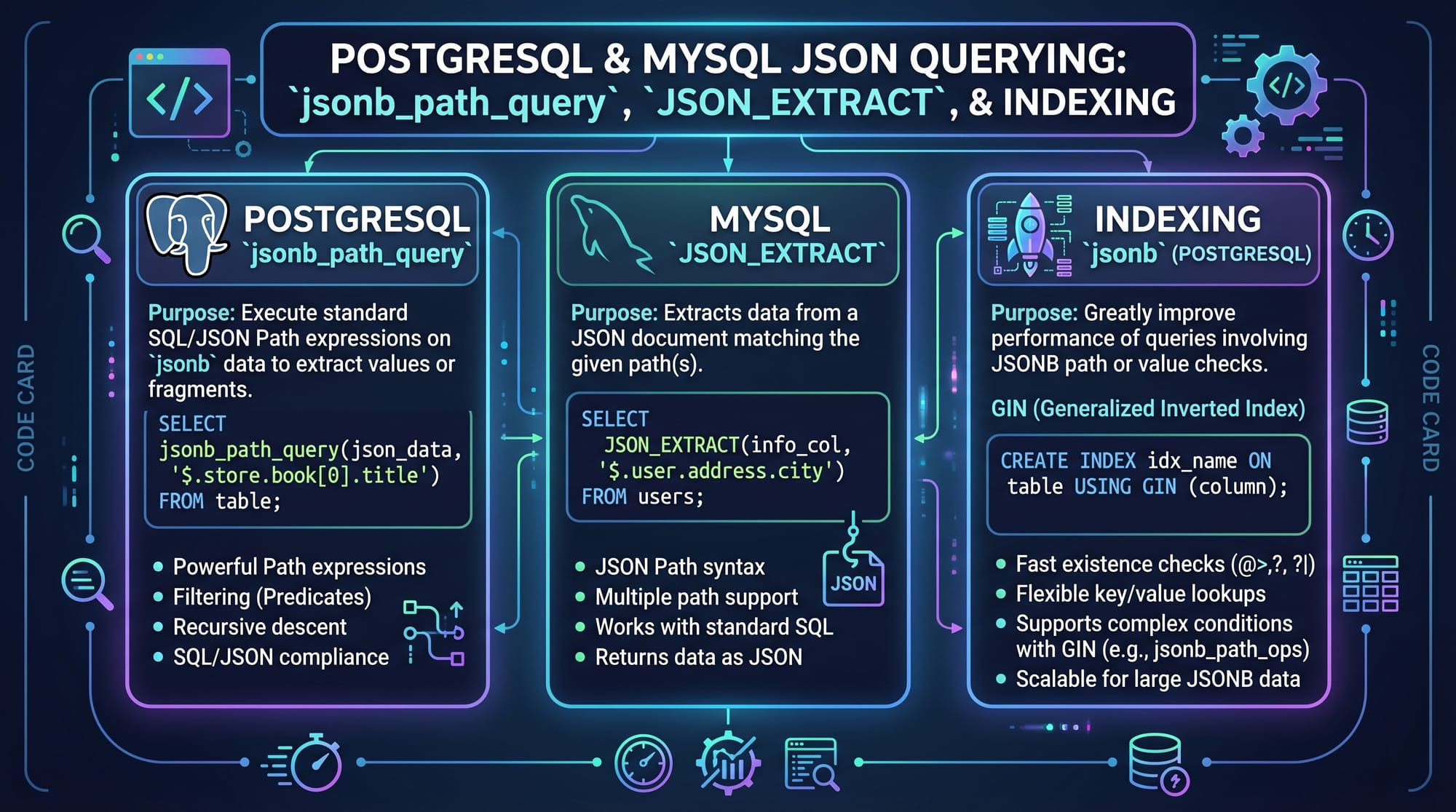
MySQL Functions:
JSON_EXTRACT()or shorthand->
SELECT JSON_EXTRACT(data, '$.name') FROM students;
Or:
SELECT data->'$.name' FROM students;
Practical Code Examples
Example 1: Extract Student Information from JSON
Let’s assume Ahmad stores student data as JSON.
-- PostgreSQL Example
SELECT
    data->>'name' AS name,
    data->>'city' AS city
FROM students;
Explanation:
SELECT: retrieves datadata->>'name': extracts the name as textAS name: renames column outputFROM students: specifies table
-- MySQL Example
SELECT
    JSON_UNQUOTE(JSON_EXTRACT(data, '$.name')) AS name,
    JSON_UNQUOTE(JSON_EXTRACT(data, '$.city')) AS city
FROM students;
Explanation:
JSON_EXTRACT: retrieves JSON value$.name: path to keyJSON_UNQUOTE: removes quotes from resultAS name: alias for readability
Example 2: Real-World Application — E-commerce Orders in PKR
Imagine Fatima runs an online store in Karachi and stores order details in JSON.
-- PostgreSQL
SELECT
    data->>'customer_name' AS customer,
    (data->>'total_amount')::INT AS amount
FROM orders
WHERE (data->>'total_amount')::INT > 5000;
Explanation:
data->>'customer_name': extracts customer name(data->>'total_amount')::INT: converts text to integerWHERE: filters orders above PKR 5000
-- MySQL
SELECT
    JSON_UNQUOTE(JSON_EXTRACT(data, '$.customer_name')) AS customer,
    JSON_EXTRACT(data, '$.total_amount') AS amount
FROM orders
WHERE JSON_EXTRACT(data, '$.total_amount') > 5000;
Explanation:
JSON_EXTRACT: retrieves JSON valuesWHERE: filters based on condition- Works well for dashboards and reporting
Common Mistakes & How to Avoid Them
Mistake 1: Using JSON Instead of JSONB in PostgreSQL
Many beginners use JSON instead of JSONB.
❌ Problem:
CREATE TABLE data_table (info JSON);
✔️ Fix:
CREATE TABLE data_table (info JSONB);
Why?
JSONBis faster- Supports indexing
- Better for querying large datasets
Mistake 2: Forgetting to Unquote JSON Values in MySQL
MySQL returns JSON values with quotes.
❌ Problem:
SELECT JSON_EXTRACT(data, '$.name') FROM students;
✔️ Fix:
SELECT JSON_UNQUOTE(JSON_EXTRACT(data, '$.name')) FROM students;
Why?
- Without
JSON_UNQUOTE, output includes quotes - Makes filtering and display difficult
Practice Exercises
Exercise 1: Extract City from JSON
Problem:
You have a table students with JSON data. Extract the city.
-- Solution (PostgreSQL)
SELECT data->>'city' FROM students;
Explanation:
data->>'city': extracts city as text- Simple JSON key retrieval
Exercise 2: Filter Orders Above PKR 10,000
Problem:
Find orders where total amount is greater than 10,000.
-- Solution (MySQL)
SELECT *
FROM orders
WHERE JSON_EXTRACT(data, '$.total_amount') > 10000;
Explanation:
JSON_EXTRACT: gets amountWHERE: filters based on value- Useful for financial reporting
Frequently Asked Questions
What is SQL JSON?
SQL JSON refers to storing and querying JSON-formatted data inside relational databases like PostgreSQL and MySQL. It allows flexible data structures while still using SQL queries.
How do I extract nested JSON values?
You can use path expressions. In PostgreSQL, use -> or ->>, while in MySQL use JSON_EXTRACT(data, '$.key.subkey') to access nested fields.
Is JSONB better than JSON in PostgreSQL?
Yes, JSONB is generally better because it stores data in binary format, making queries faster and allowing indexing.
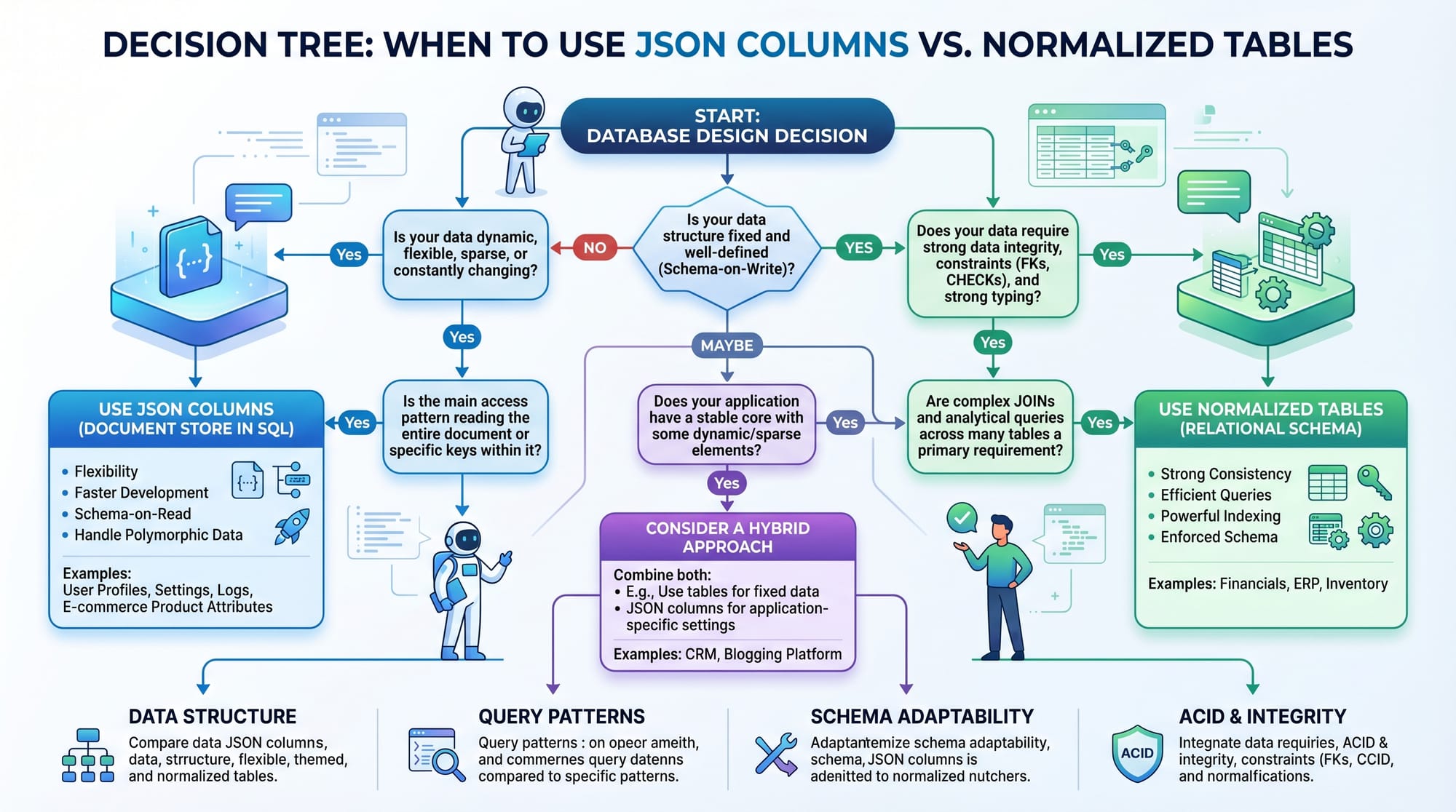
When should I use JSON instead of tables?
Use JSON when your data structure is dynamic or comes from APIs. Use normalized tables when relationships and consistency are important.
Can I index JSON data?
Yes. PostgreSQL supports indexing on JSONB columns using GIN indexes, which significantly improves query performance.
Summary & Key Takeaways
- SQL JSON functions allow querying flexible, semi-structured data
- PostgreSQL’s
JSONBis faster and supports indexing - MySQL uses
JSON_EXTRACTand requiresJSON_UNQUOTE - JSON is ideal for API data and dynamic schemas
- Always consider performance and structure when choosing JSON vs tables
- Real-world use cases include e-commerce, analytics, and user profiles
Next Steps & Related Tutorials
To deepen your understanding, explore these tutorials on theiqra.edu.pk:
- Learn database fundamentals in our PostgreSQL Tutorial
- Explore flexible NoSQL databases with our MongoDB Tutorial
- Master backend queries with our SQL Joins and Relationships Guide
- Improve performance with our SQL Query Optimization Tutorial
By combining SQL JSON skills with these topics, you’ll be well-prepared for modern backend development and data engineering roles in Pakistan 🚀
Test Your Python Knowledge!
Finished reading? Take a quick quiz to see how much you've learned from this tutorial.