SQL Performance Tuning Indexes EXPLAIN & Query Optimization
Introduction
SQL performance tuning is the process of improving database query speed and efficiency using techniques like sql indexes, EXPLAIN plans, and query optimization strategies. As applications grow—whether it’s a student management system in Islamabad or an e-commerce platform in Karachi—slow queries can become a major bottleneck.
For Pakistani students learning databases, mastering sql optimization is crucial. It not only helps in cracking technical interviews but also ensures you can build scalable, production-ready applications. Imagine Ahmad building a university portal where thousands of students query results daily—without optimization, the system would lag badly.
In this tutorial, you’ll learn how to:
- Use indexes effectively
- Analyze queries with EXPLAIN
- Perform slow query optimization
- Avoid common performance mistakes
Prerequisites
Before diving into advanced SQL performance tuning, you should have:
- Basic understanding of SQL (SELECT, INSERT, UPDATE, DELETE)
- Knowledge of relational databases (MySQL or PostgreSQL recommended)
- Familiarity with JOINs and WHERE clauses
- Basic understanding of tables and primary keys
Core Concepts & Explanation
Understanding SQL Indexes (Speeding Up Queries)
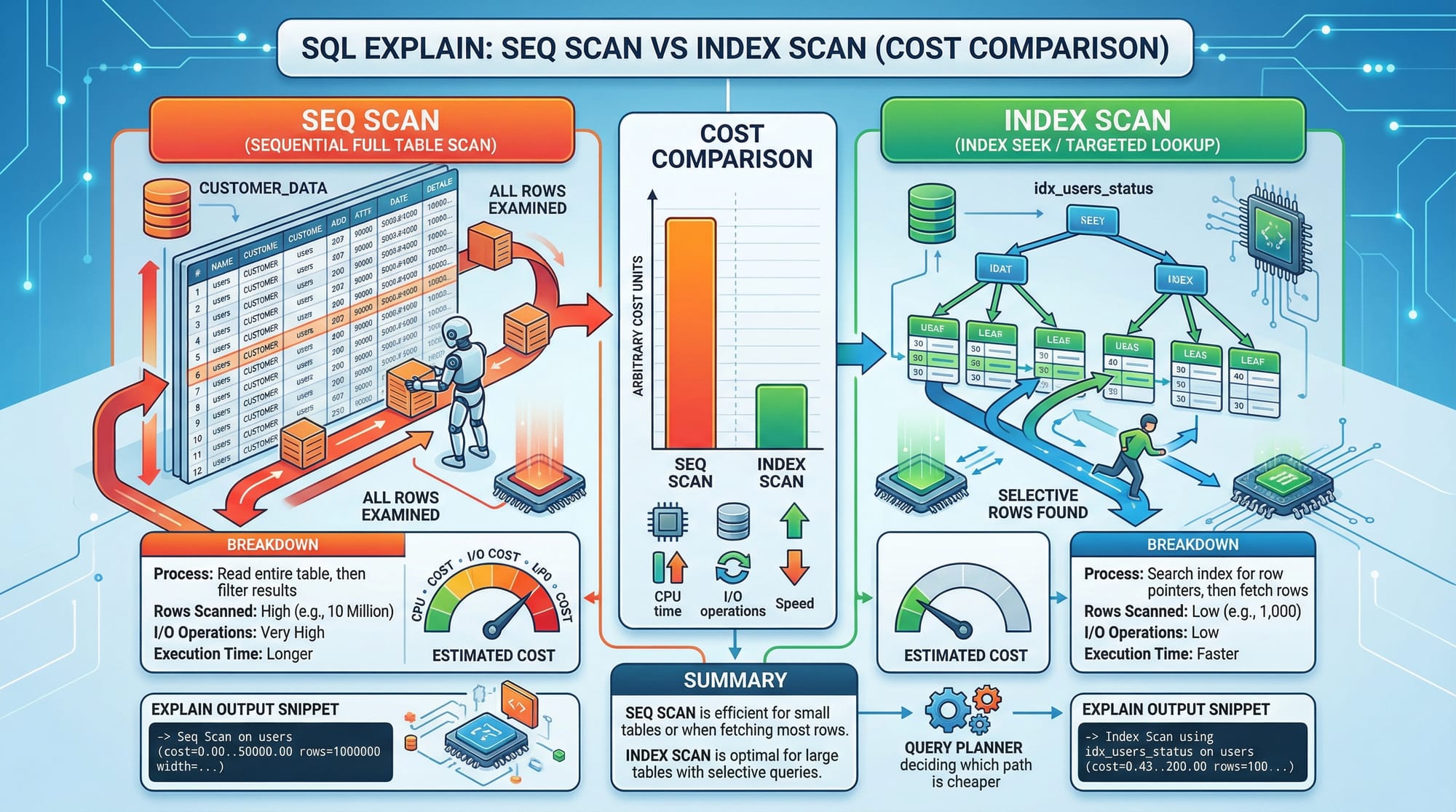
Indexes are like the index of a book—they help the database find data faster without scanning the entire table.
Example Without Index
SELECT * FROM students WHERE city = 'Lahore';
- Database scans every row (called Full Table Scan)
- Slow when table is large (e.g., 1 million students)
Example With Index
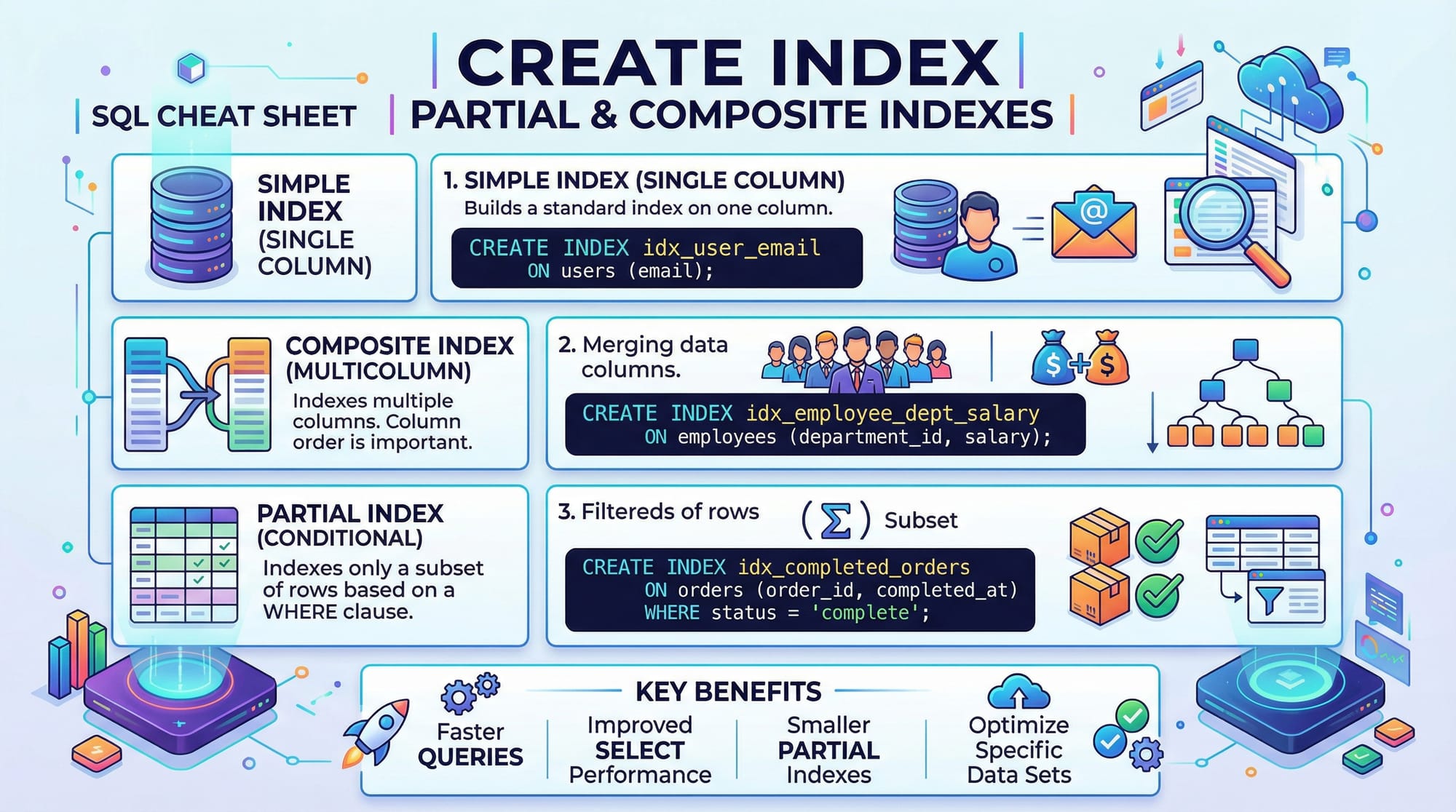
CREATE INDEX idx_city ON students(city);
- Creates an index on
city - Now queries filter faster using Index Scan
💡 Key Insight: Indexes improve read performance but slightly slow down INSERT/UPDATE operations.
Using EXPLAIN to Analyze Queries
The EXPLAIN keyword shows how the database executes a query.
Example
EXPLAIN SELECT * FROM students WHERE city = 'Karachi';
Sample Output (Simplified)
- Seq Scan (slow)
- Index Scan (fast)
- Cost values (lower is better)
What to Look For:
- Seq Scan → Bad for large tables
- Index Scan → Good
- Rows → Number of rows processed
- Cost → Estimated execution cost
💡 Always run EXPLAIN before optimizing queries.
Query Optimization Techniques
Optimization involves rewriting queries for better performance.
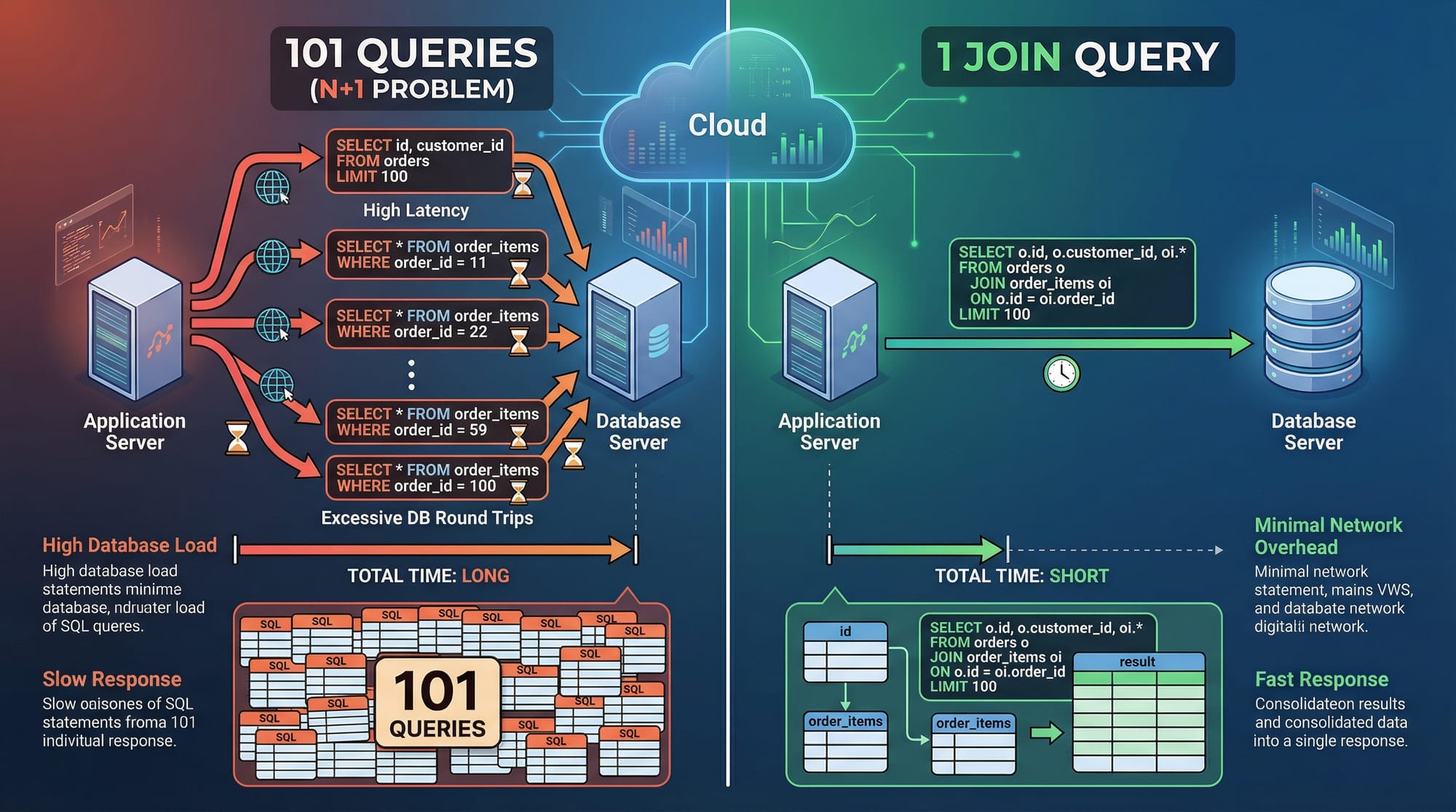
Bad Query (N+1 Problem)
SELECT * FROM orders WHERE user_id = 1;
-- Then for each order:
SELECT * FROM order_items WHERE order_id = X;
- Executes multiple queries (slow)
Optimized Query (Using JOIN)
SELECT o.*, oi.*
FROM orders o
JOIN order_items oi ON o.id = oi.order_id
WHERE o.user_id = 1;
- Single query (fast)
Practical Code Examples
Example 1: Creating and Using Indexes
-- Step 1: Create table
CREATE TABLE students (
    id SERIAL PRIMARY KEY,
    name VARCHAR(100),
    city VARCHAR(50)
);

-- Step 2: Insert data
INSERT INTO students (name, city)
VALUES ('Ali', 'Lahore'), ('Fatima', 'Karachi'), ('Ahmad', 'Lahore');

-- Step 3: Create index
CREATE INDEX idx_students_city ON students(city);

-- Step 4: Query using index
EXPLAIN SELECT * FROM students WHERE city = 'Lahore';
Line-by-line Explanation:
CREATE TABLE→ Defines structureINSERT INTO→ Adds sample dataCREATE INDEX→ Optimizes search oncityEXPLAIN SELECT→ Shows query execution plan
Example 2: Real-World Application (E-commerce in Pakistan)
Suppose Ali runs an online store in Lahore.
-- Orders table
CREATE TABLE orders (
    id SERIAL PRIMARY KEY,
    user_id INT,
    total_amount DECIMAL
);

-- Index for faster lookups
CREATE INDEX idx_orders_user_id ON orders(user_id);

-- Optimized query
SELECT user_id, SUM(total_amount) AS total_spent
FROM orders
GROUP BY user_id
ORDER BY total_spent DESC;
Line-by-line Explanation:
CREATE TABLE→ Stores order dataCREATE INDEX→ Speeds up filtering by userGROUP BY→ Aggregates user spendingORDER BY→ Sorts highest spenders
💡 This helps identify top customers in Karachi or Islamabad efficiently.
Common Mistakes & How to Avoid Them
Mistake 1: Overusing Indexes
Creating too many indexes can slow down writes.
Problem:
CREATE INDEX idx1 ON students(name);
CREATE INDEX idx2 ON students(city);
CREATE INDEX idx3 ON students(name, city);
- Too many indexes increase storage and slow INSERT
Fix:
- Use only necessary indexes
- Prefer composite indexes when needed
Mistake 2: Not Using EXPLAIN
Skipping EXPLAIN leads to blind optimization.
Problem:
SELECT * FROM orders WHERE total_amount > 1000;
- You don’t know if it uses index
Fix:
EXPLAIN SELECT * FROM orders WHERE total_amount > 1000;
- Analyze before optimizing

Practice Exercises
Exercise 1: Optimize Student Search
Problem:
Query is slow:
SELECT * FROM students WHERE name = 'Ali';
Solution:
CREATE INDEX idx_students_name ON students(name);
- Adds index for faster lookup
Exercise 2: Fix N+1 Query
Problem:
SELECT * FROM users;
-- then multiple queries for each user's orders
Solution:
SELECT u.*, o.*
FROM users u
LEFT JOIN orders o ON u.id = o.user_id;
- Reduces multiple queries into one
Frequently Asked Questions
What is SQL performance tuning?
SQL performance tuning is the process of improving query speed using techniques like indexing, query rewriting, and execution plan analysis. It ensures databases handle large data efficiently.
How do I use EXPLAIN in SQL?
Use EXPLAIN before a query to see how it will execute. It helps identify slow operations like sequential scans and suggests optimization opportunities.
What are SQL indexes?
Indexes are data structures that improve query speed by allowing faster data retrieval. They are especially useful for large tables.
When should I create an index?
Create indexes on columns frequently used in WHERE, JOIN, or ORDER BY clauses. Avoid indexing columns with low uniqueness.
Why is my SQL query slow?
Common reasons include missing indexes, large table scans, inefficient joins, or poorly written queries. Use EXPLAIN to diagnose issues.
Summary & Key Takeaways
- SQL optimization is essential for building scalable applications
- Indexes significantly improve read performance
- EXPLAIN helps understand query execution
- Avoid over-indexing and unnecessary queries
- Use JOINs to eliminate N+1 problems
- Always test and analyze before optimizing
Next Steps & Related Tutorials
To deepen your understanding, explore these tutorials on theiqra.edu.pk:
- Learn the basics with our SQL Tutorial
- Dive deeper into performance with our PostgreSQL Tutorial
- Understand relationships in our Database Design Guide
- Build real apps with our Full Stack Development Tutorial
By mastering these concepts, you’ll be well on your way to becoming a database expert in Pakistan’s growing tech industry 🚀
Test Your Python Knowledge!
Finished reading? Take a quick quiz to see how much you've learned from this tutorial.