SQL Pivot Tables & Crosstab Queries Tutorial
Introduction
In this SQL Pivot Tables & Crosstab Queries Tutorial, you will learn how to transform rows into columns using powerful SQL techniques such as pivot tables and crosstab queries. These methods are widely used in data reporting, dashboards, and analytics systems.
For Pakistani students learning SQL for careers in software development, data analysis, or freelancing, mastering sql pivot table, crosstab sql, and sql pivot rows to columns is extremely important. For example, companies in Lahore, Karachi, and Islamabad often require sales reports that summarize monthly revenue by product or region in a tabular format.
Prerequisites
Before starting this tutorial, you should already understand:
- Basic SQL SELECT queries
- GROUP BY and aggregate functions (SUM, COUNT, AVG)
- Basic understanding of relational databases
- Familiarity with tables and columns
Recommended: Complete the SQL Tutorial on theiqra.edu.pk before continuing.
Core Concepts & Explanation
Understanding Pivot Tables in SQL
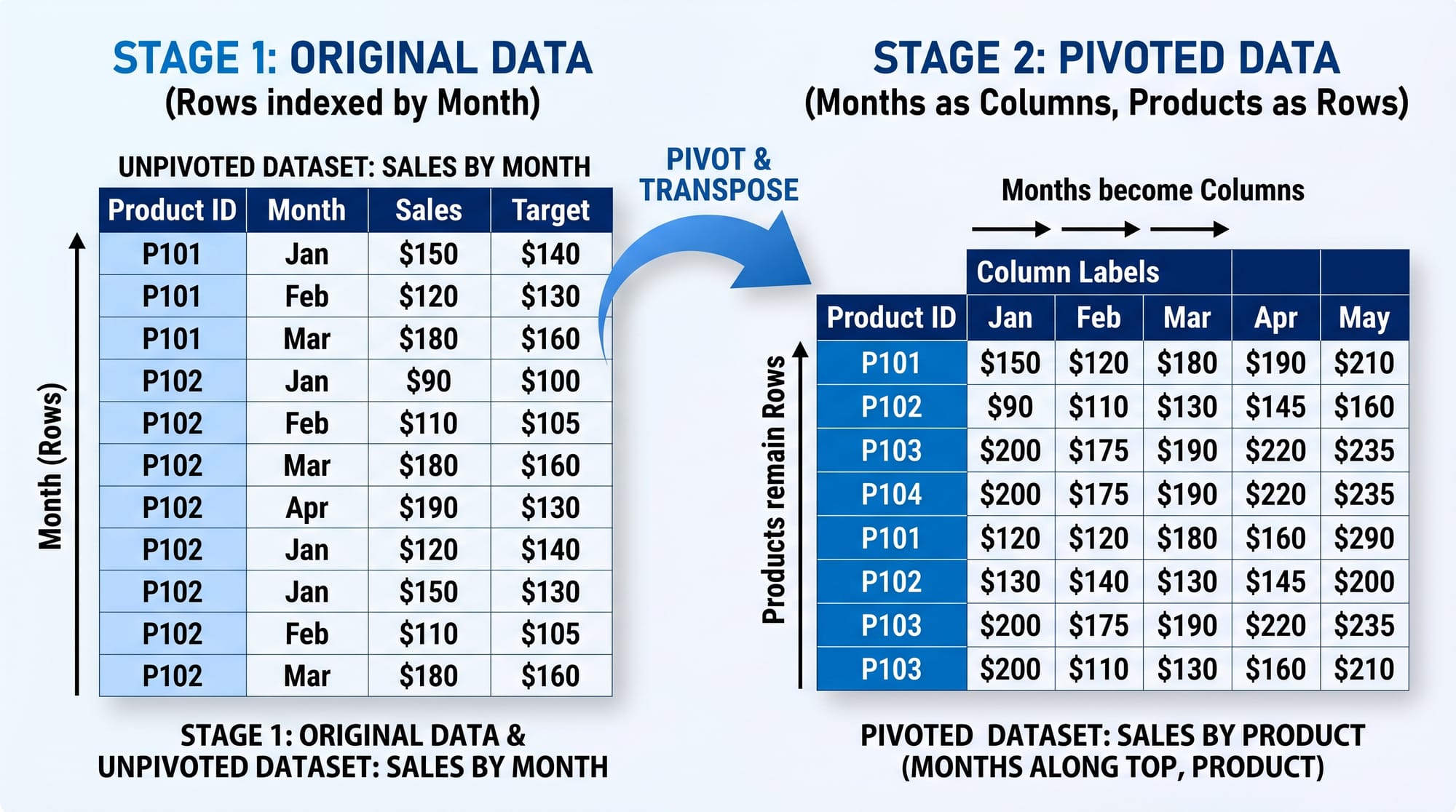
A pivot table is a technique used to convert row-based data into column-based summary format. This helps in creating readable reports like monthly sales, attendance sheets, or expense summaries.
Example scenario:
A Lahore-based ecommerce store wants to see monthly revenue per product in a single table instead of multiple rows.
Instead of:
Product | Month | Revenue
Laptop  | Jan   | 50000
Laptop  | Feb   | 60000
We want:
Product | Jan   | Feb
Laptop  | 50000 | 60000
Crosstab Queries in SQL
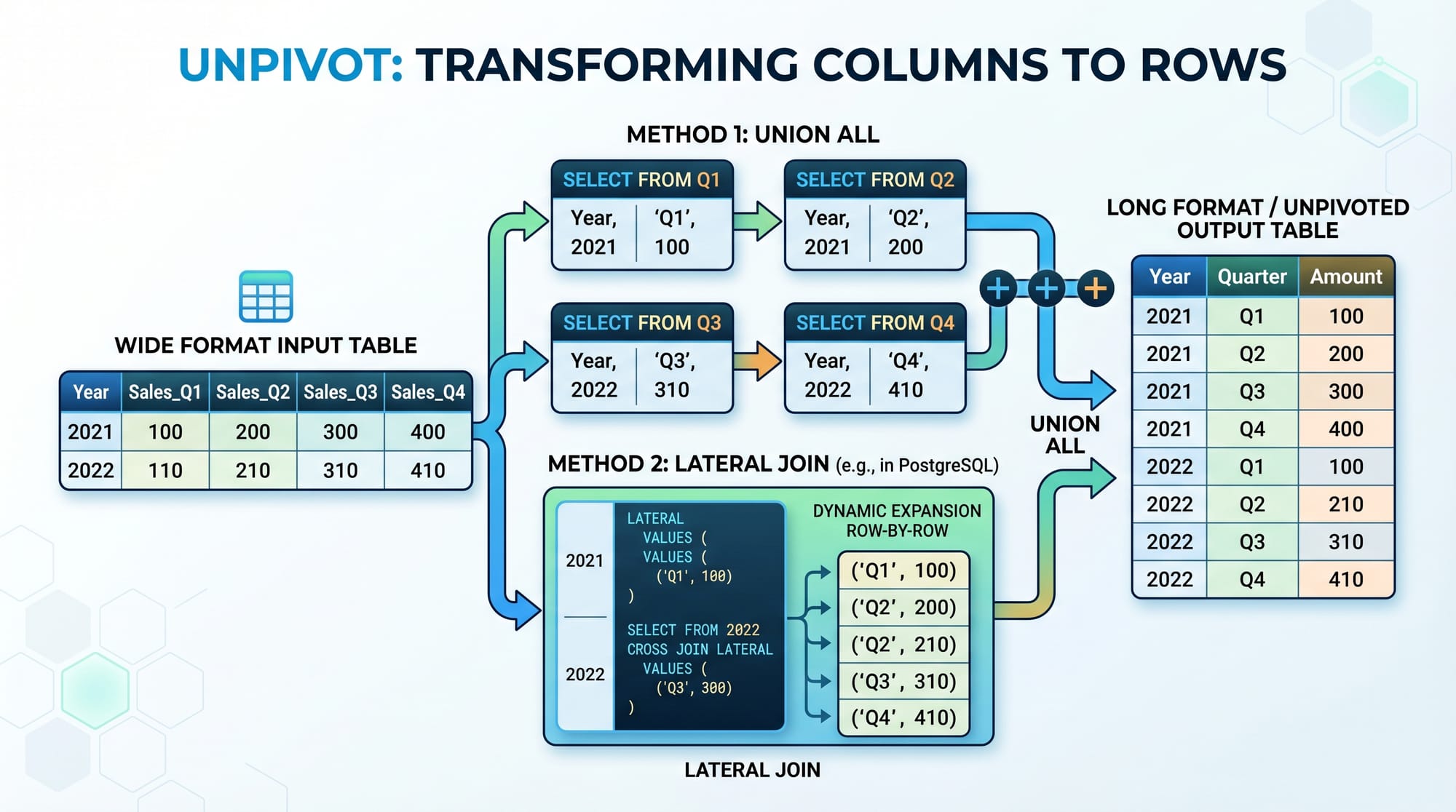
A crosstab sql query is another way to perform pivot operations, especially in PostgreSQL using the crosstab() function.
Crosstab queries:
- Convert rows into columns
- Require predefined categories
- Are useful for reporting dashboards
Manual Pivot Using CASE WHEN
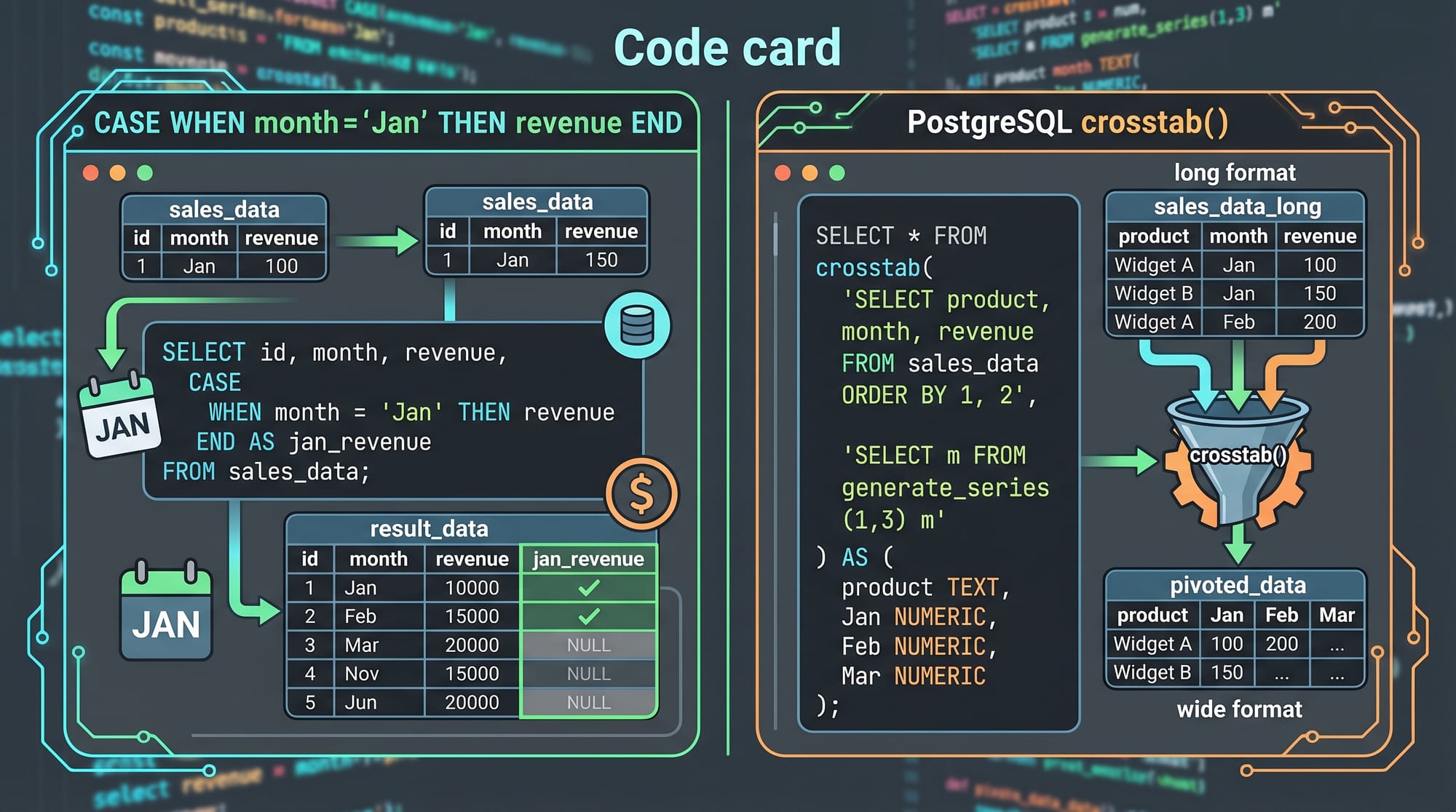
One of the most common ways to perform a pivot in SQL is using CASE WHEN.
This method is:
- Supported in most SQL databases
- Easy for beginners
- Highly flexible
Practical Code Examples
Example 1: Monthly Sales Pivot (Using CASE WHEN)
Suppose we have a sales table in Karachi retail store:
SELECT
    product,
    SUM(CASE WHEN month = 'Jan' THEN revenue ELSE 0 END) AS Jan,
    SUM(CASE WHEN month = 'Feb' THEN revenue ELSE 0 END) AS Feb,
    SUM(CASE WHEN month = 'Mar' THEN revenue ELSE 0 END) AS Mar
FROM sales
GROUP BY product;
Line-by-line explanation:
SELECT product→ shows product names like Laptop, MobileSUM(CASE WHEN month = 'Jan' THEN revenue ELSE 0 END)→ filters January revenueAS Jan→ names the column as JanuaryFROM sales→ source tableGROUP BY product→ groups data by each product
This converts row data into a pivot-style summary report.
Example 2: Real-World Application (Student Marks Report)
Imagine a school in Islamabad tracking student marks.
SELECT
    student_name,
    SUM(CASE WHEN subject = 'Math' THEN marks ELSE 0 END) AS Math,
    SUM(CASE WHEN subject = 'English' THEN marks ELSE 0 END) AS English,
    SUM(CASE WHEN subject = 'Science' THEN marks ELSE 0 END) AS Science
FROM exam_results
GROUP BY student_name;
Line-by-line explanation:
student_name→ each student like Ali or FatimaCASE WHEN subject = 'Math'→ selects math marks onlySUM()→ totals marks per subjectGROUP BY student_name→ groups results per student
Example 3: Crosstab Query (PostgreSQL)
In PostgreSQL, we can use crosstab():
SELECT *
FROM crosstab(
    'SELECT product, month, revenue FROM sales ORDER BY 1,2'
) AS final_result (
    product TEXT,
    Jan INT,
    Feb INT,
    Mar INT
);
Line-by-line explanation:
crosstab()→ function that pivots data- Inner query selects row structure (product, month, revenue)
ORDER BY 1,2→ ensures correct grouping orderAS final_result→ defines output table structure- Columns defined: product, Jan, Feb, Mar
Common Mistakes & How to Avoid Them
Mistake 1: Not Using GROUP BY Properly
Many beginners forget to use GROUP BY, which leads to SQL errors or incorrect aggregation.
❌ Wrong:
SELECT product, SUM(revenue) FROM sales;
✔ Correct:
SELECT product, SUM(revenue)
FROM sales
GROUP BY product;
Fix Explanation:
- Always group non-aggregated columns
- Ensures correct summarization
Mistake 2: Incorrect CASE WHEN Conditions
Using wrong conditions leads to missing or incorrect pivot results.
❌ Wrong:
SUM(CASE month = 'Jan' THEN revenue END)
✔ Correct:
SUM(CASE WHEN month = 'Jan' THEN revenue ELSE 0 END)
Fix Explanation:
- Always use
WHEN - Always handle NULL values using
ELSE 0
Practice Exercises
Exercise 1: Monthly Expense Report
Problem: Create a pivot table for expenses of Ahmad’s business in Lahore showing monthly totals.
Solution:
SELECT
    category,
    SUM(CASE WHEN month = 'Jan' THEN amount ELSE 0 END) AS Jan,
    SUM(CASE WHEN month = 'Feb' THEN amount ELSE 0 END) AS Feb
FROM expenses
GROUP BY category;
Exercise 2: Student Attendance Report
Problem: Show attendance of Fatima across days of the week.
Solution:
SELECT
    student_name,
    SUM(CASE WHEN day = 'Monday' THEN present ELSE 0 END) AS Monday,
    SUM(CASE WHEN day = 'Tuesday' THEN present ELSE 0 END) AS Tuesday
FROM attendance
GROUP BY student_name;
Frequently Asked Questions
What is a SQL pivot table?
A SQL pivot table is a method used to convert row-based data into column-based format for reporting and analysis. It is commonly used in dashboards and business reports.
What is a crosstab sql query?
A crosstab SQL query is a technique (mainly in PostgreSQL) that transforms rows into columns using the crosstab() function. It is useful for structured reporting.
How do I convert rows to columns in SQL?
You can use CASE WHEN statements with SUM() or use database-specific pivot functions like PIVOT or crosstab().
What is the difference between pivot and GROUP BY?
GROUP BY summarizes data into rows, while pivot transforms those rows into columns for better readability.
Which databases support pivot operations?
Most databases support pivoting:
- SQL Server (PIVOT keyword)
- PostgreSQL (crosstab extension)
- MySQL (CASE WHEN method)
Summary & Key Takeaways
- SQL pivot tables convert rows into columns for reporting
- Crosstab SQL is a PostgreSQL-specific pivot method
- CASE WHEN is the most universal pivot technique
- GROUP BY is essential for aggregation
- Pivot tables are widely used in business reporting in Pakistan
- Always handle NULL values using ELSE clauses
Next Steps & Related Tutorials
Now that you understand pivot operations, continue learning advanced SQL concepts:
- Learn advanced filtering in SQL Tutorial
- Master reporting with SQL Window Functions
- Improve performance using SQL Query Optimization Guide
- Explore structured queries in CTE in SQL Tutorial
If you want, I can also convert this into a PDF lesson, blog HTML page, or quiz (MCQs) for theiqra.edu.pk.
Test Your Python Knowledge!
Finished reading? Take a quick quiz to see how much you've learned from this tutorial.