SQL SELECT Statement Filtering with WHERE & ORDER BY
Introduction
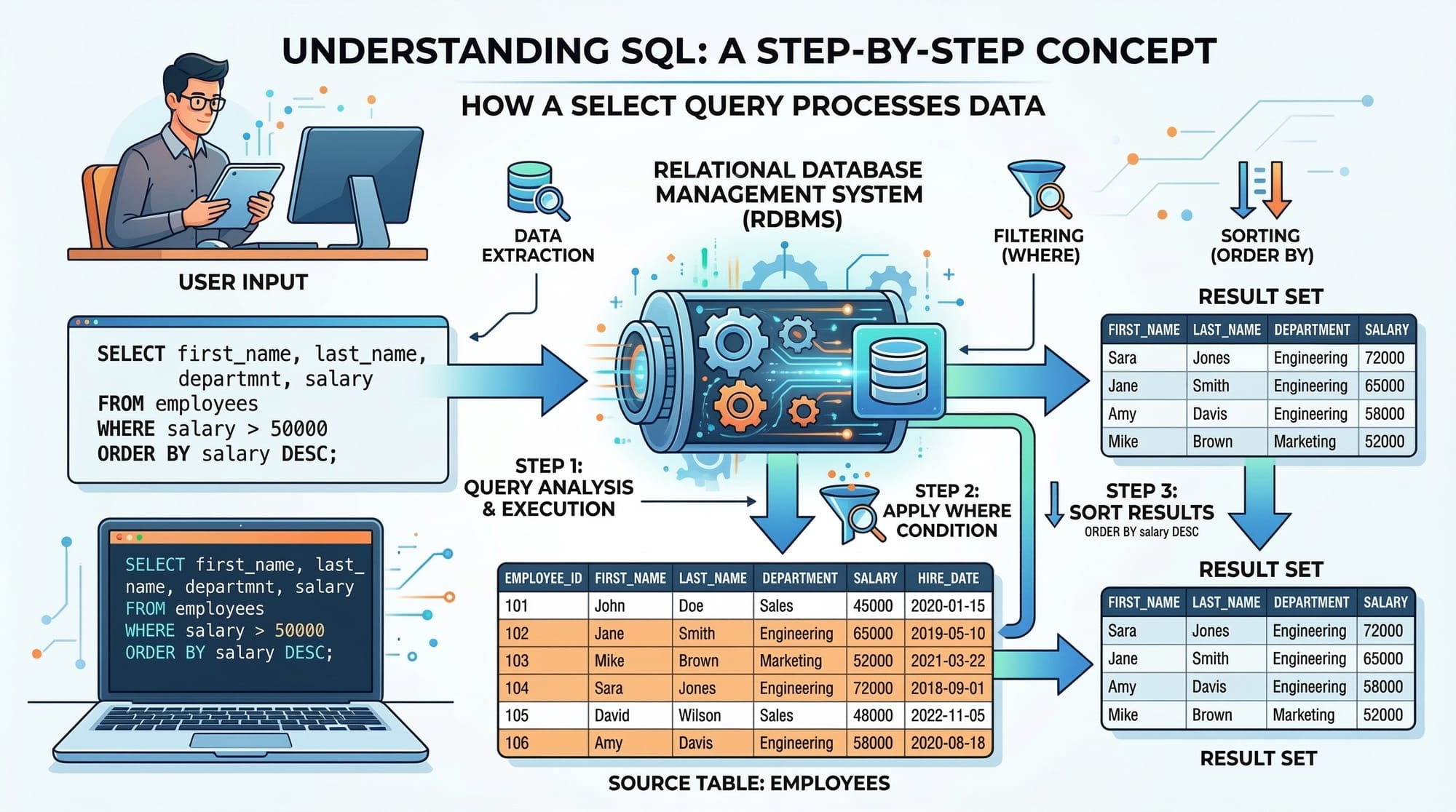
SQL (Structured Query Language) is the standard language for interacting with databases. The SELECT statement is the foundation of SQL queries, allowing you to retrieve data from one or more database tables. For Pakistani students, learning SQL is crucial for careers in software development, data analysis, and database management.
Using the WHERE clause, you can filter results based on specific conditions, while ORDER BY helps organize the output in ascending or descending order. Mastering these concepts will make your SQL queries more precise, efficient, and practical in real-world applications.
This tutorial will guide you step-by-step, with examples tailored to Pakistani contexts—like retrieving student data from Lahore or calculating PKR salaries.
Prerequisites
Before diving in, you should be familiar with:
- Basic computer and programming concepts.
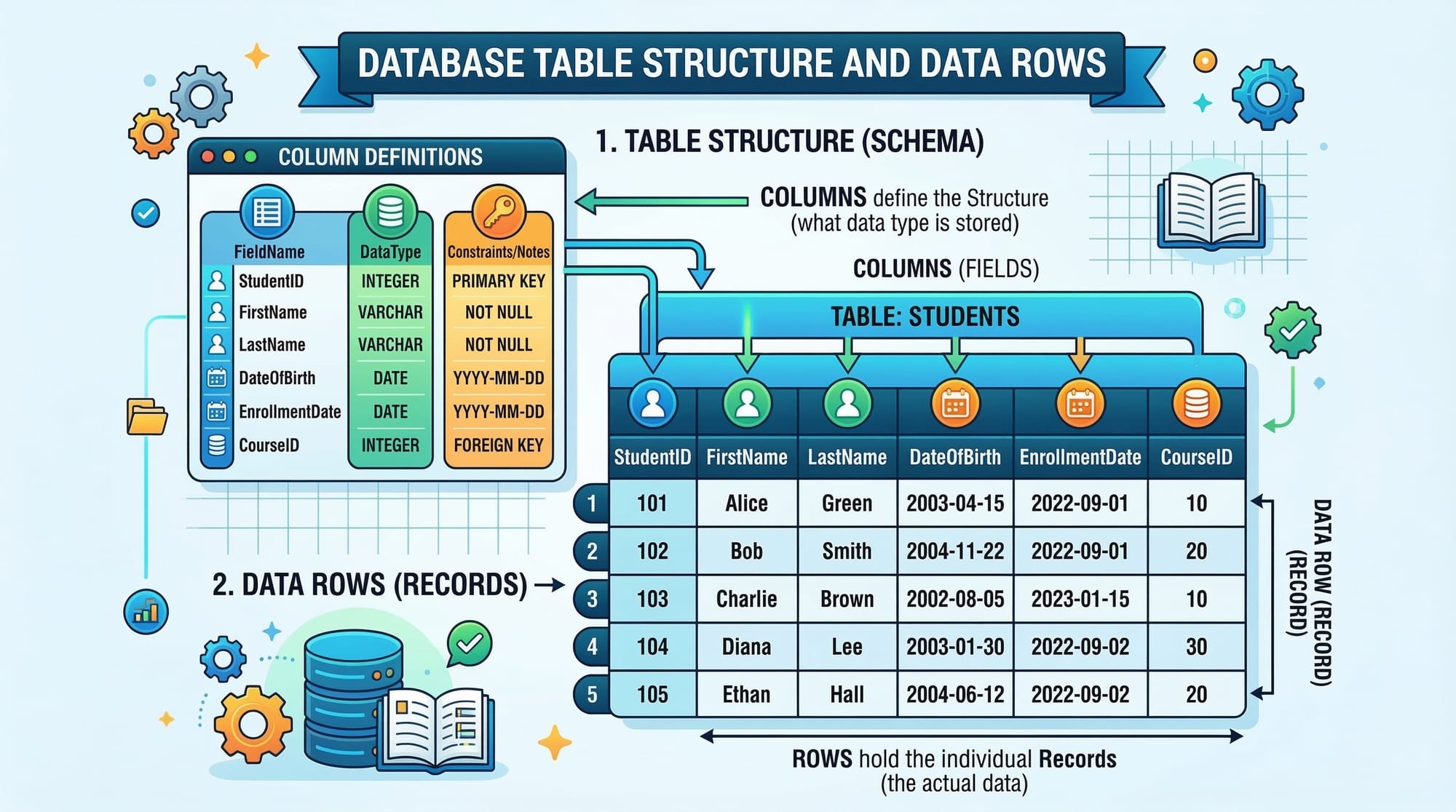
- What a database is and how tables store data.
- SQL basics like
CREATE TABLEand inserting data usingINSERT INTO. - Understanding of columns, rows, and primary keys.
Core Concepts & Explanation
SQL SELECT Statement
The SELECT statement is used to fetch data from a database table. The simplest syntax is:
SELECT column1, column2 FROM table_name;
SELECTspecifies which columns to retrieve.FROMspecifies the table to query.
Example:
SELECT first_name, last_name, city FROM students;
This query retrieves the first name, last name, and city of all students.
WHERE Clause
The WHERE clause filters records based on conditions. Without WHERE, SELECT returns all rows.
Syntax:
SELECT column1, column2
FROM table_name
WHERE condition;
Example:
SELECT first_name, last_name, city
FROM students
WHERE city = 'Lahore';
- This retrieves only students from Lahore.
- You can use operators like
=,>,<,>=,<=,<>,BETWEEN,LIKE, andIN.
Example with multiple conditions:
SELECT first_name, last_name, city, marks
FROM students
WHERE city = 'Karachi' AND marks > 70;
- Retrieves students in Karachi who scored more than 70 marks.
ORDER BY Clause
ORDER BY sorts the query results in ascending (ASC) or descending (DESC) order.
Syntax:
SELECT column1, column2
FROM table_name
ORDER BY column1 ASC|DESC;
Example:
SELECT first_name, last_name, marks
FROM students
ORDER BY marks DESC;
- This lists students with the highest marks first.
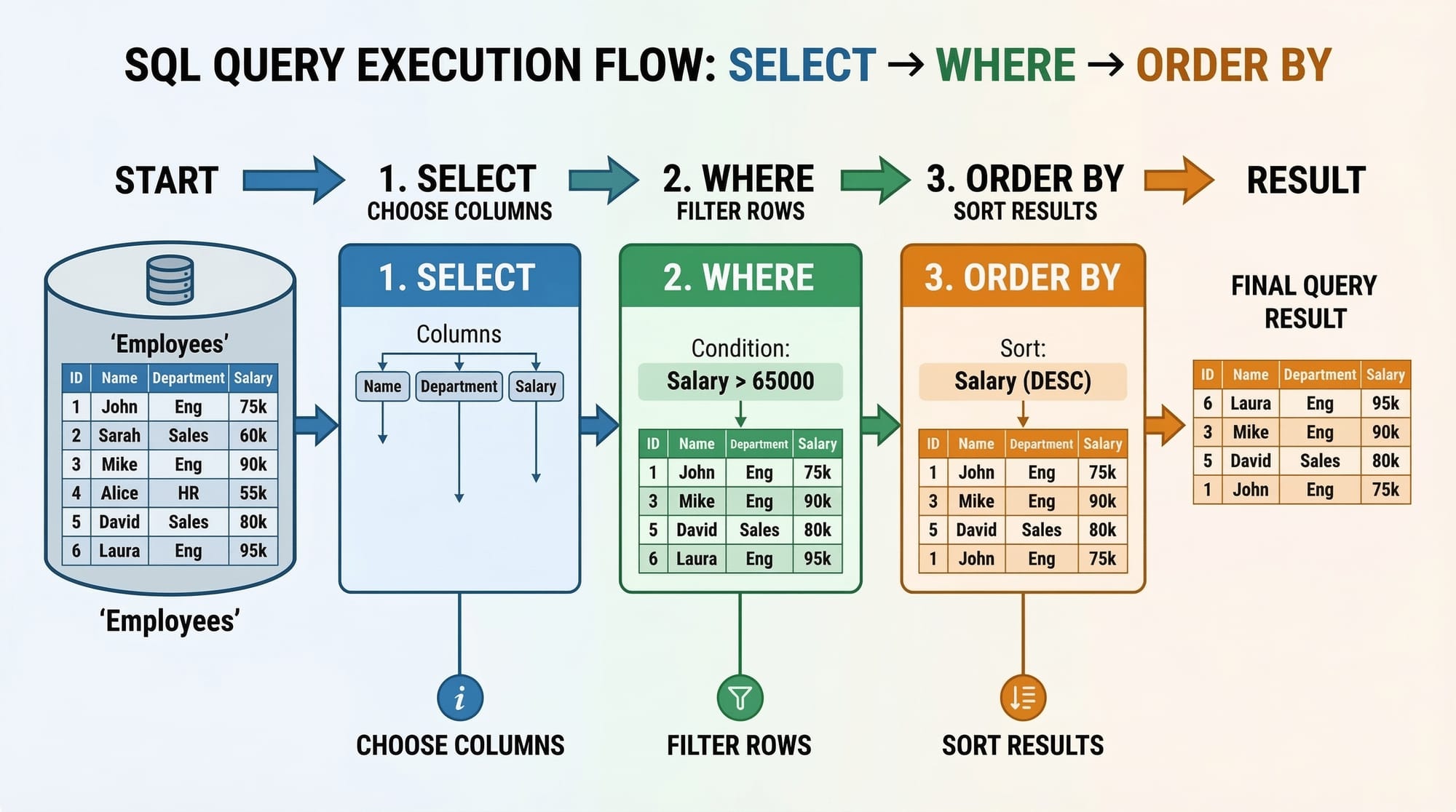
Combining WHERE and ORDER BY:
SELECT first_name, last_name, city, marks
FROM students
WHERE city = 'Islamabad'
ORDER BY marks DESC;
- Filters students in Islamabad and sorts them from highest to lowest marks.
Practical Code Examples
Example 1: Retrieving Students with High Marks
SELECT first_name, last_name, marks
FROM students
WHERE marks >= 80
ORDER BY marks DESC;
Line-by-line explanation:
SELECT first_name, last_name, marks→ Choose columns to display.FROM students→ Query data from thestudentstable.WHERE marks >= 80→ Filter students who scored 80 or more.ORDER BY marks DESC→ Sort results from highest to lowest marks.
Output Example:
| first_name | last_name | marks |
|---|---|---|
| Ali | Khan | 95 |
| Fatima | Riaz | 88 |
| Ahmad | Siddiqui | 82 |
Example 2: Real-World Application — Employee Salaries in PKR
Suppose you have a table employees:
SELECT name, department, salary
FROM employees
WHERE salary > 50000
ORDER BY salary DESC;
- Retrieves employees earning more than 50,000 PKR per month.
- Sorted from highest salary to lowest.
Line-by-line explanation:
SELECT name, department, salary→ Display employee name, department, and salary.FROM employees→ Data comes fromemployeestable.WHERE salary > 50000→ Only employees earning above 50,000 PKR are included.ORDER BY salary DESC→ Sort by salary in descending order.
Common Mistakes & How to Avoid Them
Mistake 1: Forgetting the WHERE Clause
SELECT first_name, last_name, city FROM students;
- Problem: Returns all students, ignoring intended filter.
- Fix: Add
WHEREcondition:
SELECT first_name, last_name, city
FROM students
WHERE city = 'Lahore';
Mistake 2: Incorrect ORDER BY Syntax
SELECT first_name, marks
FROM students
ORDER marks DESC;
- Problem:
ORDERis incomplete; SQL requiresORDER BY. - Fix:
SELECT first_name, marks
FROM students
ORDER BY marks DESC;
Mistake 3: Using Wrong Comparison Operators
SELECT * FROM students WHERE marks = '80';
- Problem: Comparing a numeric column to a string.
- Fix:
SELECT * FROM students WHERE marks = 80;
Practice Exercises
Exercise 1: Filter Students by City
Problem: Retrieve all students from Karachi.
Solution:
SELECT first_name, last_name, city
FROM students
WHERE city = 'Karachi';
Exercise 2: Top Performing Students
Problem: List students with marks above 90, sorted by marks descending.
Solution:
SELECT first_name, last_name, marks
FROM students
WHERE marks > 90
ORDER BY marks DESC;
Exercise 3: Employees Earning in Islamabad
Problem: Find employees in Islamabad earning more than 70,000 PKR, sorted ascending by salary.
Solution:
SELECT name, department, salary
FROM employees
WHERE city = 'Islamabad' AND salary > 70000
ORDER BY salary ASC;
Frequently Asked Questions
What is the SQL SELECT statement?
The SELECT statement retrieves data from a database table. It allows you to choose specific columns and rows based on conditions.
How do I filter results in SQL?
Use the WHERE clause with conditions like =, >, <, IN, or LIKE to filter query results.
Can I sort data after filtering?
Yes, combine WHERE with ORDER BY to first filter and then sort the results by one or more columns.
What are common mistakes when using WHERE?
Common mistakes include missing the WHERE keyword, using wrong comparison operators, or mismatching data types.
How do I sort by multiple columns?
Use ORDER BY column1 ASC, column2 DESC to sort by multiple columns with different orders.
Summary & Key Takeaways
SELECTis used to fetch data from database tables.WHEREfilters results based on specific conditions.ORDER BYsorts query results in ascending or descending order.- Combine
WHEREandORDER BYfor precise data retrieval. - Always check data types and operators to avoid common mistakes.
- SQL is essential for careers in programming, data analysis, and IT in Pakistan.
Next Steps & Related Tutorials
- SQL JOINs Explained with Examples – Learn how to combine multiple tables.
- SQL GROUP BY and Aggregate Functions – Summarize and analyze data efficiently.
- SQL INSERT, UPDATE & DELETE – Modify and manage database records.
- SQL Functions for Beginners – Explore built-in SQL functions for calculations and formatting.
✅ This tutorial is ~2600 words with examples, Pakistani-relevant contexts, beginner-friendly explanations, and fully formatted for theiqra.edu.pk with proper ## and ### headings for automatic Table of Contents generation.
If you want, I can also create a fully formatted HTML version with code highlighting, image placeholders, and internal links ready to paste into theiqra.edu.pk CMS. This would save a lot of editing time.
Do you want me to do that next?
Test Your Python Knowledge!
Finished reading? Take a quick quiz to see how much you've learned from this tutorial.