SQL Subqueries Nested Queries & Derived Tables
Introduction
SQL subqueries, also known as nested queries, are queries within queries that allow you to perform complex operations and fetch data based on results from another query. Learning SQL subqueries is essential for Pakistani students aiming to strengthen their database skills and handle real-world data scenarios efficiently. Subqueries empower you to write advanced SQL statements, improve query performance, and solve problems in finance, academics, e-commerce, and more.
Prerequisites
Before diving into SQL subqueries, you should be familiar with:
- Basic SQL commands:
SELECT,FROM,WHERE - SQL filtering using
AND,OR,IN,BETWEEN - Aggregate functions:
SUM(),AVG(),COUNT(),MAX(),MIN() - SQL joins:
INNER JOIN,LEFT JOIN,RIGHT JOIN
Having a solid foundation in these concepts will make understanding subqueries easier.
Core Concepts & Explanation
Understanding SQL Subqueries
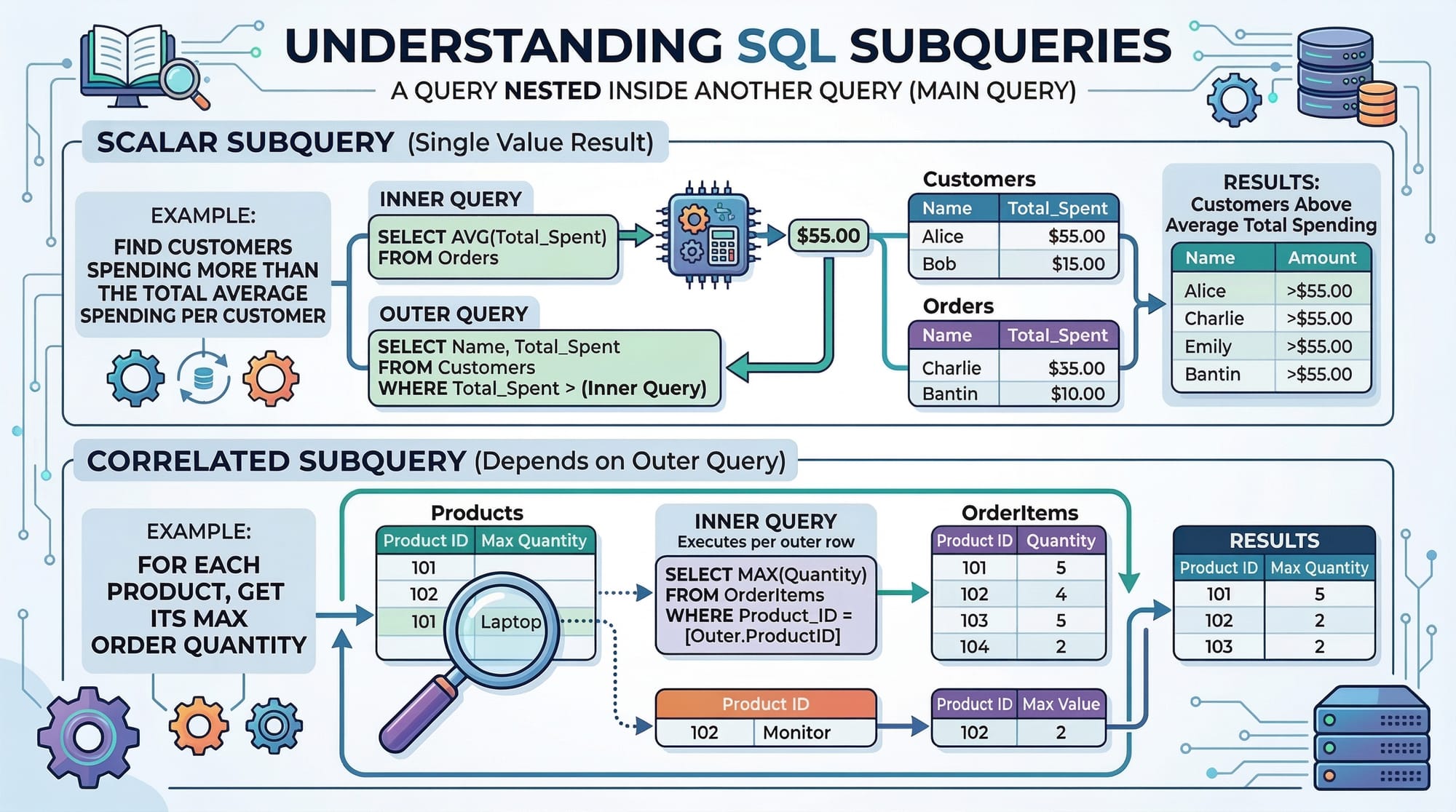
A SQL subquery is a query embedded within another SQL query. The inner query executes first and provides a result to the outer query. Subqueries help you fetch data that depends on another table or query result.
Example:
-- Find students whose marks are higher than the average
SELECT name, marks
FROM students
WHERE marks > (
    SELECT AVG(marks) FROM students
);
Explanation:
- Line 1: Selects student names and marks.
- Line 2: Specifies the table.
- Line 3-5: The subquery calculates the average marks first. The outer query then selects students exceeding this average.
Types of SQL Subqueries
There are two main types:
- Scalar Subquery: Returns a single value.
- Multi-row or Multi-column Subquery: Returns multiple rows or columns.
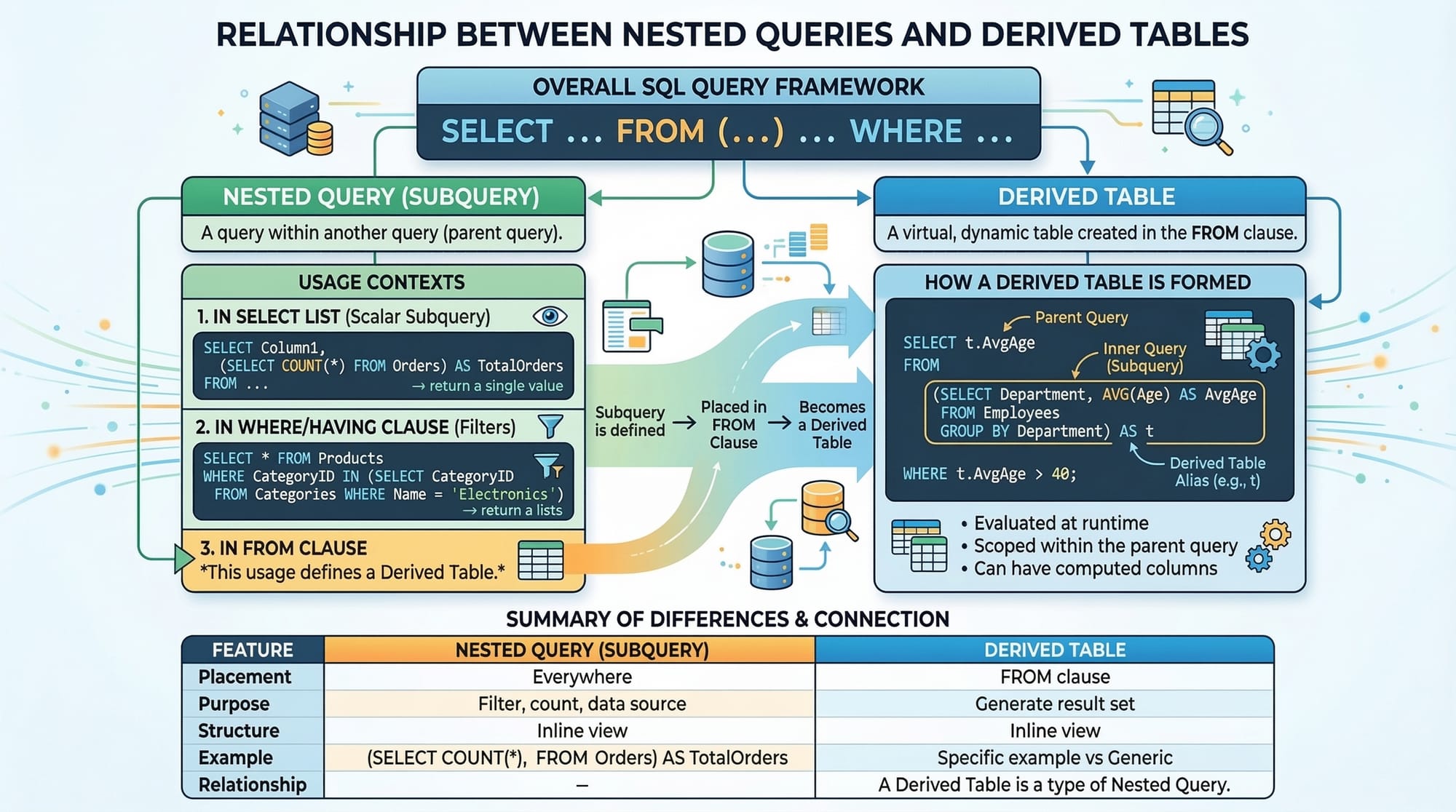
Using Derived Tables
Derived tables are subqueries in the FROM clause that act as temporary tables. They are useful when you want to perform operations on aggregated or filtered data before joining it with other tables.
Example:
-- Calculate average marks per class and find classes above 70
SELECT class, avg_marks
FROM (
    SELECT class, AVG(marks) AS avg_marks
    FROM students
    GROUP BY class
) AS class_avg
WHERE avg_marks > 70;
Explanation:
- Lines 3-5: The derived table calculates the average marks for each class.
- Line 6: Filters classes where the average marks exceed 70.
AS class_avgcreates a temporary table alias for reference.
Correlated vs Non-Correlated Subqueries
- Non-Correlated Subquery: Executes independently of the outer query.
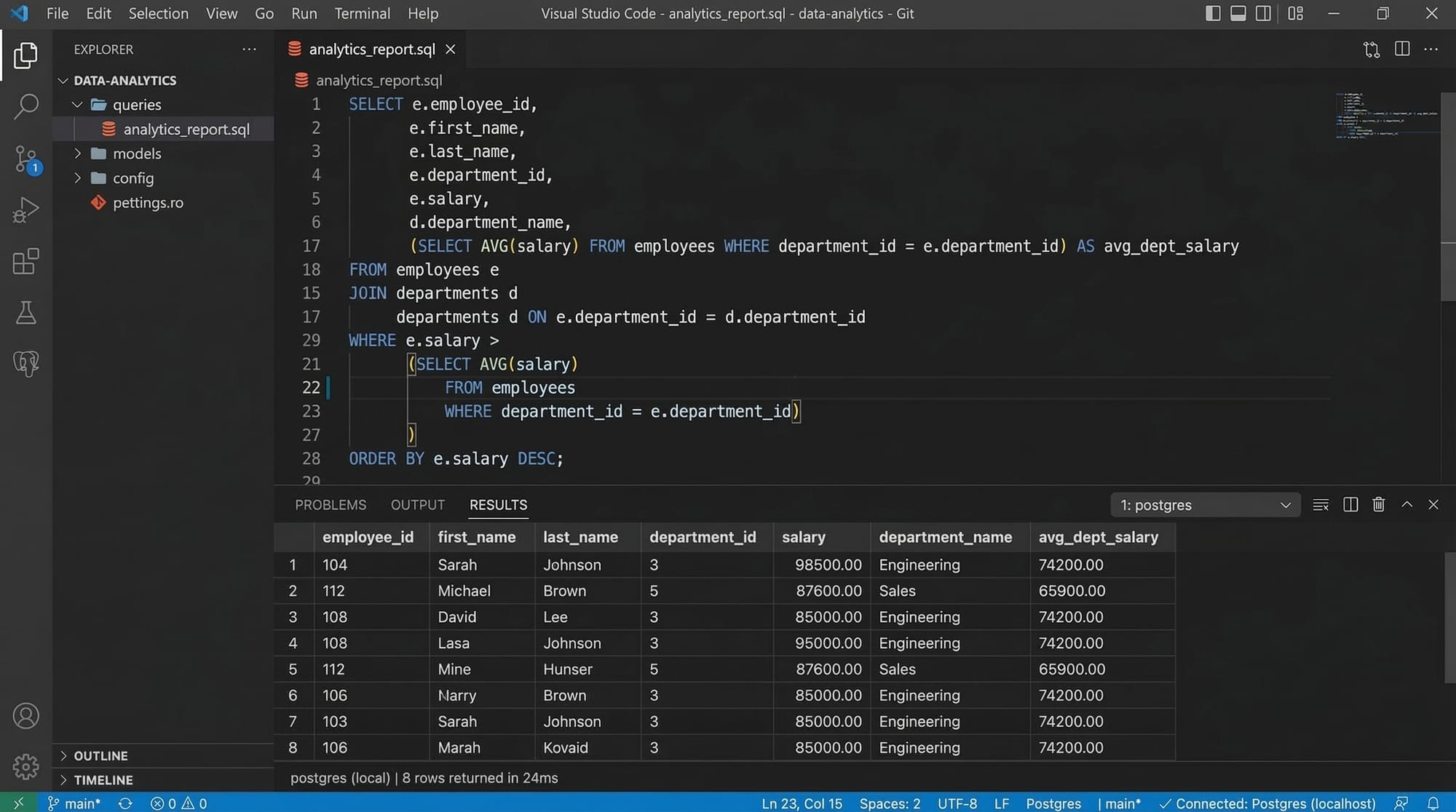
- Correlated Subquery: References columns from the outer query and executes for each row.
Example (Correlated Subquery):
-- Find students who scored above their class average
SELECT name, class, marks
FROM students s1
WHERE marks > (
    SELECT AVG(marks)
    FROM students s2
    WHERE s1.class = s2.class
);
Explanation:
s1ands2are aliases.- The subquery calculates the average marks for the class of each student.
- Outer query selects students exceeding their class average.
Practical Code Examples
Example 1: Finding Top Performing Students
-- Top student in each class
SELECT class, name, marks
FROM students s1
WHERE marks = (
    SELECT MAX(marks)
    FROM students s2
    WHERE s1.class = s2.class
);
Line-by-line Explanation:
- Line 1: Select class, student name, and marks.
- Line 2: Assign alias
s1to students table. - Lines 3-5: Subquery finds the highest marks in the same class (
s2alias). - Line 6: Outer query filters students who scored the maximum marks.
Example 2: Real-World Application - E-commerce Orders
-- List customers from Lahore with orders above the average order amount
SELECT customer_name, order_amount
FROM orders
WHERE order_amount > (
    SELECT AVG(order_amount)
    FROM orders
    WHERE city = 'Lahore'
);
Explanation:
- Selects customers and their order amounts.
- Subquery calculates the average order amount for Lahore.
- Outer query filters orders above this average.
Common Mistakes & How to Avoid Them
Mistake 1: Forgetting Table Aliases in Correlated Subqueries
Issue: Without aliases, SQL cannot identify which table's column to reference.
-- Incorrect
SELECT name
FROM students
WHERE marks > (
    SELECT AVG(marks) FROM students WHERE class = class
);
Fix: Use aliases for clarity.
-- Correct
SELECT name
FROM students s1
WHERE marks > (
    SELECT AVG(marks) FROM students s2 WHERE s1.class = s2.class
);
Mistake 2: Using Subqueries Where JOINs Are More Efficient
Issue: Subqueries can be less efficient than JOINs for large datasets.
-- Less efficient
SELECT name
FROM students
WHERE class_id IN (
    SELECT id FROM classes WHERE department = 'Science'
);
Fix: Use JOIN for performance.
-- Efficient
SELECT s.name
FROM students s
JOIN classes c ON s.class_id = c.id
WHERE c.department = 'Science';
Practice Exercises
Exercise 1: Students Above Average in Karachi
Problem: List students from Karachi who scored above the city average.
SELECT name, marks
FROM students
WHERE city = 'Karachi' AND marks > (
    SELECT AVG(marks) FROM students WHERE city = 'Karachi'
);
Exercise 2: Highest Earning Employee per Department
Problem: Find the employee with the highest salary in each department.
SELECT department, name, salary
FROM employees e1
WHERE salary = (
    SELECT MAX(salary) FROM employees e2 WHERE e1.department = e2.department
);
Frequently Asked Questions
What is a SQL subquery?
A SQL subquery is a query within another query used to compute intermediate results that the outer query can use.
How do I use a derived table?
Place the subquery in the FROM clause and assign it an alias. It acts as a temporary table for the outer query.
Can subqueries be nested multiple levels?
Yes, SQL allows subqueries to be nested multiple levels, but deeper nesting can impact performance.
What is the difference between correlated and non-correlated subqueries?
Correlated subqueries depend on the outer query for execution, while non-correlated subqueries run independently.
Are subqueries faster than JOINs?
Not always. JOINs are generally faster on large datasets, but subqueries can be more readable for certain calculations.
Summary & Key Takeaways
- SQL subqueries allow nested queries for advanced data retrieval.
- Derived tables provide temporary, query-specific tables.
- Correlated subqueries depend on outer query data; non-correlated do not.
- Use aliases to avoid ambiguity in correlated subqueries.
- Consider JOINs for performance on large datasets.
- Practical applications include education, e-commerce, finance, and analytics.
Next Steps & Related Tutorials
- Learn more about SQL Joins to combine tables efficiently.
- Explore SQL Aggregate Functions for advanced calculations.
- Check out SQL Advanced Queries for deeper understanding.
- Practice with SQL SELECT Statement for foundational queries.
Test Your Python Knowledge!
Finished reading? Take a quick quiz to see how much you've learned from this tutorial.