SQL Tutorial for Beginners Databases & Queries
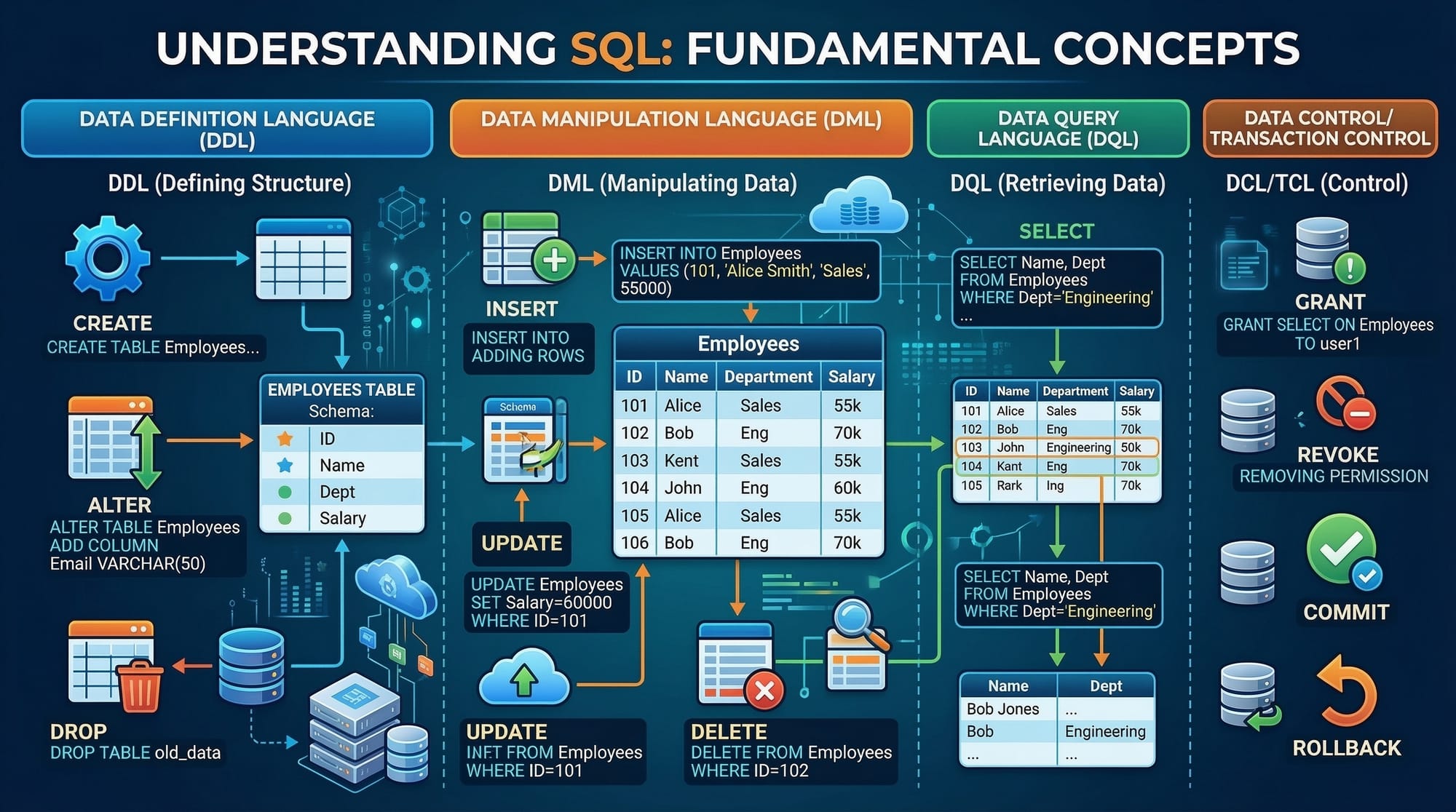
Introduction
Structured Query Language (SQL) is the standard language used to communicate with databases. If you want to store, retrieve, and manage data efficiently, learning SQL is an essential skill. This SQL tutorial for beginners is designed specifically for students who want to understand how databases work and how to write queries to interact with them.
In today's digital world, almost every application relies on a database. From online shopping websites to banking systems and university portals, databases store huge amounts of information such as user profiles, transactions, course records, and more. SQL allows developers, analysts, and data professionals to work with that data effectively.
For Pakistani students interested in programming, data science, web development, or software engineering, learning SQL can open many opportunities. Companies in cities like Lahore, Karachi, and Islamabad frequently require professionals who can work with databases. Whether you want to build a website, manage business data, or analyze information, SQL is a foundational skill.
This SQL tutorial will help you understand the SQL basics, how SQL databases work, and how to write queries to retrieve and manage information.
By the end of this tutorial, you will:
- Understand what a SQL database is
- Learn how to create and manage tables
- Write queries to retrieve and filter data
- Avoid common beginner mistakes
- Practice SQL using simple exercises
Prerequisites
The good news is that SQL for beginners is relatively easy to learn. However, a few basic skills will help you understand the concepts faster.
Before starting this tutorial, you should ideally have:
- Basic computer knowledge
- Familiarity with how websites or applications store information
- A basic understanding of tables (rows and columns)
- Interest in programming or data
You do NOT need advanced programming knowledge to learn SQL. Many beginners start SQL as their first step into data and backend development.
Recommended tools for practice:
- MySQL
- PostgreSQL
- SQLite
- Any online SQL playground
These tools allow you to create databases and test queries in real time.
Core Concepts & Explanation
What is a SQL Database?
A SQL database is an organized system that stores structured data in tables. Each table contains rows and columns.
Think of a database like an Excel spreadsheet.
Example: A university database.
| StudentID | Name | City | Fee (PKR) |
|---|---|---|---|
| 101 | Ahmad | Lahore | 50000 |
| 102 | Fatima | Karachi | 48000 |
| 103 | Ali | Islamabad | 52000 |
In SQL:
- Table → A collection of related data
- Row (Record) → One entry of data
- Column (Field) → A specific attribute
This structure makes it easy to search, update, and analyze data.
Understanding SQL Queries
A query is a command used to interact with a database.
Queries allow you to:
- Retrieve data
- Insert new records
- Update existing records
- Delete records
The most commonly used SQL command is SELECT.
Example:
SELECT * FROM students;
This query tells the database:
SELECT→ retrieve data*→ all columnsFROM students→ from the students table
The result would display all student records.
Another example:
SELECT name, city FROM students;
This query retrieves only specific columns.
Result:
| name | city |
|---|---|
| Ahmad | Lahore |
| Fatima | Karachi |
| Ali | Islamabad |
SQL Tables and Data Types
When creating a SQL table, we must define the structure of the data.
Common SQL data types include:
INT→ numbersVARCHAR→ textDATE→ date valuesDECIMAL→ precise numbers (e.g., currency)
Example table structure:
| Column | Data Type |
|---|---|
| student_id | INT |
| name | VARCHAR |
| city | VARCHAR |
| fee | DECIMAL |
Example SQL table creation:
CREATE TABLE students (
    student_id INT,
    name VARCHAR(50),
    city VARCHAR(50),
    fee DECIMAL(10,2)
);
Explanation:
CREATE TABLE students→ creates a table called studentsstudent_id INT→ numeric IDname VARCHAR(50)→ text up to 50 characterscity VARCHAR(50)→ student cityfee DECIMAL(10,2)→ stores fees in PKR
Practical Code Examples
Example 1: Creating and Inserting Data
Let's create a student table and add records.
CREATE TABLE students (
    id INT,
    name VARCHAR(50),
    city VARCHAR(50),
    fee INT
);
Explanation line by line:
CREATE TABLE students→ creates a table named studentsid INT→ numeric student IDname VARCHAR(50)→ text field for student namecity VARCHAR(50)→ text field for cityfee INT→ stores fee amount in PKR
Now insert data.
INSERT INTO students (id, name, city, fee)
VALUES (1, 'Ahmad', 'Lahore', 50000);
Explanation:
INSERT INTO students→ specifies the table(id, name, city, fee)→ columns where data will goVALUES (...)→ actual values being inserted
Add another student:
INSERT INTO students (id, name, city, fee)
VALUES (2, 'Fatima', 'Karachi', 48000);
Example 2: Real-World Application (University Fee Database)
Suppose a university wants to find students whose fees are above PKR 49,000.
SELECT name, city, fee
FROM students
WHERE fee > 49000;
Line-by-line explanation:
SELECT name, city, fee→ retrieve these columnsFROM students→ search in students tableWHERE fee > 49000→ filter students whose fees exceed PKR 49,000
Output:
| name | city | fee |
|---|---|---|
| Ahmad | Lahore | 50000 |
This type of query is commonly used in:
- School management systems
- Banking applications
- Online stores
- Government databases
Common Mistakes & How to Avoid Them
Mistake 1: Forgetting the WHERE Clause
Beginners sometimes update all records accidentally.
Incorrect query:
UPDATE students
SET city = 'Islamabad';
Problem:
This changes the city for every student.
Correct version:
UPDATE students
SET city = 'Islamabad'
WHERE id = 2;
Explanation:
WHERE id = 2ensures only one record is updated.
Mistake 2: Using Incorrect Data Types
Sometimes beginners use wrong data types.
Example mistake:
CREATE TABLE payments (
    amount VARCHAR(50)
);
Problem:
Money should not be stored as text.
Correct version:
CREATE TABLE payments (
    amount DECIMAL(10,2)
);
This allows proper mathematical operations.
Practice Exercises
Exercise 1: Retrieve Students from Lahore
Problem
Write a SQL query to display students who live in Lahore.
Solution:
SELECT name, city
FROM students
WHERE city = 'Lahore';
Explanation:
SELECT name, city→ display these columnsFROM students→ search in students tableWHERE city = 'Lahore'→ filter by city
Exercise 2: Find High Fee Students
Problem
Show students whose fee is greater than PKR 50,000.
Solution:
SELECT name, fee
FROM students
WHERE fee > 50000;
Explanation:
SELECT name, fee→ return student name and feeFROM students→ query students tableWHERE fee > 50000→ filter based on fee value
Frequently Asked Questions
What is SQL?
SQL (Structured Query Language) is a programming language used to manage and retrieve data from databases. It allows users to create tables, insert records, and run queries to analyze information.
How do I start learning SQL?
You can start by learning SQL basics such as SELECT, INSERT, UPDATE, and DELETE queries. Practicing with small databases and real-world examples is the best way to build confidence.
Is SQL difficult for beginners?
No, SQL is considered one of the easiest programming languages to learn. Its syntax is simple and readable, making it ideal for beginners and students entering the field of data and software development.
Where is SQL used in real life?
SQL is used in banking systems, e-commerce websites, school databases, hospital management systems, and many other applications that store and manage data.
Do I need programming knowledge before learning SQL?
No prior programming knowledge is required. However, understanding basic programming concepts can help you learn SQL faster.
Summary & Key Takeaways
- SQL is the standard language used to manage relational databases.
- A SQL database stores data in tables made of rows and columns.
- Common SQL commands include SELECT, INSERT, UPDATE, and DELETE.
- SQL queries allow you to retrieve and filter data easily.
- Avoid beginner mistakes such as forgetting the WHERE clause.
- Practicing real-world examples helps you master SQL quickly.
Next Steps & Related Tutorials
Now that you understand the SQL basics, you can continue learning more advanced database topics.
Recommended tutorials on theiqra.edu.pk:
- Learn JOIN queries in our guide on SQL Joins Explained with Examples
- Improve your data filtering skills with SQL WHERE Clause and Conditions
- Master table design with SQL Table Creation and Data Types
- Learn database structure in Introduction to Relational Databases
These tutorials will help you go deeper into SQL for beginners and build strong database skills for real-world projects.
Test Your Python Knowledge!
Finished reading? Take a quick quiz to see how much you've learned from this tutorial.